
E-commerce automation means using software to handle repetitive tasks, letting you run your business with less manual effort. It’s the strategic shift from processing every order by hand to building systems that run themselves. The result? You reclaim your time to focus on what actually grows your business: marketing, product development, and customer relationships.
What Is Ecommerce Automation and Why It Matters
Imagine your online store is a new cafe. At first, you can be the barista, cashier, and cleaner all at once. But as word gets out and the line wraps around the block, trying to do everything yourself leads to burnout and mistakes. E-commerce automation is your upgrade to a fully staffed, professional operation, built using the best ecommerce automation software. It gives you systems that ensure every order is handled perfectly and every customer gets a great experience, even when you’re not there.
It’s about moving beyond the daily grind of tasks like sending order confirmations or updating inventory levels. Instead of reacting, you use automation to build workflows that do the work for you. This is how you scale without hiring a massive team, eliminate costly human errors, and deliver a consistently excellent customer experience. By implementing robust automation software and using the right automation tools, you can truly optimize every aspect of your operation.
Automation Benefits: From Manual Grind to Automated Growth
Many store owners get trapped in a cycle of tedious work. They spend their days on small, repetitive tasks that consume all their time, leaving no room for big-picture strategy. Automation is the solution. To truly automate your ecommerce business, you need a dedicated automation platform.
Let’s look at some practical examples of this transformation:
- Recovering Lost Sales: Instead of manually emailing people who abandon their shopping carts, an automated workflow sends a perfectly timed sequence of reminders. For example, an email sent one hour after they leave, followed by another 23 hours later with a small discount, can recapture a significant chunk of lost revenue.
- Preventing Fulfillment Errors: Automation software syncs your inventory across all sales channels in real time. When an item sells on your website, the stock count is instantly updated on Amazon and Instagram. This eliminates the dreaded “oops, we’re out of stock” email that damages customer trust.
- Improving Customer Communication: Workflows built on your automation platform can automatically send shipping notifications, delivery updates, and even follow-up messages asking for a review. Your customers feel informed and valued, all without you lifting a finger.
At its core, e-commerce automation isn’t just about saving time. It’s about building a more resilient, efficient, and profitable business that can truly compete and grow. The data backs this up. Businesses that implement marketing automation see an 80% increase in lead generation and a 45% jump in their return on investment (ROI). Automation isn’t just a convenience; it’s a direct driver of efficiency and profit.
Best of all, this is easier than ever thanks to modern tools. You can learn more in our complete guide on no-code automation. By connecting your favorite apps and setting up simple “if this, then that” rules, you create a self-running system that works for you 24/7.
Manual vs. Automated E-Commerce Tasks at a Glance
To truly see the difference, let’s compare the old way with the new, automated approach. The contrast is stark.
| Task Area | Manual Approach (The Hard Way) | Automated Approach (The Smart Way) |
|---|---|---|
| Abandoned Carts | Manually emailing shoppers one by one (if at all). | Timed email/SMS sequences automatically sent to shoppers. |
| Inventory Sync | Updating stock counts on each channel after a sale. | Real-time sync across all platforms, preventing overselling. |
| Order Updates | Sending shipping confirmations and tracking info by hand. | Automatic notifications sent at each stage of fulfillment. |
| Customer Support | Answering the same basic questions over and over. | AI chatbots handle common queries 24/7, freeing up agents. |
| Product Reviews | Hoping customers remember to leave a review. | Automated follow-up emails sent post-delivery to request feedback. |
| Personalization | Sending the same generic promotions to everyone. | Segmenting customers and sending tailored offers based on behavior. |
The automated approach doesn’t just save time—it unlocks opportunities for better marketing, improved service, and smarter operations that are impossible to achieve manually at scale. It’s about working smarter, not harder.
Automating Your Marketing and Sales Funnel
If there’s one area to start your e-commerce automation journey, it’s your marketing and sales funnel. This is your business’s growth engine, turning curious visitors into loyal customers. By automating key touchpoints, you build a system that nurtures leads, wins back lost sales, and drives revenue around the clock.
Think of it as having a dedicated sales assistant for every person who visits your site. This assistant knows what they looked at, remembers what they left in their cart, and sends the perfect message at the right time to bring them back. This is what a well-oiled, automated funnel does every single day.
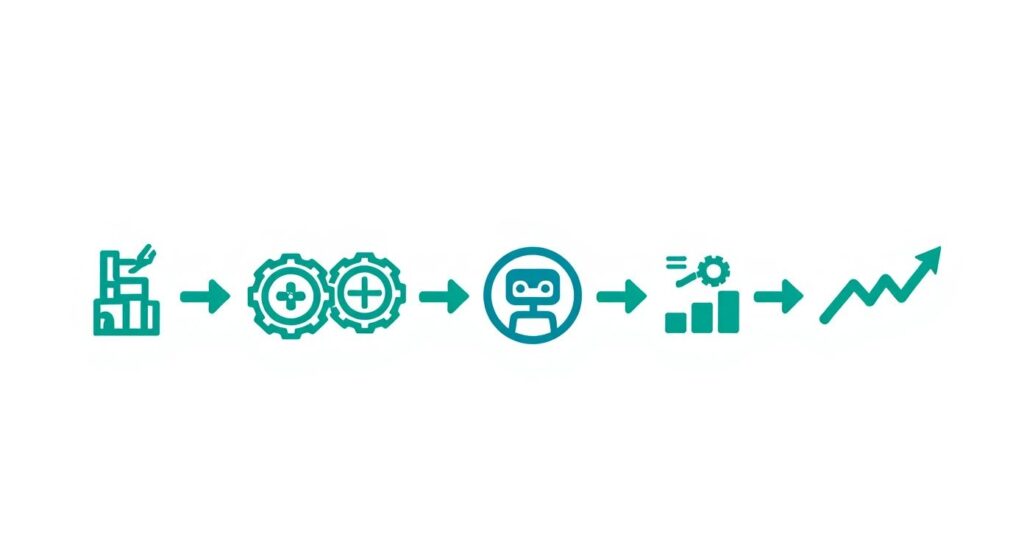
This infographic shows the journey from manual chaos to scalable growth, powered by automation.
Ecommerce Automation Process
It’s a clear visual: automation is the bridge from manual work to serious business growth.
Nurturing New Leads with Welcome Sequences
First impressions matter. When someone signs up for your newsletter, it’s the moment they’re most engaged. An automated welcome email series, set up through your ecommerce platform, is your chance to turn that interest into a relationship and guide them toward their first purchase. This is a primary way automation can help you nurture leads.
Forget a single, generic welcome email. A strategic sequence, which illustrates the core of how ecommerce automation works, is a conversation that builds trust and excitement over several days. Here’s an actionable blueprint:
- Email 1 (Instantly): Deliver the promised discount code. Introduce your brand’s mission and what makes you unique.
- Email 2 (Day 2): Showcase your best-selling products. Use social proof by highlighting “customer favorites.”
- Email 3 (Day 4): Build trust by sharing glowing customer reviews or user-generated content (e.g., photos from Instagram).
- Email 4 (Day 6): Address common questions or hesitations about your products to make the purchase decision easier.
With a simple workflow like this, a new lead quickly becomes a warm prospect who understands your brand and is ready to buy.
🛒 Recovering Lost Revenue with Abandoned Cart Workflows
Get this: nearly 70% of all online shopping carts are abandoned. That’s a huge amount of potential revenue left on the table. An automated abandoned cart sequence, managed by an automation solution, is one of the most profitable workflows you can set up, directly recovering sales that would otherwise be lost. These are powerful automation examples in action.
This isn’t just about one reminder. An effective sequence uses timing and smart incentives to create urgency.
- First Reminder (1-3 hours later): A friendly nudge. “Did you forget something?” This catches people who were simply distracted.
- Second Reminder (24 hours later): Build FOMO (fear of missing out). Remind them of the product’s benefits or mention that stock is limited.
- Final Offer (48 hours later): For those still on the fence, a small, time-sensitive discount can be the final push. “Complete your order in the next 24 hours for 10% off.”
By automating this process, you create a safety net that consistently captures otherwise lost sales, directly boosting your bottom line with zero ongoing effort. This clearly demonstrates the tangible benefits of e-commerce automation for revenue recovery.
Driving Repeat Business with Personalization and Upsells
The first sale is just the beginning. Your most profitable customers are the ones who come back. Automation is your secret weapon for increasing customer lifetime value (CLV) by encouraging that next purchase. These tactics are especially powerful for smaller stores, a topic covered in our guide to automated marketing for small business.
Use post-purchase automation to send personalized recommendations. For example, if a customer buys a pair of running shoes, an automated email a week later could suggest moisture-wicking socks or a running belt. It feels helpful, not pushy.
You can also set up automated upsell and cross-sell campaigns. A workflow could trigger right after a purchase, offering a complementary item at a small discount. This not only increases your average order value but also enhances the customer’s experience with your products.
Streamlining Operations with Order and Inventory Automation
While great marketing gets customers in the door, efficient operations keep them happy. This is the backbone of your store: order fulfillment and inventory management. Without a solid system, this is where chaos takes over, leading to errors, delays, and frustrated customers.
E-commerce automation transforms this operational chaos into a seamless, reliable, and efficient flow that just works.
Forget frantically updating spreadsheets or guessing if you have enough stock for a promotion. Automation acts as the central nervous system for your operations, connecting your sales channels, warehouse, and suppliers into one cohesive unit.

Ecommerce Automation Shipping Process
This shift isn’t just about saving time. It’s about building a business that can handle growth without breaking. It’s what allows a store to process 1,000 orders a day with the same speed and accuracy as 100.
Eliminating Overselling with Synchronized Inventory
The most common—and costly—inventory mistake is overselling. This happens when a customer buys a product that’s already out of stock because your inventory didn’t update fast enough across all your channels. The result is a canceled order and a disappointed customer.
Automation solves this problem entirely. A proper inventory management system syncs your stock levels in real time, everywhere you sell. Here’s the play-by-play:
- A product sells on your Shopify store.
- Instantly, the stock count for that product is reduced on Amazon, eBay, and Etsy.
- The product is marked as “low stock” or “sold out” across your social media shops.
This multi-channel sync ensures that what customers see is what you actually have, protecting your brand from frustrating “out of stock” moments.
The Journey from Chaotic to Cohesive Fulfillment
Let’s see how automation transforms the order process.
Before Automation (The Hard Way):
A customer places an order. You manually check the payment, copy their address into a label maker, update a tracking spreadsheet, and then remember to email them the tracking number. Each step is an opportunity for error.
After Automation (The Smart Way):
An order is placed, and a workflow kicks in instantly.
- Order Routing: The system routes the order to the best warehouse based on the customer’s location and stock levels.
- Label Generation: A shipping label is automatically created and sent to the fulfillment team’s printer.
- Customer Updates: The customer gets an immediate order confirmation, followed by automated shipping and tracking notifications.
- Real-Time Tracking: They receive updates as their package travels, drastically reducing “where is my order?” support questions.
This automated flow creates a professional, transparent experience that builds customer trust and loyalty, all without you lifting a finger.
This level of efficiency is essential for scaling. For instance, businesses often use automated shipping compliance solutions to navigate complex regulations without manual headaches.
Proactive Stock Management with Automated Purchasing
Running out of your best-selling products is like leaving money on the table. Instead of manually checking stock and guessing when to reorder, let automation manage your supply chain.
You can set up workflows that trigger when inventory drops below a certain threshold. For example, when you’re down to the last 20 units of a popular item, an automation can:
- Send a Low-Stock Alert: Notify your purchasing manager via email or Slack.
- Generate a Purchase Order: Automatically create a draft PO for your supplier with a pre-set reorder quantity.
This keeps you one step ahead, ensuring you replenish stock before you run out, maintaining sales momentum, and preventing lost revenue.
Smooth operations are critical, but so is customer communication. For more on this, see our guide to customer service automation software to learn how to keep your support as streamlined as your fulfillment.
How AI Transforms Ecommerce Automation
If standard automation is like setting up dominoes—where one predictable action triggers the next—then adding AI is like hiring a master strategist to decide which dominoes to push and when.
AI takes automation beyond simple “if this, then that” rules. It creates an intelligent system that learns, reasons, and makes decisions. This is the difference between sending the same abandoned cart email to everyone and an AI analyzing a customer’s behavior to send a personalized offer with the highest chance of converting them.

Ecommerce Automation AI Network
Think of AI as the brain connecting user data with digital actions. It’s not just about following a script; it’s about understanding context and intent to drive smarter business outcomes.
From Reactive To Predictive Automation
The biggest shift AI brings is moving from reactive to predictive power. Standard automation reacts to triggers. AI-powered automation anticipates needs and identifies opportunities before they happen.
This shift is already creating massive value. The global AI-enabled e-commerce market is projected to reach $8.65 billion by 2025, with 92% of companies viewing this level of automation as critical for success.
Here are a few game-changing applications:
- AI-Powered Chatbots: Modern AI chatbots understand context and sentiment. They can answer complex support questions, recommend products based on conversational cues, and seamlessly escalate issues to a human agent.
- Dynamic Pricing: AI algorithms can analyze competitor pricing, market demand, and inventory levels in real time to adjust your prices automatically, ensuring you stay competitive and maximize revenue.
- Predictive Analytics for Inventory: Instead of just a “low stock” alert, AI can predict future demand based on seasonal trends and sales velocity. This helps you order the right amount of stock at the right time, preventing both stockouts and costly overstocking.
Personalization At An Unprecedented Scale
AI is the engine behind true one-to-one personalization, making every customer feel like they’re getting a bespoke shopping experience. It goes far beyond just inserting a name into an email.
AI-driven personalization is about showing the right customer the right product on the right channel at the exact right moment. It transforms marketing from a broadcast into a one-on-one conversation.
For example, an AI system can analyze thousands of data points to generate hyper-personalized product recommendations on your homepage for each visitor. One of the most innovative applications is AI clothing try-on technology, which lets customers see how clothes will look on their bodies, drastically reducing returns and boosting conversions.
To fully grasp the difference, let’s compare the two approaches.
Standard Automation vs AI-Powered Automation Examples
| Feature | Standard Rule-Based Automation | AI-Powered Automation |
|---|---|---|
| Decision Making | Follows pre-set “if-then” logic. | Makes dynamic decisions based on data analysis. |
| Personalization | Basic (e.g., using a customer’s name). | Deeply personalized (e.g., tailored product recommendations). |
| Learning | Static; rules must be manually updated. | Continuously learns and adapts from new data. |
| Scope | Handles repetitive, predictable tasks. | Manages complex, unpredictable scenarios. |
| Business Impact | Increases efficiency and reduces manual errors. | Drives revenue growth, boosts conversions, and improves customer loyalty. |
As you can see, AI doesn’t just make automation faster; it makes it smarter and more strategic.
Smarter Fraud Detection And Risk Management
Finally, AI offers a powerful defense against e-commerce fraud. Manually reviewing suspicious orders is slow and often inaccurate. AI-driven fraud detection systems can analyze hundreds of variables in milliseconds to score a transaction’s risk.
These systems learn from every transaction, getting smarter over time at spotting subtle patterns of fraudulent activity. This protects your revenue, reduces chargebacks, and frees up your team to focus on serving legitimate customers.
Building Your Ecommerce Business Automation Stack
You’re convinced that e-commerce automation is the way forward. But where do you start? The key isn’t just buying a bunch of tools; it’s about building a cohesive “stack”—a team of applications that work together seamlessly.
Think of it like assembling a pit crew for your business. You strategically pick specialists—one for fuel, one for tires, one for data—who all work in sync. Your automation stack is your digital pit crew, working 24/7 to keep your store at peak performance.
Here’s a simple four-step roadmap to build it: Identify, Prioritize, Select, and Integrate.
Step 1: Identify Your Automation Opportunities
Before you look at any software, audit your daily tasks. The goal is to find the “low-hanging fruit”—the repetitive, time-consuming tasks that will give you the biggest and fastest win when automated.
Track every manual task you and your team do for a day or two. Be honest.
- How much time are you spending copying and pasting customer information?
- Are you manually updating inventory levels across multiple platforms?
- Do you type out every single shipping confirmation email?
- How often do you answer the same three customer questions?
This list will give you a clear, data-backed snapshot of your biggest time sinks. These are your prime targets for automation.
Step 2: Prioritize Based on Impact and ROI
Not all automations are created equal. You need to rank your list by Return on Investment (ROI). Start with tasks that directly make you money.
- Abandoned Cart Recovery: This is almost always #1. Automating this process turns lost sales directly into revenue, providing an immediate financial boost.
- Welcome Email Series: Engaging new leads when their interest is highest is a direct path to their first purchase.
- Inventory Synchronization: Preventing overselling protects your revenue, your reputation, and saves you from the headache of refunds and angry customers.
By tackling these revenue-driving workflows first, you generate cash flow that can fund your next automation projects. It creates a self-sustaining cycle of improvement.
Step 3: Select the Right Tools for the Job
Now that you know what to automate, it’s time to choose your tools. Your stack will typically include a few core categories.
- Email Marketing Platform: This is your engine for welcome series and abandoned cart emails. Look at tools like Mailchimp, Klaviyo, or ActiveCampaign.
- Customer Relationship Manager (CRM): A CRM like HubSpot or Zoho centralizes your customer data, enabling personalized marketing.
- Inventory Management System: For multi-channel sellers, tools like Sellercloud or Webgility are essential for syncing stock everywhere you sell.
- AI Chatbots & Customer Support: Platforms like Clepher automate frontline support, answering common questions and guiding shoppers to purchase 24/7.
When choosing software, consider your budget, technical comfort level, and growth goals. Many modern platforms are user-friendly and no-code. Use free trials to see what feels right.
Step 4: Integrate Everything for a Seamless Flow
This is the most critical step. Your tools must talk to each other. A disconnected stack is just a collection of subscriptions. A connected stack is a powerful ecosystem where data flows freely, triggering actions across platforms.
This is where integration platforms like middleware come in.
- Zapier, Make, and Pabbly act as the glue for your stack. These tools build bridges between apps that don’t connect natively.
For example, you could use Zapier to create a workflow where a new Shopify order automatically adds the customer to a Mailchimp list and creates a contact record in HubSpot. Your data stays consistent everywhere, with zero manual entry.
Got Questions About E-commerce Automation? We’ve Got Answers.
Jumping into e-commerce automation for the first time often brings up a few key questions. How much does it cost? Will it replace my team? Is it hard to set up?
Let’s tackle these common concerns so you can move forward with confidence.
Ready to see how an AI-powered chatbot can become the cornerstone of your automation strategy? Clepher makes it easy to build intelligent conversations that sell products, support customers, and recover sales 24/7 on your website, Messenger, and Instagram. Start your free trial today and build your first AI chatbot in minutes.

Related Posts
How an API Chat Bot Transforms Your Business (And How to Build One)
March 31, 2026How to Create a Survey on Facebook for Maximum Engagement
March 28, 2026
Founder Clepher