
Learning how to automate repetitive tasks boils down to a simple, actionable framework: Identify what to automate, prioritize the biggest wins, implement the right task automation tools and automation software, and refine your workflows over time using workflow automation and even robotic process automation where needed. This approach transforms automation from a complex tech problem into a clear strategy for reclaiming your team’s most valuable asset: their focus.
Why Manual Tasks Are Costing You More Than Just Time
Let’s be real—the daily grind of repetitive tasks does more than just chew up the clock. It actively drains your team’s creativity and stalls your business growth.
Imagine a marketing agency drowning in manual work. Every day, the team spends hours copying lead data into spreadsheets, sending the same follow-up emails, and manually pulling analytics for client reports. It’s a never-ending cycle of low-value work that feels productive but stops anyone from focusing on strategy, creative campaigns, or client relationships—the stuff that actually moves the needle. This is exactly where automation software, workflow automation systems, and robotic process automation, paired with practical task automation tools, start delivering real impact.
This scenario is painfully common. When your team is buried in administrative chores, the hidden costs add up fast. These aren’t just line items on a budget; they’re invisible weights dragging down your entire operation.
The True Price of Repetitive Work
- Suppressed Creativity: When your most talented people are stuck doing data entry, they have zero mental space left for strategic thinking or creative problem-solving.
- Increased Error Rates: Manual work is a breeding ground for human error. One little typo in a client report or a missed follow-up email can lead to unhappy customers and lost revenue.
- Scalability Roadblocks: You can’t scale a business on manual effort. As your company grows, that mountain of repetitive tasks grows right along with it, creating bottlenecks that choke your progress.
The goal of automation isn’t just about doing less work—it’s about creating more space for better work. By offloading the robotic tasks to technology, you empower your team to focus on high-impact activities that truly require a human touch.
Shifting from Reactive to Proactive
The first step is to reframe how you think about automation. It’s not a complex tech hurdle reserved for massive corporations; it’s your most strategic move for reclaiming focus and building a more resilient business.
By automating even simple processes, you shift your team’s energy from being reactive—constantly putting out fires and keeping up with tedious chores—to being proactive.
This guide will walk you through a simple, four-part framework to make that happen. You’ll learn how to identify the tasks draining your time, prioritize them for maximum impact, implement user-friendly tools to build your workflows, and refine them over time for continuous improvement. The result is a more efficient, creative, and profitable business.
Finding and Prioritizing Your First Automation Wins
You can’t automate everything at once, and honestly, you shouldn’t even try. The secret is to start small, lock in a quick win, and use that momentum to tackle bigger projects. Before you touch any tools, you need a clear map of where to begin for the biggest impact.
This all starts with a simple but powerful exercise: a task audit.
The goal isn’t just to make a long list of what you do every day. It’s about uncovering the hidden time-sinks that quietly drain your resources. Think of it like a financial audit, but for your most valuable asset—your time.
First, Conduct a Quick Task Audit
For the next few days, you and your team need to log how you spend your time. Don’t overthink it; just be honest. A simple spreadsheet or notebook will do the trick.
For every single task, note three things:
- Frequency: How often does this happen? (e.g., daily, 10x per day, weekly)
- Time Spent: How long does it take each time? (e.g., 5 minutes, 1 hour)
- Frustration Level: On a scale of 1-10, how much do you dread doing this?
Let’s make this real. An e-commerce store owner might log tasks like “Manually sending ‘back in stock’ emails,” “Copying new customer info into our CRM,” or “Answering the same three questions about shipping in Instagram DMs.” A coach or consultant might track “Sending onboarding welcome packets” or “Pulling data for weekly client reports.”
A task audit isn’t about judging productivity. It’s about gathering data. The most mind-numbingly “boring” tasks often reveal the biggest automation opportunities because they are structured, rule-based, and predictable.
After a few days, clear patterns will emerge. You’ll have a data-backed list of tasks practically begging to be automated.
Next, Prioritize with an Impact vs. Effort Matrix
Not all repetitive tasks are created equal. To figure out your best starting point, we’ll use a simple grid: the Impact vs. Effort matrix.
Imagine a four-quadrant grid. The vertical axis is Business Impact (Low to High), and the horizontal axis is Effort to Automate (Low to High). Go through your task audit list and plot each item on this grid.
This simple exercise makes your priorities crystal clear.
- Quick Wins (High Impact, Low Effort): This is your goldmine. These are the tasks you should automate first. They deliver immediate, noticeable value without a steep learning curve.
- Major Projects (High Impact, High Effort): These are worth doing, but they need more planning. Tackle them after you’ve built confidence with quick wins.
- Fill-Ins (Low Impact, Low Effort): Automate these when you have downtime, but don’t let them distract you from bigger prizes.
- Thankless Tasks (Low Impact, High Effort): Ignore these for now. The return on your time and effort simply isn’t there.
Let’s plug our e-commerce store example into this.
Your Automation Priority Matrix
Use this matrix to plot your repetitive tasks and identify the best candidates for automation based on their business impact and the effort required to automate them.
| Task Example (Low Effort) | Task Example (High Effort) |
|---|---|
| High Impact | Quick Win: Automating replies to common Instagram DM questions like “Do you ship to Canada?” |
| Low Impact | Fill-In: Automatically adding a “new subscriber” tag in your email platform. |
Your first automation target should come straight from that “Quick Wins” box.
Setting up a simple chatbot to answer common shipping questions is a perfect first project. It takes minimal effort with today’s tools, yet it has a high impact by instantly freeing up hours of manual work every week. If you’re new to this, getting a handle on what no-code automation is will give you a great foundation for spotting these solutions.
By identifying and prioritizing this way, you stop guessing and start making strategic decisions that guarantee a successful first project.
Choosing Your Automation Tools and Integrators
Alright, you’ve pinpointed your quick wins. Now it’s time to build your toolkit. The world of automation can look overwhelming, but for most businesses, it boils down to two layers: a core platform and an integrator.
Think of it like building with LEGOs. Your core platform is your main set of specialized bricks (like a chatbot builder), while the integrator is the collection of universal connectors that lets you attach those bricks to any other tool you can imagine.
This approach means you don’t need to be a developer to build powerful workflows. We’re talking accessible, no-code solutions all the way.
Starting with a Conversational Automation Hub
Your first layer should be a tool that owns a specific, high-volume part of your business. For most businesses, that’s customer conversations. A platform like Clepher acts as this central hub.
Using a visual, drag-and-drop builder, you can design automated conversations for Messenger, Instagram DMs, and WhatsApp. This is where you bring those “quick wins” to life, like instantly answering FAQs or capturing lead info without lifting a finger.
These platforms are the engine for your customer interactions, handling the front-line work so your team doesn’t have to. The payoff is massive: it creates better jobs, skyrockets productivity, and opens up new opportunities for growth.
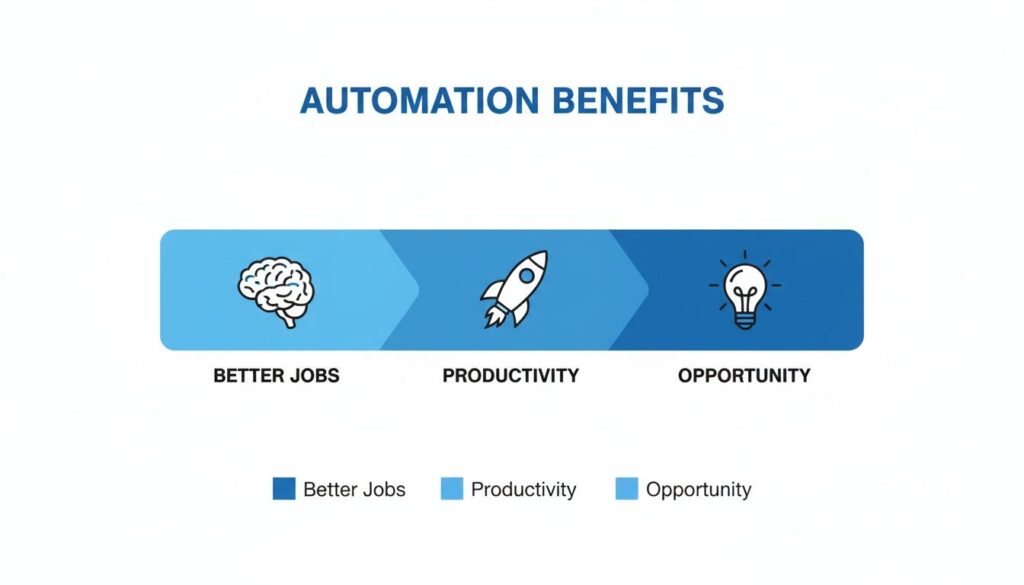
Automation Benefits
This isn’t just about shaving off a few minutes. It’s about fundamentally upgrading the quality of work and strategic focus within your business.
Connecting Your Apps with Integration Platforms
A conversational hub is powerful on its own, but its true potential is unlocked when you connect it to all the other tools you use. This is where the second layer—the integrator—comes in.
Platforms like Zapier, Make, and Pabbly are the “glue” of the internet. They make your different apps talk to each other without you writing a single line of code.
Imagine a new lead comes through your Instagram DM chatbot. With an integrator, you can set up a workflow that automatically:
- Adds the contact’s details to a Google Sheet.
- Subscribes them to a specific list in Mailchimp.
- Creates a new deal for them in your HubSpot CRM.
A process that would take several minutes of manual work (and be prone to errors) now happens instantly and flawlessly. This is how you move from automating a single task to building a truly automated system. You can see a real-world setup in our guide on how to integrate Clepher with Zapier.
Your goal isn’t just to automate isolated tasks. It’s to build interconnected “recipes” where one trigger in one app sets off a chain reaction of automated work across your entire software stack.
Picking the Right Tools for Your Business
With so many options, how do you choose? Start by looking at what you’re already using and focus on three key criteria.
- Ease of Use: Is the interface intuitive and visual? You want a tool you can learn quickly without calling a developer.
- Core Functionality: Does it crush the main task you need it for? If you’re handling customer chats, a specialized platform like Clepher will always have more focused features than a generic tool.
- Integration Ecosystem: How many apps does it connect to? Make sure the integrator you choose supports your must-have tools (email, CRM, project management).
By starting with a powerful conversational hub and wiring it into your other software with an integrator, you create a system that’s both scalable and efficient.
Building Your First Automated Workflow
Theory is great, but confidence comes from doing. It’s time to build a high-impact automated workflow from the ground up. We’ll tackle a classic business need: qualifying and following up with new leads from an Instagram ad.
The goal is simple. Instead of frantically messaging every person who responds to your ad, you’ll have a system that works for you 24/7. This automation will capture lead info, segment prospects based on their budget, and trigger personalized follow-ups—all without you lifting a finger.
By the end of this, you’ll have a concrete blueprint for a project that directly impacts your bottom line.
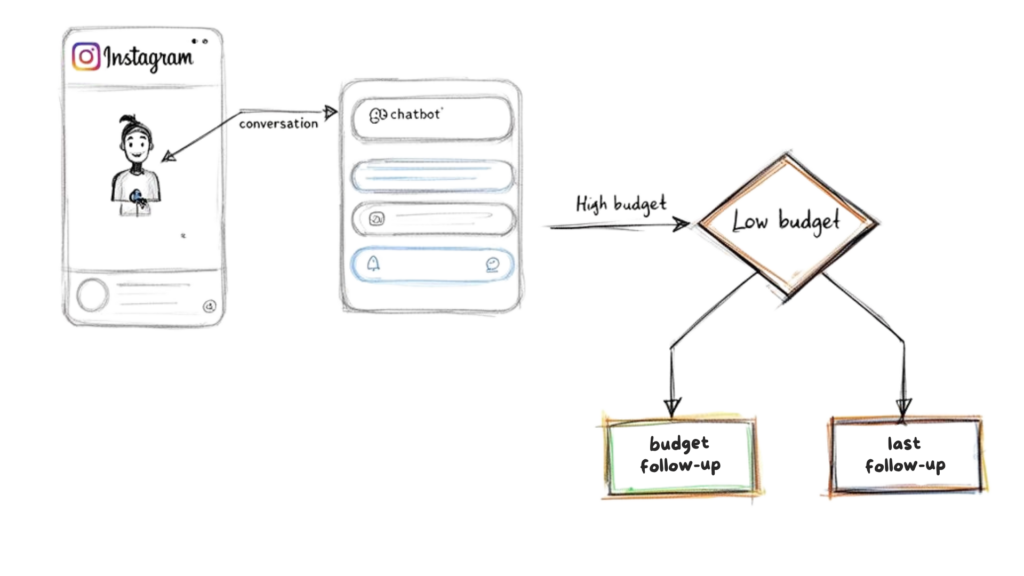
Chatbot Flow
Step 1: Set the Instagram Ad Trigger
Every workflow needs a starting point. In this case, it’s a user responding to an Instagram ad with a call to action like, “DM us the word ‘GROW’ to get our free guide!”
This is a classic lead gen strategy, but the manual follow-up is a total time-suck. With a tool like Clepher, you can set up a keyword trigger that instantly solves this.
Here’s the breakdown:
- In your chatbot builder, create a new automation flow.
- Set the trigger condition to fire when a “User’s message contains the keyword ‘GROW'”.
- Link this trigger to your Instagram account.
That’s it. Now, anytime someone DMs that keyword, your automated sequence kicks in immediately. This speed is critical; studies show that responding to a lead within five minutes can dramatically boost conversion rates.
Step 2: Design the Conversational Sequence
Once the trigger fires, don’t just dump a link and vanish. This is your prime opportunity to qualify the lead. Design a short, simple conversation that feels helpful, not robotic.
First, deliver on your promise. The bot’s initial response should be friendly and direct.
- Bot: “Hey [First Name]! Thanks for your interest in our growth guide. To make sure I get you the most relevant info, mind if I ask two quick questions?”
Next, ask your qualifying questions. For a marketing agency, these might focus on business size and budget. The key is using quick-reply buttons to make it easy for the user. No one wants to type a long answer.
- Question 1: “What’s your biggest marketing challenge right now?” (Buttons: “Getting Leads,” “Closing Sales,” “Brand Awareness”)
- Question 2: “What’s your approximate monthly marketing budget?” (Buttons: “Under $1k,” “$1k-$5k,” “Over $5k”)
As the user taps their answers, the automation platform works in the background. With each response, you can apply tags to their profile. If they select “Over $5k,” they’re automatically tagged as a High-Budget Lead.
This is where the magic happens. You’re not just chatting; you’re actively segmenting your audience in real-time. This simple act of tagging is the foundation for seriously personalized and effective follow-up.
Step 3: Use Conditional Logic for Smarter Follow-Ups
With your new leads neatly tagged, you can now use conditional logic to send them down different paths. Think of it as the “if this, then that” brain of your workflow. Instead of blasting everyone with the same message, you tailor the experience.
Let’s use the budget question as our branching point. Your workflow can now split:
- If a user is tagged
High-Budget Lead:- Action: Immediately send them a link to book a discovery call with your sales team.
- Message: “Awesome! Based on your budget, it sounds like our custom program could be a perfect fit. Here’s a link to grab a free 15-minute strategy session with our team.”
- If a user is tagged
Low-Budget Lead:- Action: Send them the free guide and add them to an email nurture sequence.
- Message: “Perfect, thanks for sharing! Here is your free guide. We’ll also send you some of our best tips over the next few weeks to help you get started.”
This single conditional step transforms your workflow from a simple auto-responder into a smart qualification engine. High-value leads are escalated to sales automatically, while lower-budget prospects are nurtured until they’re ready to buy.
Many businesses also hook their chatbot up to a spreadsheet to keep track of everything. For instance, you can integrate your workflows with Google Sheets to automatically log every new lead and their qualification data in one central spot. It creates a powerful, self-updating database without a second of manual data entry.
Real-World Automation Examples You Can Steal
Seeing what’s working in the real world sparks the best ideas. Here are four practical blueprints from different industries. Don’t just read them—adapt them for your own business.
The E-commerce Brand Recovering Lost Sales
An online clothing store was bleeding money from abandoned carts. Their team was buried in order fulfillment and couldn’t chase down every shopper who bailed at checkout.
They fixed it by building an automated abandoned cart recovery sequence using a Messenger chatbot.
- The Trigger: A customer adds an item to their cart but doesn’t check out within 60 minutes.
- The Workflow: The system pings them on Messenger with a friendly reminder about what they left behind, often including a small, time-sensitive discount.
- The Result: The brand recovered an average of 18% of its abandoned carts, translating to thousands in extra revenue each month—all on autopilot.
The Digital Agency Streamlining Client Onboarding
A busy marketing agency’s client onboarding was chaotic. Manually sending emails, chasing down assets, and scheduling kickoff calls was a huge time suck and left a rocky first impression.
Their solution? An automated onboarding flow. Now, the moment a client signs their contract, a trigger fires off a perfectly timed sequence that handles all the grunt work—sending welcome info, requesting assets, and scheduling the first call. It guarantees a smooth, professional experience every time.
This is how a business goes from reactive and messy to proactive and polished. It standardizes the client experience and frees up account managers to focus on high-value strategy, not admin tasks.
The Coach Delivering and Nurturing Leads
A business coach used a PDF guide as a lead magnet, but the follow-up was a manual nightmare. She burned hours sending the guide and trying to remember who to follow up with.
She built a simple lead magnet delivery and nurture sequence to fix it.
- The Trigger: Someone signs up for the guide on her website or uses a keyword in her Instagram DMs.
- The Workflow: The system instantly delivers the PDF. Then, over two weeks, it drips out valuable tips to build trust before inviting qualified leads to book a call.
- The Result: Her lead-to-client conversion rate jumped by 35%, and she reclaimed over five hours of manual work every week.
The SaaS Company Improving Customer Support
A growing SaaS company’s support team was drowning in repetitive questions. They were so busy answering the same things that they couldn’t get to complex issues. Wait times were long, and customers were frustrated.
They rolled out an AI-powered FAQ bot on their website, trained on their knowledge base to give instant answers to common questions. In industry, moving materials accounts for 51% of all robot applications; this bot does the same for support, handling the simple “pick and place” of common questions. You can read more about these industrial automation trends. If a question is too complex, the bot seamlessly escalates the chat to a live agent, complete with the full conversation history.
How to Measure and Scale Your Automation Efforts
You’ve built your first automation. High five. But that’s just the starting line. The real wins come when you treat automation like a system you constantly fine-tune. This is where you measure what’s working, ditch what isn’t, and scale your efforts intelligently.
Automation isn’t about “setting it and forgetting it.” It’s about creating an engine for efficiency that grows with your business.
Key Metrics to Track Your Automation ROI
You can’t improve what you don’t measure. To understand the real impact of your workflows, track a few core metrics. These numbers tell the story of your return on investment.
Focus on tangible outcomes:
- Time Saved: This is the easiest one. If your chatbot handles 100 questions a week and each one used to take 3 minutes of human time, you’re saving 5 hours weekly.
- Error Rate Reduction: Manual data entry is a breeding ground for mistakes. Compare the error rates from your old process to your new automated one. A drop in errors means fewer expensive fixes.
- Lead Conversion Lift: For marketing workflows, this is the big one. Did your automated lead qualification sequence increase discovery calls booked? Even a 5% lift can have a massive impact.
Your goal isn’t just to see if the automation works. It’s to prove how much value it creates. These metrics turn your gut feeling about efficiency into hard data you can use to justify doing more.
How to Find and Fix Bottlenecks
Even the best-designed automations have weak spots. Go back to that lead qualification chatbot. If you notice in your analytics that many users drop off after the second question, you’ve found a bottleneck.
Once you find a weak point, start testing solutions.
- A/B Test Your Messaging: Try rephrasing the question. Is it too complicated? Create a second version of your chatbot flow in Clepher and send half your traffic to it to see which performs better.
- Simplify the Steps: Maybe two qualifying questions are too many right away. Test a version with just one. Reducing friction is often the easiest way to improve completion rates.
This cycle of analyzing data, forming a hypothesis, and testing a change is how you turn a good workflow into a great one.
Creating a Culture of Continuous Improvement
To truly scale your efforts, make automation reviews a regular practice.
Set aside time once a month to go over your metrics with the team. Ask simple questions: What worked well? What broke? Where are we still bleeding time on manual tasks?
This monthly check-in keeps the momentum alive. It helps you spot new opportunities for automation and reinforces the idea that efficiency is everyone’s job. This is how a single automated workflow evolves into a core part of how your business operates and grows.
Have Questions About Automation? Let’s Clear Them Up.
Getting started with automation always brings up a few questions. It’s smart to think about the real-world costs, customer impact, and where to even begin. Let’s tackle the big ones.
Ready to stop wasting time and start automating your business conversations? Clepher gives you intuitive, no-code tools to build powerful chatbots that market, sell, and support for you 24/7. Start your free trial today and build your first bot in minutes.

Related Posts
Elevate Your Customer Experience with Conversational AI for Customer Engagement
March 22, 2026How to Create Email Lists in Gmail (The Right Way)
March 21, 2026Create a Group Email List in Gmail the Right Way
March 20, 2026
Founder Clepher