
Automating your sales process isn’t about adding more software to your tech stack. It’s about taking the repetitive, time-consuming tasks—like capturing leads, asking the same qualifying questions over and over, and sending manual follow-ups—and handing them off to a system that does them faster and more consistently.
This move frees up your team for what truly matters: having high-value conversations and closing deals. It’s how you scale revenue without burning out your best people, all while creating a customer experience that feels instant and helpful, not robotic.
Moving Beyond Manual Sales Processes
Let’s be honest: a manual sales process is quietly costing you money.
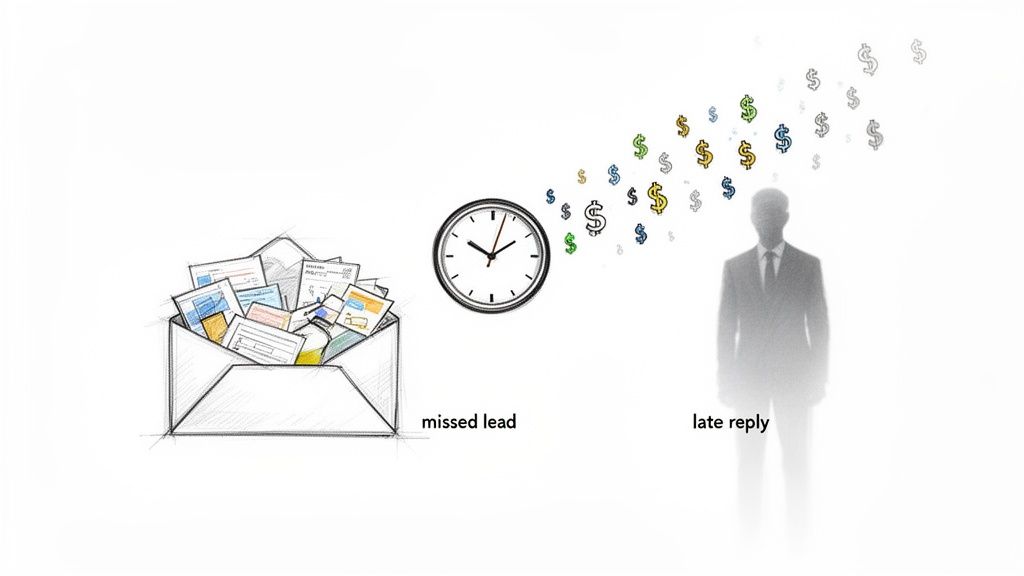
Every Instagram DM that sits unanswered overnight, every website inquiry that gets buried in a cluttered inbox, and every inconsistent follow-up from a busy rep is a potential sale slipping away. These small gaps in your workflow add up, creating a significant revenue leak over time.
Lost Revenue
Here’s a real-world example: an e-commerce store. A customer slides into your DMs at 10 PM asking if a sold-out item is back in stock. By the time your team clocks in the next morning, that customer has already bought from a competitor who had an instant, automated response. That’s a lost sale caused by slow, manual work.
Or consider a digital marketing agency. A high-value prospect fills out a detailed project inquiry on their website. But it lands in a general inbox while the sales director is swamped with meetings. It takes 48 hours to get a reply. By then, the prospect has already had discovery calls with two other, more responsive agencies.
The Real Cost of Inaction
These manual bottlenecks aren’t just minor headaches; they are genuine strategic disadvantages that stall your growth. Here are the core issues businesses are wrestling with every single day:
- Inconsistent Customer Experience: When every sales rep handles follow-ups their own way, the customer’s journey becomes unpredictable. This inconsistency erodes trust and makes your brand look disorganized.
- Lost Leads After Hours: Your business might close at 5 PM, but your potential customers are online and asking questions 24/7. Without an automated system, every lead that comes in overnight is a gamble.
- Slow Response Times: In today’s market, speed is everything. A delay of just a few hours can mean the difference between winning a new client and losing them to someone faster.
The first step away from manual chaos often involves a tool like an AI Receptionist to make sure every single inquiry gets an instant, intelligent response, day or night. It’s the quickest way to plug a major source of lead leakage.
Shifting from Reactive to Proactive
Embracing automation is about more than saving time—it’s a fundamental shift in how you engage with potential customers. You move from being reactive and constantly playing catch-up to proactively guiding people through their buying journey. For a modern business, this isn’t just an option anymore; it’s a necessity for survival and growth.
The numbers prove it. The global marketing automation market hit $6.65 billion in 2024 and is projected to skyrocket to $15.58 billion by 2030. This explosive growth shows just how seriously businesses are taking the need to ditch outdated, manual methods. Learning how to automate your sales process is no longer just a competitive edge—it’s the new standard for delivering a superior customer experience.
Map Your Customer Journey Before You Automate Anything
Before you even think about chatbots or fancy software, your first move is surprisingly old-school. You need a simple, honest blueprint of how people actually buy from you right now.
Trying to automate a messy, undefined process just gets you a faster mess. It’s a classic rookie mistake.
First, visualize the entire path a total stranger takes to become a happy, paying customer. This map is your guide. It shows you exactly where the manual bottlenecks are bogging you down and where a little automation will deliver the biggest wins. Without it, you’re just flying blind.
The Three Core Buying Stages
Every customer journey, whether for a SaaS subscription or a handmade candle on Instagram, breaks down into three key stages. Understanding these helps you organize your sales activities and pinpoint exactly where to plug in automation.
- Awareness: This is the “aha!” moment. It’s the first time a potential customer finds out your brand exists. Maybe they stumbled on a blog post from a Google search, saw an ad in their social feed, or got a referral from a friend.
- Consideration: Now they’re interested. They’ve moved from just knowing about you to actively figuring out if you’re the right solution. This is when they’re browsing product pages, digging through reviews, watching your demo video, or comparing your pricing against a competitor.
- Decision: This is the finish line. The customer is ready to pull the trigger. For an e-commerce store, it’s adding an item to the cart and hitting “checkout.” For an agency or a coach, it’s booking that discovery call or asking for a formal proposal.
Your job is to map out what these stages look like for your specific business. A simple flowchart tool like Miro or Lucidchart works perfectly. Don’t overthink it—just draw it out.
Finding the Automation Sweet Spots
Once your journey is mapped, the real work begins. Go through each stage, step by step, and find every manual touchpoint. Every email you write from scratch, every DM you answer, every contact detail you copy and paste.
These are your golden opportunities for automation.
Let’s walk through a practical example for a digital agency.
Awareness Stage:
- Manual Task: A prospect reads a blog post and fills out a generic “Contact Us” form. That submission just sits in a shared inbox, waiting for someone to notice it.
- Automation Opportunity: Swap that form for an interactive chatbot that pops up with, “Thanks for reading! Curious how we can help your business grow?” It’s an instant, personal engagement.
Consideration Stage:
- Manual Task: A sales rep has to manually email the prospect to ask basic qualifying questions—budget, timeline, company size. This back-and-forth can eat up days.
- Automation Opportunity: The chatbot continues the conversation, asking those pre-qualification questions right then and there. It can instantly tell if the lead is a good fit based on their answers.
Decision Stage:
- Manual Task: If the lead is qualified, the sales rep sends their calendar link to book a call. This kicks off more email tennis to find a time that works.
- Automation Opportunity: The chatbot integrates directly with a scheduling tool. It can say, “Great, it looks like we’re a perfect fit! Here are a few times to chat with our strategy team,” and let the lead book a meeting on the spot.
This isn’t about replacing your sales team with robots. It’s about using automation to handle the repetitive, low-value work so your team can focus on what they do best: building relationships and closing high-value deals.
By pinpointing these friction points, you create a clear roadmap for what to automate first. You’re no longer adding tech for the sake of it; you’re solving real business problems and making it easier for customers to buy from you. This foundational map ensures every workflow you build has a purpose and drives real results.
Building Your Automated Lead Capture Engine
Once you’ve mapped your customer’s journey, it’s time to build the engine that drives everything. This is where we stop planning and start doing. We’re about to create a system that actively engages visitors and turns them into qualified, perfectly segmented leads—all without a single manual click from your team.
The old way was painfully passive. A visitor lands on your site, fills out a sterile “Contact Us” form, and waits, hoping someone on your end eventually sees their submission.
The new way is active and conversational. We’re building a 24/7 digital assistant that greets every single visitor, figures out what they need, and guides them to the next logical step, instantly.
From Passive Forms to Active Conversations
Think of a traditional contact form as a dusty suggestion box. You hope people use it, but it offers zero immediate value or interaction. A conversational AI chatbot, on the other hand, is like having your best salesperson ready to greet every person who walks through your digital door, day or night.
This shift is fundamental. Instead of waiting for leads to come to you, you proactively start the conversation right on your website, Facebook, or Instagram—wherever your audience already is.
Here’s a simple, visual guide to how this automation flow actually works, from that first point of contact to the final decision.
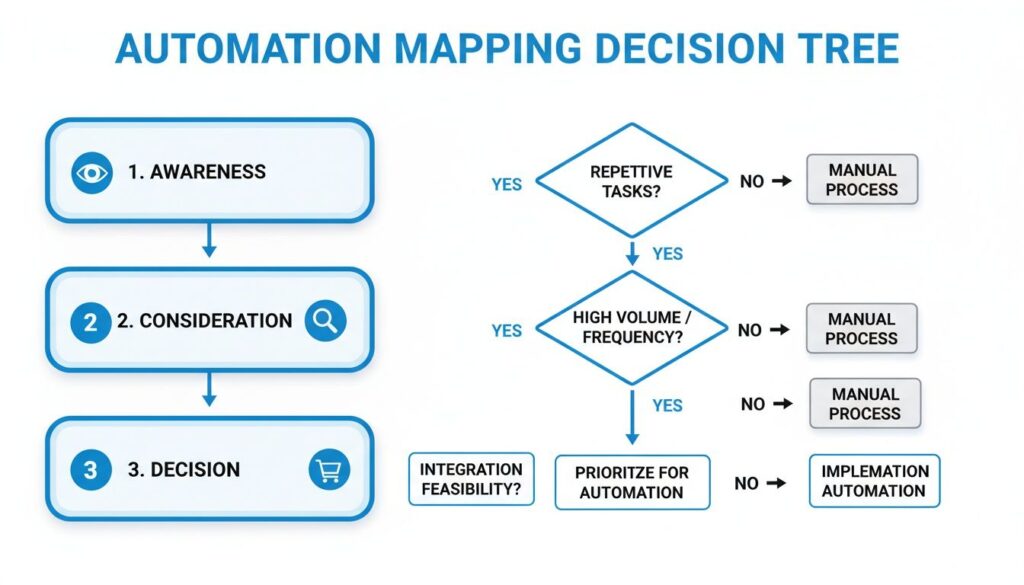
Automation Mapping Decision Tree
This decision tree shows exactly how automation can engage users at every stage, capturing their attention early and guiding them straight toward a purchase.
Designing Your First Lead Capture Flow
Let’s get practical. The goal here is to create a chatbot “flow”—a predefined conversational path—that grabs a lead’s information and qualifies them based on their answers. The logic is simple, but it’s incredibly powerful in action.
Use Case: E-commerce Store. Imagine your main goal is to convert website visitors into email subscribers so you can nurture them into paying customers.
- The Trigger: A visitor has been looking at a product page for more than 10 seconds.
- The Hook: A chatbot pops up with a friendly message: “Hey there! See something you like? I can send you a 15% discount code for your first order.”
- The Capture: If the user clicks “Yes, please!”, the bot immediately replies, “Awesome! What’s the best email address to send it to?”
- The Handoff: Once they enter their email, the system automatically tags them as a “New Lead,” adds them to your email platform like Klaviyo, and delivers the discount code.
In less than a minute, you’ve captured a high-intent lead and provided real value, all while your team was focused on something else.
The core principle is a simple value exchange. You’re not just demanding their contact information; you’re offering something genuinely useful in return—a discount, a helpful guide, a free consultation. This one shift dramatically increases conversion rates.
Pre-Qualifying Leads to Save Your Sales Team Hours
Now, let’s apply this to a B2B scenario, like a digital marketing agency. Here, the goal isn’t just to capture a lead—it’s to make sure they’re the right kind of lead before they ever speak with a sales rep. An unqualified lead can easily burn dozens of hours in discovery calls and proposal writing.
This is where a chatbot becomes your tireless gatekeeper.
Agency Lead Qualification Flow:
- Initial Greeting: “Hi! Thanks for your interest in our marketing services. To make sure we’re the best fit, I just need to ask two quick questions.”
- Budget Filtering: “First, what is your approximate monthly marketing budget? A) Under $2,000, B) $2,000-$5,000, C) Over $5,000.”
- Timeline Filtering: “Great, thanks! And what’s your ideal project start date? A) This month, B) Next 1-3 months, C) 3+ months from now.”
- Segmentation & Routing: Based on their answers, the bot takes a specific, pre-planned action.
If the user selects “C” for budget and “A” for timeline, that’s a hot lead. The bot can respond, “Perfect! It sounds like we’re a great match. Let’s get you booked in with a strategist right away,” and immediately present a calendar link to schedule a call.
But if they select “A” for budget, they might not be a fit. The bot can politely pivot: “Thanks for sharing. Based on your budget, our one-on-one services might not be the best fit right now. However, we have a free [ebook/webinar] on growing your business that you’d get a ton of value from.” You can learn more about how to set up a chatbot for lead generation to really dial this in.
This automated filtering ensures that 100% of the calls your sales team takes are with pre-qualified prospects who match your ideal customer profile. Your team stops wasting time on dead-end leads and focuses entirely on closing deals. This single machine, running silently on your website, can dramatically increase the efficiency of your entire sales operation.
Key Automation Tasks by Business Type
Not sure where to start? Every business has different priorities. An e-commerce store needs to fight cart abandonment, while an agency needs to filter out unqualified prospects. This table breaks down the most impactful automation tasks for different business models to help you focus your efforts.
| Business Type | Top Automation Priority | Example Implementation (Using a Chatbot) |
|---|---|---|
| E-commerce | Cart Abandonment Recovery & Upselling | Trigger a chatbot message offering a 10% discount or free shipping if a user has items in their cart for over 20 minutes without checking out. |
| Agency/B2B | Lead Qualification & Appointment Setting | Use a chatbot to ask qualifying questions (budget, timeline, company size) and automatically book qualified leads onto a sales rep’s calendar. |
| Creators/Coaches | Audience Segmentation & Webinar Signups | Greet website visitors with a chatbot that asks about their biggest challenge, then directs them to a relevant lead magnet or webinar signup. |
| SMB (Local) | Answering FAQs & Booking Appointments | Automate responses to common questions like “What are your hours?” or “Where are you located?” and let the chatbot book appointments directly. |
Picking the right priority is half the battle. Focus on the one task that will free up the most time or generate the most immediate revenue, build it, and then move on to the next. You don’t have to automate everything at once.
Crafting Automated Follow-Up Sequences That Convert
Getting a lead is just the starting line. The real work—and where most sales are won or lost—happens in the follow-up. This is where you methodically build trust, deliver actual value, and gently guide a warm lead toward becoming a customer. Without a smart, automated nurturing plan, even your best leads will go cold. Fast.
This is your chance to move beyond a simple thank-you page and start building relationships at scale. The goal is to stay top-of-mind with timely, relevant messages that feel personal, not like they came from a machine.
Automate Sales Process
Go Beyond a Single Channel
If your entire follow-up strategy lives in their email inbox, you’re setting yourself up to be ignored. It’s just too crowded. Your audience is active across multiple platforms, and your follow-up needs to be, too. An effective sequence meets people where they already are.
- Messenger/Instagram DM: Best for instant, conversational wins. Use it for immediate confirmations, asking a quick question, or sending something interactive. Open rates here crush email.
- Email: Your workhorse for delivering long-form value. It’s the perfect place to share detailed case studies, in-depth guides, or more formal proposals.
- SMS: Your direct line for urgent, high-priority messages. Use it sparingly for time-sensitive offers or appointment reminders to ensure your message cuts through the noise.
When you weave these channels together, you create a persistent, multi-faceted presence that keeps your brand visible without being annoying. The key is making each message feel like the natural next step in the conversation.
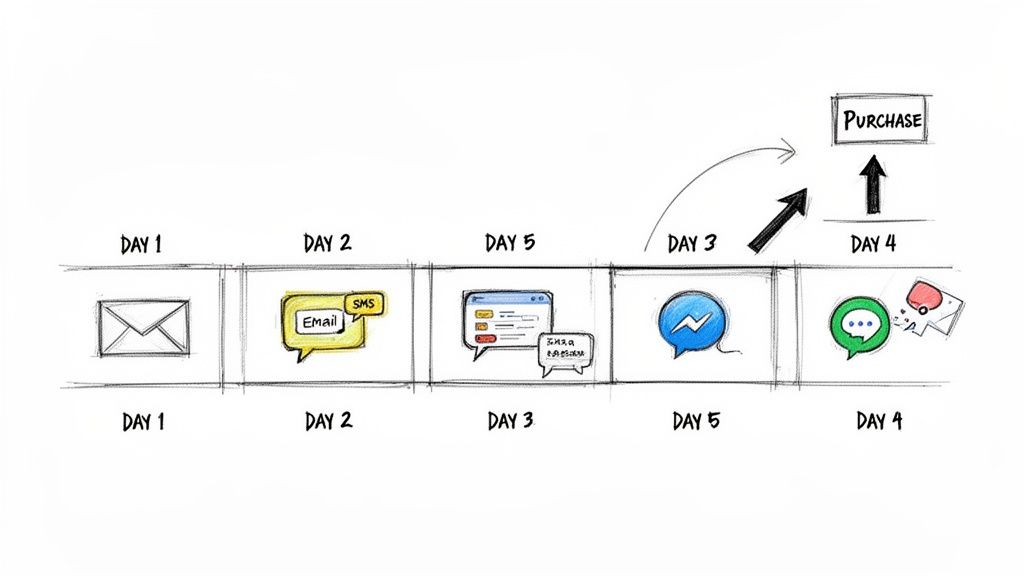
A Battle-Tested 5-Day Follow-Up Sequence
Theory is nice, but let’s get practical. Here’s a real-world, battle-tested follow-up sequence you can steal. Imagine a prospect just downloaded your ebook, “5 Strategies to Double Your E-commerce Sales.”
This multi-channel flow is designed to provide value first, building a strong foundation of trust before you ask for the sale.
Day 1 (Instant Gratification)
- Channel: Messenger or Instagram DM
- Message: “Hey [First Name]! Thanks for grabbing the e-commerce guide. Here’s your direct download link: [link]. I’d love to hear which of the 5 strategies you’re most excited to try first!”
- Why It Works: It’s immediate, conversational, and delivers the goods right away. The open-ended question encourages a reply, turning a passive download into an active conversation.
Day 2 (Provide Tangible Proof)
- Channel: Email
- Subject: A quick follow-up for [First Name]
- Message: “Hi [First Name], hope you’re finding the guide useful. I wanted to share a quick case study about how an online boutique just like yours used Strategy #3 (Abandoned Cart Recovery) to boost their revenue by 18% in just one month. You can check it out here: [link to case study]. Let me know what you think!”
- Why It Works: This isn’t a sales pitch. It’s valuable content that connects directly back to the ebook, reinforcing its value with real-world results and building your authority.
Day 4 (Create Urgency)
- Channel: SMS
- Message: “Hey [First Name]! Quick heads-up. We’re offering a free 1-on-1 strategy session to help you implement the tactics from the ebook. We only have 3 spots left this week. Want to claim one? Reply YES to book.”
- Why It Works: SMS is direct and commands attention. By adding scarcity (3 spots left) and making the call-to-action dead simple (Reply YES), you create a powerful reason for them to act now.
The core of a successful automated sequence is progression. Each message should build on the last, logically guiding the prospect from initial interest to a point where a purchase decision feels like the natural next step.
This sequence works because it doesn’t just blast offers. It educates, proves value, and then presents a compelling, time-sensitive opportunity.
Personalization is Non-Negotiable
Finally, remember that “automated” should never mean “generic.” The best follow-up sequences use the data you’ve gathered to make the experience feel one-on-one.
- Use Their Name: A simple “[First Name]” tag goes a surprisingly long way.
- Reference Their Actions: Mention the specific ebook they downloaded or the product page they lingered on.
- Segment Your Audience: Don’t send the same messages to everyone. A new lead who downloaded an intro guide needs a different journey than a prospect who watched a 20-minute product demo.
When you build thoughtful, multi-channel sequences that deliver genuine value at every turn, your follow-up process transforms from a chore into your most powerful conversion tool.
Integrating Your Tech Stack for a Seamless Workflow
An automated sales process running on a single, isolated platform is like having a high-performance engine that isn’t connected to the wheels. Your chatbot might be capturing leads brilliantly, but if that valuable data stays locked inside one tool, you’re still stuck with manual data entry and a disconnected customer view.
The real magic happens when your tools talk to each other. When your conversational AI platform, CRM, email service, and calendar work in concert, you create a seamless system where data flows effortlessly from one stage to the next.
Building Your Integration Recipes
Think of integrations as simple “if this, then that” recipes that connect your apps. They listen for a trigger in one system—like a lead answering a question—and then perform an action in another. This kills the tedious copy-paste work that tanks productivity.
You can set these up using native integrations or with third-party connectors like Zapier, which acts as a universal bridge between thousands of different apps.
Here are a few powerful, practical recipes you can set up today:
- Chatbot to CRM: When a chatbot qualifies a lead on your website, automatically create a new deal in HubSpot or Salesforce, assign it to the right sales rep, and populate the contact record with the conversation transcript.
- Social DM to Email Nurturing: A user clicks a specific button in an Instagram DM broadcast. That click instantly adds them to a targeted nurture sequence in Klaviyo or Mailchimp.
- Automated Scheduling: A bot flags a high-value lead. Instead of back-and-forth emails, it sends them a Calendly link to book a discovery call. Once booked, the system creates the event, sends reminders, and updates their status in your CRM.
These connections ensure a smooth handoff from automated engagement to human interaction, creating a single source of truth for every customer.
Your CRM Is the Central Hub
Your Customer Relationship Management (CRM) system has to be the central hub of your entire sales operation. It’s the mothership. This is where all customer data lives, providing a complete history of every interaction, purchase, and conversation.
Integrating it properly isn’t just a nice-to-have; it’s non-negotiable.
Without this link, your sales team flies blind. They get a new lead notification but have zero context on the conversation that led them there. They won’t know what questions the prospect asked the chatbot or what pain points they mentioned. The crucial link between your CRM and your ticketing or support system operates on the exact same principle of creating one unified customer view.
A properly integrated CRM means your sales team can open a new lead’s record and see their entire journey—from the initial chatbot conversation on Facebook to the case study they downloaded via email. This context is the difference between a cold call and a warm, informed conversation.
Two Paths to Integration
When it comes to connecting your tools, you generally have two main options. Both are effective, and the right choice really just depends on your specific tech stack and needs.
- Native Integrations: These are direct, pre-built connections between two platforms (e.g., Clepher connecting directly to HubSpot). They are often the easiest to set up and are highly reliable because they are maintained by the software developers themselves. They are perfect for your most critical, high-volume connections.
- Third-Party Connectors (like Zapier or Make): These tools act as the glue between apps that don’t have a native integration. They offer incredible flexibility, connecting to thousands of different services. They are ideal for creating custom, multi-step workflows or linking less common tools in your stack.
Ultimately, your goal is to build a tech stack where data moves automatically, triggered by customer actions. This not only saves hundreds of hours but also creates a smarter, more responsive sales process that delivers a vastly superior customer experience.
Measuring and Optimizing Your Automated Sales Funnel
Getting your automated sales process live is a huge win. But real growth doesn’t come from flipping a switch; it comes from treating your automation like a living system.
You have to constantly measure, tweak, and refine it. The “set it and forget it” approach is a fast track to stagnation. What separates the pros from the amateurs is a commitment to data-driven optimization. This is how you build an actual competitive advantage.
The goal here is simple: stop guessing what works and start knowing. Every interaction—a chatbot conversation, a click in a follow-up email, a lead handed off to sales—is a data point. These data points tell you a story about what’s resonating and, more importantly, where the friction is.
Key Metrics You Need to Watch
To do this right, you need to track the numbers that actually matter. It’s easy to get lost in vanity metrics that look good but don’t move the needle. Instead, focus on the key performance indicators (KPIs) that directly impact your bottom line.
Here are the essentials:
- Lead Qualification Rate: What percentage of conversations end with a lead meeting your criteria (budget, timeline, need)? If this number is low, your initial questions might be unclear or your ad targeting is off the mark.
- Average Response Time: Your bot is instant, but this metric is about the human handoff. When the bot flags a hot lead, how long does it take for a real person to jump in? Delays here kill deals.
- Sequence Conversion Rate: Of all the people who enter a specific follow-up sequence—like your 5-day ebook campaign—how many take the desired action, like booking a call? This tells you exactly how persuasive your messaging is.
We have a whole guide on increasing your sales conversion rate that dives deeper into this.
Don’t underestimate the financial impact of obsessing over these numbers. Businesses see an average $5.44 return for every $1 spent on automation, leading to an 80% increase in leads and a 77% jump in conversions. You can dig into more stats about the impressive ROI of automation on Flowlyn.com.
A Simple Framework for Monthly Reviews
Optimization shouldn’t be a random, “I feel like changing this” activity. A structured monthly review keeps you focused. Block out two hours, pull up your analytics dashboard, and run through these three questions:
- Where are people dropping off? Dive into your chatbot flows. Is there one specific question where a huge chunk of users go silent? That’s your biggest bottleneck. Fix it by rephrasing the question or offering different answer choices.
- What can we A/B test? Never assume you know what works best. Test everything. Try different opening hooks in your chatbot, change the text on your buttons, or re-order your qualification questions. A tiny change can yield a massive result.
- Are our handoffs seamless? Walk through the process of a lead being passed from bot to human. Is there a lag? Is the full conversation context getting passed along correctly? A clunky handoff makes your business look disorganized.
Continuous improvement is the secret sauce. A 5% improvement in your lead qualification rate each month might not sound like much, but over a year, it compounds into a dramatically more efficient and profitable sales engine.
Got Questions About Sales Process Automation?
Diving into automation always brings up a few questions. That’s a good thing. It’s smart to tackle these concerns head-on to make sure your strategy is solid from the get-go. Let’s clear the air on a few common ones.
Conclusion
Sales process automation transforms the sales workflow by allowing sales professionals and sales representatives to automate repetitive sales tasks, streamline their sales process, and focus on high-value activities. By integrating automation tools, automation software, or a full automation platform with your sales CRM and marketing automation, teams can improve lead management, move prospects efficiently through the sales pipeline and sales funnel, and send timely follow-up email sequences using email automation tools. This automation helps produce accurate sales data and sales reports, shorten the sales cycle, and increase conversion rate, so sales teams improve overall sales performance.
Using the right automation solutions and sales automation tools—whether sales automation platforms, sales automation software, or crm tools—lets sales leaders implement an automation strategy and best practices that save time and let sales reps spend more time selling. Automation works by capturing leads from lead generation, scoring them, and routing them to the right sales rep while giving managers visibility into sales activities and sales reports. That’s where sales automation shines: it simplifies the process, reduces manual work, and ensures consistent follow-up so marketing and sales teams can collaborate more effectively.
Examples of sales automation include automated lead assignment, email automation, task reminders, and dashboards that manage sales performance. For sales operations and sales teams looking to automate or wanting to automate their processes, using automation tools to create templates, sequences, and workflows is a practical sales automation solution. The benefits of sales automation include higher sales productivity, more accurate sales forecasting, better lead nurturing, and improved customer relationship management. With the right tools and an integrated automation strategy, you can streamline your sales process, improve sales performance, and enable sales teams to spend more time selling and close more deals.
Ready to build an automated sales engine that works for you 24/7? Clepher gives you the no-code tools to design, launch, and optimize conversational automation on your website, Messenger, and Instagram. Start turning visitors into qualified leads today.

Related Posts
Website Facebook Messenger: Setup & AI for Sales in 2026
April 1, 2026How an API Chat Bot Transforms Your Business (And How to Build One)
March 31, 2026
Founder Clepher