
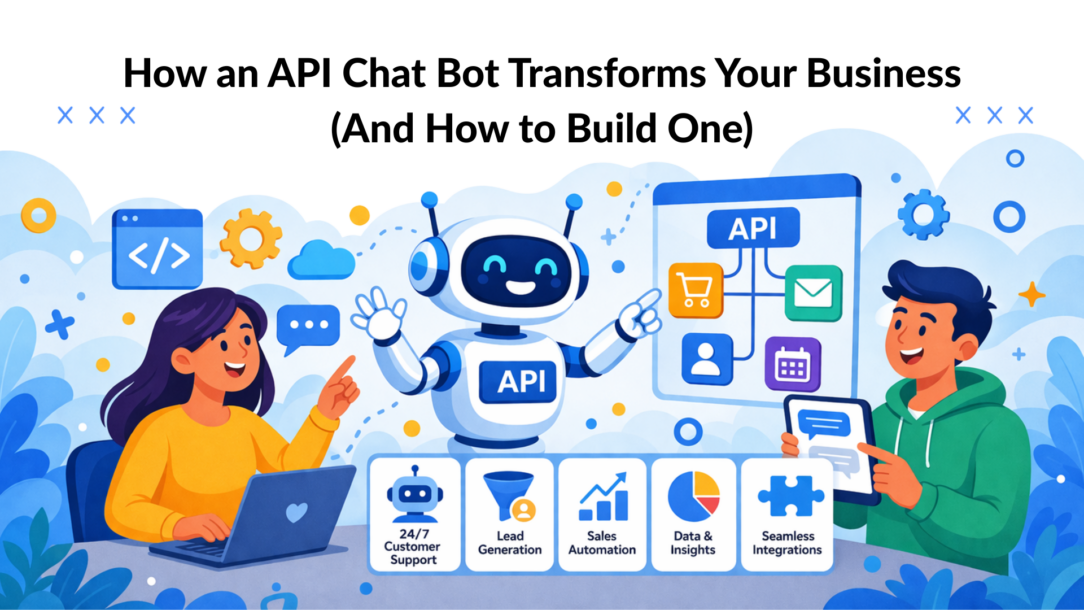
An API chat bot is a powerful tool that connects your chat platforms—like Messenger or Instagram—to other business software using an Application Programming Interface (API). Think of it as a super-connector, letting your bot talk directly to your CRM, e-commerce store, or email platform to get real work done.
This isn’t just about answering basic questions. It’s about automating tasks that eat up your team’s valuable time, turning conversations into direct business results.
Unlocking Automated Growth with an API Chat Bot
If your sales, marketing, and customer support teams operate in separate bubbles, you’re leaving money on the table. This siloed approach leads to manual data entry, missed opportunities, and a fragmented customer experience that slows everything down.
An API chatbot shatters those walls.
Think of an API as a secure messenger that lets different software programs communicate. It defines the rules for how they can request and share data. When you’re using chatbot systems powered by APIs, they evolve far beyond basic live chat—they become active, intelligent players in your business operations.
With capabilities like natural language understanding, these bots don’t just respond—they actually interpret intent, making conversations feel human while still being fully automated. Whether embedded as a simple widget on your site or integrated across platforms, the chatbot becomes a central hub for communication.
This simple shift transforms your one-on-one chats from a time-consuming manual task into a 24/7 automated engine that drives growth while you sleep. You move from putting out individual fires to building a scalable system for intelligent engagement.
Moving Beyond Simple Chat
Without an API, a chatbot is stuck. It can follow a script, much like a basic live chat tool, but it can’t access real-time information or take meaningful action. It’s like a receptionist who can greet visitors but can’t check them in or look up their appointment details—limiting both efficiency and the overall customer experience.
An API chat bot, however, can perform powerful actions:
- Check order status: It connects directly to your Shopify or WooCommerce store to give a customer an instant shipping update. No more “Where is my order?” tickets.
- Qualify leads: It asks a prospect key questions on Facebook, then automatically sends their details into your HubSpot or Salesforce CRM, creating a warm lead for your sales team.
- Segment subscribers: When someone opts in, the bot can use an API to add tags in a tool like Klaviyo, placing them into the perfect email nurture sequence automatically.
This level of automation is no longer a luxury; it’s a necessity. The global AI chatbot market, which thrives on these API connections, is set to explode from roughly $10 billion in 2025 to over $30 billion by 2031. This massive growth shows just how crucial these tools are for brands selling online and engaging customers on Messenger and Instagram. You can explore the full chatbot market research for more on these trends.
Before we dive deeper, here’s a quick summary of what an API chat bot is and why it’s so transformative.
API Chat Bot at a Glance
| Component | What It Is | Why It Matters for Your Business |
|---|---|---|
| API Chat Bot | A conversational AI using APIs to connect chat platforms (like Messenger) with other systems (like your CRM or e-commerce store). | It turns simple chats into automated actions, converting conversations into leads, sales, and support tickets without manual effort. |
| Primary Function | To automate workflows by sending and receiving data between your chat channels and your core business software. | It eliminates data silos, ensures your teams have current information, and provides a seamless, instant experience for your customers. |
| Key Business Benefit | Transforms conversational marketing from a manual task into a scalable, 24/7 engine for lead generation, sales, and support. | It saves time, reduces operational costs, and increases conversions by meeting customers where they are with the exact action they need. |
This table illustrates that an API chat bot is not just another tech tool—it’s the central hub connecting customer conversations to tangible business outcomes.
What This Means for Your Business
The biggest transformation here is turning conversations into conversions, automatically. An API-powered bot is more than a friendly face; it’s a tireless digital employee that qualifies leads, recovers abandoned carts, and provides instant support around the clock.
At its core, an API chat bot bridges the gap between customer conversation and business action. It turns a simple “Hello” into a new lead in your CRM, a resolved support ticket, or a completed sale, all without manual intervention.
By connecting your chat channels to the rest of your tech stack, you create a fluid, uninterrupted customer journey. This not only makes your team more efficient but also delivers the instant, personalized experience that modern buyers expect.
Platforms like Clepher are designed to make this powerful automation accessible, offering no-code solutions that let you leverage an API chat bot without needing a team of developers.
How an API Chat Bot Works Behind the Scenes
To really understand what an API chat bot can do, it helps to peek under the hood. The technology might sound complex, but the core concepts are surprisingly straightforward. You don’t need to be a developer to grasp how these pieces fit together to solve problems and capture data on autopilot.
At its heart, an API chat bot acts as a translator between different software systems. This “conversation” relies on a few key components working together seamlessly.
The Core Components of an API Chat Bot
Imagine the process like a well-oiled restaurant. A customer (your user) gives their order to a waiter (the chat bot). The waiter needs a reliable way to get that order to the kitchen (your business systems) and bring the finished dish back.
The API makes this happen using three main elements:
- Webhooks: A webhook is like a digital doorbell. When a user sends a message to your bot on Messenger, the webhook rings instantly. It’s an event-driven signal that tells your system, “Hey, something just happened! Time to act.”
- Endpoints: An endpoint is the specific address where information is sent and received. If the webhook is the doorbell, the endpoint is the kitchen’s service window. It’s the exact digital location where your bot sends a request (e.g., “Find order #12345”) and where your system sends a response back (e.g., “Order #12345 has shipped”).
- Authentication: This is the secret handshake. To prevent anyone from walking into your digital kitchen, you need security. Authentication ensures only your trusted chat bot can communicate with your business systems by using secure API keys or tokens. It’s what protects your data and your customers’ privacy.
This flowchart illustrates the simple yet powerful flow of information—from the user’s chat all the way to your backend systems, with the API as the connector.
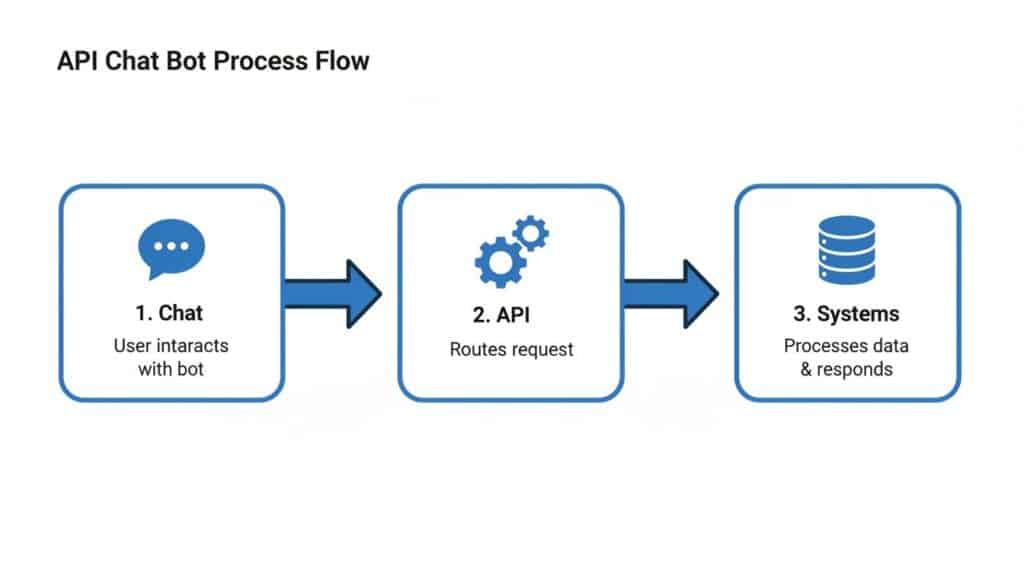
api-chat-bot-process-flow
As you can see, the API acts as the central translator. It takes a conversational request from a user and turns it into a structured command your software can understand and execute.
Rule-Based Bots vs. AI-Powered Bots
Not all bots are created equal. The logic powering a bot’s “brain” dictates what it can accomplish. The two main types are rule-based bots and AI-powered bots.
A rule-based bot is a strict script-follower. It operates on a predefined decision tree, forcing users down a fixed path. For example, it might ask a user to choose between “Track Order” and “Ask a Question.” If the user types something else, the bot gets stuck. It’s rigid and can feel robotic.
This approach works for simple, repetitive tasks but often frustrates users who expect a more natural conversation.
An AI-powered bot, in contrast, is far more intelligent. Instead of just following a script, it uses Natural Language Processing (NLP) to understand the user’s intent. This means a user can type “where’s my stuff?” or “shipping status,” and the bot understands they want to track an order.
AI-powered bots don’t just match keywords; they interpret meaning. This allows for fluid, human-like conversations that adapt to the user, leading to higher satisfaction and better outcomes.
Platforms like Clepher build this AI capability right into the bot-building process. By understanding user intent, the bot can handle a much wider range of questions and create a genuinely helpful experience. To learn more, check out our guide on how a chatbot uses natural language processing. This advanced understanding is what separates a basic FAQ bot from a powerful business automation tool.
When you combine these components—webhooks, endpoints, and authentication—with an intelligent AI brain, your API chat bot becomes an active, problem-solving extension of your team that works 24/7.
Real-World Examples of API Chat Bots in Action
The theory behind an api chat bot is one thing, but its true value is measured in the tangible results it delivers. Let’s move beyond the technical jargon and look at how smart businesses use these automations to fix common problems and drive real growth. These examples draw a straight line from a well-built bot to a healthier bottom line.
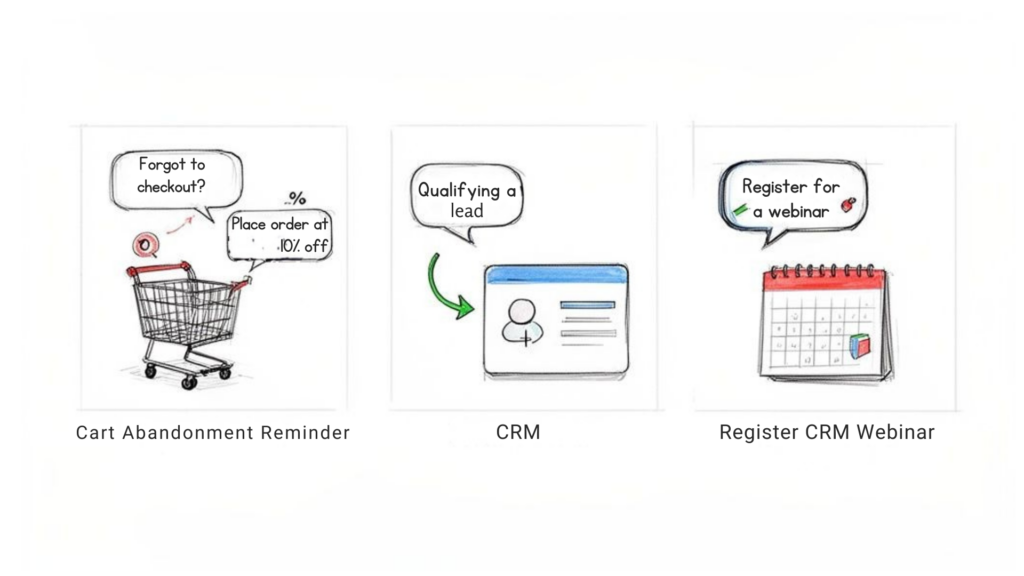
Real-World API Examples
In each of these use cases, there’s a clear problem, a bot-driven solution, and a measurable impact.
E-Commerce Cart Recovery on Instagram
An online fashion boutique was losing significant revenue from abandoned carts. Shoppers on Instagram would add items, get distracted, and never complete their purchase. Manually messaging every single one was impossible.
The API Chat Bot Solution:
They implemented an Instagram DM bot connected directly to their Shopify store via API.
- The Trigger: A user adds items to their cart but doesn’t check out within 60 minutes.
- The API Action: The bot sees the abandoned cart event from the Shopify API, grabs the specific items left behind, and slides into the user’s Instagram DMs.
- The Conversation: It sends a friendly, personalized message like, “Hey [User Name], we noticed you left some amazing items in your cart! To help you finish your order, here’s a 15% discount on us.”
The Result: This simple, automated follow-up helped the boutique recover over 15% of previously lost sales. The bot transformed a frustrating problem into a 24/7 automated revenue engine, all without a single person lifting a finger.
This is a prime example of an API-powered chatbot turning a messaging app into a powerful sales tool that acts on real-time data.
Automated Lead Qualification for Agencies
A digital marketing agency running Facebook ads for a real estate client was overwhelmed with comments and messages. The small sales team couldn’t keep up, struggling to separate serious leads from casual browsers. Response times lagged, and valuable opportunities were lost.
The API Chat Bot Solution:
The agency built a Messenger bot for the ad and connected it to the client’s CRM.
- When someone clicks the ad, the bot immediately starts a conversation.
- It asks key qualifying questions: “Are you a first-time homebuyer?” “What’s your budget?” “Are you pre-approved for a loan?”
- Based on the answers, the bot segments each person. High-quality leads are instantly sent to the client’s CRM via an API call, creating a new contact record with all the details.
The Result: The agency cut the client’s lead qualification time by an incredible 80%. The sales team could finally stop searching for needles in a haystack and focus on pre-qualified leads that landed directly in their pipeline. This setup functions much like a dedicated AI SDR that handles initial outreach automatically.
Streamlined Webinar Registrations for Coaches
An online business coach depended on webinars to attract new clients, but the sign-up and follow-up process was a manual nightmare. Users registered on a clunky landing page, and the coach had to spend hours sorting them into the right email lists.
The API Chat Bot Solution:
The coach switched to a Messenger bot for webinar registrations, linking it to their email marketing platform.
- Registration: Users could sign up right in the chat by typing “WEBINAR.”
- Segmentation: The bot asked if they were a new or established business owner and automatically applied a tag.
- API Action: It then passed the user’s contact info and tag straight to the email platform’s API.
The Result: The entire registration process became a quick, two-minute chat. Better yet, the audience was automatically segmented, allowing for hyper-targeted follow-up emails that spoke to each group’s specific needs and boosted post-webinar sales. This hands-off automation is a huge reason why 80% of companies are now using or planning to use AI-powered chatbots.
Essential Integration Blueprints for Your Business
A chatbot API is the bridge connecting conversations to real business actions. But what does that look like in practice? These common integration patterns show you how to turn your chatbot into a nonstop engine for marketing, sales, and support.
Think of it as a simple chain reaction: a customer’s message triggers an action, an API call performs the heavy lifting, and you get a measurable business result—like a new subscriber or a closed sale.
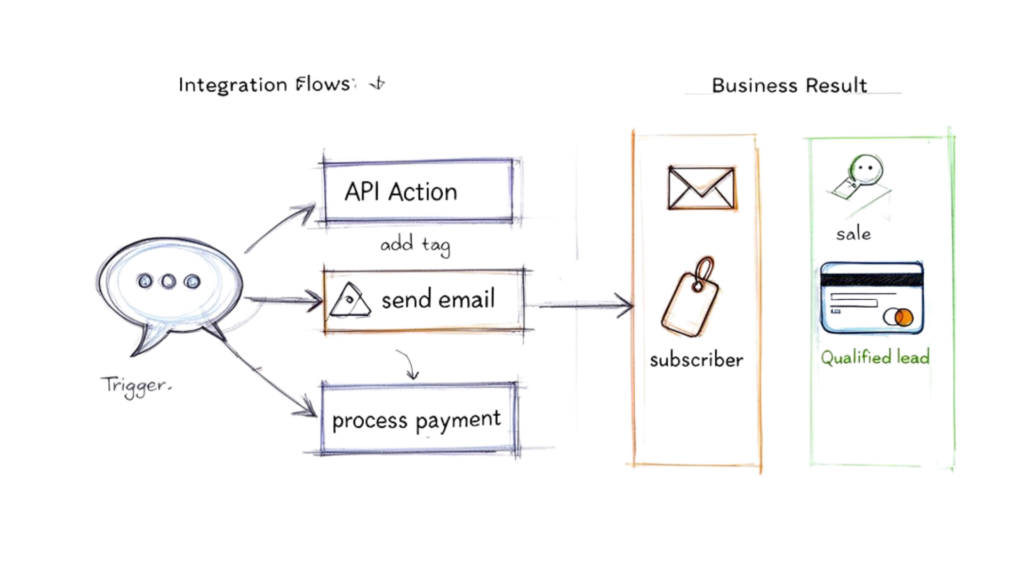
API Chatbot Integration Flow
Marketing Automation with Messenger and Klaviyo
One of the most valuable integrations is connecting your Messenger bot directly to your email marketing platform. This creates a powerful, automated bridge from a casual chat to a dedicated email subscriber.
- Trigger: A user clicks a “Subscribe” button in Messenger after engaging with your content.
- API Action: Your bot instantly sends an API request to Klaviyo, passing the user’s name, email, and a tag like “messenger-subscriber.”
- Business Result: The new contact is immediately added to a Klaviyo welcome sequence. They receive your first nurture email in seconds, moving them from a social media interaction into your marketing funnel—all automatically.
Sales Handoff with a Website Bot and HubSpot
For any business focused on lead generation, the handoff from a chatbot to your sales team is crucial. Integrating your website bot with a CRM like HubSpot ensures no lead falls through the cracks.
This integration transforms your website from a passive brochure into an active lead-capturing machine. It bridges the gap between initial interest and a meaningful sales conversation, ensuring warm leads are handled swiftly.
- Trigger: A visitor on your pricing page answers a few qualifying questions from your website’s chatbot (e.g., “What’s your company size?”).
- API Action: Once the bot identifies the visitor as a good fit, it makes an API call to HubSpot to create a new contact, populating their record with the conversation transcript.
- Business Result: Your sales team gets an instant notification about a new, pre-vetted lead. They can review the chat history and follow up with a perfectly tailored message, dramatically increasing the odds of closing the deal.
In-Chat Transactions with Payment Gateways
Why force a customer to leave a chat to pay? Modern API chat bots can plug directly into payment gateways like Stripe or PayPal, allowing you to process sales right inside the conversation. This reduces friction and captures revenue at the peak moment of buying intent.
- Trigger: A customer says “I’ll take it!” or confirms they want to buy a product within a Messenger or website chat.
- API Action: The bot uses an API call to your payment processor to generate a secure payment link. After the user pays, the gateway sends a confirmation webhook back to the bot.
- Business Result: The sale is completed instantly, inside the chat. This smooth experience is proven to lift conversion rates, especially for impulse buys or simple, one-time purchases.
This ability to connect different systems is why chatbot adoption has skyrocketed. By 2026, ChatGPT alone is projected to command a 60.4% market share in the generative AI chatbot space, a clear sign of how API-driven bots have changed business communication. As noted in the latest generative AI chatbot market report, businesses using these integrations see massive returns.
When you’re ready to put these ideas into practice, our guide on integrating a chatbot with a CRM and ticketing system offers more detailed steps to get you started.
Best Practices for a Secure and Effective Chat Bot
Getting an api chat bot running is just the start. The real goal is to make it secure, effective, and scalable—transforming it from a neat feature into a core business asset.
Following a few key best practices will protect your data, keep your users happy, and ensure your bot consistently delivers value. These aren’t just technical details; they are strategic must-haves for long-term success.
Prioritize Security and Data Protection
Your chatbot API is a doorway to your business systems and customer data, making security non-negotiable. The single most important element to protect is your API key.
Think of your API key as the master key to your entire digital operation. If it falls into the wrong hands, your data, your customers, and your reputation are at risk.
- Actionable Insight: Always store API keys and other credentials as secure environment variables or use a dedicated secrets management service. Never hardcode them directly into your bot’s script. That’s the digital equivalent of leaving your house key under the doormat.
A compromised API key can lead to devastating data breaches and destroy customer trust. Treat your bot’s credentials with the same seriousness you would your bank passwords.
Respect and Manage API Rate Limits
Every API has rules, and one of the most important is the rate limit—the maximum number of requests your bot can make in a given time. Ignoring these limits is like talking over someone constantly; eventually, they’ll just stop listening.
If your bot exceeds the rate limit, the API provider will temporarily block it, causing service outages and a broken user experience.
To avoid this, use these smart strategies:
- Use Exponential Backoff: If a request fails, don’t just retry immediately. Instead, program your bot to wait for a short, increasing interval before trying again. This prevents you from overwhelming a service that’s temporarily down.
- Cache Frequent Requests: Does your bot often pull the same static information, like product details or store hours? Store (cache) that data locally for a short period. This reduces unnecessary API calls and keeps your bot running smoothly.
Continuously Monitor Performance and Metrics
You can’t improve what you don’t measure. A smart chatbot strategy relies on constant monitoring to see what’s working and what isn’t.
Focus on metrics that tie directly to business goals:
- Resolution Rate: What percentage of conversations does the bot handle successfully without needing a human? A high rate here means your bot is effectively deflecting support tickets.
- Conversion Rate: For users in a sales flow, how many complete the desired action, like booking a demo or buying a product?
- Fallback Rate: How often does the bot get confused and reply with “I don’t understand”? A high fallback rate is a clear sign you need to improve your bot’s training or redesign the conversation flow.
Implement a Human-in-the-Loop Design
No matter how intelligent your bot is, it will eventually face a question it can’t answer or a problem that requires human empathy. That’s why a “human in the loop” design is an absolute must.
This ensures a seamless handoff from the bot to a live agent when things get too complex. It prevents user frustration and stops them from abandoning the conversation. Crucially, the handoff must transfer the full chat history so the user doesn’t have to repeat themselves.
This one feature is critical for maintaining customer trust and showing you’re ready to help when automation reaches its limit.
Your First Steps to Launching an API Chat Bot
Diving into the world of an api chat bot doesn’t have to be overwhelming. It’s easy to get lost in technical details, but the truth is, you can start automating and growing your business much faster than you think.
The key is to start small, prove the concept with one quick win, and then expand from there. Here’s a clear, actionable path to get your first bot live.
Step 1: Identify One High-Impact Problem
Before building anything, pinpoint a single, nagging problem that’s costing you time or money. Don’t try to solve every issue at once. Focus on a quick win that will deliver an immediate, noticeable result.
Good places to start include:
- Answering Repetitive Questions: What are the top 3-5 questions your support team answers daily? Automating these can free up a massive amount of time.
- Capturing After-Hours Leads: Are you losing leads who message you at 10 PM? A bot can engage them instantly, collect their info, and ensure a human follows up first thing in the morning.
- Saving Abandoned Carts: For any e-commerce store, this is low-hanging fruit. A bot can ping users who left items in their cart, perhaps with a small discount, and recover otherwise lost sales.
Step 2: Choose a User-Friendly Platform
The good news? You don’t need a team of developers. Modern no-code and low-code platforms are designed for marketers and entrepreneurs, not engineers. They handle the complex API work for you.
Your top priority should be an intuitive, drag-and-drop builder with pre-built integrations. The goal is to move from idea to a working bot quickly. A platform like Clepher is built to handle the API connections so you can focus on strategy, not code.
Step 3: Design and Test Your First Flow
With a platform selected, map out your first conversation. Use the visual builder to create a simple script that directly solves the problem you identified in Step 1. Every flow should have a clear beginning, middle, and end that guides the user toward a valuable outcome.
Now for the most important part: test it. Before any customer sees it, go through the flow yourself. Try to break it. Then, ask a few colleagues to do the same. This is where you’ll find awkward phrasing or dead ends before they can frustrate a real user. Our guide on how to make a chatbot offers more in-depth tips for crafting effective conversations.
Step 4: Launch, Monitor, and Improve
Once your flow is tested and polished, you’re ready to go live. But launching isn’t the finish line. After your bot is active, you must watch how it performs. Pay close attention to your metrics. How many people are using it? Where are users getting stuck or dropping off?
This data is your roadmap for improvement. Use it to make small, continuous tweaks. An api chat bot isn’t a “set it and forget it” tool—it’s a living part of your team that gets smarter and more valuable over time with a little attention.
Frequently Asked Questions
Thinking about using an API chatbot for your business? It’s natural to have a few questions. Let’s get them answered, so you can see how this technology really works.
Ready to see how an API-powered chatbot can transform your business? Clepher makes it easy to build, launch, and manage intelligent automations on your website, Messenger, and Instagram. Explore our features and start your journey with Clepher today.

Related Posts
How an API Chat Bot Transforms Your Business (And How to Build One)
March 31, 2026How to Create a Survey on Facebook for Maximum Engagement
March 28, 2026
Founder Clepher