
A broadcast message in WhatsApp is a powerful tool for sending one message to many people at once through a business broadcast that lets you send messages to multiple contacts. But here’s the key difference: it’s not a group chat. Each recipient gets the message as a private, one-on-one text. When they reply, it comes directly and only to you, making it feel like you send a business message personally instead of publicly.
This feature transforms mass communication into a personal conversation, allowing businesses to connect with their audience on a level that other channels just can’t match — especially when reaching contacts who have saved your number, which increases visibility and trust.
Why WhatsApp Broadcasts Beat Traditional Marketing
If you’ve ever felt like your marketing emails are shouting into a void, you’re not alone. The battle for attention in a crowded inbox is fierce, making it incredibly tough to connect with your audience.
This is where a broadcast message in WhatsApp changes the game for any business broadcast strategy trying to send messages to multiple contacts efficiently.
Instead of competing with hundreds of promotional emails, your message lands in the most immediate and personal space on a person’s phone. It’s not just another notification to swipe away; it’s a direct line to your customer, delivered in the same way they chat with friends and family — the same way you would send a business update to contacts who have saved you, creating familiarity instead of friction.
WhatsApp Broadcast vs Traditional Marketing Channels
Let’s look at the raw numbers. The difference in engagement between WhatsApp and older channels like email or SMS isn’t a small gap—it’s a chasm.
| Metric | WhatsApp Broadcast | Email Marketing | SMS Marketing |
|---|---|---|---|
| Open Rate | ~98% | 20-25% | ~95% |
| Click-Through Rate | 45-60% | 2-6% | 15-25% |
| Read Time | 80% read in 5 mins | Hours, if at all | Most read in 3 mins |
| Conversion Impact | Up to 12x higher | Standard | Moderate |
Simply put, WhatsApp isn’t just another channel; it’s a more direct, immediate, and effective one. You’re not just sending a message; you’re starting a conversation where your audience already is.
The Unmatched Power of Direct Engagement
The statistics tell a powerful story. A broadcast message in WhatsApp boasts a stunning 98% open rate, worlds away from email’s typical 20-25%.
Even more impressive? Studies show 80% of WhatsApp messages are read within just five minutes. This immediacy drives click-through rates between 45-60% and can lead to conversion rates up to 12 times higher than email or SMS. This shift is a perfect example of the digital marketing vs traditional marketing debate in action, where personalization and immediacy win.
By meeting customers on the platform they use all day, every day, you stop being just another marketer. You become part of their daily conversation. This transforms your relationship from purely transactional to something built on trust and loyalty.
Real-World Impact Across Industries
This isn’t just theory; businesses are seeing massive, tangible results right now.
- E-commerce Brands: A clothing store can broadcast a flash sale with product images and see an instant spike in website traffic and sales. No more waiting for people to check their email.
- Coaches and Creators: A business coach can send a last-minute reminder for a webinar and see attendance shoot up, far more effectively than an email that might sit unread for hours.
- Local Businesses: A neighborhood cafe can send its daily specials to a list of loyal locals, driving real foot traffic during the lunch rush.
Each scenario highlights the core strength of a broadcast message: it delivers timely, relevant information that gets people to act now. And as you’ll see throughout this guide, a few smart WhatsApp marketing strategies can amplify these results even further.
How to Set Up a WhatsApp Broadcast (Mobile & Business App)
Ready to send your first broadcast message in WhatsApp? The process is straightforward on both the personal app and the WhatsApp Business app. Think of this as creating a VIP list for your most loyal customers.
Just open the app, go to the main Chats screen, and find the “Broadcast Lists” option in the menu. From there, you can create a new list and select people from your address book. While both apps work, the Business app offers extra tools like a business profile and quick replies that complement your broadcast strategy.
The Most Important Rule for Deliverability
Listen up, because this is the part everyone gets wrong: your message will only be delivered to people who have your phone number saved in their contacts.
This isn’t a bug; it’s a hard-coded privacy feature from WhatsApp designed to kill spam before it starts.
If a contact hasn’t saved your number, they will never get your broadcast, even if they’re on your list. This is why your opt-in process is everything. You have to actively encourage new subscribers to save your number right after they sign up.
For example, a local bakery’s automated welcome message could say, “Welcome! To get our daily deals, make sure you save this number as ‘Sweet Treats Bakery.’ 🍰 You won’t want to miss out!”
Why Organizing Your Broadcast Lists is a Game-Changer
As your audience grows, dumping everyone into one massive list is a recipe for low engagement. Smart organization is key to sending relevant messages that people appreciate.
Start naming your lists in a way that helps you segment your audience. It’s a simple habit that makes a huge difference.
- By Interest: “VIP Skincare Fans” or “New Product Testers”
- By Location: “Downtown LA Customers” or “Weekend Market Shoppers”
- By Purchase History: “Recent Buyers – Jan 2024” or “Loyalty Club Members”
This way, a local boutique can send a “New Arrivals” broadcast to people who bought something recently without bugging customers who only shop seasonal sales. It makes your communication feel personal, not like a generic blast.
A great broadcast message in WhatsApp should feel like a one-on-one chat, even when it’s going out to hundreds of people. Smart list organization is how you make that happen.
That 256-Contact Limit You Need to Know About
Both the standard and Business apps have a strict ceiling: you can add a maximum of 256 contacts to a single broadcast list.
While you can create multiple lists, this cap is a clear signal from WhatsApp that the feature is meant for small-scale, direct communication, not mass marketing.
For a freelancer or a small local shop, 256 contacts is often more than enough to build a tight-knit community. But for a growing e-commerce brand or any business looking to scale, this limitation quickly becomes a bottleneck. It’s the point where you need to look for more powerful solutions that go beyond the basic app.
Scaling Your Reach with The WhatsApp Business API
Sooner or later, that 256-contact limit on the WhatsApp Business app starts to feel less like a feature and more like a roadblock. When you hit that ceiling, it’s time to look at the tool built for serious growth: the WhatsApp Business API.
Don’t let the name intimidate you; you don’t need to be a developer. Think of the API as the official gateway that lets businesses send a broadcast message in WhatsApp to thousands—or even hundreds of thousands—of opted-in contacts at once. It’s what separates small-scale messaging from a true, automated engine for growth.
At its core, the process for setting up any broadcast is straightforward.
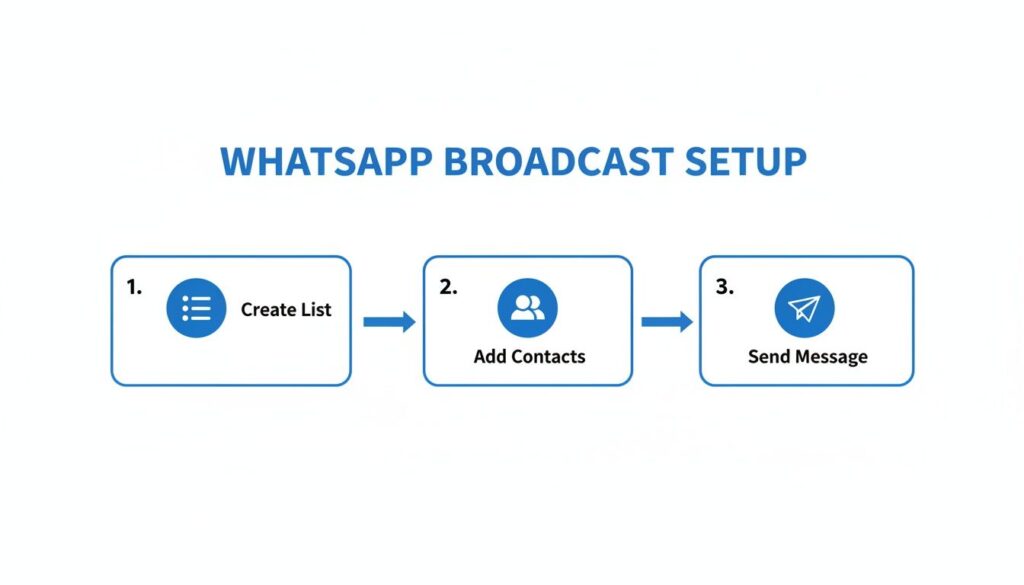
WhatsApp Broadcast Setup
While these steps look familiar, the API elevates each one. It’s built to manage massive contact lists and send out messages with powerful automation that you just can’t get with the standard app.
Unlocking True Scale with Message Templates
The real power of the API comes from Message Templates. Before you can send a broadcast, you have to submit your message format to Meta (WhatsApp’s parent company) for approval. This might sound like a hassle, but it’s actually a brilliant quality-control system.
This pre-approval step keeps WhatsApp from turning into another spam-filled inbox. It ensures businesses send high-quality, relevant content, which protects the user experience and, in turn, your brand’s reputation. It forces you to be intentional.
The API isn’t just about sending more messages; it’s about sending better messages. The template system maintains the high-quality, personal feel that makes WhatsApp so effective in the first place, even when you’re communicating at scale.
For growing e-commerce stores, this is a game-changer. Done right, WhatsApp broadcasts can deliver an incredible 45-60% click-through rate on promotional content. With 175 million daily business interactions on the platform and 66% of consumers actually completing purchases after a WhatsApp chat, the business case for scaling is crystal clear.
Your Command Center for Automated Broadcasts
So, how do you use the API without touching a line of code? You use a platform like Clepher, which acts as a user-friendly command center. These tools plug directly into the WhatsApp Business API, giving you all its power through a simple, visual interface.
Instead of wrestling with a complex technical setup, you can focus on what really matters:
- Building Your Audience: Easily import and manage thousands of contacts who have opted in to hear from you.
- Segmenting Your Lists: Use tags and custom fields to send hyper-targeted offers. A clothing brand, for instance, could send a broadcast about a new dress collection only to customers who previously bought dresses. That’s smart marketing.
- Automating Your Sends: Plan your campaigns in advance. With the right tools, you can learn how to schedule a WhatsApp message to land in your customers’ inboxes at the perfect time, maximizing engagement without any last-minute manual work.
This is how you combine the massive reach of the API with the strategic control needed to make every broadcast message count—and drive real business results.
Crafting Messages People Actually Want To Read
Knowing how to hit “send” on a broadcast is just the first step. The real skill is crafting a message that doesn’t just get delivered but gets read, felt, and acted upon. Your goal is to make every broadcast message in WhatsApp feel less like a mass announcement and more like a personal note from a brand they trust.
This is where smart strategy takes over from pure technology. You’ve got to blend sharp copywriting with deep personalization to create something that feels both exclusive and valuable. A generic blast is a fast track to getting blocked; a thoughtful, relevant message builds loyalty and drives sales.
Personalization Beyond Just a First Name
True personalization goes way deeper than plugging in a {{first_name}} tag. It’s about sending the right message to the right person at exactly the right time, based on what you know about them. This is where segmenting your audience using tags and custom fields becomes your superpower.
Segmentation lets you create smaller, targeted groups within your main audience, so you can send hyper-relevant offers that hit the mark every time.
- By Purchase History: Tag customers who recently bought a specific product. When a matching accessory drops, you can send them an exclusive first look.
- By Engagement Level: Create a “VIP” segment for your most loyal customers—the ones who click and buy often. Reward them with a special offer that nobody else sees.
- By Location: A restaurant chain could send a broadcast about a local happy hour special only to subscribers in that specific city.
This level of targeting transforms a generic broadcast into a helpful, timely tip that feels like it was sent just for them.
The most effective broadcast doesn’t shout to everyone; it whispers to someone. By using segmentation, you ensure your message is a welcome arrival, not an unwelcome interruption.
Actionable Message Templates That Convert
Theory is great, but let’s get practical. Seeing these principles in action is the best way to understand how they work in the real world. Here are a few effective templates for common business scenarios you can adapt for your own broadcasts.
Effective WhatsApp Broadcast Message Templates
These examples blend personalization with a clear call-to-action, making your message feel both valuable and urgent.
| Use Case | Message Template Example | Key Personalization Element |
|---|---|---|
| E-commerce Flash Sale | “Hi {{first_name}}! Big news: our bestselling Summer Collection you love is 25% off for the next 4 hours only. Use code VIP25 at checkout. Shop now: [link]” | References their interest in a specific collection, creating urgency. |
| Webinar Invitation | “Hey {{first_name}}, based on your interest in lead generation, you’ll love our free webinar on Tuesday about ‘5 Ways to Triple Your Leads with AI.’ Spots are limited. Save yours: [link]” | Connects the webinar topic directly to their known interest. |
| Abandoned Cart | “Did you forget something, {{first_name}}? Your cart with the ‘Pro-X Headphones’ is waiting for you. Complete your order and get free shipping: [link]” | Mentions the specific product left behind to jog their memory. |
Notice how each template is short, clear, and provides immediate value. They start a conversation by acknowledging the user’s context, making the call-to-action feel like a natural next step instead of a hard sell. This is how you craft a broadcast message in WhatsApp that people are happy to receive and eager to act on.
Navigating Compliance and Ensuring Deliverability
Sending a broadcast message in WhatsApp gives you a direct line to your customers, but with that power comes a huge responsibility to respect their trust and follow the rules. Ignoring them is the fastest way to get your number blocked and lose access to one of your best-performing channels.
The core principle is simple: your messages should always be anticipated, personal, and relevant. This isn’t just a friendly suggestion; it’s the foundation of WhatsApp’s Commerce Policy. Bending these rules will wreck your sender reputation and lead to serious restrictions.
Your Non-Negotiable Compliance Checklist
To protect your channel and ensure your messages land in the inbox, follow these non-negotiable rules.
- Explicit Opt-In is Mandatory: You absolutely must get clear, affirmative consent before adding anyone to a broadcast list. A customer buying a product from you is not consent. They need to actively agree to get your WhatsApp messages, whether by texting a keyword or checking a specific, un-pre-checked box on a form.
- A Clear Opt-Out is a Must: Every message, especially the first one, should give people an easy way to unsubscribe, like replying with “STOP.” Not only is this required, but it also helps you maintain a clean, engaged list of people who actually want to hear from you.
- Avoid Spammy Language and Behavior: Firing off too many messages, using ALL CAPS, or cramming your text with emojis can get you flagged. Keep your content valuable and your frequency reasonable.
It’s also critical to understand data privacy laws like CCPA regulations, which dictate how you must handle user data.
Maintaining a High-Quality Sender Score
Your deliverability depends on more than just following rules; it’s about actively managing your reputation with WhatsApp. The platform’s algorithm watches how users interact with your messages. A high block rate or a low response rate signals that your content isn’t hitting the mark, which will throttle future delivery.
A huge part of this is list hygiene. Regularly remove contacts who are inactive or have opted out. A smaller, highly engaged list is infinitely more valuable than a massive list of uninterested users. To make this easier, check out our guide on how to create a WhatsApp link to make the opt-in process seamless for new subscribers.
Your sender score is a direct reflection of the value you provide. The more people engage positively with your messages, the more WhatsApp will trust you, ensuring your broadcasts continue to reach their intended audience.
With 98% delivery and open rates, WhatsApp broadcasts can drive astonishing results. But this level of performance is directly tied to responsible use. Keeping access to this massive user base depends entirely on a strong opt-in strategy and strict adherence to the platform’s rules.
Common Questions About WhatsApp Broadcasts
As you start using a broadcast message in WhatsApp, you’ll likely run into some practical questions about deliverability, scale, and feature differences.
Let’s clear up the most common questions businesses have. Getting straight answers will help you build your broadcast strategy with confidence.
Ready to move beyond the 256-contact limit and automate your broadcasts at scale? Clepher gives you the power of the WhatsApp Business API through an easy-to-use, no-code platform. Build smarter campaigns, segment your audience, and drive real results.

Related Posts
Unlock Growth with Conversational AI for Customer Support
March 26, 2026Your Ultimate Guide to Instagram Chat Bots
March 25, 2026How to Create a Killer Poll Game on Instagram to Boost Engagement and Leads
March 24, 2026
Founder Clepher