

Imagine waking up to qualified leads, resolved customer issues, and new sales—all handled while you were offline. This isn’t a fantasy; it’s what happens when you use an Instagram chatbot. This tool transforms your chaotic DM inbox into a streamlined, 24/7 engine for business growth.
The New Era of Instagram Engagement

Instagram chatbot interaction
Does your Instagram feel like a constant battle against a flood of DMs? You’re not alone. Many brands struggle with the slow, manual grind of replying to every question, comment, and story mention. This bottleneck doesn’t just eat up your time; it costs you sales and erodes customer loyalty.
Let’s be real: modern customers expect answers now. If they wait hours for a reply, their interest fades, and they move on—often to a competitor who responds instantly. An Instagram chatbot solves this by delivering 24/7, immediate interactions, no matter the volume.
A chatbot isn’t just about sending automated replies. It’s a fundamental shift from a reactive, one-on-one communication model to a proactive, one-to-many engagement system that works for your business around the clock.
This switch from manual labor to smart automation is a massive opportunity. Instead of hiring more people to manage DMs, a single bot handles the repetitive work. This frees your team to focus on high-value conversations that require a human touch.
Transforming DMs Into a Growth Channel
Stop thinking of your Instagram DMs as just an inbox. See them as an untapped channel for sales, support, and relationship building. With the right strategy, a chatbot becomes your most dependable employee—one who never sleeps, gets tired, or makes a typo.
Here’s how that transformation looks in the real world:
- Instant Lead Qualification: A user DMs you about a service. The bot immediately asks qualifying questions, filtering serious prospects from casual browsers on the spot.
- 24/7 Customer Support: Provide immediate answers to common questions like, “Where’s my order?” or “What are your business hours?”—any time of day.
- Proactive Sales Assistance: A user comments on a product post. The bot slides into their DMs to offer help, answer questions, and guide them toward a purchase.
- Effortless Engagement: Automatically reply to story mentions or specific comments. This small touch makes your followers feel seen and valued.
With over 2 billion monthly active users, Instagram is a key battleground for brands. Chatbots give you a serious edge by offering personalized product recommendations, running interactive campaigns, and even facilitating the entire shopping experience inside the app. Check out more on how to use automated Instagram messaging to make this happen.
Manual DMs vs Automated Chatbot Interactions
See the transformation a chatbot brings to your Instagram communications at a glance.
| Feature | Manual Management | Instagram Chatbot |
|---|---|---|
| Response Time | Hours or days, depending on team availability | Instant, 24/7 replies |
| Lead Qualification | Slow, manual Q&A for each person | Automated, immediate filtering based on preset criteria |
| Handling Volume | Easily overwhelmed, leading to missed messages | Handles thousands of conversations simultaneously |
| Consistency | Varies by team member and time of day | 100% consistent brand voice and accuracy |
| Cost | High labor costs for dedicated staff | Low, fixed monthly cost |
| Data Collection | Inconsistent and hard to track | Gathers valuable user data and insights automatically |
The difference is night and day. Automation doesn’t just do the same job faster; it unlocks capabilities that are impossible to achieve manually.
The Clear Advantage of Automation
Ultimately, bringing in a chatbot for Instagram is about reclaiming your time and creating a better experience for your audience. But automation is only one piece of the puzzle. To make it count, you need a solid foundation. Understanding how to get more engagement on Instagram is crucial. When you pair a smart engagement strategy with powerful automation, you create a system that doesn’t just keep up with demand—it actively drives your business forward.
How an Instagram Chatbot Actually Works
So, how does this all work behind the scenes? Let’s skip the dense technical jargon. Think of a chatbot as an efficient digital receptionist for your DMs—one that works 24/7, never misses a message, and knows exactly how to handle most questions that come its way.
Everything starts with a secure connection. A platform like Clepher uses the Instagram Messenger API, an authorized gateway provided directly by Meta. This API allows the chatbot to safely send and receive messages on your behalf, so you can be confident your account is compliant and secure.
This isn’t some sketchy workaround. It’s the officially sanctioned way to build reliable automation, giving you peace of mind while your bot is on the job.
The Brains of the Operation: Rule-Based vs. AI
At its heart, an Instagram chatbot operates on a set of instructions you give it. These instructions can be simple or surprisingly complex, typically falling into two camps.
1. Rule-Based Chatbots
This is the most common approach. It works like a flowchart (“press one for sales, two for support”). You define specific keywords or triggers, and then map out the conversation that should follow.
- Keyword Triggers: If a user DMs the word “price,” the bot instantly sends back your pricing info.
- Story Mentions: When someone mentions you in their Story, the bot can fire off a thank-you message in seconds.
- Comment Replies: If a user comments on a post with “info,” the bot can jump into their DMs to start a conversation.
This method is perfect for handling common questions and guiding people through predictable interactions.
2. AI-Powered Chatbots
This is where things get really smart. Instead of just looking for exact keywords, AI chatbots use Natural Language Processing (NLP) to understand the intent behind a user’s message. They can figure out slang, typos, and all the different ways people ask for the same thing.
For example, one user might ask, “How much does this cost?” while another types, “What’s the price?” An AI bot recognizes that all three questions have the same goal and delivers the right answer, without you needing to program every possible phrasing. To dig into how these bots generate answers, check out this guide on what is AI-generated content.
A good chatbot doesn’t just listen for words; it recognizes intent. This shift from simple keyword matching to understanding context is what allows a bot to handle complex, natural-sounding conversations effectively.
Mapping the Conversation Flow
The real power comes to life in the conversation flow. This is the visual map you build that tells the chatbot exactly how to respond and guide the user from one step to the next. Using a simple drag-and-drop builder, you connect different actions to create a smooth, helpful experience.
Let’s say a customer DMs you about a recent purchase. The flow might look like this:
- User Message: “Where is my order?”
- Bot’s First Reply: “I can help with that! What’s the email address you used for your order?”
- User Provides Email: The user types in their email.
- Bot Action: The bot instantly checks your e-commerce platform for the order status.
- Bot’s Final Reply: “Found it! Your order #12345 is out for delivery and should arrive today.”
This entire exchange is over in seconds, with zero human effort required. By building out these flows, you create a powerful system that saves you massive amounts of time and gives your customers the instant answers they love.
Putting Your Chatbot to Work for Your Business
Okay, we’ve covered the technical side. But theory is one thing—seeing real business growth is another. Let’s get into how an Instagram chatbot actually makes you money and saves you time. A bot isn’t just a cool tech toy; it’s a workhorse designed to solve real problems and hit your most important business goals.
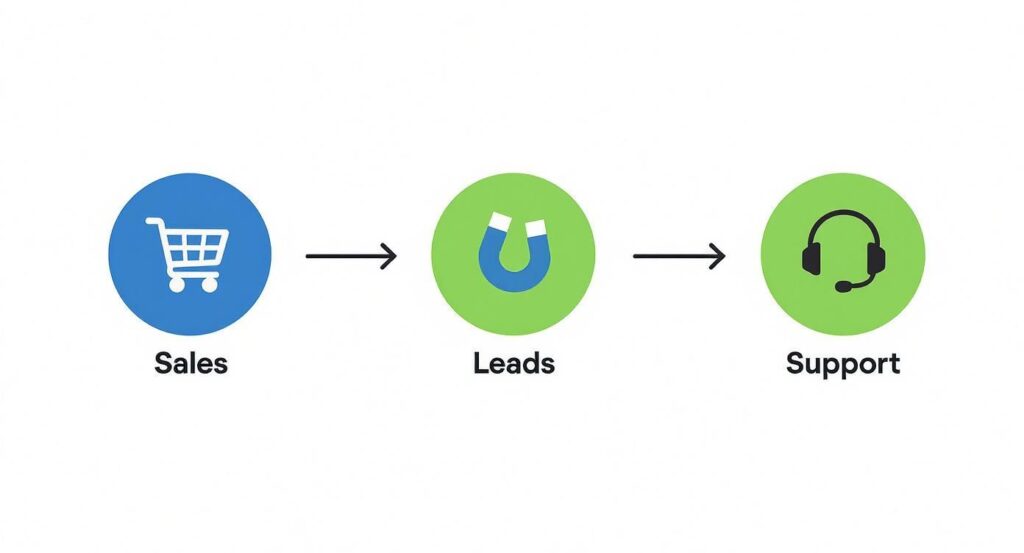
We can boil its most powerful uses down to three core functions: boosting e-commerce sales, capturing qualified leads, and delivering world-class customer support. Each one directly impacts your bottom line by automating tasks that would otherwise eat up your day or lead to missed opportunities.
This diagram shows how a single chatbot can manage all three, turning your Instagram DMs into a powerful, multi-purpose growth engine.
Instagram chatbot business process
The chatbot acts as a central hub. It intelligently directs conversations toward a sale, a lead magnet, or a support resolution, depending on what the user needs in that exact moment.
Supercharge Your E-commerce Sales
For e-commerce brands, Instagram is a discovery goldmine. But the journey from seeing a product to buying it is often clumsy. A chatbot smooths out that path, turning casual scrollers into paying customers, all without them ever leaving their DMs.
Imagine someone sees your latest product post and comments, “I love this!” Instead of that comment getting lost, your bot instantly slides into their DMs.
E-commerce Scenario: A user adds sneakers to their cart but gets distracted. An hour later, your bot sends a friendly DM: “Hey, Alex! Looks like you left these amazing sneakers behind. Need any help with sizing, or would you like a 10% discount to complete your order?”
This simple, automated nudge can make a huge difference in your cart recovery rate. Here are a few other ways a bot drives sales:
- Product Recommendations: When a user asks about an item, the bot can suggest complementary products, boosting your average order value.
- Answering Purchase Questions: The bot instantly handles common questions about shipping, materials, or return policies, removing purchase barriers on the spot.
- Running Flash Sales: Announce a limited-time offer in your Stories and tell followers to DM a keyword to get the discount. The bot handles the rest, creating urgency and driving a flood of sales.
Generate a Stream of Qualified Leads
Not every business sells physical products. If you’re a service provider, coach, or agency, Instagram is a goldmine for new clients. Your chatbot becomes your 24/7 sales development rep, working around the clock to find and qualify potential leads.
It all starts the moment someone engages with your content. Whether they reply to a Story poll or comment on a post, the bot can kick off a conversation to gauge their interest. This is far more effective than manually sifting through notifications. We dive deeper into these strategies in our complete guide to building a chatbot for lead generation.
Lead Gen Scenario: A real estate agent posts a “Just Listed” Story. A user replies with a fire emoji. The chatbot immediately messages them: “Thanks for the love! This beautiful 3-bed, 2-bath home is getting a lot of attention. Are you interested in scheduling a viewing this week?”
With a few quick questions, the bot can qualify their budget and timeline, find out if they’re serious, and even sync an appointment directly to the agent’s calendar. It turns a simple emoji into a booked meeting.
Deliver World-Class Customer Support
Today’s customers expect fast, helpful answers. Making them wait hours—or days—for a response is a surefire way to create frustration and lose business. This is where an Instagram chatbot becomes a vital part of your customer service team. It’s your first line of defense, handling common issues instantly.
Let’s be honest: most customer questions are repetitive. An AI chatbot can automate up to 80% of these routine queries. Plus, customers actually prefer it. Data shows that 62% of consumers would rather chat with a bot than wait for a human agent to become available.
Support Scenario: A customer messages you at 10 PM on a Friday asking, “Where’s my package?” The chatbot replies instantly: “I can help track that for you! What’s your order number?” Once they provide it, the bot pulls the latest tracking data and responds, “Good news! Your order is out for delivery and is scheduled to arrive tomorrow.”
The customer gets a fast, satisfying answer without any human effort. And for trickier issues? The bot can gather all the necessary details and seamlessly hand the conversation over to a live agent, who now has all the context needed to solve the problem efficiently.
Your Step-by-Step Launch Checklist
Building your first Instagram chatbot feels like a huge project, but it’s not. It’s really just a series of small, logical steps. I’ve put together this checklist to walk you through the entire process, from a rough idea scribbled on a napkin to a fully functioning bot that actually helps your business.
1. Define Your Primary Goal
Before you build anything, stop and ask: why? What’s the single biggest headache you want this chatbot to solve? A clear goal focuses your energy and makes every other step easier. Don’t try to make your bot a jack-of-all-trades right away. Start with one high-impact task.
Common goals usually fall into one of these buckets:
- Answering FAQs: Aim to automatically handle the top 5-10 questions that clog up your DMs every day. Think “Where’s my order?” or “What’s your return policy?”
- Generating Leads: Focus the bot on qualifying people who show interest in what you sell.
- Increasing Sales: Build a flow to rescue abandoned carts or guide users directly to a product they asked about.
Pick the one goal that will save you the most time or make you the most money right now. You can always add more features later.
2. Choose the Right Platform
Your chatbot needs a home—a platform that lets you build and manage it without becoming a developer overnight. This is where a tool like Clepher comes in. Look for a platform that is an official Meta Business Partner. That’s your guarantee it’s safe, secure, and playing by Instagram’s rules.
A good platform should have a visual, drag-and-drop builder. This lets you see your conversation flows as you create them, making the whole process feel intuitive instead of intimidating.
3. Connect Your Instagram Account
Once you’ve picked your platform, the next step is connecting it to your Instagram account. This is usually a simple process that involves logging into your Facebook Business account and giving the platform the green light.
This secure handshake, done through the official API, is what allows the tool to send and receive messages for you. It’s the official method and typically takes just a few clicks.
4. Design Your First Conversation Flow
Now for the fun part: mapping out the conversation. Using your platform’s visual builder, you’ll lay out the path a user takes from their first message to their final answer. Kick things off with a solid welcome message that sets expectations and tells people what the bot can help with.
From there, use buttons and quick replies to guide the conversation. For example, if your goal is answering FAQs, your first message might offer buttons like “Track My Order,” “Return Policy,” or “Speak to a Human.” Each button then branches off to another part of the flow that gives them the info they need.
5. Set Up Your Automated Triggers
So, how does your bot know when to jump in? You tell it by setting up triggers. These are the specific actions that wake your chatbot up and put it to work.
- Keyword Triggers: The bot springs into action when a user DMs a specific word, like “pricing” or “support.”
- Comment Triggers: When someone comments on a post, the bot can automatically send them a follow-up DM. This is huge for engagement.
- Story Reply Triggers: The bot can respond instantly when someone replies to one of your Instagram Stories, turning a casual interaction into a real conversation.
Think of triggers as the “on” switch for your automation. They make sure the right conversation starts at the right moment.
Pro Tip: Don’t just set up your triggers and assume they work. Use a different Instagram account to test them yourself. See exactly what your audience will experience. It’s the single best way to catch awkward phrasing or broken flows before your customers do.
6. Test and Refine Your Bot
Before you unleash your bot on your entire audience, you need to be its worst critic. Test it relentlessly. Think like a customer and try to break it. Ask weird questions, make typos, and click every button combination you can think of.
This testing phase is non-negotiable. It helps you find and fix problems before they become customer complaints. Does the bot get stuck in a loop? Is the language clear and on-brand? Does the “talk to a human” escape hatch work? A few minutes of testing now will save you hours of headaches later.
7. Go Live and Spread the Word
Once you’re confident your bot is running smoothly, it’s time for the launch. But don’t just flick a switch and hope people stumble upon it. You have to promote it!
Create an Instagram Story that says, “Have a question? DM us the word ‘HELP’ for an instant answer!” Add a call-to-action in your post captions telling people to DM you a specific keyword. The more you guide people to interact with your bot, the faster you’ll see a return on your effort.
Designing a Chatbot People Actually Enjoy
Enjoyable Instagram chatbot
A powerful bot isn’t just about automation. It’s about creating a positive experience that feels like your brand. A clunky, frustrating bot can do more harm than good, driving potential customers straight to your competitors.
The goal is to design a chatbot for Instagram that feels genuinely helpful, not robotic. These best practices will help you get there. It’s the small details that turn a good bot into a great one that your audience actually appreciates.
Give Your Bot a Personality
Your chatbot is a direct extension of your brand, so it needs to sound like you. Is your brand voice witty and playful? Or more professional and straight to the point? Infuse that personality into every message your bot sends.
This doesn’t mean writing a novel for every interaction. It’s about consistency. Use the same language, emojis, and tone that your audience already knows from your posts and Stories. A consistent voice makes the automated experience feel less jarring and more authentic.
Always Provide an Escape Hatch
This is the golden rule of chatbot design: always give users an easy way to talk to a human. No matter how smart your bot is, there will be complex issues or frustrated users it can’t handle. Hiding the option to speak with a person is a recipe for disaster.
A simple button labeled “Talk to an Agent” or “Contact Support” is all it takes. This “escape hatch” is a critical safety net, ensuring no one gets stuck in a dead-end conversation with a machine. It builds trust and shows you care about solving their problem.
A great chatbot understands its own limitations. Its primary job is to solve problems quickly, and sometimes the fastest solution is handing the conversation over to a human expert.
Keep Messages Short and Scannable
People don’t read on Instagram; they scan. Long, dense paragraphs of text are the fastest way to get someone to tune out. Write your bot’s messages to be short, clear, and easy to digest at a glance.
- Break up your ideas. Use multiple short messages instead of one giant text block.
- Use emojis. They add visual cues, break up text, and help convey tone.
- Focus on one point per message. Keep each chat bubble focused on a single question or piece of information.
This approach makes the conversation feel more like a natural chat and less like you’re forcing them to read an instruction manual.
Guide the Conversation with Buttons
Instead of forcing users to type out every response, guide them with quick replies and buttons. This makes a huge difference. It dramatically reduces friction and prevents those frustrating “Sorry, I didn’t understand that” moments.
For example, instead of asking “What can I help you with today?” and hoping for a clear response, present them with buttons like:
- [Track My Order]
- [View Products]
- [Ask a Question]
Buttons give you control over the conversation’s direction, making the experience foolproof for the user. It also ensures your bot gets the structured input it needs to function correctly. This simple shift from open-ended questions to guided choices completely transforms the user experience.
Measuring Your Chatbot’s Real-World Impact
So, you’ve launched your Instagram chatbot. Great. But how do you know if it’s actually working? If you’re not measuring its performance, you’re just guessing. It’s time to move past vanity metrics and dig into the hard numbers that prove your bot is delivering real value.
Tracking the right data shows you exactly what’s hitting the mark and where you need to make improvements. Let’s break down the key performance indicators (KPIs) that really matter—the ones that connect directly to your bottom line.
Core Metrics That Drive Improvement
Your chatbot platform’s analytics dashboard is a goldmine. Focus on these four essential KPIs to get a crystal-clear picture of your bot’s effectiveness.
- Engagement Rate: This measures how many people who see a prompt (like a call-to-action in a post) actually start a conversation. A low engagement rate is a red flag that your trigger isn’t compelling enough.
- Containment Rate: This one’s a big deal. It shows the percentage of conversations your chatbot handles from start to finish without a human needing to step in. A high containment rate means your bot is successfully answering questions and saving your team a massive amount of time.
- Lead Conversion Rate: For any business focused on growth, this is non-negotiable. It tracks the percentage of chatbot conversations that result in a qualified lead—someone who drops their email, books a meeting, or takes another key action. This number directly shows your chatbot’s ROI.
- Human Takeover Rate: This is the flip side of the containment rate. It measures how often a human agent has to intervene. While a sky-high rate might signal a problem, a moderate rate is perfectly healthy. It means your bot is filtering simple queries and escalating the complex stuff to the right people.
Don’t chase a 0% human takeover rate. The goal isn’t to eliminate human interaction. It’s to automate repetitive work so your team can focus on the high-value conversations that need a human touch.
Turning Data Into Actionable Insights
Looking at numbers isn’t enough. The real magic happens when you use that data to make smart adjustments. Think of it as a constant feedback loop: you measure, you learn, and you optimize.
For example, if you notice your Containment Rate is dipping every time someone asks about shipping, that’s a clear signal. Your bot’s pre-programmed answers on that topic aren’t cutting it. You can jump back into your conversation flow and add more detailed information or clearer options to solve the problem.
This table breaks down how to use these metrics to improve your chatbot for Instagram.
Key Instagram Chatbot Performance Metrics
Track these essential metrics to understand and improve your chatbot’s effectiveness.
| Metric | What It Measures | Why It’s Important |
|---|---|---|
| Engagement Rate | The percentage of users who start a conversation after seeing a prompt. | Shows how effective your calls-to-action are at initiating chats. |
| Lead Conversion Rate | The percentage of chats that result in a qualified lead (e.g., email signup). | Directly measures the bot’s ability to generate new business opportunities. |
| Containment Rate | The percentage of queries resolved entirely by the chatbot without human help. | Proves the bot is successfully reducing your team’s support workload. |
| Human Takeover Rate | How often does a human agent need to step into a conversation? | Helps you identify gaps in your bot’s knowledge and improve its conversation flows. |
By checking in on these KPIs regularly, you stop guessing and start making data-driven decisions. This transforms your chatbot from a “set it and forget it” tool into a dynamic asset that gets smarter and more valuable over time.
Got Questions? Let’s Clear Things Up
Diving into Instagram chatbots for the first time? It’s totally normal to have a few questions. Let’s tackle the most common ones business owners ask, so you can move forward with confidence.
Ready to turn your Instagram DMs into an automated growth engine? With Clepher, you can build your first chatbot in minutes—no coding needed. Start qualifying leads, supporting customers, and driving sales 24/7. Get started with Clepher today and see the difference for yourself.

Related Posts
5 Best Chatfuel Alternatives in 2026 You Need to Try!
April 6, 2026How to Customize Your Facebook Page URL: A 2026 Guide to Boost Your Brand
April 5, 2026Chatbots for Banks: The Ultimate Guide for 2026
April 4, 2026
Founder Clepher