
Think of a chatbot on Facebook as more than just a support tool; it’s your automated sales engine, working around the clock. It transforms passive likes and comments into active, one-on-one conversations that qualify leads, answer product questions, and guide people toward a purchase—24/7, even while you sleep.
Why a Chatbot on Facebook Is a Sales Engine
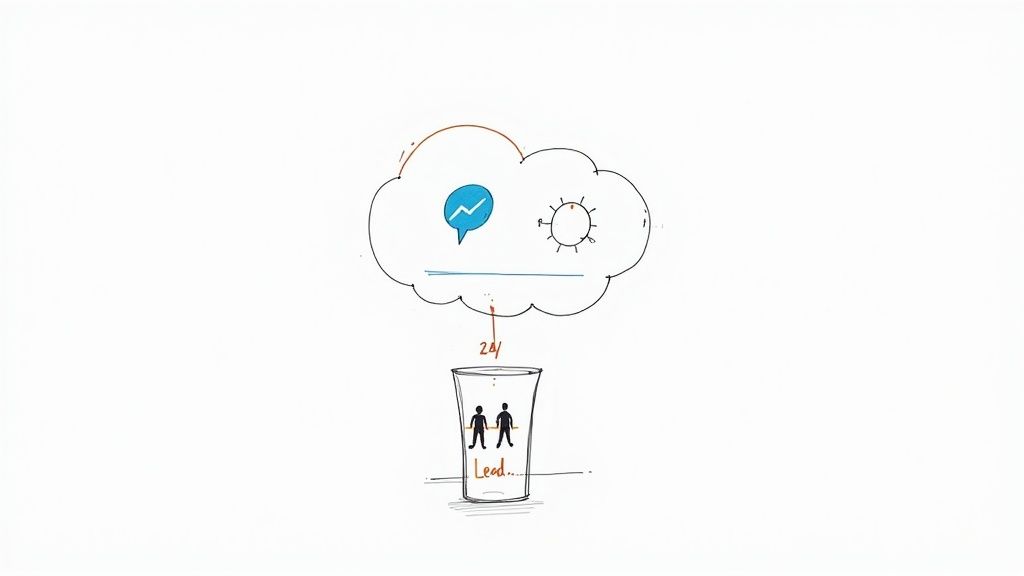
chatbot as sales engine
Let’s be honest: crowded inboxes and slow response times kill conversions. Today’s customers expect answers now, and a chatbot on Facebook delivers instantly. It opens a direct, personal line of communication right where your audience hangs out, turning customer support from a cost center into a proactive sales channel.
This isn’t just a trend; it’s a fundamental shift in how businesses connect with people. With over 300,000 active bots already working on Messenger, they have become central to modern conversational commerce.
From Answering Questions to Driving Revenue
A well-built chatbot does more than spit out pre-written answers. It becomes a vital part of your sales funnel, creating a smooth path from a person’s first spark of interest to the final click to buy.
Here’s how this works in the real world:
- E-commerce Instant Gratification: A customer sees your ad for new shoes and messages your Page to ask about sizing. Instead of waiting for an email reply, the chatbot instantly sends a size chart and a direct link to the product page. Sale closed in minutes.
- Lead Qualification for Service Businesses: A potential client asks about pricing. The bot asks a few smart qualifying questions (“What’s your project timeline?” or “What’s your approximate budget?”). Once qualified, it seamlessly books a call on a sales rep’s calendar.
- Automated Promotions: You run a Facebook post offering a discount code to anyone who comments. The chatbot automatically DMs every single commenter, delivering the coupon and a link to your store. This turns passive engagement into direct traffic and sales.
The magic of a Facebook chatbot is its ability to meet customers in their moment of highest intent. It removes friction, provides immediate value, and dramatically shortens the sales cycle.
This transforms your Facebook Page from a simple broadcast channel into an interactive sales floor. Let’s look at the practical business impact of this change.
From Manual Support to Automated Sales
This table shows the transformation when you implement a Facebook chatbot, shifting key metrics from slow, traditional methods to an efficient, automated approach.
| Business Function | Traditional Method (Before Chatbot) | Automated Method (With Chatbot) |
|---|---|---|
| Lead Response Time | Hours or days | Instant, 24/7 |
| Lead Qualification | Manual, time-consuming | Automated, consistent |
| Sales Funnel Entry | Relies on user clicking a link | Proactive engagement via Messenger |
| Customer Support | Staffed during business hours only | Always-on for common questions |
| Promotions | Manual outreach or broadcast posts | Automated, personalized delivery |
The chatbot doesn’t just speed things up; it creates entirely new opportunities for engagement and conversion that are impossible with a manual approach.
By automating these first crucial touchpoints, you free up your team to focus on high-value conversations while ensuring no lead ever goes cold.
Planning Your Chatbot: The Blueprint for Success
A powerful chatbot isn’t built on a whim. It starts with a smart strategy. Before you even open a builder like Clepher, you must define its one true purpose. This foundational work is what separates a genuine business asset from just another frustrating gadget.
Think of it like building a house. You wouldn’t start without a blueprint, right? Your chatbot needs the same kind of plan. What is the single most important job you need it to do?
Define Its Primary Job
Every great chatbot is built to achieve a specific, measurable goal. Trying to make it a jack-of-all-trades is a classic mistake that leads to a clunky user experience. Instead, nail down one core objective to start.
Here are a few common goals for a chatbot on Facebook:
- Generate Qualified Leads: The bot acts as your frontline qualifier, asking targeted questions to identify high-intent prospects before scheduling a call or sending their info to your sales team.
- Answer FAQs Instantly: Automate answers to your top 5-10 questions like “What are your hours?” or “Where is my order?” to free up your support team for complex issues.
- Drive Direct Sales: A bot can guide users through product discovery, recommend items, and drop a direct link to the checkout, acting as a 24/7 personal shopper.
- Boost Event Registrations: For a webinar or workshop, your bot can promote it, answer questions, and capture sign-ups—all within Messenger.
Choosing one primary job brings incredible clarity. If you run an e-commerce store, your goal might be to reduce cart abandonment. For a marketing agency, it could be booking more discovery calls.
A chatbot without a clear goal is like a salesperson without a quota. It might have pleasant conversations, but it won’t produce meaningful business results. Define its job first, then build it to win.
Map Out Key Conversations
Once you know the destination, it’s time to draw the map. Forget the software for a minute—grab a pen and paper or a flowchart tool. Visualize the user’s journey from their first message to a successful outcome.
Start by scripting the top five questions your customers always ask. What does a user typically say, and how should the bot respond to guide them toward the goal?
For example, here’s a simple flow for a service business when a user asks about pricing:
- User: “How much does your service cost?”
- Bot: “I can help with that! To give you an accurate price, could you tell me if you’re looking for [Service A] or [Service B]?”
- User picks an option.
- Bot: “Great. And what’s the biggest challenge you’re hoping to solve?”
- Bot qualifies the lead and offers to book a call.
Walking through simple exercises like this ensures your automated conversations feel natural and genuinely helpful, not robotic.
Give Your Bot a Personality
Finally, think about your bot’s voice and tone. Is it witty and casual, or more formal and professional? This isn’t just a fun detail; it’s a critical part of your brand experience. The personality should feel like a natural extension of how you already communicate with customers.
Your bot’s personality shines through in every interaction, from the welcome message to the button text. A consistent tone makes the experience feel less robotic and more like talking to a helpful representative of your brand.
How to Build Your First Facebook Chatbot (No Code Required)
Alright, let’s get practical. Building your first chatbot on Facebook doesn’t require a team of developers or staring at complex code. With a platform like Clepher, you can get a functional bot running using a simple drag-and-drop builder.
This walkthrough covers the essential steps, from linking your Facebook page to crafting an effective welcome message. By the end, you’ll have a live bot ready to start conversations.
Step 1: Connect Your Facebook Page to Clepher
First, you need to give Clepher permission to manage your Facebook Page’s messages. This is a secure process that allows the platform to send and receive messages on your behalf. Simply log into your Clepher account and follow the on-screen instructions to connect your Facebook Business Page.
It’s crucial to grant all requested permissions. This ensures every feature—like replying to comments or sending broadcasts—works correctly from the start.
Step 2: Craft a Winning Welcome Message
Your Welcome Message is the first thing a new subscriber sees. Think of it as a digital handshake; it sets the tone for the entire conversation. A strong welcome pulls people in and makes them want to engage.
A great Welcome Message should:
- Greet the User: A warm, personal greeting using their first name feels more human.
- Set Expectations: Briefly explain what the bot can do, like “I can help you browse products, track your order, or connect you with support.”
- Provide Clear Next Steps: Use buttons to guide them. Avoid vague, open-ended questions that cause confusion.
Your Welcome Message isn’t just a “hello.” It’s the beginning of a guided journey. Keep it clear, concise, and focused on helping the user get what they need, fast.
This simple flow chart breaks down the core strategy: define your goal, map the conversation, and decide on a personality.
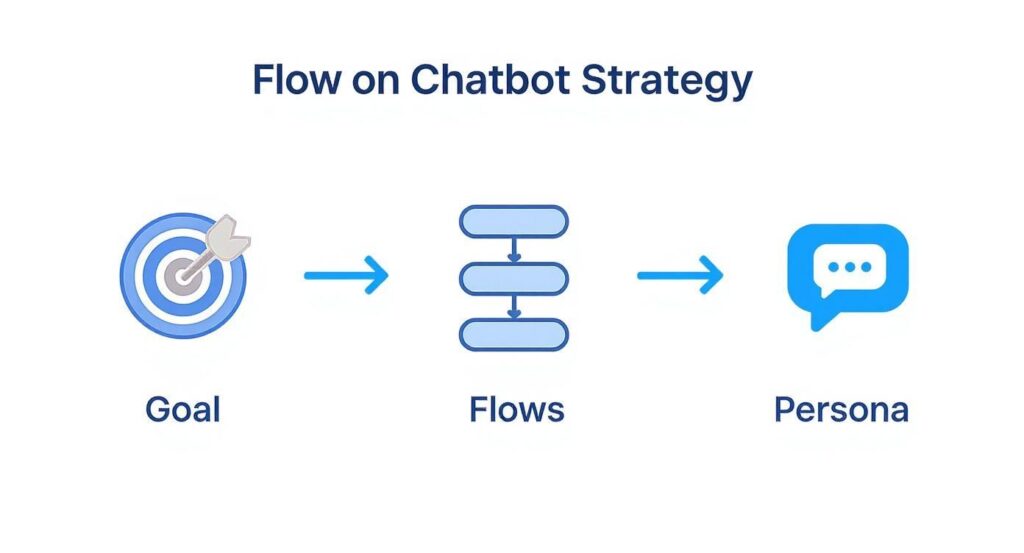
flow on chtabot strategy
As you can see, a successful bot starts with a solid plan before you open the builder.
Step 3: Build Your Main Menu with Buttons
After the greeting, give people a clear path forward with a main menu. Inside Clepher’s visual builder, you’ll use “blocks” and “buttons” to create these pathways. A block is a container for a message (like text or an image), and a button is a clickable option that takes the user to another block.
For an e-commerce store, your main menu buttons could be:
- Browse Products: Links to a gallery of your best-sellers.
- Track My Order: Kicks off a sequence that asks for their order number.
- Talk to a Human: Provides an essential escape hatch to get live support.
Building this is intuitive. You create a new block for each menu option, write the content, and then link your main menu buttons to these new blocks. This simple structure is the foundation for most chatbot conversations. For more advanced logic, you can dive deeper into Clepher’s Facebook chatbot builder.
While Clepher is a fantastic tool, it’s smart to know what else is out there. For instance, many businesses use an AI chatbot platform for their Messenger marketing. Seeing how other tools work can inspire your own strategy.
By following these steps, you now have a functional chatbot skeleton on your Facebook Page, ready to be enhanced with more advanced automation.
Automating Conversations to Capture Leads 24/7
With a welcome message and main menu in place, it’s time for the fun part: turning your Facebook chatbot into an automated lead-generation machine. This is where you go beyond basic greetings and build smart systems that convert casual interest into active conversations.
The core idea is to meet people where they are, in their moment of high intent, with an instant, relevant response. Whether someone comments on a post or asks about pricing, your bot should be ready to jump in and guide them to the next step—no waiting, no missed opportunities.
Set Up Keyword Triggers for Instant Answers
Keyword triggers are one of the most powerful and straightforward automation tools. You tell your chatbot to listen for specific words or phrases and fire off a pre-built message flow when it “hears” one.
Think about your most common questions. For a SaaS company, people always ask about “pricing.” Instead of making them wait for a human, create a keyword trigger. When the bot detects the word “pricing,” it can instantly send a link to your pricing page or offer to connect them with sales.
Pro-Tip: Don’t stop at one keyword. Think like your customer. For “pricing,” also add triggers for “cost,” “price,” “plans,” and “how much” to catch their intent no matter how they phrase the question.
By 2025, it’s projected that Messenger chatbots will handle nearly 39% of all business-to-consumer chats worldwide, a testament to their efficiency.
Master the Comment-to-Messenger Game
This is a true game-changer for Facebook marketing. The Comment-to-Messenger feature (often called a “comment trigger” in Clepher) lets you automatically send a private message to anyone who comments on a specific Facebook post.
This automation is incredibly powerful:
- It turns public engagement into a private conversation, moving the interaction into a one-on-one Messenger chat where you can nurture the lead.
- It boosts your post’s reach by signaling to Facebook’s algorithm that your content is valuable, which increases visibility.
- It delivers instant value by sending lead magnets, discount codes, or registration links when a person’s interest is at its peak.
Actionable Example: Imagine you run an e-commerce store. You create a Facebook post: “Want a secret 20% OFF coupon? Comment DEALS below, and we’ll send it straight to your inbox!”
The moment someone comments “DEALS,” your chatbot slides into their DMs: “Hey [First Name]! Here’s your exclusive 20% OFF coupon: SAVE20. Click here to start shopping!” This single automation can drive massive traffic and sales, all on autopilot. To learn more, check out our guide on using a chatbot for lead generation.
Using Data to Optimize Your Chatbot Performance
Getting your chatbot live is a huge first step, but the real work starts now. Think of your bot as a living tool that needs to evolve. Success comes from listening to how people use it and refining the experience based on cold, hard data.
Your Clepher dashboard is your command center for this. It provides the analytics you need to stop guessing and start making informed decisions. Focus on the metrics that tell a story about the user experience and show you exactly where to improve.
Key Metrics to Monitor in Your Dashboard
To get started, zero in on a few critical data points that show what’s working and what needs attention.
- Click-Through Rates (CTR) on Buttons: If a button in your main menu has a very low CTR, that’s a red flag. The label might be confusing, or the option isn’t valuable to your audience.
- User Drop-Off Points: Where are conversations dying? Clepher’s analytics show which “blocks” or messages are the last ones users see before they leave. This is a goldmine for identifying friction.
- Message Open Rates: Are people opening your messages? High open rates mean your initial hook is working. Low rates might suggest your notifications or timing are off.
The most valuable insights come from failure points. A high drop-off rate isn’t a failure—it’s a clear signal from your users telling you, “This part is broken, please fix it.”
By checking these metrics regularly, you can diagnose problems. For instance, if you see a huge drop-off right after your bot asks for an email address, you’re likely asking too soon. Try moving that step to after you’ve provided more value.
From Analysis to Actionable Improvements
Once you’ve identified a weak spot, it’s time to experiment. The process is simple: form a hypothesis, make a small change, and measure the results. This creates a powerful feedback loop for continuous optimization.
Here’s a practical example: Say you discover that only 10% of users are clicking the “Browse Products” button in your welcome flow.
- Form a Hypothesis: You suspect the label “Browse Products” is too generic. Your hypothesis: “Changing the button text to ‘See Our Best-Sellers’ will be more compelling and increase clicks.”
- Make the Change: Jump into your Clepher flow builder and update the button text. This takes two minutes.
- Measure the Impact: Let the updated flow run for a week, then check the CTR again. If it improved, you’ve just made a data-driven enhancement that will likely boost your bottom line.
This iterative process—test, measure, repeat—is how you turn a good chatbot into a great one through a series of small, strategic tweaks over time.
Understanding Facebook Chatbots
Jumping into the world of automation, particularly with a chatbot for Facebook Messenger, can feel a little daunting at first. However, understanding a few key points will make it much easier to get started with Facebook Messenger automation. Messenger bots aren’t designed to handle complex problems—and they don’t need to. Their real strength lies in managing high-volume, repetitive inquiries such as order tracking, store hours, or basic product recommendations. By taking care of these routine interactions in real time, chatbots provide instant responses to user messages, allowing your human agents to focus on more nuanced issues that require empathy and judgment. Utilizing chatbot tools like Clepher, you can easily integrate a Facebook Messenger chatbot into your existing systems. This integration empowers your customer experience by offering quick replies and addressing frequently asked questions through a user-friendly interface. Furthermore, deploying a messenger chatbot allows you to send follow-up messages and interact with users in their preferred language.
Creating Seamless Collaboration Between Bots and Humans
The optimal strategy involves establishing a seamless human handover flow, where the chat bot collects initial information and transfers the conversation context retained to a support agent. This system conserves your team’s time and spares customers from the need to reiterate their issues. The chatbot serves as the primary line of defense, allowing your team to concentrate on addressing more intricate challenges. It’s a win-win for both customer satisfaction and operational efficiency.
Utilizing Chatbots on Facebook for Enhanced Customer Engagement
The optimal strategy is to establish a seamless human handover process, where the chatbot on Facebook collects preliminary information in real-time and passes the conversation context preserved to a support agent. This customizable setup saves your team valuable time and spares customers from having to restate their inquiries. Using the messenger platform, the chatbot serves as the initial line of defense, while your staff concentrates on addressing more intricate issues. By leveraging best practices and chatbot integration, it’s a beneficial scenario for both customer satisfaction and operational efficiency. For those looking to implement free chatbot solutions, ManyChat and Chatfuel offer templates that can be trained to handle a global audience and manage incoming messages effectively. With natural language processing capabilities, these bots for the workplace can also help in addressing customer questions across bots in groups, ensuring a comprehensive support system.
Building Chatbots That Feel Human
A poorly designed bot can come across as stiff or mechanical, but a well-crafted one enhances your brand’s responsiveness by offering instant, helpful answers 24/7. The key is to give your chatbot a personality that reflects your brand voice—writing conversational, friendly copy that feels natural and authentic. Instead of pretending to be a person, the goal is to deliver immediate value and a consistent experience that builds trust. Features like Comment-to-Messenger can even turn public comments into private, one-on-one conversations, making your brand feel more attentive and approachable.
Simplifying Chatbot Development
Building a chatbot no longer requires programming expertise. Modern no-code platforms like Clepher make it simple with visual, drag-and-drop builders that anyone can use. If you can map out a simple flowchart, you already have the skills to design a functional and effective chatbot. Today, success depends far more on understanding your customer’s journey and having a clear strategy than on technical know-how.
Conclusion
In conclusion, integrating a chatbot on Facebook can significantly enhance user engagement and streamline communication. By leveraging the capabilities of the Meta platform, businesses can utilize live chat functionalities to provide real-time assistance. Moreover, employing a webhook and API allows developers to train the chatbot effectively, ensuring it can converse naturally with users. This integration can be seamlessly connected to a CRM system, empowering businesses to manage customer interactions efficiently. For additional support, the help center provides resources to guide users in optimizing their chatbot experience. Overall, using Facebook as a platform for chatbot deployment offers a robust solution for modern customer service needs.
Ready to build a chatbot on Facebook that captures leads and drives sales on autopilot? Clepher gives you all the tools you need in an intuitive, no-code platform. Start your free trial today and launch your first bot in minutes!

Related Posts
Conversational AI for Sales: Your 2026 Guide to Boosting Revenue
April 10, 2026Transform Your Sales Game with an AI Powered Sales Assistant
April 9, 2026No-Code AI Agent Builder: Your 2026 Growth Playbook
April 8, 2026
Founder Clepher