
Think of a CRM for WhatsApp as your business’s central command center for all customer chats. It connects the official WhatsApp Business Platform directly to your Customer Relationship Management (CRM) software. The result? Your entire team can manage conversations, see customer history, and launch automated campaigns, all from one organized dashboard.
Why a CRM for WhatsApp Is No Longer Optional
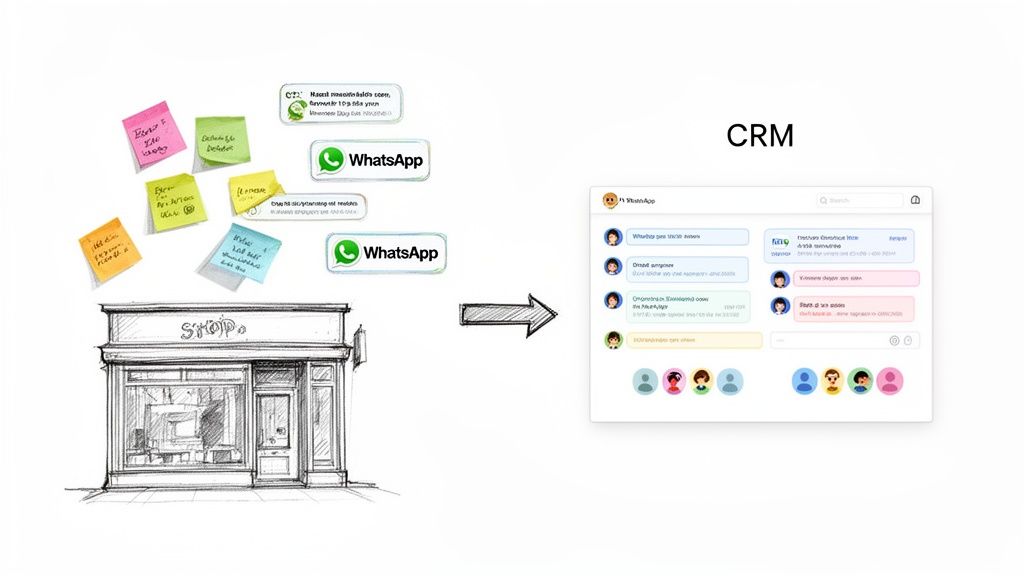
Remember the old days of handling customer chats? Maybe you had a couple of business phones, and your team just replied as messages came in. It was pure chaos. Conversations were siloed, follow-ups got dropped, and you had zero visibility into what was actually happening. Good luck trying to scale that.
A CRM for WhatsApp completely transforms that messy process. It organizes random, one-off chats into a streamlined engine for growth. This is how you scale personal connections without losing your mind—or your customers.
This isn’t just about being tidy; it’s about turning WhatsApp from a simple messaging app into a core part of your business strategy. This is especially true for online stores, where finding the best CRM for ecommerce growth is a complete game-changer.
The Shift to Conversational Commerce
Let’s be real: your customers live on WhatsApp. With over 3.14 billion monthly active users, it’s where they talk to friends, family, and now, businesses. If you’re not there, you’re missing out on a direct line of communication that builds trust and drives faster decisions.
This isn’t a niche trend. More than 5 million businesses have already jumped on the WhatsApp Business API. The results speak for themselves. When connected to a CRM, you can deliver automated responses that are 225% faster than old-school channels like email. That speed is crucial for recovering an abandoned cart or qualifying a hot lead the second they reach out.
The bottom-line impact is undeniable. Businesses using this approach often report a 27% increase in sales, and a well-designed chatbot can pull in up to five times more leads than a standard website contact form.
WhatsApp CRM Integration
To put this shift into perspective, let’s compare the old way of doing things with the new, WhatsApp-centric approach.
Traditional Communication vs WhatsApp CRM
| Metric | Traditional Channels (Email/SMS) | CRM for WhatsApp |
|---|---|---|
| Response Time | Hours or days. Leads go cold waiting. | Instantaneous. Automated replies engage leads 24/7. |
| Customer Context | Scattered across different inboxes. | A single, unified view of every interaction. |
| Team Collaboration | “Who replied to this?” Constant confusion. | Shared inbox and internal notes keep everyone in sync. |
| Engagement | Low open rates, feels impersonal. | High open rates, feels like a real conversation. |
| Data & Insights | Limited metrics, hard to track performance. | Rich analytics on response times, volume, and conversions. |
This table makes it clear: moving your core communications to a WhatsApp CRM isn’t just an upgrade; it’s a completely different way of building customer relationships.
Key Benefits of a WhatsApp CRM Integration
Plugging WhatsApp into your CRM unlocks real, tangible benefits that drive your business forward.
- Centralized Communication: Every single customer chat—past and present—lives in one place. Your team gets a complete, unified history for every contact. No more digging through different phones or asking, “Did anyone get back to this person?”
- Enhanced Team Collaboration: Imagine a shared inbox where sales and support can work together. They can add private notes, assign conversations, and ensure everyone is on the same page for a consistent, high-quality response.
- Automated Lead Nurturing: Greet new leads instantly with a welcome message. Use a chatbot to ask qualifying questions. Schedule automated follow-ups. All of this happens in the background, so your team can focus on closing deals, not manual busywork.
- Data-Driven Insights: Finally, you can measure what’s working. Track key metrics like response times, conversation volume, and agent performance. This data shows you exactly where to optimize your process for better results.
Core Features of CRM Integration with WhatsApp
A great WhatsApp CRM is much more than a glorified inbox. It’s a suite of powerful tools designed to solve real business problems, turning everyday chats into a predictable engine for sales and support.
Let’s break down the features that actually move the needle.
Shared Team Inbox for Unified Communication
The first thing you’ll notice is the end of chaos. A Shared Team Inbox gets rid of the mess of different agents replying from different phones. It creates a single, unified place for every customer conversation, killing the “Hey, did anyone reply to this?” confusion for good.
Practical Example: A support agent can pull up the entire chat history a customer had with a salesperson last week. No more asking customers to repeat themselves. They can jump right in with the right context, which is a massive win for the customer experience.
With a shared inbox, agents can assign conversations to the right person, leave private notes for teammates (that the customer can’t see), and track the status of every single ticket. This simple organization stops leads from falling through the cracks and makes sure support issues get resolved, fast.
Contact Segmentation for Targeted Messaging
Not all customers are the same, so your messages shouldn’t be either. Contact Segmentation lets you group your audience based on real data—like what they’ve bought, where they live, or how they’ve interacted with you. This is how you go from generic message blasts to surgical, high-impact campaigns.
Practical Example: Imagine you’re an e-commerce brand dropping a new sneaker line. Instead of spamming your entire list, you could create a segment of “VIPs” who have bought shoes in the last three months. Sending them an exclusive early-access link is far more powerful than a one-size-fits-all announcement. For more on this, check out our in-depth guide to sending broadcast messages on WhatsApp.
Here are a few actionable ways to use segmentation:
- By Purchase History: Group customers who bought a specific product to upsell them on related accessories.
- By Location: Announce a local pop-up shop or in-store deal only to subscribers in that city.
- By Lead Status: Split your hot leads from your cold ones so you can send the perfect follow-up message to nudge them along.
Chatbot Automation for 24/7 Efficiency
Your team needs to sleep, but your business doesn’t have to. Chatbot Automation is your tireless sales and support assistant, handling common questions and qualifying leads around the clock. This frees up your human agents to focus on the high-value conversations that require a human touch.
Practical Example: A real estate agency could use a chatbot to ask potential buyers about their budget, preferred neighborhood, and the number of bedrooms they need. The bot then tags the qualified lead and assigns it to the right agent, along with a neat summary of all the info it gathered. This simple flow means leads never go cold, and agents are handed warm, pre-qualified prospects.
Analytics and Reporting for Smart Decisions
You can’t fix what you can’t see. A proper CRM for WhatsApp comes with a powerful analytics dashboard that turns raw conversation data into actionable insights. It gives you a crystal-clear picture of your team’s performance and how customers are engaging.
This is where you track the metrics that matter, helping you figure out what’s working and what’s not.
Key metrics to watch:
- First Response Time: How fast your team is getting back to new messages.
- Resolution Time: How long it takes, on average, to solve a customer’s problem.
- Conversation Volume: The number of chats you’re handling daily, weekly, or monthly.
- Agent Performance: Individual stats showing who’s handling the most conversations and resolving them efficiently.
By keeping an eye on these numbers, a support manager can spot bottlenecks, reward top performers, and make smart, data-driven decisions to fine-tune the entire communication strategy.
How to Choose Your WhatsApp Integration Path
Connecting WhatsApp to your CRM boils down to picking the right tool for the job. You have three main paths, each built for different business needs, technical skills, and growth plans.
Let’s break down these options so you can confidently pick the integration path that fits your business like a glove.
The Official WhatsApp Business API
This is the “build it from scratch” approach. The WhatsApp Business Platform API is the raw, powerful source straight from Meta. It isn’t a piece of software you can just install; it’s a toolkit for developers to build custom bridges between WhatsApp and any other system, including your CRM.
- Best For: Large enterprises or tech-savvy companies with in-house developers who need a completely tailored solution.
- Key Advantage: Unmatched flexibility and control over features, branding, and data security. You can build exactly what you need.
- Potential Challenge: This route demands significant technical expertise, development resources, and ongoing maintenance, making it the most expensive and time-consuming option.
Third-Party Connectors and Middleware
Think of these tools as a universal adapter. Services like Zapier, Make, or Pabbly act as a bridge, linking your CRM to WhatsApp through the API without needing a developer.
This method lets you set up simple “if this, then that” workflows. For instance, if a new lead lands in your CRM, a connector can automatically fire off a welcome message on WhatsApp. It’s a fantastic middle ground for businesses that already have a CRM they love but just need to add WhatsApp functionality.
- Best For: Small to medium-sized businesses comfortable with automation tools who want to plug WhatsApp into their existing tech stack.
- Key Advantage: Far more affordable and quicker to set up than a direct API integration. Thousands of pre-built connections are ready to go.
- Potential Challenge: Workflows can become complex to manage as you scale. Costs can also climb depending on how many tasks you run.
This decision tree shows how your primary goal—sales or support—can guide you toward the essential features to look for in a CRM for WhatsApp. Whether your focus is on driving conversions or making customer service a breeze, picking the right integration path is the first step to getting the features that truly matter.
All-in-One Platforms
This is your “ready-to-drive” solution. All-in-one platforms, like Clepher, are built from the ground up to combine CRM features, chatbot automation, and WhatsApp integration into a single, seamless package. Everything just works together from day one.
These platforms handle all the technical heavy lifting for you. They provide the API access, a shared team inbox, automation builders, and analytics dashboards straight out of the box. You don’t need to be a developer to get started; you can build powerful automated chats and manage your team with intuitive interfaces. Understanding how a CRM and ticketing system works inside these platforms is key to maximizing efficiency.
- Best For: E-commerce brands, agencies, coaches, and small businesses that want a powerful, easy-to-use solution without the technical overhead.
- Key Advantage: Lightning-fast setup, a user-friendly interface, and a full suite of tools designed to work together perfectly.
- Potential Challenge: You get less customizability than a direct API integration because you’re working within the features the platform provides.
Comparing WhatsApp Integration Methods
This table breaks down the key differences between each option to help you see which one aligns best with your business goals and resources.
| Method | Best For | Key Advantage | Potential Challenge |
|---|---|---|---|
| Official WhatsApp API | Large enterprises with development teams. | Maximum control and custom features. | High cost, technical complexity, and long setup time. |
| Third-Party Connectors | SMBs using existing CRM and automation tools. | Fast, affordable, and connects existing software. | Can become complex to manage; costs scale with usage. |
| All-in-One Platforms | E-commerce, agencies, and SMBs need simplicity. | User-friendly, quick setup, all tools included. | Less customizable than building from scratch. |
Ultimately, the best choice depends on where you are now and where you want to go. Whether you need the raw power of the API or the plug-and-play simplicity of an all-in-one solution, there’s a path that will get you there.
Real-World Use Cases and Success Stories
Theory is one thing, but seeing a CRM for WhatsApp in action is where you really grasp its power. Let’s look at how companies are turning simple chats into serious revenue with actionable, real-world examples.
WhatsApp Business Examples
E-commerce Abandoned Cart Recovery
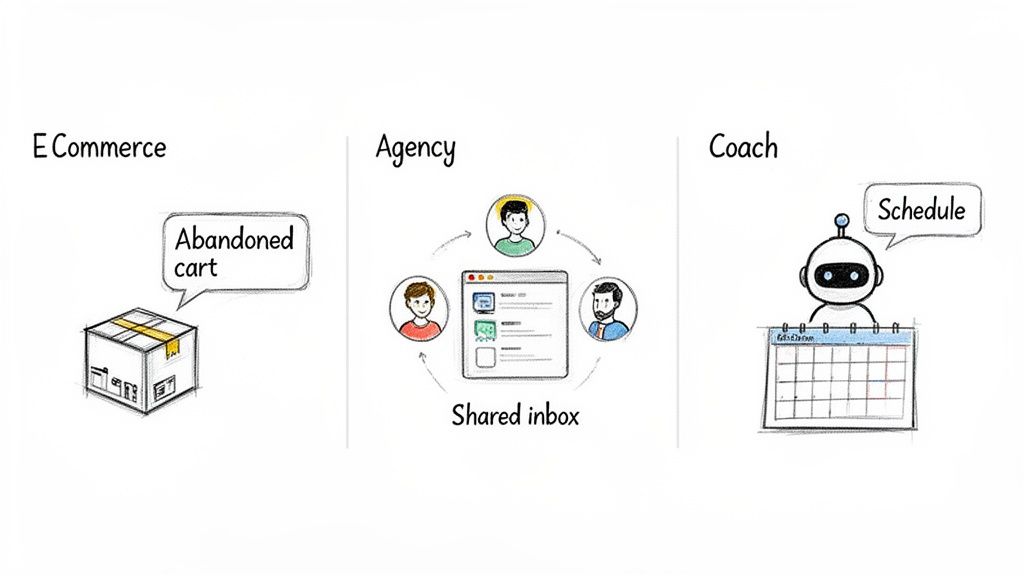
For any online store, the abandoned cart is a huge headache. It’s a customer who was seconds from buying before getting distracted. A WhatsApp CRM flips this lost opportunity into your best recovery tool.
- The Problem: An online fashion brand saw nearly 70% of its carts abandoned at checkout. Their email reminders had a dismal 15% open rate.
- The Transformation: They set up an automated workflow. Now, sixty minutes after someone leaves a cart, the system pings them a friendly WhatsApp message. It includes a picture of the item left behind and a direct link to finish the purchase.
- The Result: The new WhatsApp reminders hit a 90% open rate. By making it easy to pick up where they left off, the brand recovered 15% of otherwise lost sales, adding a massive boost to their monthly revenue.
Agency Client Management Simplified
Digital marketing agencies juggle multiple clients, each with urgent questions. When communication is scattered across emails, Slacks, and texts, things get missed, and clients get antsy.
- The Problem: An agency handling social media for five brands was struggling to keep up. Client messages were falling through the cracks, leading to delays.
- The Transformation: They switched to a CRM for WhatsApp with a shared team inbox. Instantly, they could create separate channels for each client, giving every account manager an organized view of all communications.
- The Result: Client response times dropped from hours to under 10 minutes. The centralized system killed the confusion and built trust. Clients felt heard, which led to 100% client retention at the end of the year.
Automated Lead Qualification for Coaches
If you’re a coach, your time is your most valuable asset. Wasting hours on discovery calls with unqualified prospects is a huge productivity killer. This is where a WhatsApp CRM can act as your personal gatekeeper.
- The Problem: A high-ticket business coach was spending over ten hours a week on initial calls, but only 20% of prospects were actually a good fit.
- The Transformation: She installed a chatbot on her website that invited visitors to connect on WhatsApp. The bot then asked key qualifying questions about their business goals and monthly revenue. Based on the answers, high-potential prospects were sent a link to book a call, while others received a link to a free webinar.
- The Result: Her calendar is now filled exclusively with highly qualified, pre-vetted leads. This simple automation cut her admin time by 90% and doubled her conversion rate from discovery call to paying client.
The impact on e-commerce is especially staggering. Brands have reported 10x ROAS improvements by using WhatsApp for retargeting alone. Automating abandoned cart reminders with personalized product catalogs regularly boosts recovery rates to between 10-25%. While simple broadcasts might see 3-7% conversion, the best campaigns are generating a Revenue Per Recipient (RPR) of €2.00-€6.00, showing just how profitable this channel can be. You can dive deeper into the latest WhatsApp trends and their impact to see more data.
WhatsApp Sales and CRM System: Boost Sales via WhatsApp
WhatsApp has become an essential channel for marketing and sales. A crm for whatsapp lets your sales team communicate with leads directly through WhatsApp, capture leads via WhatsApp messages, and manage customer engagement from a unified dashboard. Whether you’re looking for a crm like HubSpot or Zoho, the right whatsapp crm solution offers integration with crm platforms and workflows that help your business close deals faster.
Why use WhatsApp with CRM?
Integrate WhatsApp to centralize conversations and automate repetitive tasks. A crm integration with WhatsApp or integration with WhatsApp cloud api enables your team to send WhatsApp templates, follow up on WhatsApp leads, and log WhatsApp conversation history directly within CRM records. This reduces manual data entry and supports a sales process that moves prospects through the sales pipeline with visibility for managers.
Key features of a WhatsApp CRM integration
- WhatsApp Business API or WhatsApp Business app support, including whatsapp cloud api for scalable messaging.
- Native integration or crm integration that can connect WhatsApp messages directly from the crm to contacts and leads.
- Automation and workflow tools to automate follow-ups, triggers, and WhatsApp templates for consistent outreach.
- Dashboard and reporting to track WhatsApp sales, conversation metrics, and campaign performance.
- Ability to manage multiple WhatsApp numbers or multiple WhatsApp agents and ensure WhatsApp coexistence across teams.
- Capture leads from WhatsApp chat and route them into the CRM with tags, priority, and owner assignment.
Sales and support use cases
Sales teams use whatsapp crm integration to qualify leads faster, book meetings directly through WhatsApp, and move opportunities through the sales pipeline. Customer support teams use it to respond to inquiries, resolve issues via WhatsApp chat, and provide a seamless experience between the WhatsApp web version and the mobile app. By leveraging templates and automation, teams ensure fast response times and consistent messaging.
Choosing the best CRM with WhatsApp integration
If you are looking for the best crm with WhatsApp integration, consider platforms that offer full WhatsApp integration, a robust automation engine, and prebuilt connectors to HubSpot, Zoho CRM, and other CRMs. A guide to whatsapp crm can help you evaluate native integration vs. third-party connectors, and decide whether using whatsapp business api is necessary for your scale. Some businesses prefer a crm without complex configuration, while others need advanced automation and the ability to integrate WhatsApp deeply into existing workflows.
Practical tips
- Start with a free trial to test whatsapp crm features, message templates, and the dashboard.
- Offer both the WhatsApp app and web access to your sales team to manage multiple channels.
- Use WhatsApp templates and automation to standardize onboarding and sales outreach.
- Ensure compliance with WhatsApp policies when using the whatsapp business api.
- Train your team on how crm is a customer relationship tool that captures WhatsApp leads and organizes WhatsApp messages into meaningful records.
Your Step-by-Step Guide to WhatsApp CRM
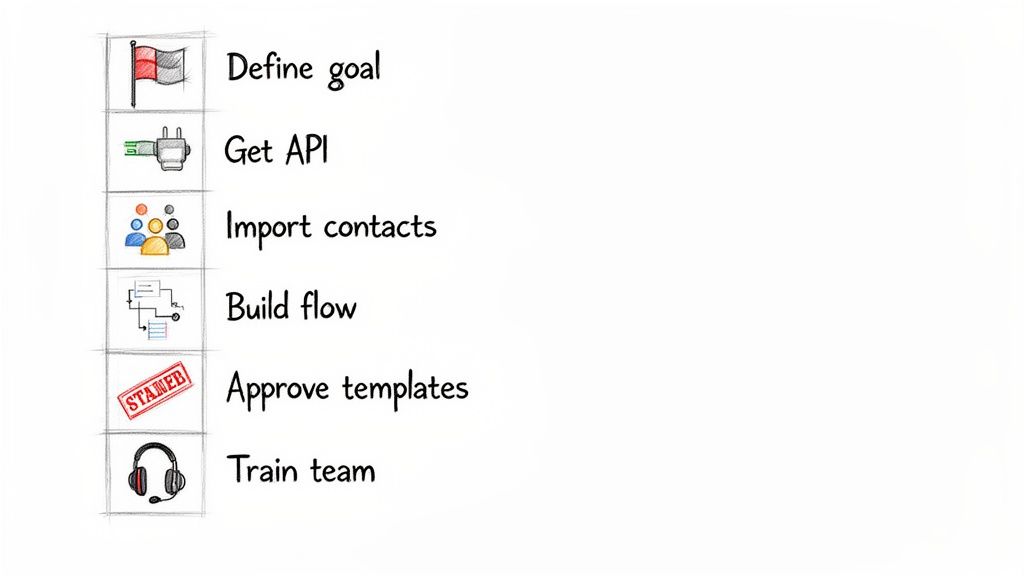
Ready to go from theory to practice? This simple, six-step roadmap breaks down exactly how to launch your CRM for WhatsApp and avoid common mistakes.
CRM for WhatsApp Process Steps
Step 1: Define Your Primary Goal
Before you touch any software, get crystal-clear on your “why.” What is the single most important thing you want this channel to do for you? Trying to do everything at once is a recipe for failure.
Pick one core objective to start. Are you trying to:
- Slash support tickets by automating common questions?
- Capture more leads by engaging website visitors instantly?
- Recover abandoned carts and claw back lost e-commerce sales?
- Wow your clients with faster, more direct communication?
Picking one main goal gives your entire project a laser focus and makes every other decision simpler.
Step 2: Select Your Platform and Get API Access
With your goal locked in, it’s time to choose your tools. As we covered, you can wrestle with the raw API, piece together connectors, or grab an all-in-one platform. For most businesses, an integrated platform is the quickest way to get results.
Once you’ve picked a provider, the next move is connecting your WhatsApp Business account. Platforms like Clepher handle the messy technical part of getting WhatsApp Business API access for you, turning a complicated process into a simple, guided setup.
Step 3: Ethically Import Contacts and Create Segments
Let’s be clear: you cannot message anyone on WhatsApp without their explicit permission. This is non-negotiable. Before importing contacts, ensure you have a clear record of their opt-in.
Once your list is good to go, don’t just dump everyone into one giant bucket. Start creating smart segments based on the goal you set in step one.
- For Sales: Group contacts by their source, like “Website Inquiry” or “Facebook Ad Lead.”
- For E-commerce: Segment by buying behavior, such as “VIP Customers” or “One-Time Buyers.”
- For Support: Organize by the product or service tier they use.
Step 4: Build Your First Automated Flow
Now for the fun part. Start small by building one simple automation that directly serves your main goal.
A perfect first automation is a welcome message. When someone messages you for the first time, your system can instantly reply with a friendly greeting, set expectations on response times, and maybe ask a simple qualifying question. It guarantees a professional first impression, 24/7. Learning how to schedule a WhatsApp message is also a game-changer for effective follow-up sequences.
Step 5: Get Your Message Templates Approved
WhatsApp has a rule: any conversation you start (like a promotion) must use a pre-approved message template. This is how they prevent spam.
Draft a few key templates that align with your goal. For an e-commerce store, this might be an abandoned cart reminder and an order confirmation. Submit them for approval from your platform’s dashboard. Approval usually takes anywhere from a few minutes to 24 hours.
Step 6: Train Your Team for a Smooth Transition
Technology is only as good as the people using it. Host a quick training session to walk your team through the new system. Cover the fundamentals: how to manage the shared inbox, assign chats, leave private notes, and use message templates.
Set clear guidelines for response times and tone of voice. A smooth internal rollout ensures everyone is confident, which translates directly into a top-notch customer experience from the moment you go live.
Staying Compliant with WhatsApp Policies
Using WhatsApp for business isn’t the Wild West. There are clear rules designed to protect users from spam. Following these policies is essential if you want to stick around.
The absolute foundation of that trust is getting explicit consent. Before you send a single message, a customer must clearly opt-in to hear from you. No surprise messages, and definitely no adding contacts from a list you bought online.
Understanding the 24-Hour Customer Service Window
Once a customer sends you a message, a 24-hour clock starts ticking. This is the customer service window. Inside this window, you can reply with any kind of message without needing pre-approval. It’s meant for free-flowing, responsive conversations.
But as soon as that 24-hour window closes, the rules change. You can’t just send a casual, free-form message anymore. This is WhatsApp’s way of encouraging businesses to be prompt. A good CRM for WhatsApp will track this window automatically for every contact.
Business-Initiated Messages and Templates
So, what happens if you need to reach out after 24 hours? This is where business-initiated messages come in, and they have one major requirement: you must use a pre-approved message template.
These are structured messages you create and submit to Meta for review. The cool part is they can include placeholders for personalization, like a customer’s name or an order number.
Here are a few practical examples:
- Order Confirmations: “Hi {{1}}, your order #{{2}} has shipped and is on its way!”
- Appointment Reminders: “Just a friendly reminder about your appointment with us tomorrow at {{1}}.”
- Back-in-Stock Alerts: “Good news! The {{1}} you were interested in is now back in stock.”
The Golden Rule: You must get an opt-in before sending any business-initiated message. The template is just the format; permission is the prerequisite. Skipping this step is the fastest way to get your number flagged or even blocked.
Key Do’s and Don’ts for Compliance
Navigating these rules is simple if you keep the customer’s experience front and center.
Do:
- Get Clear Opt-In: Use a simple checkbox on your checkout page or a clear call-to-action to get permission.
- Provide Value: Ensure every message is helpful, timely, and relevant. Don’t waste their time.
- Offer an Easy Opt-Out: Always include clear instructions on how people can stop receiving messages, like replying with “STOP.”
Don’t:
- Send Spam: Never send unsolicited promotional messages. Just don’t.
- Message Without Consent: Never import a list of contacts who haven’t explicitly agreed to hear from you on WhatsApp.
- Ignore the 24-Hour Rule: Don’t try to send conversational replies outside the service window. Use an approved template instead.
Questions About Integration of WhatsApp CRMs
Diving into the world of a CRM for WhatsApp usually brings up a few questions. Let’s tackle the most common ones head-on.
Conclusion
Choosing a crm for WhatsApp means prioritizing a crm platform that offers reliable WhatsApp integration—whether native integration, WhatsApp cloud api, or using whatsapp business api—so your sales team and customer support can capture leads, manage multiple conversations, and send and receive messages directly from the crm.
A best crm with WhatsApp integration or a whatsapp crm solution (like HubSpot or zoho crm) can streamline your sales process and marketing and sales efforts by leveraging WhatsApp templates, automation and workflows, a unified dashboard, and access to WhatsApp contacts both within WhatsApp and directly through the crm.
For organizations looking for a tool like a full WhatsApp integration or a crm with WhatsApp integration, consider testing a free trial to evaluate features such as WhatsApp leads capture via web forms, built-in WhatsApp chat, mobile app support, and the ability to engage with leads and handle WhatsApp conversation history in the sales pipeline. Whether you need a crm tool that offers native WhatsApp integration or a more custom business integration, the right whatsapp crm will improve customer engagement, simplify WhatsApp marketing and sales, and let your team open WhatsApp conversations directly from the crm for faster response and better results.
Ready to turn your WhatsApp chats into a powerful sales and support engine? With Clepher, you can build AI-powered chatbots, manage conversations in a shared inbox, and launch automated campaigns without writing a single line of code. Start your journey with Clepher today and see how easy it is to grow your business on the world’s favorite messaging app.

Related Posts
Turn Visitors Into Leads With a Web Chat Widget
April 2, 2026Website Facebook Messenger: Setup & AI for Sales in 2026
April 1, 2026How an API Chat Bot Transforms Your Business (And How to Build One)
March 31, 2026
Founder Clepher