
Choosing the right customer support software isn’t just about checking boxes on a feature list. It’s a strategic decision that will either ignite your growth or drag it down.
The real question is this: are you looking for a tool to simply manage problems, or an engine to create opportunities? The right platform transforms your support team from a cost center into a powerful revenue driver while strengthening long-term customer satisfaction.
Why Choosing the Best Customer Support Software Is a Growth Strategy
Let’s be real—today’s customers expect immediate, personal customer interaction on the channels they use every day, like Messenger and Instagram. They hate waiting, and they definitely don’t want to repeat themselves.
This creates a serious operational challenge: how do you scale thousands of one-on-one conversations without overwhelming your team or sounding robotic? This is where modern platforms designed for omnichannel support become a critical growth lever.
Solutions like Help Scout and other modern systems help streamline support operations by bringing conversations from multiple channels into one unified workspace. The best platforms do far more than close tickets—they enable proactive engagement, help recover abandoned carts, and turn everyday support moments into revenue opportunities.
They’re built for a world where the lines between support, marketing, and sales have completely blurred. Making the right choice is crucial if you want to improve ecommerce customer experience and build a sustainable business.
Core Criteria for This Comparison
To help you make a smart, actionable decision, we’re cutting through the marketing fluff to focus on four areas that directly impact your bottom line and your team’s daily workflow.
- Automation Intelligence: How effectively does the tool automate conversations that lead to a sale? We’re not talking about basic FAQ bots, but intelligent flows that guide customers toward a purchase without human intervention.
- Omnichannel Integration: This is about creating one seamless, unified conversation, no matter where it starts or ends. A customer can start on Instagram and finish via web chat without ever losing context. For a deeper look, check out our guide on what is omnichannel customer experience.
- Real-World Usability: How fast can your team actually build and launch a campaign? We’re focusing on no-code builders that let your marketing team take action without needing to file a ticket with developers.
- Total Cost of Ownership: We’ll look past the appealing monthly price tag. What’s the true cost when you factor in per-agent fees and contact limits that penalize you for growing your audience?
The market is already signaling this shift. The global customer self-service software market is projected to hit $24.9 billion by 2026, a massive leap from $7 billion in 2019. This tells a clear story: the future is about empowering customers while freeing up your team for high-impact interactions.
Key Takeaway: The goal is no longer just closing tickets faster. It’s about building relationships at scale that drive loyalty, retention, and repeat business. This comparison is designed to show you which tools are built for that reality.
Comparing Core Features and Capabilities of Customer Support Tools
Let’s move past the shiny feature lists. A genuine customer support software comparison requires looking at how features perform in the real world. A platform might claim to have “AI automation,” but if it’s just a clunky, rule-based system, it will frustrate customers more than it helps.
This section digs into the capabilities that actually make a difference. We’ll break down how leading platforms handle crucial functions, using practical scenarios to show you what works, what doesn’t, and what will truly move the needle for your business.
Choosing the right tool is a strategic decision that directly impacts your ability to retain customers, build loyalty, and grow your revenue.
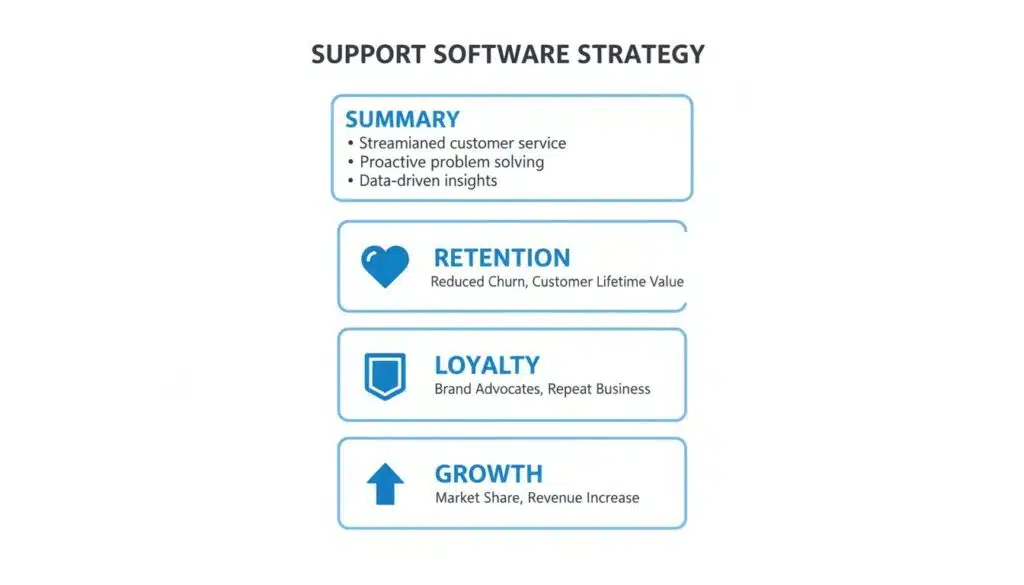
Support Software Strategy
As you can see, a solid support platform becomes the engine for your entire customer lifecycle, turning satisfied users into your most powerful advocates.
To give you a quick overview, here’s how some of the top platforms stack up on the core capabilities we’re about to discuss.
Core Capability Matrix for Leading Customer Service Platform
This table offers a direct comparison of key capabilities across Zendesk, Intercom, and Clepher, helping you quickly spot the best fit for your specific business goals.
| Feature | Zendesk | Intercom | Clepher |
|---|---|---|---|
| AI & Automation | Strong for ticketing and routing; less focused on revenue. | Good for proactive engagement; can be complex to build. | Excellent for revenue-driven, multi-step flows on social channels. |
| Multi-Channel Support | Broad channel support, but can feel disconnected. | Focuses on web chat and email; social channels feel secondary. | Natively built for Messenger, Instagram, and web chat; truly unified. |
| Live Chat & Handoff | Solid agent interface with ticketing context. | Seamless handoff within its own ecosystem. | Instant, context-rich handoff from bot to human in a single conversation. |
| Integrations | Massive marketplace, but often requires paid add-ons. | Strong native integrations; can become costly. | Native integrations with key tools plus Zapier/Make for unlimited flexibility. |
| Actionable Analytics | Deep ticketing analytics; less on marketing ROI. | Good for funnel and engagement tracking. | Focuses on conversion rates, revenue, and flow performance. |
| Primary Use-Case | Enterprise-level ticketing and help desk. | SaaS onboarding and proactive sales. | E-commerce, agencies, and creators using social media to sell. |
Now that you have the big picture, let’s dive into what these differences mean for your day-to-day operations and your bottom line.
AI and Automation
The term “AI” is thrown around a lot, but its real-world application varies dramatically. The gap between a simple rule-based chatbot and an intelligent automation engine often determines whether your business resolves problems efficiently or creates more customer issues.
Rule-based systems are rigid. They operate on strict “if this, then that” logic. For instance, a customer types “shipping status,” and the bot responds with a generic link. But if someone asks, “Where’s my stuff?” the system fails to understand intent, forcing a human agent to step in. This kind of limitation prevents many basic tools from becoming the right customer support tool for growing businesses.
Truly advanced platforms work differently. A modern customer support solution powered by AI can interpret natural language, recognize intent, and guide users through a full interaction without constant human intervention. That’s the difference between basic automation and the best customer support tools—systems that don’t just respond to questions but actively help resolve problems, assist decisions, and move conversations toward meaningful outcomes.
- Real-World Scenario: An e-commerce brand wants to reduce its abandoned cart rate on Instagram.
- The Rule-Based Way: A basic bot sends a single, generic DM: “You left items in your cart!” This feels robotic and rarely converts.
- The Intelligent Automation Way: A platform like Clepher builds a dynamic, multi-step flow. It waits 30 minutes, then sends a personalized message with an image of the actual item left behind. No response? An hour later, it follows up with a limited-time 10% discount to create urgency. This transforms a simple notification into an active sales recovery machine.
Don’t just ask if a platform has automation. Ask if its automation can run complex, multi-step conversations that directly generate revenue. For a deeper look, check out our complete guide on customer service automation software.
Multi-Channel Support
Your customers want to interact with you where they already are—on your website, in Facebook Messenger, or in your Instagram DMs. True multi-channel support isn’t just about being present on these platforms; it’s about weaving every interaction into a single, unified conversation.
Many platforms bolt on social channels as an afterthought, creating a disjointed experience. Conversations get trapped in silos, leaving agents without context. A customer might start a chat on Instagram, then send an email later, forcing your team to piece the conversation together manually.
A natively integrated system treats every channel as part of one customer story. An agent sees the entire conversation history—from a Messenger chat last week to an Instagram DM five minutes ago—in one clean timeline.
- Real-World Scenario: A digital marketing agency manages social media for multiple clients.
- The Clunky Add-On Way: The agency team has to log in and out of different tools for each client’s Instagram and Facebook. It’s a logistical nightmare that makes it impossible to manage conversations efficiently.
- The Native Integration Way: Using a tool like Clepher, the agency manages unlimited Facebook Pages and Instagram accounts from a single dashboard. They can deploy a proven chatbot template to all clients in minutes and monitor every conversation without switching screens.
Live Chat and Agent Handoff
Automation is powerful, but it can’t solve every problem. The moment a conversation moves from a bot to a human—the “handoff”—is where customer experience is either made or broken. A clumsy handoff can instantly erase any goodwill your automation just built.
A poor system simply alerts an agent that someone needs help, providing no context. The agent is forced to ask the customer to repeat everything—a top source of customer frustration. A staggering 43% of customers say they would switch brands after just one negative experience like this.
A seamless handoff is the complete opposite. The agent receives a full transcript of the bot conversation instantly. They see what was asked, how the bot responded, and why the conversation was escalated, allowing them to jump in with the right solution immediately.
Integrations and Analytics
Your customer support software cannot operate in a vacuum. It must connect with the other tools you depend on, like your CRM, email platform, and e-commerce store. Integrations are the bridges that turn your support tool into the central hub for all your customer data.
Some platforms offer a few native integrations but rely on expensive third-party connectors for everything else. The best platforms provide both: a wide range of native integrations and seamless connections to services like Zapier or Make for unlimited flexibility.
Actionable analytics are just as critical. It’s not enough to track how many tickets you closed. You need to know which automation flows are converting customers, your team’s average response time, and how support efforts are directly impacting sales. The market for these tools is booming—projected to hit USD 67,277.2 million by 2033—driven by the demand for data that tells a clear business story.
Finding the Right Fit for Your Business Model
The most feature-rich customer support software is useless if it doesn’t align with your business model. A game-changing feature for an e-commerce store might be irrelevant for a SaaS company. A smart investment means looking past generic claims and matching a platform’s strengths to your specific challenges and opportunities.
This is where most software comparisons miss the mark. You need to pick a tool built to solve your industry’s unique problems. Let’s break down how different business types can find the right software architecture for their success.
E-commerce and DTC Brands
For e-commerce and direct-to-consumer (DTC) brands, customer support is a sales channel. Every interaction is an opportunity to solve a problem, drive a purchase, and boost lifetime value. Your support software must be a revenue engine.
The key is meeting customers where they are most active—primarily Messenger and Instagram. Your software must excel at turning those DMs into dollars.
Essential Features for E-commerce:
- Abandoned Cart Recovery: The platform must trigger automated, multi-step message sequences the moment a cart is abandoned. A single reminder is not enough. It needs to be a persuasive conversation, complete with product images, social proof, and a time-sensitive discount to create urgency.
- Automated Order Updates: Proactively sending shipping notifications and tracking information directly to a customer’s DMs drastically reduces “Where is my order?” inquiries. This frees up your team for conversations that generate revenue.
- Promotional Broadcasts: You need the ability to send targeted promotions to specific audience segments—for example, a flash sale announcement that only goes to customers who have purchased a specific product in the past.
Best for E-commerce: Clepher was built for this environment. Its deep, native integration with Messenger and Instagram, combined with a no-code automation builder designed for marketing flows, makes it the ideal tool for recovering abandoned carts and running promotions directly within the chat.
Digital Marketing Agencies
Agencies operate in a multi-client world. You aren’t just managing one brand’s support; you’re juggling it for five, ten, or even fifty clients simultaneously. Efficiency, scalability, and brand consistency are non-negotiable. Your software must simplify client management, not complicate it.
A system that requires logging in and out of different dashboards for each client is a productivity killer. The right tool acts as a central command center for your entire client roster.
Essential Features for Agencies:
- Multi-Client Dashboards: A single interface is essential. You need one place to manage every client’s Facebook Pages and Instagram accounts to monitor conversations, deploy chatbot templates, and pull reports without constant context switching.
- White-Labeling Capabilities: The ability to apply your agency’s branding to the software’s interface and reports adds a layer of professionalism. It reinforces your value and makes the tool feel like your own proprietary system.
- Ease of Deployment: Look for a platform with reusable chatbot templates that can be deployed across client accounts in a few clicks. This makes onboarding new clients incredibly fast and ensures a consistent quality of service.
Best for Agencies: Clepher’s structure is a perfect fit for agency workflows. The ability to manage unlimited Pages and Instagram accounts from a single dashboard, combined with its template-driven system, provides the scalable foundation agencies need to serve clients efficiently and profitably.
SaaS and Subscription Companies
For SaaS businesses, support is about user onboarding, feature adoption, and churn prevention. The goal is to proactively guide users to their “aha!” moment, so they recognize the value of their subscription and remain a customer. Your support software should function as an automated onboarding and retention machine.
For smaller teams, a well-chosen chatbot for small business can manage these tasks without requiring a large support staff. Since retention is the lifeblood of a subscription model, the software must excel at identifying at-risk users and re-engaging them before they cancel.
Essential Features for SaaS:
- Proactive User Onboarding: The tool should let you build automated chat sequences triggered after a user signs up. These flows can walk them through key features, offer tips, and check in to see if they’re stuck, dramatically improving their first impression.
- Feature Announcement Campaigns: When you launch a new feature, you need an effective way to drive adoption. The software should allow you to send targeted broadcasts to specific user segments, reminding them of the platform’s ongoing value.
- Churn Reduction Sequences: By integrating with your CRM, the platform can identify users with low engagement. It can then trigger automated check-in messages, special offers, or feedback requests to resolve issues before they lead to cancellation.
Best for SaaS: While established players like Intercom are strong in this area, Clepher offers a highly flexible and cost-effective alternative for building these proactive onboarding and re-engagement flows. Its robust segmentation and broadcasting tools empower SaaS companies to deliver the right message to the right user at the right time.
Understanding Pricing Models and Total Cost of Ownership
The advertised price is rarely the final price. When conducting a customer support software comparison, focusing only on the monthly fee is a common mistake. You must calculate the Total Cost of Ownership (TCO), which includes all the hidden fees designed to emerge as your business grows.
Many platforms use pricing models that penalize you for scaling. They attract you with a low entry price, but costs escalate as you add agents or expand your contact list. This model creates financial friction precisely when you should be building momentum.

TCO Breakdown
This is a significant issue in a massive market. The customer success software space was valued at USD 1.88 billion in 2024 and is projected to reach USD 13.43 billion by 2033. Businesses are investing heavily in these tools, and that investment must be predictable. You can explore the complete market analysis to see the full picture.
Common Hidden Costs to Watch For
To understand the real price, you have to read the fine print. Watch out for these common budget-killers.
- Per-Agent Fees: This is the classic trap. A low base price looks great until you realize you’re paying an extra $30, $50, or even $90 per month for every team member. As you hire, your bill balloons.
- Contact-Based Tiers: These platforms charge you more as your audience grows. It’s a direct penalty for successful marketing, creating a financial barrier that discourages list-building.
- Expensive Feature Add-Ons: Need advanced automation or a key integration? Often, these core features are locked behind pricey “add-on” packages or higher-tier plans, forcing an upgrade to get the tools you thought were included.
Modeling Total Cost of Ownership: A Practical Example
Let’s apply this to a real-world scenario. Imagine an e-commerce store with 10,000 contacts and two support agents. We’ll compare two common pricing models to see the true cost.
Platform A (Complex Pricing):
- Base Plan: $99/month (includes 1 agent, 2,000 contacts)
- Additional Agent Fee: $49/month
- Contact Tier (up to 10,000): $150/month
- Total Monthly Cost: $298
Platform B (Transparent Pricing like Clepher):
- Growth Plan: $199/month
- Includes: Unlimited agents and up to 25,000 contacts.
- Total Monthly Cost: $199
In this typical scenario, the platform with the higher “sticker price” is actually 33% cheaper. A transparent, all-inclusive model provides predictable costs and the freedom to grow your team and audience without penalty.
Choosing a platform with a straightforward pricing model is a strategic move. It ensures your software investment supports your growth instead of holding it back with surprise fees. Always model your costs based on where you plan to be in 12-24 months, not just where you are today.
Navigating Implementation and Onboarding
Even the most powerful software is useless if your team finds it difficult to use. A smooth setup is non-negotiable. When conducting a customer support software comparison, you must ask: How quickly can we get this tool delivering results?
The answer often depends on whether you need a developer. Many large enterprise systems require technical expertise to configure APIs, connect integrations, and build custom workflows. This can delay your launch by weeks or even months.

Business Process
This process should be a runway to launch, not a roadblock.
The Power of No-Code Implementation
Contrast that with modern, no-code platforms. These tools are built for the people on the front lines—your marketing and support teams. With intuitive, drag-and-drop interfaces, you can build complex automation flows, design chat widgets, and launch campaigns in hours, not weeks.
This approach empowers the people who interact with your customers every day to own the tool from day one.
Consider migrating existing contacts and support history. A clunky system might require manual CSV uploads and complex data mapping. A user-friendly platform simplifies this with guided imports and one-click CRM integrations, ensuring you don’t lose crucial conversational context.
The true test of a great onboarding experience is how quickly your team feels confident enough to start building. Platforms with visual builders flatten the learning curve and encourage immediate adoption.
Training and Establishing Best Practices
Once the software is live, success depends on your team. Clear internal guidelines and accessible training resources are essential. A platform that provides a robust knowledge base, video tutorials, and responsive support makes this transition much smoother.
Here’s how that looks in the real world:
- Zendesk: Offers extensive documentation, but its complexity can create a steep learning curve, especially for teams new to traditional ticketing systems.
- Intercom: Provides excellent onboarding materials. However, mastering its advanced features often requires dedicated training sessions to unlock their full potential.
- Clepher: Built for immediate action. Its visual builder is so intuitive that marketers and support agents can create and test their first automation flows within minutes of signing up, delivering results from day one.
Ultimately, the best onboarding process removes friction and empowers your team to deliver results quickly.
Our Recommendation for Growth-Focused Businesses
After a thorough customer support software comparison, one conclusion is clear. The right platform for a growth-oriented business is not a traditional help desk built to manage problems. It’s a modern growth engine designed to generate revenue from every customer conversation.
This shift in perspective is what separates tools that cost you money from those that make you money.
For any business that views every social media and chat interaction as a sales opportunity, our recommendation is Clepher.
It is built from the ground up for modern commerce, which happens inside Messenger and Instagram DMs. While other platforms treat these channels as an afterthought, Clepher makes them the core of your growth strategy.
Why Clepher Is the Growth Engine
Clepher’s architecture is designed for a scaling business, not a reactive support team. Its power lies in three key areas:
- Marketing-Centric Automation: The no-code builder is a powerhouse for creating multi-step, revenue-driving campaigns like abandoned cart recovery, promotional broadcasts, and automated lead qualification flows.
- Unified Social Conversations: Clepher’s native connection to Messenger and Instagram delivers a truly seamless experience. It allows your team to manage conversations from multiple accounts in one place, creating an efficient workflow that is impossible with platforms relying on clunky, third-party integrations.
- Transparent, Scalable Pricing: You are never punished for growth. The pricing model includes unlimited agents and generous contact limits, so your costs remain predictable. You can scale your team and audience without worrying about a surprise bill.
Ultimately, the choice reflects your business philosophy. Are you building a team to put out fires, or a system to ignite growth? The tools required for each goal are fundamentally different.
While many platforms build complex helpdesks for managing problems, Clepher builds intuitive growth engines designed to create opportunities.
That distinction is everything. For any e-commerce brand, agency, or creator looking to turn conversations into conversions, Clepher provides the most direct and effective path forward.
Frequently Asked Questions on the Right Customer Service Tool
When comparing customer support software, a few key questions always come up. Answering them is the final step before you can make a confident decision. Let’s tackle the most common ones.
Ready to turn your customer conversations into a growth engine? See how Clepher combines powerful automation with an intuitive, no-code builder to help you sell more on social media. Get started with Clepher today.

Related Posts
How an API Chat Bot Transforms Your Business (And How to Build One)
March 31, 2026How to Create a Survey on Facebook for Maximum Engagement
March 28, 2026
Founder Clepher