
Tired of chasing paperwork? Imagine your business documents—invoices, contracts, client forms—moving on a smart, digital conveyor belt. That’s document workflow automation in a nutshell. Instead of manually passing files from person to person, this system routes them automatically. Instantly. And without human error.
This isn’t just about saving a few minutes; it’s about transforming how you get work done.
What Is Document Workflow Automation and Why Does It Matter?
At its core, document workflow automation uses technology to move information through your business according to predefined rules. This isn’t just scanning papers; it’s about intelligently guiding documents from creation to completion without anyone babysitting the process. To really get it, you first need to understand the relationship between document management and workflow, as these two concepts are the foundation for any serious automation effort.
Think about the last time you handled an invoice. You probably downloaded it, attached it to an email for your manager’s approval, waited, and then forwarded it to accounting. Each step is a potential breaking point—a lost email, a missed notification, or a simple human mistake.
Document workflow automation eliminates these manual handoffs. It systematically attacks the common pain points that drain your resources and slow you down.
- Actionable Insight: Free your team from mind-numbing admin tasks. Instead of spending hours moving files and chasing approvals, they can focus on activities that actually grow your business, like sales or customer service.
- Real-World Impact: Automation forces documents to follow the correct path, every single time. For an e-commerce store, this means no more shipping to the wrong address because of a data entry typo. For an agency, it means contracts are always sent to the right manager for approval.
- Business Transformation: It smashes bottlenecks. By automating the process, you can accelerate critical tasks like closing sales contracts, onboarding new clients, and resolving customer support tickets, getting you to revenue faster.
From Manual Mess to Automated Success
The shift is nothing short of dramatic. Studies show that document workflow automation can slash processing times by an incredible 30 to 450 times compared to manual methods. A team handling 500 documents manually might spend 125 hours, but with automation, that time shrinks to just 2-4 hours.
This isn’t just theory; it’s a fundamental change in how your business operates.
Manual vs. Automated: A Clear Comparison
Let’s break down the real-world differences. When you compare a traditional, manual process to an automated one, the benefits become crystal clear.
| Metric | Manual Workflow (Before) | Automated Workflow (After) |
|---|---|---|
| Speed | Slow, dependent on human availability. An invoice approval might take days. | Instantaneous routing. An invoice can be approved in minutes. |
| Accuracy | Prone to data entry errors, lost files, and wrong versions. | High, with data extracted correctly and versions controlled automatically. |
| Cost | High due to extensive manual labor and time spent fixing errors. | Low, with reduced labor costs and minimal need for rework. |
| Visibility | Opaque. It’s hard to know where a document is in the process. | Transparent, with real-time status tracking for everyone involved. |
The improvements aren’t just marginal—they’re transformative. Implementing document workflow automation is about reclaiming your team’s most valuable asset—time—and empowering them to focus on strategic work instead of administrative busywork.
The Core Components of an Automated Document Workflow
To really get what document workflow automation can do, you need to follow the document’s journey. Think of it like a four-part relay race where each stage hands off the baton to the next—no fumbling, no dropping it. This predictable structure is what makes the whole system so efficient.
Every automated workflow follows this same logical sequence, whether it’s for sales contracts, HR forms, or support tickets. It starts with getting the document into your system and ends with it being securely tucked away but still easy to find. Once you understand these stages, the “magic” of automation starts to look a lot more like a practical, step-by-step plan you can build yourself.
Stage 1: Capture
The journey kicks off with Capture. This is the moment a document officially enters your workflow. Modern capture happens wherever your customers and team are.
- Use Case: A potential client uploads a project brief directly into a chatbot on your website.
- Use Case: A new customer snaps a photo of a signed agreement and sends it through an Instagram DM.
The system is always ready to grab that information from any entry point and instantly pull it into your workflow, eliminating the need for manual downloads and uploads.
Stage 2: Process
As soon as a document is captured, the Process stage begins. This is where AI-powered tools do the real heavy lifting. The system uses Intelligent Document Processing (IDP) to “read” and understand the content.
It automatically pulls out critical information like:
- Customer names and contact info from an intake form.
- Invoice numbers and total amounts from a supplier’s PDF.
- Product SKUs from a purchase order.
- Specific clauses within a service contract.
This step alone wipes out a huge amount of human error and saves your team from hours of soul-crushing data entry.
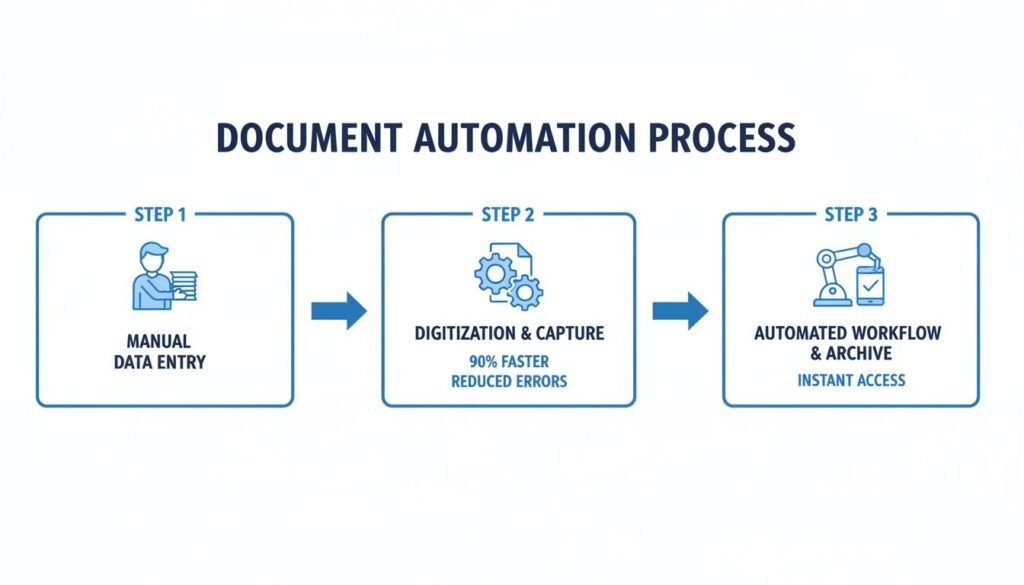
The infographic below shows this transformation perfectly, moving from a manual mess to a clean, digital flow.
Document Workflow Automation
You can see the clear contrast between the slow, person-dependent manual steps and the fast, technology-driven automated path.
Stage 3: Route
Once the data is extracted, the Route stage acts as the workflow’s traffic controller. Based on the rules you set, the system intelligently decides where the document or its data needs to go next.
- Use Case: A new client contract worth over $10,000 is automatically flagged and sent to a senior manager for approval.
- Use Case: Smaller contracts go straight to the assigned account manager, preventing bottlenecks and letting your team get to work faster.
This logic-based routing ensures the right information lands in front of the right person at exactly the right time.
Stage 4: Archive
Finally, once all actions are completed—approvals are given, payments are logged, signatures are collected—the document lands in the Archive stage. The final, approved document, along with its full audit trail, is saved in a secure, central hub.
This creates a single source of truth, making it dead simple to find any document you need later for compliance or reference. This isn’t just about tidy folders; it’s about connecting to your other business tools for a complete operational picture. For more on this, check out our guide on integrating with a CRM and ticketing system. A well-archived document is a valuable, accessible company asset.
Practical Automation Examples to Transform Your Business
Theory is great, but let’s see what document workflow automation actually looks like in the real world. This is where you can see how businesses are solving real problems and driving growth.
The results speak for themselves: 60% of organizations see a positive return on their automation investment within the first 12 months. For those in marketing and e-commerce, automation can slash spending by 12.2% while boosting productivity by a massive 14.5%. You can learn more about these workflow automation trends and see what they mean for your own operations.
Let’s dig into a few actionable examples.
E-commerce Order and Invoice Automation
Picture a small shop selling custom apparel. Before automation, every order from Facebook Messenger meant stopping everything to manually create an invoice, email it, and then message a fulfillment partner. It was slow, clunky, and prone to errors.
- The Problem: Manually handling orders from Messenger was a bottleneck, creating a poor customer experience and leading to fulfillment errors.
- The Actionable Solution: A Clepher chatbot now manages the entire sale inside Messenger. The moment a customer confirms their order, the system instantly generates a professional PDF invoice populated with their details.
- The Result: The invoice is sent to the customer right in the chat, while a copy is simultaneously emailed to the fulfillment team. A process that used to take 15 minutes per order now takes seconds, and the risk of human error is gone. This frees the owner to focus on marketing instead of admin.
Agency Client Onboarding Workflow
Now, think about a digital marketing agency bringing on a new client. The old process was a mess of back-and-forth emails, manually creating a contract, and chasing signatures. It was a terrible first impression that delayed the start of billable work.
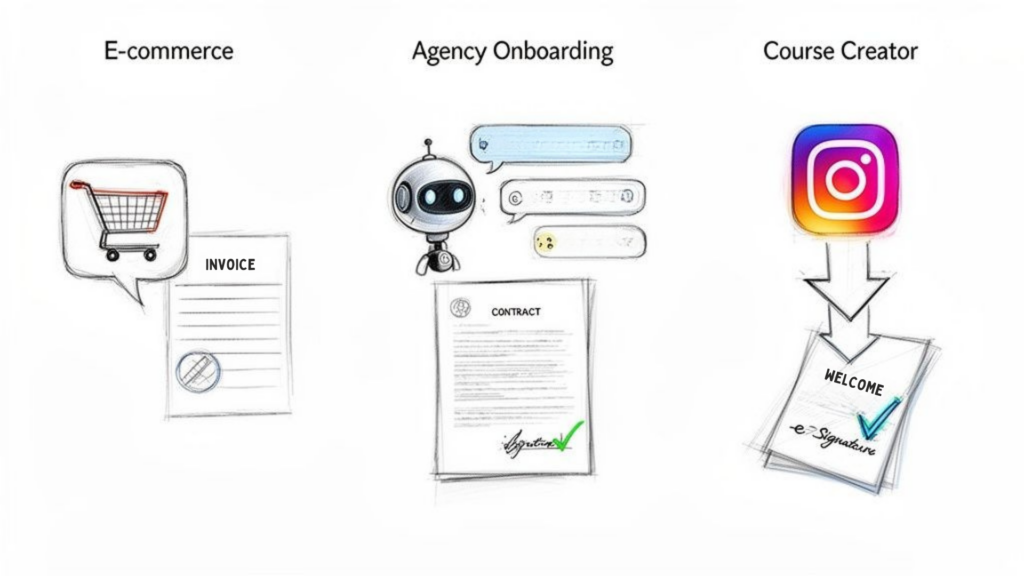
This screenshot shows how different business types can use automation to eliminate these document-heavy tasks.
Document Workflow Automation Business Scenarios
In each case, a slow, manual process is transformed into a quick, automated one that makes the business look more professional and run more efficiently.
- The Problem: The manual onboarding process was slow, unprofessional, and delayed revenue.
- The Actionable Solution: The agency’s new workflow uses a chatbot to guide new clients through a simple intake questionnaire. Their answers automatically populate a service agreement template. That document is then instantly sent to the client via an e-signature platform.
- The Result: New clients are onboarded in a single, smooth session, often in less than an hour. It not only improves the client experience but gets projects—and revenue—flowing faster.
Lead Capture for Course Creators
Finally, let’s look at a course creator who finds new students on Instagram. They used to live in their DMs, answering the same questions and manually sending a generic PDF “welcome packet.” It was a huge time-sink that failed to capture lead information effectively.
Their new document workflow automation has completely changed the game:
- A potential student DMs a keyword like “INFO” to their Instagram account.
- An AI-powered chatbot immediately engages, asking a few qualifying questions to gauge their interest and budget.
- For qualified leads, the bot collects their name and email address.
- It then instantly generates a personalized welcome packet—a PDF with the lead’s name right on it—and emails it to them directly.
This workflow doesn’t just save the creator hours every day. It builds a high-quality email list on autopilot and delivers a personalized experience that makes every potential student feel valued from the very first interaction.
The Technology Driving Modern Document Automation
So, what’s actually under the hood? The tech that makes document workflow automation a reality is now more accessible and user-friendly than ever, putting serious power into the hands of entrepreneurs and marketers.
At the heart of it all is Intelligent Document Processing (IDP). Think of IDP as AI that can “read” documents like a human—only faster, and it never gets tired. It does more than just recognize text; it understands context, letting it pluck the specific information you need, like a total amount from an invoice or an expiration date from a contract.
APIs: The Digital Messengers
Next up, you have APIs (Application Programming Interfaces). These are the digital messengers that let all your favorite apps talk to each other. When a new lead fills out a form captured by Clepher, an API is what instantly zaps that data over to your Google Sheet, CRM, or email marketing platform. This seamless communication is the glue that connects individual tasks into a smooth, automated workflow. For example, many of the best legal AI tools for lawyers depend on APIs to process and manage case files efficiently.
The Rise of No-Code Platforms
But the most important piece of the puzzle is the rise of no-code platforms. These tools give you a visual, drag-and-drop playground where you can build powerful workflows without writing a single line of code. If you can draw a flowchart on a whiteboard, you can design an automated process.
This accessibility is fueling a market explosion. The intelligent document processing industry is projected to leap from $10.6 billion in 2025 to $66 billion by 2032. This growth is driven by AI that can now understand intent, cut processing times by 50-70%, and slash error rates to less than 5%.
These platforms have completely democratized automation. They empower the people who actually know the business processes—like marketers and agency owners—to build the exact solutions they need. Our guide on no-code automation tools is a great place to start. By combining IDP, APIs, and no-code builders, any business can now create sophisticated document workflows that save time and help them scale.
How to Build Your First Automated Document Workflow
Ready to get started? Building your first automated workflow doesn’t have to be complicated. By breaking it down into a few manageable steps, you can go from manual mess to smooth automation without needing a team of developers.
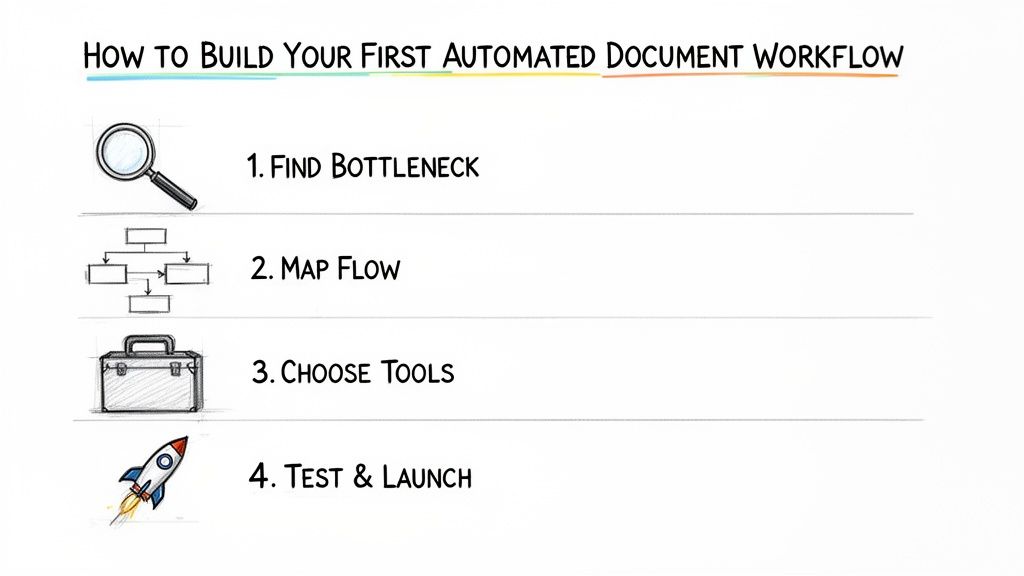
Think of this as your roadmap.
Document Workflow Automation Workflow Steps
The secret is to start small. Don’t try to automate your entire business overnight. Pick one high-impact process and nail it.
Step 1: Identify Your Biggest Bottleneck
First, find the single biggest point of friction in your daily operations. Where do documents always seem to get stuck? What tedious manual task eats up the most time or causes the most headaches?
A few common suspects:
- Manually creating and sending invoices after every sale.
- Chasing down new clients for information to kick off a project.
- Endlessly following up on unsigned service agreements.
Pick the one process that, if you fixed it, would give you the biggest chunk of your day back. This focus guarantees you’ll see a quick, tangible win.
Step 2: Map Your Current Workflow
Now, grab a whiteboard or a flowchart tool. Map out the process exactly as it happens today. Who touches the document? Where does it go next? What causes the delays?
Be brutally honest. This visual map is your “before” picture—it will expose every unnecessary handoff, long wait time, and weak link. This step is critical if you want to effectively automate repetitive tasks and see a real difference.
Step 3: Design the New Automated Path
With your old process mapped out, it’s time for the fun part: designing the new, automated one. Rethink the entire flow from the ground up, asking, “What if a system just did this for me?”
For instance, instead of you emailing an invoice, could a chatbot generate and deliver it the second a purchase is made? Instead of waiting for approval, could the system automatically ping the right person based on the document’s value?
Your goal is to design a simple, straight line from start to finish, cutting out all the manual twists and turns.
According to the Association for Intelligent Information Management (AIIM), only 29% of organizations rate their workflow design skills as “advanced.” This highlights the importance of using no-code tools with pre-built templates, which help you skip common design mistakes and get started faster.
Step 4: Build, Test, and Launch
Alright, it’s time to build. Choose your automation tools—like Clepher for conversational data capture and Google Docs or an e-signature service for the documents themselves. Then, connect them using a no-code builder, following the new path you just designed.
Before you go live, run a few tests. Does the document get created correctly? Does it route to the right person? Does the follow-up trigger?
Once you’ve confirmed everything works, launch your new workflow. Then, monitor its performance and watch the time savings and error reductions stack up.
Measuring the Success of Your Automation Efforts
You’ve automated a workflow. Now what? To prove its value, you need to track the right numbers—the Key Performance Indicators (KPIs). This is how you turn your automation wins into a language everyone understands: time, money, and quality.
These metrics aren’t complicated, but they are incredibly powerful.
Key Metrics to Track
You need a clear “before and after” picture. These metrics provide just that.
-
Document Processing Time: How long does it take a document to go from start to finish? For an invoice, that’s from creation to payment. If that time drops from five days to five hours, that’s a massive, measurable win.
-
Error Rate: How often do mistakes happen, like incorrect data entry or sending a contract to the wrong person? A lower error rate means higher accuracy and less time wasted on fixing things.
-
Cost Per Document: Calculate the total cost to process one document, including employee time. As you automate, this number should plummet.
Employee Time Saved is one of the most powerful metrics. If you save each of your three team members two hours a week, that’s 24 hours of productive time reclaimed every month. That’s three full workdays your team can now spend on sales or marketing instead of pushing paper.
Beyond the Numbers: The Human Impact
Success isn’t just about data. Some of the biggest wins are about the human impact. While these qualitative benefits are harder to quantify, they’re often what your team and customers feel most directly.
Track improvements in areas like:
- Customer Satisfaction: Are clients happier because onboarding is now silky smooth? A quick survey can provide the proof.
- Team Morale: Is your team less stressed now that they’re free from repetitive tasks? Better morale leads to better work and lower turnover.
When you pair hard data with human feedback, you get the complete picture. It proves that automation isn’t just about making things faster—it’s about building a smarter, happier, and more profitable business.
Frequently Asked Questions About Document Automation
Thinking about automating your documents? You probably have a few questions. Let’s get straight to the answers.
Ready to reclaim your time and put your document processes on autopilot? With Clepher, you can build smart, conversational workflows that capture data, generate documents, and get work done faster. Start automating your business today.

Related Posts
Unlock Growth with Conversational AI for Customer Support
March 26, 2026Your Ultimate Guide to Instagram Chat Bots
March 25, 2026How to Create a Killer Poll Game on Instagram to Boost Engagement and Leads
March 24, 2026
Founder Clepher