

You’ve got a few ways to schedule a WhatsApp message. For simple needs, the WhatsApp Business app has some basic automation built right in. If you’re using the regular version of WhatsApp, you’ll need to look at third-party scheduling apps. And for anyone needing serious power and scalability, the WhatsApp Business API is the way to go.
Why Scheduling WhatsApp Messages Is a Smart Move
Most people see WhatsApp as a tool for quick, back-and-forth chats. But once you learn how to schedule messages on WhatsApp, you shift from being reactive to proactive. This simple change saves you time, helps you communicate more effectively, and can deliver real results for your business. For those using a specific device, knowing how to schedule WhatsApp messages on Android is particularly useful.
Practical Example: A local salon can stop manually texting appointment reminders every afternoon. Instead, a scheduled message automatically goes out 24 hours before each appointment. The immediate result? No-shows drop, and the front desk saves an hour every day.
Even for personal use, it’s a game-changer. Schedule a “Happy Birthday” text for a friend in another time zone, and it’ll arrive first thing in their morning—no need for you to stay up late.
The Power of Perfect Timing
It all boils down to sending the right message at exactly the right time. For businesses, this is crucial. We’ve seen that scheduling promotional messages to land during peak hours can boost open rates by 30-40%. When you’re starting with WhatsApp’s massive 98% open rate, that extra lift is a huge competitive advantage. Note that using external tools for WhatsApp message scheduling may require granting specific permissions to third-party apps.
Good timing doesn’t just get your message seen; it gets results. For an e-commerce store, a well-timed “flash sale starting now” message can increase conversion rates by as much as 40% in the first hour.
From Manual Effort to Smart Automation
Ultimately, scheduling is about reclaiming your most valuable resource: your time. It lets you batch your communication tasks in one go, freeing you up to focus on strategy and growth instead of getting stuck in day-to-day messaging. This is essential when trying to schedule WhatsApp messages on Android efficiently.
By prepping your messages ahead of time, you guarantee consistent, thoughtful communication without the last-minute scramble. It’s about working smarter, not harder, to keep those connections strong.
So, which path is right for you? This quick decision tree can help you figure it out based on what you’re trying to achieve.

Goal Decision Making Tree WhatsApp
As you can see, the path is pretty clear. If you’re using WhatsApp for business, you should be looking at the official Business App or the API. If your goals are personal, third-party apps are your best bet. Making this distinction early is key for getting the right features and staying compliant with WhatsApp’s rules.
Understanding the key benefits of automated text messages will help you nail down the best approach for what you need.
Comparing Your WhatsApp Scheduling Options
To give you a quick snapshot, here’s a breakdown of the different methods. This should help you zero in on the right solution for your specific needs, whether you’re sending birthday wishes or running a global marketing campaign.
| Method | Best For | Cost | Ease of Use |
|---|---|---|---|
| WhatsApp Business App | Small businesses need simple away messages, greetings, and quick replies. | Free | Very Easy |
| Third-Party Apps | Personal users and individuals wanting to schedule reminders or greetings. | Free to low-cost subscriptions. | Easy |
| WhatsApp Business API | Medium to large businesses need scalable, automated campaigns. | Varies by provider; typically involves setup and per-message fees. | Moderate to Complex |
| Automation Tools (Zapier, etc.) | Tech-savvy users and businesses want to connect WhatsApp to other apps. | Subscription-based, depending on usage. | Moderate |
Each option has its place. The free tools are great for getting started, but if you want to scale or create complex workflows, you’ll quickly see the value in the more powerful API-based solutions.
Basic Scheduling with the WhatsApp Business App
If your business is already using WhatsApp, you have a surprisingly useful scheduling tool tucked right inside the Business app.
Now, it’s not a calendar where you can schedule a specific message for a future date and time. Instead, it lets you schedule automated responses based on when customers message you. This powerful feature manages expectations and keeps conversations going, even when you’re off the clock.
This simple action can be the difference between a happy customer who’s willing to wait and a frustrated one who jumps over to a competitor. It’s about creating a professional, responsive vibe, 24/7.
Set Up Automated Greeting and Away Messages
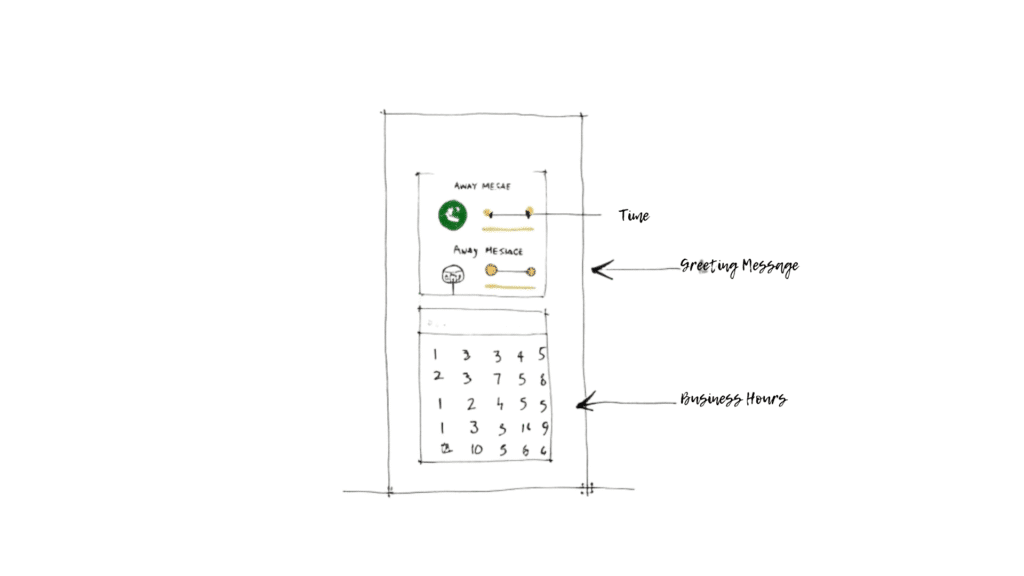
The two core features here are Greeting Messages and Away Messages. Think of them as your digital receptionist. A Greeting Message automatically welcomes new customers or anyone who hasn’t messaged you in 14 days. An Away Message takes over when you’re outside of your set business hours.
Here’s how this plays out in the real world:
- A Local Restaurant: A potential diner messages you at 11 PM to book a table. Your automated Away Message instantly replies, “Thanks for reaching out! We’re closed for the night, but we will confirm your reservation first thing tomorrow morning.” You just secured a lead without having to be glued to your phone late at night.
- An E-commerce Store: A customer asks about a product on a Sunday. The Away Message can guide them immediately: “Hi! Our support team is available Mon-Fri, 9-5. In the meantime, you might find an answer on our FAQ page: [link].” This offers real value and can even reduce your support ticket pile-up.
Setting up an away message is dead simple right inside the app.
WhatsApp Global Messaging
You can toggle the feature on or off, edit your message, and set the exact schedule for when it should be active. This control lets you define your “out of office” hours with precision.
Defining Your Business Hours
For Away Messages to work properly, you first need to set your Business Hours in your profile. This tells WhatsApp when you’re “open” and when you’re “closed.” Any message that comes in outside those hours will trigger your pre-written Away Message.
This isn’t just another setting; it’s a promise to your customers. By clearly defining your availability, you manage expectations from the very first interaction. It builds trust and shows you value their time.
Getting this set up is easy. Just go to your business profile settings, tap “Edit,” and find “Business Hours.” From there, you can specify your hours for each day of the week. This small step makes your business look more professional and is the foundation for smart, automated messaging.
Advanced Scheduling with the WhatsApp Business API
When your messaging needs grow beyond simple greetings and away messages, it’s time to bring in the heavy machinery. The WhatsApp Business API is the go-to solution for businesses that need to communicate at scale, but it’s crucial to understand what it is—and what it isn’t.
WhatsApp Scheduling Interface Mockup
Forget downloading another app. The API isn’t a piece of software you install. Think of it as a powerful gateway that connects your existing business systems—like a CRM or e-commerce platform—directly to WhatsApp. This direct line unlocks a level of automation and personalization that’s flat-out impossible to do by hand.
Why go through the trouble of setting up an API? Because it transforms your communication from a manual task into an automated, scalable system. As of July 2023, WhatsApp was processing a staggering 140 billion messages every single day. The API is what lets your business actually participate in those conversations without drowning in manual work.
It’s the difference between manually texting a customer their tracking number versus automatically sending thousands of personalized shipping updates triggered directly from your logistics software.
Here’s what that looks like in the real world:
- Segmented Promotions: Launch a targeted campaign to a specific customer segment—like offering a special discount only to customers who haven’t purchased in the last 90 days.
- Large-Scale Event Reminders: Send personalized reminders to thousands of webinar registrants an hour before it starts, each with a unique joining link.
- Transactional Alerts: Automatically fire off order confirmations, shipping updates, and delivery notifications. This alone can slash your “Where is my order?” support tickets.
Working with Business Solution Providers
Here’s a key detail: you don’t connect to the API directly. Instead, you work through an official Business Solution Provider (BSP). These are companies that specialize in providing the infrastructure and software to make the API accessible and user-friendly.
A BSP acts as the bridge between your business and the WhatsApp platform. They handle the technical complexities, provide a user-friendly interface for managing your campaigns, and ensure you comply with WhatsApp’s policies.
Choosing the right partner is critical. Some BSPs like Twilio are popular with developers who want to build custom solutions from the ground up. In that case, learning how to integrate Twilio with your marketing platform is a solid next step. If you’re diving into programmatic scheduling, this guide on how to Automate Social Media Posting: Your Practical API Guide also offers great developer insights that translate well to messaging automation.
The API is the definitive tool for any business serious about using WhatsApp for growth. It delivers the power and reliability you need to build meaningful customer relationships through perfectly timed, automated communication.
Scheduling Messages with Third-Party Apps
If you’re using the standard, personal version of WhatsApp, you’ve probably noticed it’s missing a crucial feature: a built-in message scheduler. Thankfully, a whole ecosystem of third-party apps has popped up to fill this exact gap, giving you a direct way to schedule a WhatsApp message for a specific date and time.
These apps are the perfect fix for personal users. They connect to your WhatsApp account and provide a simple interface to write, schedule, and manage your timed messages. Think sending birthday wishes across time zones, setting personal reminders, or making sure a critical message goes out at the perfect moment—all without needing the complexity of the Business App or API.
How Popular Scheduling Apps Work
Most of these schedulers operate on a similar principle. You grant them permission to access your WhatsApp notifications and contacts, which lets them automate the sending process. Two popular choices you’ll often see are SKEDIT and Wasavi.
The workflow is usually pretty straightforward:
- Connect Your Account: First, you install the app and link it to your WhatsApp.
- Compose Your Message: Next, you write your text, add any attachments, and pick the recipient from your contact list.
- Set the Schedule: Then, you choose the exact date and time for the message to be sent.
- Automation Kicks In: At the scheduled time, the app either sends a notification for you to approve or, in some cases, automates the entire send.
Actionable Insight: A freelancer can write a follow-up message to a client on Friday afternoon, schedule it with an app for 9:00 AM on Monday, and then completely switch off for the weekend. The message goes out automatically, ensuring timely communication without weekend work.
A Word on Security and Privacy
Handing over permissions to any third-party app is something you should think about carefully. Because these tools need access to your notifications—and sometimes even your screen—to work, you’re placing a lot of trust in the developer. An app with bad intentions could theoretically access sensitive information.
Before you install any scheduling app, do your homework. Read user reviews, check the app’s privacy policy, and understand exactly what permissions it’s asking for. It’s always safer to stick with well-known, highly-rated applications to minimize your risk.
It’s a classic trade-off: convenience versus security. For sensitive business communications, this method isn’t the best choice. But for sending a simple “Happy Anniversary!” message, the risk is generally low if you choose a reputable tool.
Feature Showdown of Popular WhatsApp Schedulers
With so many third-party tools available, it can be tough to pick the right one. This table breaks down a few popular options to help you decide which one best fits your needs and budget.
| Tool Name | Platform | Key Feature | Pricing Model |
|---|---|---|---|
| SKEDIT | Android | Schedules for WhatsApp, SMS, Email, and Calls. | Freemium with a Pro tier |
| Wasavi | Android | Browser extension, note-taking, and scheduling. | Free with paid features |
| Do It Later | Android | Supports a wide range of messaging apps, including Telegram and Messenger. | Freemium with paid plans |
| Scheduled App | Android, iOS, Web | Multi-platform support and team collaboration features. | Subscription-based |
The best tool for you depends on what you need. A simple, free app might be enough for personal reminders, while a paid tool with more integrations could be better for a small business owner.
Expanding Beyond Simple Schedulers
While dedicated apps are fantastic for one-off messages, sometimes you need to weave WhatsApp scheduling into a much bigger workflow. This is where automation platforms like Zapier and Make really shine. These tools act as connectors, linking WhatsApp to thousands of other applications you already use.
For a deeper dive into how this works, our guide on how to integrate Zapier with your marketing platform provides a solid starting point.
For more advanced scheduling needs, especially if you manage multiple social channels, looking into the best social media scheduling tools can be a game-changer. These platforms offer a centralized hub for all your timed communications.
Best Practices for Smart Message Scheduling
Scheduling Best Practices WhatsApp
Knowing how to schedule a WhatsApp message is only half the battle. To get real results, your approach must be strategic, respectful, and focused on the person receiving the message. Effective scheduling isn’t just about automation; it’s about thoughtful communication.
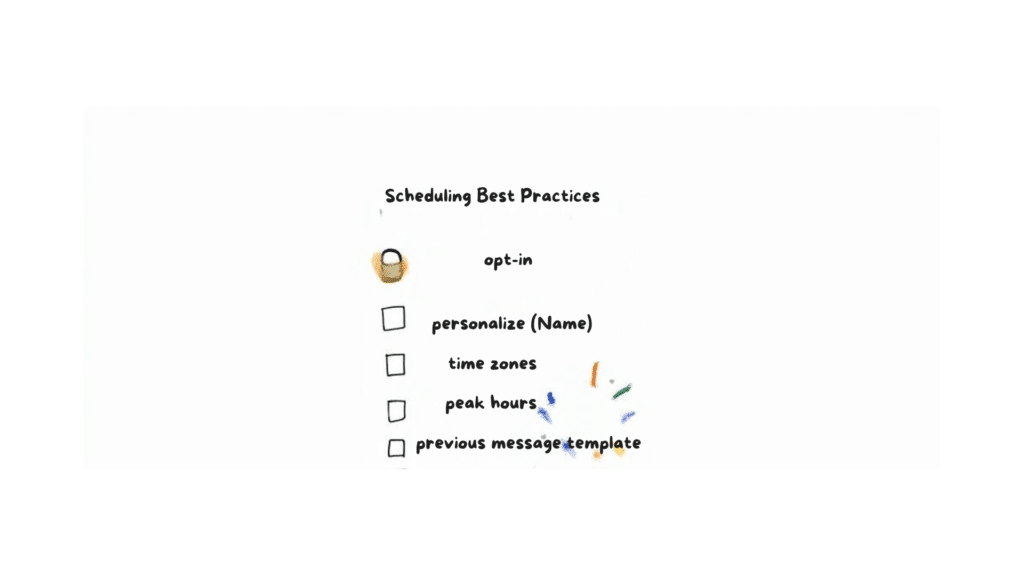
The absolute foundation of any good messaging strategy is consent. Never add users to a broadcast list or send promotional content without their explicit opt-in. Unsolicited messages are a fast track to getting blocked and damaging your brand’s reputation. Always provide a clear and easy way to opt out.
Personalize and Humanize Your Messages
Generic, robotic messages get ignored. The goal is to make every scheduled message feel like it was just typed for that one person. Use personalization variables like [FirstName] to address subscribers by name—it creates an instant, human connection.
But don’t stop at names. Tailor the content to their interests or past interactions. For instance, if you’re scheduling a follow-up after a purchase, mention the specific product they bought.
A personalized message acknowledges the individual, transforming a simple notification into a meaningful touchpoint. It shows you see them as a person, not just another number on a list.
This small effort makes a massive difference in how your messages are received, turning what could be an intrusive ping into a welcome one.
Master the Art of Timing
Timing is everything. A promotion sent at 3 AM is a surefire way to annoy your audience and get yourself blocked. Send messages when your users are most likely to be active and ready to engage.
Research shows that most WhatsApp users are highly active from the afternoon until midnight. In fact, a staggering 83% of users open the app every single day. If you schedule your messages for these peak hours, you dramatically increase the odds they’ll be seen and acted on right away. You can learn more about these WhatsApp engagement statistics to fine-tune your strategy.
Also, be mindful of time zones, especially with a global audience. A good scheduling tool will let you send messages based on the recipient’s local time, making sure your 2 PM promotion actually arrives at 2 PM for everyone.
Provide Clear Value with Actionable Templates
Every scheduled message needs a clear purpose. To avoid sounding spammy, build your messages around providing real value. Here are a few actionable templates for common business scenarios:
- Appointment Reminder: “Hi [FirstName]! Just a friendly reminder about your appointment with us tomorrow at [Time]. Please reply ‘YES’ to confirm or call us at [PhoneNumber] to reschedule. We look forward to seeing you!”
- Feedback Request: “Hi [FirstName], thanks for your recent order! We’d love to hear your thoughts. Would you mind taking 60 seconds to leave us a review here? [Link] Your feedback helps us improve!”
- Event Notification: “Hey [FirstName]! Our exclusive webinar on [Topic] starts in one hour. Don’t miss out! Join us live here: [Link]”
These templates are direct, helpful, and have a clear call to action. They make it easy for the user to know exactly what to do next. By following these best practices, you can turn scheduling from a simple automation trick into a powerful tool for building real, lasting customer relationships.
Common Questions About WhatsApp Scheduling
Once you start exploring WhatsApp automation, a few common questions always seem to pop up. Let’s clear the air and tackle the most frequent queries so you can move forward with confidence.
We’ll get into the practical details and bust a few myths, so you know exactly what to expect.
Conclusion
Scheduling WhatsApp messages is possible for both personal and business needs, though the methods vary by user and platform. Individual users on Android and iOS typically rely on third-party applications (like SkedIt) or automation tools (such as iOS Shortcuts) to compose a message and set a desired send time, often requiring the user to manually confirm the final message delivery. For business users, the native WhatsApp Business App offers only limited scheduling features. The most robust solution for scale, bulk messages, and utilizing message templates for marketing is integrating with the WhatsApp Business API via official Meta partners. Ultimately, whether you choose a third-party app or a business API solution, the best choice depends on your requirements for accessibility, the ability to send bulk messages, and the need for reliable automation to deliver your messages on the exact date and time.
Ready to move beyond basic scheduling and build powerful, automated conversations on WhatsApp? Clepher provides the tools you need to engage customers at scale with our intuitive, no-code chatbot builder. Start turning conversations into conversions today.

Related Posts
Unlock Growth with Conversational AI for Customer Support
March 26, 2026Your Ultimate Guide to Instagram Chat Bots
March 25, 2026How to Create a Killer Poll Game on Instagram to Boost Engagement and Leads
March 24, 2026
Founder Clepher