You’ve connected your inbox, support desk, CRM, and social accounts, yet the work still piles up. A customer asks about an order in Instagram Direct, a lead replies to an old Messenger campaign, and a support ticket needs information from a separate system. You can automate pieces of each process, but the handoffs remain manual.
An AI agent builder brings those pieces into a governed workflow. It helps you configure an agent to understand a goal, retrieve information, use approved tools, complete bounded actions, and send uncertain or sensitive cases to a person. The important question isn’t whether an agent can produce a convincing reply. It’s whether your business can control what the agent sees, does, records, and escalates.
What an AI Agent Builder Actually Does
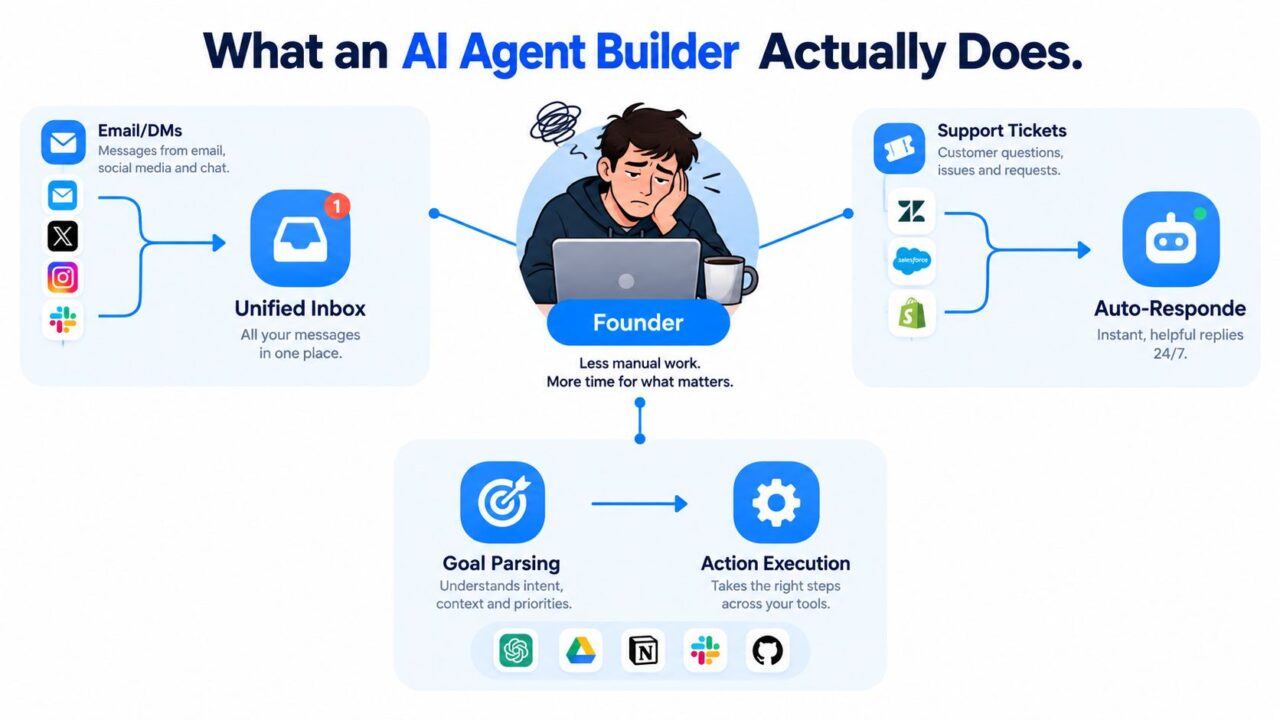
An AI agent builder is a no-code or low-code workspace for designing operational agents. Instead of writing every interaction as a fixed script, you define the agent’s purpose, data sources, tools, permissions, conditions, and handoff rules.
A basic chatbot might answer “What are your opening hours?” from a stored response. A flow-based chatbot can ask questions in a set order, apply conditions, and route the visitor to a page. A task-specific AI agent goes further. It can interpret a request such as “I need to change my delivery address,” check the relevant customer or order data, determine whether the request is allowed, and either complete the action or escalate it.
AI Agent Builder Workflow Automation
Four capabilities separate agents from simple bots
Goal interpretation means the agent identifies what the person is trying to achieve, even when the wording varies. “Where is my package?” and “Can you check my delivery?” may point to the same workflow.
Tool use lets the agent consult approved systems. Those tools might include a product catalog, knowledge base, order database, calendar, CRM, or ticketing platform.
Action execution allows the agent to do something within a defined boundary. It might add a tag, create a support ticket, book a meeting, update a field, or send a permitted message.
Human escalation gives the agent a safe way to stop. If the request involves uncertainty, sensitive data, an angry customer, or an irreversible action, the workflow can pass the conversation to a person with the relevant context attached.
That distinction changes what you can automate. A FAQ bot reduces repetitive questions. An agent can move a customer through a controlled business process.
Practical rule: Treat the agent as a junior operations assistant. Give it clear responsibilities, approved tools, and a supervisor path, rather than unrestricted authority.
The market is moving toward this model. Gartner’s forecast on task-specific AI agents projects that 40% of enterprise applications would include task-specific AI agents by the end of 2026, compared with fewer than 5% in 2025. The same source reports that 47% of organizations use a hybrid approach, combining off-the-shelf agent-building tools with custom-built components.
For a practical explanation of the underlying concept, see what AI agents are and how they differ from ordinary automation. The key takeaway is simple: the builder turns an operational idea into a workflow that can interpret, retrieve, act, and escalate.
Where the Market Actually Stands in 2026
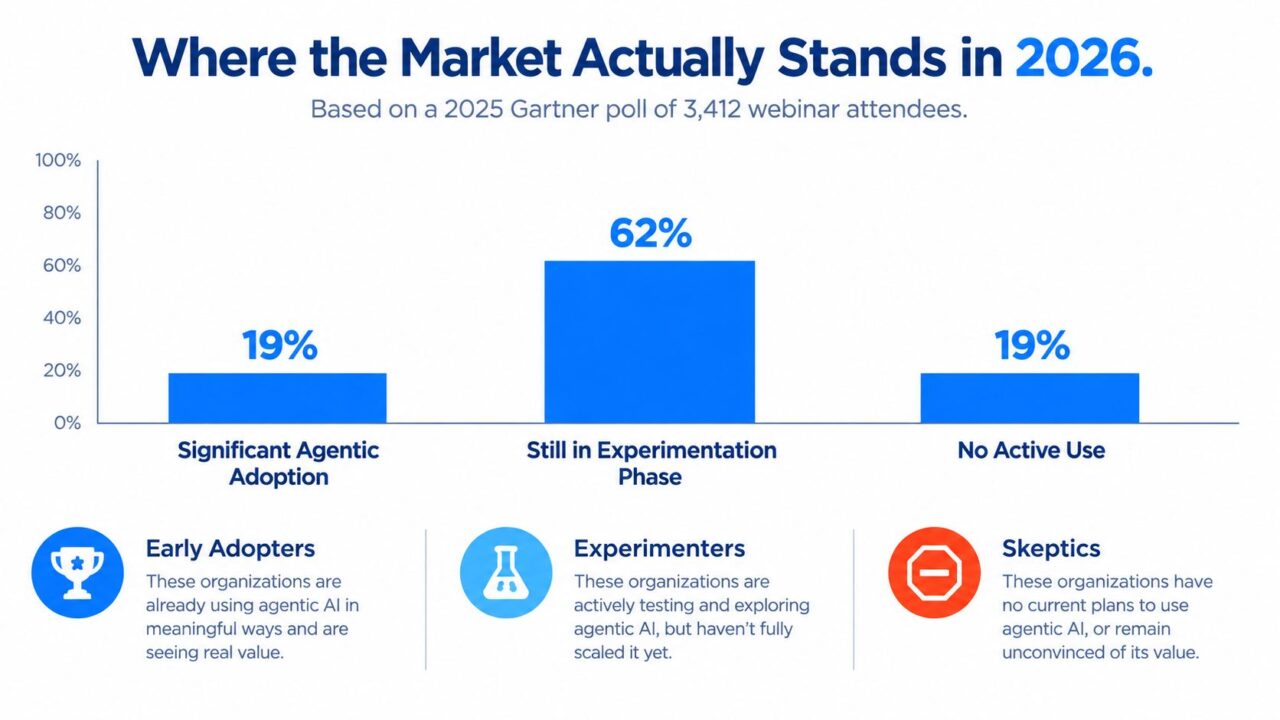
Interest in agents is ahead of production maturity. That matters because a polished demo can hide weak data connections, unclear permissions, missing audit trails, and unreliable escalation.
A 2025 Gartner poll of 3,412 webinar attendees found that 19% said their organizations had made significant investments in agentic AI, while 42% reported conservative investments. Another 8% had made no investments, and 31% were waiting, unsure, or pursuing a mixed position, according to this summary of the Gartner and Capgemini adoption findings.
Capgemini’s 2025 research shows the implementation gap more sharply. 2% of surveyed organizations had deployed AI agents at scale, 12% had reached partial scale, 23% had launched pilots, and 61% were still exploring. Those figures describe a market that’s active, but still learning how to move from experimentation to dependable operations.
AI Agent Builder Market Adoption
What this means for smaller teams
For an e-commerce brand, SaaS company, agency, creator, or local business, the opportunity isn’t to imitate a large enterprise’s entire AI program. It’s to choose one workflow where the inputs are understandable, the outcome is measurable, and human review is practical.
Good starting points include:
- Support triage: Identify the request type, collect missing details, and route complex cases.
- Lead qualification: Ask a small set of relevant questions and pass high-intent prospects to sales.
- Onboarding: Answer recurring setup questions and identify accounts that need personal attention.
- Sales follow-up: Respond to common objections and offer a calendar handoff.
- Order assistance: Provide status information and route exceptions to a service representative.
A useful way to evaluate the business case is to start with repetitive, high-volume work. McKinsey estimates that generative AI applied to customer care could create productivity value equal to 30% to 45% of current customer-care costs, while marketing applications could add value equal to 5% to 15% of total marketing spending, and sales applications could improve productivity by roughly 3% to 5% of global sales expenditures. These are potential value ranges, not promises, so your own baseline still matters.
Founders researching the market, funding ecosystem, or potential backers may also find Gritt.io’s investor search for early-stage artificial intelligence investors in France useful. The broader lesson is to fund a controlled operating capability, not an experiment with no owner.
A specialist platform may be the better fit when your work centers on conversations across social and messaging channels. A broader automation suite may make more sense when the agent must coordinate complex internal systems. You can compare these approaches through AI agent platforms and their operating models, but the decision should follow the workflow, not the fashionable feature list.
Core Features Every Serious Builder Must Have
A serious builder should help you design the conversation, control the logic, reach the right channels, manage audience data, and connect the workflow to the rest of your stack. Evaluate those capabilities as a system. A visually attractive editor is not enough if the agent can’t be tested, restricted, or monitored.
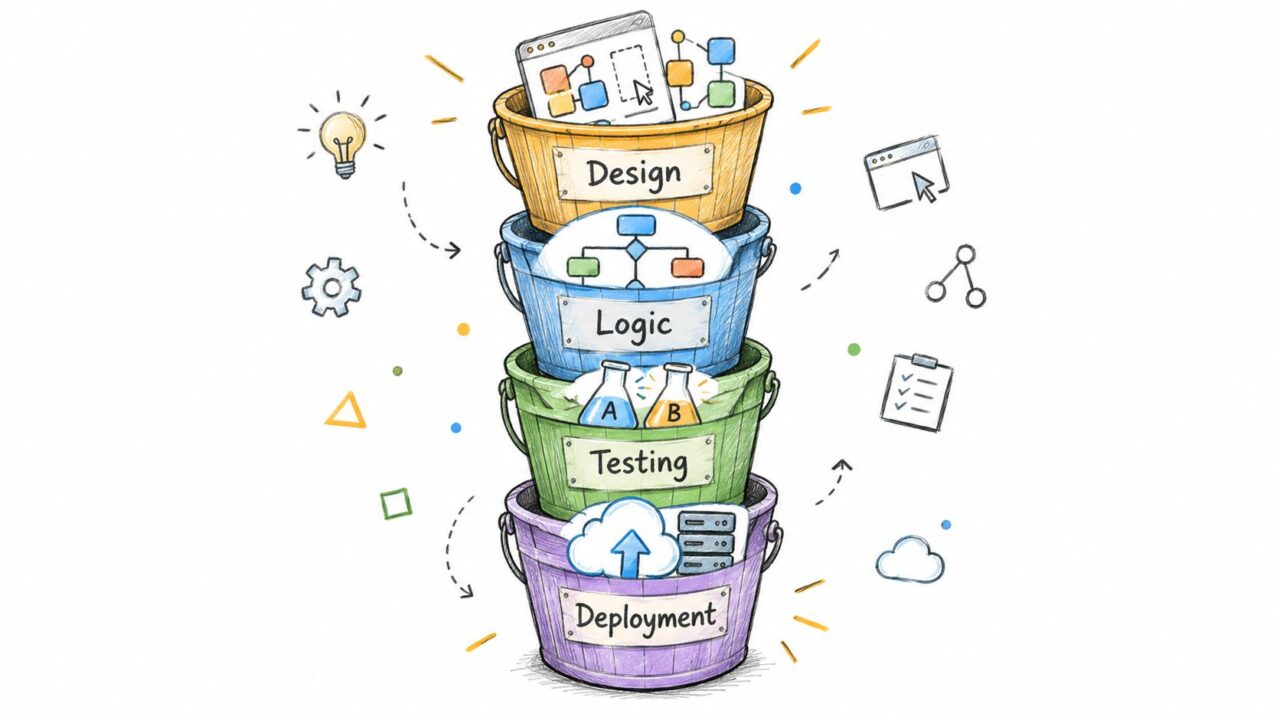
AI Agent Builder Development Process
Design and orchestration
Look for a visual flow builder with drag-and-drop steps, conditions, branches, and explicit handoffs. The builder should let you combine deterministic logic with AI interpretation. For example, the agent can recognize a refund request, then follow a fixed policy flow rather than inventing its own refund rules.
Useful design controls include:
- A/B testing: Compare different prompts, offers, or entry messages.
- Random path distribution: Send conversations through controlled variants.
- AI keyword triggers: Start a relevant flow when someone uses terms such as “pricing,” “cancel,” or “delivery.”
- Test conversations: Run realistic scenarios before exposing the agent to customers.
Channels and audience reach
Channel coverage determines where the workflow can operate. Check support for websites, Facebook, Messenger, WhatsApp, and Instagram Direct, along with the ability to manage multiple pages or accounts when an agency or multi-brand team needs it.
Audience controls matter just as much. Segments, tags, custom fields, global fields, personalization tokens, personas, typing indicators, broadcasts, and capture widgets let the agent adapt its response without treating every contact identically.
Integrations and extensibility
A builder should connect to the systems that hold business truth. Native integrations are useful for common tasks, while Zapier, Make, n8n, Pabbly, and webhooks extend the workflow to less common tools.
Ask what happens after the conversation. Can the agent create a CRM record, update a commerce field, send an email or SMS handoff, create a ticket, or add a sales task? A beautiful conversation that leaves the rest of the team without context creates more work instead of less.
Teams coordinating physical operations may also need specialized scheduling connections, such as smart auto-seating tools, when an agent must pass a confirmed request into a seating or booking workflow.
McKinsey’s estimates on potential value reinforce why these features should be tied to business processes, not isolated chat quality. Customer care, marketing, and sales each require different data, permissions, and success measures. A practical framework for mapping those elements is described in AI agent frameworks for structured workflow design.
A builder that’s strong in design but weak in governance will create production headaches.
Real Use Cases in Marketing, Support, and Sales
The best way to understand an agent is to follow the work it performs. The examples below are illustrative workflows, not guaranteed performance claims. Each one starts with a narrow job and ends with a measurable operational outcome.
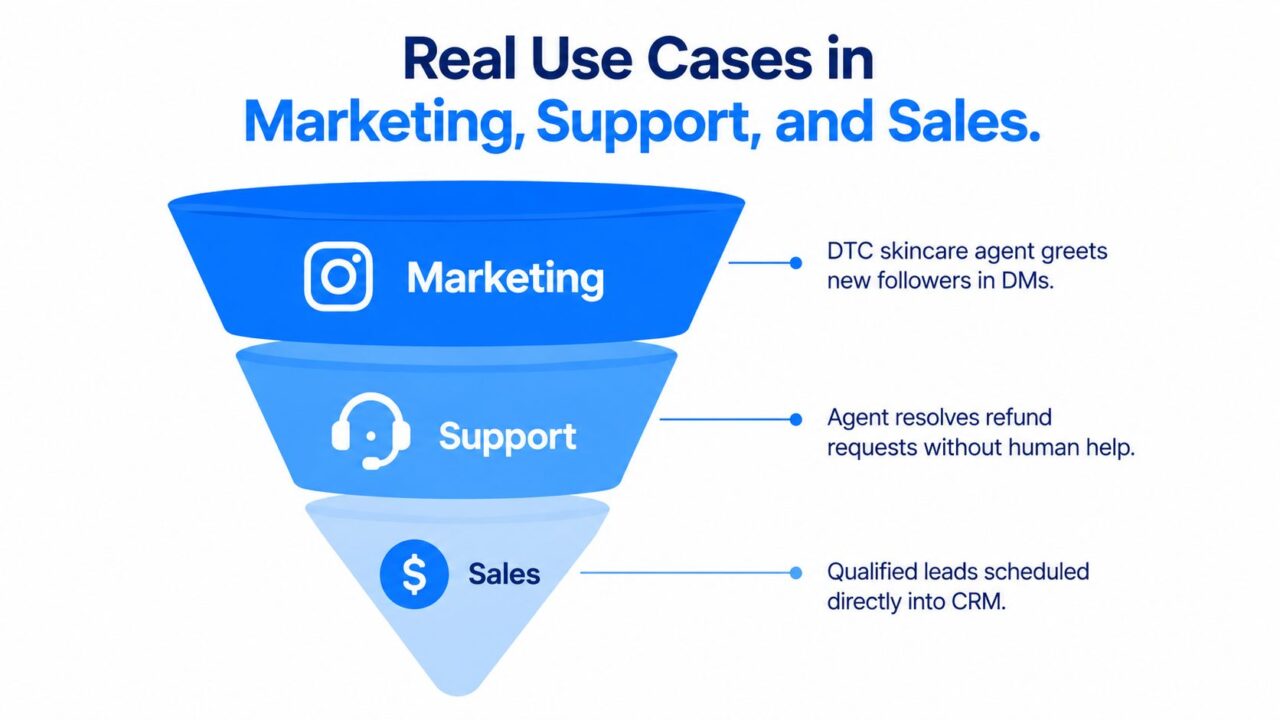
AI Agent Builder Business Funnel
Marketing through personalized conversations
A direct-to-consumer skincare brand connects an Instagram Direct agent to its product catalog and customer segments. When a new follower asks about dry skin, the agent asks about routine preferences, recommends products from the approved catalog, and records the product interest.
If that person later leaves items in a cart, the agent can trigger a separate follow-up flow with the correct promotional message and an unsubscribe option. The team measures recovered revenue, product recommendations accepted, and handoffs to a human advisor.
The workflow shouldn’t treat every message as interchangeable. WhatsApp Business Platform messages are organized into marketing, utility, authentication, and service categories, and the category determines how the agent should design and route the communication. An abandoned-cart offer is marketing, while an order-confirmation update is utility, as described in the WhatsApp Business Platform messaging categories.
Support with controlled escalation
A SaaS company uses an agent to triage incoming tickets. It answers onboarding questions from the help center, identifies the product area involved, asks for missing account details, and classifies urgency.
An account lockout follows a different path. The agent doesn’t attempt an improvised fix. It escalates the case to a human with the conversation history, account identifier, requested action, and severity context attached. The team measures first-response time, correct routing, containment of routine questions, and escalation completeness.
The value comes from separating routine information retrieval from cases that require judgment or authority. That separation makes the workflow safer and gives support staff better context when they take over.
Sales that filters and routes intent
A coaching business runs a Messenger agent for inbound leads. It asks about the prospect’s goal, timeline, budget range, and preferred program format. It then offers a discovery-call link to suitable prospects and routes high-intent conversations to a closer.
The business measures qualified-lead rate, completed bookings, and the share of conversations requiring manual qualification. The agent isn’t replacing the closer. It’s removing repetitive discovery work so the closer can focus on fit, objections, and commitment.
The same pattern can work for a local service provider, an agency, or a subscription company. Define the signals that indicate fit, collect only the information the team needs, and make the next action explicit.
Here’s a visual walkthrough of how conversational automation can support these kinds of workflows:
The measurable outcome doesn’t have to be revenue. It could be faster routing, fewer repeated questions, more complete lead records, or better visibility into why conversations are handed to people.
Trust, Transparency, and Consent by Design
Transparency shouldn’t be a legal note added after the flow is finished. It belongs in the first interaction, the handoff logic, the message templates, and the testing checklist.
The European Commission states that AI systems interacting directly with people, including chatbots and AI agents, must tell users they’re interacting with AI. The EU AI Act’s Article 50 transparency obligations apply from 2 August 2026, according to the European Commission’s AI Act transparency guidance.
Design disclosure into the conversation
A practical customer-facing flow should:
- Disclose early: Tell the person at the first interaction that an AI system is responding.
- Use clear language: Make the notice easy to distinguish from promotional copy or general terms.
- Preserve the context: Keep the disclosure visible or available when the conversation moves between website chat, Messenger, Instagram, WhatsApp, and a human handoff.
- Offer a human path: Give the user an obvious way to request a person, especially when the agent can’t resolve the issue.
- Test accessibility: Check whether the notice remains understandable with assistive technology, translated content, and different screen sizes.
Disclosure identifies the agent. It doesn’t automatically resolve consent, personal-data handling, profiling, or generated-content questions. Those decisions need their own rules.
Make marketing consent an actual flow step
GDPR consent for conversational marketing must be freely given, specific, informed, and unambiguous. The notice should explain the intended data use, identify the organization processing the data, describe the purposes and data types involved, and explain how consent can be withdrawn, as set out in the European Commission’s information on data protection rights.
In practical builder terms, use an affirmative action such as an unchecked opt-in box. Store the consent purpose and timestamp, attach the record to the correct subscriber, and provide an obvious unsubscribe or withdrawal path.
Separate permissions when the purpose differs. A retailer may need one permission for promotional broadcasts and another for order-related updates. Don’t reuse a contact’s details for a new marketing purpose just because the person once answered a support question.
Respectful automation gives people clarity before it asks for attention, data, or action.
Governance as the Real Bottleneck
Prompt quality gets attention because it’s visible in a demo. Permission design and accountability determine whether the agent can operate safely after launch.
Only 21% of organizations in a 24-country Deloitte survey reported mature governance for agentic AI, leaving roughly 80% without mature capabilities such as explicit autonomy boundaries, real-time monitoring, and complete action audit trails, according to Deloitte’s analysis of scaling AI agents.
A simple risk model makes the problem manageable:
| Risk Tier | Example Action | Approval Rule | Audit Requirement |
|---|---|---|---|
| Read-only | Answer a product FAQ or retrieve order status | Agent may proceed within approved data sources | Store the user request, source used, response, and escalation decision |
| Write but reversible | Add a tag or update a custom field | Permit automatically when the field and condition are explicit | Record the previous value, new value, timestamp, channel, and agent version |
| Irreversible or consequential | Issue a refund, change a customer record, or broadcast a promotion | Require human approval or a tightly controlled secondary check | Retain the request, evidence used, approver, final action, and rollback or remediation record |
Build controls around each tier
For read-only actions, test conversations with incomplete questions, contradictory details, and requests outside the knowledge source. The agent should say it doesn’t know or escalate instead of filling the gap with confidence.
For reversible actions, define rollback before launch. If an agent applies the wrong tag or changes a field, the team should know who can restore the previous value and how the mistake will be identified.
For irreversible actions, require approval. A refund, customer-record change, or broadcast should display the proposed action, supporting context, and affected audience before anyone confirms it.
Audit every channel
Keep a channel-specific checklist for:
- Messenger: Conversation identifier, page, user request, triggered flow, tool calls, and handoff status.
- Instagram: Account, message context, product or campaign reference, response, and escalation record.
- WhatsApp: Template category, consent status, message content, delivery state, and human approval where required.
- Web chat: Session identifier, disclosure shown, data collected, actions proposed, and transcript retention.
When an agent makes a mistake, retain enough evidence to reconstruct what happened. That includes the user’s message, retrieved data, rules applied, tools called, response sent, action taken, approval state, and the version of the workflow active at the time.
How to Choose the Right AI Agent Builder
Evaluate the platform against the work your team must perform, not against a generic feature page.
- No-code design depth: Can a non-technical operator build branches, conditions, fallbacks, tests, and handoffs?
- Channel coverage: Does it support the website, Facebook, Messenger, WhatsApp, and Instagram environments your customers already use?
- Integration breadth: Can it connect to your CRM, commerce system, calendar, help desk, email, SMS, and automation tools?
- Governance and permissions: Can you limit tools, require approvals, define risk tiers, and review action history?
- Analytics and experimentation: Can you measure response quality, containment, handoffs, qualified leads, and conversion-related outcomes?
- Compliance support: Does the platform help manage disclosure, consent records, unsubscribe paths, and data controls?
- Total cost and speed: Consider subscription cost, setup effort, maintenance, human review, and the time needed to launch a useful first workflow.
A specialist conversational platform suits a team whose core work happens in customer messaging and social channels. A broader automation suite may be more appropriate when the agent must coordinate complex internal systems or custom data services. Clepher offers a no-code visual builder for conversational workflows on Facebook Messenger and Instagram Direct, with a website chat widget, segmentation, integrations, and live chat handoff for marketing, sales, and support use cases.
Run a focused 30-day pilot
- Week one: Choose one narrow workflow and record a baseline for response time, qualified leads, containment, or recovered revenue.
- Week two: Design the flow, connect only necessary data, assign a risk tier, and write the escalation rules.
- Week three: Soft-launch on one channel with a human in the loop. Review conversations daily and correct unclear branches.
- Week four: Compare results with the baseline. Decide whether to scale, refine, or stop based on evidence rather than excitement.
The right AI agent builder becomes part of your operating system. Start with a bounded job, give the agent the minimum authority it needs, and expand only when the workflow is reliable, measurable, and accountable.
Clepher gives teams a no-code way to build AI-powered conversational flows for marketing, sales, and support on Facebook Messenger and Instagram Direct. Visit Clepher to explore a practical platform for turning a controlled agent workflow into a live customer conversation.