
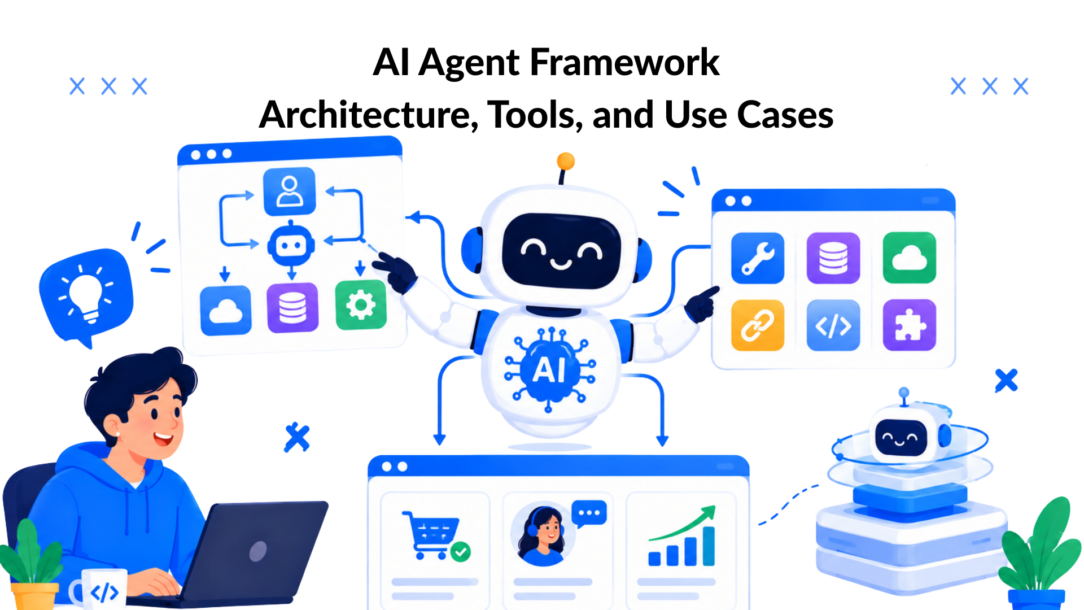
You’ve launched a webinar campaign, the landing page is live, and the first questions are already arriving. One visitor wants to know whether the plan includes onboarding. Another wants a demo. A third is angry about a billing charge from a previous purchase. A basic chatbot can answer one question at a time, but you can build AI agents that handle multiple queries simultaneously. An AI agent framework can interpret each request, retrieve context, call the right system, and decide whether the conversation should continue or reach a person.
That distinction matters for marketing and support teams. The framework is the operating layer behind the visible conversation. It connects language understanding, memory, tools, integrations, and decision logic so a bot can move a lead through a funnel instead of just producing text.
The Moment an AI Agent Framework Actually Shows Up
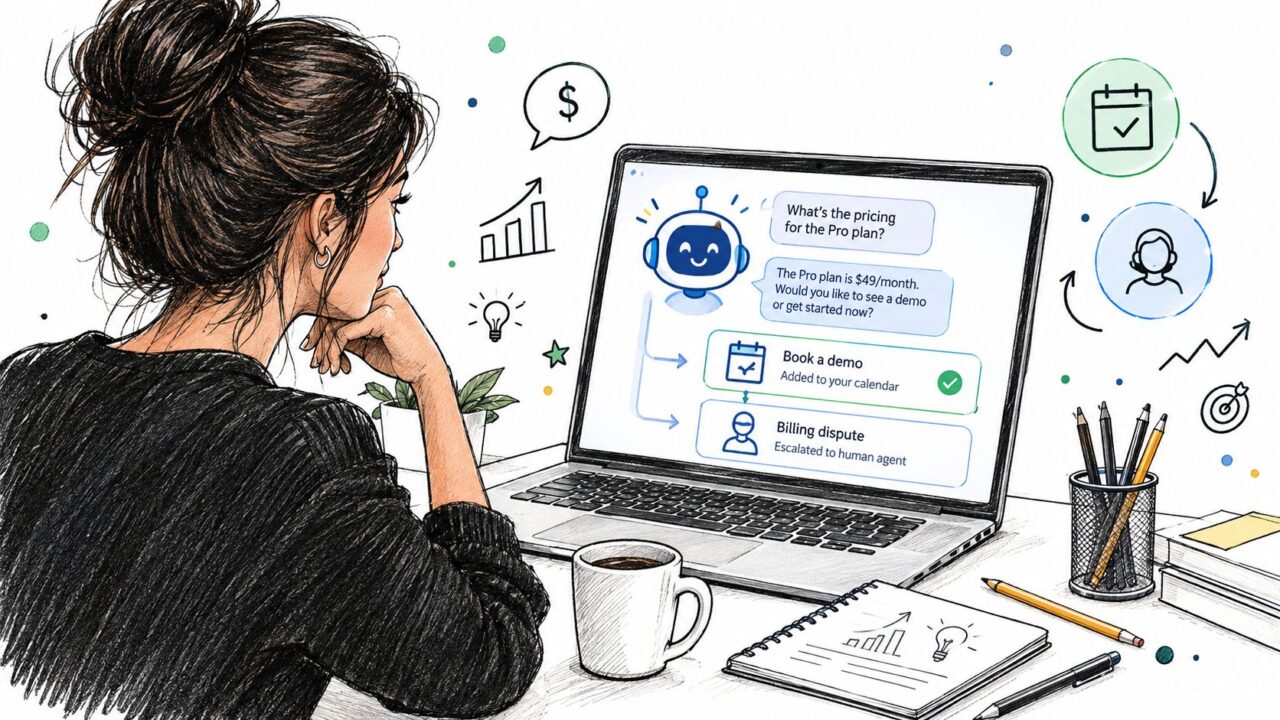
It’s Tuesday morning. Your webinar landing page has just gone live, and paid traffic is beginning to arrive. Within minutes, a visitor asks about pricing, another asks whether the webinar is suitable for a small team, and a third wants to book time with sales.
The agent handles each conversation differently. It searches approved product information for the pricing answer, asks a qualifying question before offering a calendar slot, and sends a billing dispute to a human queue instead of improvising. After a qualified demo is booked, it passes the contact details and conversation summary into the follow-up sequence.
AI Agent Framework AI Chatbot
The visitor sees a chat window. Underneath, several systems are working together:
- Natural language understanding identifies the request and its emotional context.
- Memory preserves the current conversation and retrieves relevant customer information.
- Orchestration chooses the next step, including when to ask a question, call a tool, or escalate.
- Tools connect the agent to calendars, CRMs, payment systems, and knowledge bases.
- Integrations deliver the interaction through webchat, Messenger, WhatsApp, or another channel.
The history of agent frameworks helps explain why this architecture feels new, especially with the rise of open-source solutions. The field’s foundations reach back to the Dartmouth Summer Research Project on Artificial Intelligence in 1956 and agent-oriented programming proposed in 1993. The practical category became distinct in 2023, when GPT-4-era systems, AutoGPT, BabyAGI, and LangChain-style loops showed that language models could plan, use tools, and iterate. The ChatGPT API launch on March 1, 2023, made low-cost agent loops easier to build, while BabyAGI’s compact implementation helped popularize the objective, task creation, execution, and reprioritization loop. These milestones are summarized in this history of agents and agentic workflows.
The promise of an AI agent framework is practical. It turns a one-message answer into a repeatable funnel action, such as qualifying a lead, booking a meeting, recovering an abandoned sale, or routing a sensitive support issue.
What an AI Agent Framework Actually Is
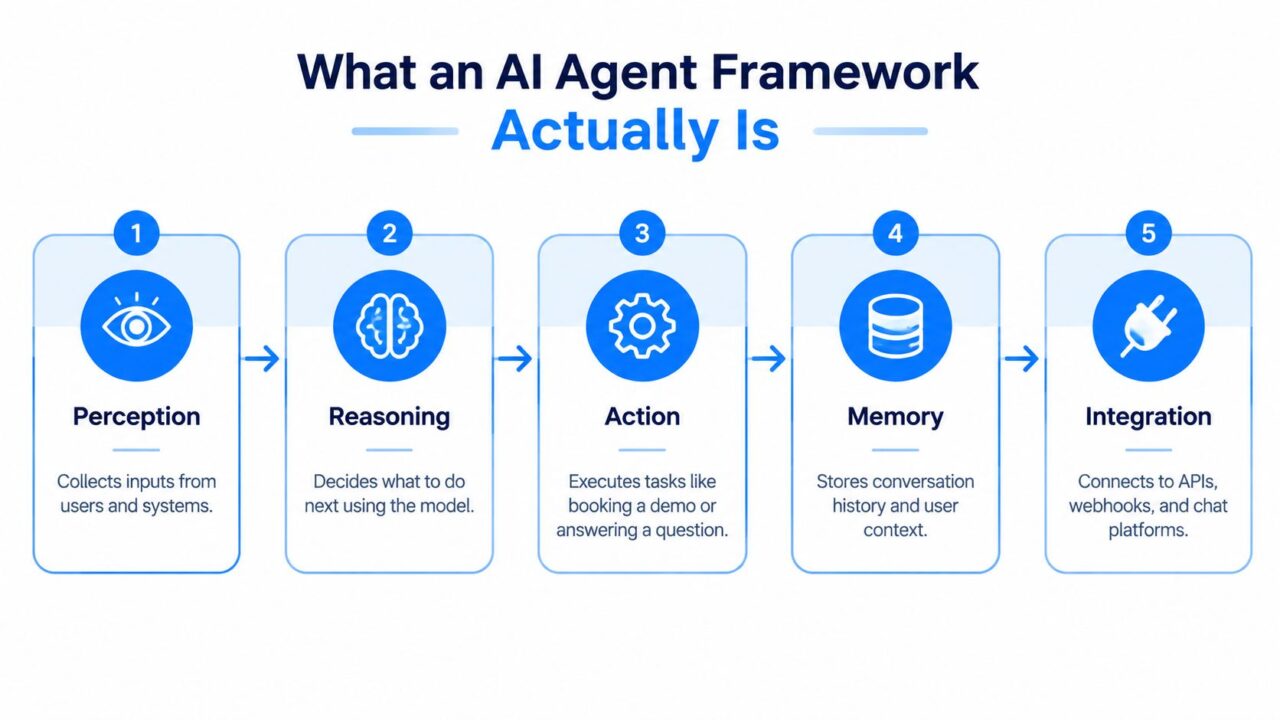
An AI agent framework is a layered runtime for systems that interpret goals, use context, call tools, and manage multi-step work. It isn’t just a large language model with a clever prompt.
Use the webinar workflow as a simple mental model:
- Perception receives the visitor’s message, form submission, or event from another system.
- Reasoning interprets what the person wants and determines which information matters.
- Orchestration selects the next step, such as answering, asking a qualifying question, or escalating.
- Action calls a calendar, CRM, payment, search, or ticketing tool.
- Memory stores the conversation state and relevant customer context.
- Integration connects the agent to channels and business systems.
The model provides language-based reasoning, but the framework supplies the surrounding controls. Without orchestration, a model can respond fluently but won’t reliably complete a workflow. With orchestration, the agent can follow a sequence, inspect a tool result, adjust its next move, and stop when a human should take over.
AI Agent Framework Process Diagram
A useful explanation of the broader relationship between agents, workflows, context, and tools appears in this guide to what AI agents are. The key point is that an agent can make decisions dynamically, while a workflow can enforce a known sequence, which is critical in the context of building AI agents. Most useful business systems combine both.
For your funnel, the difference is easy to see. A basic chatbot answers, “What does the webinar cover?” An agent can answer, recognize buying intent, ask about team size, check availability, book the right meeting, and record the context for sales.
The Core Components That Make a Framework Work
A framework works when its components cooperate under clear boundaries. Think of the system as a small digital team. One part listens, one interprets, one remembers, one performs tasks, and one coordinates the work.
| Component | What It Does | Example in Action | Common Failure |
|---|---|---|---|
| Natural Language Understanding | Identifies intent, entities, sentiment, and ambiguity in a message | Recognizes that “I need my money back, and your last reply ignored me” is a frustrated refund request | Treats “refund,” “invoice,” and “cancel” as interchangeable keywords |
| Memory | Maintains conversation state and retrieves relevant customer context | Remembers that the visitor already shared their company size and pulled a prior CRM interaction | Mixes one customer’s details into another conversation or retains sensitive context too broadly |
| Tools | Exposes controlled actions and data access through APIs or functions | Checks calendar availability, creates a ticket, searches a knowledge base, or generates a payment link | Calls an API without the right authentication context or sends an irreversible action too early |
| Orchestration | Controls sequence, branching, retries, approvals, and handoffs | Qualifies a lead, routes it by segment, schedules a meeting, then confirms the booking | Loops endlessly, skips a required question, or chooses the wrong tool |
Natural language understanding
The agent must understand more than the nouns in a message. A refund request may contain intent, urgency, account details, and dissatisfaction. The system should extract those signals and decide whether the request is suitable for automation or needs review, leveraging the capabilities of a robust agents SDK.
For a marketing workflow, NLU might classify a visitor as researching, evaluating, or ready to buy. That classification can influence the next question, the content shown, and the CRM stage updated.
Memory
Memory has at least two useful scopes. Short-term memory tracks the active conversation, while longer-term context can come from a CRM profile, previous tickets, subscription status, or consent record.
The scope must be deliberate. A support agent may need an order number for the current case, but it shouldn’t expose unrelated internal notes or carry private information into a new customer session.
Tools
Tools turn language into business action. A calendar tool can find open slots, a payment tool can create a secure checkout path, and a ticket tool can open a case with the transcript attached.
Each tool should have a narrow purpose, clear inputs, permission checks, and predictable output. The agent should know whether a tool only retrieves information or changes a record.
Orchestration
Orchestration is where the framework becomes operational. It defines the path from intent to outcome and gives the agent rules for missing information, failed calls, low confidence, and human approval, essential for effective agent development.
Practical rule: Let the model choose among well-defined actions, but don’t let it invent the business process.
Your funnel depends on this layer. If orchestration is weak, a polished conversation can still produce a duplicate booking, an incorrect CRM update, or an escalation that arrives without enough context.
Common Framework Patterns and Architectures
The right architecture depends on the shape of the work. A high-volume FAQ flow doesn’t need the same design as a support process that checks an account, calls a carrier API, and creates a case.
AI Agent Framework Architectures
Single-agent and multi-agent designs
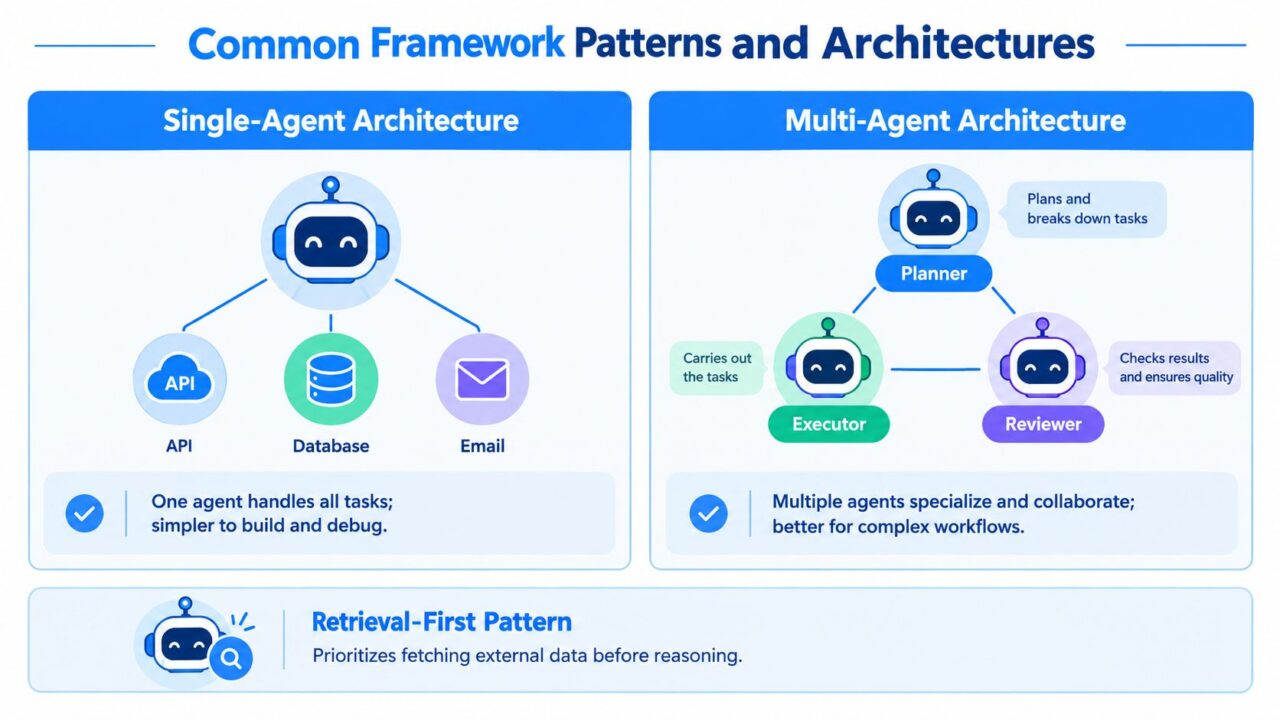
A single-agent architecture gives one agent access to a controlled set of tools. It’s usually easier to build, test, and debug. A lead qualification bot that asks questions, checks routing rules, and books a meeting is a good candidate for development using CrewAI tools.
A multi-agent architecture splits responsibility among specialists. A planner can break down the request, an executor can call tools, and a reviewer can check the result. This can suit a complex content operation or a support system with separate billing, technical, and account specialists, but every handoff adds coordination and observability requirements.
A retrieval-first pattern tells the agent to fetch approved external information before it reasons about an answer. This is often safer for product documentation, campaign rules, shipping policies, and pricing content than relying on general model knowledge.
Three recurring control patterns
- ReAct: a framework for building intelligent agents that can adapt to user needs. The agent alternates between reasoning and action. A support bot reads a ticket, searches the knowledge base, checks an order system, and decides whether to respond or escalate.
- Planner-executor: One component creates a plan, and another executes the steps. A sales agent can qualify a lead, enrich the record, select a route, and schedule a meeting.
- Router-agent: A lightweight decision layer sends each request to the right path. A campaign assistant can route questions about pricing, registration, technical setup, or partnership inquiries.
The tradeoff is operational. More reasoning steps can improve flexibility, but they can also increase latency, model usage, failure points, and debugging complexity. A deterministic state machine may outperform an LLM planner for a compliance-heavy refund process where every branch must be known and auditable.
For framework selection, review how the system handles tracing, retries, tool contracts, and state. Microsoft’s public preview of its Agent Framework, for example, describes agents and workflows as composable building blocks, while the practical comparison of AI agent platforms can help a non-developer team compare deployment approaches.
Connecting Frameworks to APIs, Webhooks, and Chat Platforms
An agent becomes useful when it can interact with the systems where your funnel already lives. Start by treating every incoming interaction as an event, regardless of whether it arrived through webchat, WhatsApp, Messenger, Slack, or another channel.
The integration layer normalizes that event before NLU processes it. A normalized event might include the message, channel, user identifier, conversation identifier, timestamp, consent state, and attachments. This keeps the reasoning layer from needing separate logic for every channel.
Outbound calls need safeguards
When the agent calls an external API, define the boundaries before launch:
- Authentication: Use scoped credentials and keep permissions limited to the actions the tool needs.
- Rate limits: Decide what happens when the calendar, CRM, or payment provider slows down.
- Pagination: Make sure searches don’t inspect only the first page of records.
- Idempotency: Use an idempotency key where supported so a retry doesn’t create duplicate bookings or CRM updates.
- Timeouts: Return a useful fallback instead of leaving the visitor waiting indefinitely.
A tool result should also be structured. “Meeting booked” is less useful than a response containing the booking identifier, time zone, attendee address, and confirmation status.
Inbound webhooks need verification
A webhook might notify the agent that a deal stage changed in HubSpot, a payment succeeded, or a support ticket was updated. The agent can then trigger a follow-up message, but it should first verify the sender signature, reject replayed events, and use scoped secrets.
Teams that are new to event-driven workflows can review this webhooks site overview For a practical introduction to how webhooks connect systems through real-time notifications, consider using an agent’s SDK.
Make every conversation inspectable
Use structured logs and a trace ID that follows the request through NLU, memory lookup, orchestration, tool calls, and the final response. Store enough information to replay a failed conversation safely without exposing unnecessary personal data.
Observability isn’t a dashboard added after launch. It’s how you answer a marketer’s urgent question, “Why did this qualified visitor receive the wrong follow-up?”
Putting the Framework to Work in Marketing, Sales, and Support
The same architecture can support different funnel jobs when the tools, memory, and escalation rules change.
Marketing workflows
A campaign-launch agent can take a brief, create on-brand copy variants, route drafts for approval, schedule approved posts, and send engagement information back to analytics. The agent shouldn’t publish everything automatically. A review step can protect brand language and prevent unsupported claims.
For marketers, the value is coordination. The agent connects the content brief, approval workflow, publishing tool, and reporting system so the team spends less time moving information between platforms. A visual AI agent for marketing can be developed using tools provided by Microsoft and Langgraph. can represent this same logic through triggers, conditions, and conversational paths.
Sales workflows
A qualify-and-book agent can ask about company size, need, timeline, and current process. It can enrich the lead record, apply routing rules, check a representative’s calendar, and pass the conversation summary to the person who takes the meeting.
The human handoff is part of the design, not a failure. Sales receives the reason for the inquiry, answers already given, objections raised, and the next recommended action. That context helps the representative continue the conversation without making the prospect repeat themselves.
Support workflows
Consider a customer reporting a shipping delay. The agent identifies the intent, retrieves the order context, remembers whether the customer has already contacted support, calls the carrier API, and checks the approved delivery policy. Orchestration then chooses among three paths:
- Resolve: Explain the latest status and provide the next expected step.
- Escalate: Create a ticket with the order data and transcript when the result is ambiguous.
- Approve an action: Trigger a refund or replacement only when policy and account checks pass.
A support team evaluating this use case can also consult this Shopify customer service automation guide for ideas on handling repetitive customer requests while preserving human escalation.
The funnel impact differs by department. Marketing cares about qualified engagement and movement toward an opportunity. Sales cares about useful handoffs and representative capacity. Support cares about resolution quality, customer satisfaction, and safe handling of account actions. The framework should connect each outcome to a traceable event, not just a pleasant conversation.
Misconceptions and Operational Traps to Watch For
A larger model doesn’t automatically create a better agent. A smaller or mid-tier model with clear tools, strong routing, and strict approval rules may fit a customer workflow better than a more capable model connected to an uncontrolled tool layer, especially in agent development scenarios. Latency, cost, consistency, and brand safety can matter more than raw language ability.
An agent framework also isn’t plug-and-play. Teams often discover gaps in retry handling, webhook verification, authentication, and human escalation only after a live workflow encounters an unusual condition.
More tools don’t necessarily make an agent smarter. Tool sprawl gives the orchestrator more similar choices, which can increase incorrect calls and make failures harder to diagnose.
Use these questions before launch:
- Observability: Can you reconstruct why the agent chose an action?
- Fallbacks: What does the visitor see when a tool fails?
- Memory scope: Which facts may persist, and who can access them?
- Ownership: Who handles cases the agent cannot safely resolve?
- Automation boundary: Does this workflow still require human judgment?
The operational concern is measurable adoption without equal measurement discipline. A 2026 report found that 57.3% of surveyed teams had agents in production and 89% had observability, but only 52% used evaluations, as reported in the State of Agent Engineering. Shipping first and measuring later leaves your funnel exposed to silent routing and quality problems.
Putting the Framework Pieces Together
Use one compact loop to evaluate any AI agent framework:
An intent enters through a channel. NLU classifies it. Memory supplies relevant context. Orchestration selects the next step. A tool retrieves information or performs an action. The integration layer returns the response and records the trace, which is crucial for building AI agents that require accurate data tracking.
If the workflow breaks, identify the layer. A wrong interpretation points to NLU or prompt design. Missing customer history points to memory issues that can be addressed through agent development. An unsafe action points to orchestration or tool permissions. A duplicate CRM update points to integration reliability.
A practical selection checklist looks like this:
- Name the workflow: Start with lead qualification, ticket triage, or another narrow process.
- Map the dependencies: List the APIs, knowledge sources, calendars, CRM records, and channels required.
- Define memory: Separate conversation state from durable customer context.
- Choose the pattern: Use routing for high-volume classification, retrieval-first for approved information, and deterministic steps for sensitive actions.
- Pilot narrowly: Test real conversations and edge cases before expanding the agent’s authority.
- Instrument immediately: deploy your AI agents to gather data and improve performance using Python scripts. Capture tool calls, outcomes, errors, handoffs, latency, and evaluation results from the first release.
The wider market signals why this discipline matters. A 2026 industry summary reports that 54% of organizations were actively deploying AI agents in Q1 2026, compared with 33% in mid-2024 and 12% in 2024, while another survey reports that 46% use orchestration frameworks. The same summary says 88% of technology executives are embedding agents into workflows, products, or value streams across 27 countries. These figures are reported in this AI agents statistics summary.
A framework is a runtime, not a funnel strategy. Your team still has to choose the customer problem, define the safe action boundary, and decide what success means.
Clepher gives marketing and support teams a no-code way to build AI-driven conversational workflows across website chat, Facebook Messenger, WhatsApp, and Instagram Direct Message using an open-source framework for building agents. Use its visual flows, triggers, conditions, segmentation, and integrations to prototype lead qualification or support automation, then visit Clepher to explore how the framework ideas in this guide can become a live customer conversation.
