
Two visitors ask your website chat the same question on the same afternoon. One is a student comparing prices. The other is a procurement manager ready to sign. If both receive the same reply, one of them is likely to leave, not because your offer is wrong, but because the message doesn’t match the situation.
That’s the quiet cost of treating an audience as one contact list. A useful segment changes what you say, when you say it, and what action you ask the person to take. It can also prevent wasted messages, such as sending a discount to a loyal customer who would have purchased without one, or promoting a beginner plan to an enterprise buyer.
Audience segmentation became a formal marketing strategy in 1956, when Wendell Smith described how firms could divide heterogeneous markets according to different needs and adapt products, positioning, and communications accordingly. The principle still holds, but messaging platforms now let teams connect a segment to a live conversation.
This guide walks through 10 audience segmentation strategies, ordered from simpler data to richer insight. Each one follows a working rule: identify the data source, apply a segment tag in Clepher, choose a flow, and test a message variant. Just as important, each strategy shows where it breaks down, so you know when not to use it.
1. Demographic and Geographic Segmentation
An online course seller might show one bundle to a student and another to a working professional. A local salon might tag people inside its service area and push same-day openings. An apparel brand might swap in weather-relevant products by region. That is the practical use of demographic and geographic segmentation. Start with a data point you can collect, turn it into a tag in Clepher, connect it to a flow, then test whether the message improves response.
Audience Segmentation Strategies Online Shopping
Build the rule in Clepher
Use a capture widget or a short conversation question to collect optional profile details such as student status or profession. Add location from a form response, a conversation question, or a manual tag when a team member already knows the area. Then map that tag to a flow with a message that changes something real: the offer, timing, availability, shipping, or appointment options.
- Data source: Profile fields, forms, location signals, and stated preferences.
- Segment tag:
region_north,student,professional, orlocal_service_area. - Flow: Route contacts to regional shipping details, local promotions, or age-relevant bundles.
- Message test: Compare a general offer against a version with local delivery information or a region-specific event.
Set send times by the recipient’s local time. For local businesses, the same segment can also support inventory planning or appointment routing.
Practical rule: Use demographic or geographic data when it changes the offer, logistics, or timing. If the message stays the same, the segment is just a label.
This approach has limits. Age, gender, or location can point you in a useful direction, but they break down fast when you treat them as a proxy for intent. A student can have enterprise-level urgency. Someone in the same city can want a completely different service level. Use this segment as a first pass, then layer in behavior or a stated preference before you make a stronger personalization choice.
2. Firmographic Segmentation
A startup founder lands on your demo flow. A procurement lead from a large healthcare company hits the same entry point an hour later. Sending both people the same message usually wastes one of those visits.
Firmographic segmentation works when company context changes the sales motion, the proof points, or the handoff. Company size, industry, revenue, years in business, technology stack, and org structure all affect what buyers need to see first and how carefully they evaluate risk.
The practical rule is simple. Pick one company signal, turn it into one tag, route it into one flow, then test one message angle against another in Clepher.
A project management SaaS team might send a startup into a path that highlights fast setup and basic capacity limits. The same team can send an enterprise contact into a version focused on collaboration controls and implementation support. A compliance provider can do the same by matching healthcare accounts to HIPAA-related messaging and technology companies to SOC 2 concerns. The offer may stay the same. The framing should not.
Build the segment around one useful field first
Start with fields you can maintain: company name, industry, company size, and role. Collect them in an early Clepher capture widget, or sync them from the CRM so prospects do not have to repeat themselves. Enrichment tools such as ZoomInfo, Apollo, or Clearbit can fill gaps, but stale records create bad branches fast, so review source quality before those values trigger a live conversation.
- Data source: Capture forms, CRM records, or firmographic enrichment.
- Segment tag:
startup,healthcare,enterprise, oragency_owner. - Flow: Send contacts to the right product explanation, qualification route, or sales rep.
- Message test: Compare a feature-led version against one framed around industry context or operating scale.
This segment breaks down when teams treat company size as purchase intent. Small firms can buy fast. Large accounts can browse for weeks with no authority. Use firmographics to set context and routing. Then add behavior, role, and conversation signals before you push anyone into a high-priority sales path.
3. Behavioral Segmentation
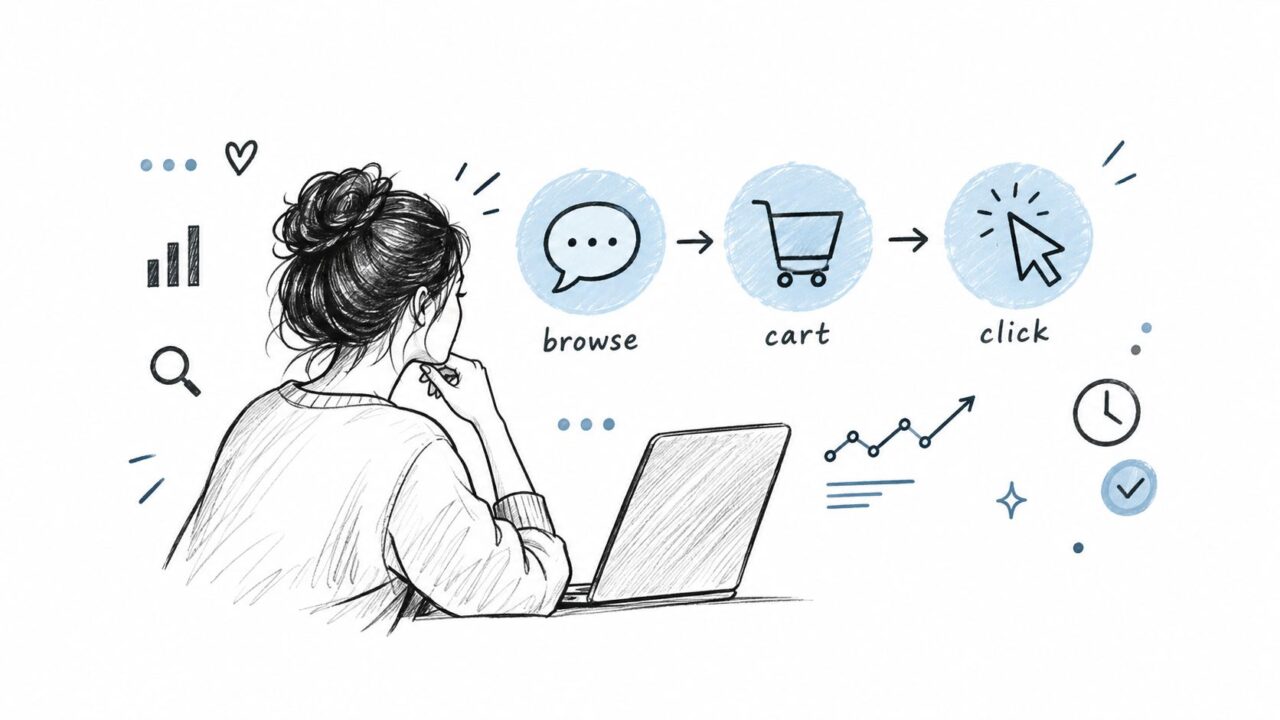
A contact clicks your pricing page, asks one product question in chat, then disappears. Another keeps reading how-to content for a week and never looks at pricing. Those contacts should not enter the same flow. Behavioral segmentation works best as a working rule: one data source, one tag, one automation path, and one message you can test in Clepher.
A retailer might tag repeated product views with no order as viewed_no_purchase and trigger a reminder or a small piece of decision support. A SaaS team can tag people who click a comparison page as feature_focused, then test a feature-led follow-up against a message that answers the exact objection behind that click. Support-heavy behavior deserves its own route too. If someone asks technical questions, support_needed should send them to help, not to a generic sales sequence.

Audience Segmentation Strategies Mental Mapping
Build from events you can act on now
Use Clepher custom fields and tags to record button clicks, replies, and keywords, and sync events such as purchases or product usage from your other tools through integrations. Then connect each behavior to a single next step. Browsing behavior gets education or a recovery flow. Price questions get a price_sensitive tag and a message that handles cost concerns directly. Recent product usage can trigger onboarding help, expansion prompts, or a related recommendation.
This segment breaks down when teams overread weak signals. One click can be accidental. An old visit can be irrelevant. Tags also go stale fast after the contact buys, upgrades, or gets their answer. Set a recency window, remove people once the goal is complete, and keep testing the message, not just the segment name.
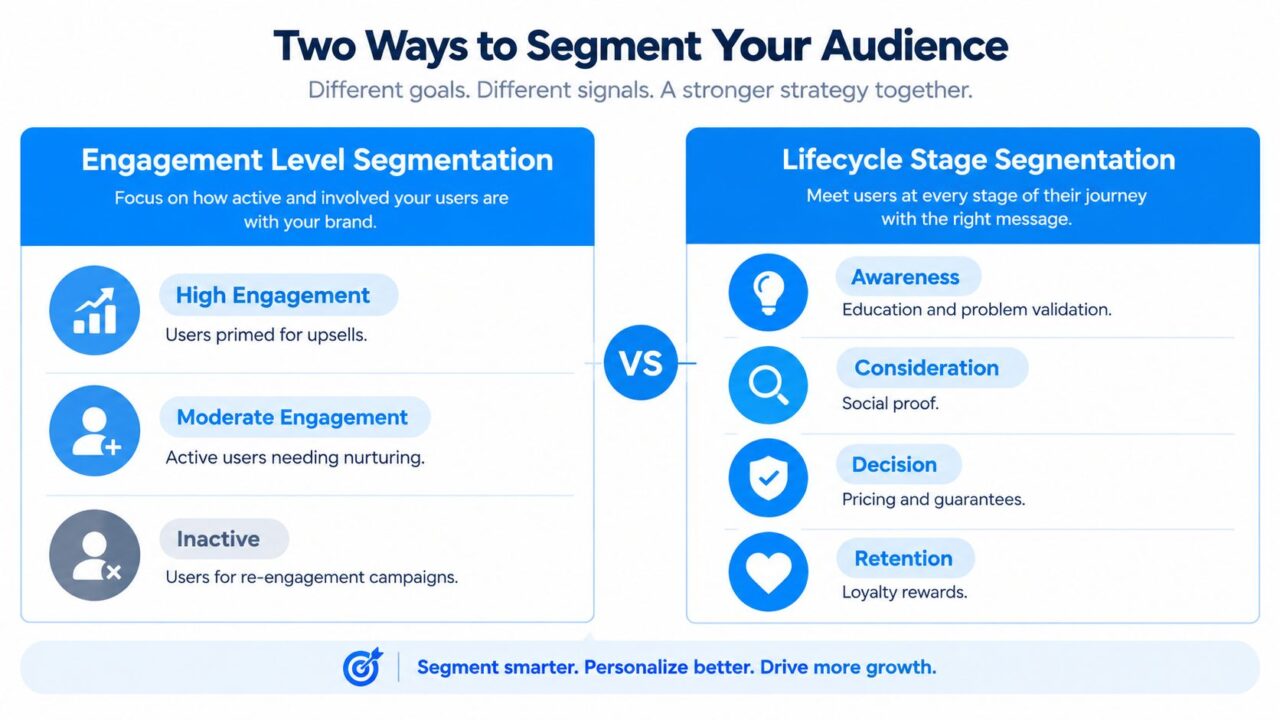
4. Engagement Level Segmentation
A contact opens three emails this week, clicks once, then goes quiet for a month. Another never clicks but replies in chat every time support reaches out. Treating both people as equally engaged creates bad timing and weak follow-up.
Engagement works best as a working rule you can build and test. Combine email opens and clicks from your email tool with replies, broadcast responses, and chat frequency in Clepher to sort people by recent activity, then attach a clear next step. Tag active readers as high_engagement and test early access against a value-first message. Tag steady but less responsive contacts as moderate_engagement and send useful content on a slower cadence. Tag quiet contacts as inactive and run a low-frequency reactivation flow with a preference update or channel switch.
The threshold has to come from your own baseline. A 40% open rate in the last 30 days can be a starting rule, but it is only a starting rule. Email-heavy audiences, chat-led programs, and longer sales cycles produce different patterns, so build the first version, then pressure-test it with A/B variants and actual downstream results.
Here is the trade-off. Engagement signals are easy to collect, but they are easy to misread too.
Low engagement does not always mean low intent. Some people mute email and wait for SMS. Some are interested but not ready. Some buy without clicking much at all. That is where this segment breaks down, especially if the team treats opens as the main score. Privacy changes and inbox filtering can also distort open data.
Use engagement to set message pace and format, not to judge account quality. If a segment starts slipping, reduce frequency first, test a channel change, and measure replies, purchases, opt-outs, and revenue per recipient before removing anyone from the flow.
5. Purchase Value and Frequency Segmentation
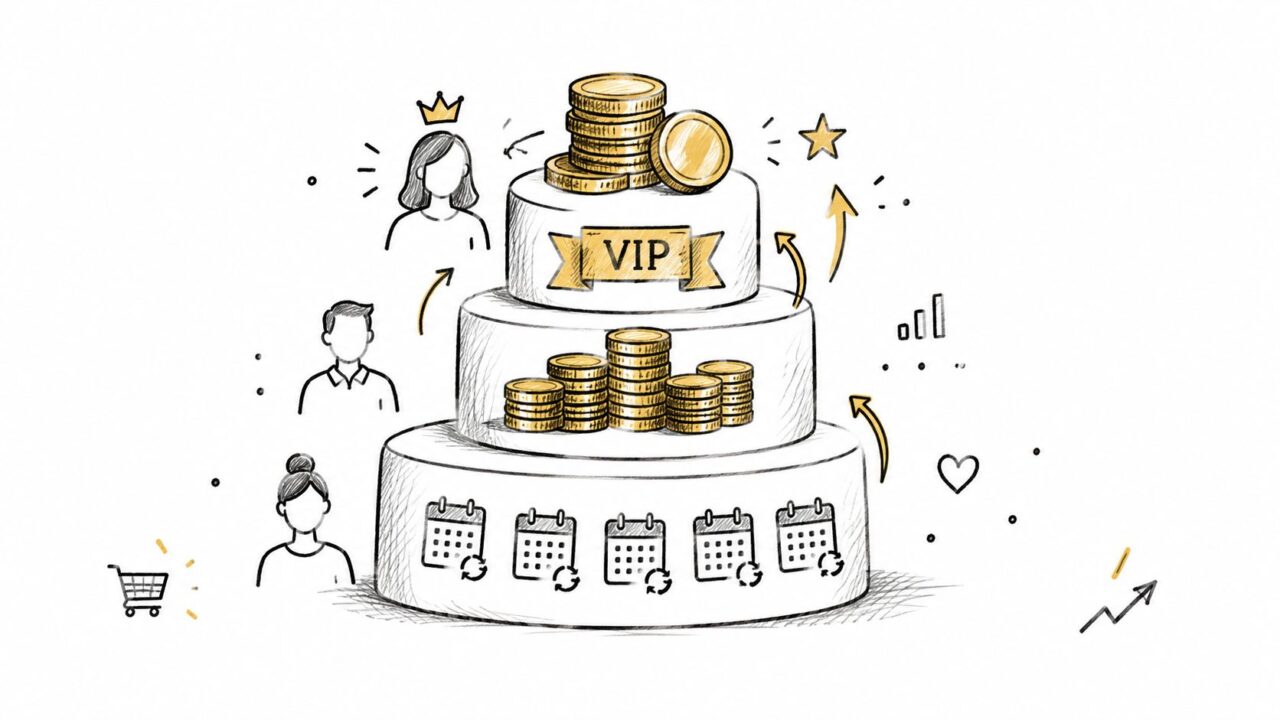
A buyer places a large order, then gets the same discount blast as everyone else a day later. Another has not ordered in months and keeps receiving VIP-style offers. Purchase value and frequency segmentation fixes that mismatch. It works best as a rule set you can build in Clepher. Pick a data source, assign a segment tag, trigger a flow, and test the message against a control.
Start with buying patterns that affect the next decision. Import orders, contract value, repeat purchases, and subscription status from your e-commerce platform or CRM through an API, Zapier, or another integration. Then map simple tags such as vip, active, at_risk, and lapsed to actions your team can deliver.
One example is enough to show the logic. If a customer has more than $2,000 in lifetime value, that can support a VIP path with early access, priority support, or a faster buying experience. A subscription business can watch for falling order frequency and shift that group into a retention flow before sending another broad promotion. A SaaS team can route larger contract accounts to a high-touch service path and keep smaller accounts in self-service onboarding. In each case, test the offer. Compare recognition against a standard promotion, or replenishment against a plain reminder.
The trade-off is simple. Value signals are useful, but they get messy fast.
A high-value segment breaks down when the calculation is incomplete, margins are thin, or recent buyers need help more than another sales push. Frequency can mislead too. Some customers buy rarely by nature and still have strong intent when the timing is right. Treat these segments as service and timing rules, not as a license to pressure your best customers more often.
The next step is practical. Suppress anyone who already completed the target action; check support status and satisfaction first, then run an A/B test on one high-value and one at-risk flow.
6. Lifecycle Stage Segmentation
A contact asks about pricing on Monday, starts a trial on Tuesday, then goes quiet after signup. If they keep getting top-of-funnel education, the flow is already behind. Lifecycle stage segmentation works best as an operating rule: use one visible signal, apply one stage tag, trigger one flow, then test one message against a control in Clepher.
Start with events your team can observe without debate. Signup status, product views, pricing questions, purchases, and post-purchase activity are usually enough to separate awareness, consideration, decision, customer, and advocate. In Clepher, those tags should update as behavior changes, not sit there as static labels.
The message changes with the stage. Someone in awareness needs product education. A contact comparing options needs proof, objection handling, or a clear next step. After purchase, the job shifts to onboarding, retention, and eventually referral asks. A course creator might keep free subscribers in education while sending webinar attendees payment-plan details. A SaaS team might split new signups into guided tours, feature education, or activation prompts, then A/B test stage-specific copy against a general nurture message.
Build for movement, not neat funnels
Lifecycle segments break down when teams treat stages as fixed or force every contact through the same order. People pause. Some skip straight from light research to purchase. Others buy once and still need basic education before they can activate. That is why each flow needs exit conditions. A purchase should remove a person from acquisition messaging and place them in onboarding. A stalled trial should not keep receiving decision-stage prompts forever.
Audience Segmentation Strategies Segmentation Overview
Use the diagram to align the team on definitions before you build. Then pick one stage transition, such as pricing question to decision or purchase to onboarding, and test two message variants there first.
7. Psychographic Segmentation
Two leads can ask for the same feature and want different outcomes from it. One wants control. The other wants less effort. Psychographic segmentation helps you build for that difference.
Use it as a working rule inside Clepher’s builder. Start with one clear signal, assign one tag, route one flow, then test two messages against each other. A sustainable fashion brand might tag a contact as sustainability-focused after questions about materials and supply chains. A digital agency can separate a growth-driven prospect from a steady operator based on the language used during onboarding. A productivity app may present automation one way to a user who wants precision and another way to someone who wants speed.
The catch is obvious. Motivation is useful, but it is easy to overread. A single reply is not a personality profile.
A better setup is simple. Ask a short preference question early in the conversation. Store the answer in a Clepher custom field, then use the tag only for the next step in the flow. Good tags stay broad, such as sustainability, price, convenience, or control. Good tests stay narrow too. Compare a feature-led message with a benefit-led message for the same motivation, and see which one gets the stronger response.
This segment breaks down when teams infer sensitive traits, lock people into a label too early, or keep using an old preference after behavior changes. Privacy matters here. People tend to be more comfortable with personalization based on purchase history and website visits than on financial information or social media activity, according to the Qualtrics XM Institute report.
Keep the signal first-party and easy to explain. Then test one motivation-based branch against a general message before you add more nuance.
8. Problem-Based and Use Case Segmentation
A lead asks for the same demo as everyone else, but for a different reason. One team needs cleaner handoffs across time zones. Another needs people to hit deadlines without constant follow-up. If both contacts enter the same nurture flow, one of them gets the wrong story.
That is the rule here. Segment by the job the buyer is trying to get done, then build the flow and message around that use case inside Clepher.
Start with language buyers already use. Review Clepher chat logs, support threads, form responses, and sales notes. Look for recurring problem statements, then group close variants under one practical tag instead of creating a new segment for every phrase. Tags such as reduce_abandonment, improve_retention, need_expertise, or coordinate_teams are specific enough to route a flow and broad enough to stay usable.
Then build one branch per problem. A project-management platform can change its product tour based on coordination issues versus accountability issues. A digital agency can split prospects who lack in-house expertise from those who cannot justify a full engagement yet. An e-commerce SaaS provider can send different sequences for cart abandonment, average-order-value growth, and retention. In each case, the message should open with the problem, then show the feature, proof point, or package that fits it. Test that against a product-first variant and keep the winner.
If two contacts need different outcomes, they need different flows, even when they look identical in your CRM.
This segment breaks down in two places. First, teams over-tag minor wording differences and end up with clutter instead of signal. Second, they treat the problem as the whole buying context. Shared pain does not mean shared urgency, budget, or authority. Add lifecycle stage or role before you route a high-value lead too aggressively.
9. Persona-Based Segmentation
A lead asks for the same product, through the same funnel, as everyone else. The wrong message still lands because the buyer behind that lead is different. Persona-based segmentation helps when you need a working rule that combines role, motivation, buying style, and context into something a team can route inside Clepher.
Use personas as operating labels, not as fictional profiles. A fitness brand may need one flow for a busy parent who wants consistency and another for an athletic competitor chasing performance. A SaaS team may speak differently to an overwhelmed manager who wants visibility than to a detail-oriented operator focused on control settings. An agency usually should not qualify an agency owner the same way it qualifies an in-house marketer.
The build is straightforward, but the tag must be earned.
Pull signals from interviews, surveys, purchases, support interactions, sales notes, and Clepher chat logs. Then assign one persona tag only when the pattern shows up across those sources, not when a single call sounds convincing. From there, connect the tag to a qualification rule, a flow, and a message variant you can test against a neutral version.
- Data source: Interviews, surveys, chat language, purchase behavior, and sales notes.
- Segment tag:
busy_parent,athletic_competitor,agency_owner, orin_house_marketer. - Flow: Route contacts to the recommendation, qualification path, or education sequence that fits that persona.
- Message test: Compare persona-led framing with a neutral offer in an A/B test.
Persona segmentation breaks down when teams create too many labels, or when a persona sounds clear in a workshop but cannot be identified in the data. It also fails when the tag hides stronger signals like lifecycle stage, budget, or urgency. Revisit the labels regularly, and merge any persona that does not change the flow or the result.
10. Channel-Based Segmentation
A lead taps your Instagram story, asks a quick question in DM, then goes quiet. Two days later, the same person replies on WhatsApp and is ready to buy. If both messages get the same sequence, the flow usually feels off.
Channel-based segmentation works best as an operating rule. Use the channel as the data source, apply a channel tag, route the contact into a matching flow, and test the message against a second variant in Clepher. The point is not to treat Instagram, WhatsApp, email, SMS, website chat, and Messenger as equal. Each one changes tone, response speed, consent, and what a realistic call to action looks like.
An e-commerce team may use Instagram DMs for image-led discovery and WhatsApp for product questions that need more detail. A coach might use Instagram for awareness and WhatsApp for payment-plan conversations. A local business may keep reminders on WhatsApp and save Instagram for event announcements.
Audience Segmentation Strategies Tiered Growth
Start with permission, then shape the flow around it. In Clepher, record where the opt-in happened and how that person responds. Build templates for the channel itself instead of pasting an email into chat. Instagram may ask someone to reply to shop. WhatsApp may work better with a confirmation reply.
- Data source: Opt-in channel, replies, clicks, purchases, and conversation history.
- Segment tag:
instagram_engaged,whatsapp_subscriber,messenger_support, orwebsite_lead. - Flow: Adjust content, timing, media, and call to action to fit the channel.
- Message test: Compare a channel-native version with a cross-channel variant.
This segment breaks down when channel tags replace identity. One customer may use several platforms, and disconnected systems can send conflicting messages. Analysts at Deloitte Digital found in its 2024 research that many brand experiences still do not feel personalized to consumers. The practical fix is to connect channel identifiers, consent status, lifecycle stage, and recent actions, then suppress the next message once the intended action happens.
10-Way Audience Segmentation Comparison
| Segmentation Type | 🔄 Implementation Complexity | ⚡ Resource Requirements | ⭐📊 Expected Outcomes | 💡 Ideal Use Cases | Key Advantages |
|---|---|---|---|---|---|
| Demographic & Geographic Segmentation | Low, simple forms, IP geo-tagging | Low, basic data capture and time-zone logic | ⭐⭐⭐, improves local relevance and reduces wasted spend | Local promotions, shipping rules, regional offers | Cost-effective, easy to start; aligns with ad targeting |
| Firmographic Segmentation | Medium, CRM and enrichment integrations | Medium‑High, company data providers (ZoomInfo, Clearbit) | ⭐⭐⭐⭐, better B2B qualification and prioritization | B2B sales qualification, ABM, enterprise routing | Enables account-based strategies and precise pricing/feature focus |
| Behavioral Segmentation | Medium‑High, multi-touch tracking & event capture | High, tracking infra, integrations, privacy controls | ⭐⭐⭐⭐⭐, highly predictive; ties to conversions and revenue | Cart abandonment, personalization, real‑time routing | Real-time, predictive targeting that drives conversions |
| Engagement Level Segmentation | Low‑Medium, analytics + scoring rules | Low, engagement metrics (opens, clicks, replies) | ⭐⭐⭐⭐, optimizes ROI, flags churn risks | Re-engagement, upsell prioritization, broadcast targeting | Actionable segmentation with clear intervention strategies |
| Purchase Value & Frequency Segmentation | Medium, e‑commerce/transaction sync required | Medium‑High, transaction history, LTV calculations | ⭐⭐⭐⭐⭐, directly impacts revenue and profitability | VIP programs, retention, resource allocation | Prioritizes high-value customers and maximizes CLV |
| Lifecycle Stage Segmentation | Medium‑High, define stages + triggers | Medium, journey tracking and stage assignment | ⭐⭐⭐⭐, improves conversion by matching readiness | Onboarding, nurture sequences, funnel optimization | Aligns messaging to customer readiness; identifies bottlenecks |
| Psychographic Segmentation | High, qualitative research and tagging | High, conversation analysis, NLP, ongoing listening | ⭐⭐⭐⭐, emotionally resonant messaging; boosts loyalty | Brand positioning, values-driven campaigns, storytelling | Deep relevance and long-term loyalty through value alignment |
| Problem‑Based / Use Case Segmentation | Medium‑High, discovery flows and tagging | Medium, capture pain points and map solutions | ⭐⭐⭐⭐, highly resonant positioning; improves conversion | Solution selling, product tours, targeted case studies | Directly ties messaging to customer pain and urgency |
| Persona‑Based Segmentation | High, research, synthesis, cross‑team adoption | Medium‑High, interviews, analytics, persona assets | ⭐⭐⭐⭐, consistent, humanized messaging across teams | Content strategy, sales enablement, UX design | Makes audiences memorable and aligns marketing/sales/product |
| Channel‑Based Segmentation | Medium, multi‑channel routing and templates | Medium, channel-specific content and tools | ⭐⭐⭐⭐, higher engagement when optimized per platform | Omnichannel campaigns, social commerce, messaging apps | Tailors tone/format to platform norms; improves platform performance |
From Segment Labels to Live Automations
Segments only pay off when they change what a customer receives. A tag sitting in a dashboard isn’t a strategy. The working unit is a rule that connects a data source to a segment, a flow path, a message, and a measurable outcome.
Start with two strategies that already have usable data. Behavioral and lifecycle signals are often practical because they come directly from chat history, clicks, purchases, and signup status. Demographic or geographic signals can also work when they change shipping information, local availability, timing, or the offer itself.
For each segment, define four parts:
- One trigger: A product view, form response, purchase, reply, or inactivity window.
- One field or tag: Use a clear name that another person can understand.
- One flow path: Decide what the contact receives and what removes them from the path.
- One message variant: Test a targeted message against your current general copy.
Don’t build a segment just because Clepher can store the data. A 2005 study found that combining demographic, health, and psychosocial variables produced stronger behavioral differentiation than using one category alone, while demographic-only segmentation added little over no segmentation as documented in Health Education Research. The practical point is to combine signals only when each one helps you make a different decision.
Privacy should shape the design from the beginning. The Federal Trade Commission recommends reasonable limits on data collection and retention, de-identification where feasible, secure disposal, data accuracy, and choices presented at a relevant time and context in its privacy-by-design guidance. Collect the field because you know what you’ll do with it, not because it happens to be available.
A useful consent-aware setup includes a stable contact ID, channel permissions, lifecycle stage, product interest, recent actions, and timestamps. Use first-party events when possible. Keep frequency limits in the flow. Give contacts a clear way to opt out or change preferences.
Measure segment performance separately. Conversion rate and revenue per recipient matter, but so do repeat purchase rate, response rate, unsubscribe rate, time to purchase, and support resolution. A broad campaign can win on clicks while losing on margin or customer experience.
McKinsey research reports that personalization most commonly produces a 10% to 15% revenue lift, with observed outcomes ranging from 5% to 25% depending on sector and execution capability. It also found that high-performing companies generate 40% more revenue from personalization than average companies in its personalization analysis. Treat those figures as context, not a promise. Your own control group and segment-level results should decide whether a rule earns a place in the automation.
Review the results in Clepher’s analytics after a defined testing period. If the segment doesn’t change behavior, revise the boundary, offer, or flow. If two segments receive the same message and respond the same way, merge them. If a segment becomes stale, suppress or reclassify its contacts rather than letting old assumptions drive new campaigns.
Then add the next strategy. Clepher gives teams tags, segments, custom fields, conditions, broadcasts, A/B testing, and automated flows for Facebook Messenger and Instagram Direct Message, plus email and SMS steps through integrations. Those features matter only when they support a clear customer decision.
Clepher helps you turn audience segmentation strategies into live conversational flows on Facebook Messenger and Instagram Direct Message. Use tags, behavioral signals, custom fields, conditions, and A/B tests to send more relevant messages, then visit Clepher to build and test your first segment.
