
At its core, a Facebook Messenger chatbot is an automated software experience that lives inside Messenger. Built within the Meta ecosystem, it’s designed to talk with users in real time—handling everything from customer support questions and live chat interactions to lead qualification and sales conversations. Powered by AI agents, these chatbots allow your business to instantly respond to messages, nurture prospects, and run promotions 24/7 without a human needing to be online.
Think of it this way: when you create a Facebook Page and connect a Messenger chatbot, that Page instantly transforms from a static profile into a fully interactive sales and support machine—one that works around the clock to engage, convert, and support your audience.
Why Your Business Needs a Facebook Chatbot
Let’s skip the hype and focus on what a Messenger chatbot actually does for a business. This isn’t about chasing a tech trend; it’s a practical shift in how you connect with customers right where they already spend their time. You’re meeting them in a conversational format they prefer, which almost always drives better results than old-school channels.
Chatbot in Facebook Messenger Statistics
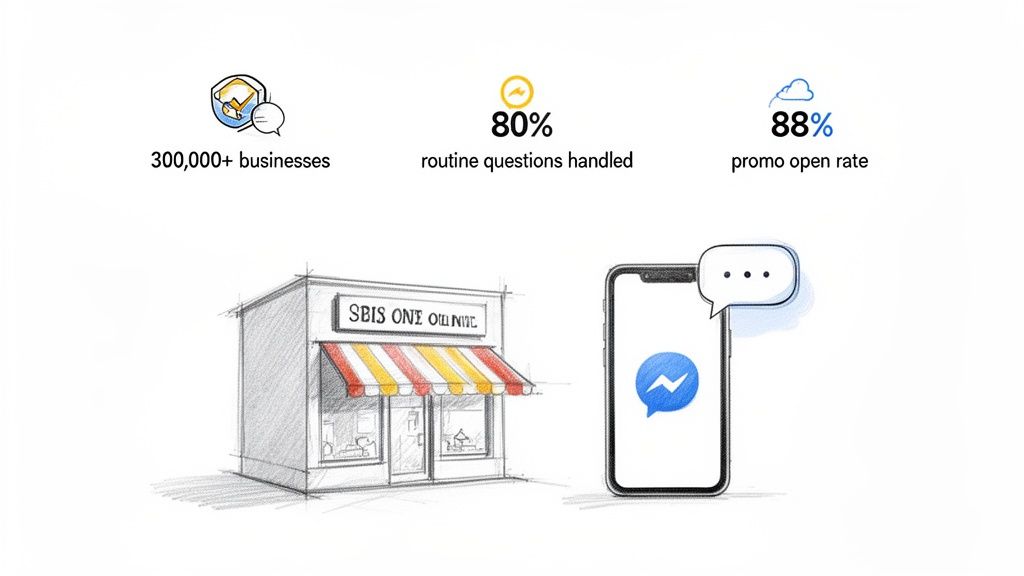
The numbers speak for themselves. Over 300,000 chatbots on Facebook are already active on Messenger, handling up to 80% of routine questions for businesses. These Facebook chatbots for business take repetitive conversations off your team’s plate, freeing them up to focus on complex, high-value interactions that still need a human touch. A well-configured Messenger bot or Facebook Messenger bot can work around the clock without fatigue or delays.
Even better, promotional messages sent through Messenger can reach open rates as high as 88%. That’s not a typo. Compared to traditional channels, a Facebook Messenger bot completely outperforms email when it comes to visibility and engagement. For the full picture, take a look at these impressive Facebook Messenger statistics and see why chatbots on Facebook have become a must-have for modern marketing.
Facebook Messenger Chatbot Impact vs Traditional Channels
To put this into perspective, let’s compare the raw numbers. When you stack Messenger chatbots against a traditional channel like email, the difference in engagement and speed is stark. This isn’t a small improvement; it’s a total game-changer for customer interaction.
| Metric | Facebook Chatbot | Email Marketing |
|---|---|---|
| Average Open Rate | 70% – 88% | 15% – 25% |
| Average Click-Through Rate | 20% – 30% | 2% – 5% |
| Response Time | Instant (seconds) | Hours to days |
| Interactivity | High (conversational) | Low (static) |
The data is clear: Messenger isn’t just another channel. It’s a more direct, immediate, and engaging way to reach your audience. The conversational nature of chatbots simply performs better.
Real-World Business Transformation
Let’s talk results. An e-commerce brand can use a chatbot in Facebook to automatically message users who abandon their shopping carts, perhaps offering a small discount to nudge them over the finish line. That single automated flow can directly recover lost revenue with almost no ongoing effort.
It’s just as powerful for service-based businesses. Imagine a marketing agency using a bot to qualify leads on the spot. When someone messages their Page, the bot can ask a few key questions:
- What’s your monthly marketing budget?
- Which of our services are you most interested in?
- What’s your timeline for getting started?
Based on those answers, the bot can instantly schedule a call with high-value prospects or guide smaller leads toward helpful resources. This ensures the sales team invests their time only in people who are a genuine fit.
This isn’t just about saving time—it’s about creating a streamlined, immediate customer experience that turns casual page visitors into loyal clients and paying customers. It builds a direct line of communication that nurtures relationships at scale.
Hooking Up Your Facebook Page to a Chatbot Builder
Before designing conversations and reeling in leads, you first need to connect your Facebook Page to a chatbot builder. Think of this as the initial handshake. It’s a simple, one-time process that requires zero coding. You’re basically just giving a trusted app permission to manage messages for you.
To start, head into your chatbot platform of choice and look for a button like “Add New Page” or “Connect Facebook Account.” Clicking it will pop up the standard Facebook authentication window, asking you to log in and approve the connection. It’s the same secure process you’ve used before to log into other apps with your Facebook profile.
Getting the Permissions Right
During this authorization step, Facebook will show you a list of permissions it needs you to grant. It’s crucial to review and approve these, as they’re what allow your bot to do its job. The list might look long, but each permission has a specific purpose.
You’ll be asked to let the app:
- Access your public profile and email address: This just verifies your identity.
- Manage your Pages: This allows the chatbot builder to see which Pages you’re an admin for.
- Show a list of the Pages you manage: This is so the platform can display your Pages for you to choose from.
- Manage and access Page conversations in Messenger: This is the most important one. It’s the permission that lets your bot send and receive messages from users.
If you deny these, the chatbot simply won’t work. Reputable platforms only ask for the access they absolutely need to function, keeping your data secure.
Giving a chatbot builder access doesn’t mean it can post on your Page’s timeline or snoop on your personal profile. The permissions are strictly limited to handling Messenger conversations for the specific Page you connect.
Once you’ve approved the permissions, you’ll be sent back to the chatbot platform. From there, you’ll see a list of all the Pages you manage. Just select the one you want to automate, click confirm, and the connection is live.
You’re now ready to build your first chatbot on Facebook. To get a better handle on what a bot can do for your business, you can learn more about how a chatbot for Facebook works and check out some advanced strategies.
Designing Conversations That Actually Convert
Once your page is connected, you become a conversation architect. This is where you move beyond simple automation and start designing a chatbot in Facebook that actively works toward your business goals—whether that’s generating leads, recovering abandoned carts, or qualifying prospects on autopilot.
The magic happens inside a drag-and-drop flow builder, where you map out every step of the user’s journey.
It all starts with the Welcome Message. This is your bot’s first impression. A generic “Hello, how can I help?” won’t cut it. You need to be direct, engaging, and immediately show users what your bot can do for them. The best way to do this is with quick-reply buttons that present clear options.
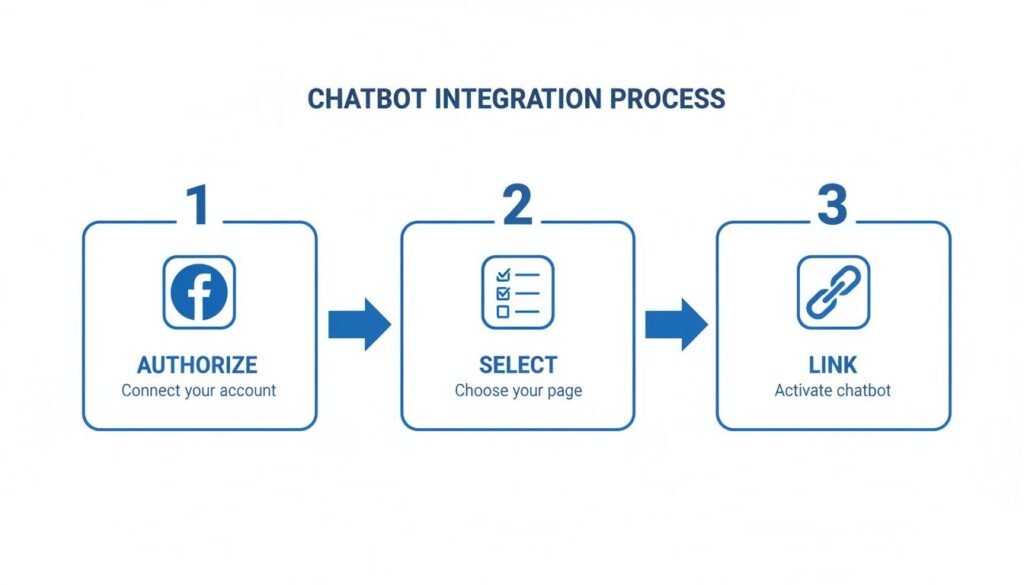
This visual breaks down the simple connection process, from authorizing your Facebook account to linking the chatbot to your page.
Chatbot in Facebook Integration
Following this flow ensures you grant the right permissions, pick the correct page, and get the connection live in just a few clicks.
Mapping Out a High-Value Flow
Let’s get practical. Imagine you run an e-commerce store. A user clicks your “Send Message” button. Your bot’s welcome message could pop up with: “Hey {{user_first_name}}! Welcome to our store. Are you looking for a specific product, or do you want to see our latest deals?”
This simple opener nails several key principles:
- Personalization: Using the user’s first name (
{{user_first_name}}) creates an instant, friendly connection. - Guidance: It offers two clear paths with quick-reply buttons (“Find a Product” and “See Deals”). No guesswork for the user.
- Efficiency: It immediately segments users based on their intent, without making them type a single word.
From there, you build out each branch. If they tap “See Deals,” your bot can slide in a carousel of your top-selling items on sale. If they choose “Find a Product,” it can ask a few qualifying questions to narrow down their search. This structured approach guides users toward a goal and prevents them from getting lost.
Turning Clicks into Customer Data
A great chatbot doesn’t just talk; it listens and remembers. This is where Custom Fields come in. Think of them as containers for important data you collect during a conversation.
Here’s how an agency might use this to qualify leads:
- Bot asks: “What’s your estimated monthly budget for this project?” It offers quick-reply buttons like “<$1k”, “$1k-$5k”, and “$5k+”.
- User clicks: “$5k+”.
- Action: The bot instantly saves “$5k+” to a “Budget” custom field and applies a “High-Value Lead” tag to that user’s profile.
Just like that, you’ve captured their budget and segmented them for future marketing. Now you can send targeted broadcast messages only to users tagged as “High-Value Lead,” ensuring your follow-ups are always relevant.
The real power of a chatbot in Facebook comes from its ability to systematically guide, qualify, and segment users at scale. Every button click is an opportunity to gather intelligence and deliver a more personalized experience.
Don’t forget that the small details matter. Adding a simple typing delay before the bot responds makes the interaction feel more natural and human. To make sure your chatbot excels at turning conversations into results, it’s a good idea to incorporate proven conversion rate optimization best practices into your design.
Turning Page Visitors into Engaged Subscribers
So, you’ve built a powerful conversation flow. Fantastic. But it’s useless if nobody ever sees it.
The next step is to proactively invite people into a conversation. This is how you grow your Messenger subscriber list. Instead of passively hoping users click “Send Message,” you can use specific growth tools to turn page visitors and post commenters into engaged leads.
Chatbot in Facebook Chat Features
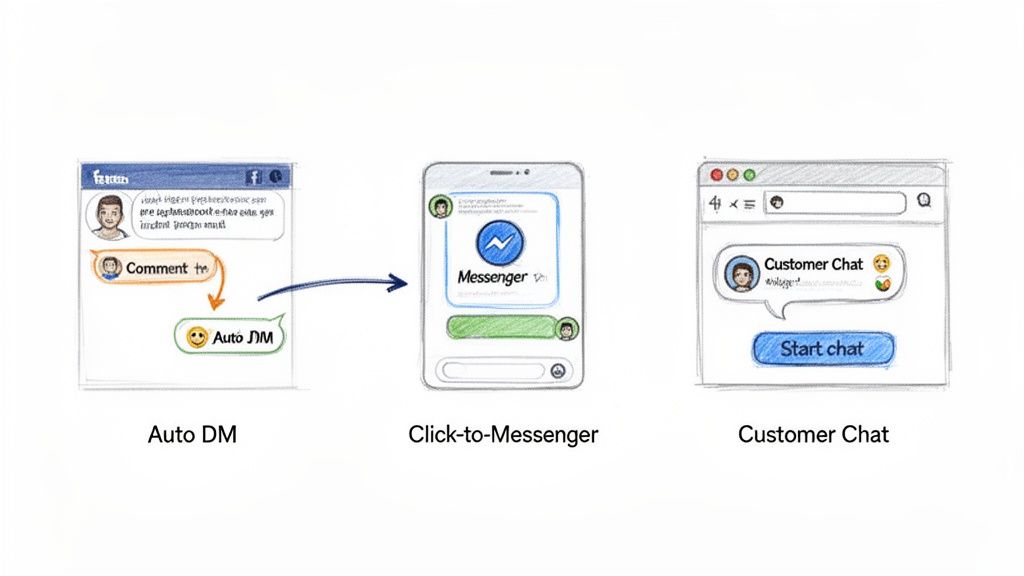
Think of these tools as the bridge between your public content (like posts and ads) and your private Messenger conversations, where the real relationship-building happens. Let’s break down three effective methods for building that audience.
The Comment Growth Tool
This is one of the most dynamic ways to build a subscriber list using a chatbot in Facebook. The concept is simple: you connect your chatbot to a specific Facebook post, and it automatically sends a private message to anyone who leaves a comment.
Just like that, a high-engagement post becomes a lead generation machine.
It’s perfect for running contests. Imagine a post that says, “Comment with your favorite emoji to enter our giveaway!” When someone comments, your bot immediately slides into their DMs with a message like: “Thanks for entering! To complete your entry, please tap the button below to confirm.”
The moment they tap that button, they officially become a Messenger subscriber.
This tactic does more than just capture leads; it boosts your post’s visibility. As more people comment to get the automated reply, Facebook’s algorithm sees the high engagement and shows your post to an even wider audience. It’s a win-win.
Click-to-Messenger Ads
Traditional Facebook ads send people to a landing page, which is where you hit friction—slow load times and clunky forms. Click-to-Messenger ads cut out that frustrating middle step.
When a user clicks the ad’s call-to-action button, it opens a conversation with your chatbot directly inside Messenger instead of kicking them over to a website.
This shift dramatically lowers the barrier to entry. People are already logged into Messenger, so there are no forms to fill out. The bot can immediately engage them, ask qualifying questions, and deliver the value you promised in the ad. This approach often leads to a significantly lower cost per lead.
For instance, a real estate agent could run an ad for a new listing. When someone clicks, the bot could say:
- “Hi there! Interested in the 123 Main St. property? I can send you the photo gallery or schedule a viewing.”
- Then, it provides simple buttons for “See Photos” or “Schedule Tour.”
This instant, interactive experience captures lead information far more effectively than a standard contact form. If you want to dive deeper, we have a complete guide on how to set up and optimize Click-to-Messenger ads to maximize your return.
Customer Chat Widgets on Your Website
Your website traffic is valuable, but most visitors leave without a trace. A Customer Chat widget changes that by embedding a Messenger conversation window directly onto your site.
This allows anonymous visitors to start a chat with your bot with a single click.
Suddenly, you can provide instant support, answer product questions, or offer a lead magnet right when they’re most interested. Once a visitor engages with the widget, they become a subscriber in your chatbot platform. Now you can follow up with them directly in Messenger, even long after they’ve left your website.
Advanced Automation and Broadcast Strategies
Once you have subscribers, the real work begins. Building an audience is just step one; scaling your engagement with smart automation is where you’ll see the biggest returns. This is about moving beyond one-off conversations and creating a system that delivers value consistently.
The most powerful tools for this are broadcast campaigns and AI-driven keyword triggers. Broadcasts let you send targeted messages to segments of your audience, while triggers teach your bot to recognize what a user is asking for and launch the right conversation automatically.
Sending Laser-Focused Broadcasts
A broadcast is a message you send to multiple subscribers simultaneously, similar to an email campaign. However, a chatbot in facebook has one critical rule: Facebook’s 24-hour messaging window. This policy means you can only send promotional messages to users who have interacted with your bot in the last 24 hours.
Don’t see this as a limitation. It’s a feature that protects the user experience and forces you to stay relevant, preventing spam and keeping Messenger a high-engagement channel.
To make broadcasts truly effective, you must segment your audience using tags. Think of tags as labels you apply to users based on their actions.
Here’s a practical e-commerce example:
- A user clicks a button to view your “Summer Collection.” Your bot automatically applies a
seen-summer-collectiontag. - Another user buys a product and gets tagged as a
first-time-buyer. - A high spender earns the
VIP-customertag.
Now, instead of blasting a generic sale announcement, you can send laser-focused messages. Send a special “early access” broadcast only to your VIP-customer segment. Or, send a follow-up offer to everyone with the seen-summer-collection tag who didn’t buy. This personalization is why Messenger broadcasts see such high open rates.
Automating Responses with AI Keyword Triggers
While broadcasts are for outbound messaging, keyword triggers automate your inbound conversations. You can teach your bot to listen for specific words or phrases in a user’s message and automatically launch a predefined conversational flow in response.
This is a simple yet powerful form of AI that saves immense time. You’re essentially creating a self-service hub where customers get instant answers to common questions.
By setting up triggers for terms like ‘pricing,’ ‘support,’ ‘refund,’ or ‘hours,’ you empower your chatbot to handle a significant portion of routine inquiries 24/7. This frees up your human team to focus on complex issues that require a personal touch.
For example, if a user types, “What are your shipping costs?” your bot can recognize the word “shipping” and immediately reply with a message containing a link to your shipping policy page. It’s efficient, instant, and delivers a better customer experience. For businesses looking to implement cutting-edge technology, you might also explore how generative AI can be leveraged for marketing and sales growth.
Integrating Your Chatbot and Measuring Success
Your chatbot in Facebook is a solid tool on its own, but its real power is unleashed when it connects with the rest of your marketing stack. If it’s operating in a silo, you’re leaving money on the table. The goal is to connect it to your other systems to automate workflows and get a complete picture of your customer journey.
Integrations are how you make this happen. Using a connector like Zapier or Make, you can build automated “recipes” that trigger actions in your other apps. For instance, when your chatbot captures a new lead, that contact’s info can be automatically sent right into your CRM. No manual entry needed.
Imagine a new subscriber from a Messenger giveaway being instantly added to a specific sequence in Klaviyo or Mailchimp. This creates a consistent, immediate follow-up experience across channels without you lifting a finger.
Metrics That Actually Matter
Measuring success is about more than just counting subscribers. To prove your chatbot’s ROI, you need to track the metrics that connect directly to business outcomes. Vanity metrics are fine, but conversion data pays the bills.
Focus on these key performance indicators:
- Flow Completion Rate: What percentage of users who start a flow actually finish it? A low completion rate is a red flag, pointing to a bottleneck or a confusing step in your design.
- Click-Through Rate (CTR): Are people clicking the buttons and links you provide? Analyzing CTR on a message-by-message basis helps you see which CTAs are working.
- Conversion Rate: This is the big one. Track how many users complete a goal—like making a purchase or booking a call—either in the bot or right after an interaction.
Don’t be afraid to A/B test your messages. Set up two different versions of a key message in your flow and split your traffic 50/50. You’d be shocked how often a small tweak in wording can lead to a 20% jump in click-through rates.
Attributing Sales and Proving Value
To truly understand your chatbot’s impact, you need clear attribution that ties revenue directly to conversations. When using Facebook chatbots, most modern platforms allow you to track users who click a product link inside Messenger and then complete a purchase on your website. By leveraging Facebook chatbot tools and the ability to use Facebook Messenger as a conversion channel, you gain full visibility into how chat-driven interactions influence sales.
When you can confidently walk into a meeting and say, “Our cart recovery bot generated an extra $5,000 in sales last month with a 35% conversion rate,” you’re no longer talking about a nice-to-have feature. You’re proving that using Facebook chatbots creates a measurable, revenue-generating asset that drives real business growth.
Frequently Asked Questions Facebook Chatbots
Jumping into Facebook chatbots for the first time? It’s natural to have a few questions. Let’s clear up the most common ones we hear from businesses getting started.
Conclusion
Ready to turn your Facebook Page into an automated sales and support engine? With Clepher, you can build your first Facebook chatbot in minutes using an intuitive drag-and-drop builder—no coding required.
In conclusion, a Facebook chatbot helps businesses unlock the full power of Messenger by delivering instant responses, managing inbox messages, and streamlining customer conversations at scale. With Clepher, you can customize replies, set language preferences, recommend products, and seamlessly hand off complex conversations to human agents when needed.
The result is simple: smoother interactions, faster support, and more conversions. By combining conversational AI, smart templates, and seamless Messenger integration, Clepher turns everyday chats into meaningful customer relationships on one of the world’s most powerful social platforms.
Start your free trial today and see just how easy it is to grow your business with a chatbot in Facebook.

Related Posts
5 Best Chatfuel Alternatives in 2026 You Need to Try!
April 6, 2026How to Customize Your Facebook Page URL: A 2026 Guide to Boost Your Brand
April 5, 2026Chatbots for Banks: The Ultimate Guide for 2026
April 4, 2026
Founder Clepher