
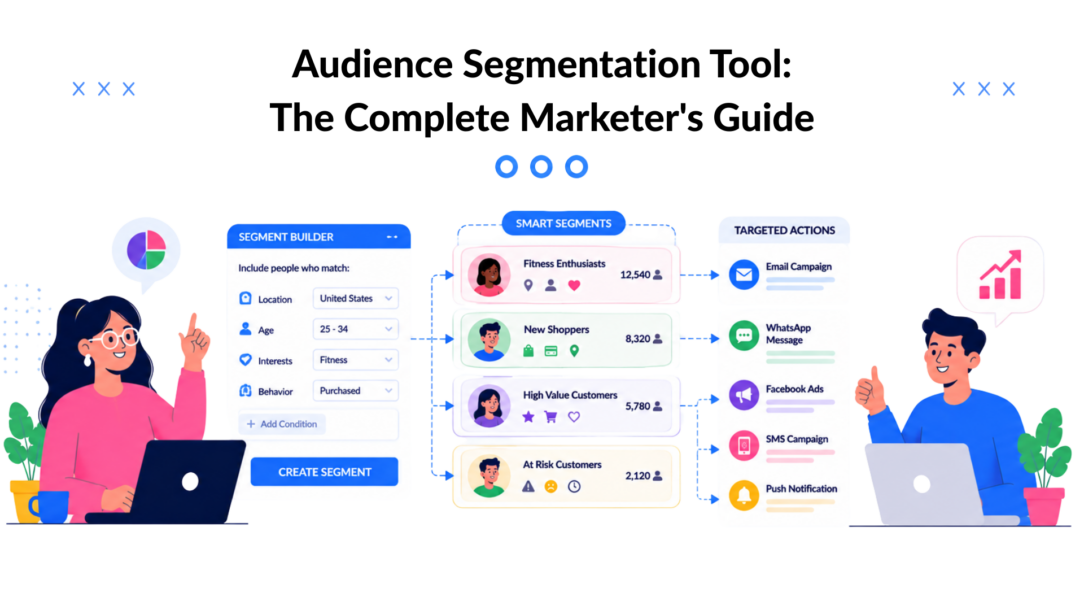
You launch a campaign, the subject line looks fine, and the audience feels vaguely right. Then the numbers land flat because everyone got the same message, even though they weren’t all at the same stage, with the same intent, or even the same problem.
That’s where an audience segmentation tool earns its place. It helps you stop guessing and start grouping people by what they do, what they care about, and where they are in the journey, so your campaigns feel relevant instead of generic.
Why Audience Segmentation Tools Matter Now
The reason broad messaging fails is simple: people aren’t buying for the same reason, on the same timeline, or with the same level of trust. A one-size-fits-all email or ad might reach the whole list, but it rarely reaches the right moment.
That’s why segmentation stopped being a niche tactic years ago. Industry sources cited in customer segmentation statistics say 70% of marketers use market segmentation, and 80% of companies using segmentation report increased sales. The same compilation reports 14.31% higher open rates and 101% more clicks for segmented campaigns, while personalized emails can generate 6x higher transaction rates. Those figures matter because they translate directly into the outcomes marketers care about: more engagement, more revenue, and less wasted spend.
A useful way to think about it is this: segmentation isn’t just about sorting a list; it’s about making a message fit. If you’re trying to refine your targeting for B2B lead generation, the ICP guide for B2B lead gen is a helpful companion because it shows how audience definition and segmentation work together in practice.
Practical rule: If a campaign has to persuade everyone, it usually persuades no one strongly enough.
The case for segmentation is also why many teams now treat it as core infrastructure rather than a nice-to-have. If you want a broader explanation of why it sits at the center of modern marketing, the internal guide on why segmentation is important is a useful follow-up. The point is the same across email, paid media, web personalization, and lifecycle messaging: when people see messages that reflect their context, they’re more likely to act.
What an Audience Segmentation Tool Actually Does
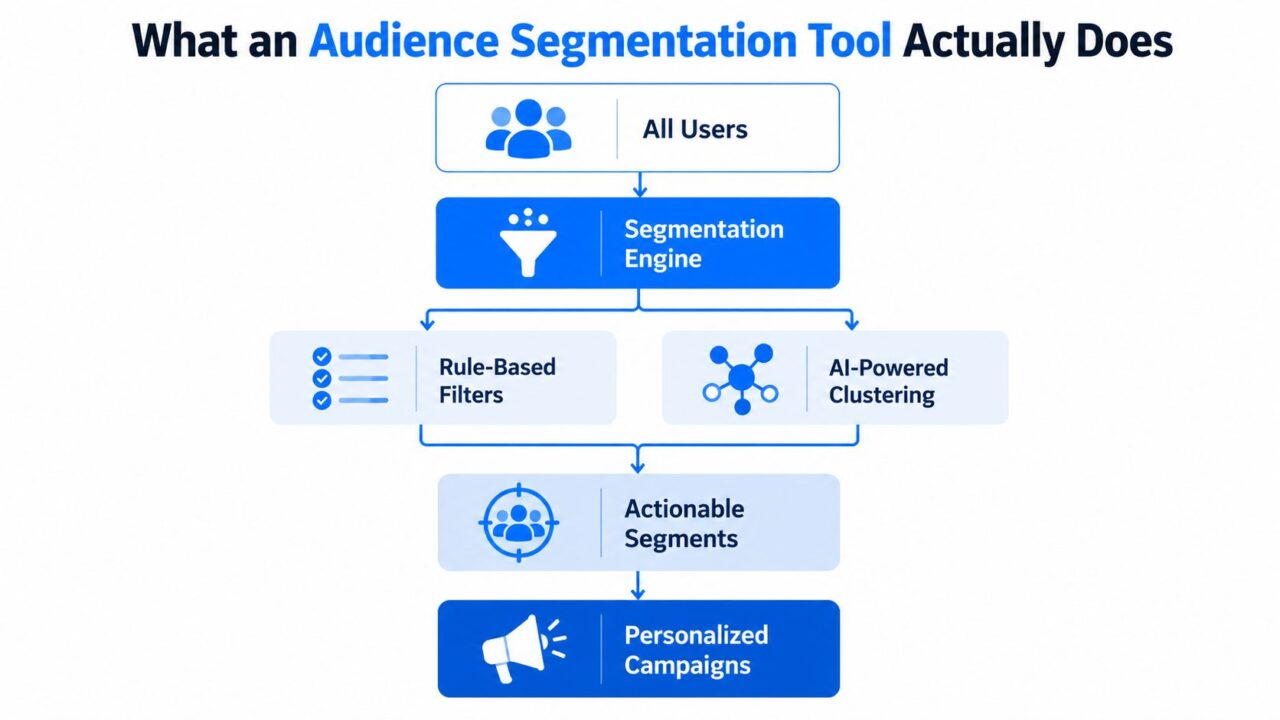
Audience Segmentation Tool Flowchart
An audience segmentation tool takes a broad customer base and divides it into smaller groups with shared traits. That sounds basic, but modern tools do a lot more than split lists by age or geography.
The main job
Instead of forcing marketers to export spreadsheets and build manual filters, the tool collects data, applies rules, and creates segments that can be used in campaigns. Contemporary platforms group people by behavioral, demographic, geographic, psychographic, and lifecycle attributes, and some also add predictive and contextual logic. If you want a primer on the basics of age, location, and similar fields, the audience demographic analysis guide is a useful reference point.
The useful part is that this doesn’t stop at labels. A serious implementation should support the eight segmentation types identified in a published framework, demographic, behavioural, psychographic, technographic, transactional, contextual, lifecycle, and predictive. That breadth matters because a campaign built only on demographics usually misses the signals that drive buying behavior.
A simple e-commerce example
An e-commerce brand doesn’t just tag someone as a target audience; they analyze their behavior for effective marketing campaigns. 25- to 34-year-old woman and call it done. It can also layer in recent purchase history, cart abandonment, browsing behavior, and lifecycle stage. That means one shopper might sit in a “new visitor” segment, another in “high-intent cart abandoner,” and a third in “repeat purchaser ready for cross-sell.”
A clean way to think about the output is:
- Input data from customer actions, profiles, and history
- Segmentation logic that groups users by shared patterns
- Actionable segments that marketing teams can target
- Personalized campaigns that match the segment’s stage and intent
A good segment is only useful if you can do something with it.
That’s why the internal overview of what audience segmentation is matters. It frames segmentation as a working marketing system, not just an analytics exercise. Once you see it that way, the value of the tool becomes clearer; it turns scattered customer data into a structure your team can use.
How Segmentation Tools Turn Data Into Action
The mechanics matter because the strongest segments aren’t built from guesswork. Advanced tools combine SQL- or rule-based logic with AI and machine learning scoring to create cohorts from event streams and historical signals. In plain language, they’re reading what people did, then deciding what that behavior probably means for tailored marketing campaigns.
Rule-based and predictive logic work differently
Rule-based segmentation is deterministic. You define conditions with AND, OR, and NOT, then the tool places people into a segment when they match those conditions. Predictive segmentation is different; it uses models to estimate whether someone is likely to buy, engage, or churn, then assigns them accordingly.
That difference matters because each approach solves a different problem in the context of audience segments. Rule-based segments are precise and easy to explain. Predictive segments are more fluid and can surface patterns you might not have tagged manually.
Modern systems also unify first-party, CRM, and behavioral data into a single profile, then refresh segments in real time as events change, following the approach described in Adobe’s real-time customer data platform audience management overview. That lets a marketer target recent page visits, engagement recency, purchase stage, or churn risk instead of stale batch data.
A SaaS workflow that feels real
A SaaS company can build a segment of people who visited the pricing page three times in seven days and still haven’t converted. That signal is much more useful than a generic “website visitor” list. Once the segment exists, the team can trigger a chatbot flow that offers a demo, answers objections, or routes the lead to sales.
The structure behind this kind of workflow is straightforward:
- Collect activity signals from the site, CRM, and product usage.
- Apply rules or scoring to identify intent.
- Refresh membership automatically as behavior changes.
- Activate a journey through chat, email, SMS, or ads.
Segmentation stops being reporting and starts becoming execution. The best tools don’t just show who belongs in a group. They keep that group current and connected to the next action.
Core Features That Separate Good Tools From Great Ones
A decent tool can build lists. A great one can move those lists into automated journeys without a lot of manual cleanup. That’s the difference between insight that sits in a dashboard and insight that changes revenue.
Good tools versus great tools
A good tool usually gives you static rules, basic demographic filters, and manual updates. It can be enough for simple campaigns, but it starts to strain as soon as customer behavior gets more dynamic. Great tools add behavioral and psychographic data, dynamic and predictive rules, automated triggers, and deep platform integrations.
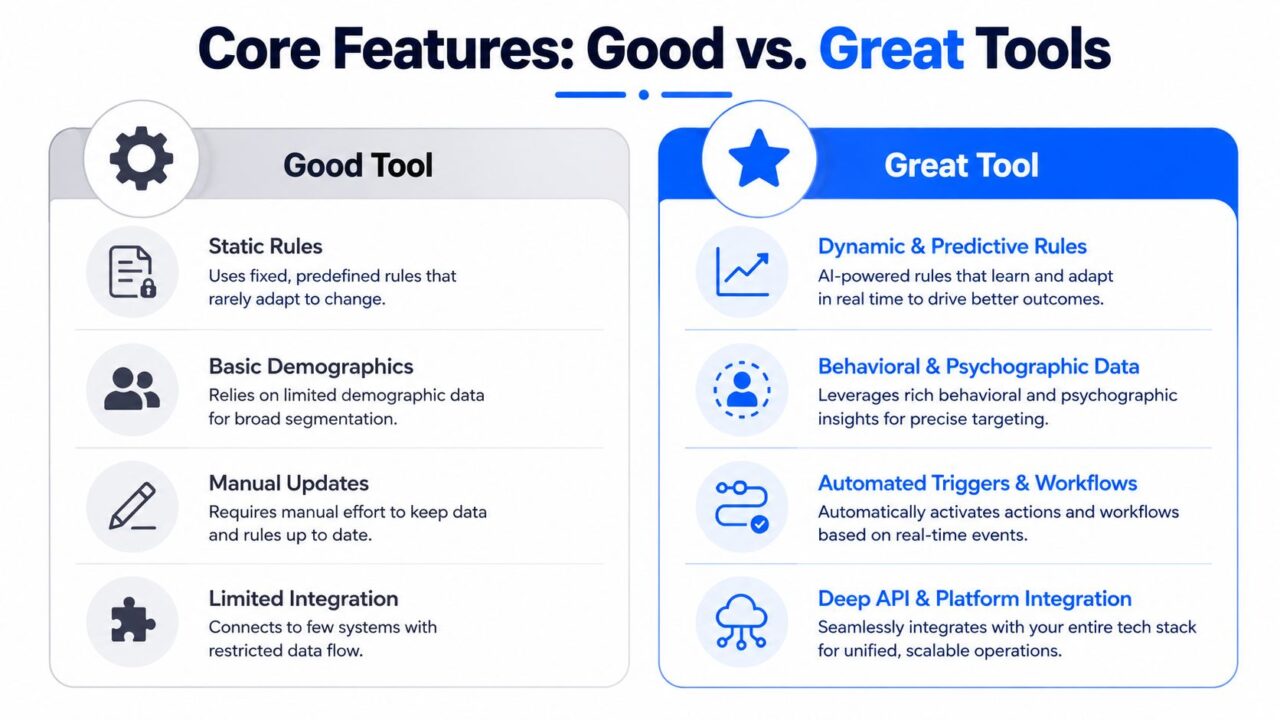
Audience Segmentation Tool Feature Comparison
A useful way to evaluate the gap is to ask whether the tool supports both behavioral segmentation and activation in marketing campaigns:
- Tags and segments help organize people into meaningful groups.
- Conditions let you build logic that gets more specific than one filter at a time for tailored audience segmentation.
- Personalization tags make dynamic content possible in broadcasts or pages.
- Integrations connect segments to email, SMS, CRMs, and ad platforms.
- Analytics tell you whether a segment is performing.
The activation gap is the real test
Most comparison content talks about how to find a segment. Fewer tools make it easy to do something with that segment the moment it changes. That’s the activation gap, and it’s where a lot of ROI disappears in marketing campaigns. Recent guidance from enterprise vendors, including the approach discussed in Pulsar’s segmentation tools guide, points to a stack where intelligence, enrichment, and activation are separate layers instead of one blurry feature.
This is also where chatbot and AI agent workflows matter. If a segment is defined in the morning and only gets used after a manual export in the afternoon, you’ve already lost the timing edge. If the tool can hand the segment straight into a conversational flow, the message lands while intent is still hot.
Good buying question: Can this tool move a segment into a journey without rebuilding the logic every time data changes?
That’s the right lens. A polished dashboard is nice. A system that reliably turns live segments into action is what drives measurable marketing work.
Real-World Use Cases Across Every Business Type
Segmentation looks different depending on the business, but the logic stays the same: identify the behavior that signals intent, then match the message to it. That’s why the same tool can support e-commerce, SaaS, support, and local promotions without feeling like a one-trick product.
E-commerce and DTC
In e-commerce, purchase history and cart behavior usually give the cleanest signals. A shopper who browses a category twice, adds an item, and leaves is not the same as a one-time buyer or a high-value repeat customer. Teams often use that difference to trigger browse-abandon or cart-recovery flows, then move successful buyers into loyalty or cross-sell journeys.
For a deeper library of audience segment patterns in retail, the customer segmentation guide for ecommerce is a good reference. A practical workflow might be a DTC brand that tags repeat purchasers, syncs those tags into a chatbot, and then automatically sends loyalty broadcasts only to that group.
SaaS, support, and local offers
SaaS teams often segment by onboarding stage, feature use, or account risk. That lets them send in-product prompts to new users, demo nudges to high-intent prospects, and reactivation messages to accounts that have gone quiet during their customer journey. Support teams can segment by issue type and resolution history, then route users into the right automation path instead of forcing one generic help flow.
Local businesses use a different mix. Location, promo response, visit frequency, and community behavior can matter more than age or job title. Recent guidance from Pulsar’s 2026 comparison of segmentation tools also argues that community- and behavior-based segmentation often exposes underreached groups that demographic filters miss.
A few examples make the point quickly:
- E-commerce brands target cart abandoners with a recovery flow.
- SaaS companies target pricing-page visitors with demo prompts.
- Support teams route issue-based segments to the right automation.
- Local businesses run promo offers tied to geography and response patterns.
The useful takeaway is simple: smaller segments can be more profitable if they’re better aligned with behavior. Demographics still help, but they’re rarely enough on their own.
How to Choose and Implement Your Segmentation Tool
A segmentation tool becomes easier to judge when you focus on the decisions it helps your team make. A segment only matters if it is large enough to act on, reachable through the channels you already use, and specific enough to change the next message, offer, or workflow.
A practical selection framework
A guide from The Compass for SBC lays out a clear sequence: define the segmentation criteria, divide audiences into segments, assess each segment for impact and accessibility, then target the ones that are both meaningful and reachable. It also recommends stopping segmentation when the need or ability to target differences ends, which helps keep the logic focused instead of turning it into a pile of extra rules.
That is why a segmentation table or segmentation tree for AI-powered segmentation can be more useful than a polished interface. It forces the harder question: can this audience segment be acted on, or does it only sound useful in a planning document? For teams working from customer segmentation strategies, the key is to connect the segment definition to the next automated step, whether that means a chatbot branch, a timed email sequence, or a handoff to an AI agent.
What to check before you buy
- Real-time data sync for behavioral segmentation: if updates lag, your activation lag grows too.
- Integration breadth: the tool should connect to your CRM, email, SMS, ad stack, or chatbot layer for seamless audience segment management.
- Rule-based and AI scoring: you want both explicit logic and predictive options.
- Activation ease: segments should flow into campaigns without constant exports.
- Analytics depth: you need segment-level performance, not just audience counts.
The activation gap is where many tools fall short. A platform may help you define audiences cleanly, yet still leave your team copying lists into other systems or rebuilding the same logic every week. The better test is whether the tool can turn a segment into a live journey with minimal manual work, since that is what keeps segmented messaging from staying stuck in analysis.
A simple implementation checklist
- Audit your data and identify what you can reliably segment on today.
- Map priority segments to the buying journey, from awareness to retention.
- Set up integrations so the tool can sync with your active channels.
- Test a small flow before rolling the system out broadly.
- Monitor performance in your marketing automation efforts. and adjust segment rules based on what gets used.
A practical rollout usually starts with one segment, one channel, and one automation path. For example, a team might tag high-intent visitors, send them into a chatbot conversation, and use the responses to trigger a follow-up email or an AI-assisted reply sequence. That kind of setup keeps the learning loop short, so you can see whether the segment drives action instead of just adding another reporting layer.
If you are comparing platforms, a brief review of customer segmentation strategies can help you check whether the tool matches the way your team already plans offers, journeys, and handoffs. The goal is not perfect segmentation on day one. The goal is a system that connects audience definitions to live messaging without forcing your team to rebuild the same logic every week.
Getting Started With Smarter Audience Targeting
The fastest way to make segmentation useful is to treat it as an operating system for messaging, not a research project. Find the segments that matter, connect them to the channels you already use, and let behavior decide who gets what next.
The big ideas are now pretty clear. Segmentation can be demographic, behavioral, psychographic, technographic, transactional, contextual, lifecycle, or predictive. Real-time data matters because stale segments lose relevance. And the activation gap is where the money is made or lost.
Start with one high-intent segment, one automated journey, and one channel. If you can turn that into a live flow this week, you’ll learn more than you would from debating your segmentation framework for another month.
If you want to turn segmented audiences into live chatbot flows, broadcasts, and AI-assisted follow-up, visit Clepher and see how its tags, segments, and automation tools fit into a practical marketing stack. It’s built for teams that want to move from audience definition to active conversations using AI-driven marketing automation without stitching together extra manual steps.

Related Posts
Audience Segmentation Tool: The Complete Marketer’s Guide
September 3, 2026Skill Based Routing: Match Customers to the Right Agent
September 2, 2026Lead Capture Widget: How to Turn Visitors Into Subscribers
September 1, 2026
Founder Clepher