
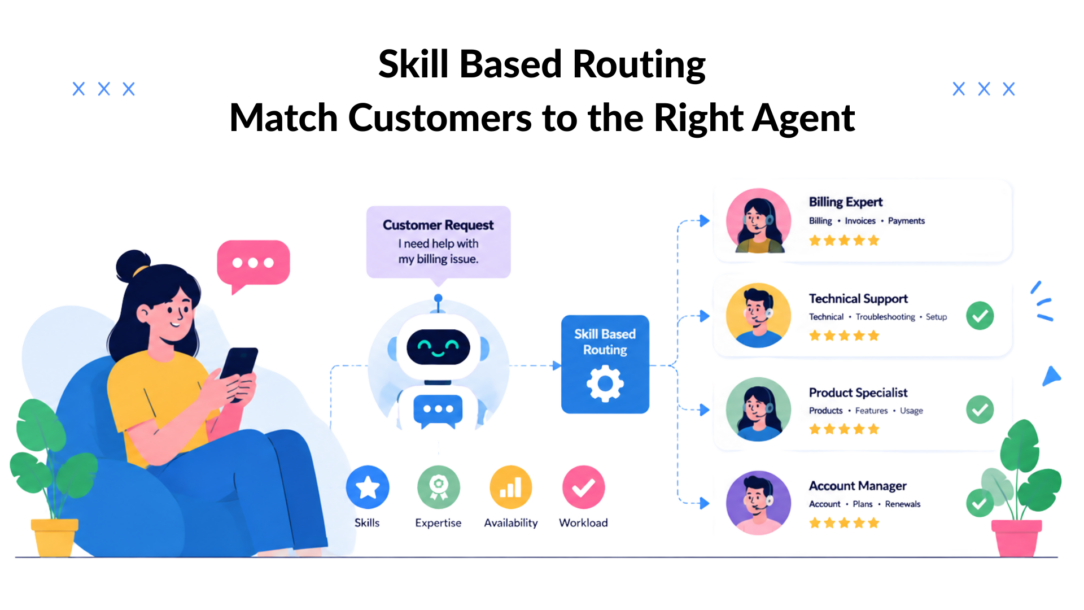
83% of customers expect to engage with someone immediately when they contact a company, and that single expectation has changed skill-based routing from a back-office tactic into a core service design choice. When customers want speed and knowledgeable help at the same time, the old “next available agent” model starts to crack. Routing is no longer just about answering the phone; it’s about deciding whether a customer gets the right answer on the first try or gets bounced around until they give up.
In practice, that means routing quality now sits inside customer satisfaction, operating cost, and brand perception at once. Specialized agents can deliver 5% to 15% higher first contact resolution than generalists on the same incoming call types, and the same research cited by Aircall says every call center needs specific skills. 1% improvement in FCR maps to a 1% improvement in customer satisfaction, and a 1% reduction in operating cost can significantly impact call center efficiency. (Technion lecture notes). That’s why skill based routing belongs in the operating model, not just the configuration screen.
Why Skill Based Routing Matters More Than Ever
Customers don’t experience your queue logic; they experience friction or relief. NICE cites research showing that 83% of customers expect immediate engagement, and that speed to issue resolution outranks other service priorities (NICE). CloudTalk echoes that speed is the top priority for nearly all incoming calls. 90% of consumers worldwide, which explains why routing quality now feels like a customer experience issue, not a pure contact-center efficiency issue.
That shift matters because the same interaction can now move across voice, chat, SMS, and social channels. A customer who starts in Instagram DMs and ends in a case queue still expects the business to connect them with the person who can solve the problem. Skill based routing is the mechanism that keeps that promise intact.
The business case is broader than call deflection
A lot of teams first adopt routing to reduce transfers. That’s the right instinct, but it’s too narrow. Better routing also protects the customer’s patience, reduces repeat explanations, and helps specialists spend time on work where they add real value.
Practical rule: If your agents are good at different things, your routing should recognize those differences instead of flattening everyone into one queue.
That matters even more in multi-channel operations, particularly for incoming calls. Salesforce and Microsoft both treat skills-based routing as standard workflow logic for matching work to the best rep, which tells you how far the market has moved from simple availability-based distribution. This isn’t a niche feature anymore; it’s the default way serious service teams orchestrate expertise across modern support stacks, especially in call centers.
The operational takeaway is simple. If your business handles language-specific cases, technical tiering, regulated workflows, or high-value customers, then routing is one of the few levers that can lift both customer satisfaction and service cost at the same time.
How Skill Based Routing Actually Works
Skill based routing works best when the router knows more than yes or no. Cisco Webex Contact Center models skill types as Text in a call center must be clear and concise., Proficiency on a 0-to-10 scale, Boolean, or Enum, which is important because the platform can rank fit instead of just checking whether a rep belongs in a group (Cisco Webex Contact Center). That ranking matters in real life when a bilingual queue, a product-specific queue, or a compliance-sensitive queue needs more nuance than a checkbox.
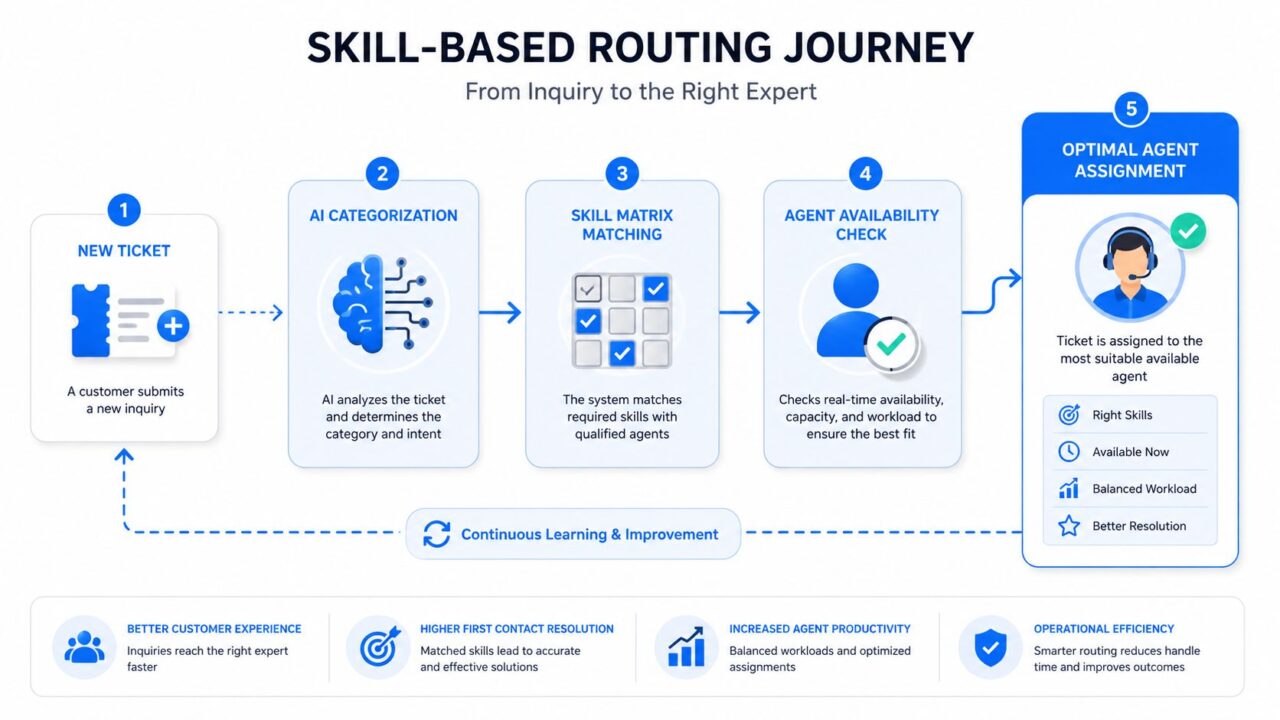
Skill-Based Routing Journey
The routing decision starts before the agent sees the work
Microsoft’s guidance for unified routing makes the sequence concrete. You define a rating model, define skill types and skills, assign reps, choose exact or closest match as the default algorithm, and optionally use machine-learning-based classification (Microsoft skill-based routing setup). In plain terms, the better your taxonomy and matching rules, the fewer misroutes you create. If the taxonomy is too coarse, the router has to fall back to a weaker match.
Salesforce’s Omni-Channel documentation adds another useful detail. When a work item is created, the system can pull required skills from routing configuration, skills-based routing rules, and even skill requirements passed into Route Work in the flow (Salesforce Omni-Channel skills-based routing). That means routing isn’t locked to a static agent profile. It can react to the moment the work item is created, which is exactly how modern chat and case flows should behave.
A practical way to think about it is this. The system classifies the incoming work, matches it against the skill matrix, checks availability, and then assigns the best fit. If any one of those layers is weak, the result is a worse match, a longer wait, or both.
For a useful companion approach on the people side, assess employee capabilities before you finalize your routing taxonomy. If the inventory is fuzzy, the router will be fuzzy too.
Skill Based Routing vs Alternative Strategies
Not every queue needs a highly specialized router. Round-robin can work well when work types are similar, and the team is small. Availability-based routing is often easier to maintain, especially when speed matters more than specialization. Skill based routing earns its place when the work is mixed, or when the team handles multiple languages, products, or escalation paths.
| Routing Strategy Comparison for call routing systems. | Best For | Weakness | FCR Impact |
|---|---|---|---|
| Skill based routing | Complex queues, tiered support, multilingual service | Can become too narrow if the skill matrix is overbuilt | Strong when the taxonomy matches real work types |
| Round-robin | Simple teams, similar requests, predictable workloads | Ignores expertise and can send cases to the wrong rep | Usually modest, because fit is inconsistent |
| Availability-based routing | Fast response needs for low-complexity queues are crucial in a call center environment. | Prioritizes who is free, not who is best | Often weaker when issue complexity rises |
| Predictive routing | Mature teams with clean data and enough volume | Harder to manage and explain when models drift | Can be strong, but only if data quality stays high |
Where simpler models actually win
Simple routing wins when the cost of a wrong match is low. A small team handling repetitive FAQs may do better with a straightforward queue than with a skill matrix that nobody maintains. The same is true when staffing is thin, and every rep can handle most issues well enough.
That’s why the right comparison is not “which model is smartest,” it’s “which model fits the work and the team.” A predictive or skill-aware system can outperform a simpler one, but only if the business keeps the skills current and the taxonomy usable. If not, the router becomes a maintenance burden.
For teams evaluating broader operations software, intelligent hiring analytics can be a helpful way to think about talent patterns before you overdesign a routing model. The same logic applies here. Better matching beats broad generalization, but only when the matching rules reflect how work really arrives.
If your queue has one or two recurring issue types, keep the routing simple. If your queue has real specialization, the router should mirror that complexity instead of hiding it.
Measurable Benefits and KPIs That Move
The fastest way to judge skill based routing is to watch what changes first at the operational level. In mature contact centers, the biggest gains usually show up in fewer handoffs, cleaner resolution paths, and better use of specialist time. That is the value of routing by skill. It reduces the amount of work that gets bounced around before someone who can solve it picks it up.
A clean routing model also gives AI chatbot platforms a better handoff path. Clepher and similar systems can triage routine questions, then pass the conversation to the right agent without forcing a restart. That matters because the routing logic has to hold up under normal demand and during spikes. If every message is pushed to the narrowest specialist pool, the system can look great on paper and still buckle when volume jumps.
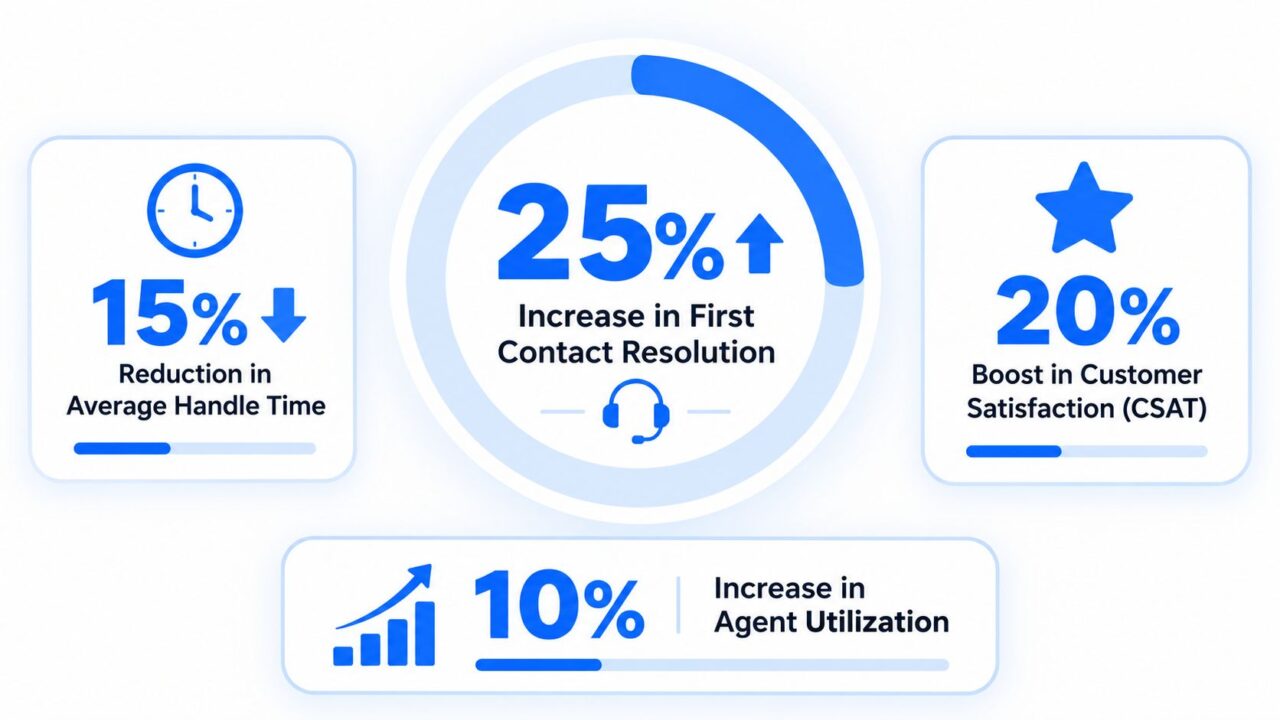
Skill-Based Routing Performance Metrics
The metrics worth watching before and after launch
FCR still matters, but it should not be treated as the whole story. What leaders need is a connected view of average handle time, transfer rate, customer satisfaction, and agent utilization. Those metrics tell you whether the router is sending work to the right place or making queues look cleaner while effort shifts somewhere else.
Watch the trade-off between precision and resilience. Highly specific routing can improve answer quality because specialists spend more time on work they know well, but it can also create hot spots if a few agents absorb too much of the demand. That shows up fast in utilization, queue health, and repeat contact patterns in the call center. In a chat-heavy operation, it can also create long waits after the bot has already filtered the easy work.
For claims and service leaders who want a practical measurement frame, efficiency metrics for claims operations help anchor the discussion in process quality instead of vanity reporting. Use that same discipline here. Measure where conversations slow down, where transfers happen, and where specialists are being used for cases that do not justify the extra routing precision.
The strongest sign that routing is working is not that every case reaches the most specialized agent. It is that the right mix of work reaches the right people without starving the rest of the team or creating brittle bottlenecks. That balance is what keeps service quality stable when demand is steady and keeps the operation from breaking when demand surges.
The same measurement logic applies to automation programs. How to automate customer service is useful only if the handoff from bot to human protects context and avoids rework. If the bot resolves simple issues and the router preserves intent, the team gets cleaner queues and better agent focus. If the bot sends too much to a narrow specialist path, the queue may look efficient for a day and then slip under load.
Implementation Steps for Chat and Messaging Channels
Skill based routing in chat and messaging starts with the work, not the software. First identify the kinds of messages customers send, then define the skills needed to answer them well, then group agents accordingly. That sequence sounds basic, but it’s where most projects succeed or fail because messy inputs create messy routing.
A practical seven-step rollout looks like this.
- Identify caller or sender needs: Map the common reasons people reach out, such as order status, returns, account access, or technical support.
- Identify the needed skill sets: Separate language, product, billing, retention, or escalation expertise instead of collapsing them into one queue.
- Categorize agents into skill groups: Build clear tags so the router has something real to match against.
- Define queues in the context of skills-based routing systems: Keep queues aligned to business outcomes, not just departments.
- Define the routing model: Decide when to use exact match, closest match, or fallback logic.
- Train or re-skill agents: Make sure the team understands why they receive certain conversations.
- Monitor, measure, and adjust: Review misroutes, transfers, and wait times regularly.
Messaging channels need tighter handoffs than voice
The mechanics are different in chat, WhatsApp, Instagram DMs, and website messaging because customers expect faster context switching. A bot can handle the first pass, but the handoff to a human has to preserve the reason for contact, the customer’s intent, and any tags already collected. That is where routing and automation meet.
For a deeper buildout on automation flow design, the practical guide on how to automate customer service is a useful reference when teams are designing the routing logic behind the scenes. The same principle applies when you use no-code flow builders, AI keyword triggers, and conditional logic to send conversations to the right specialist. The point isn’t just automation; it’s preserving match quality as the conversation moves from bot to person.
Implementation rule for skills-based routing systems: If the bot collects useful context but the handoff drops that context, the routing model loses most of its value.
A strong build also includes CRM integration, audience tags, and segmentation so the router can use customer context, not just message content. Once that’s in place, the team can route high-intent conversations, route existing customers differently from first-time leads, and keep specialist time focused on the cases that need it most.
When to Loosen Routing Precision During Demand Spikes
Hyper-specialized routing sounds ideal until the queue starts backing up. A narrow skill matrix can improve fit, but it can also create congestion when volume spikes or staffing drops. That’s the operational tension most beginner guides miss, and it’s the part leaders have to manage in real time.
Genesys calls out a useful exception in routing practice: after a timeout, systems may expand the queue or loosen the skill expression so more agents can take the work (Genesys routing guidance). That’s not a compromise for its own sake. It’s a safeguard when strict matching would otherwise damage service levels more than it helps precision.
Precision should be adjustable, not absolute
The right question is not whether to broaden routing; it’s when and how. If wait times climb, the system should know when to relax from exact skill fit to closest fit, or from a narrow specialist queue to a broader fallback pool. In many real queues, that’s the difference between holding the SLA line and watching customers abandon.
This is also where staffing and routing have to be designed together. If the skill matrix is too narrow for the incoming volume pattern, the operation can look elegant on paper and fail under load. The router needs a pressure-release valve, especially during promotions, outages, or seasonality.
For teams building a broader customer service stack, AI customer service automation is most effective when it includes fallback logic, not just smart classification. The automation should know when to preserve precision and when to widen the pool so customers don’t wait too long for a perfect match.
A practical rule is to define the trigger in service terms, not gut feel. Use the point where the queue starts threatening customer patience, then broaden just enough to protect response time without sending every case to generalists. After the spike passes, restore the tighter model so specialists aren’t flooded with work they don’t need to own.
Real-World Use Cases Across Industries
An e-commerce brand running post-purchase support across Instagram and WhatsApp usually needs one routing logic for delivery questions and another for refunds or damaged items. The first can often stay in a broad service queue, while the second needs faster access to a rep who can handle policy exceptions and customer recovery. A bot can tag the issue at the start, then pass the conversation to the right specialist with the intent intact.
A SaaS company has a different problem. Basic onboarding questions can go to a general support pool, but integrations, billing errors, and tiered technical issues should route by skill level so senior reps only touch the cases that need deeper product knowledge. That keeps expertise available for the tickets that would otherwise cycle through multiple handoffs.
A digital marketing agency often routes by client account and campaign familiarity. A rep who knows one client’s brand voice and promotions can resolve issues faster than someone reading a brief for the first time, especially on fast-moving Instagram and Facebook work. Local businesses also benefit when promotions generate sudden spikes, because the router can push simple inquiries to a broad pool while keeping complaints or urgent service requests with a better-fit rep.
What the best setups have in common
Across these examples, the pattern stays the same. The first message gets classified, the skill set gets matched, and the handoff happens without losing context. Platforms with conditions, tags, and AI agent handoffs make that flow easier to maintain because the business can change routing logic without rebuilding the entire stack.
Building Your Routing Strategy for Scale
Routing strategy scales when it stays close to the incoming work. Start with the current maturity of your queues, then decide whether the highest-impact fix is better classification, cleaner skill definitions, or a broader fallback path. Over-engineering the taxonomy usually causes more pain than it solves.
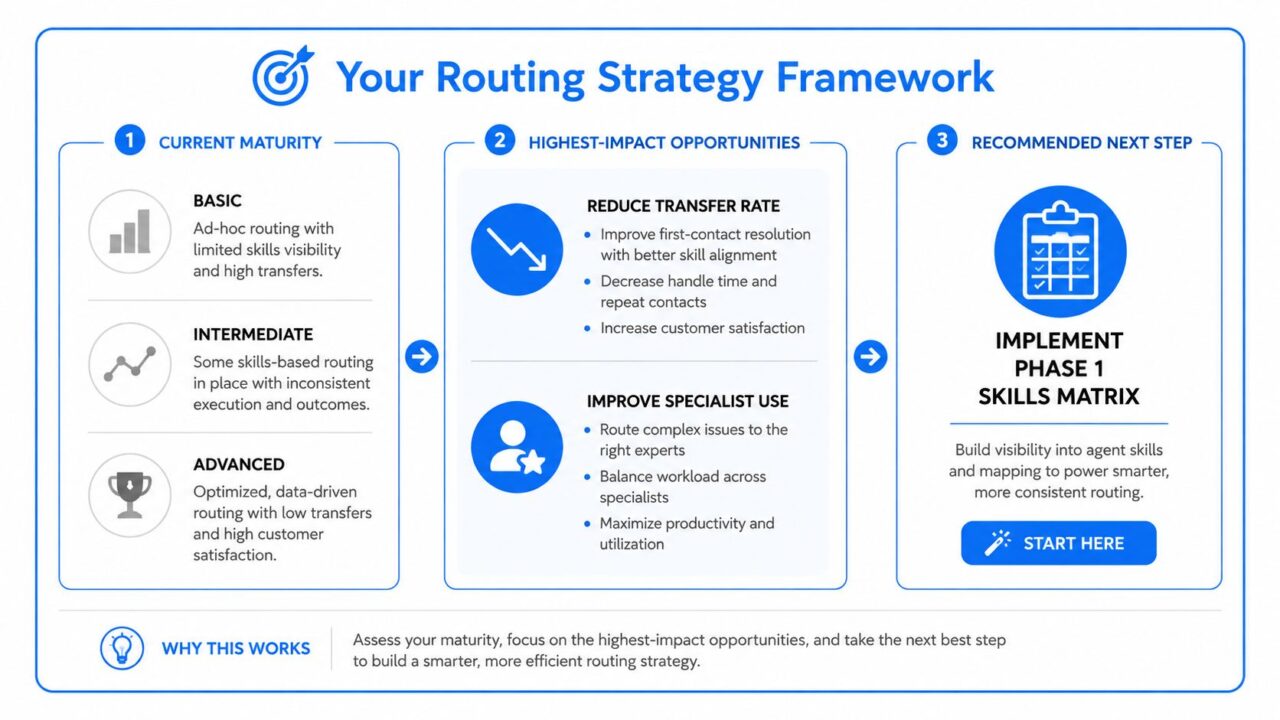
Skill-Based Routing Framework
The quickest path to better performance
If your routing is basic, focus first on reducing transfer rate and improving specialist use. If it’s already mature, add AI classification carefully and connect the routing system to your CRM or ticketing layer so customer context stays intact during incoming calls. For teams building that foundation, the CRM and ticketing guidance at CRM and ticketing system is a useful operational reference point.
The biggest mistake is treating launch day as the finish line. Routing rules drift as products change, agents improve, and demand patterns shift. The teams that keep winning are the ones that review misroutes, retrain agents, and loosen or tighten precision based on what the queue is doing.
If you want skill based routing to pay off, keep one hand on the taxonomy and the other on the service metrics. The router should serve the customer first, then protect the operation second, and it should always be ready to widen or tighten based on real demand rather than habit.
If you want to build skill-based routing into a system that works across chat, Messenger, WhatsApp, Instagram, and website conversations, Clepher gives you the no-code flow builder, AI agents, tags, and integrations to make that routing practical. Visit Clepher to turn routing rules into a live customer support workflow without dragging your team through a heavy technical build.
