
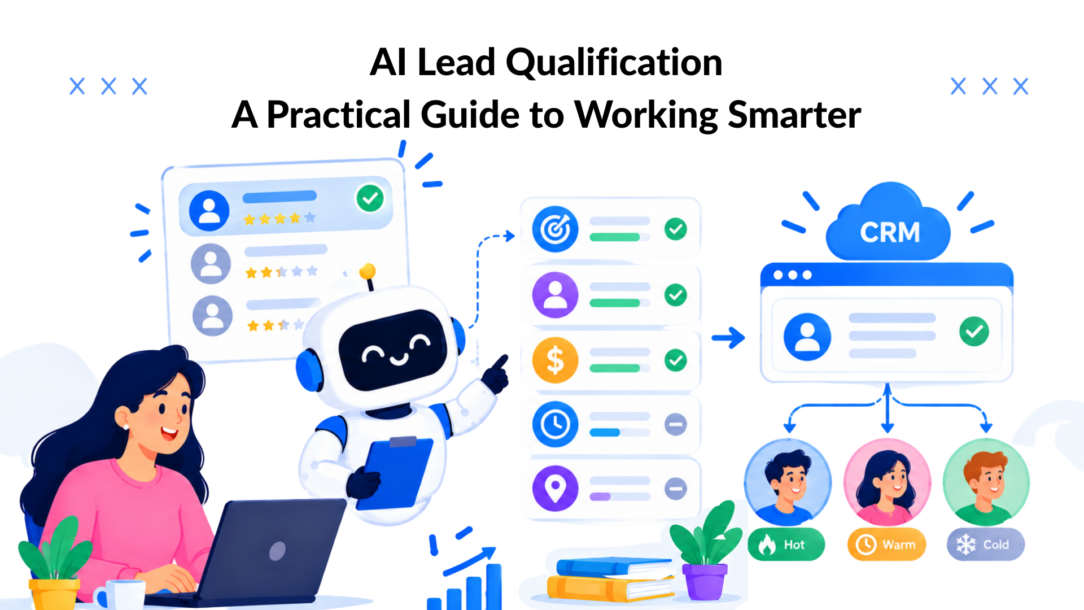
Your team probably has a lead-quality problem disguised as a volume problem. A demo request arrives, the CRM assigns a score, and a sales rep still spends valuable time checking company fit, purchase intent, authority, and timing. Meanwhile, a student, competitor, or low-fit shopper may receive the same attention as a buyer who’s ready to talk.
AI lead qualification only creates revenue when it improves the handoff. Scoring helps, but scoring alone doesn’t decide who gets a call, who receives nurture, who enters self-serve, and who should never reach a senior rep. The operational design around the score is where the gains appear.
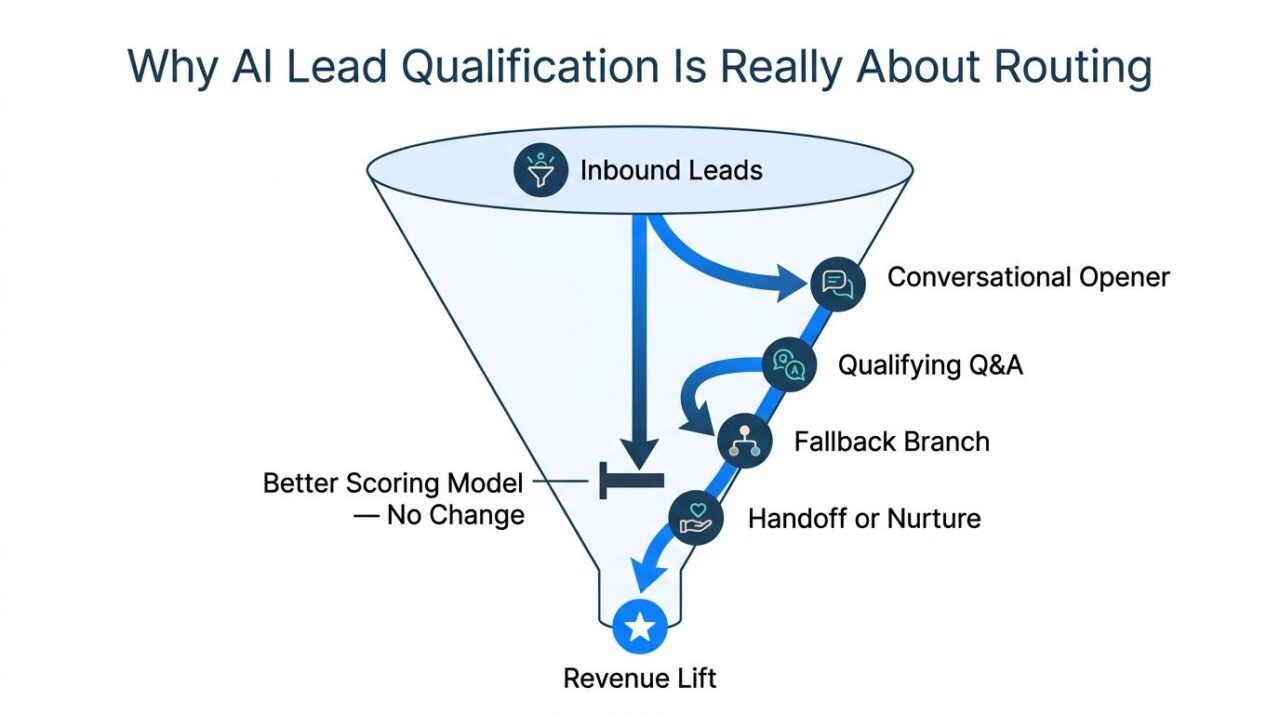
Why AI Lead Qualification Is Really About Routing
Many teams buy AI lead qualification expecting a smarter number. That assumption is too narrow. A SaaS request scored at 82 instead of 74 still produces no meaningful lift if both records land in the same queue with the same vague notification.
The useful question isn’t “What score did this lead get?” It’s “What should happen next, and who should own it?”
That distinction matters because lead qualification is already a major operational lever. Only 44% of organizations use lead scoring systems, while just 27% of the leads marketing sends to sales are qualified for sales engagement. Properly qualified leads convert at 40%, compared with 11% for unqualified prospects, and responding within the first hour can improve qualification odds by 7x, according to Landbase’s lead qualification statistics. A score that doesn’t change routing leaves much of that opportunity untouched.
AI Lead Qualification Routing Funnel
Build a decision tree, not a threshold
Treat qualification as a set of branches:
- Sales-ready: The lead fits your target account, shows clear intent, and has a credible buying path.
- Nurture: The lead has a relevant problem but isn’t ready to engage with sales.
- Self-serve: The buyer can succeed with documentation, a trial, or a lower-touch product path.
- Disqualified: The contact is a student, competitor, job seeker, or clearly outside your market.
A practical SaaS flow might collect annual contract value band, team size, current technology stack, decision timeline, buying authority, and one primary pain point. Each answer must trigger a route. A target contract value may send the lead to a senior account executive. A small team using a supported integration may enter a product-led trial. A competitor domain may be excluded from the sales queue.
For e-commerce, replace contract value with average order value threshold and repeat-purchase potential. Someone shopping for a one-time gift should see a different path from a returning buyer comparing a subscription bundle, which can be optimized using AI. The bot can ask about product category, intended use, purchase timing, and whether the shopper wants help choosing between products.
Pull these criteria from closed deals and lost deals, not from a generic BANT worksheet. BANT can provide a starting vocabulary for budget, authority, need, and timeline, but a criterion with no downstream action is just data collection.
Keep the conversation short and commercially useful
Keep the qualification set to six to eight fields maximum. A bot should collect the essentials across a few exchanges, then make a routing decision. Long interrogations create friction and encourage visitors to abandon the conversation before they reveal intent, which can be mitigated by AI agents.
Mark every field as either a positive signal or a disqualifier. A student email pattern, competitor domain, or a free-tier user showing no expansion potential should reduce sales priority. A repeat visit to a pricing page, a clear business pain, and a near-term decision should increase it.
Teams that need a broader framework for assigning destinations can use Tagada’s Smart Routing feature as a reference point for thinking about routing conditions rather than scores alone. For the wider automation architecture, map the qualification branches inside your sales funnel automation so every response leads somewhere useful.
Practical rule: If a question doesn’t change the destination, remove it.
Designing the Conversational Flow Step by Step
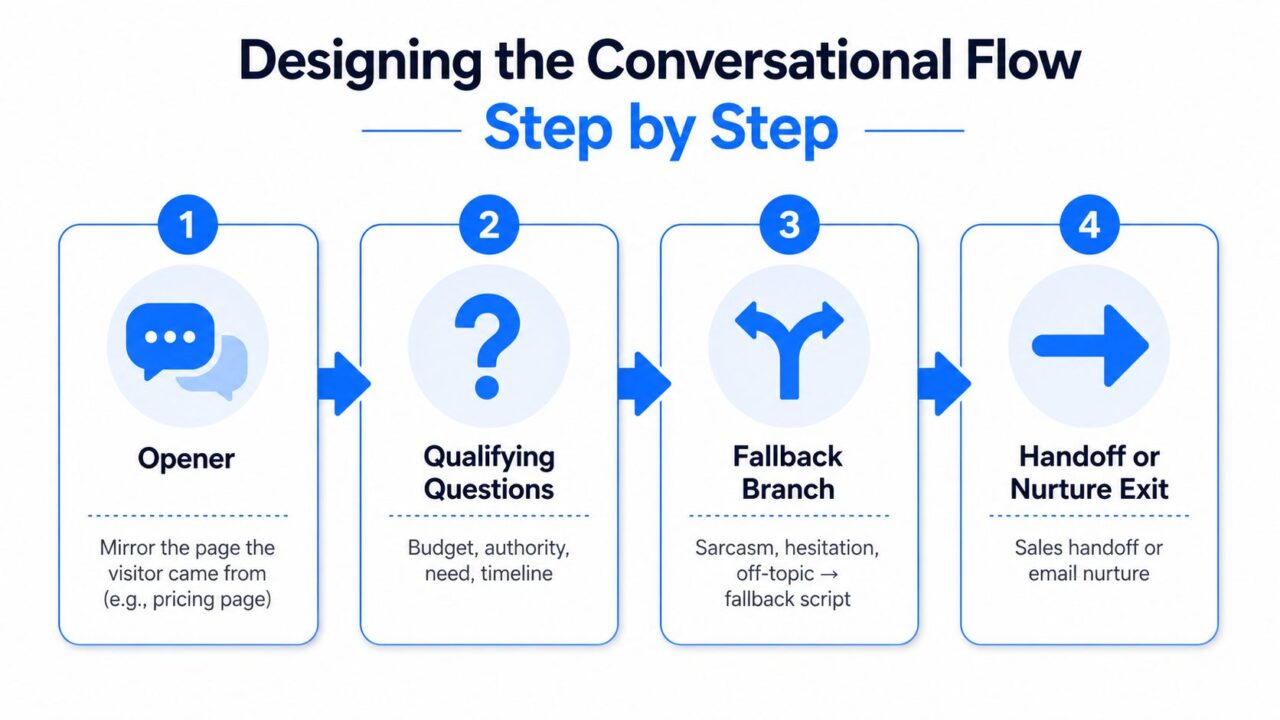
A strong conversational flow has four blocks: opener, qualifying questions, fallback branch, and handoff or nurture exit. Draw those blocks as a decision tree before building them in a no-code editor. Otherwise, every exception becomes another disconnected branch.
Start with context
The opener should match the page or campaign that brought the visitor in, utilizing AI tools for personalization. A pricing-page visitor needs a pricing-aware prompt. Someone arriving from a product comparison page needs help choosing between options. A visitor from an educational article may need a softer question about their current process.
Ask about the problem before asking about budget. The usual sequence should move from soft to firm:
- What are you trying to solve?
- What have you tried already?
- Which product or workflow are you evaluating?
- Who else is involved in the decision?
- What timing are you working toward?
- What budget or commercial range makes sense?
This order lets the visitor establish relevance before facing sensitive questions.
AI Lead Qualification Conversational Flow
Design fallback logic before launch
When someone says “not sure,” don’t repeat the same question. Offer examples, provide a multiple-choice shortcut, or let the visitor skip the field while recording uncertainty as a signal.
Intent triggers need their own branch. Phrases such as “I’ll think about it,” “send me information,” or “I need to check internally” often indicate that the visitor needs nurture rather than an immediate sales call. A bot should acknowledge the request, capture the preferred follow-up channel, and offer useful content without pretending the lead is sales-ready.
A no-code builder such as Clepher can represent these branches with conditions, tags, custom fields, and handoff actions. The visual interface matters less than the logic behind it. Build the tree first, then implement AI to translate it into blocks.
Scoring Leads With Signals, Not Just Answers
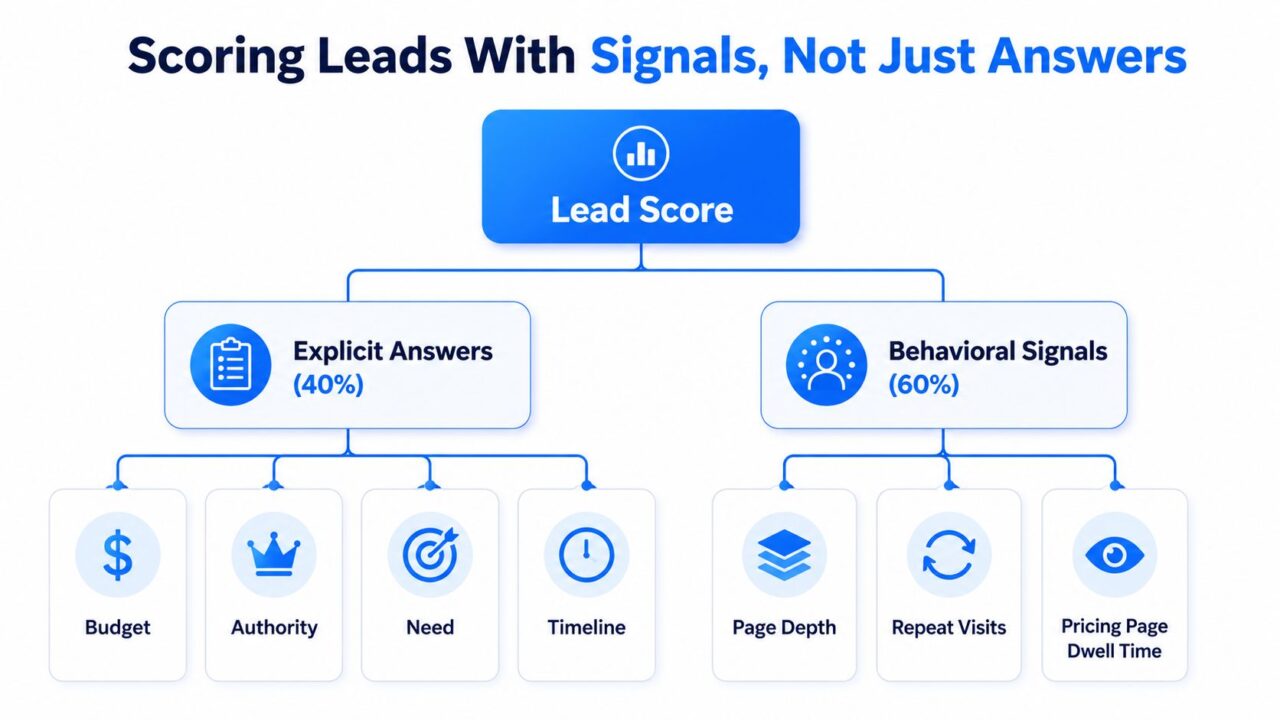
A lead score should summarize evidence, not replace judgment. The most useful model combines explicit answers with observed behavior, then converts the result into a route.
A workable starting formula gives 40% weight to explicit answers and 60% to behavioral signals. This isn’t a universal law. It’s a practical design choice for testing whether intent reveals more than a polished form response.
AI Lead Qualification Lead Scoring
Use a transparent scoring model
Start with a simple point allocation:
| Signal | Points |
|---|---|
| Budget | 15 |
| Authority is crucial when implementing AI for lead generation. | 10 |
| Need to prioritize leads for better conversion rates. | 15 |
| Timeline | 10 |
| Pricing-page dwell | 20 |
| Repeat visits | 15 |
| Email reply under two hours | 15 |
A score above 70 routes to sales. A score from 40 to 70 Enters nurture, where AI can help in prioritizing leads based on their engagement. A score below 40 goes to self-serve. Those thresholds should be treated as operating rules, not permanent truths.
Consider two visitors. One founder states a $15,000 budget and returns to pricing twice. Another visitor vaguely mentions a $100,000 budget, lands on one page, and leaves without engaging. The first lead should rank higher because behavior confirms the stated need. The second has a large answer but weak evidence.
Penalize fit problems aggressively
Company size often receives too much weight because it’s easy to collect, while lead quality should also be prioritized. Intent matters more when the account fits your product. A competitor email domain, a student .edu address, or a free Gmail address on an enterprise page should receive a hard demotion unless the visitor provides strong evidence that changes the route.
The score also needs to carry the reason behind it. A sales rep should see whether a lead qualified because of timing, repeat engagement, product fit, or a specific pain point. Teams refining CRM routing for leads should preserve that context instead of sending only a number.
For practical guidance on maintaining the model, use lead scoring best practices as a reference, then adjust the weights against real sales outcomes.
Connecting Bots to CRMs Without Losing Data
The integration path determines whether your qualification logic survives contact with the rest of the stack. Choose based on the data you need, the latency your sales process can tolerate, and who will maintain the connection.
| Path | Setup Time | Latency in processing lead data can affect overall performance. | Custom Field Support | Maintenance Risk | Best For |
|---|---|---|---|---|---|
| CRM-native connector | Fast | Low | Moderate | Moderate | Standard HubSpot, Salesforce, or Pipedrive workflows |
| Zapier or Make | Moderate | Variable | High | Moderate to high | Unusual workflows without dedicated engineering |
| Direct webhook | Longer | Very low | High | Lower after engineering | Custom systems requiring control and reliable retries |
A native HubSpot sync can capture name, email, score, and source quickly, but it may not expose every custom field with the granularity your team wants. Zapier or Make can queue an enriched lead to Slack and then Salesforce, though each extra step introduces another point of failure. A direct webhook can push structured data to a custom endpoint with retry logic, but a developer must handle authentication, validation, and error recovery.
Preserve the fields that explain the decision
Teams often map the obvious fields and lose the evidence sales needs. Your minimum mapping should include:
- Attribution: UTM source and first-touch campaign.
- Conversation context: Transcript URL and the visitor’s stated pain point.
- Qualification detail: Score, intent tag, and route.
- Rejection context: Disqualification reason when the bot declines sales routing.
- Compliance record: GDPR consent timestamp and consent status.
The common data-loss points are predictable and can be addressed by implementing AI. Form submissions can drop UTM parameters, custom fields can arrive with mismatched types, and consent timestamps can arrive blank. Test each field with real payloads before launch, not just a successful dummy contact.
A sales operation also needs a reliable place for support and handoff records. Organize that workflow through a CRM and ticketing system that keeps the conversation, ownership, and follow-up visible to the right team.
Setting Up the Sales Handoff That Protects Revenue
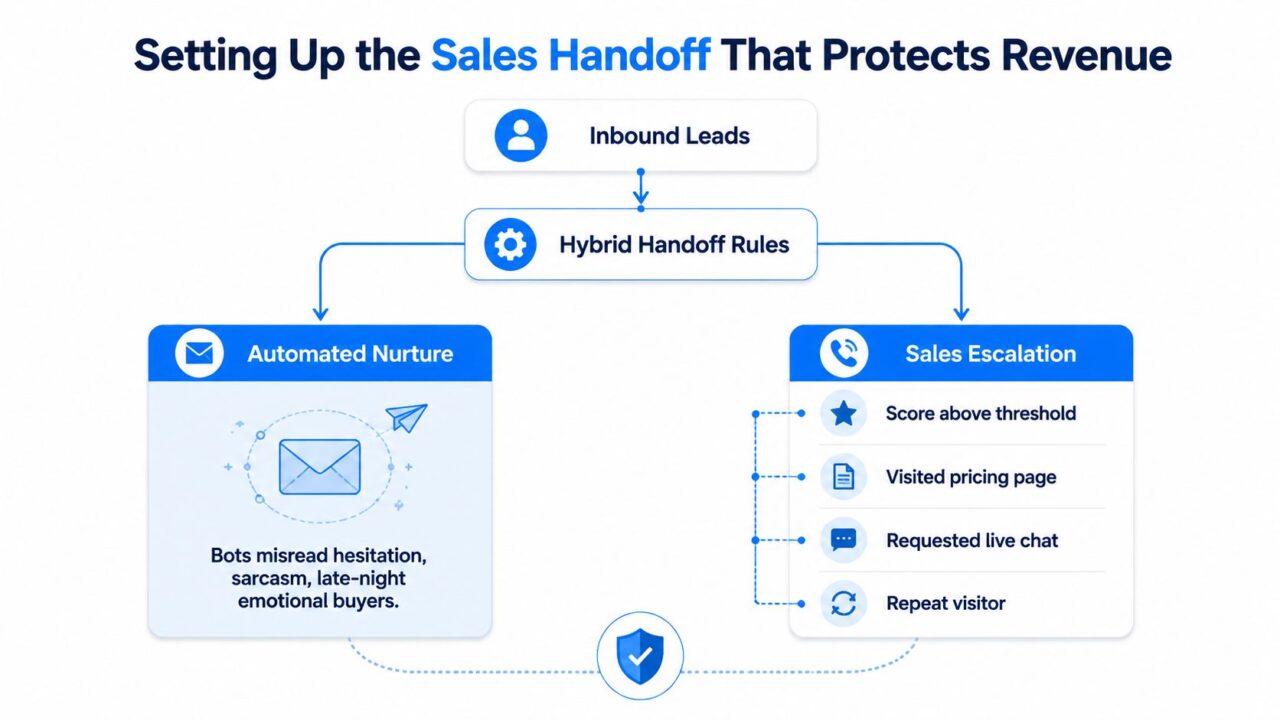
Pure automation fails when language carries more meaning than the words themselves. Bots can identify explicit budget and timeline criteria well, but they’re weaker at hesitation, sarcasm, frustration, and subtle uncertainty.
One multi-client deployment summary found that bots came within 4 to 5 percentage points of human representatives on budget and timeline qualification, yet hesitation detection accuracy was 34% for bots versus 91% for experienced representatives. Decision-authority identification reached 61% for bots versus 88% for experienced representatives, as reported by LiveHelpNow’s chatbot qualification analysis, which uses AI to enhance lead quality.
AI Lead Qualification Sales Handoff
Escalate ambiguity early
Use hybrid rules instead of forcing the bot to complete every sequence. Escalate when any of these conditions appears:
- Score above threshold: The lead matches the commercial and behavioral criteria for direct engagement.
- Specific objection: The visitor raises a concern about price, security, implementation, migration, or product capability.
- Repeated pricing questions: The visitor keeps returning to commercial details instead of progressing through the flow.
- Human-request language: The visitor asks to speak with someone, requests a call, or signals that automation isn’t answering the question.
Slow escalation has a measurable cost. The same deployment summary reported conversion around 41% when a lead reached a human after the first bot message, 38% after the second, 29% after the third or fourth, and 11% after a full automated sequence for lukewarm leads. Route uncertainty to a person before the bot exhausts the visitor’s patience.
Give the rep discovery-ready context
A clean handoff contains the enriched CRM record, transcript link, suggested next action, qualification rationale, and a clear response deadline. Set a 5-minute SLA for assigned reps when the lead is high intent.
Use a routing matrix that reflects experience:
- Tier-one reps: Scores from 70 to 85 can help prioritize leads effectively.
- Senior reps: Scores above 85.
- Competitor and student domains: Skip the sales queue and enter the appropriate non-sales path.
- Ambiguous or emotional conversations: Escalate for human review regardless of score.
The rep should receive the context they’d normally gather in a 20-minute discovery call. That means the handoff needs more than contact details. It needs the problem, current setup, urgency, authority, objections, and the reason the system selected that destination.
Revenue protection rule: A high score never overrides a clear signal that the buyer is confused, frustrated, or asking for human help.
Testing, A/Bing, and Tuning the System
Treat qualification as a funnel with four measurable stages. If you only monitor the final sales number, you won’t know whether the opener failed, the questions created friction, the score misclassified leads, or sales responded too slowly.
Stage one starts before scoring
Track prompt engagement and question completion first. If visitors don’t start the conversation or abandon after a particular question, changing the scoring weights won’t solve the problem.
Then inspect data quality:
- Field completeness: Which answers are missing most often?
- Intent match: Does the bot’s interpretation match the visitor’s actual purpose?
- Fallback frequency: Which prompts trigger “not sure,” off-topic replies, or repeated clarification?
A high fallback rate usually points to weak wording or poor answer options, not a problem with the model.
Compare qualification with revenue outcomes
Review AI-generated scores against closed-won and closed-lost outcomes weekly. Look for false positives, especially high-intent but low-fit leads, and false negatives where a buyer entered nurture despite strong commercial intent.
Test one variable at a time. Compare opening questions, fallback phrasing, and qualification thresholds using holdout segments. Document the audience, variable, route rules, and success metric inside your automation tool, so the team knows what changed.
At the sales end, watch SQL-to-opportunity rate, time-to-first-touch, and revenue per qualified lead. A higher capture rate is not a win if sales receives more unsuitable contacts.
Testing principle: Optimize the downstream route using AI tools, not the easiest top-of-funnel metric.
Rerun the baseline every six weeks because buyer language and channel behavior shift faster than a static flow. Preserve the old version long enough to understand whether a change improved quality or merely moved abandonment to another step.
Your 90-Day Rollout Checklist
A successful rollout looks more like product development than a one-time chatbot launch. Assign an owner, document the rules, and create a review cadence before the first visitor enters the flow.
Days 1 to 15: lock the foundation
Map the current funnel from first touch to sales outcome, focusing on leads in real time. Document qualification criteria in a shared sheet, using closed and lost opportunities as the source of truth. Audit the CRM so lead source, intent, score, route, transcript, and disqualification reason have a defined destination before the bot writes anything.
Also list the routes you need. A SaaS company may require sales, nurture, self-serve, partner, and disqualified paths, while prioritizing lead quality. An e-commerce brand may need product recommendation, support, high-value buyer, repeat-purchase, and abandoned-conversation paths.
Days 16 to 35: build in a sandbox
Create the conversational flow away from production traffic. Wire the explicit and behavioral scoring weights, then test every branch with internal examples.
Stress-test edge cases deliberately:
- Students asking for educational access.
- Competitors seeking product details.
- Visitors giving vague or contradictory answers.
- Buyers asking for a human immediately.
- Existing customers looking for support rather than a new purchase.
- Visitors who object to price but show strong intent.
The purpose isn’t to make the bot sound clever. It’s to make every answer produce a safe and explainable next action.
Days 36 to 55: launch narrowly
Start with one traffic source, such as demo traffic from a pricing page or a single paid campaign. Watch completion, fallback, field quality, route distribution, and response time daily.
Run one controlled test on opening language or threshold values. Don’t change the opener, scoring model, CRM fields, and handoff SLA at the same time. You need to know which change produced the result.
Days 56 to 75: expand with evidence
Add another channel only after the first route behaves predictably. Push enriched records into the CRM and compare AI-qualified leads with sales-marketed leads across the same opportunity set.
Review false positives with sales. If senior reps keep receiving students, competitors, or low-fit accounts, fix the fit rules before adding more behavioral signals.
Days 76 to 90: formalize ownership
Write the escalation triggers into the operating handbook. Define who handles hesitation, objections, high-value accounts, existing customers, and compliance questions. Set a review schedule for model weights and route performance.
By day 90, the system should have an owner, a dashboard, and a review cadence. It should show not only how many contacts were captured, but also how many reached sales, how quickly reps responded, which routes created opportunities, and where the bot still misread intent.
The implementation gap is real for smaller teams. Effective AI qualification needs structured outcome data, interaction history, notes, time-to-conversion, and deal value. Teams without that history should begin with explicit rules and human review, then let every confirmed sales outcome improve the model. Adoption is accelerating, with one industry dataset reporting AI use for lead scoring rising from 23% in 2024 to 61% in the first quarter of 2026, as cited by Yuverse’s implementation guidance.
Speed also deserves its own operating target. Leads contacted within 5 minutes qualify at 41%, compared with 1.9% after 24 hours, according to Visionary Marketing’s lead response analysis. A separate study of 15,000+ leads found that contacting a new lead within 5 minutes made it 21 times more likely to qualify than waiting 30 minutes, with qualification dropping by about 80% between 5 and 30 minutes, reported by LeadWinner’s speed-to-lead review. The operational conclusion is simple: automate the first response, but escalate interpretation to humans when the conversation becomes ambiguous.
Clepher gives you a no-code way to build conversational qualification flows, capture answers, apply tags and conditions, and route suitable contacts into follow-up or sales workflows across web and messaging channels. Visit Clepher to turn your qualification rules into a live flow with clearer handoffs and less manual triage.

Related Posts
AI Lead Qualification: A Practical Guide to Working Smarter
September 24, 2026AI Agents for Ecommerce: A Complete Strategy Playbook
September 23, 2026Human in the Loop Automation: A Practical Guide for 2026
September 22, 2026
Founder Clepher