
You’ve got messages coming in at midnight asking about price, stock, and delivery, and by morning half those people have gone elsewhere. You don’t need a robot that chats like a novelist. You need a reliable way to answer the repeat questions, capture the right details, and know exactly when to stop automating and bring in a person.
That’s where a chatbot flow builder helps. Think less about writing clever messages and more about mapping what can go wrong at each step, then giving every visitor a clear way forward.
The Building Blocks Every Chatbot Flow Uses
A chatbot flow builder is a visual tool for designing automated conversations as connected steps, so your team can decide what the bot says, asks, checks, and does next without writing code. In practice, you get around-the-clock answers to repeat questions, lead and tag capture without a person on every chat, and faster routing to the right staff member.
Picture it as a subway map. The stations are blocks. The lines are the paths a visitor can take between them. If a station has no line leaving it, your visitor is stuck there, and that’s a design problem, not a customer problem.
The Eight Blocks You’ll Reuse
| Block | What It Does | Example |
|---|---|---|
| Trigger | Starts the flow from a keyword, button, comment or ad click | Visitor types PRICE on Messenger |
| Message | Sends text, images, cards or quick replies | Welcome message with three buttons |
| Question | Collects one answer and saves it to a field | Asks for email and stores it as a custom field |
| Condition | Routes the user down a branch by tag, field or answer | Customers tagged VIP go to a priority path |
| Action | Changes data or starts another step | Adds a tag or subscribes the user to a segment |
| Delay | Waits before the next message | Sends a reminder 24 hours after a cart is abandoned |
| Handoff | Passes the conversation to a person or external system | Sends a refund request to a support agent |
| Fallback | Catches input the flow does not recognize | Sorry, I did not get that. Pick an option below. |
Most confusion starts with three blocks. A question should collect one answer at a time and save it to a named field, so you can use it later. A condition reads that field, a tag, or an answer and picks the branch. An action changes something behind the scenes, such as adding a tag, even though the visitor sees no message.
Practical rule: If you can’t say what a block saves, checks, or changes, you probably don’t need it in version one.
Your minimum viable flow needs only five parts. Add one trigger, one message, one question, one condition, and one clear exit. Sketch that on paper first. If the sketch works, the builder part is mostly copying stations onto a canvas and connecting the lines.
How a Flow Moves a Visitor to an Outcome
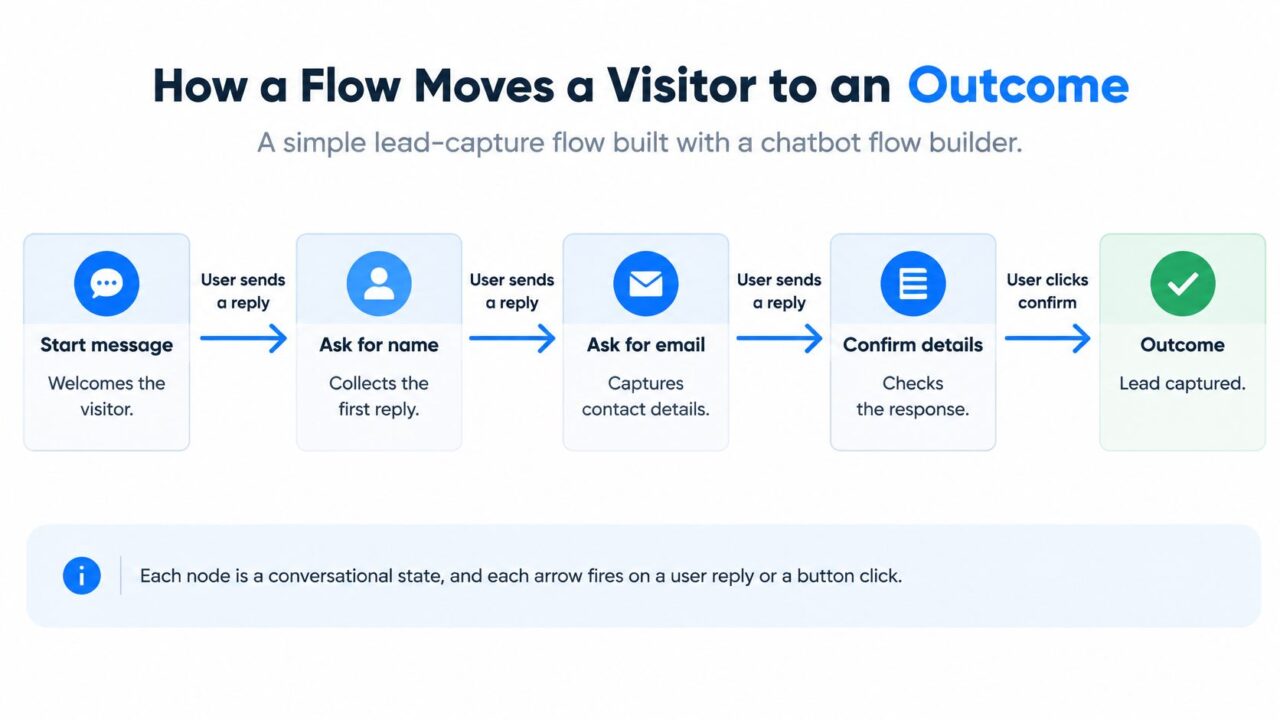
A flow behaves like a state machine. Each node is a conversational state, and each arrow fires on a recognized intent, a button tap, a field value, a timeout, or a failure. The visitor isn’t reading a script. They’re moving from one state to the next, and your job is to control those moves.
The diagram below shows movement in a simple lead-capture path, from welcome to confirmed outcome.
Chatbot Flow Builder Lead Capture Process
A Lead-Capture Example, Step by Step
Say a consultancy runs a Facebook ad and sends clicks into Messenger.
- Trigger: The flow starts when the visitor arrives from the ad or types BUDGET.
- Question: The bot asks for monthly budget and saves the answer to a field.
- Condition: A budget above 500 goes to a sales path. Anything below goes to nurture. Conditional branching in a chatbot flow does the sorting work.
- Delay: The flow waits one day instead of pushing again in the same minute.
- Follow-up offer: Qualified visitors get a booking prompt. Others get a useful guide.
- Exit with a tag: Each branch ends with a tag, so follow-up doesn’t rely on anyone’s memory.
That clean route is the happy path. It works when visitors tap the button you expected and type an answer in the format you wanted.
Where Dead Ends Appear
A dead end is any state with no exit. The usual cause is a missing fallback. Someone answers your budget question with “depends on what you can do for us,” the flow doesn’t recognize it, and the conversation stops.
Fix that state with a choice, not an apology alone. For example: “I didn’t catch that budget. Which range is closest?” Then show two buttons, Under 500 and 500 or more, plus a third option to talk to a person if neither fits.
Before launch, run three checks.
- Every state has an exit: No node ends in silence.
- Every input has a fallback: Free text always has a recovery route.
- Every branch ends properly: It closes with a tag, a handoff, or a closing message.
Common UI Patterns in Flow Builders
Most builders combine the same four interface patterns, and knowing them helps you judge a tool in minutes instead of days.
How the Workspace Is Organized
- Node canvas: You drag blocks onto a board and connect them with arrows. This suits flows with three or more branches, because you can see loops and orphan nodes.
- Linear step list: You add messages from top to bottom. It’s fine for a short quiz or welcome sequence, but branching gets hard to follow fast.
- Side-panel editing: You select a node and edit its message text, buttons, tags, and delays in a form beside the canvas.
- Entry-point manager: A separate list shows every keyword, ad link, and page that can start a flow, so two campaigns don’t collide.
Two safeguards matter more than visual polish. Look for a warning on any node with no outgoing connection, and a preview mode that shows the conversation as a phone user would see it.
Choose a canvas for branching flows. Choose a list for short, linear ones.
Example Flows for Marketing, Sales and Support
Start where your customers already want to talk. WhatsApp Business reports in its State of Business Messaging research that 73.3% of consumers across 22 global markets prefer messaging when communicating with businesses. In comparison, 72.4% say they are more likely to buy from brands that offer messaging. Put your entry point beside high-intent actions such as product pages, cart recovery, and promotions, rather than hiding it on a contact page.
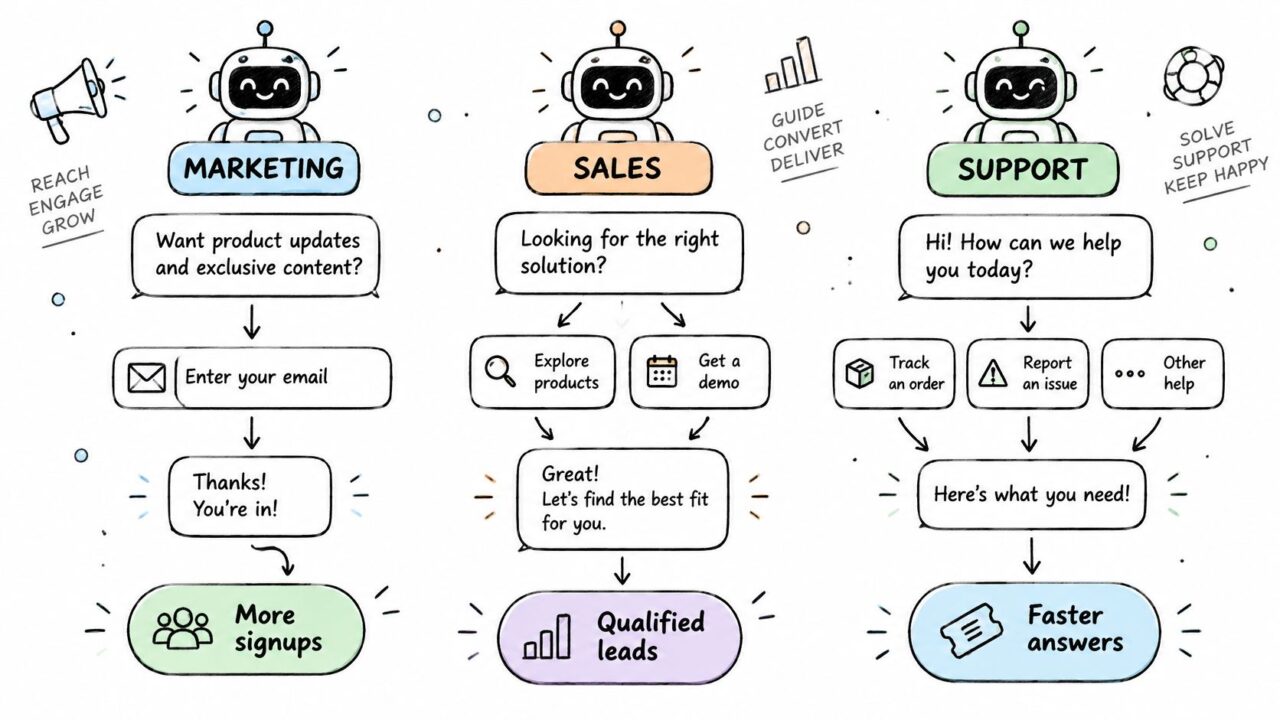
The examples below show how different teams use the same blocks for different jobs.
Chatbot Flow Builder Workflow
| Team Need | Trigger | Key Branch | Metric to Watch |
|---|---|---|---|
| Marketing quiz | Comment or ad click | Tags interest and sends the matching offer | Tagged subscribers and offer clicks |
| Sales qualification | Pricing page or keyword | Asks about need, budget, and timeline, then sends a booking link to qualified leads | Qualified bookings |
| Support status | “Where is my order?” message | Collects order number, looks up status, hands off on failure | Resolved status checks |
| Cart recovery | Abandoned cart delay | Checks discount eligibility before sending a reminder | Recovered orders |
| Promotion entry | Giveaway post | Asks one entry question and sends confirmation | Completed entries |
If you’re comparing layouts before you build, reviewing a concrete chatbot conversation flow example helps you see how triggers, branches, and exits line up in one finished path.
Two Small Businesses, Two Different Wins
Say a fashion store runs the marketing quiz from an Instagram post. A visitor picks “work outfits” or “weekend casual,” gets tagged, and receives only the matching collection. The transformation is simple. Browsing becomes a segmented lead you can follow up with, instead of a like you can’t use.
A local gym gets more value from sales qualification. Its flow asks about goals, preferred training times, and whether the visitor wants a tour. Ready prospects get a booking link in the same chat. People who aren’t ready get class information and stay in nurture, so staff spend their time on booked tours rather than chasing every inquiry.
A flow is ready to build when its row has a named trigger, one clear branch, and one success number.
Pick the row that matches your biggest leak first. A store losing carts should start with recovery. A coach losing inquiries outside office hours should start with qualification or support.
Features Worth Checking Before You Choose a Builder
A tidy demo flow tells you very little. Real campaigns need branching, personal data fields, timing, testing, and a clean exit to a person, all at once.
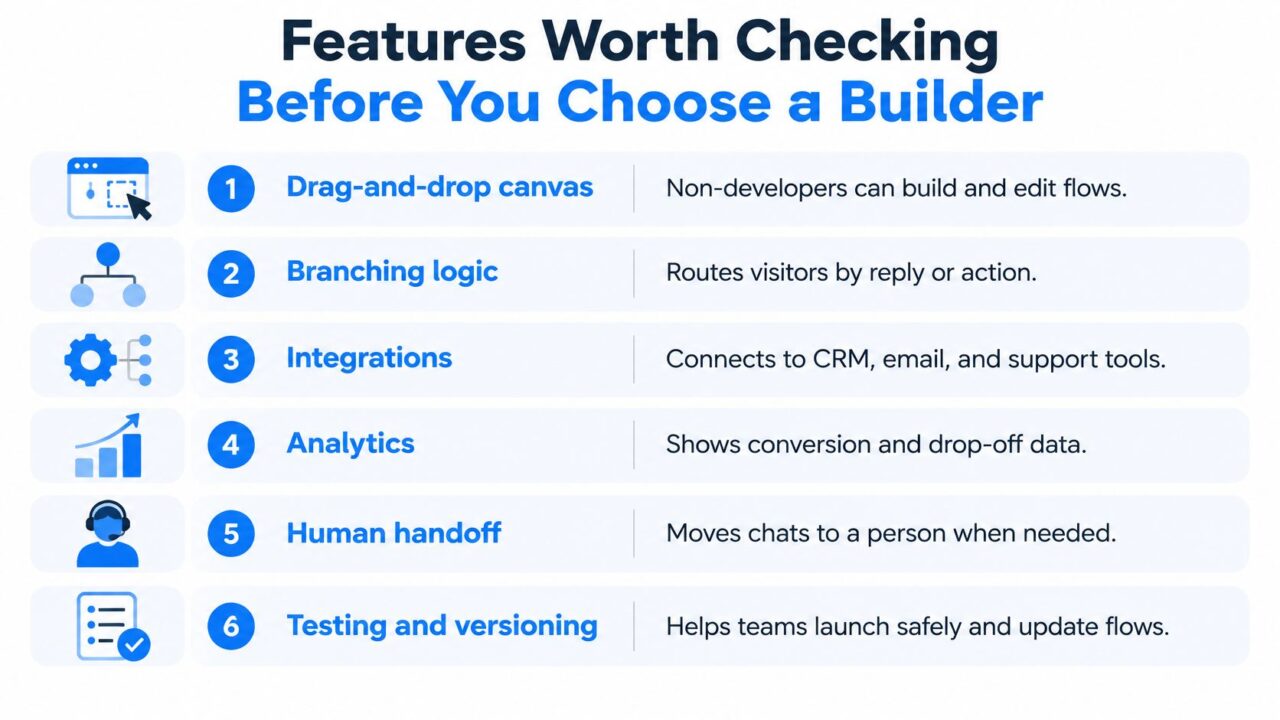
Use the checklist below while you’re in a trial, and test each item with your own campaign rather than sample data.
Chatbot Flow Builder Features List
Your Evaluation Checklist
- No-code drag-and-drop canvas: Non-developers can build, copy, and edit flows without filing a ticket for every wording change.
- Conditions on tags, fields, and answers: A repeat buyer, a new lead, and someone with an open complaint shouldn’t travel the same path.
- Custom and global fields with personalization tags: Messages can use the customer’s name, chosen product, or order detail instead of sounding generic.
- Delays and scheduled broadcasts: You can wait before a cart reminder, then send a later campaign to the segment it created.
- A/B testing and random path distribution: Split visitors between two opening messages and see which discount wording converts better on the same audience.
- Channel coverage: The same logic should run on your website, Messenger, Instagram Direct, and WhatsApp, so answers don’t drift between channels.
- AI keyword triggers: Natural phrases can start the right flow, so “how much is delivery” and “shipping cost” reach the same place.
- Live chat inbox for handoff: Staff need the transcript and fields in front of them, not a cold transfer.
- Segments and node analytics: You can spot completion and drop-off by node and fix the exact question that loses people.
- Integrations: Native apps plus automation tools such as Zapier, Make, or n8n keep leads and orders moving into your other systems.
Now run one practical test. Build a five-node flow in one sitting and time yourself. A week later, ask someone who didn’t build it to change the offer wording and the delay. If they can’t find those settings without your help, the tool will become a bottleneck, however strong its feature list looks.
When a Bot Should Hand Off to a Person
Maximum containment is the wrong goal. A flow that traps an angry customer in polite loops hasn’t saved you a ticket. It’s created a bigger one.
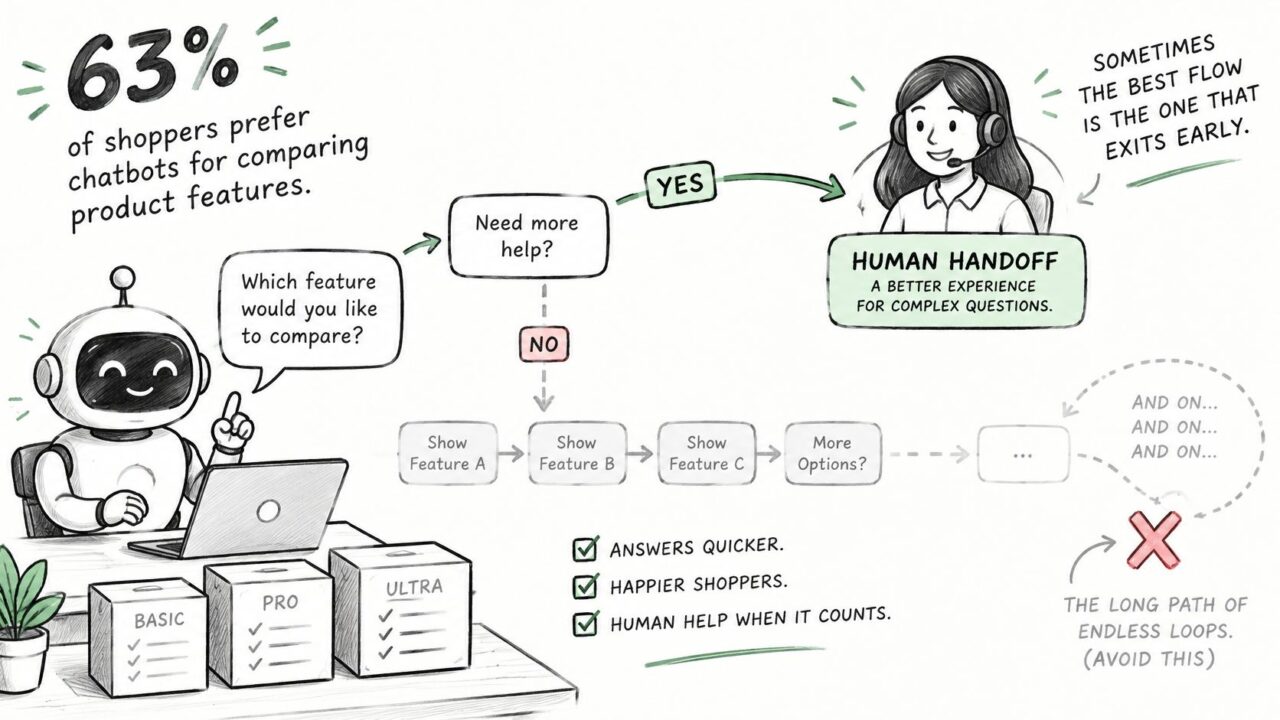
The handoff pattern below puts the person inside the design from the start, instead of treating escalation as a failure at the end.
Chatbot Flow Builder Chatbot Process
Baymard Institute’s independent UX research on AI engagement reports that shoppers favor chatbots for low-stakes discovery, with 63% preferring chatbots for comparing product features, 59% for checking stock, and 56% for personalized recommendations. The preference reverses for service failures, with 69% preferring a human for damaged or incorrect items, 67% for late or missing orders, and 66% for shipping or billing mistakes.
Turn that into a routing rule. Automate low-stakes, reversible tasks such as product education, availability checks, recommendation quizzes, and lead capture. Hand off disputes, exceptions, and anything where a wrong answer costs money or trust. If you’re unclear on the staffing model behind that receiving end, understanding what an AI support agent is helps you decide which issues can stay automated longer and which need a person immediately.
Triggers to Build Into the Flow
- Two misunderstood messages in a row: Don’t ask for a third attempt.
- Explicit request for a person: Respect it the first time.
- Damaged or wrong item: Route to support with the order number.
- Late or missing order: Give tracking facts, then offer a person.
- Billing error: Stop automated explanations and escalate.
- High-value lead: Bring sales in while intent is warm.
The short video below walks through how a handoff step sits inside a working flow, so you can see the transfer in context.
Pass context with every transfer: name, order number, the last three messages, and what the bot already tried. Then set expectations. Show the likely wait time during staffed hours. After hours, collect contact details, offer a callback, and give a response window the team can meet.
Metrics That Show Whether a Flow Works
Deflection alone can hide a bad experience. A bot may prevent a ticket from being created because the customer gave up, not because it solved their problem.
Adobe’s 2025 retail research on AI and digital trends found that 66% of consumers expect fast support from automated systems, yet only 33% believe brands deliver it, and 74% want clear disclosure when AI is used. Measure speed, honesty, and outcome together.
Seven Metrics Worth Reviewing
| Metric | What It Reveals | Healthy Direction |
|---|---|---|
| Completion rate | Share of starters who reach the final node | Higher |
| Fallback rate | Share of messages that hit the fallback node | Lower |
| Assisted resolution | Conversations resolved after a handoff | Higher |
| Transfer wait time | Minutes until a person replies after handoff | Lower |
| Repeat-contact rate | Users returning within seven days on the same issue | Lower |
| CSAT after handoff | Satisfaction score after a person takes over | Higher |
| Revenue per flow | Sales attributed to the flow | Higher |
Read the numbers as a set, not as trophies. A high completion rate with a rising repeat-contact rate means the flow looks finished but failed the customer. A rising fallback rate points to a wording problem or a new question you haven’t covered. If you need help structuring that dashboard, these chatbot KPI metrics give you a practical reporting starting point.
Reading rule: Completion tells you people reached the end. Repeat contact tells you whether the end actually helped them.
Report automated resolution and handoff separately, so a healthy escalation doesn’t look like a failure. Review the set weekly for the first month after launch, fix the worst node each week, then move to monthly reviews once the pattern stabilizes.
Build Your First Flow and Test It
Keep your first project small enough to build and test in one afternoon. Small doesn’t mean shallow. It means one outcome, one audience, and every exit covered.
Six Steps to Launch
- Pick one flow: Choose the example that matches your biggest gap, such as the abandoned cart reminder or the sales qualification flow.
- Sketch the state map: Write down the trigger, questions, conditions, delays, fallbacks, handoff, and exit before you build anything.
- Build on the canvas: In Clepher, chatbot flows are built by drag and drop in the Flow Composer, and no coding experience is needed. If a ready-made template fits your use case, start from it and adapt the branches.
- Add the handoff: Pass the context fields your support team needs, such as name, order number, and the last three messages.
- Test every branch: Run it on a phone and on desktop, and enter a deliberately wrong answer for each question to check the fallback.
- Go live on one channel: Launch narrowly, then review completion, fallback, and repeat-contact rates after 14 days.
That 14-day review is your next move, not adding five more flows. Fix the question people abandon, tighten the fallback they hit most, and check whether handoffs arrive with enough context. A first flow that reliably nurtures relationships, qualifies leads, provides support, or automates one sales path gives you a proven pattern you can copy for the next job.
Build your first small, testable flow with clear fallbacks and a proper human handoff, instead of trying to automate everything at once. Clepher gives you a no-code, drag-and-drop Flow Composer for Messenger and Instagram, plus a chat widget for your website, and you can try it risk-free. Start with one trigger, one outcome, and one 14-day review, then expand from what your customers do.