
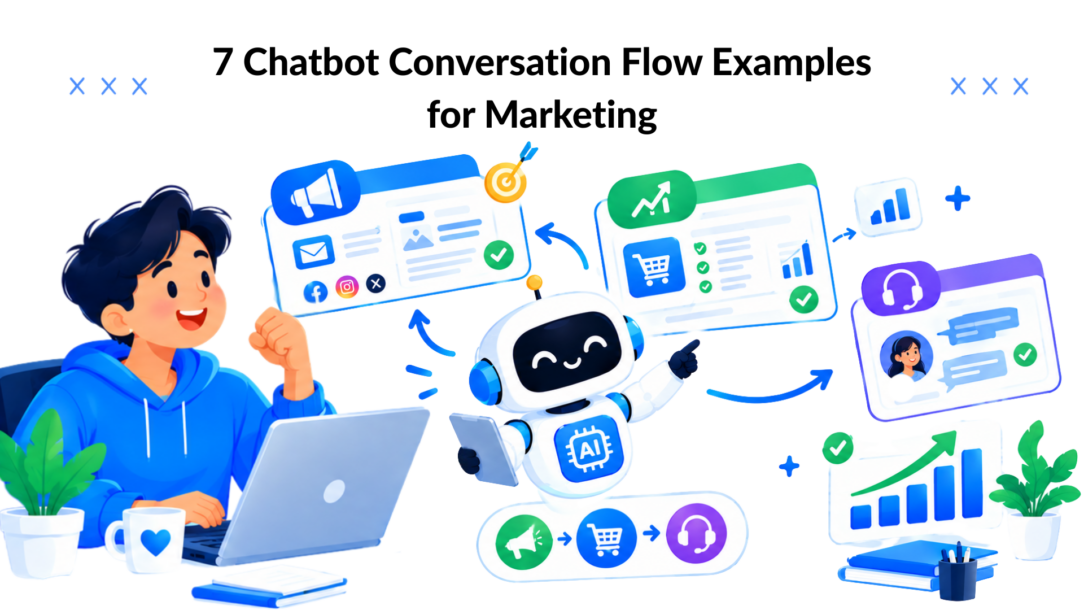
A visitor lands on your product page after hours, a subscriber replies to a campaign while your team is offline, or a new customer gets stuck during setup. They need a useful answer now, but your business can’t manually handle every conversation across every channel. A strong chatbot conversation flow example solves more than that response gap. It connects a clear trigger to focused questions, conditional paths, relevant personalization, a useful next action, and measurable outcomes.
The seven journeys below cover product discovery, lead qualification, support, cart recovery, nurture, promotions, and onboarding. Each one maps the conversation from entry point to conversion or human handoff, then shows how to build the logic with tags, segments, broadcasts, integrations, and analytics in a Clepher-style no-code workflow. Clepher supports flows across websites, Facebook, Messenger, WhatsApp, and Instagram Direct Message, with live chat and automation available when a conversation needs a person.
1. E-commerce Product Discovery and Purchase Flow
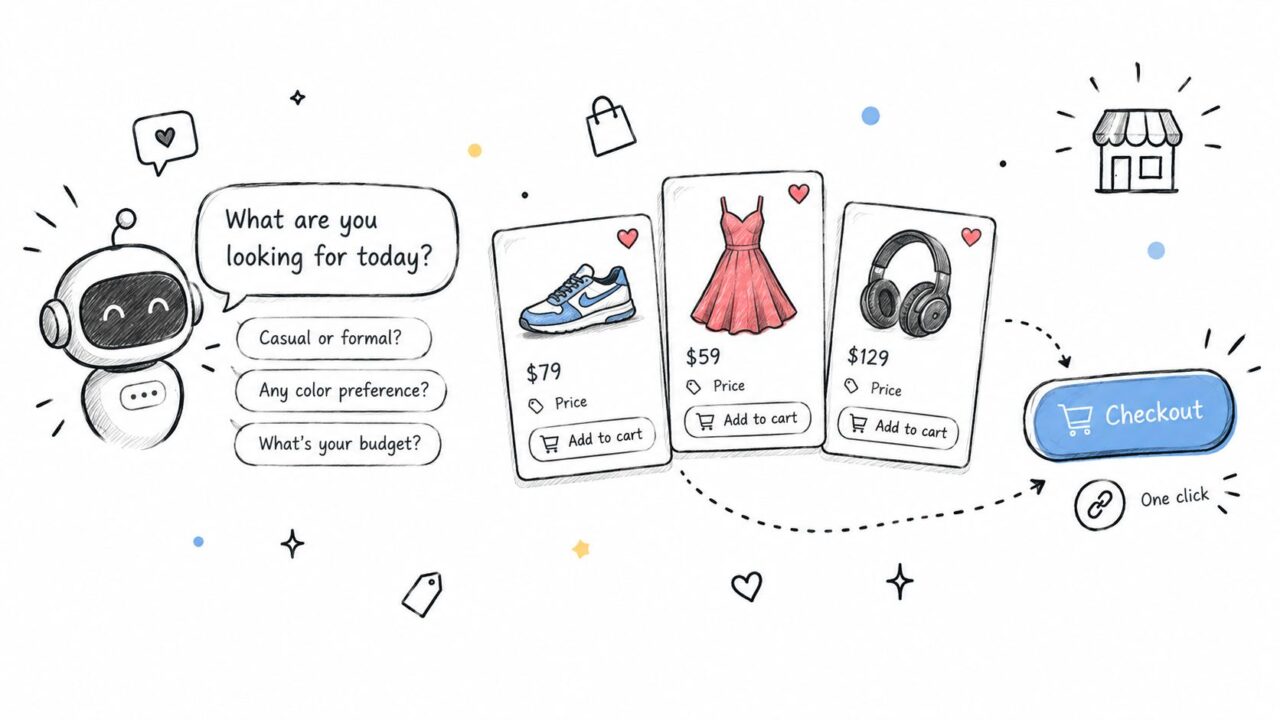
A shopper who says, “I need something for a summer wedding,” shouldn’t receive a giant product catalog. They need a short path from intent to confidence. Start with a trigger from a website widget, Messenger conversation, or Instagram Direct Message keyword such as “style.”
The opening can be simple:
- “What are you shopping for?”
- “What style feels most like you?”
- “What budget range should I work within?”
Ask no more than a few qualifying questions before showing recommendations. Store each response in custom fields, then apply tags such as occasion_wedding, style_minimalist, or budget_midrange. Conditions can skip questions that no longer matter. A shopper who selects “gift” shouldn’t be asked about their personal style.
Use conversational cards to display a small group of products with images, prices, short benefits, and buttons for View details, Compare, and Add to cart. For a beauty brand, the same structure can use skin type and concern. A SaaS company can replace style with team size and required features, then route users toward the most relevant plan.
Build the buying path
After a recommendation, ask, “Want help choosing between these?” A “Yes” path can address shipping, returns, compatibility, or payment objections. A “No, take me to checkout” path should send the shopper directly to the relevant product or cart page.
If the user expresses a complex need, apply a needs_specialist tag and launch a live-chat handoff with the conversation history attached. That preserves context instead of making the customer repeat every answer.
Practical rule: Personalization should explain the recommendation, not merely insert a name. “Based on your preference for minimalist designs, these options are the closest match” feels useful because it reflects a previous choice.
For implementation ideas around this journey, see Clepher’s conversational AI for e-commerce. Track recommendation clicks, product-page visits, add-to-cart events, checkout starts, completed purchases, and handoffs. Test whether budget comes before style, and use random path distribution to compare sequences.
Chatbot Conversation Flow Example Chatbot Shopping
2. Lead Qualification and Sales Pipeline Flow
A form asks a prospect to do all the work upfront. A conversational flow earns each answer by making the next question relevant. For a B2B SaaS company, agency, or high-ticket consultant, begin when someone clicks “See pricing,” replies to a campaign, or asks for a demo.
The first branch separates intent:
- “Are you exploring this for yourself or a team?”
- “What are you hoping to improve?”
- “What timeline are you working with?”
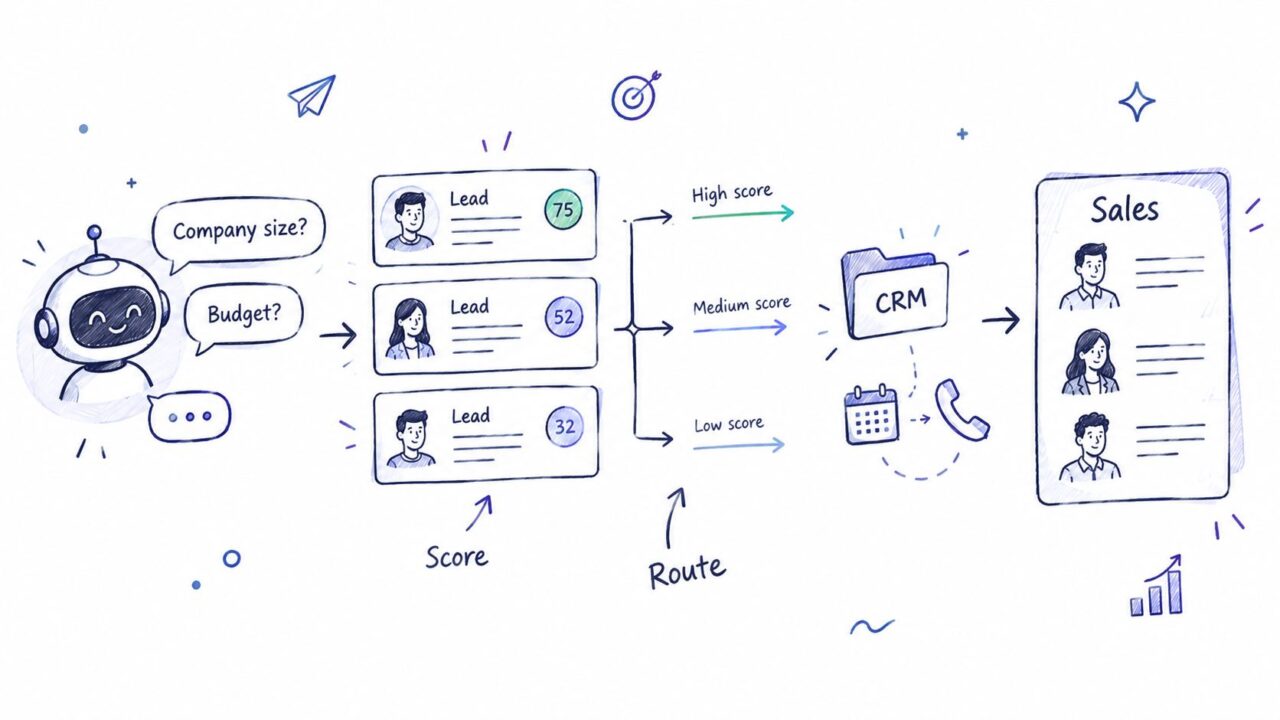
Ask about budget early enough to avoid wasting the sales team’s time, but frame it naturally. “What investment range have you set aside?” feels less rigid than a formal field asking someone to indicate a budget. Save the answer as a custom field, then combine it with company size, industry, use case, and timeline.
Route leads by fit
A high-fit prospect can receive a calendar link, a hot_lead tag, and an immediate CRM record. A prospect with a longer timeline might receive a nurture_long_term tag and a sequence of educational emails. Someone outside the service range can receive a useful alternative resource rather than being forced toward a sales call.
The warm handoff matters as much as the qualification. Send the sales representative a summary containing the prospect’s stated challenge, team context, budget range, timeline, and selected offer. Use Zapier or Make to sync fields and lead scores with the CRM, so sales prioritization doesn’t depend on manual copying.
A drop-off shouldn’t end the journey. If someone answers the first question but leaves before sharing an email address, trigger a permission-based follow-up through the channel they opted into. Keep the message focused on continuing the conversation, not pretending the qualification is complete.
Use this guide to qualify sales leads with Clepher as a practical reference for the flow logic. Measure completion by question, qualified-lead rate, booking clicks, booked meetings, sales handoffs, and pipeline outcomes. The weakest question is usually the best place to test shorter wording or a different sequence.
Chatbot Conversation Flow Example Lead Routing
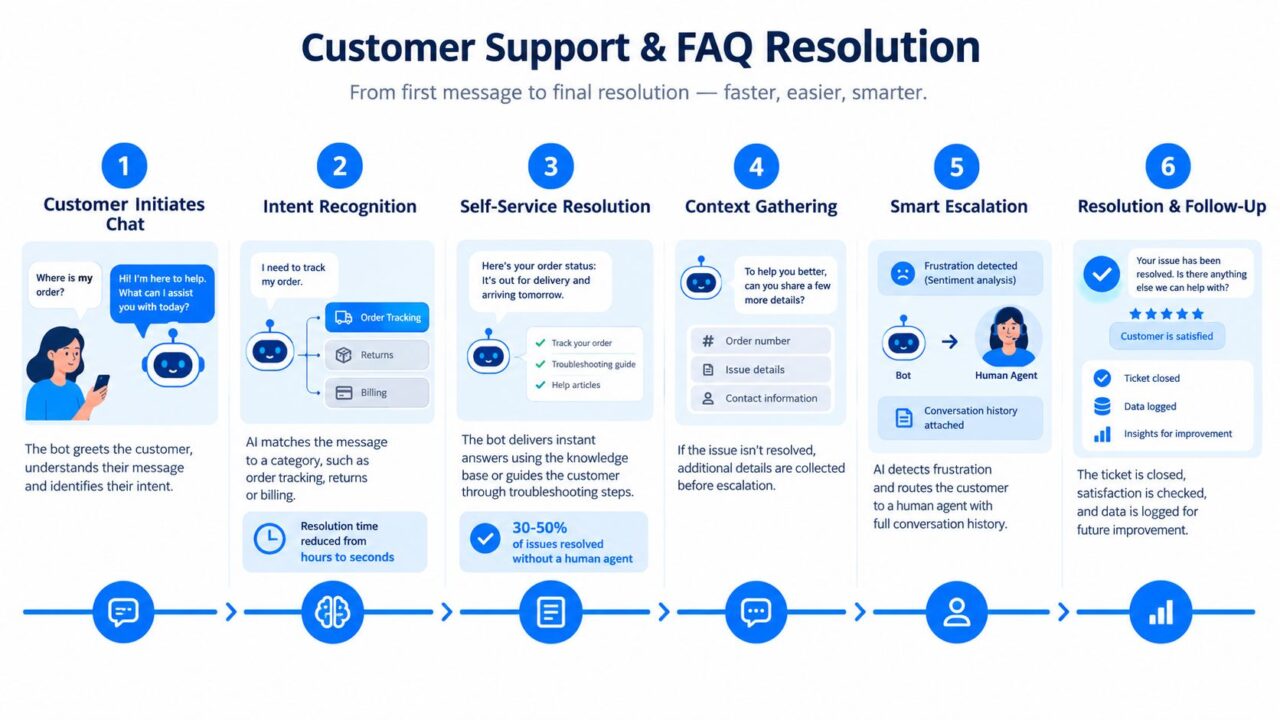
3. Customer Support and FAQ Resolution Flow
Support flows work best when they begin with recognition, not a wall of articles. A customer types “Where’s my order?” and the bot should identify the intent, request the order reference or email, retrieve the relevant status, and offer the next useful action.
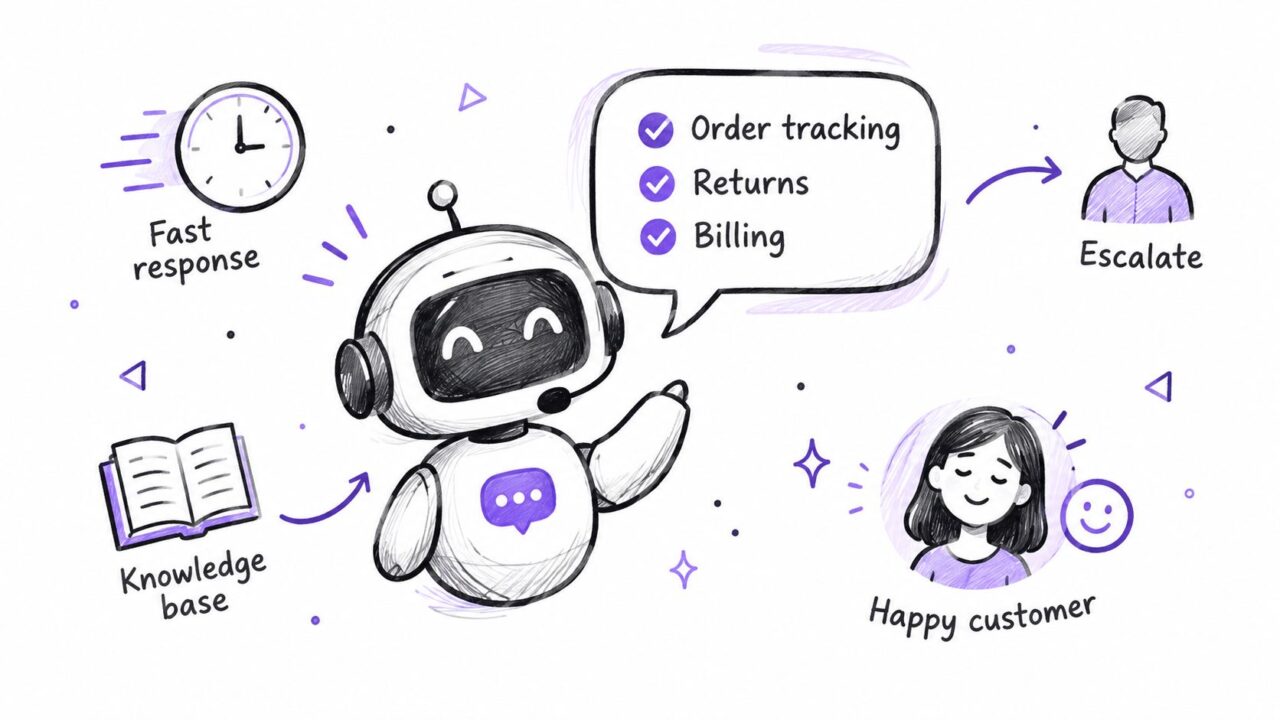
Start with quick replies for common intents:
- Track an order: Request the identifier and connect to the order system.
- Returns and refunds: Share the applicable policy and collect order context.
- Billing: Confirm the account and route payment-specific issues.
- Technical problem: Ask for the product area, device, or error description.
- Something else: Use intent recognition or offer live support.
Apply tags such as order_tracking, returns, billing, or login_issue. Conditions should use existing customer data when available, including purchase history, account status, or subscription tier. A Shopify store might provide tracking immediately. A SaaS company might send account-recovery steps before offering an agent.
Make escalation part of the design
Every answer should include a clear way to request a person. Escalate sooner when the customer uses frustrated language, repeats the same question, reports a sensitive issue, or reaches a fallback path. The fallback shouldn’t bluff:
“I’m not sure I’ve understood this correctly. I can connect you with a support specialist and pass along what you’ve already told me.”
That message protects trust and reduces repetition. Teams seeking broader support automation can review Clepher’s AI chatbot for customer support. For smaller businesses, a well-placed human option also supports the wider role of live chat in boosting small business leads.
Track containment, escalation, mean turns to resolution, task completion, and error management. A 2026 KPI guide recommends 40% to 65% containment for RAG-based bots, under 20% escalation in many domains, under 5 turns for simple intents, and 3% to 12% lead conversion in B2B chatbot funnels, according to independent chatbot KPI guidance. Use those ranges as directional targets, not guarantees.
Chatbot Conversation Flow Illustration
4. Cart Recovery and Win-Back Campaign Flow
Cart recovery should begin with context. If a shopper abandons a cart, the first message can identify the items and ask whether they need help with checkout, delivery, payment, or product details. For a dormant customer, the trigger might be a defined period without a purchase, followed by a message built around prior interests.
A practical sequence looks like this:
- Acknowledge the interruption: “You left these items in your cart. Would you like to continue?”
- Identify friction: Offer buttons for price, shipping, product questions, or checkout trouble.
- Remove uncertainty: Provide policy, delivery, security, or payment information.
- Offer a relevant incentive: Use a segment-specific promotion only when appropriate.
- Create a final reminder: Stop the sequence when the cart converts or the customer opts out.
Store abandonment reason as a field, then tag shoppers by objection. A high-price item may need financing information or product proof. A shipping concern needs delivery clarity before any discount. A subscription business can separate paused customers from people who cancelled, because those audiences need different messages.
Protect permission and margin
Use Messenger, WhatsApp, or email only where the customer has opted into the relevant communication. Broadcasts should stop as soon as a purchase event arrives from the commerce integration. A cart_recovered tag can exclude the customer from later reminders and trigger a post-purchase flow instead.
Don’t use false scarcity. A countdown is appropriate when an offer expires, but urgency shouldn’t disguise unclear shipping or cancellation terms. Analytics should connect the recovered sale to the incentive cost, so the team can judge margin rather than celebrate every conversion equally.
Chatbot Conversation Flow Example Support Process
5. Lead Nurture and Educational Content Flow
Not every prospect is ready for a sales call. A nurture flow gives the person a useful reason to continue engaging, then adapts based on what they read, click, or request. A digital agency might ask whether the lead is more interested in paid advertising, content, or social strategy. Each answer assigns an interest tag and starts a matching sequence.
Keep the path focused. A short series can deliver a practical tip, a checklist, a relevant guide, a mistake to avoid, and a soft invitation to speak with someone. Gate a useful resource behind an email capture when the exchange makes that value clear. The bot can say, “I can send the template to your inbox. What email should I use?”
Let behavior change the next message
A click on a paid-ads guide should add interest_paid_ads, remove unrelated nurture tags, and send the next relevant lesson. A prospect who repeatedly clicks case-study content may enter a proof-focused segment. Someone who stops engaging should receive fewer messages rather than an endless broadcast.
Use a conversational question to improve segmentation:
- “What’s your biggest challenge right now?”
- “Do you want examples, a template, or a quick explanation?”
- “Would you rather fix traffic, conversion, or retention first?”
The flow should teach before it sells. Soft calls to action can appear periodically, but each message needs a clear connection to the stated problem. Measure message opens, content clicks, replies, email captures, unsubscribes, and movement into sales qualification.
Research guidance also warns that users branch, backtrack, and switch topics. Test conversations across 4 to 8 turns, where context retention and topic-switching failures often become visible, as described in chatbot user research guidance. Add a “change topic” option and preserve the original interest tag so a temporary detour doesn’t erase useful context.
6. Promotional Campaign and Flash Sale Flow
A promotional flow has a narrow window, so the message must be relevant before it becomes urgent. Segment the audience before broadcasting. VIP customers might receive early access, recent customers might see complementary products, and inactive subscribers might receive a reactivation message tied to a previous category.
A fashion brand can announce a seasonal sale through Messenger, WhatsApp, and Instagram Direct Message. The opening message should state who the offer is for, what category is included, and what the customer can do next. Buttons can lead to Shop my picks, See all offers, or Ask a question.
Use real scarcity and useful personalization
Dynamic content can reference purchase history without sounding intrusive. “You previously browsed running shoes, so we selected these offers” is more useful than a generic discount blast. If inventory is genuinely limited, show the actual availability context. Don’t claim that only a few items remain when the stock isn’t restricted.
A campaign sequence might include:
- Early notice: Invite a segment to preview the promotion.
- Launch message: Present personalized products and a direct checkout path.
- Objection path: Answer delivery, returns, sizing, or plan questions.
- Last reminder: Reach opted-in fence-sitters before the deadline.
- Stop condition: End all reminders after purchase or opt-out.
Use broadcasts for the launch, conditions for eligibility, and tags for campaign membership. Integrate checkout events so a buyer exits the promotional sequence immediately. Measure open rate, click-through rate, conversion rate, average order value, unsubscribe rate, and profit after discounts.
The broader design principle is trust. Academic work on conversational cues shows that people can react differently when a bot feels overly persuasive. The flow should let users ask questions, decline the offer, or reach a person without being pushed through repeated prompts. See this chatbot conversation flow template guidance for ideas on confirmations, feedback loops, and escalation paths.
7. Onboarding and Product Education Flow
A new customer doesn’t need every feature at once. They need the next action that helps them experience value. Trigger the flow after signup, purchase, or trial activation, then ask what kind of setup applies. A solo user, a team administrator, and an existing customer migrating data shouldn’t receive identical instructions.
Break the journey into milestones such as:
- Account setup: Complete the profile or workspace basics.
- Data connection: Link the first integration or import information.
- Core action: Create a project, product, list, or campaign.
- First result: Run a report, process an order, or send a campaign.
- Review: Check the result and choose the next useful feature.
Save completed steps as fields or tags. Conditions can skip a connection step for users who already imported data, while team accounts can receive prompts to invite members. A progress message such as “You’re through setup, with a few quick steps left” gives orientation without turning the conversation into a rigid wizard.
Find blockers through behavior
If the user clicks help during integration, apply integration_blocked and offer a targeted guide or live chat. If they stop after creating a first project, send a short prompt tied to that missing milestone. Don’t keep broadcasting generic feature announcements to a user who hasn’t completed the basic setup.
Explain why a question matters. “We ask about your team so we can recommend the right workspace settings” feels more transparent than collecting information without context. Celebrate meaningful progress, then connect the next message to what the customer just accomplished.
Research on chatbot quality identifies usability, speed, task completion, dialogue efficiency, context awareness, and error management as practical global measures, while response quality also includes appropriateness, comprehensibility, realism, empathy, repetitiveness, and linguistic accuracy, according to a review of health-care chatbot evaluation. Apply the same lens here. A fast onboarding flow that repeats itself or fails at errors still creates friction.
Use product analytics, session recordings, and support conversations to locate stalls. Then test shorter instructions, different milestone order, and more relevant fallback paths.
Chatbot Conversation Flow: 7 Use Case Comparison
| Flow | Implementation Complexity 🔄 | Resource Requirements ⚡ | Expected Outcomes ⭐📊 | Ideal Use Cases 💡 | Key Advantages ⭐ |
|---|---|---|---|---|---|
| E-commerce Product Discovery & Purchase Flow | Medium–High, conditional logic + product DB & inventory integration | Moderate, product taxonomy, images, inventory API, multi-channel connectors | ↑Conversion 15–30%, ↑AOV ~20% | DTC fashion, beauty, subscription boxes, retail sites | Guided selling, personalization, 24/7 multi-channel checkout |
| Lead Qualification & Sales Pipeline Flow | High, lead scoring, progressive profiling, CRM routing | High, CRM integrations (HubSpot/Salesforce), scoring rules, ICP definition | ↓Sales cycle 30–40%, ↑win rates ~25% | B2B SaaS, agencies, high‑ticket services | Filters unqualified leads, faster response, focused sales time |
| Customer Support & FAQ Resolution Flow | Medium–High, NLP intent recognition + KB sync and escalation | Moderate, knowledge base, AI training, ticketing integration, monitoring | Resolves 30–50% of issues; response time reduced from hours to seconds; ↓support cost 30–40% | High‑volume e‑commerce, SaaS support teams | 24/7 instant answers, ticket triage, reduced agent load |
| Cart Recovery & Win‑Back Campaign Flow | Medium, real‑time cart triggers, dynamic content, sequence timing | Moderate, ecommerce platform hooks, discount/code mgmt, multi‑channel messaging | Recovers 10–30% abandoned carts; 5–10% incremental revenue | Retailers with cart abandonment, subscription renewals | Timely personalized recoveries, objection handling, urgency mechanics |
| Lead Nurture & Educational Content Flow | Medium, segmentation, staged content delivery, engagement tracking | High (content), guides, templates, emails/DMs, analytics, automation | ↑Conversion 20–30%, ↓sales cycle 40–50% over time | Coaches, agencies, SaaS with long consideration periods | Builds trust/authority, cheaper conversion, repeatable content library |
| Promotional Campaign & Flash Sale Flow | Medium, broadcast capability, timers, inventory sync, A/B testing | Moderate, audience lists, creative assets, inventory & checkout links | Short‑term revenue spike 15–25% during campaigns; high engagement | Seasonal sales, product drops, VIP offers, event promotions | High open rates, creates urgency/FOMO, rapid revenue generation |
| Onboarding & Product Education Flow | Medium–High, milestone tracking, product backend integration | Moderate, product analytics, tutorials/videos, success team handoffs | ↑Activation 20–30%, ↓early churn 25–40% | SaaS trials, complex products, new customer onboarding | Faster time‑to‑value, improved activation, identifies blockers |
Turn One Flow Into a Repeatable System
Start with the journey closest to your current bottleneck. If shoppers can’t choose, build product discovery. If sales spends time on poor-fit inquiries, build qualification. If support repeats the same answers, build intent-based resolution. If new users sign up but never reach a meaningful action, build onboarding.
Define the trigger and the outcome before writing messages. The trigger might be a page visit, keyword, purchase, abandoned cart event, trial signup, or campaign reply. The outcome should be observable, such as a completed purchase, booked meeting, resolved request, captured email, live handoff, or completed setup milestone.
Map the shortest useful path next. Each question should either identify intent, remove an objection, personalize the next step, or determine routing. If a question doesn’t change what happens next, remove it or move it later. Count turns as messages exchanged between the user and the bot, a concrete structural measure described in research on chatbot conversation measurement. Simple requests need short paths. Complex qualification needs branching, but not unnecessary repetition.
Build the logic with tags, segments, custom fields, conditions, and stop rules. Connect the data source that makes the answer useful, such as a CRM, product catalog, order system, calendar, email platform, or SMS provider. Then test every handoff. The human agent should receive the relevant answers, the user’s stated goal, and the reason for escalation.
Review completion, click-through, conversion, handoff, and drop-off points in analytics. Use A/B testing or random path distribution to improve the weakest step, whether that’s the opening prompt, a qualification question, a recommendation card, or the handoff message. A 2026 benchmark reported resolution time moving from 45 seconds to 22 seconds, abandonment moving from 15% to 5%, and engagement moving from 68% to 92% for top-performing flows, as reported by chatbot conversation-flow benchmark analysis. Treat those figures as benchmark evidence, not a promise for every implementation.
Evaluation also needs breadth. One quality framework found 24 metrics with high consensus and 3 with moderate consensus, grouped across global, response generation, response understanding, and aesthetics dimensions, according to the chatbot quality evaluation framework. Readability, security, accuracy, comprehension, and presentation can all affect whether users continue.
A Pew Research Center report published in June 2026 found that about 49% of U.S. adults used AI chatbots, compared with 33% in 2024 and 23% in 2023, while roughly one in four used them daily. The same report recorded 12% using chatbots several times a day and 4% almost constantly, as summarized by the 2026 Pew chatbot usage analysis. That shift makes flow quality an everyday utility issue. Users expect fast intent recognition, remembered context, clear fallbacks, and a human option when automation reaches its limit.
Choose permission-based messaging, preserve context, and make escalation visible. Build a small live version in a platform like Clepher, measure where users struggle, and improve that path before adding more channels or complexity.
Clepher gives you a no-code Flow Composer for building chatbot journeys with drag-and-drop cards, conditions, tags, segments, personalization, broadcasts, analytics, and live-chat handoffs. Visit Clepher to turn the chatbot conversation flow example closest to your bottleneck into a working automation across your customer channels.
