
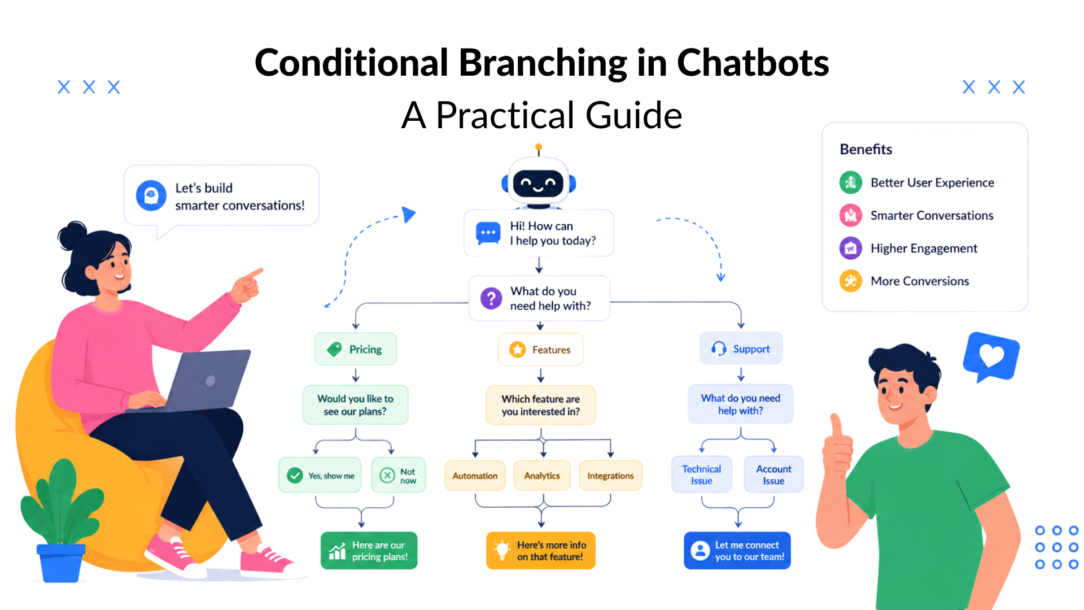
A high-intent prospect lands on your pricing page, opens the chatbot, and types “enterprise plans.” The bot replies, “Welcome. Are you looking for shoes, accessories, or something else?” The problem isn’t the greeting. The problem is that the conversation has no decision logic.
Conditional branching fixes that disconnect. Instead of sending every visitor through the same script, the chatbot evaluates intent, answers, tags, custom fields, persona data, or behavior, then routes the person to a relevant path. In marketing, that can mean separating a demo request from a product question. In support, it can mean sending an order-status request to self-service while escalating a payment issue.
The strongest chatbot flows don’t feel complicated to the user. They absorb complexity behind the scenes and present one clear next step.
Why Your Chatbot Conversations Feel Broken
A linear chatbot treats every person as if they arrived with the same goal, context, and history. That approach may work for a simple announcement, but it breaks as soon as visitors ask questions outside the sequence the builder expects.
The enterprise prospect doesn’t need a broad product menu. They need qualification around team size, requirements, timeline, or a sales handoff. If the bot asks irrelevant questions first, the visitor has to work around the system. Many won’t. They’ll close the widget or repeat the same question until a human notices.
Support flows fail in a similar way. A customer selects “help,” receives a generic list of articles, chooses an option that doesn’t match the issue, and gets returned to the same menu. The customer experiences a loop. The support team receives a ticket that could have been resolved with a more precise first question.
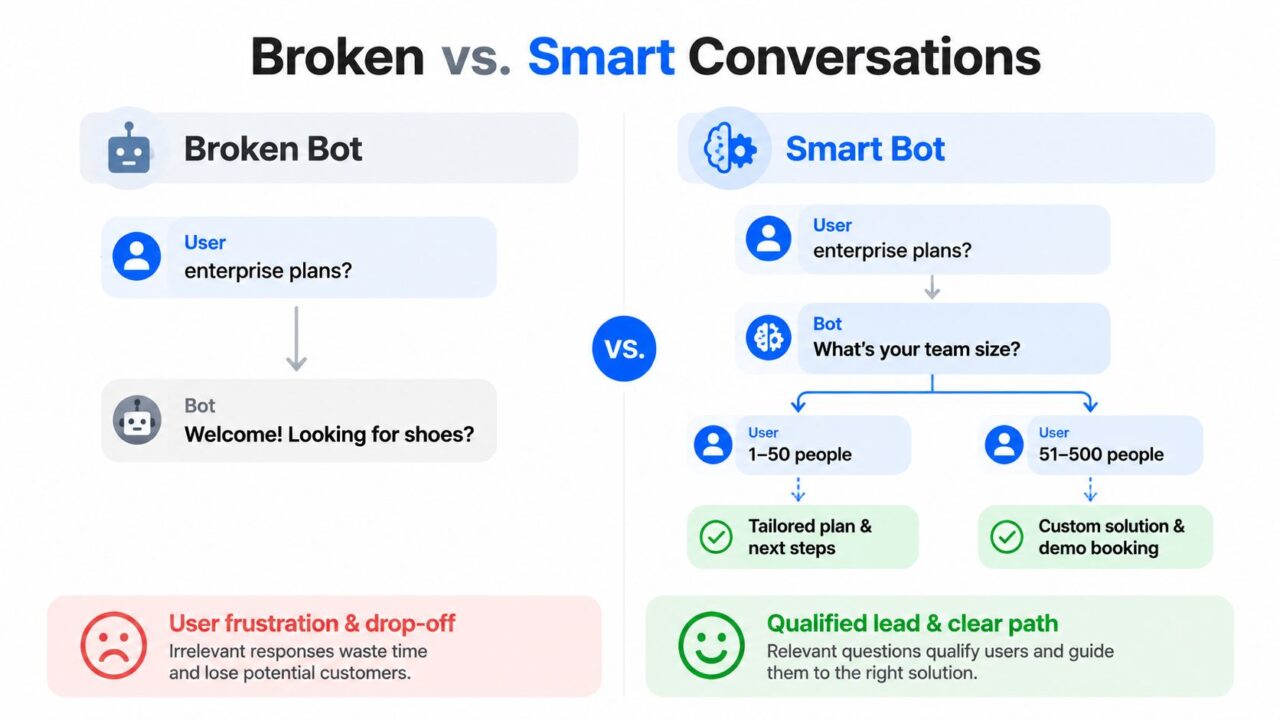
Conditional Branching Chatbot Comparison
The failure modes of one-size-fits-all flows
A non-branching flow usually creates three problems:
- Irrelevant qualification: The bot asks for information that doesn’t apply to the visitor’s intent.
- Dead-end support: The user reaches an answer that doesn’t solve the issue, but the flow offers no useful recovery route.
- Generic persuasion: A returning buyer sees the same introductory message as a first-time visitor, even though their needs are different.
These aren’t merely conversational annoyances. They affect whether a person continues, shares contact details, books a meeting, or asks for human help.
Practical rule: Every user message should lead to a clear next action, a useful fallback, or a human handoff.
Conditional branching turns the chatbot into a decision system. A trigger starts the evaluation, conditions inspect available information, and paths determine what happens next. For example, a pricing-page visitor who selects “Enterprise” can receive a team-size question, while a returning customer can go directly to account support.
Before building that logic, map the conversation around user intent rather than around the messages you want to send. This practical guide to designing a chatbot helps frame the flow around outcomes, entry points, and the decisions users need to make.
Understanding Conditional Branching Fundamentals
At its simplest, conditional branching follows an if/then structure:
- If the user selects “Enterprise,” then show the enterprise qualification path.
- If the user selects “Support,” then present troubleshooting options.
- If the user has a returning-customer tag, then use a customer-focused greeting.
The logic resembles a choose-your-own-adventure book. The reader makes a choice, and the next page depends on that choice. A chatbot does the same thing with buttons, replies, metadata, and stored customer information.
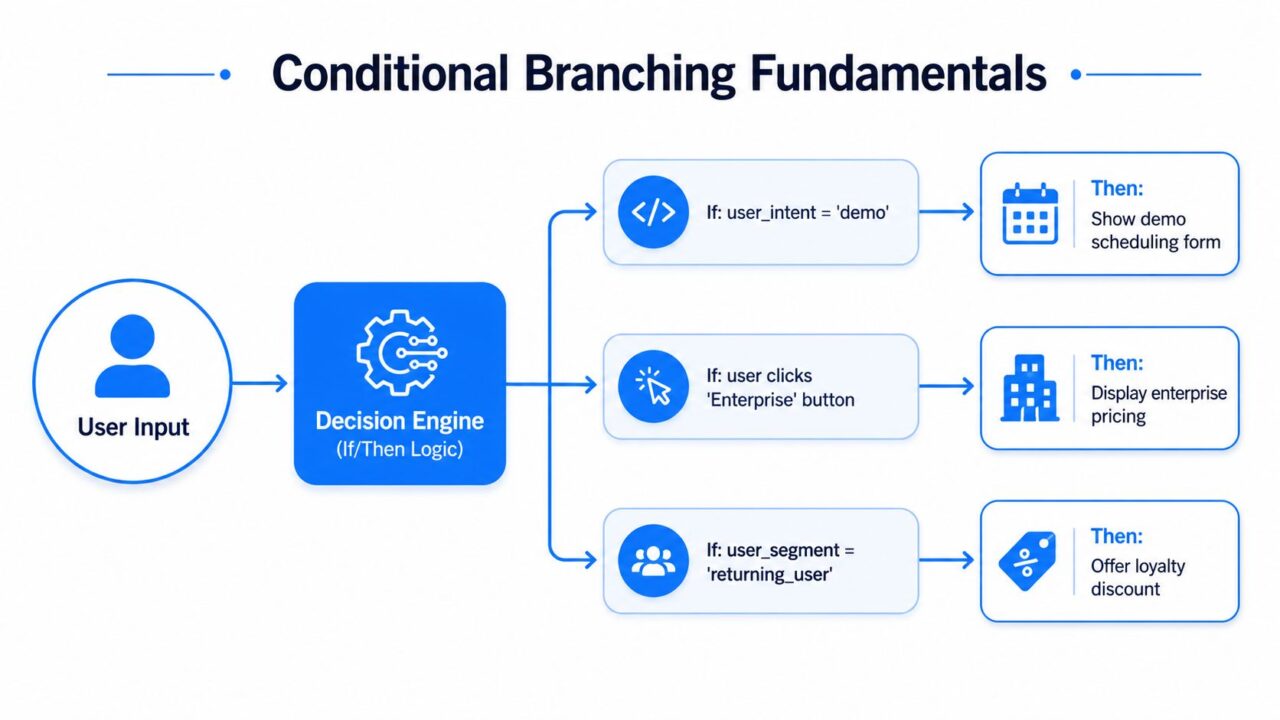
Conditional Branching Logic Flow
The three parts of a useful branch
A reliable branch has three components.
- Trigger: The event that starts the decision. This might be a button click, a keyword, a page-based entry, or a response captured earlier in the conversation.
- Condition: The rule the system checks. Examples include
user_intent = pricing, awebinar_attendeetag, orcustomer_tier = VIP. - Path: The action that follows. The bot can display a message, collect a field, route to another flow, offer an article, or start a live handoff.
A simple branch has one condition and two outcomes. A more advanced decision tree evaluates several variables. For example, the bot might check whether the person is a returning lead, whether their company size is enterprise, and whether they previously attended a webinar.
Use AND logic when every requirement must be true. Use OR logic when any qualifying signal should activate the route. Keep those rules visible in the builder and name them so another person can understand the decision without reverse-engineering the entire flow.
Complexity belongs backstage
Branching isn’t an excuse to expose users to a maze of choices. The frontend should remain short and conversational, even when the backend evaluates several conditions.
Build a fallback path for missing, unexpected, or conflicting information. If the user doesn’t match a known intent, offer a small set of clear options or a human handoff. A fallback is not an afterthought. It protects the conversation when a field hasn’t been populated, a user gives an unrecognized answer, or a campaign sends traffic into the flow from an unexpected context.
The basic programming model is consistent across environments. An if condition evaluates to true or false, an else path is optional, and if/elif/else chains support multiple alternatives, as described in Microsoft’s explanation of if and else statements. At the processor level, conditional branch instructions also determine whether control transfers based on status information, which is why unpredictable decisions can affect execution behavior, not just application logic, as outlined in this overview of conditional branching.
The same thinking applies beyond chatbots. If your marketing team routes local prospects by service area, understanding how Aim Set Win ranks local businesses can help you identify which location and intent signals deserve a branch.
Business Impact of Smart Decision Logic
Conditional branching connects conversation design to business outcomes because it changes what happens after a user reveals intent.
A lead qualification flow can ask about company size and budget signals, then route an enterprise prospect to sales while giving a smaller buyer a self-serve product path. Without that distinction, salespeople receive mixed-quality conversations and high-intent visitors may receive too much generic education.
A post-purchase flow can branch on order status and issue type. A customer asking where an order is shouldn’t receive the same sequence as someone reporting a damaged item. The first path can direct the customer toward status information. The second can collect the details an agent needs before the handoff.
Event-driven branches use context captured before the conversation begins. A visitor arriving from a campaign, a product page, or a support article can receive a different opening path. Page URL and campaign parameters help the bot match the conversation to the promise that brought the person there.
| Use Case | Without Branching | With Branching | Primary Metric Impact |
|---|---|---|---|
| Lead qualification | Every lead answers the same questions | Intent, company size, and budget signals route leads to relevant paths | Lead quality and qualification completion |
| Post-purchase support | Customers search through generic help options | Order status and issue type determine self-service or escalation | Resolution rate and agent workload |
| Campaign-driven marketing | Visitors receive broad messaging | Page and campaign context shape the offer or next step | Click-through and conversion activity |
| Returning customers | Existing buyers repeat introductory steps | Tags and history unlock account-specific assistance | Engagement and repeat purchase activity |
The cost of not branching is often hidden in abandoned conversations, unnecessary agent work, and follow-up messages that don’t match the user’s situation. A support team may still answer every ticket, but the process becomes slower and less consistent.
Why prediction quality matters
The technical cost of a branch depends on how predictable its outcome is. In modern CPUs, a highly predictable branch has overhead close to a simple condition check, while a branch with roughly 50% predictability can trigger a 15 to 20 cycle recovery penalty from pipeline flushing and refetching, according to Algorithmica’s branch-prediction analysis. That source also describes a benchmarked worst point of about 6.15 cycles per element and performance improvements of about 10% to 15% when the branch became easier to predict.
The chatbot lesson is different but useful. A decision system needs observable, well-defined inputs. If conditions rely on vague intent, missing fields, or inconsistent tags, the route becomes difficult to predict and diagnose. In a 1996 architectural analysis, branch penalty was described as a product of misprediction rate, branch frequency, and IPC, with a 5-cycle misprediction cost and branch density around 0.9 branches per instruction requiring prediction accuracy above 97.7% to keep total penalty below 10%. The broader principle is that many uncertain decisions can compound into meaningful performance loss, as explained in this architectural analysis of branch prediction.
Building Branches in Clepher
Start with a branch that answers one meaningful business question. In Clepher, create or capture a custom field such as user_intent, then check whether its value equals pricing. If it does, route the person to a pricing-specific flow. If it doesn’t, continue to the next relevant decision or use a fallback that asks what they need.
The field name should describe the business meaning, not the technical action. user_intent is clearer than field_4, and company_size is easier to audit than qualification_value.
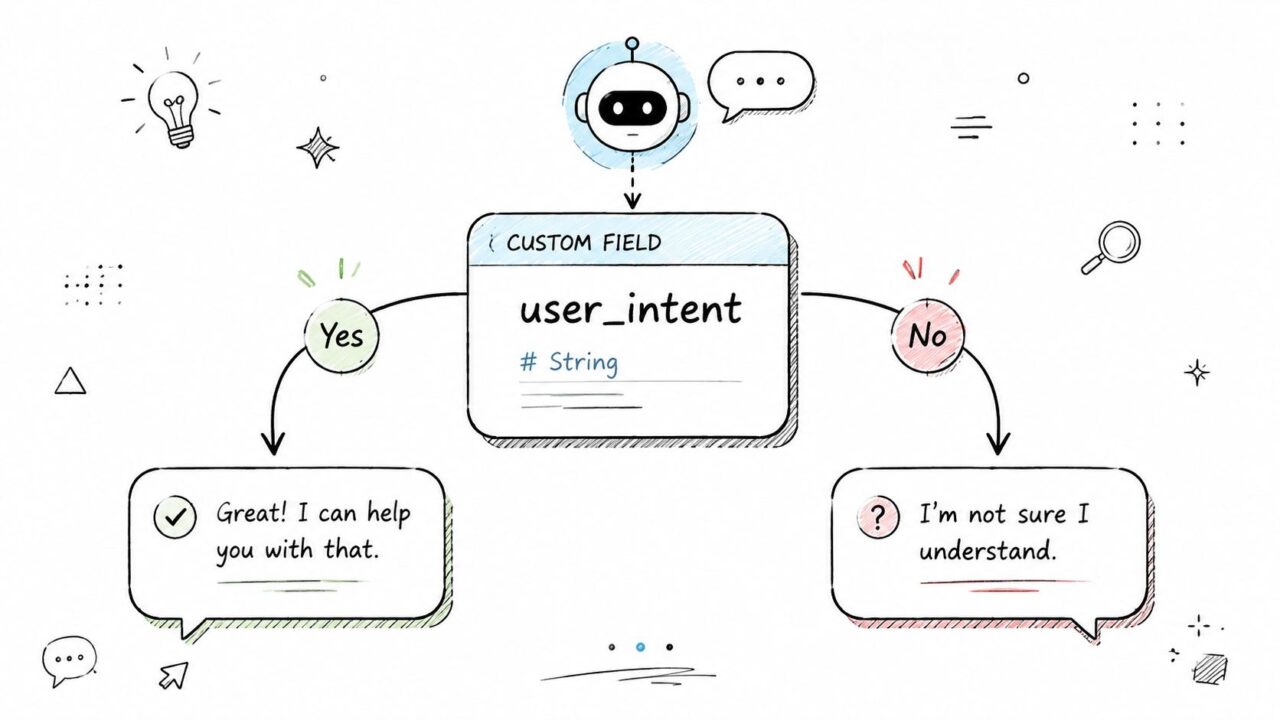
Conditional Branching Chatbot Flow
Build the first decision
Use a simple sequence:
- Capture intent: Ask whether the visitor wants pricing, a demo, product information, or support.
- Store the answer: Write the response to
user_intent. - Evaluate the field: Create a condition for
user_intent = pricing. - Route the path: Send matching users to pricing content or a qualification step.
- Protect the exception: Add a fallback for empty or unrecognized values.
That structure keeps the branch easy to test. It also gives the next person on your team a clear explanation of why the user entered a path.
Tags add behavioral context. If a person engaged with a previous webinar campaign, apply a webinar_attendee tag and use it to tailor the next conversation. You can combine that tag with a custom field, such as company_size = enterprise, to create a more specific route.
The rule becomes:
webinar_attendee AND company_size = enterprise
That user might receive a concise enterprise demo invitation with webinar-specific proof points. Someone with the same company size but no webinar tag can receive a different introduction. Tags are especially useful when the relevant behavior happened before the current conversation.
Use fields, personas, and traffic splits deliberately
Global fields such as customer_tier can route VIP customers to a priority support path while standard customers receive the normal troubleshooting route. Persona splits can separate first-time visitors from returning leads, so the first group receives orientation and the second group can continue from a more advanced prompt.
Personalization should support the decision, not decorate it. Use personalization tags to make a relevant route feel specific, but don’t add personal details that don’t change the user’s next action.
Clepher’s A/B and random path distribution features let you divide traffic between two variations. Test one meaningful difference, such as a direct demo invitation versus a short qualification question, then compare the downstream outcome. Avoid changing the audience, offer, and follow-up simultaneously, because you won’t know which change affected performance.
Naming rule: Name conditions after the decision they make, such as
Route enterprise webinar leads, not after the block’s position in the flow.
Review every branch for a default route. A condition that never matches can send users to the wrong experience. A fallback that repeats the same question creates a loop, so give it a useful alternative, such as a broader menu or a human handoff.
Common Branching Patterns and When to Use Them
Different business goals need different branch shapes. Choosing the wrong pattern creates unnecessary questions, difficult maintenance, or avoidable drop-off.
Five patterns worth knowing
Linear qualifier: Ask a sequence of focused yes/no or multiple-choice questions to place a visitor into a useful bucket. Use it for lead qualification when a few answers determine the next action. The trade-off is drop-off if the sequence feels like an interrogation.
Hub-and-spoke: Present a compact main menu, then route each choice into a specialized sub-flow. This works well for support triage because users can select billing, delivery, account access, or product help without seeing every downstream step. The hub is easy to understand, but each spoke needs independent maintenance.
Progressive profiler: Collect information across multiple interactions instead of demanding every field at the beginning. This suits lead nurturing, where the bot can ask for intent first and gather company details later. The experience feels lighter, though incomplete profiles can complicate later routing.
Behavioral trigger: Activate a path based on an action, such as visiting a page or interacting with a campaign. Use it when behavior provides stronger context than an explicit menu choice. The trade-off is that behavioral signals can be ambiguous, so include a confirmation question when the consequence matters.
A/B split: Distribute users between two message or path variations to compare outcomes. Use it for testing a call to action, qualification prompt, or support instruction. It creates learning, but only if the two versions have a clearly defined success metric.
| Branching Pattern | Best For | Complexity | Key Trade-off |
|---|---|---|---|
| Linear qualifier | Sorting leads by stated needs | Low to moderate | Longer questioning can reduce completion |
| Hub-and-spoke | Routing support and broad inquiries | Moderate | Every sub-flow requires upkeep |
| Progressive profiler | Gathering lead data over time | Moderate | Some profiles remain incomplete |
| Behavioral trigger | Contextual campaigns and re-engagement | Moderate to high | Behavior may not reveal true intent |
| A/B split | Comparing message or offer variations | Moderate | Poor test design produces weak conclusions |
Use a hub-and-spoke structure when users arrive with clearly different support needs. Choose progressive profiling when asking for all information upfront creates friction. Use a behavioral trigger when the entry context is reliable, and an A/B split when you have one specific hypothesis to test.
For complex flows, combine patterns carefully. A campaign can begin with a behavioral trigger, use a linear qualifier, and finish with an A/B split. Keep each decision understandable on its own.
Testing and Measuring Branch Performance
A branch isn’t finished when it saves successfully in the builder. Test it as a user would experience it, including incomplete answers, unexpected replies, returning contacts, and users who don’t meet any condition.
Create test profiles that represent the audiences the flow must serve. Give one profile a pricing intent, another a support intent, and another a returning-customer tag. Then verify the entry point, condition evaluation, message sequence, field updates, and final action.
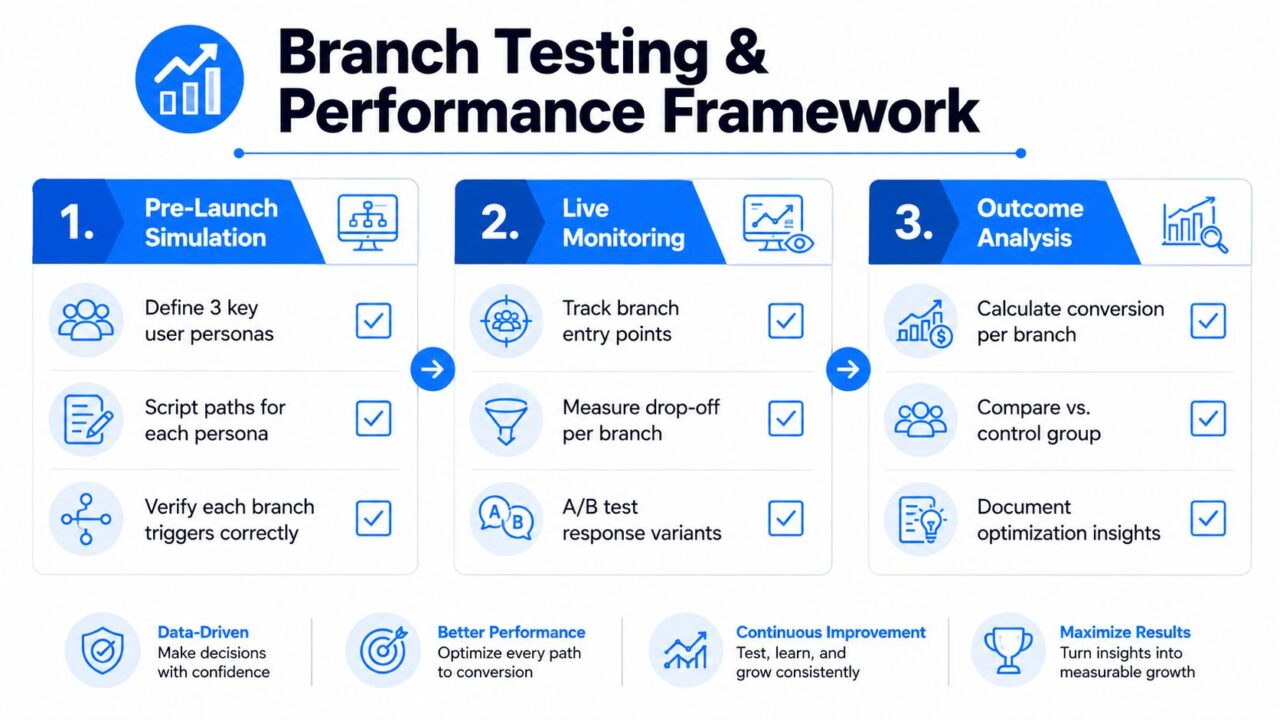
Conditional Branching Performance Framework
Measure the outcome that matches the branch
A qualifier flow should be judged by completion rate, not merely by how many people enter it. A support branch should focus on resolution rate, including whether the customer reaches a useful answer without unnecessary escalation. A marketing path should measure conversion activity, such as a completed form, booked meeting, or relevant purchase action.
Track where users enter and where they leave. A high entry count with weak completion can indicate unclear questions, excessive steps, or a condition that sends the wrong audience into the path.
Use conversation analytics to inspect branch-level behavior over time. Compare similar paths, look for sudden changes after an edit, and identify branches that perform below the flow’s broader outcome. Analytics won’t explain the cause automatically, so pair the numbers with transcript review.
A practical troubleshooting checklist
- Check the field value: Confirm the custom field is populated before the condition runs.
- Check exact matching: Review spelling, capitalization, spaces, and value formats.
- Check tag timing: Make sure the tag is applied before the branch evaluates it.
- Check operator logic: Verify whether the rule needs AND logic or OR logic.
- Check ordering: Place more specific conditions before broad catch-all conditions.
- Check the fallback: Test what happens when no condition matches.
- Check the destination: Confirm each route reaches the intended flow and doesn’t loop.
A/B tests should compare a defined hypothesis and a shared success metric. Don’t declare a winner after a few early interactions or change the variants while the comparison is running. Let the test collect enough comparable observations to support a responsible decision, then document what changed and why.
Your Implementation Checklist
Use this checklist before launching or auditing a conditional chatbot flow:
- Map the intents: List the questions, goals, and support issues users bring to the conversation.
- Choose decision points: Identify the smallest number of answers or signals that can route each intent.
- Define data requirements: Create the custom fields, global fields, tags, and persona rules the flow needs.
- Build the primary paths: Configure conditions and connect each outcome to one clear next action.
- Add personalization: Use relevant tags and persona splits without making the conversation feel invasive.
- Create test variations: Apply A/B or random path distribution only where you have a clear hypothesis.
- Protect edge cases: Test missing fields, unexpected answers, conflicting tags, and no-match fallbacks.
- Review depth: Keep branch depth manageable, typically no more than three to four levels deep, so users don’t face a maze and your team doesn’t inherit a maintenance problem.
- Monitor outcomes: Track completion, resolution, conversion, and drop-off at each important path.
- Iterate deliberately: Start with one high-impact flow, such as lead qualification or support triage, measure results over a two-week window, then expand based on what the data reveals.
Conditional branching works when every decision has a purpose, every path has an outcome, and every exception has somewhere useful to go.
Clepher provides a no-code chatbot builder with conditions, custom and global fields, tags, personas, A/B testing, random path distribution, live chat, and analytics for adapting conversations across the website, Messenger, WhatsApp, and Instagram. Visit Clepher to build one focused branching flow, test its paths, and turn the results into your next optimization.
