
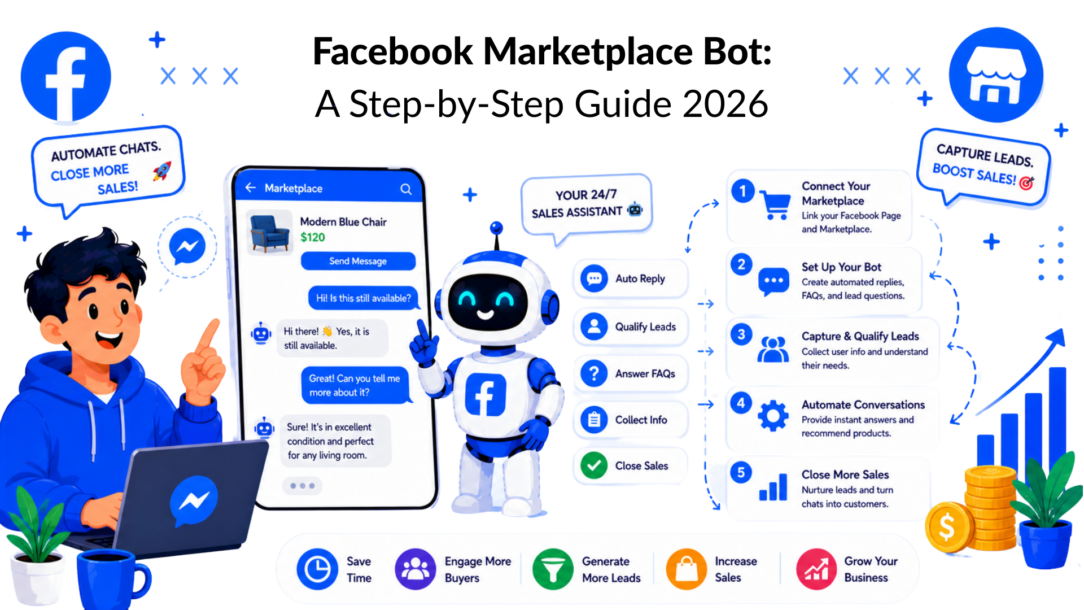
If you’re selling on Facebook Marketplace, your inbox probably looks the same every day. A burst of “Is this still available?”, a few price questions, maybe one serious buyer, then long gaps of silence that make the whole channel feel noisy and low intent.
That reading is understandable, but it’s incomplete. Most sellers don’t have an inquiry problem. They have a response system problem. When messages are handled manually, the first reply is slow, follow-up is inconsistent, and good buyers slip away because nobody moved the conversation forward while they were still in buying mode.
The Hidden Goldmine in Your Marketplace Inbox
Facebook Marketplace isn’t a side channel anymore. It’s operating at a massive scale, with over one billion consumers shopping on the platform in an average month, and 51.2% of social media shoppers made their most recent purchase on Facebook Marketplace, according to Capital One Shopping’s Facebook Marketplace statistics.
That changes how you should think about your inbox. Those repetitive messages aren’t just interruptions. They’re entry points into one of the biggest buyer pools on the internet.

Facebook Marketplace Bot Automated Messages
Why manual selling breaks down fast
Manual inbox management usually fails in the same places:
- Speed drops first: You see the message, but reply after you’ve finished something else.
- Consistency disappears next: One buyer gets full details. Another gets a two-word answer.
- Follow-up gets skipped: Interested people vanish because nobody nudged them back.
- Lead capture never happens: If the item sells out, the conversation dies instead of turning into a future sale.
That last point matters more than most sellers realize. Marketplace conversations often start with low-friction curiosity, not polished buying intent. A bot helps because it responds instantly, asks the next useful question, and routes serious buyers toward pickup, delivery, payment, or a human handoff.
The inbox is part of your sales funnel
A good Facebook marketplace bot doesn’t just answer “yes, it’s available.”
It qualifies demand, handles common objections, and creates structure where most sellers rely on memory. That’s the same mindset strong outbound teams use when they build repeatable response systems. If you want a useful parallel from B2B, Reachly’s B2B pipeline solutions show the value of treating conversations like a process instead of a pile of disconnected messages.
Practical rule: If the same buyer question appears every week, it belongs in an automated flow.
The best Marketplace automation isn’t flashy. It’s fast, clear, and boring in the right ways. It turns messy inbox traffic into organized buyer conversations.
Setting the Stage for Smart Automation
The first thing to accept is the platform limit. Facebook does not provide an official API for posting Marketplace listings, and Business Pages only get partial automation through Messenger. That’s not an oversight. It’s part of how Facebook limits spam and protects trust in Marketplace, as explained in this overview of Facebook Marketplace automation constraints.
That means a compliant facebook marketplace bot is not a listing spam machine. It’s a message handling and lead management system built around the conversations Marketplace already generates.
What your setup needs before any bot logic
If your foundation is messy, your bot will be messy too. Before building flows, clean up the operational basics:
-
Use a Business Page for messaging workflows
Personal-profile selling may still be part of your Marketplace activity, but automation options are far more limited there. If you’re serious about response automation, your Page needs to be the operational center. -
Check your Page inbox routing
Make sure Marketplace-originated messages land where your team can process them. If staff members are splitting work manually across phones, you’ll lose visibility fast. -
Review Messenger permissions
Admin roles, inbox access, and notification settings should be explicit. If one person has hidden access and everyone else assumes messages are covered, buyers will sit unanswered. -
Separate listing creation from conversation automation
Posting is manual. Messaging can be structured. Keep those workflows distinct so nobody expects the bot to do something Facebook intentionally blocks.
Compliance starts with restraint
A lot of bad advice in this space comes from people trying to force Marketplace into a fully automated posting engine. That’s where accounts get exposed.
A safer approach is simpler:
- Be transparent: Buyers should understand they’re interacting with an automated assistant at the start of the flow.
- Avoid spam behavior: Don’t trigger aggressive follow-up sequences with no clear user action.
- Escalate edge cases to a human: Refunds, disputes, condition disagreements, and custom delivery terms shouldn’t be buried inside rigid automation.
- Document your policies: Pickup rules, holds, returns, and payment expectations should be written clearly before you automate any response.
Automation works best when it removes friction for the buyer, not when it tries to imitate a human too aggressively.
For product-based brands, this same principle shows up in other AI workflows too. A useful example is how retailers talk about visual merchandising and product presentation in AI jewelry. The tools matter, but the guardrails matter more.
The operating model that actually works
Think of your setup in three layers:
| Layer | What stays manual | What can be automated |
|---|---|---|
| Listings | Creating and updating Marketplace listings | None of the postings flows in an official way |
| Messaging | Exception handling, negotiation boundaries, dispute resolution | First replies, FAQs, qualifications, reminders |
| Back office | Final review of unusual cases | Tagging, routing, inventory checks, CRM updates |
This is the model most sellers should use. It respects platform limits and still provides a real advantage.
Designing Your Ideal Customer Conversation
Most Marketplace bots fail because they sound like a vending machine. A buyer asks a simple question and gets a stiff answer that doesn’t help them move forward.
A better flow feels closer to a good sales assistant. It answers the obvious question, then guides the buyer toward the next decision while they’re still active. Since the average user spends 20 minutes per visit on Facebook Marketplace, there’s enough time for a smart conversation to qualify intent and direct action if the flow is well designed.
Facebook Marketplace Bot Strategy
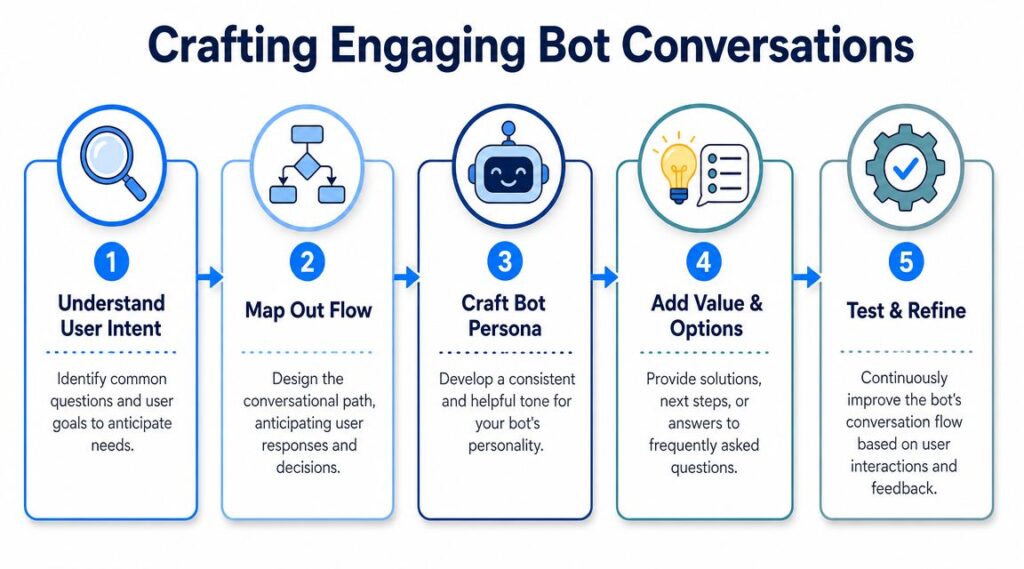
Start with intent, not keywords
A buyer message usually signals one of a few things:
-
Basic availability
“Is this available?” means they want fast confirmation and a reason to keep talking. -
Price testing
“What’s your best price?” usually means they’re interested, but they want to know how flexible you are. -
Logistics
“Do you deliver?” or “Where are you located?” signals someone closer to action. -
Risk reduction
“Any flaws?” or “Can you send more photos?” means trust needs to be built before they commit.
Your bot should recognize those intent buckets and respond with context, not canned filler.
A simple conversation map that works
Here is a practical starting flow:
- Confirm availability
- State the item’s condition clearly
- Offer the two or three next actions
- Capture the buyer’s preference
- Route to human review if needed
For example:
Buyer: Is this available?
Bot: Yes, it’s available. You can choose pickup, local delivery if offered, or ask for more details about condition.
That is already better than “Yes.”
From there, branch based on the reply.
- If they ask about pickup, give the area, pickup windows, and whether same-day collection is possible.
- If they ask about shipping, collect location details and move into delivery rules.
- If they ask about the condition, send a structured answer, not a vague reassurance.
- If they ask about price, give your approved response range or route the negotiation to a human.
Give the bot a usable personality
Your bot doesn’t need jokes. It needs tone discipline.
Good Marketplace bot tone is:
- clear
- short
- polite
- specific
- calm under pressure
Bad bot tone is overly salesy, evasive, or robotic. “Dear valued customer, we are thrilled to inform you…” is the wrong voice for Marketplace.
A better default is: “Yes, it’s still available. Pickup is in [area]. If you’d like, I can also send condition details and available times.”
Build around real buyer friction
Most buyers don’t need a long script. They need the next useful answer.
A strong flow usually includes:
| Buyer concern | Good bot move |
|---|---|
| Unsure if the item is still live | Confirm status immediately |
| Doesn’t trust the listing quality | Share the condition summary and offer more photos |
| Wants to know the convenience | Give pickup or delivery options fast |
| Hesitating after the price | Clarify terms or hand off to a human |
| Not ready today | Offer future-stock or similar-item updates |
If you need help tightening the wording, this guide on how to write a chatbot script is a useful reference for structuring short, natural flows.
Short messages usually outperform long explanations in Marketplace chats because buyers are scanning, comparing, and deciding quickly.
Building Your Marketplace Bot in Clepher
Once your conversation map is clear, building the bot becomes a workflow exercise. The fastest way to get results is to automate the repeated middle of the conversation, not every possible edge case.
Start with the highest-frequency triggers. On Marketplace, that usually means availability, price, condition, and delivery questions.

Facebook Marketplace Bot Workflow
Build the core flow first
In Clepher, a practical starter build looks like this:
-
Create a keyword trigger
Use phrases buyers often send, such as “Is this available?”, “available?”, “still available”, “pickup”, or “best price”. -
Send a short confirmation message
Confirm availability if the inventory says the item is active. If not, send an out-of-stock response and offer alternatives or future updates. -
Ask for a guided follow-up
Give button-style choices or short prompts like:- pickup details
- condition details
- delivery options
- speak to the seller
-
Tag the contact based on behavior
Tags likepickup_interest,shipping_question,price_sensitive, orneeds_human_reviewmake future follow-up much easier. -
Route exceptions
If the buyer asks something outside approved boundaries, push the chat to a human instead of forcing the bot to improvise.
No-code tools offer an advantage. You can see the whole flow, update one branch, and publish changes without rebuilding the system from scratch.
Add inventory awareness early
Inventory mismatch is where Marketplace automation gets sloppy. If the bot says an item is available after it has already been sold on another channel, trust drops immediately.
For multi-channel sellers, the stronger approach is connecting the bot to an external stock source. Platforms like Clepher can connect to over 5,000 apps via middleware, which makes it possible to check real-time stock in a separate system before the bot confirms availability, as shown in this walkthrough on multi-channel bot integration.
That stock source can be:
- a Google Sheet
- Airtable
- Shopify inventory
- a lightweight internal database
- an operations tool updated by your sales team
The point isn’t technical elegance. Its response accuracy.
A useful walkthrough for the messaging side is this page on a chat bot for Facebook, especially if you want to model triggers, conditions, and audience tags before adding more advanced logic.
Use this pattern for branch design
Here’s a simple branch layout that works well:
| Trigger | Bot action | Next step |
|---|---|---|
| “Is this available?” | Confirm status | Offer pickup, delivery, and condition info |
| “Where are you located?” | Send area or pickup zone | Ask if they want pickup times |
| “Best price?” | Send approved pricing response | Offer a handoff if negotiation is needed |
| “Can you deliver?” | Ask for the area | Check delivery rules or hand off |
Later in the build, add richer paths like appointment booking, alternate product suggestions, and lead capture for similar items.
A visual walkthrough helps when you’re mapping those branches in the builder:
What not to automate
Don’t let the bot freestyle on:
- warranty-like promises
- legal disputes
- refund decisions
- custom item condition disputes
- aggressive back-and-forth negotiation
Those situations need rules, judgment, and accountability. Automation should narrow the path to purchase, not create risk.
Automating Lead Capture and Sales Recovery
Most sellers stop at auto-replies. That’s useful, but it’s not where the primary value resides. The bigger payoff comes when your Facebook marketplace bot keeps a conversation alive after the first question and turns short-lived interest into an owned contact.
That only works if you stay compliant. Using bots for lead capture and commercial follow-up requires transparency, respect for platform rules, and care around consumer protection. Aggressive or misleading automation can get flagged and create account risk, as discussed in this compliance-focused overview of Facebook automation risks.
Capture intent before the buyer disappears
A common Marketplace pattern looks like this: a buyer wants the item, can’t commit today, then vanishes. If you don’t collect any information, the conversation dies with the listing.
A better flow gives them a clear option:
- get notified if the item is still available later
- hear about similar products
- receive updates when new stock arrives
- continue the conversation through another approved channel
The key is consent and clarity. Ask plainly. Explain what they’ll receive. Store the data with labels that make later follow-up relevant instead of spammy.
If you’re building those follow-up paths in Messenger, this guide to automate Facebook Messenger is useful for thinking through opt-ins, tags, and sequence structure.
Operational advice: Only collect contact details when the buyer gets a clear benefit in return, such as stock alerts, appointment confirmation, or relevant product updates.
Recover stalled conversations
A lot of Marketplace revenue leaks out in the final stretch. The buyer asked the right questions, agreed in principle, then stopped replying.
That doesn’t always mean the sale is dead. People get distracted, compare listings, or forget. A light recovery sequence can bring some of those conversations back without turning your inbox into a spam engine.
A good recovery flow usually includes:
-
A delayed follow-up
Short, neutral, and specific. Confirm whether they’re still interested. -
A context reminder
Mention the item and the last step discussed. -
A low-pressure choice
Reply with pickup, delivery, a question, or “not interested.” -
An exit path
Let inactive buyers end the conversation cleanly.
What a compliant follow-up sounds like
Good:
Hi, just checking in on the item you asked about. If you’d still like it, I can help with pickup details or answer any last questions.
Bad:
Final warning. Other buyers are waiting. Act now.
The difference is simple. One helps. The other pressures.
Lead capture and recovery should feel like service operations with commercial upside. That’s how you preserve trust and get more value from every Marketplace conversation.
Your Go-Live Checklist Monitoring and Optimization
Launching your bot is not the finish line. It’s the point where you’ll finally see where your script is too vague, where buyers ask unexpected questions, and where automation helps or hurts.
Before launch, run the bot like an operator, not like a marketer.
Pre-launch checks that matter
Use a checklist that reflects real buyer behavior:
- Test every trigger phrase: Try short versions, misspellings, and blunt messages.
- Review every branch: Make sure each response leads somewhere useful.
- Check human handoff rules: A buyer should never get trapped in a loop.
- Validate inventory lookups: If stock checks lag or fail, turn off auto-confirmation until fixed.
- Read responses out loud: If a message sounds stiff in speech, it will read stiff in chat.
- Confirm policy wording: Pickup terms, holds, delivery rules, and payment expectations should be consistent.
A bot that handles common cases well is ready. A bot that tries to answer everything is usually not.
Track business outcomes, not chat activity
Message volume is easy to see and easy to misuse. What matters is what the conversation produced.
Track outcomes like:
| Metric | Why it matters |
|---|---|
| Lead captured | Shows the bot is preserving buyer interest |
| Qualified buyer conversation | Tells you whether messages are moving beyond empty inquiries |
| Human handoff rate | Helps you spot script gaps or edge-case volume |
| Recovered stalled sale | Measures whether follow-up logic is working |
| Completed purchase after bot interaction | Connects automation to actual revenue |
This matters even more because social platform data can be noisy. Research highlighted by MIT found bot-detection systems can look highly accurate in training conditions and then fail badly when applied elsewhere, which is a strong reminder not to trust surface-level interaction signals on their own. Read the summary from MIT Sloan on bot detection accuracy limits.
Validate engagement against real sales
Facebook traffic quality isn’t perfectly clean. Estimates cited in market research suggest that 13% to 16% of Facebook’s active accounts are fake or duplicate, which means engagement data can contain noise that distorts performance analysis. The practical takeaway from CHEQ’s Facebook market research discussion is simple: don’t judge your bot by clicks, replies, or apparent engagement alone.
Use harder validation points:
- order completion
- confirmed pickup
- successful payment
- account creation
- repeat purchase
- customer support continuity after the sale
If the bot produces lots of conversation but few completed transactions, the issue isn’t activity. It’s qualification, trust, or handoff quality.
Improve with an unanswered-question log
One of the best optimization habits is maintaining a log of messages the bot couldn’t handle cleanly.
Review that log weekly and sort questions into three groups:
-
Should be automated
Repeated condition, timing, and logistics questions. -
Should be clarified in the listing
If buyers keep asking the same basic details, your listing is underexplaining the offer. -
Should stay human-only
Disputes, edge-case negotiations, unusual delivery requests, or any issue with legal implications.
That loop keeps the bot useful without making it reckless.
Keep the bot narrow and sharp
The strongest Marketplace systems usually stay focused on a few things:
- instant first response
- buyer qualification
- logistics handling
- lead capture
- sales recovery
- human escalation
Everything else is optional.
A Facebook marketplace bot becomes valuable when it shortens response time, structures follow-up, and protects your team from repetitive inbox work. It becomes risky when it pretends to be a complete replacement for human judgment.
If you want to build that kind of system without coding it from scratch, Clepher gives you a practical way to create Messenger and social DM automations, connect them to your tools, and manage lead capture, follow-ups, and handoffs in one place. It’s a good fit when you’re ready to move from reactive replies to a cleaner, more compliant conversation workflow.

Related Posts
Customer Experience Optimization Playbook
October 8, 2026Automated Checkout Bot: Build and Launch Guide
October 7, 2026AI Agent Framework: Architecture, Tools, and Use Cases
October 6, 2026
Founder Clepher