
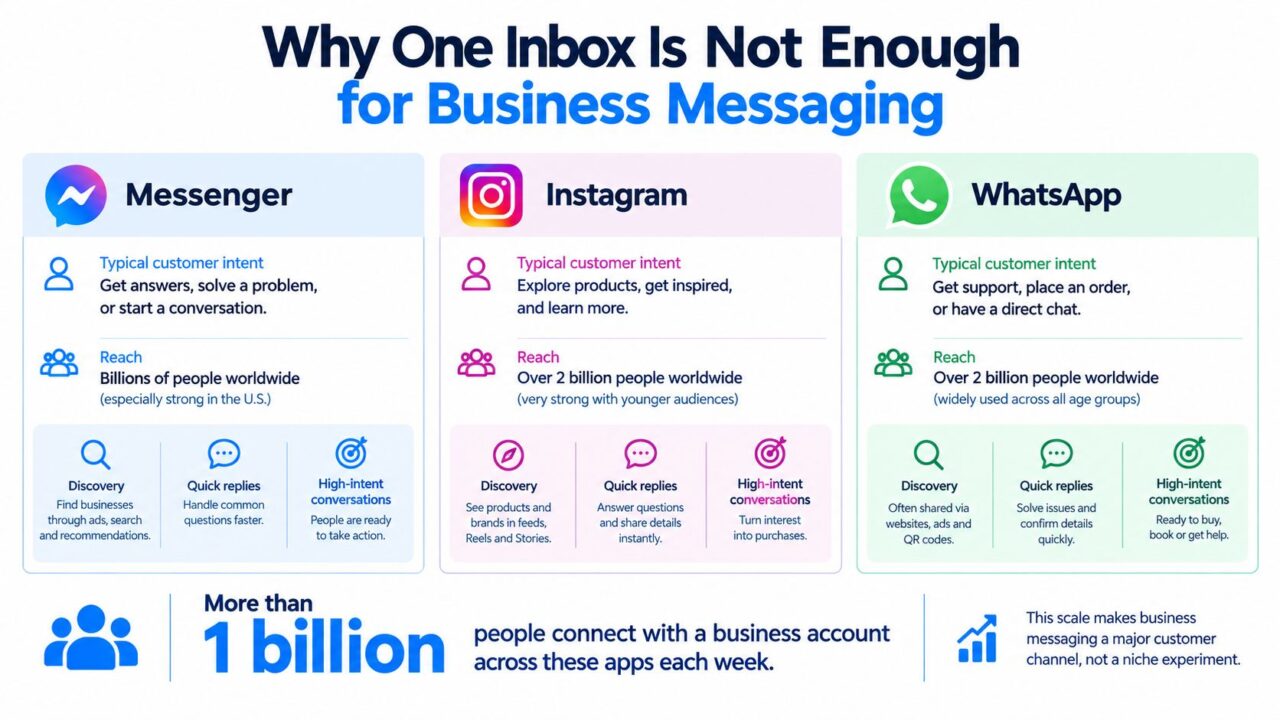
More than 1 billion people connect with a business account on Facebook Messenger, Instagram, or WhatsApp each week, and Meta reports more than 600 million daily conversations between people and businesses across its platforms (Marketing Interactive). For businesses, the practical move is to automate all three with different rules, tones, routing logic, and response-window controls instead of forcing them into one generic inbox.
That distinction matters because a customer asking about a product through an Instagram comment isn’t behaving like someone requesting an order update on WhatsApp. Messenger often sits closer to Facebook discovery and customer service, Instagram turns public attention into private conversation, and WhatsApp carries more transactional and privacy-sensitive intent. The channels belong in one operating system, but they shouldn’t share one undifferentiated experience.
Why One Inbox Is Not Enough for Business Messaging
Volume does not justify automation by itself. What justifies it is that each app carries a different default expectation about speed, tone, privacy, and follow-up, so a shared inbox without shared logic usually creates more friction than it removes.
A unified inbox is still useful. It cuts tab switching, helps agents see conversation history, and makes handoffs easier across support, sales, and retention. The mistake is assuming one view of messages should also mean one response design. In practice, these channels reward different operating models. An Instagram reply often starts from public engagement and needs fast context capture. A WhatsApp thread usually feels more private and more task-oriented. Messenger can sit closer to discovery, lead qualification, or customer service depending on how the person entered the conversation.
Facebook Messenger Instagram Whatsapp Business Messaging
The hidden cost of channel sameness
Across all three channels, the same failure pattern shows up again and again. Teams centralize the interface and then accidentally centralize the logic. That is where performance drops. The inbox looks organized, but the customer experience gets worse because every conversation is forced through the same opener, the same qualification path, and the same escalation rule.
A generic “Thanks for contacting us” message is a good example. On Instagram, it can feel out of sync with the post, Reel, or Story that triggered the DM. On WhatsApp, it often slows down the operational answer the customer came for. On Messenger, it may restart discovery questions after the user already signaled intent through a Page, ad, or comment.
Practical rule: Centralize visibility, not assumptions.
The routing layer should be built around four fields that affect revenue and response handling:
- Channel origin: Record whether the thread started on Messenger, Instagram, or WhatsApp.
- Entry context: Preserve the ad, post, Story, comment, product page, or support trigger that created the message.
- Customer intent: Separate product questions, lead qualification, order support, appointment booking, and escalation.
- Conversation state: Store whether the user is waiting for an answer, qualified, assigned to a human, or outside the allowed response window.
This setup supports a more realistic omnichannel customer experience because continuity depends on remembered context, not identical scripts. It also makes handoffs cleaner between media buying, CRM, and support teams. If your acquisition and retention programs run across several surfaces, the operational side of optimizing cross-platform campaigns starts here, with channel-specific routing and response rules instead of one generic inbox flow.
Comparing Messenger, Instagram, and WhatsApp Capabilities
The three platforms differ less in whether they support messaging than in what kind of conversation each one makes natural.
DataReportal’s survey of internet users aged 16 and above found that 54.4% reported using WhatsApp, while 36.9% said they had used Facebook Messenger at least once in the previous 30 days (DataReportal). Those figures describe platform usage, not identical buying intent, and they shouldn’t be treated as a reason to copy one flow across every channel.
| Platform | Strongest operating context | Automation implication | Main constraint |
|---|---|---|---|
| Messenger | Facebook discovery, lead generation, and customer service | Use guided qualification, rich answers, and human escalation | Standard messaging is governed by user-initiated interaction and response timing |
| Visual discovery, comments, Stories, creators, and product questions | Turn public engagement into a concise DM flow with a conversational tone | Professional-account permissions, API limits, and response-window rules shape follow-up | |
| Private support, order updates, and high-intent conversations | Minimize stored data and retrieve sensitive details from controlled systems | Free-form replies depend on the customer-service window and approved templates afterward |
WhatsApp is private, but privacy isn’t a complete architecture
WhatsApp uses the Signal Protocol. Messages are encrypted on the sender’s device, and message content is designed to remain inaccessible to unauthorized intermediaries, including WhatsApp itself. Technical properties include forward secrecy, protection against substantial classes of man-in-the-middle attacks, and asynchronous key establishment that lets people communicate without being online simultaneously (WhatsApp security information).
That protection doesn’t cover every system your business connects to. Agent inboxes, CRM records, exported transcripts, endpoint devices, and metadata can still create exposure. For a support workflow, store consent status, an order identifier, a routing tag, and support state. Retrieve the actual order details from an access-controlled backend only when the agent or workflow needs them.
Instagram rewards context over corporate scripts
Instagram professional accounts can use Meta-authorized APIs to respond to users, but access is permissioned and subject to business-use-case rate limits. The newer Instagram API with Instagram Login can simplify onboarding compared with older architectures that required a Facebook Page link, but authorization and policy requirements remain (Instagram Platform overview).
Use Instagram for flows that begin with visible intent. A comment such as “GUIDE,” a Story reply, or an inbound keyword can open a useful conversation. The first message should reference the content that prompted the action, offer one clear next step, and avoid turning a casual interaction into a long form.
Teams that need to coordinate account structure should understand the practical implications of linking Instagram and Facebook accounts. That connection may simplify management, but it doesn’t erase the difference between a visual discovery surface and a private support channel.
Messenger handles structured conversations well
Messenger is a strong fit for Facebook Page inquiries, lead qualification, booking flows, and customer service that benefits from multiple guided responses. It can support a richer conversational path than a single FAQ reply, but it still depends on user-initiated interaction and timing rules.
Choose the platform based on the job:
- Product discovery: Start on Instagram when the customer arrives from visual content.
- Qualification: Use Messenger when a Facebook-based audience needs a guided sequence.
- Transactional support: Use WhatsApp when the customer expects a private operational exchange.
- Sensitive details: Keep the payload in a controlled backend, not in reusable automation fields.
For implementation planning, WhatsApp for Business is the relevant operational category, but the same architectural discipline applies across the Meta messaging ecosystem.
Mastering the 24-Hour Response Window
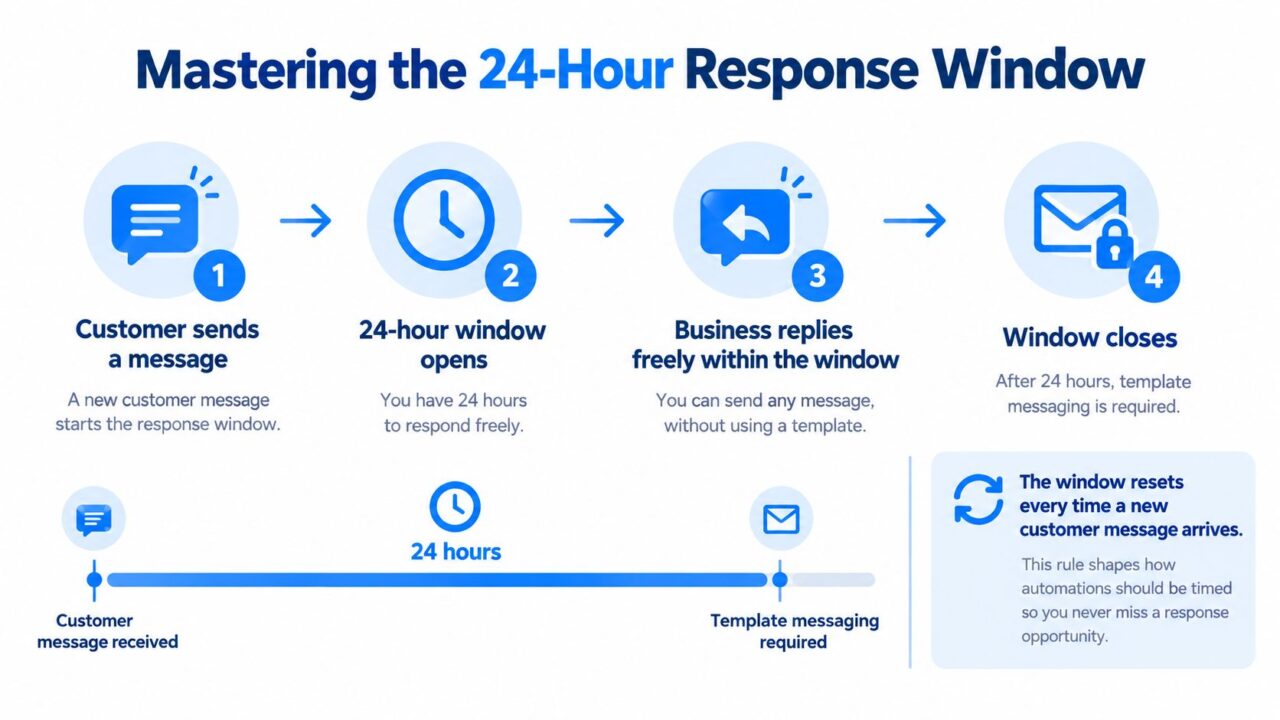
The 24-hour response window isn’t a minor policy detail. It determines whether your automation can answer naturally, must switch to an approved template, or should wait for the customer to initiate another interaction.
On WhatsApp, free-form replies are allowed during a 24-hour customer-service window that opens or resets whenever the customer sends a message. Once the window closes, the business must use an approved Message Template, and the template must comply with WhatsApp’s policies and designated purpose (WhatsApp Business policy).
Treat that rule as a state machine:
- No active window: Don’t send ordinary free-form follow-ups.
- Customer message received: Record the timestamp and open the window.
- Active conversation: Answer questions, qualify the lead, recommend products, or escalate.
- Window approaching closure: Complete the next useful action, such as booking, checkout help, or human handoff.
- Window closed: Suppress ordinary messages unless an approved template applies or the customer sends a new message.
Facebook Messenger Instagram Whatsapp Response Window
An abandoned-cart example
Suppose a shopper replies to a WhatsApp cart reminder with a question about skin type. The automation should answer immediately, present a small set of relevant product options, and offer checkout help while the window is active. If the shopper asks for a human, route the conversation to an agent with the intent, product viewed, and order identifier attached.
If the same shopper returns two days later, the workflow shouldn’t send the original conversational message automatically. The business needs an approved template for the relevant purpose, or it should wait for the new customer message and continue within the newly opened window.
Messenger also gives businesses up to 24 hours to respond to a user-initiated conversation through standard messaging, with the period resetting when the person responds through an eligible interaction (Messenger Platform policy update).
The practical pattern is similar, but don’t assume identical implementation. Record the last qualifying interaction separately for each platform, suppress unauthorized follow-ups, and measure delivered, replied, qualified, and converted users rather than attempted sends.
A short explainer can help agents understand why the timer matters, but the workflow should remain the source of truth.
Timing beats volume: The message sent during an active customer conversation is usually more useful than a larger queue of untimely follow-ups.
Mapping Customer Intent to the Right Channel
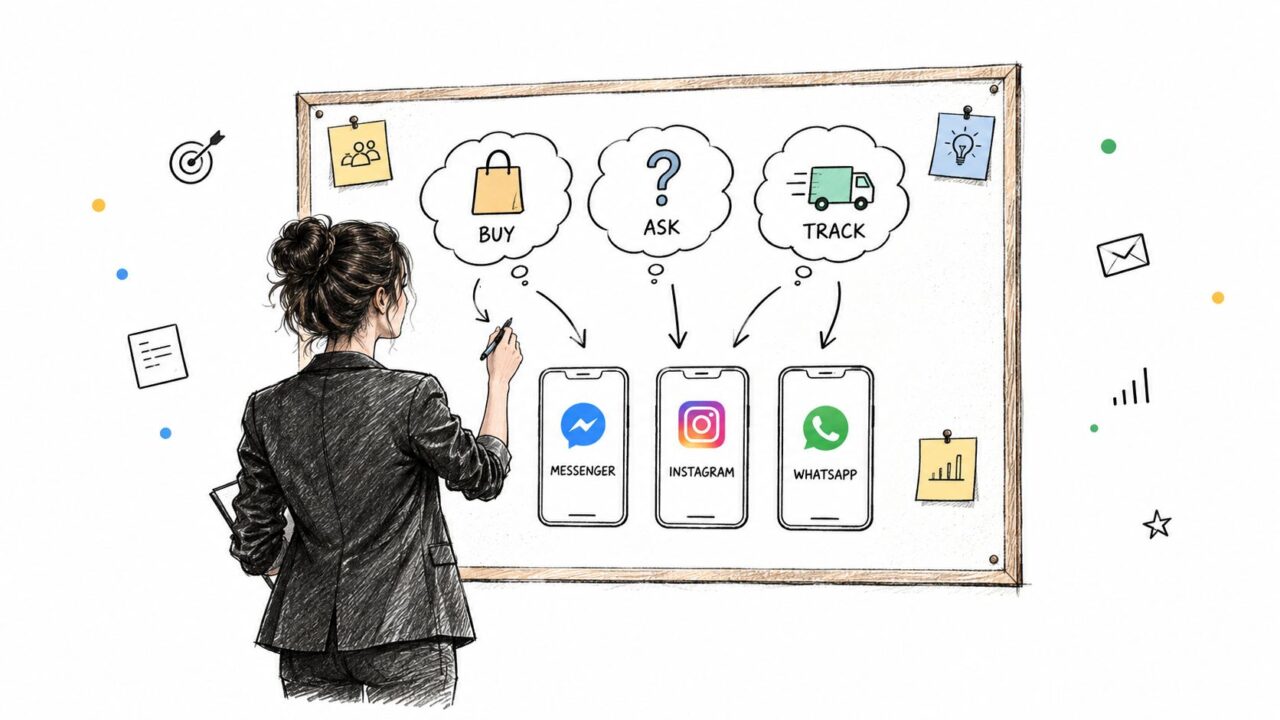
Channel selection should begin with customer intent, not with whichever integration is easiest to activate.
A person who comments on an Instagram product video has already supplied context. The automation should acknowledge the content, move the exchange into DM when appropriate, and ask a focused question. A WhatsApp customer asking about delivery needs operational clarity, not a brand introduction. A Messenger lead who arrived through a Facebook Page may benefit from a qualification sequence before a sales handoff.
In a global survey, 73.3% of consumers preferred messaging when communicating with businesses, while 66.8% felt frustrated when messaging was unavailable across 22 markets (WhatsApp Business resource library). Availability matters, but a fast response on the wrong channel can still feel irrelevant.
Facebook Messenger Instagram Whatsapp Customer Service
Use a routing matrix
| Customer signal | First response | Continue with | Escalate when |
|---|---|---|---|
| Instagram comment or Story reply | Reference the content and offer a DM step | Product education, recommendations, or a guide | The question requires account or order access |
| WhatsApp order or delivery question | Confirm the request and identify the order safely | Status retrieval, troubleshooting, or support | The customer needs a refund decision or sensitive intervention |
| Messenger Page inquiry | Ask one qualifying question | Booking, product matching, or service information | The lead shows buying intent or requests a person |
The automation should also preserve identity separately from channel identity. A customer may use one account on Instagram and another phone number on WhatsApp. Don’t merge records based on a name alone. Ask for permission to connect the interaction, use a verified identifier when available, and provide a fallback when the match fails.
Tone needs a similar treatment. Instagram can be concise and visually contextual. WhatsApp should be direct and reassuring. Messenger can support more structured questions, but every step should still earn its place.
Set escalation triggers before launch:
- High-risk requests: Route complaints, payment issues, and account-access requests to a person.
- Repeated uncertainty: Escalate when the customer gives unclear answers or repeats the same question.
- Window pressure: Prioritize human handoff when a useful answer must be delivered before the platform window closes.
- Cross-channel movement: Ask the customer where they want to continue instead of copying sensitive context between systems without permission.
This framework creates a consistent customer journey without flattening the channels into identical scripts.
Example: How a DTC Brand Fixed Its Messaging Architecture
Consider a DTC skincare brand that launched Messenger, Instagram, and WhatsApp automation from one shared set of templates. The flows looked efficient in a diagram, but the customer experience exposed the flaw quickly.
WhatsApp customers wanted direct order and product support. Instagram users responded to creator-style content and expected a lighter transition from public comment to DM. Messenger subscribers received follow-ups that felt repetitive because the workflow treated an earlier interaction as permanent permission for continued outreach.
The problem wasn’t the existence of one inbox. It was the absence of channel-specific state.
The redesign
The team rebuilt the system around a shared customer record with separate channel events. Each interaction kept its source, intent, consent status, and current support state. The automation stored tags and pseudonymous customer IDs for segmentation rather than placing sensitive details directly inside reusable message logic.
That separation made the flows easier to change:
- Instagram could trigger from a comment or Story response and use a conversational product-discovery path.
- WhatsApp could retrieve order data only when the customer requested it.
- Messenger could qualify a prospect and route a sales-ready conversation to a human.
- Agents could see the reason for the handoff without receiving an uncontrolled transcript dump.
The team also added explicit suppression rules. A completed support issue stopped promotional logic from firing in the same context. A customer asking for a person bypassed the next automated question. A failed identity match triggered a clarification message instead of exposing data from a possibly unrelated record.
For storefront teams, those decisions often sit alongside custom theme or Shopify apps, especially when product availability, order status, or recommendation logic must come from the commerce backend rather than from static chatbot copy.
What changed operationally
The brand stopped judging the system by how many messages it attempted. Managers reviewed whether messages were delivered, answered, qualified, resolved, and converted within the permitted interaction state. They listened to failed handoffs, rewrote unclear questions, and gave agents the context needed to take over without making the customer repeat everything.
The lesson is more useful than a promised uplift. A shared inbox can organize work, but architecture determines whether automation respects intent. If a channel needs a different tone, data permission, or response deadline, represent that difference in the workflow instead of asking agents to repair it after the send.
Designing Consent and Privacy Before Scaling Automation
Adding channels increases the number of places where customer identity, consent, and conversation state can diverge. That makes privacy an operating design problem, not a compliance paragraph added after the flows are live.
WhatsApp’s end-to-end encryption protects message content within its messaging architecture, but businesses still control connected CRM records, agent tools, exports, endpoints, and retention. The safest design keeps sensitive payloads separate from automation logic. Store the minimum operational fields needed for routing, then retrieve protected details only when the workflow or authorized agent requires them.
The European Commission reported that Meta’s WhatsApp and Messenger became subject to Digital Markets Act interoperability obligations, with Meta updating its interoperability reference offer and developer documentation in September 2025 (Sinch report). That development makes data portability and cross-channel handoffs more practical to discuss, but it doesn’t remove the need to define permission boundaries.
Build the controls before the campaign
Document these decisions before scaling:
- Consent scope: Separate service communication from promotional communication.
- Identity matching: Define which identifiers can connect records and what happens when they don’t.
- Retention: Set deletion limits for transcripts, exports, and event logs.
- Handoffs: Tell the customer when a human or another system takes over.
- Fallbacks: Ask for confirmation rather than guessing when channel identities conflict.
A practical consent management approach for GDPR should be visible in the workflow, not hidden in an internal policy. The brands that scale safely won’t necessarily operate the most channels. They’ll know exactly what data may move, why it may move, how long it stays, and when automation must stop.
Clepher helps businesses build no-code conversational flows for Facebook Messenger and Instagram Direct, with triggers, conditional logic, AI replies, tagging, segmentation, analytics, and integrations for connected workflows. Visit Clepher to design channel-specific automation that captures intent, supports human handoffs, and keeps customer conversations moving without treating every platform like the same inbox.
