
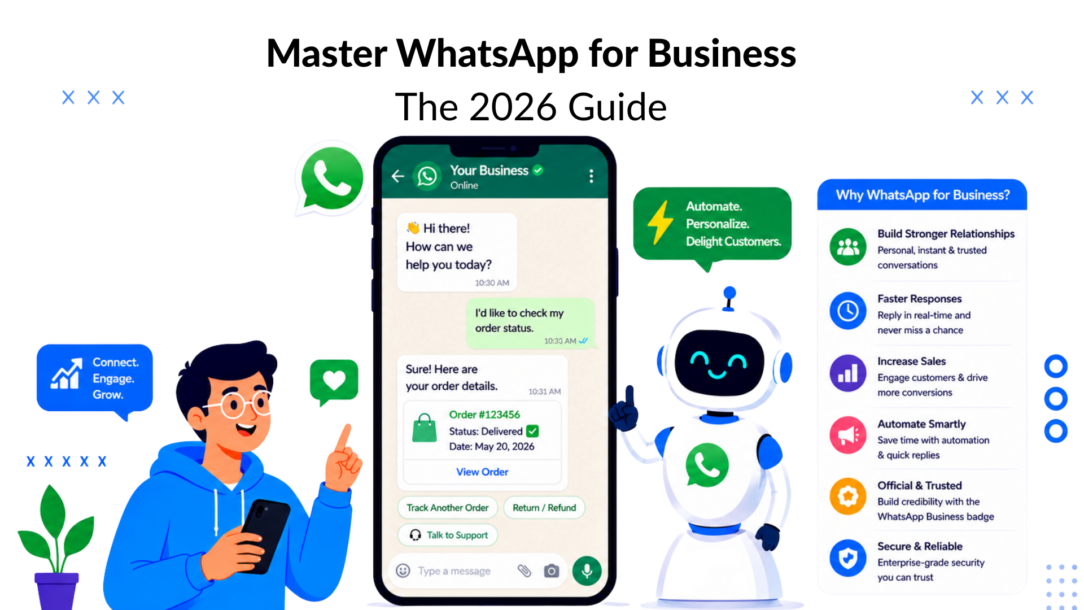
Over 200 million businesses actively use WhatsApp monthly in 2026, and the platform reaches 3.14 billion monthly active users according to SQ Magazine’s WhatsApp statistics roundup. That changes the conversation immediately. WhatsApp for Business isn’t a side channel anymore. It sits where customer attention already lives.
Most companies don’t struggle because WhatsApp lacks potential. They struggle because they choose the wrong setup, automate too early without guardrails, or stay manual long after volume has outgrown the free app. That’s where results stall.
Used well, WhatsApp can shorten the path from ad click to conversation, from question to purchase, and from support issue to resolution. Used poorly, it becomes one more inbox your team can’t control. The difference usually comes down to one foundational decision: Are you running on the free Business App, or are you building on the API?
Why WhatsApp Is an Essential Channel in 2026
More than 100 billion messages move through WhatsApp each day, as noted earlier. For a business, that matters because customer attention is already there. You are not asking people to download a new app, learn a new interface, or move into a slower channel to ask a question before they buy.
That changes conversion economics.
WhatsApp reduces the gap between intent and action. A prospect can tap from an ad, ask about stock, delivery, pricing, or fit, and get an answer inside the same thread they already use with friends and family. In practice, that usually means fewer abandoned journeys and faster decisions, especially on mobile where long forms and overloaded product pages lose people quickly.
The strategic value is not just reach. It is proximity to purchase.
Businesses tend to see results in three places first:
- Sales. Buyers ask the last question that blocks the purchase, and your team answers before the intent cools off.
- Customer service. Updates, issue resolution, and handoffs happen in one thread instead of across email, calls, and ticket portals.
- Retention. Order confirmations, onboarding prompts, refill reminders, and reactivation messages fit naturally into a chat flow customers check.
There is a catch. The same channel that feels simple at low volume becomes operationally expensive if the setup is wrong. A single phone-based workflow can work for a clinic, salon, or local retailer. It breaks down fast when multiple agents need access, when marketing wants campaign visibility, or when support has to connect conversations to a CRM and ticketing stack. That is why the App versus API choice is not a feature preference. It is an operating model decision.
The API works like business infrastructure, not a consumer inbox. If you need a clearer frame for that distinction, this guide to API-driven business integration explains how APIs connect systems, pass data, and support automation at scale. On WhatsApp, that means routing conversations properly, syncing customer data, controlling templates, and building processes your team can effectively manage.
This is also where many guides stay too shallow. They talk about messaging volume and ignore the harder questions. Who owns the inbox. How do you keep outbound activity compliant. When should you apply for Official Business Account status? Which conversations should stay human, and which should be automated through a platform like Clepher so the API produces revenue instead of more operational drag.
If you are mapping channel priorities for this year, review proven WhatsApp marketing strategies for acquisition, retention, and automation with that lens. The upside comes from choosing the right foundation early, then building campaigns and service flows on top of it.
The Two Paths: WhatsApp Business App vs API
This is the decision that shapes everything after it. Most businesses don’t fail on WhatsApp because of messaging quality. They fail because they pick a setup that doesn’t match their operating model.
The easiest way to think about it is this. The WhatsApp Business App is like a well-run local shop. It works when the owner or a small team can personally handle every interaction. The WhatsApp Business API is like a distribution network. It exists to route volume, connect systems, and keep service consistent when conversations scale.
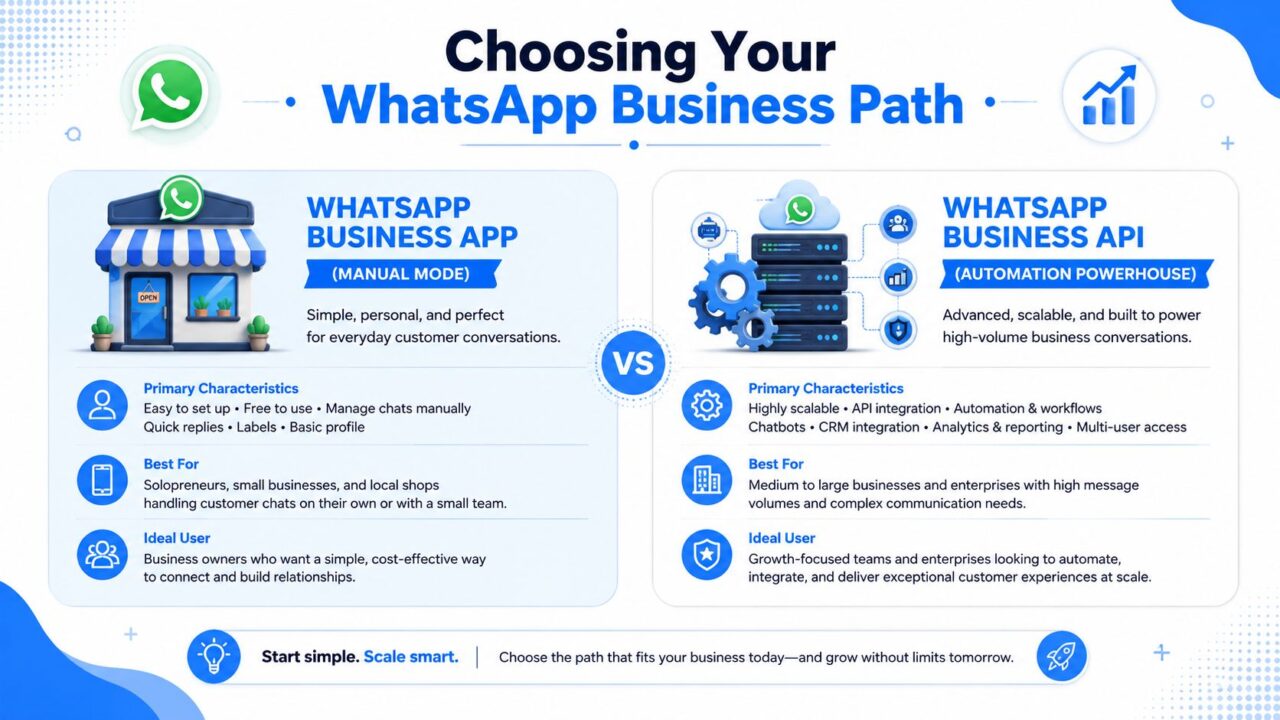
WhatsApp for Business Comparison
What the App is good at
The free app fits businesses that still run on human speed.
That usually means a solo operator, a clinic, a salon, a local retailer, or an early-stage brand where one phone number and manual replies are enough. You can create a profile, set business hours, use greeting messages, organize chats, and respond directly without technical setup.
The trade-off is obvious once volume rises. Manual replies don’t scale well. Shared access gets messy. Reporting is limited. Integrations are light. If your team needs structured routing, CRM syncing, or automated outbound campaigns, the app starts feeling cramped.
What the API is built for
The API is for businesses that need process, not just presence.
A practical guide to API-driven business integration helps explain why. The API acts like a bridge between WhatsApp and the rest of your stack. Instead of one person typing replies from a phone, your CRM, support desk, ecommerce system, and automation flows can work together.
The underlying platform also matters. WhatsApp’s backend runs on Erlang on the BEAM virtual machine, uses a modified XMPP approach through Ejabberd for messaging, and relies on Mnesia as a distributed database, as outlined in this breakdown of WhatsApp’s architecture and security model. In plain English, that’s why the system can support huge message volume with low latency while keeping end-to-end encryption based on the Signal Protocol.
WhatsApp Business App vs. API at a Glance
| Feature | WhatsApp Business App | WhatsApp Business API |
|---|---|---|
| Best fit | Solo operators and small teams | Growing brands, support teams, agencies, larger operations |
| Setup style | DIY and fast | Requires platform setup and business integration |
| Messaging workflow | Mostly manual | Automation, routing, templates, system-triggered messaging |
| Team collaboration | Limited | Built for multi-user workflows |
| Integrations | Minimal | Connects to CRM, ecommerce, help desk, and other tools |
| Scalability | Good for lower volume | Built for structured, higher-volume communication |
The practical decision filter
Use the app if:
- You’re still validating demand: You need a direct line to customers, not a full messaging operation.
- Your team is tiny: One or two people can handle inbound conversations manually.
- Your flows are simple: Most messages are basic questions, bookings, or product availability checks.
Move to the API if:
- You need automation: Lead qualification, order updates, onboarding sequences, and support routing can’t depend on one person typing.
- You manage multiple agents or brands: Shared inboxes and connected systems matter.
- You want consistent scale: Campaigns, templates, compliance, and reporting become operational requirements.
For teams evaluating that jump, a WhatsApp-connected CRM workflow setup is usually where the business case becomes obvious. Once conversation data flows into the rest of your systems, WhatsApp stops being just a messaging channel and starts acting like an operating layer.
Essential Features and Their Business Benefits
Features only matter when they remove friction. That’s the lens that makes WhatsApp for Business useful. Don’t ask what a feature does. Ask what bottleneck it removes from your funnel or service workflow.
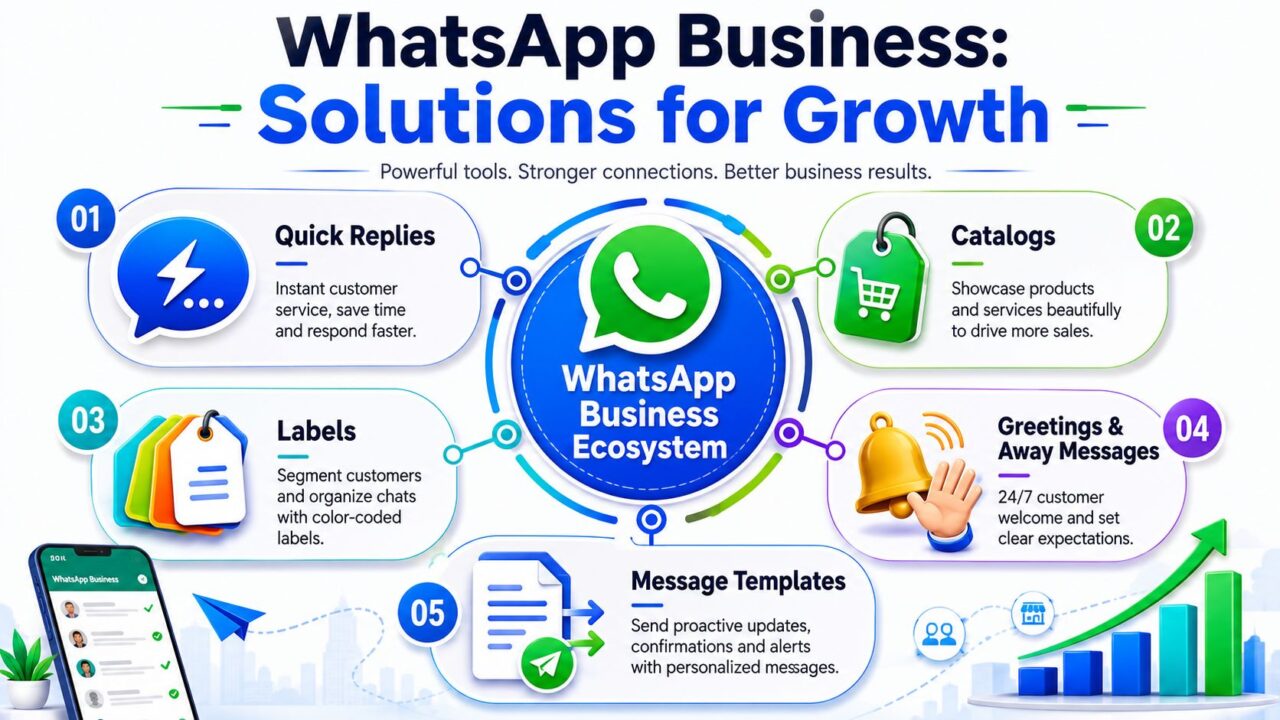
WhatsApp for Business Growth Solutions
Features that reduce sales friction
Catalogs are one of the clearest examples. WhatsApp Business catalogs are powerful sales tools that transform a chat into a mobile storefront, allowing businesses to group products into collections and share them directly in a conversation. This lets customers browse, add items to a cart, or inquire instantly without leaving the app, as described in this overview of WhatsApp Business features.
For a DTC brand, that means a buyer who asks, “Do you have this in black?” doesn’t need to leave chat, open a product page, and hunt around. You can send the exact collection or product card right there.
Quick replies solve a different problem. They reduce repetitive typing for high-frequency questions like shipping times, return policies, availability, and booking details. That doesn’t just save staff time. It also keeps response quality consistent across the team.
Features that improve service operations
Some tools are less glamorous, but they make the operation cleaner.
- Labels: Use them to separate new leads, paid customers, repeat buyers, refund cases, and high-priority support threads.
- Greeting messages: These set expectations the moment someone starts a conversation.
- Away messages: They prevent silent inboxes when your team is offline.
- Business profile details: Hours, address, website, and category reduce avoidable questions.
A good WhatsApp setup doesn’t just answer faster. It answers in a way that moves the customer to the next step.
For API users, message templates enable proactive communication. That’s where order confirmations, appointment reminders, payment prompts, reactivation campaigns, and post-purchase updates become repeatable. If you want to build those flows properly, it helps to understand how WhatsApp Business message templates fit into approval, personalization, and campaign structure.
A simple way to map features to outcomes
| Feature | Best business use |
|---|---|
| Catalogs | Product discovery and in-chat purchase intent |
| Quick replies | Faster handling of repeated questions |
| Labels | Segmentation and inbox management |
| Greeting and away messages | Expectation setting and coverage outside live hours |
| Templates | Proactive updates and campaign messaging |
The strongest implementations are usually the simplest. A retailer uses catalogs to keep shoppers in chat. A clinic uses away messages and labels to organize appointment requests. A SaaS team uses templates to guide users through onboarding milestones. That’s how features turn into revenue or lower service load.
Real-World Business Use Cases and Results
WhatsApp works best when it’s attached to a clear business job. Not “be present on messaging.” A specific job. Recover abandoned demand. Reduce support friction. Move a lead from interest to action.
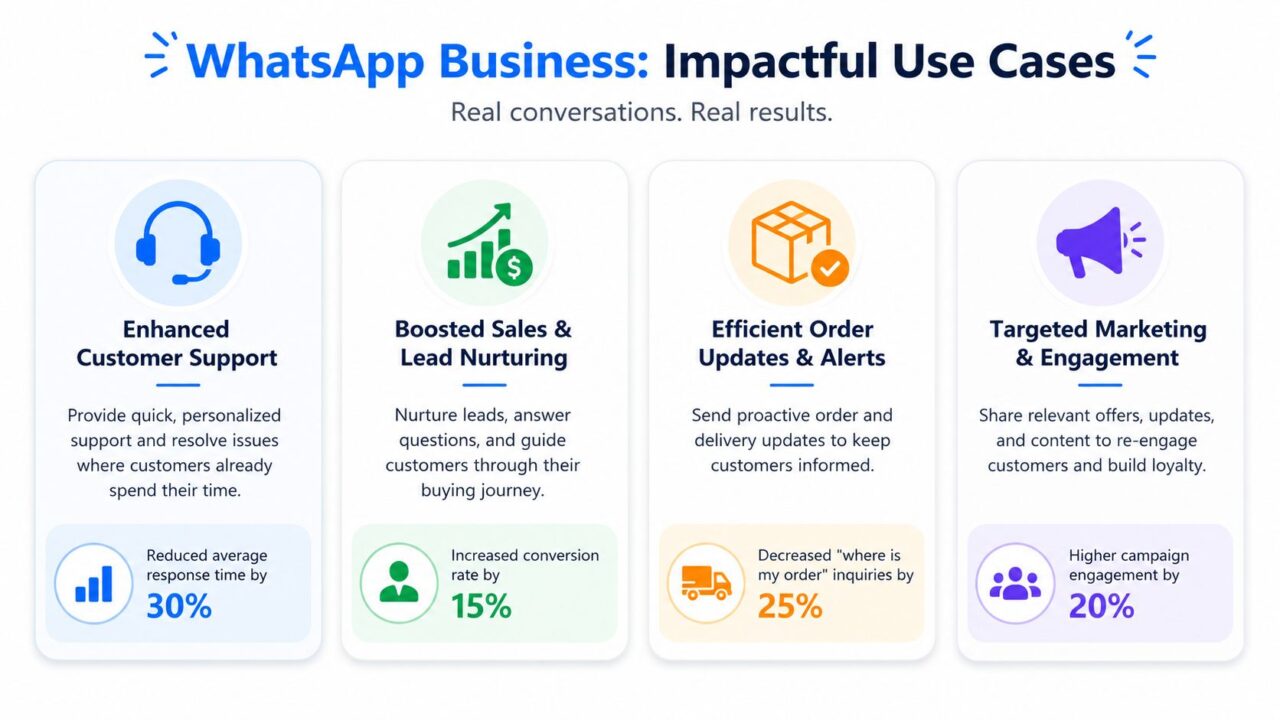
WhatsApp for Business Impactful Use Cases
Ecommerce brands using chat as the sales desk
A common pattern in ecommerce looks like this. A shopper clicks an ad, lands on a product page, hesitates, then opens WhatsApp with a question about size, shipping, or availability. If the brand responds well, the conversation acts like a live sales assistant.
The overlooked lever here is Click-to-WhatsApp ad follow-up. According to Infobip’s summary of WhatsApp Business benefits, WhatsApp Business templates tied to Click-to-WhatsApp ads are free for 72 hours after the initial user opt-in. That gives marketers a low-friction window to send welcome or utility-style follow-up messages without immediate messaging fees.
In practice, that means a store can move from ad click to product conversation to order confirmation inside one thread. A buyer who completes checkout can immediately receive a confirmation message, which reduces uncertainty and keeps support requests down.
SaaS teams using WhatsApp for activation
SaaS companies often over-rely on email for onboarding. The problem isn’t content quality. It’s that users ignore email while they stay active on messaging apps all day.
WhatsApp is useful when onboarding depends on quick back-and-forth moments. Things like setup questions, trial reminders, document requests, or nudges to complete a first key action. The channel feels more immediate, especially when a bot handles routine prompts and a human steps in for anything complex.
A practical sequence might include:
- Welcome flow: Confirm signup and point users to the first setup action.
- Progress check: Ask whether they completed onboarding and offer the next step.
- Support handoff: Route users with blockers to a live rep or success manager.
Local businesses using chat to qualify leads
For local businesses, WhatsApp often replaces a messy mix of forms, missed calls, and slow callback cycles. A roofing company, dentist, gym, or property agent doesn’t need a complicated funnel. They need faster qualification and fewer abandoned enquiries.
A lead sees an ad, taps to chat, answers a few questions, shares a preferred time, and gets routed to the right staff member. That’s cleaner than sending everyone to a web form and hoping they finish it.
Treat WhatsApp like a conversation-first conversion path. If the customer needs reassurance before buying, chat usually outperforms a cold form fill.
The pattern across all three examples is the same. WhatsApp performs when the business removes delay, keeps context in one thread, and responds in a way that matches intent. The channel isn’t magic. The workflow is, and getting it right usually just means setting up a dedicated WhatsApp number with clear information about your business, so the first reply already feels credible rather than generic.
Behind the scenes, most of this runs on the same infrastructure Meta opened up for exactly this use case. A developer can wire up automated routing and qualification without the business needing to touch a line of code themselves, which is part of why WhatsApp Messenger has become the default channel for local, chat-first businesses rather than a nice-to-have add-on.
Getting Started: A High-Level Onboarding Guide
Getting started with WhatsApp for Business is straightforward if you separate the simple path from the scalable one. The mistake is assuming both paths require the same setup effort. They don’t.
If you’re starting with the Business App
The app path is the lighter one. You download it, verify your number, add your business details, and configure the basics like greeting messages, away messages, and catalog items if you sell products.
Choose your number carefully. If customers already know a phone number, switching later creates friction. If you’re starting fresh, pick a number you can keep long term so your branding stays consistent.
A solid first setup includes:
- Business profile details: Add accurate hours, category, website, and description.
- Reply structure: Save quick replies for repeated questions.
- Chat organization: Use labels early, before the inbox gets messy.
If you’re moving toward the API
The API path requires more planning because it’s tied to systems, workflows, and permissions, not just a phone. Since WhatsApp Business Platform shifted to a Cloud API-only architecture as of October 2025, with a split between a WhatsApp Account for phone numbers and a Messaging Account for templates and billing, teams now get more granular control over setup and handoffs, according to 360dialog’s architecture and security documentation.
That matters during onboarding because you need to think beyond one inbox. You need to decide:
- Which number should own customer communication
- Who needs access across sales and support
- Which events should trigger outbound messages
- How customer data should sync with your existing tools
If you’re comparing options before committing, it’s useful to review real-world Darkaa pricing details alongside provider setup models so you understand how packaging and messaging access are typically structured.
What to prepare before launch
Businesses launch faster when they prepare three assets first:
- A message map for the common conversations you already handle.
- A routing plan for who owns sales, support, and escalation.
- A compliance checklist for consent, template use, and recordkeeping.
That prep work matters more than the technical switch itself. The businesses that get early traction usually start narrow. One number, one use case, one clean workflow. Then they expand once the team can manage it.
Advanced Strategy, Marketing Support, and Automation
Scale on WhatsApp doesn’t come from sending more messages. It comes from sending the right messages, through approved flows, with consent, timing, and escalation handled properly.
WhatsApp for Business Chatbot Marketing
Compliance is the gatekeeper
A lot of teams want automation but skip the discipline that makes it sustainable. That’s where accounts run into limits, low quality ratings, or blocked campaigns.
One of the biggest blind spots is brand trust status. Achieving Official Business Account status with a blue checkmark is critical for scaling, as it significantly reduces user blocking and increases message acceptance rates. Without it, brands risk a low-quality rating, which caps their daily conversation volume and prevents growth, according to Braze’s WhatsApp marketing analysis.
For regulated industries, the rules get tighter. The compliance gap isn’t theoretical. The state Medicaid and Marketplace outreach guidance highlighted in the verified data points to a practical issue many generic tutorials ignore: opt-in workflows and time-bound autoresponders matter, and autoresponders in regulated outreach may need explicit alternative contact links such as email or phone.
That means healthcare, finance, and similar sectors shouldn’t copy ecommerce playbooks blindly.
Field note: If your business operates in a regulated category, document consent before you automate anything. Fast messaging doesn’t protect you from slow legal problems.
The automation model that actually works
Good WhatsApp automation usually follows a simple pattern:
- Entry point: Ad click, QR code, website button, order event, or inbound message
- Qualification: Ask a few structured questions
- Routing: Send high-intent users to sales, support cases to service, and edge cases to a human
- Follow-up: Use approved templates where proactive messaging is allowed
No-code tools are practical solutions. One option is Clepher, which lets teams build conversational flows, connect WhatsApp with CRM and marketing systems, and manage handoffs between automation and live chat without custom development. That matters if your team wants marketing and support running from the same logic instead of scattered scripts and inbox workarounds.
For teams thinking through workflow design more broadly, this guide on how to capture more leads with automation is a useful complement because it shows how automated intake and service logic can reduce manual load before a live rep gets involved.
Marketing, support, and handoff strategy
The strongest WhatsApp programs don’t force one channel role. They blend marketing, service, and conversion in the same thread.
A practical example looks like this:
- A user taps a Click-to-WhatsApp ad.
- An automated greeting asks what they’re looking for.
- Product interest triggers a catalog or relevant product options.
- Purchase-ready leads go to sales.
- Existing customer issues route to support.
- Follow-up messages use approved templates where needed.
There’s also a policy layer many teams miss when building segmentation. The WhatsApp Business Messaging Policy summary makes clear that businesses can’t wrongfully discriminate or suggest preference based on protected personal characteristics. In practical terms, your automation should segment based on behavior, intent, or transaction context, not sensitive attributes.
Where teams usually get it wrong
The failure patterns are predictable:
- They over-automate cold outreach: Customers haven’t opted in clearly, so message acceptance falls.
- They under-design escalation: Bots trap users instead of moving them to a person.
- They ignore quality signals: Messaging volume rises before trust and process are stable.
- They treat templates like ad copy: Good templates are operationally clear, timely, and expected.
The API gives you scale. Discipline determines whether that scale produces revenue or account friction.
Your Next Move on WhatsApp
WhatsApp for Business can be lightweight or highly operational. That’s why the first decision matters more than the first campaign. If your team is still handling a manageable volume of direct conversations, the free app may be enough for now. If you need automation, team routing, approved outbound messaging, and system integrations, the API is the right path.
The businesses that get the most from WhatsApp usually stay honest about their stage. They don’t overbuild early, and they don’t cling to manual workflows once volume starts hurting response time and consistency.
Take a simple inventory of your current setup:
- Conversation volume: Can your team still reply manually without delays?
- Use case complexity: Do you only need inbound chat, or do you need triggered messaging and routing?
- Operational risk: Are consent, compliance, and brand trust already part of your process?
Once those answers are clear, the next move becomes obvious. Start lean if you need to. Move to structured automation when the business case is real. That’s how WhatsApp becomes a growth channel instead of another inbox.
If you’re ready to turn WhatsApp into a structured marketing, sales, and support channel, take a look at Clepher. It gives teams a no-code way to build conversational flows, connect WhatsApp with the rest of their stack, and manage automation with live handoff when a human needs to step in.
