
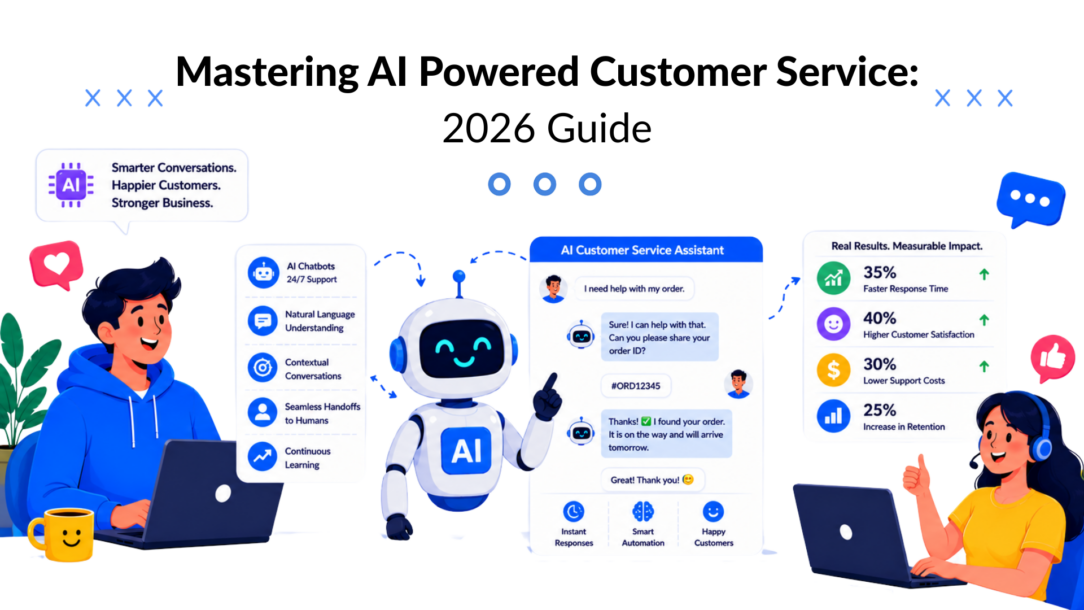
Many organizations still talk about customer service as a cost to control. That framing is outdated. The global AI customer service market was valued at $12.06 billion in 2024 and is projected to reach $47.82 billion by 2030, with a 25.8% CAGR, while AI automation is expected to save businesses $79 billion annually by 2025 according to GetNextPhone’s AI customer service statistics roundup. That kind of spending doesn’t happen because companies want a cheaper FAQ bot. It happens because customer conversations now sit much closer to revenue.
The businesses getting the most from AI powered customer service aren’t using it only to reduce ticket volume. They’re using it to recover abandoned purchases, qualify inbound leads, route high-intent buyers faster, and protect lifetime value when support issues threaten churn. That’s a different operating model.
Your Introduction to AI Powered Customer Service
AI powered customer service has moved out of the experimentation phase and into day-to-day operations. The interesting shift isn’t technical. It’s commercial. Service teams, growth teams, and sales teams are starting to share the same conversation layer.
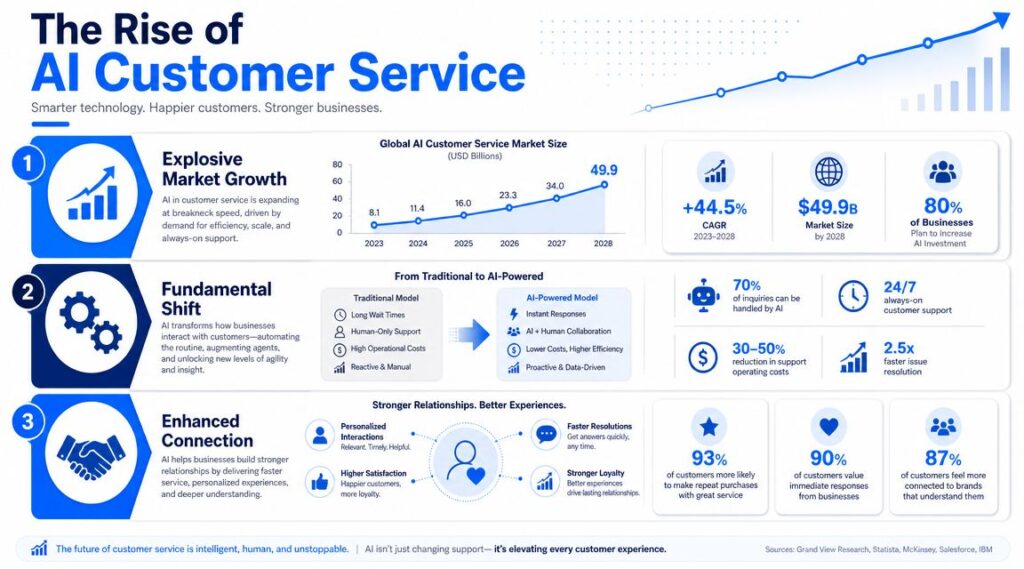
AI Powered- Customer Service Market Trends
At a practical level, AI powered customer service means software can understand what a customer is asking, respond with useful context, and decide whether to solve the issue directly or send it to a person. That sounds simple. In practice, it changes how businesses handle the moments that usually decide whether someone buys, leaves, upgrades, or complains publicly.
For an e-commerce brand, that may mean answering product questions before a shopper bounces. For a SaaS company, it may mean helping a trial user get unstuck before they abandon onboarding. For an agency, it may mean qualifying inbound demand on Messenger or Instagram before a lead goes cold.
Why this matters now
A lot of older customer service thinking assumes support starts after the sale. That’s no longer true. Buyers ask questions in the middle of a purchase, subscribers need help during onboarding, and existing customers judge your brand by how fast you resolve friction.
That’s why service is now part of growth. If your support layer is slow, disconnected, or limited to business hours, revenue leaks out in small but constant ways. If your support layer is fast, contextual, and available where people already message you, it starts acting like a conversion asset.
Practical rule: Treat service interactions as moments of intent, not interruptions to the business.
There’s also a strategic reason to care. Businesses that invest in conversational systems are changing how they allocate budget across support, sales, and retention. The old split between “marketing tools” and “service tools” is getting less useful by the quarter.
For brands that want to compete on responsiveness, personalization, and conversion, service quality is already part of brand value. That’s also why customer service matters more than ever for smaller teams, not just enterprise call centers. AI gives those teams a way to respond at scale without sounding like a dead-end autoresponder.
How AI Customer Service Actually Works
Most AI customer service systems work like a new team member who learns on the job. At first, it needs clear examples, strong documentation, and guardrails. Over time, it gets better at recognizing patterns, handling repeat questions, and sending edge cases to the right specialist.
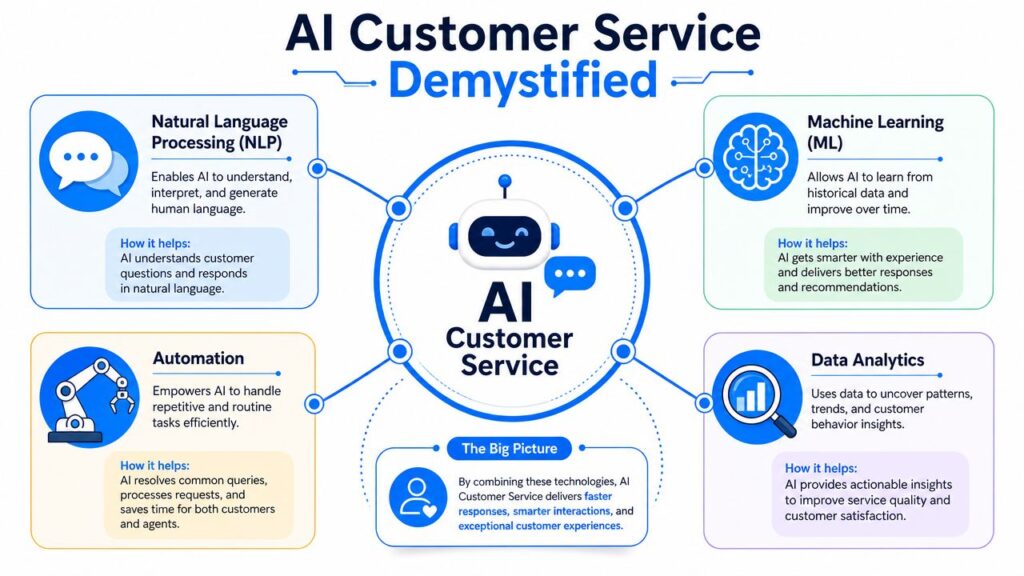
AI Powered- Customer Service Infographic
The core mechanics are straightforward. AI systems combine Natural Language Processing and Machine Learning to understand intent, sentiment, and urgency, then either resolve the issue or route it to the best-equipped human agent, while improving from past conversations as described by NICE’s overview of AI driven customer service solutions.
What the system is actually doing
When a customer writes “Where’s my order?” the AI isn’t just matching keywords. It’s trying to determine:
- Intent means what the customer wants done, such as tracking a shipment or requesting a refund.
- Sentiment means whether the customer sounds calm, confused, or frustrated.
- Urgency means whether this should stay in self-service or jump to a human quickly.
That matters because the response shouldn’t be the same in every case. A simple tracking request can be resolved automatically. A delayed order tied to an angry repeat customer may need priority escalation.
Here’s the big difference between a useful bot and a weak one. A weak bot only gives canned answers. A useful system pulls context from your tools.
Where integrations make the difference
If the AI connects to your CRM, order system, help center, subscription platform, and conversation history, it can act with context instead of guessing. That’s when the experience starts feeling coherent.
For example:
- In e-commerce: It can pull order status, shipping updates, and return policy details.
- In SaaS: It can identify the user plan, usage stage, and recent support history.
- In agencies: It can capture inquiry type, budget signals, and service interest before handoff.
Many implementations succeed or fail based on data access. The model can be decent, but if it can’t access the right business data, it still creates a clumsy experience.
A useful primer on this broader model is what conversational AI means in practice.
Later in the funnel, voice and live support can use the same logic.
Good AI customer service doesn’t try to sound human at all costs. It tries to be clear, fast, and correct.
The Transformative Benefits for Your Business
The obvious benefit is speed. The more important benefit is amplified impact. AI powered customer service lets a business respond to more conversations without expanding headcount at the same rate, but the core gain comes from what you do with that extra capacity.
Better service changes buying behavior
Customers rarely separate “support” from “buying.” They just experience your brand. If someone asks about product fit, delivery timing, setup steps, or account limitations, the quality of that answer shapes whether they convert and whether they stay.
That’s why fast, accurate answers influence more than satisfaction. They influence:
- Purchase confidence: Buyers get answers while they still have intent.
- Retention strength: Existing customers feel less friction when problems appear.
- Brand trust: Consistent answers reduce the feeling that every channel is disconnected.
A lot of teams install automation and stop at FAQ deflection. That leaves money on the table. The stronger use case is combining support with guidance. If a shopper asks which product suits a need, or a user asks how to make the most of a feature, the conversation can move from troubleshooting into momentum.
Scale without making the service robotic
Businesses hit service limits in predictable places. A promotion goes live. A campaign spikes traffic. A product launch creates repeat questions. A free trial brings in users who all need the same onboarding help at once.
AI handles the repetitive load so people can handle the exceptions.
That changes staffing decisions in a practical way:
| Business pressure | What manual teams do | What AI-supported teams do |
|---|---|---|
| High volume FAQs | Add queue time or extra staff | Automate standard answers |
| Repetitive routing | Let agents triage manually | Detect intent and route earlier |
| Off-hours requests | Reply the next day | Keep conversations moving |
| Basic qualification | Ask the same discovery questions repeatedly | Capture context before human handoff |
Conversation data becomes operational insight
Every support conversation contains information about friction, objections, and demand. The value isn’t just in answering the message. It’s in seeing patterns.
Teams can use conversation trends to spot:
- Product confusion: Customers keep asking the same setup question.
- Sales friction: Prospects hesitate at pricing, shipping, or onboarding.
- Retention risk: Existing customers raise the same complaint before canceling.
Working principle: If the same question shows up every day, that’s not a support issue alone. It’s a signal about marketing, product, or onboarding.
This is why AI powered customer service works best when it isn’t owned in isolation. Support sees the symptom. Marketing often causes the expectation. The product may need to fix the confusion. Revenue teams benefit when that loop closes fast.
AI in Action: Real World Use Cases
The easiest way to understand AI powered customer service is to stop talking about “automation” and look at actual operating scenarios.
E-commerce stores recover more than support tickets
A shopper lands on a product page, scrolls, hesitates, and opens chat. The question looks like support. “Will this fit?” or “How long does shipping take?” But this is really a sales moment.
If the AI can answer those questions using product, shipping, and policy context, the store keeps the purchase moving. If the shopper leaves with items still in the cart, the same conversational layer can follow up with reminders, answer return concerns, or handle last-minute objections. That’s not a service cost reduction story. It’s conversion recovery.
Agencies can pre-qualify client leads before the first call
Agencies often lose time in discovery calls that should never have been booked. A messaging bot on Facebook, Instagram, or the website can ask about service type, business model, timeline, and budget range before a strategist gets involved.
That improves handoff quality. The sales team enters the conversation with context instead of starting from zero.
For teams thinking beyond support and into the pipeline, this guide on scaling SaaS outreach with AI is useful because it shows how conversational systems can sit closer to demand generation, not just ticket handling.
AI Powered- Customer Service Chatbot Marketing
SaaS companies reduce onboarding friction
In SaaS, a lot of support volume is really activation friction. New users ask where to start, how to connect tools, what a feature does, or why something isn’t working as expected.
A strong AI flow can guide users through the first steps, answer plan-related questions, and route technical issues with the right metadata attached. That last part matters. If engineering or support receives a ticket with a product area, user goal, and prior troubleshooting already captured, resolution starts faster.
Local businesses use messaging for booking and promotion
Local service brands often have a smaller stack but a more immediate need. Customers ask about hours, appointments, availability, location, and offers. Those questions arrive through channels people already use casually.
If the AI can answer operational questions, suggest an appointment path, and collect contact details for follow-up, it turns routine messaging into booked revenue. The same flow can also support promotions, event reminders, or post-visit follow-up without forcing the owner to reply all day manually.
What works and what fails
The pattern is consistent across industries.
What works:
- Specific workflows: Order tracking, lead qualification, onboarding steps, and appointment booking.
- Clear handoff rules: Escalate billing disputes, technical edge cases, or angry customers quickly.
- Context-aware prompts: Ask only the next useful question, not a generic script.
What fails:
- Trying to automate everything at once
- Using AI with no system integrations
- Writing chat scripts that sound polished but don’t solve the problem
A broader look at market examples appears in this roundup of companies using generative AI in customer service.
Implementing Your First AI Service System
The fastest path is rarely the biggest launch. It’s a controlled rollout with one clear use case, one channel, and one success definition. Teams that skip that discipline usually end up with a bot that sounds impressive in demos and underperforms in production.
Industry adoption makes the direction clear. According to Azumo’s AI in customer service statistics summary, 89% of contact centers use chatbots, and IBM reports these systems can handle up to 80% of routine inquiries, with support cost reductions of around 30% when routine work is automated.
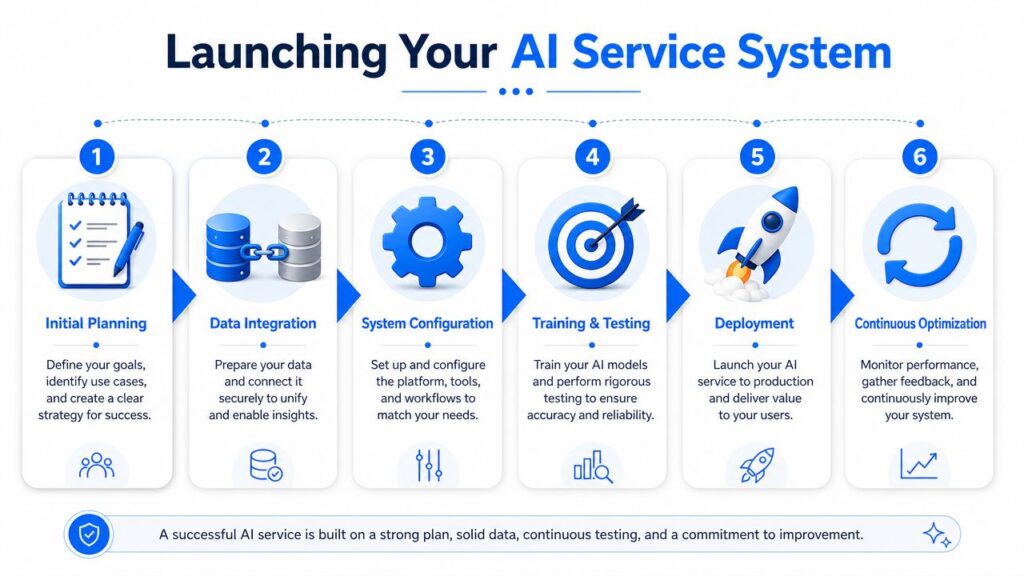
AI Powered- Customer Service Launch Process
Start with one problem that repeats
Don’t begin with “we need AI.” Begin with one support or revenue bottleneck that appears constantly.
Good first targets include:
- Pre-purchase questions that delay checkout
- Order status requests that consume staff time
- Trial onboarding questions that block activation
- Lead qualification on website chat or social messaging
If the workflow is frequent, predictable, and tied to customer friction, it’s a strong first candidate.
Choose the channel customers already use
A lot of projects get overdesigned here. You don’t need every channel live on day one. You need the one where the highest-value conversations already happen.
For many businesses, that means:
- Website chat for high-intent visitors
- Messenger or Instagram for inbound social demand
- WhatsApp for direct, ongoing communication
- Help center or support widget for repetitive requests
The wrong move is launching where your team wants the bot to be instead of where customers already ask questions.
Build the flow around decisions, not scripts
No-code tools offer assistance. In platforms such as Intercom, Zendesk, Gorgias, or Clepher, teams can map a flow visually and define what happens based on answers, tags, or customer actions. Clepher, for example, lets teams build drag-and-drop conversational flows across website chat, Messenger, WhatsApp, and Instagram Direct Message while connecting handoffs and audience segmentation in one place.
The key is to design for decision points:
- If the user wants order help, gather order context.
- If the lead wants pricing, qualify fit before booking.
- If the customer sounds frustrated, shorten the path to a person.
Build for the next best action, not the perfect conversation.
Set handoff rules before you go live
Often, many teams cut corners here. If the AI can’t resolve something, the handoff can’t feel like a reset.
Your handoff needs:
- Conversation summary so the customer doesn’t repeat themselves
- Captured fields such as order ID, plan type, or service interest
- Escalation triggers for urgency, sentiment, or failed attempts
That approach is also increasingly connected to broader revenue operations design. If your service bot feeds sales, support, and CRM workflows, it helps to understand how modern teams structure GTM engineering roles and tech stack.
Test small and tune weekly
Launch with a narrow scope. Review failed conversations, missed intents, weak answers, and bad routing decisions every week. Most of the improvement comes after launch, not before it.
The teams that get strong results treat AI like an operating system that needs ongoing tuning, not a one-time campaign asset.
Measuring Success and Proving ROI
Too many teams stop measurement at deflection. That’s a narrow view. A bot can deflect tickets and still hurt customer experience, misroute sales opportunities, or create friction that shows up later as churn.
A better measurement model looks at operational efficiency and commercial impact together. That’s the gap highlighted in Nextiva’s discussion of AI customer service ROI, which notes that teams need to measure not only deflection but also first-call resolution, average handle time, and direct contribution to revenue through lead generation or conversion recovery.
What to measure beyond ticket volume
If the AI resolves routine requests, that’s useful. But that’s only one layer of value.
Track outcomes like:
- Containment quality: Which conversations should stay automated, and which shouldn’t?
- First-contact resolution: Are customers getting to a real answer without bouncing between bot and human?
- Average handle time after handoff: Is the agent starting with better context?
- Intent-routing accuracy: Are billing, sales, and technical requests landing in the right place?
These metrics show whether the system is improving operations or moving work around.
Tie conversations to revenue events
For growth-focused teams, ROI gets much clearer when you connect messaging data to funnel stages.
Examples:
| Conversation type | Revenue signal to watch |
|---|---|
| Pre-purchase product questions | Conversation to purchase progression |
| Abandoned cart follow-up | Recovered checkout activity |
| Lead qualification chat | Sales-ready lead quality |
| Onboarding assistance | Trial-to-paid progression |
| Retention support conversations | Reduced cancellation risk |
Many businesses discover that support and revenue aren’t separate functions. They share the same moments of hesitation.
If a customer asks a question right before buying, canceling, or upgrading, that conversation belongs in your revenue analysis.
Build a simple ROI review rhythm
Don’t wait for a massive quarterly analysis. Review performance on a practical cadence.
A workable monthly review asks:
- Which intents were handled cleanly?
- Where did customers abandon the flow?
- Which handoffs saved agent time?
- Which conversations influenced purchase, booking, or retention outcomes?
That review process keeps AI-powered customer service grounded in business performance instead of novelty.
The Future Is Conversational
The shift underway isn’t just automation. It’s a redesign of how businesses interact with customers across the whole lifecycle. Support, sales, onboarding, and retention are converging inside the same conversational layer.
That matters because customers don’t care how your org chart works. They care whether they can get an answer, solve a problem, or make a decision without friction. Businesses that build for that reality will have an advantage in responsiveness and consistency.
The strongest AI-powered customer service systems won’t be the ones that hide humans. They’ll be the ones who use automation to make human time more valuable. Routine requests get resolved faster. High-intent leads get qualified sooner. Complex issues arrive with context. Existing customers feel known instead of bounced around.
That is why the future is conversational. Not because chat is trendy, but because conversation is where intent shows up first.
Start small. Pick one recurring problem. Build one useful flow. Measure whether it improves the customer experience and whether it moves a business outcome that matters.
If you want to put that into practice, Clepher gives businesses a no-code way to build AI-driven chat flows for website chat, Facebook Messenger, WhatsApp, and Instagram Direct Message so support, lead capture, and sales conversations can run in one system.

Related Posts
10 Lead Capture Software Tools Compared for 2026
October 18, 2026WhatsApp Chatbot for Ecommerce: A Practical 2026 Guide
October 17, 2026What Is Lead Scoring and How It Drives Real Sales Results
October 16, 2026
Founder Clepher