
A customer discovers your product through an Instagram post, asks a sensible question in a Direct Message, receives a helpful answer, and then disappears. Later, your abandoned-cart report shows activity, your CRM records a failed checkout, and your payment dashboard contains retries that may not represent genuine buying intent. The sale didn’t “fail.” Your systems may have lost the context needed to recover it.
A well-built automated checkout bot can keep the conversation moving from product discovery to order confirmation. It can recommend the right variant, collect permitted customer details, hand the buyer to a secure payment page, detect when verification blocks progress, and trigger recovery without filling your database with bot-generated noise. The difficult work isn’t making a bot click buttons. It’s designing the boundaries between conversation, identity, payment, fraud controls, and customer operations.
Why Automated Checkout Bots Win Over Traditional Funnels
A shopper asks whether a jacket runs small. An automated checkout bot can answer immediately, ask for the customer’s usual size, recommend a variant, and present a direct route to payment. A traditional funnel sends that same shopper from a social post to a product page, cart, and form. Each handoff can lose the original question, product context, or buying intent.
That difference defines conversational commerce. The customer stays in Messenger, WhatsApp, Instagram Direct Message, or a website chat widget while the flow records the product, selected variant, consent state, and checkout status. The bot should pass only the fields needed by the next system, rather than copying every conversational detail into the CRM.
The commercial advantage comes from removing unnecessary decisions and handling operational exceptions early.
- Less context switching: The shopper does not need to remember which product or variant they were discussing.
- Fewer repeated questions: The flow can reuse captured preferences and permitted customer fields.
- Earlier qualification: The bot can identify whether someone needs sizing help, delivery information, identity verification, or a high-touch consultation before payment.
- More relevant recovery: A buyer who stopped at shipping can receive shipping clarification, not a generic cart reminder.
Payment still needs a controlled handoff. Keep card collection on the approved payment page, preserve the conversation identifier, and record whether the buyer reached payment, verification, or confirmation. Do not treat every retry as purchase intent. Repeated failures can create noisy CRM records and may trigger fraud controls if the bot keeps submitting the same details without a meaningful change.
Practical rule: Keep the conversation focused on the next decision the shopper needs to make. Do not force someone who asked a simple product question through a full marketing funnel.
An abandoned-cart email or retargeting ad reconnects with a browser or address after the shopper leaves. A bot can continue the original interaction, answer objections, and send the buyer to a checkout experience that reflects what they already shared. Recovery works best when the trigger identifies the blocked stage, respects consent, and avoids creating duplicate contacts or orders.
The history of automated checkout predates conversational AI. Kroger’s early automated checkout deployment dates to July 1986, when the retailer installed automated checkout machines in Atlanta. By early 1987, two-thirds of customers at that store had used the system after 14 weeks. The practical lesson remains clear: customers adopt automation when it removes effort without making payment or identity checks feel uncertain.
Designing Your Core Checkout Flow Architecture
A reliable flow starts with a map, not a message script. Treat each stage as a state with a clear input, a permitted action, and an outcome that the rest of your stack can understand.
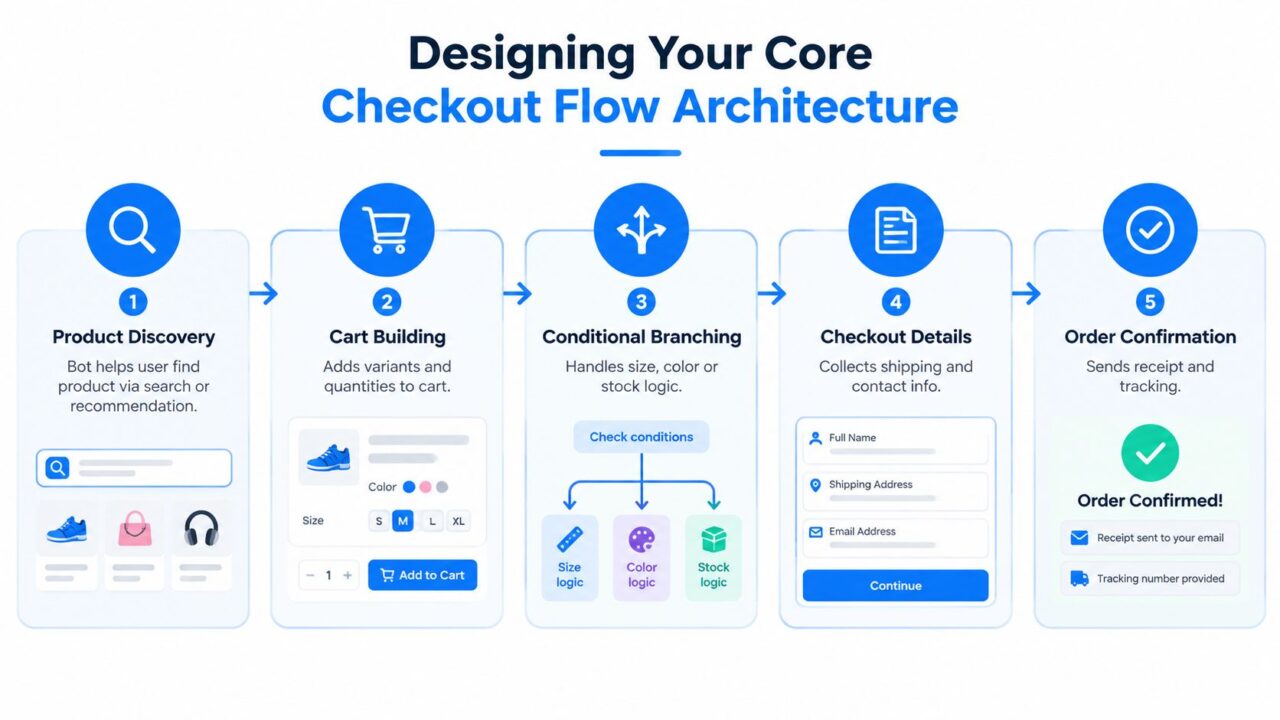
Automated Checkout Flow
Product discovery and cart building
The opening node should help the shopper find or confirm a product. For a single-product store, that may mean answering a question about use, fit, or delivery before presenting the product. For a large catalog, use search, recommendation, category buttons, or an AI agent that narrows the selection from the shopper’s stated need.
Once the product is identified, capture variant and quantity as structured values. Don’t bury size, color, subscription term, or pack choice inside free text. A custom field for variant_id or an equivalent catalog identifier gives downstream systems something reliable to pass into the cart and order record.
Conditional branches and qualification
Branches should appear where the answer changes the next action. If a size is unavailable, suggest an available alternative or offer a notification path. If the shopper is buying for a business, route them toward bulk pricing or a human. If the order requires age, location, or eligibility confirmation, make that requirement visible before the payment handoff.
Ask for email or phone based on the operational job you need to complete. Email may support receipts and account matching, while phone may suit Messenger or WhatsApp follow-up. Capture consent separately from the contact value, and avoid making optional marketing permission look like a condition of purchase.
A no-code builder such as Clepher can support e-commerce automation through visual flow logic, tags, conditions, custom fields, and integrations. For the storefront itself, review guidance on how to improve mobile checkout UX because a smooth conversation can’t compensate for a confusing hosted payment page.
Checkout details and confirmation
Map shipping, contact, payment, and confirmation as separate states. The bot should know whether it has collected an address, created a checkout session, received a payment result, or merely sent a redirect. That distinction prevents a failed payment from being recorded as a completed order.
Use typing indicators and short delays selectively. They can make a conversational interface feel less mechanical, but excessive delay adds friction. Personalization tags should clarify the next step, not decorate every message. Random path distribution can test alternate prompts or recovery routes, provided each path writes comparable events to analytics.
The flow should finish with an explicit order state, receipt handoff, and support route. “Payment submitted” isn’t the same as “order confirmed.”
Payment Handoffs and Order Capture Strategies
Payment is where a promising conversation meets security, compliance, and merchant infrastructure. The right handoff depends on customer trust, order complexity, payment methods, and how much control your team needs over the transaction.
Native in-chat payment keeps the shopper inside the conversation. It can feel efficient for a known customer buying a familiar product, especially when the platform and payment provider support the required method. The trade-off is integration complexity. You must handle tokenization, payment status, refunds, tax, shipping, and platform limitations without exposing sensitive payment data to the conversational layer.
Redirect checkout sends the shopper to a hosted experience such as Stripe Checkout or a Shopify checkout. This usually gives the merchant a mature payment surface and clearer separation between conversational data and payment credentials. The cost is context switching. Preserve the selected product, variant, discount, and customer identity in the checkout session so the buyer doesn’t have to reconstruct the order.
Hybrid flows use the bot for discovery, qualification, cart preparation, and order context, then pass the customer to a secure payment page. For many DTC teams, this is the most practical starting point because it limits the bot’s payment responsibility while retaining conversational momentum.
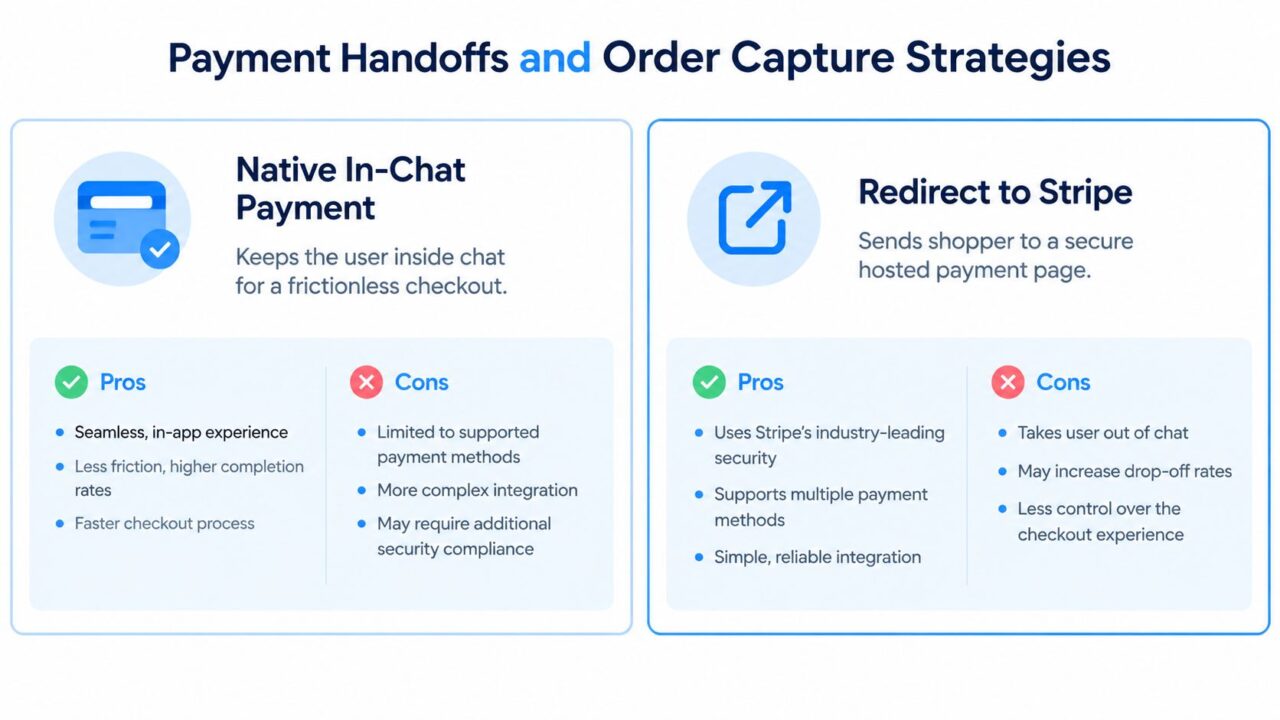
Automated Checkout Bot Payment Strategies
Design for failure, not only approval
A declined card should create a recoverable state, not a dead end. Save the non-sensitive order context, explain that payment wasn’t completed, offer another permitted payment route, and avoid repeatedly retrying in a way that resembles abuse.
Expired sessions need similar treatment. Recreate the checkout session only after validating current inventory, price, shipping, and discount eligibility. International methods may require a different provider or a human route, so the bot should identify that condition early rather than failing after a long form.
The benchmark evidence is clear about where flows break. In a 2026 benchmark, agent checkout completed successfully 61% of the time on average, ranging from 88.4% for agent-ready merchants to 21.4% for account-required flows. CAPTCHA or bot-challenge flows were the largest blocker, accounting for 31% of failed checkouts. These figures come from the 2026 agent checkout success benchmark.
Payment insight: The hardest step may not be authorization. Identity gates, account requirements, and challenge screens often decide whether the buyer finishes.
Instrument each handoff with events such as checkout created, redirect opened, challenge shown, payment failed, payment succeeded, and order confirmed. Never infer a paid order from a button click.
Recovering Abandoned Checkouts Without Annoying Customers
Recovery works when the message answers the reason for abandonment. A shopper who stopped after seeing shipping costs needs shipping clarity. Someone who selected a size and left may need availability confirmation. A generic “you left something behind” message treats both people as identical and often feels automated in the wrong way.
Start with a short, useful sequence:
- After 15 minutes: Send the product, variant, and cart summary. Ask whether the shopper needs help completing checkout.
- After 2 hours: Address the most likely hesitation, such as delivery timing, returns, sizing, or payment options. Use an incentive only when it solves a real objection.
- After 24 hours: Make one final, low-pressure attempt. Free shipping may be more credible than a discount when delivery cost caused the exit, while social proof may help when trust was the issue.
- Stop sequence: Respect an opt-out, a completed order, a support escalation, or a clear lack of interest.
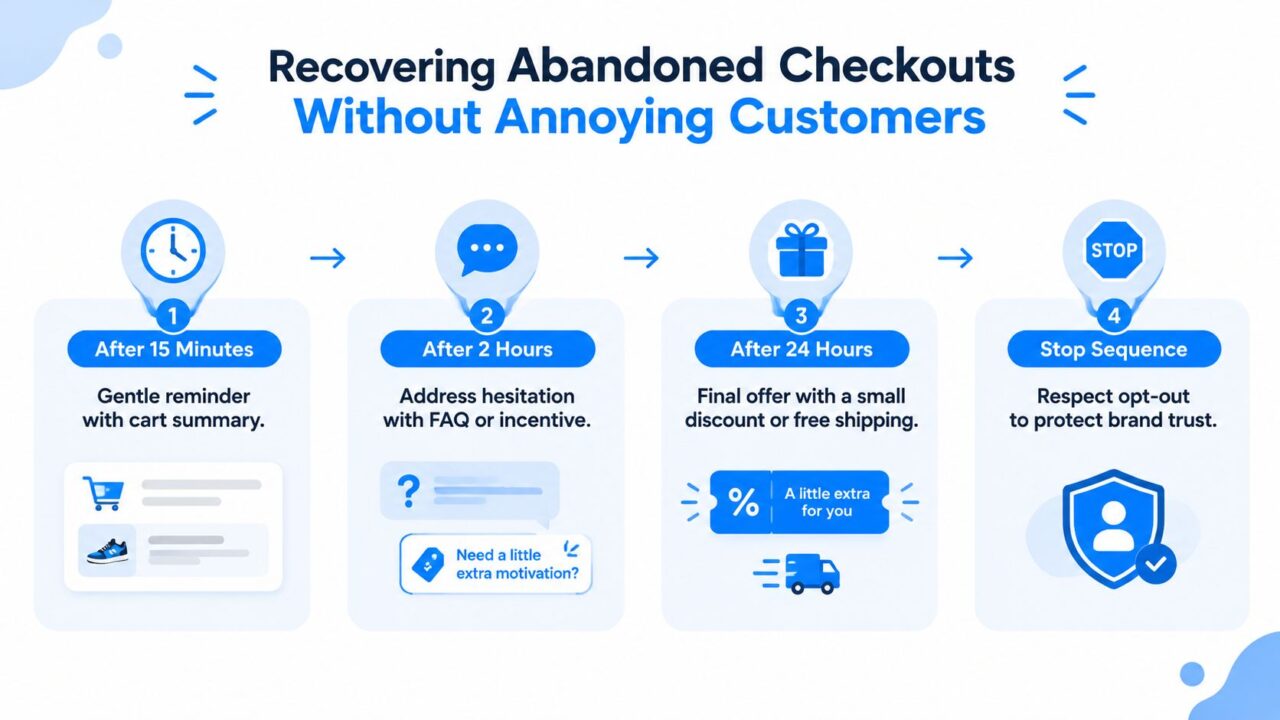
Automated Checkout Bot Cart Recovery
Branch recovery by checkout state
Store the last reliable state before sending anything. “Variant selected” should produce a different message from “payment declined.” If a checkout session expired, create a fresh route. If inventory changed, don’t promise the original item. If the customer reached a bot challenge, route to a human or a clearly explained manual path instead of sending repeated links.
The recovery message should carry enough context to reduce work:
“Your blue medium jacket is still in your cart. If delivery timing or sizing is holding you back, reply with your question and we’ll help.”
Avoid stacking incentives automatically. Discounts can train customers to abandon on purpose, and they can hide a broken checkout experience. Test helpful content, shipping clarification, and support access before reducing price.
Protect your customer data and sending reputation
Bot waves can create thousands of apparent checkouts that never represented genuine shoppers. Shopify community guidance warns that abandoned-checkout emails should be paused or filtered during bot waves because they can damage sending reputation, while failed payments can pollute CRM data and distort conversion analysis. The operational guidance is documented in this report on automated bot attacks and ecommerce impact.
Use a suppression rule for suspicious sessions, failed-payment bursts, reused device or network signals, and incomplete records without valid consent. A recovery platform such as abandoned-cart recovery automation is useful only when its triggers receive clean event data. Otherwise, automation amplifies the mess.
When to Hand Off to Humans and When to Stay Automated
More automation isn’t automatically better. A bot that answers routine questions quickly can increase buying confidence, while a bot that refuses to recognize an unusual problem can turn a nearly completed order into a complaint.
Keep the automated path for decisions with predictable inputs and low downside:
- Product basics, compatibility, sizing guidance, and availability
- Shipping regions, delivery policies, returns, and payment-method explanations
- Cart creation, variant changes, and checkout links
- Order-status requests that match a verified order record
Escalate when the customer’s situation requires judgment, discretion, or access the bot shouldn’t have. Complex product configuration, pricing negotiation, damaged goods, suspected fraud, complaints, VIP treatment, and unusual international orders belong in a human queue.
Preserve context during transfer
A handoff fails when the customer has to repeat the entire conversation. Pass the transcript summary, product identifier, selected variant, cart value, checkout state, payment error category, consent status, and customer segment to the agent. The human should open with a relevant statement, such as, “I can see you selected the black large version and the payment page rejected the card before the order was created.”
Route by business value and risk, not sentiment alone. A frustrated customer with a simple delivery question may need a fast answer, while a calm customer reporting an unauthorized payment needs immediate specialist handling. Use order value, prior purchase history, account status, and the type of failure as routing signals.
Make escalation measurable
Track how often the bot transfers, why it transfers, whether the human resolves the issue, and whether the customer completes a purchase afterward. A rising handoff rate may indicate a product-data gap, unclear policies, or a broken payment integration. A low handoff rate isn’t necessarily good if customers abandon after the bot fails to answer.
The strongest operating model is selective automation. Let the bot handle repeatable work, then make human intervention easy at the moments where trust and judgment affect revenue.
Measuring What Actually Matters in Bot Performance
Message volume can make a bot look busy while the checkout remains broken. The dashboard should connect each conversation to a valid commercial outcome, while separating genuine customer behavior from automated abuse.
Start with an event model that follows the transaction:
- Conversation started
- Product identified
- Variant selected
- Cart created
- Checkout session opened
- Payment attempted
- Payment failed or succeeded
- Order confirmed
- Recovery sent
- Recovery converted or stopped
Each event needs a timestamp, source channel, flow version, customer identifier where permitted, and a confidence or risk classification. Without those fields, teams can’t distinguish a customer who abandoned after shipping costs from a script that generated repeated payment failures.
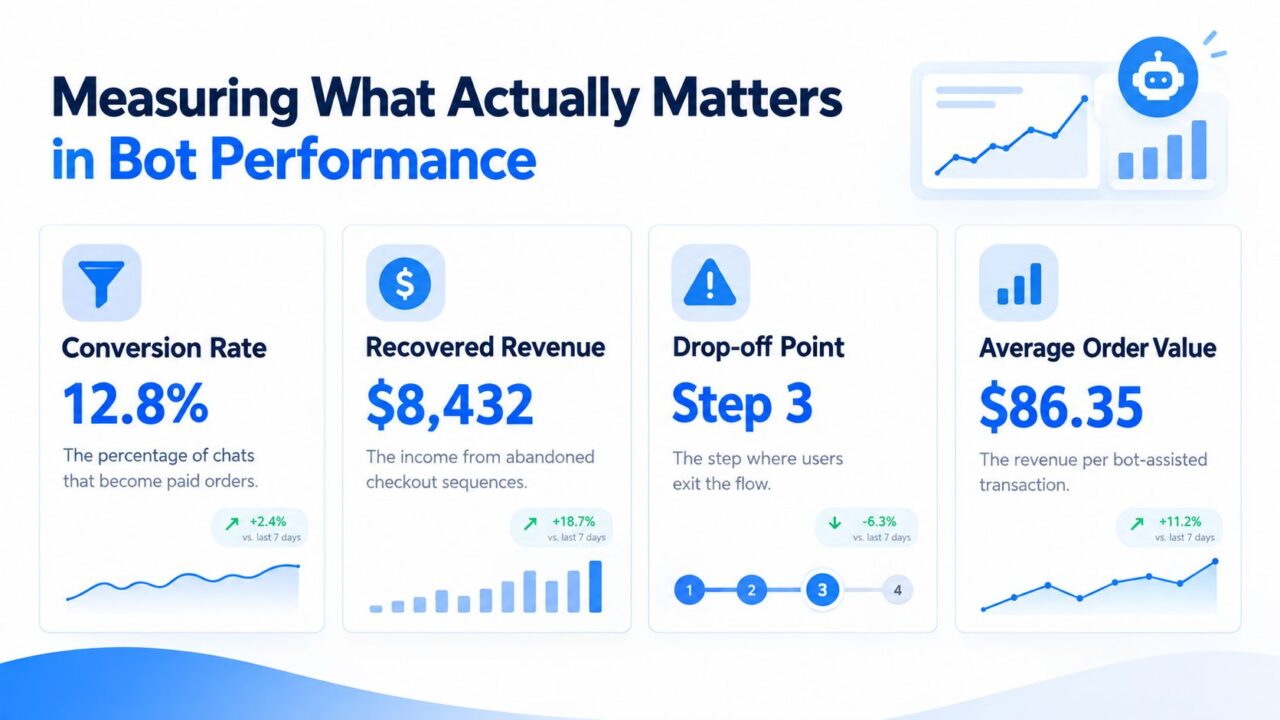
Automated Checkout Bot Performance
Use revenue metrics as the decision layer
The useful metrics are tied to money and customer experience:
- Paid orders per qualified conversation: Measures whether product guidance leads to a real transaction.
- Revenue per bot-assisted conversation: Shows whether the bot attracts valuable purchases or only generates activity.
- Drop-off by state: Identifies whether customers leave at variant selection, shipping, identity verification, redirect, or payment.
- Recovered revenue: Counts only orders confirmed after a recovery interaction.
- Average order value: Helps compare bot-assisted transactions with other acquisition paths.
- Human-assisted conversion: Shows whether escalation protects revenue rather than increasing support volume.
A/B test one meaningful variable at a time, such as the product recommendation wording, the timing of a recovery prompt, or the location of a qualification question. Keep the underlying checkout and attribution rules consistent so a messaging improvement isn’t confused with a payment change.
Treat bot traffic as a data-quality problem
In 2024, automated traffic exceeded human traffic for the first time in a decade, reaching 51% of all web traffic, while bad bots accounted for 37% of internet traffic. In ecommerce, bots reportedly represented 57% of website traffic during the 2024 holiday season. These figures are reported in checkout bot risk analysis from 2Accept.
That environment makes raw conversion rates unreliable. Human Security’s benchmark measured carding attempts at an average of 5.06% of total checkout attempts across 2021, and its report states that bad bots can negatively impact an average of 18% to 23% of ecommerce revenue each year. The Automated Fraud Benchmark Report also supports the operational need to instrument checkout attempts and segment by velocity, IP or device reuse, and payment-failure patterns.
Filter suspicious attempts before they enter CRM campaigns, abandoned-cart audiences, and experiment cohorts. A clean dashboard doesn’t merely report performance. It prevents the team from optimizing for traffic that should never have been treated as a customer.
Clepher gives e-commerce teams a no-code way to build conversational product and checkout flows across website chat, Facebook, Messenger, WhatsApp, and Instagram Direct Message, with segmentation, analytics, handoffs, and recovery automation. Visit Clepher to connect customer conversations to cleaner checkout journeys without letting failed or suspicious attempts contaminate the rest of your marketing stack.
