
You’ve launched a campaign, watched traffic arrive, and then discovered that many visitors disappeared before anyone followed up. A form submission sits in a spreadsheet, a chat question waits in an inbox, and a promising prospect receives a reply after interest has already cooled. The problem isn’t always a shortage of traffic. Often, it’s the gap between buyer intent and business response.
Lead generation automation closes that gap by capturing prospects, asking useful questions, organizing context, and triggering the next action without requiring someone to monitor every channel manually. Done well, it doesn’t replace judgment. It gives your team a faster, more consistent way to decide which leads need education, which deserve immediate sales attention, and which should be excluded.
This guide explains the core ideas, components, workflows, KPIs, implementation steps, trust safeguards, and industry applications behind effective lead generation automation. It also connects the operational details to practical resources, including Machine Marketing’s B2B automation framework and this guide to how to generate leads online.
Introduction to Lead Generation Automation
Consider a marketing manager promoting a new software guide. A visitor clicks an ad, reads the landing page, and submits a question through the website chat. Nobody responds immediately because the sales team is in a meeting. By the time someone notices the message, the visitor has moved on to another vendor.
A lead generation automation system would handle the first moments differently. The chatbot could answer a common question, collect the visitor’s role and business need, apply a qualification rule, store the conversation, and alert the appropriate salesperson. A lower-intent visitor could receive educational follow-up instead of entering a sales queue prematurely.
The value comes from connecting actions, not from sending more messages. A form submission should create usable contact data. A pricing-page visit can signal stronger intent. A reply can stop an automated sequence and start a human handoff.
Automation has already changed lead generation from a mostly manual follow-up process into a software-driven system built around segmentation, triggers, scoring, and workflow orchestration. The challenge now is balancing rapid response with accurate qualification and authentic communication.
Understanding Key Concepts
Lead generation automation uses software to identify, attract, capture, qualify, nurture, and route potential customers. It joins several actions into a connected process. When a prospect does something meaningful, the system responds according to rules, context, and available data.
A useful analogy is fishing. A traditional team casts a manual net, checks it repeatedly, sorts what it finds, and decides what to do next. An intelligent, self-baiting net attracts attention, detects useful signals, separates likely catches from irrelevant activity, and alerts the right person. The system still needs human oversight, but it removes repetitive inspection.
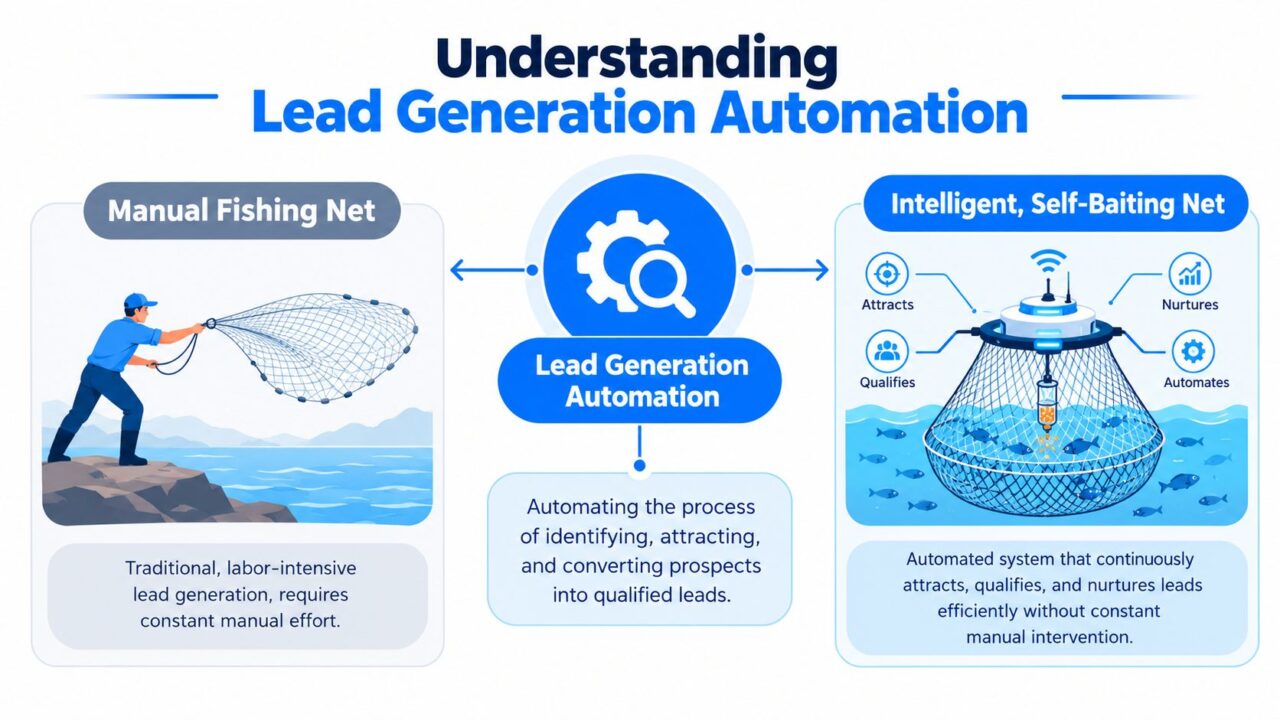
Lead Generation Automation Fishing Comparison
The three ideas that make automation useful
Trigger-based messaging: The observable event starts the process of automating lead generation. A visitor submits a form, opens a conversation, requests a resource, or returns to a product page. The event determines the next action, such as sending a confirmation, asking a qualifying question, or creating a sales task in the lead generation tool.
Segmentation prevents every contact from receiving the same treatment. A first-time visitor researching options needs different content from a returning prospect asking about implementation. Segments can use fit information, stated interests, conversation answers, and behavior.
Workflow orchestration: The automation tool connects the steps in the lead generation process. A workflow might capture a contact, update a CRM record, assign a lead owner, start a nurture sequence, and remove the person from automation after a meeting is booked. Each action should have a clear purpose and an exit condition.
Generic marketing automation can manage broad campaigns, scheduled emails, and audience activity. Lead generation automation focuses more tightly on the journey from unknown visitor to qualified opportunity. It asks not only, “Who received this message?” but also, “What should happen next for this specific prospect in our lead generation tool?”
Companies using marketing automation can see a 451% increase in qualified leads and an 80% boost in overall lead generation, according to Oracle’s marketing automation statistics. Those figures help explain the historical shift from manual sales follow-up toward systems that increase output without requiring headcount to grow at the same rate.
Practical rule: Automate a repeatable decision, not a vague hope for “more leads.”
Benefits and ROI of Automation
The business case has two sides: speed and quality. A system that captures a large number of contacts but sends poor-fit prospects to sales creates more work. A system that qualifies carefully but responds slowly can lose high-intent buyers. Strong automation tools improve both sides by acting quickly while preserving the lead information needed for a useful decision.
Engaging a lead within five minutes makes them nine times more likely to convert, while AI-enabled lead generation can produce 50% more sales-ready leads and reduce acquisition costs by up to 60%, according to Click Vision’s AI lead generation statistics. The operational lesson is straightforward. Instant confirmation, chatbot engagement, routing alerts, and nurture sequences matter because they protect the period when a prospect is actively paying attention.
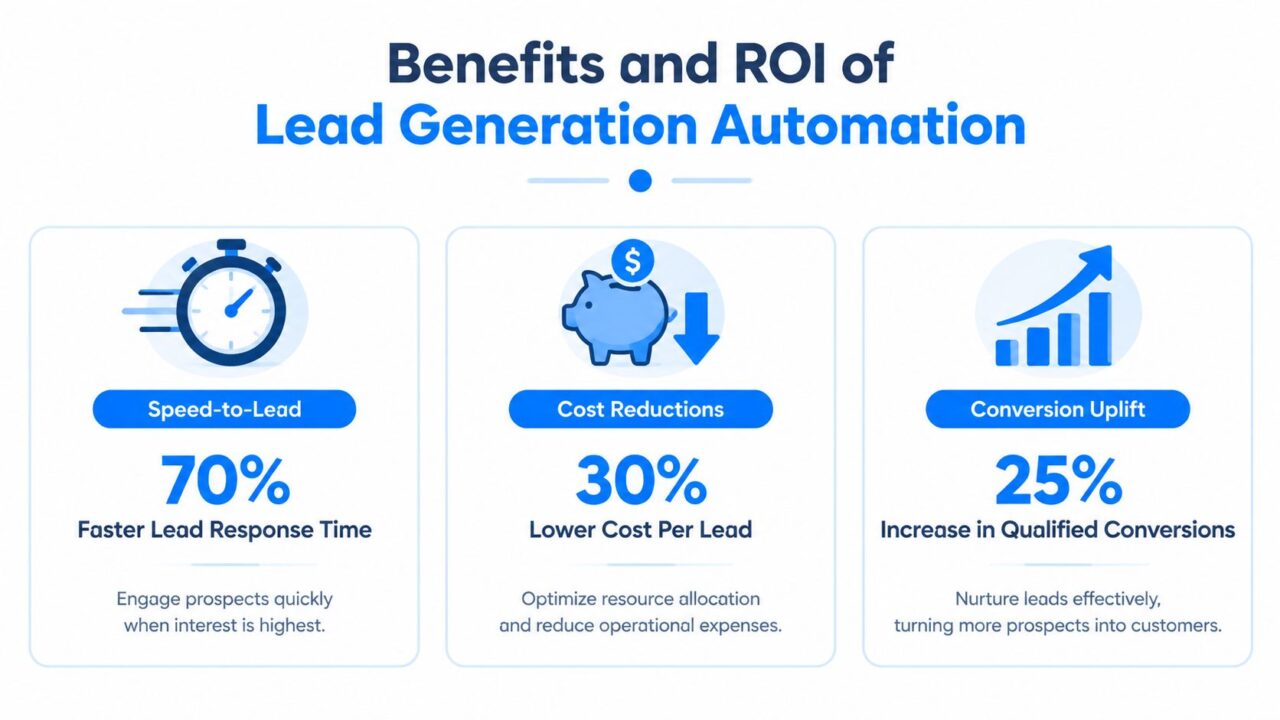
Lead Generation Automation ROI Infographic
The savings don’t come only from reducing manual tasks. Automation helps salespeople spend more time on qualified conversations instead of checking every submission, copying data, or sending routine reminders. It also creates a consistent process, so a lead who arrives outside business hours still receives an appropriate next step.
A simple ROI model should connect activity to revenue rather than stopping at contact volume:
- Capture efficiency: Are visitors completing forms or starting conversations?
- Qualification efficiency: How many captured contacts meet your fit and intent criteria?
- Sales efficiency: How quickly do qualified leads reach the right salesperson?
- Pipeline efficiency: How many qualified leads become opportunities?
- Economic efficiency: What resources does the system require compared with the pipeline it supports?
AI-powered nurturing programs can improve b2b lead generation. lead-to-opportunity conversion rates by up to 43%, as reported in AI lead generation benchmarks from The Starr Conspiracy. Treat that benchmark as a reason to measure nurture quality, not as a promise for every campaign. Your result will depend on audience fit, message relevance, data quality, and handoff discipline.
Key Components of Lead Generation Automation
An automated funnel works like a connected control system. Each component gathers or interprets lead information, then passes useful context to the next component. If one part operates in isolation, the team may generate activity without creating a reliable path to revenue.
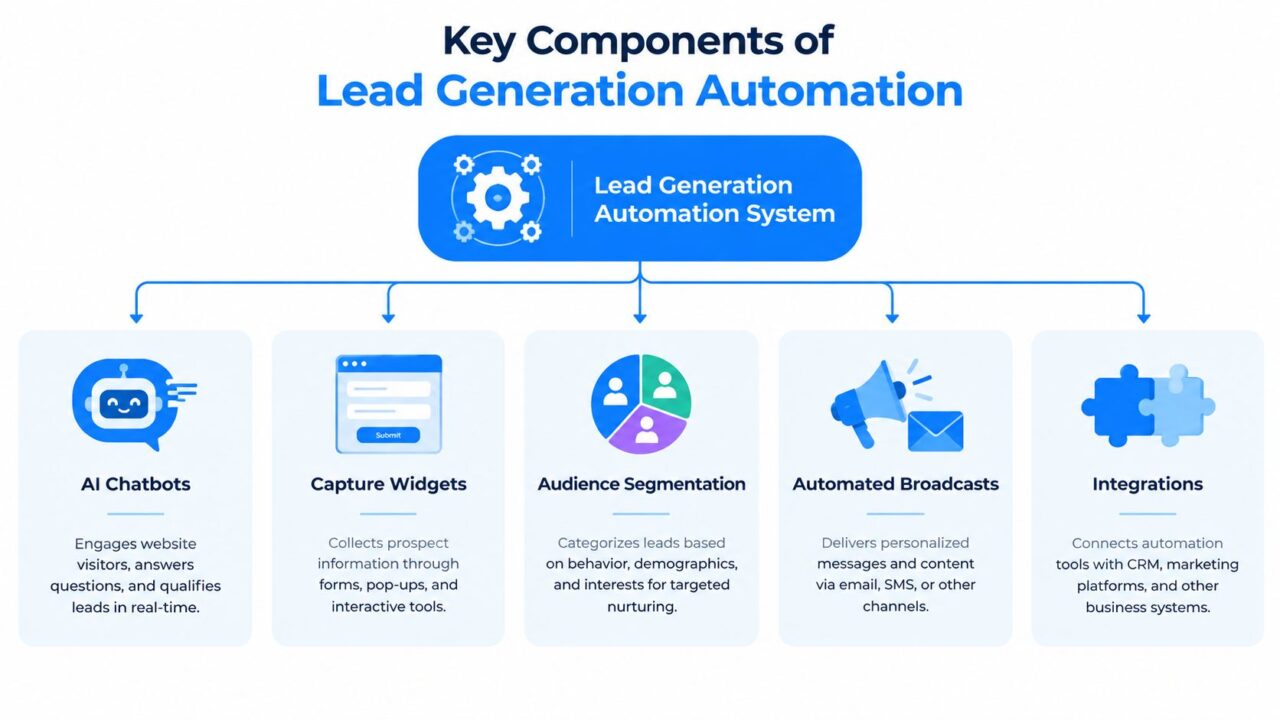
Lead Generation Automation Key Components
AI chatbots
An AI chatbot engages visitors when they ask a question, click a chat prompt, or show behavior that suggests they need help. It can answer common questions, collect qualifying details, offer a booking option, and route complex conversations to a person.
For a B2B service, the bot might ask whether the visitor needs strategy, implementation, or ongoing support. For an online store, it might identify product interest and collect an email address for a promotion. The bot should ask only for information that changes the next step.
Businesses comparing conversational tools can review Clepher’s chatbot lead generation resource for examples of how chat-based capture and qualification fit into a broader funnel.
Capture widgets
Capture widgets turn passive attention into an identifiable contact or conversation. They include forms, pop-ups, quiz-style tools, click-to-message buttons, and resource gates. The best widget matches the visitor’s immediate motivation.
A pricing-page widget might offer a consultation request. A blog widget might offer a practical checklist. A visitor who isn’t ready to submit a form may still start a chat, giving the business a chance to understand intent without forcing a high-commitment action.
Audience segmentation
Segmentation organizes contacts according to information that affects messaging or routing. Useful categories can include product interest, customer status, business type, stated goal, source, and conversation stage.
Keep the first model understandable. A segment called “interested in onboarding” is more useful than a dozen labels nobody maintains. Separate fit from intent where possible. A company can match your target profile while showing little buying activity, while another visitor may be highly engaged but outside your service area.
Automated broadcasts
Broadcasts deliver updates, promotions, educational content, or event invitations to selected audiences. They’re most effective when they use tags, segments, and exclusions rather than sending the same message to every contact.
For example, a creator can send a course announcement to subscribers who engaged with related lessons while excluding current students. An agency can share a platform update with clients but send a separate educational message to prospects.
Integrations
Integrations connect the automation layer to the CRM, email system, calendar, analytics platform, and sales tools. A lead record should carry source, conversation context, qualification answers, and ownership information wherever the salesperson needs it.
Platform buying priorities reflect this need. Integrations rank first at 53%, while lead management is cited by 44%, and lead scoring can improve by 40% with the right automation tool, as important features in lead generation statistics from Email Vendor Selection. A disconnected chatbot may collect contacts, but an integrated system helps the business act on them.
Mapping Workflows and Tracking KPIs
Start with the customer’s path, then attach an automated action and a measurement point to each stage. This prevents teams from choosing tools before they understand the process they’re trying to improve.
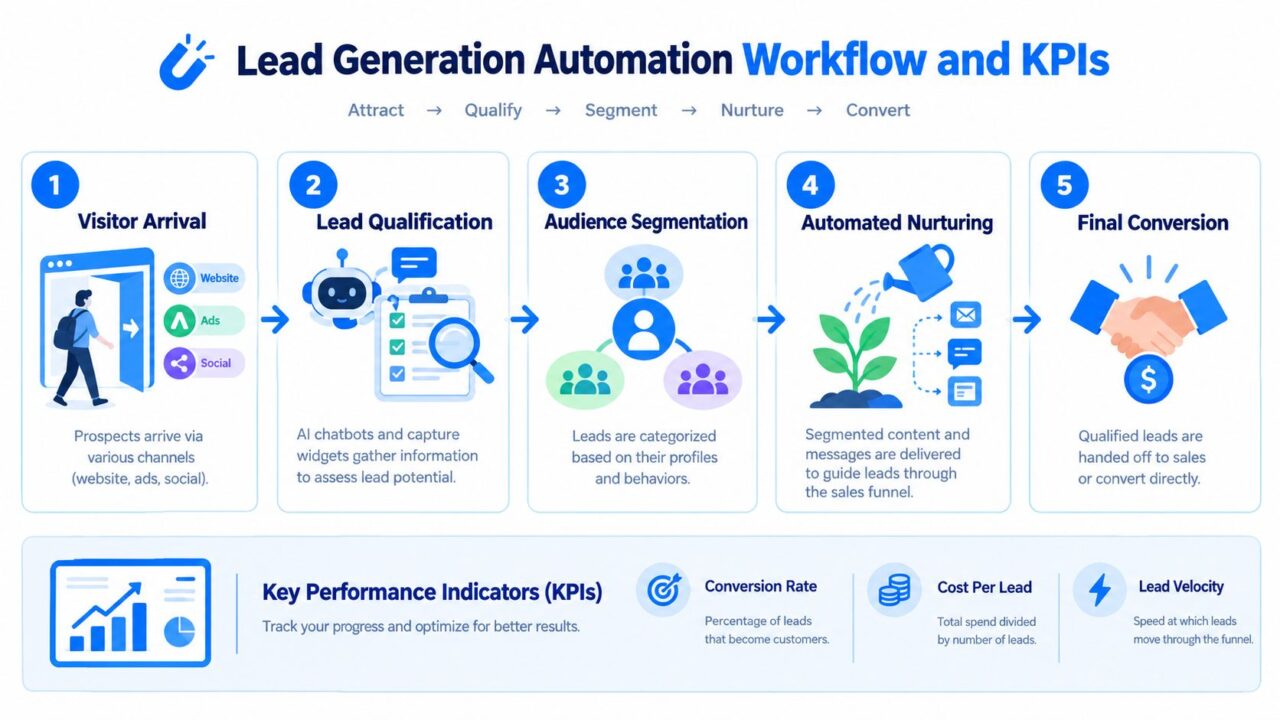
Lead Generation Automation Workflow KPIs
A practical workflow
Visitor arrival: A prospect reaches the website through an advertisement, search result, social post, or referral. Record the campaign and landing page so later reporting can connect the original source to the eventual opportunity.
Lead qualification: A form or chatbot asks questions that determine fit, need, timing, or service category. Avoid collecting information that nobody uses. A question earns its place when the answer changes routing, messaging, or sales preparation.
Audience segmentation: The system applies tags or fields based on the answers and observed behavior. A visitor interested in pricing should not enter the same nurture path as someone downloading introductory education.
Automated nurturing: The system delivers relevant content, reminders, or follow-up messages. A person who clicks a product comparison can receive a deeper explanation, while a person who ignores several messages can be suppressed or moved to a lighter sequence.
Final conversion: A qualified lead books a meeting, starts a trial, requests a quote, or reaches a salesperson. Automation should pass the conversation history and qualification context so the handoff feels informed rather than repetitive.
Match KPIs to decisions
| Funnel stage | Useful KPI | Decision it supports |
|---|---|---|
| Capture | Capture rate and source quality | Which entry points deserve improvement? |
| Response | Response time | Are high-intent prospects receiving help quickly? |
| Nurture | Opens, clicks, replies, and sequence exits | Does the content create meaningful engagement? |
| Qualification | Lead-to-opportunity conversion | Are scoring and routing rules identifying the right people? |
| Revenue | Pipeline contribution and ROI | Is the workflow producing commercial value? |
Published B2B benchmarks place median inbound lead response time at 42 hours, and the average MQL-to-SQL conversion rate at 25.9%, according to B2B lead nurturing and scoring benchmarks. These figures make the measurement problem visible. A system should show whether it reduced delay and improved progression, not merely whether it sent messages.
Use dashboards to compare automated leads with relevant historical or manual processes. Review sales feedback alongside conversion data, because a lead can look active in marketing reports while lacking a real buying need.
The most useful KPI is the one that changes what your team does next.
Step-by-Step Implementation Roadmap
Automation becomes manageable when you build around one bottleneck at a time. Don’t begin by connecting every channel and creating a maze of branches. Begin with a workflow your team understands manually, then make each repeated action explicit.
Start with the business problem
Write down the failure you want to fix. It might be slow response, inconsistent qualification, lost form submissions, weak follow-up, or poor visibility into campaign revenue. Define the desired next action for a qualified lead and the conditions that prevent an unqualified lead from reaching sales.
Document your ideal customer profile, required fields, lead sources, qualification questions, and ownership rules. If marketing and sales use different definitions of “qualified,” automation will only make the disagreement faster.
Choose the smallest useful stack
Map the systems involved before selecting software. Identify where contacts enter, where records live, which tool sends messages, where meetings are booked, and how revenue data returns to reporting.
Prioritize reliable connections over a long feature list. A smaller workflow that synchronizes context correctly is more valuable than a complex setup that creates duplicates or loses source information.
Build a controlled pilot
Create one capture path, one qualification model, one nurture sequence, and one handoff rule. Use test contacts to check successful submissions, duplicate handling, missing answers, failed integrations, unsubscribe behavior, and human escalation.
A visual reference such as Clepher’s marketing automation workflow guide can help teams translate triggers, conditions, actions, and exits into a process they can review together.
Add compliance before launch
GDPR requires consent to be freely given, specific, informed, and unambiguous. Pre-ticked checkboxes don’t count, and businesses must be able to demonstrate consent with records showing when it was given and what it covered, according to this GDPR guide to automated lead capture.
Use clear opt-in language for forms, chat widgets, and messaging subscriptions to capture leads effectively. Keep consent for marketing separate from acceptance of terms, store timestamped records, and define how people can withdraw permission.
Launch, inspect, and scale
Monitor the first live interactions closely. Review transcripts, routing decisions, lead fields, message relevance, and sales feedback. Fix unclear questions and incorrect branches before adding more channels.
Once the pilot produces reliable data, expand carefully. Add another source, segment, or follow-up path only when the current workflow has clear ownership and measurable outcomes.
Best Practices and Common Pitfalls
The popular assumption is that more automation creates more growth. In practice, better decisions create better growth. A system that responds instantly with irrelevant language can damage trust faster than a slower but thoughtful human reply.
Recent coverage reports that LinkedIn is a powerful platform for b2b lead generation. 64% of buyers can identify AI-generated outreach within the first sentence, according to The Starr Conspiracy’s analysis of AI lead generation outreach. That makes authenticity a design requirement, not a copywriting afterthought.
Use hybrid handoffs
Let automation handle repetitive, low-risk actions. Let people handle ambiguity, high intent, sensitive questions, negotiation, and strategic advice.
A chatbot can collect a prospect’s goals and budget range, then send the conversation to sales when the visitor asks about implementation or requests a proposal. The human shouldn’t restart the discovery process. The CRM alert should include the answers, page context, and reason for escalation.
Build attribution into the first interaction
Poor tracking and attribution is a major obstacle for automation buyers. In a survey of 180 local businesses, 27% cited poor tracking and attribution as a primary challenge, according to Neil Patel’s lead generation challenge statistics.
Store the original source, campaign, landing page, conversation entry point, qualification outcome, and opportunity status. Use consistent naming and make sure the data survives each integration. If the system reports only conversations, clicks, or form fills, you won’t know which automated touchpoints generated qualified pipeline.
Avoid the common traps
- Over-automating the opening: Don’t send a long AI-written pitch before understanding the visitor’s need. Ask a focused question first.
- Using one segment for everyone: Separate prospects by intent, product interest, customer status, or business context.
- Skipping exit rules: Stop nurture after a purchase, booking, unsubscribe, disqualification, or human takeover to ensure efficient lead management.
- Ignoring consent: Make opt-in language visible, specific, and recordable.
- Treating scores as truth: Use scoring to prioritize review, then compare scores with sales outcomes and adjust the model.
The strongest systems make automation feel like timely assistance. They don’t force people through a closed loop or hide the path to a human.
Industry-Specific Automation Examples
Automation works best when it follows the buyer’s decision process. An online store must answer product questions quickly and recover abandoned purchases. A SaaS company must qualify interest and preserve handoff context. A local business must confirm service area, availability, and location. The same tools can support each model, but the triggers, questions, and quality checks should differ.
E-commerce brands
An e-commerce brand can place a capture widget on product pages and invite questions about fit, availability, shipping, or product differences. A chatbot can identify the category under consideration, tag that interest, and offer a relevant guide or promotion.
Useful segments include first-time shoppers, previous buyers, visitors showing strong interest in a product, and customers seeking support. A broadcast can promote a related product to an interested group while excluding recent purchasers who should not receive the same offer.
Track product-page conversation starts, captured contacts, assisted purchases, broadcast clicks, and campaign-attributed sales. A conversation is not automatically a lead. Support questions and buying questions need separate paths, and the system should measure whether each path produces useful outcomes.
Speed matters for shoppers comparing products, but a fast reply that recommends the wrong item can reduce trust. Review sampled conversations and compare automated recommendations with purchases, returns, and requests for human help.
Digital marketing agencies
An agency can use a website chatbot to identify whether a prospect needs paid media, SEO, content, or social advertising. The bot can ask about business type, current challenge, and preferred next step before routing the conversation to the right specialist.
A high-fit prospect requesting a proposal should receive a human handoff with the full conversation attached. A visitor still researching can enter an educational sequence based on the selected service instead of receiving a generic agency newsletter. The handoff should preserve the prospect’s words, not just a score, so the specialist can respond in a natural way.
Useful KPIs include qualified consultation requests, source-to-opportunity progression, response time, sales acceptance, and proposal-stage conversion. Report them by client or campaign. Large activity totals can hide weak targeting and low-quality inquiries.
Coaches and creators
A coach or course creator can turn a free lesson, quiz, or social conversation into a segmented nurture journey. Someone interested in business fundamentals can receive introductory material, while a subscriber asking about group coaching can be invited to a consultation or program information session.
Automation should recognize readiness without sending every subscriber toward a sale. Repeated engagement with advanced material may justify a direct invitation. Someone who requested only a free resource may need more education first.
Track subscriber growth alongside replies, consultation requests, program-page engagement, and enrollment attribution. Keep the transition to personal guidance clear when a prospect asks for advice about a specific situation. An automated message can open the conversation, but a human should handle questions that depend on judgment or personal context.
SaaS and subscription businesses
A SaaS company can connect its chatbot, product pages, trial forms, CRM, calendar, and customer messaging. One workflow might capture a trial user’s role and use case, route enterprise questions to sales, and send self-serve users onboarding guidance.
Segments can reflect company type, use case, trial status, feature interest, and support needs. Broadcasts can announce relevant education or product updates. Behavioral triggers can invite a conversation when a prospect needs help choosing a plan.
Measure qualified demo requests, trial-to-sales progression, onboarding engagement, support deflection, and conversion by segment. Keep sales and support data connected. A prospect asking for help with an unresolved issue should not receive a sales message that ignores the problem.
Review the quality behind each conversion. A trial user who books a call quickly is not necessarily ready for sales. The conversation, product behavior, and stated need should support the score before an automated handoff to sales and marketing teams.
Local businesses
A local store, clinic, studio, or service provider can use click-to-message ads, website chat, and simple forms to capture inquiries about appointments, availability, services, or promotions. Location, service interest, and preferred contact method often matter more than a long profile.
A visitor asking about a promotion can receive the relevant details and a booking or visit option. Someone outside the service area should be identified early and excluded from local follow-up. Staff should receive the conversation context, so they do not repeat questions the visitor has already answered.
Attribution deserves special attention. Businesses often face high costs, poor tracking, inconsistent lead quality, and limited local personalization, as discussed in Neil Patel’s survey coverage. Record the campaign, channel, service requested, booking status, and final outcome in one place. A rapid response has little value if the inquiry cannot be connected to a completed appointment or qualified opportunity.
Across all five models, use the same test: does the workflow give the right person a relevant response and preserve enough context for the next action? Measure response speed and lead quality together. If message volume rises while qualified outcomes do not, improve the questions, segments, or handoff instead of sending more messages.
Clepher helps businesses build no-code conversational flows that capture and qualify leads across website chat, Facebook Messenger, WhatsApp, and Instagram Direct Message, then connect those interactions with segmentation, broadcasts, analytics, and external business tools. Visit Clepher to explore conversational lead generation automation while keeping human handoffs and lead quality measurement in view.
