
The most popular advice about a Facebook broadcast message is also the quickest way to damage a Page: build a large list, write one promotion, and blast it to everyone. Messenger isn’t email. Your copy matters, but permission state and timing decide whether the message can be delivered at all.
Messenger became a global-scale channel long before businesses began treating it as a serious broadcast platform. Its audience grew from approximately 600 million monthly users in April 2015 to 900 million in June 2016, passed 1 billion in July 2016, and reached roughly 1.2 billion by April 2017. During COVID-19 quarantine periods in March 2020, messaging traffic increased by 50% in affected countries and group calls rose by more than 1,000%. Those figures describe Messenger overall, not a business’s opted-in audience, but they explain why the channel remains attractive for updates, support, promotions, and relationship-building. Facebook Messenger’s documented growth and usage history show the scale. The operational question is whether your recipients are eligible when you press send.
Navigating the 24-Hour Messaging Window
The standard Messenger window is measured from the recipient’s latest qualifying interaction, not from your last campaign. If a customer writes to your Page today, promotional content can generally be sent while that window remains open. If another subscriber interacted earlier, that person’s eligibility may already have expired, even if both contacts sit in the same campaign list.
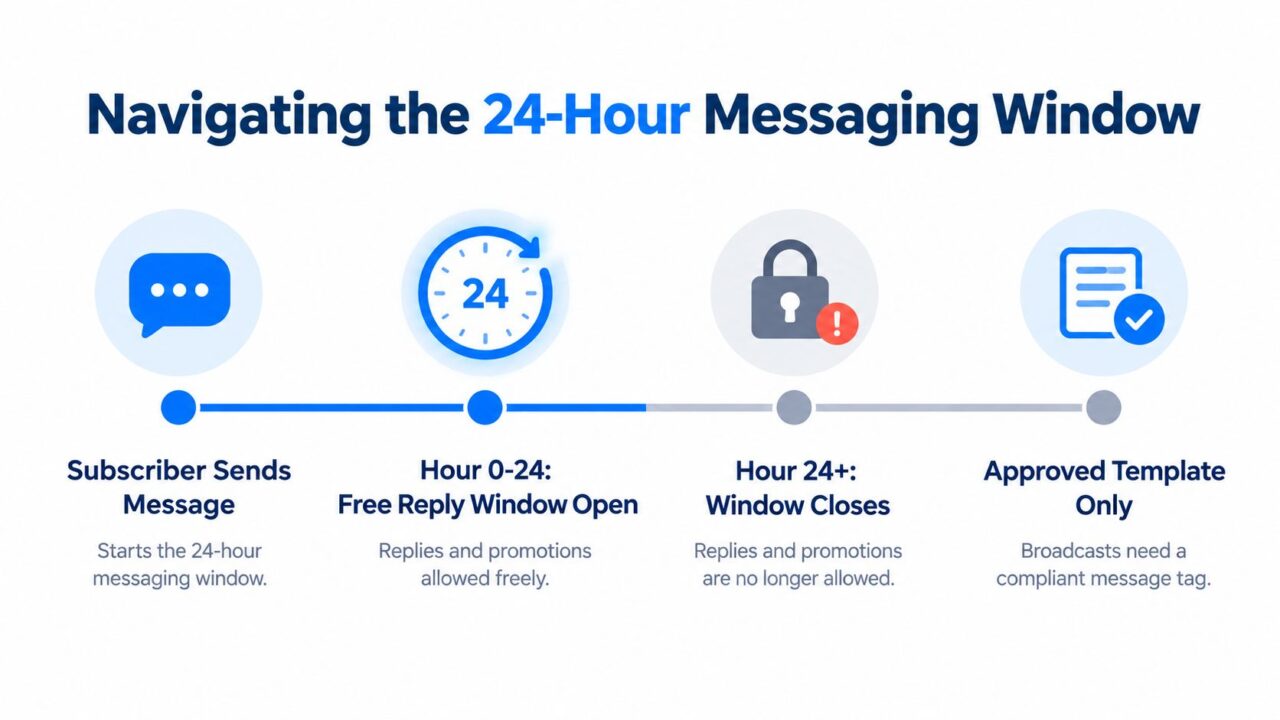
Broadcast Message Facebook Messaging Window
Replace the static list with a live decision
A static audience flag such as “eligible for broadcast” becomes unreliable as soon as contacts age out at different times. Instead, treat eligibility as a real-time rule checked at dispatch:
- Interaction timestamp: Store the latest inbound message or qualifying action.
- Message purpose: Separate promotional content from service and transaction updates.
- Permission type: Identify whether the contact has an applicable Marketing Messages opt-in.
- Suppression status: Exclude unsubscribed users, revoked permissions, and repeated delivery failures.
That workflow aligns with our breakdown of Messenger policy, where the 24-hour window is treated as a condition of eligibility rather than a campaign setting. A broadcast created at 9 a.m. can contain recipients whose windows close at different times, so checking only at campaign creation creates avoidable rejects.
Practical rule: Calculate eligibility immediately before delivery, not when the campaign is drafted.
After the window closes, ordinary promotional follow-ups aren’t automatically allowed. Route approved transactional messages through the applicable mechanism, or wait for a compliant marketing-message permission. A customer who once contacted your Page isn’t permanently reachable for discounts, product launches, or general announcements.
Capturing Explicit Marketing Opt-Ins
A person who messages your Page hasn’t automatically agreed to receive recurring promotions. The safer flow captures explicit Marketing Messages consent while the customer is still inside the active conversation, after you’ve answered the immediate question and explained what future messages will contain.
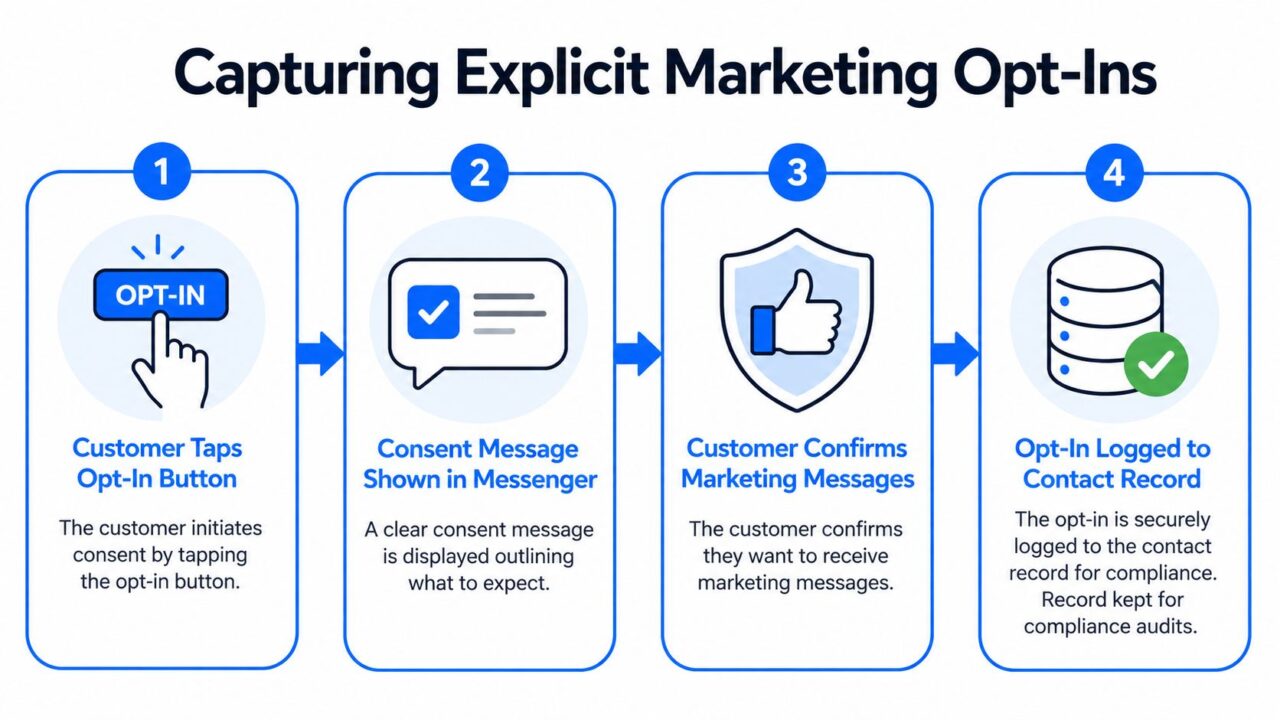
Broadcast Message Facebook Marketing Opt-In
Ask at the right moment
A useful sequence is simple:
- Resolve the current request. If someone asks about sizing, shipping, or course access, answer first.
- State the benefit and category. Explain whether the user will receive restocks, price drops, education, or another defined message type.
- Request the opt-in inside the active window. The consent request must occur while the standard conversation window is open.
- Record the permission. Store the token with the approved frequency, audience attributes, consent timestamp, and unsubscribe state.
The opt-in itself doesn’t reopen the 24-hour window. That distinction is easy to miss. A user can consent to recurring marketing messages, yet the business still needs to follow the applicable program rules and send only at the permitted cadence. Meta’s documentation specifies separate tokens for separate recurring frequencies and limits monthly permission to one message per calendar month. After a user opts in, up to three follow-up messages may be sent, but they must occur within two minutes of the first follow-up, and the second and third must each be no longer than 250 characters. Meta’s Marketing Messages documentation provides the governing details.
Make consent understandable
Don’t hide the opt-in inside a vague “send me updates” button. Tell the subscriber what they’ll receive, how often they should expect it, and how to stop it. A beauty retailer might offer “restock alerts for skincare products,” while a course provider might offer “lesson reminders and enrollment announcements.” Those descriptions create a narrower, more defensible permission than a generic promise of “news.”
Teams designing lead capture can also review guidance on using Instant Forms for qualified leads, then connect that acquisition flow to a Messenger consent experience. For conversation-specific examples, this Messenger subscribe-message example shows how the request can be presented without making the customer guess what they’re agreeing to.
Using Approved Message Tags Correctly
When the standard window closes, message tags aren’t a back door for promotions. Meta’s approved tag framework is designed for important, personally relevant updates, including confirmed event updates, post-purchase updates, and account updates. The message must match the purpose, not merely carry a tag selected from a menu.
Consider three common cases:
| Business situation | Appropriate route | What fails |
|---|---|---|
| A learner registered for a scheduled webinar | Confirmed event update | Adding a course discount to the reminder |
| A buyer needs delivery information | Post-purchase update | Turning shipping information into a product promotion |
| A customer needs an account-related notice | Account update | Disguising a coupon as account maintenance |
A course provider can remind a registered learner about an event. An ecommerce brand can send transaction-related delivery information. Neither should place a general discount inside that message and label it an account update. Promotional content under an inappropriate tag violates policy and can put Page messaging access at risk.
Use a decision tree before dispatch:
- Is the recipient inside the standard window? Promotional content may be eligible, subject to the rest of the policy.
- Is the recipient outside it but expecting a transaction, event, or account update? Send only the relevant non-promotional information.
- Is the purpose a discount, launch, or general promotion? Require an applicable Marketing Messages permission or use another approved re-engagement route.
- Would the recipient reasonably see this as an advertisement? Don’t disguise it as service communication.
The wording should follow the message purpose. A delivery notification can link to tracking. It shouldn’t add “buy another item today” merely because the customer is already reading it.
Segmenting Audiences to Prevent Fatigue
A large opted-in list isn’t automatically a valuable list. Subscribers may have agreed to one category of message, one cadence, or one kind of benefit. Sending every promotion to every contact ignores the reason each person subscribed and makes the opt-in less meaningful over time.
The pressure is visible across digital advertising. A 2025 privacy study reported that participants were targeted by ads from an average of 441 companies and assigned an average of 474 ad topics, a mismatch that shows how far commercial targeting can move beyond user expectations. Those findings support a practical conclusion: relevance isn’t a cosmetic improvement. It helps preserve trust, especially as Meta updates branded DMs in the Messenger app.
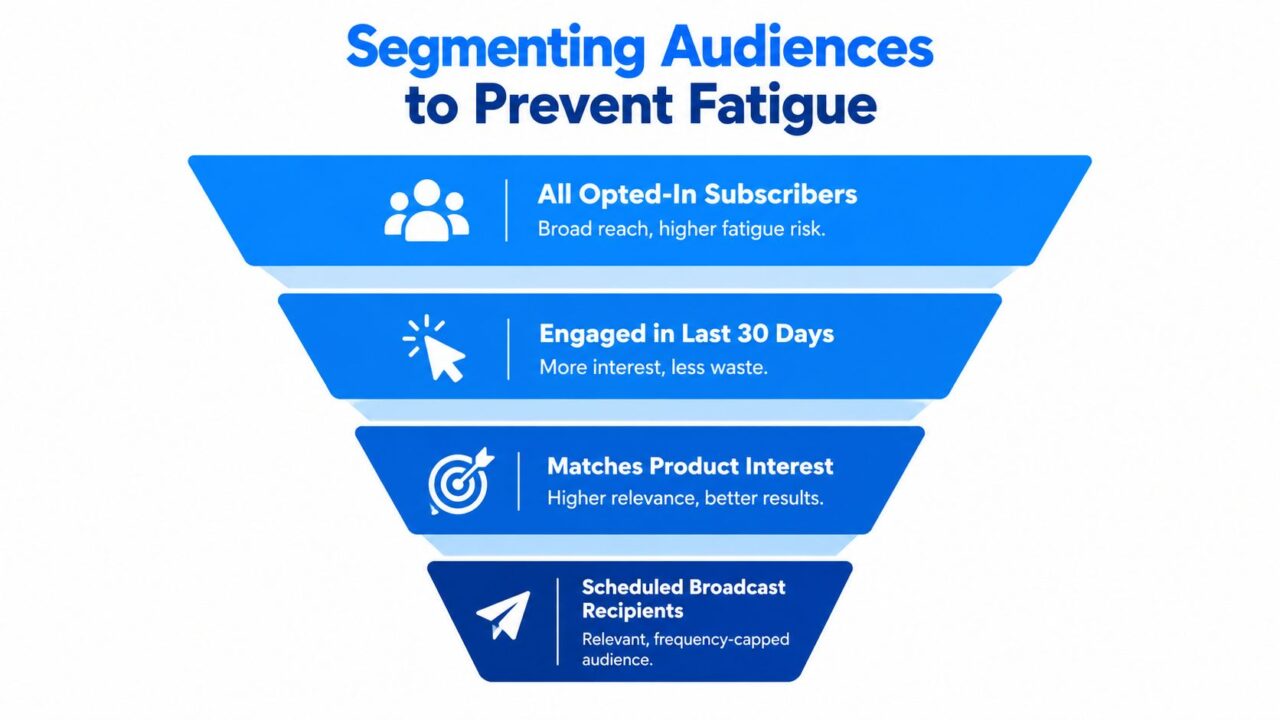
Broadcast Message Facebook Audience Segmentation
Segment by intent, not convenience
Start with the preference the person expressed, then narrow the audience using behavior and eligibility:
- Restock subscribers: Send when a selected product or category returns, not when unrelated inventory changes.
- Price-drop subscribers: Prioritize products the user viewed, saved, or requested.
- Member education: Share tutorials, lessons, or product guidance with people who chose educational content.
- Recent engagers: Give priority to contacts who interacted recently, while still checking permission at dispatch.
- Inactive or unresponsive contacts: Suppress or re-permission them rather than repeatedly testing their patience.
A useful broadcast record includes interest tags, consent frequency, last interaction, last send, conversion status, and unsubscribe state. Apply frequency-based deduplication so a person who qualifies for several campaigns receives one considered message rather than multiple overlapping promotions.
The strongest broadcast isn’t the one with the largest audience. It’s the one where every recipient has a clear reason to care.
Measure opt-outs, blocks, complaints, and delivery failures alongside clicks and conversions. A high click-through rate can hide poor permission hygiene. If a campaign produces short-term activity but more people suppress future messages, the apparent win may weaken the channel.
Executing and Monitoring the Dispatch
Treat sending as a controlled release, not a button press. The final audience should be assembled from current data, and every recipient should pass the same checks immediately before dispatch.
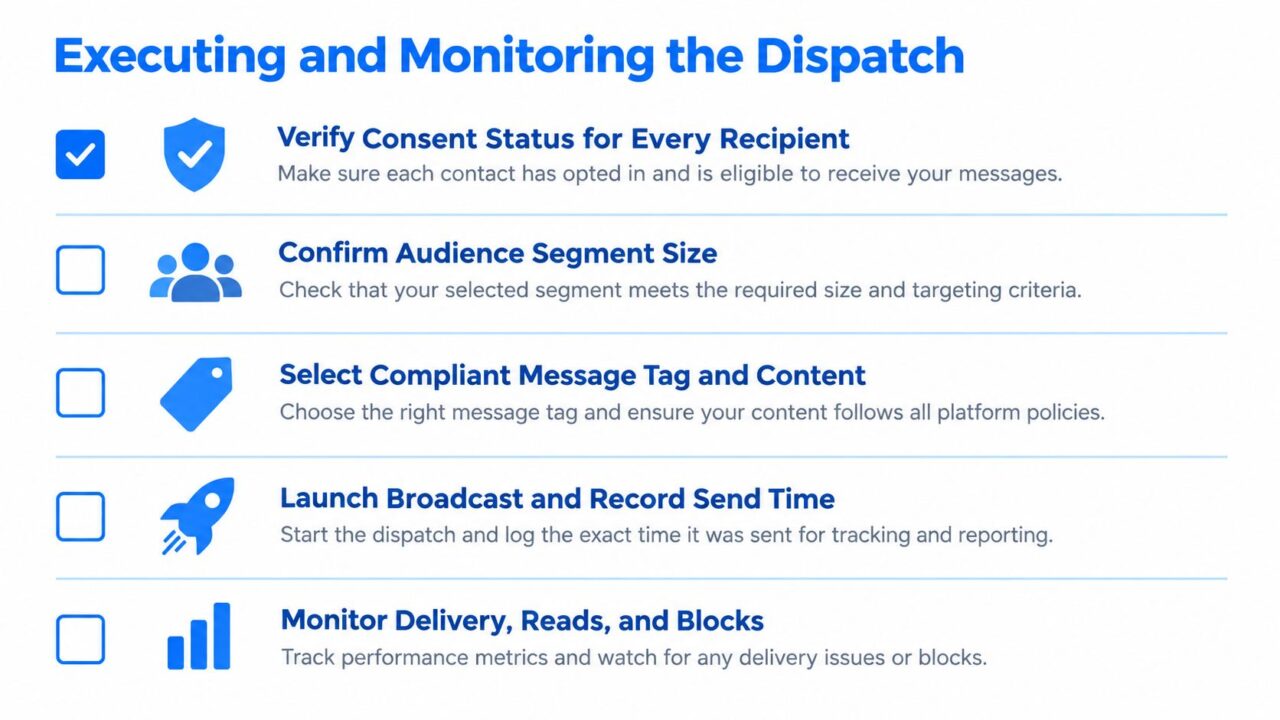
Broadcast Message Facebook Dispatch Checklist
Run the preflight checks
Use this order:
- Verify consent status per recipient. Remove expired, revoked, or frequency-incompatible permissions.
- Recalculate timing. Confirm the latest qualifying interaction and current window status.
- Apply segment rules. Check product interest, recent activity, conversion state, and prior campaign exposure.
- Validate the message purpose. Confirm that promotional content isn’t being sent under a transactional tag.
- Deduplicate by frequency. Keep each recipient within the applicable cadence.
- Record the send event. Store audience version, message identifier, send time, and policy response.
- Suppress failures. Add unsubscribes, blocks, and relevant delivery failures to the suppression process.
Keep the primary message short and give it one clear call to action. If a customer hasn’t converted, a follow-up may be useful, but don’t spend the available follow-up allowance on a chain of extra promotions. The documented allowance permits up to three follow-up messages after opt-in, with the timing and character constraints described earlier. Treat those messages as a deliberate sequence, not as permission to keep adding copy.
Separate reach from revenue
Monitor each stage independently:
- Sent-to-delivered rate: Shows whether eligible messages reached the recipient.
- Click-through rate: Indicates whether the content and call to action created interest.
- Conversion rate: Connects the click to the business outcome.
- Policy-error rate: Reveals whether eligibility or message classification is failing.
- Opt-outs and blocks: Show whether the campaign damaged future reach.
A campaign with strong clicks but weak delivery needs eligibility work. A campaign with good delivery but poor conversions needs an offer, segment, or landing experience review. A campaign with rising policy errors should be paused before creative testing continues.
Scaling Messenger Campaigns Safely
Broadcast growth is constrained less by copywriting than by permission state, message purpose, and timing. Messenger evolved from Facebook Chat into a standalone application, but its scale does not make an unqualified contact eligible for marketing. The Messenger timeline and audience milestones provide context, not permission to contact people.
A larger opted-in audience can still produce less revenue if subscribers have different interests, interaction histories, frequency limits, and consent states. Treating every person alike creates policy exposure and audience fatigue.
Run this audit before raising volume:
- Permission: What exactly did each person agree to receive?
- Timing: Does the system check eligibility at dispatch, rather than when the audience was created?
- Purpose: Can it separate promotions from event, post-purchase, and account updates?
- Relevance: Does each broadcast match a stored interest or recent behavior?
- Frequency: Can it block overlapping or excessive sends?
- Health: Are delivery failures, opt-outs, blocks, clicks, and conversions tracked separately?
Add a dispatch-level exclusion rule to make those checks operational. For example, a recipient tagged both “product launch” and “recent promotion” should be rejected if the frequency rule says the person received a promotional broadcast within the applicable interval. The system should record the rejection, rather than sending twice.
Recurring notification requests should be made promptly after a user interacts with the Page, while the standard window remains open. The consent request does not reopen that window, so timing and recordkeeping belong in one flow. Sinch’s Messenger broadcast guidance describes this sequence.
Clepher supports Messenger broadcasts with audience segments, tags, personalization tags, conditions, custom fields, scheduling, and analytics. These tools suit a workflow based on real-time eligibility and preferences instead of one undifferentiated blast. Teams can also review practical guidance on sending bulk messages on Messenger.
Build the list gradually, explain every permission, and let the system reject questionable recipients before Meta does. A clean audit trail protects reach while giving revenue reporting a reliable audience definition.
Clepher helps businesses build Messenger flows, capture subscribers, segment audiences, schedule broadcasts, and track campaign analytics without relying on a static list. Visit Clepher to design a broadcast workflow built around consent and timing.
