
It’s 9 p.m., your shop’s closed, and your phone is still lighting up. One customer wants a delivery update, another wants tomorrow’s opening time, and a third is asking for a refund. You can’t answer all three well from your sofa, and you shouldn’t have to, but leaving them until morning risks losing the sale and the customer.
A WhatsApp AI chatbot helps only if you decide in advance which of those messages it should answer, which it should look up, and which it should hand to a person immediately. That’s the design work most launch guides skip.
What a WhatsApp AI Chatbot Does With One Message
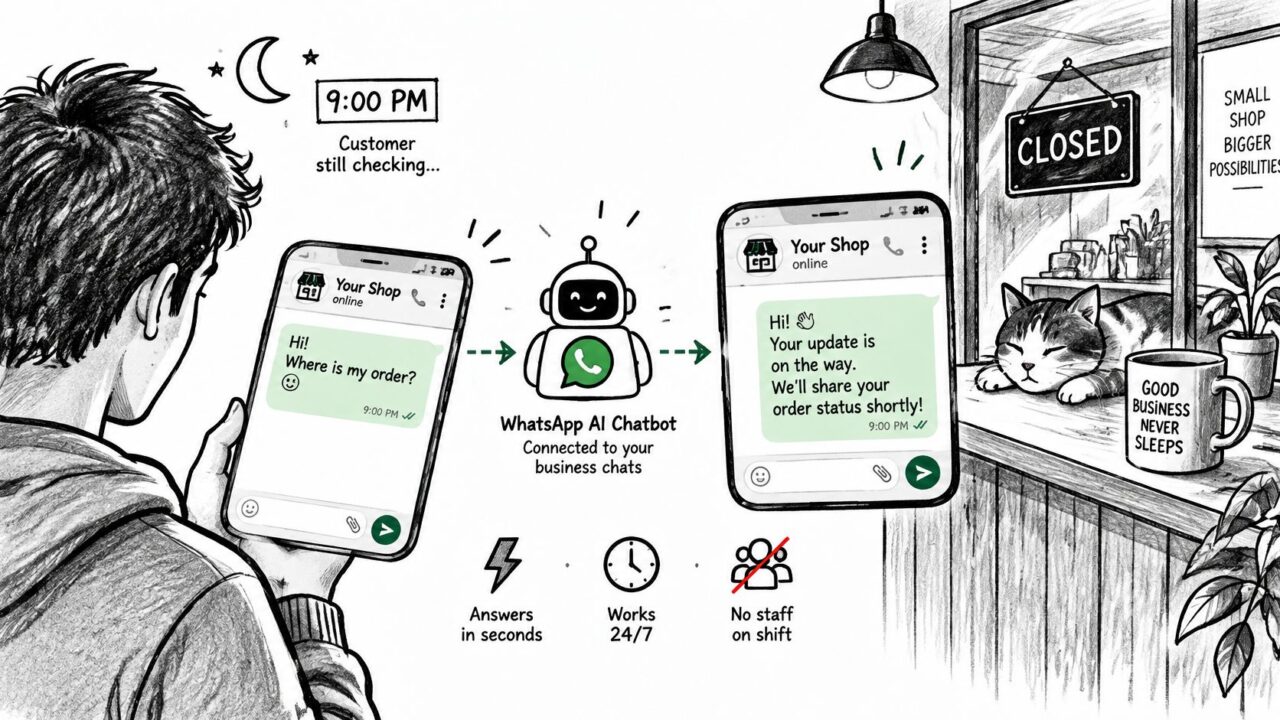
At 9 p.m., a customer messages your shop, “Where’s my order?” Seconds later they get a tracking update and delivery estimate. Nobody’s on shift, and nobody typed that reply.
A WhatsApp AI chatbot is software connected to the WhatsApp Business Platform. It reads each incoming message, works out what the customer wants, checks business data such as an order record or opening hours, then replies or hands the chat to a person.
Think of it as a receptionist. A good receptionist answers common questions, looks up the file, and calls a manager when a complaint needs judgment. She doesn’t guess, and she doesn’t approve refunds on her own.
Whatsapp AI Chatbot Automation
Four stages in one exchange
- Arrival: The message reaches your business number through the platform.
- Intent detection: The bot decides if this is order status, hours, booking, or something else. That ability depends on the technology behind human-like sales conversations, because customers phrase the same request ten different ways.
- Data lookup: It checks the linked record, calendar, or price list instead of inventing an answer.
- Reply or handoff: It sends a clear answer, or transfers the chat with context if the request needs a person.
That’s different from an older keyword bot, which only matched fixed phrases and failed when wording changed. An AI bot can handle variation, but it still needs a reliable record behind the answer.
Your customers are already on this channel. WhatsApp Business exceeded 200 million monthly active users in June 2023, according to the WhatsApp Business AI statistics summary citing Meta.
Meta’s own assistant also shows where the channel is heading. The WhatsApp blog post on talking to Meta AI describes Meta AI launching across WhatsApp and other Meta apps in April 2024, so AI now lives inside WhatsApp itself.
Send your own business line three test messages tonight, order status, opening hours, and a refund request.
My prediction is simple. Opening hours are the one a bot should answer alone on day one. Order status comes second once it’s linked to a real order record, and the refund should reach a person.
Five Business Uses That Pay Off First
Many teams overbuild their first bot. They try to automate the whole inbox, then spend weeks fixing edge cases nobody asked about. Start with the requests that repeat most often and can be answered from a lookup.
A furniture store is a clean example. “When will my sofa arrive?” doesn’t need creativity. It needs the delivery record, the current status, and a plain estimate.
A dental clinic works the same way. The bot checks available slots, offers two or three, and confirms the one the patient picks. A course seller can answer enrollment questions about start dates, price, and what’s included, as long as those answers come from the current course page or price list.
| Use case | Bot handles | Hand off to a person when |
|---|---|---|
| Order status | Tracking lookup and delivery estimate | Parcel is lost or damaged |
| Product questions and sales | Sizes, stock checks and checkout links | Customer asks for bulk or custom pricing |
| Lead qualification | Budget, need and timeline questions before a sales call | Lead requests a quote above your set threshold |
| Bookings and appointments | Checking availability and confirming slots | Double booking or rescheduling a paid service |
| Returns and refunds | Return policy and label instructions | Any refund request or complaint about a refund |
| Promotions and reminders | Replies to opted-in campaigns and reminders | Customer asks to stop messages or reports a problem |
The pattern behind the table
The bot handles the lookup and the explanation. A person owns money decisions, complaints, and anything that changes an account.
Look at how a local agency would use lead qualification. The bot asks about budget, need, and timeline before a sales call, so the consultant doesn’t waste the first ten minutes on basics. If the lead asks for a large custom quote, the bot stops and books the human conversation instead.
Refunds show the split most clearly. The bot can explain your return window and send label instructions in seconds. It should not approve the money back, argue about a damaged item, or promise a timeline your finance team hasn’t agreed to.
Practical rule: If a bot reply can’t be checked against a real record, such as an order, a calendar slot, or a price list, don’t automate it yet.
Promotions need the same discipline. A bot can reply to an opted-in customer who asks about a reminder or a replenishment date. The moment that person says stop, or reports a problem, automation ends.
Sort your inbox before you build anything. Count last month’s messages by topic, rank the top three, and pilot only those. People handle the rest until your results show the bot is helping, not just replying faster.
WhatsApp Rules Your Bot Must Follow
WhatsApp’s business rules aren’t background paperwork. They set the boundaries your flow has to be built around, and the 24-hour customer-service window is the most important one.
Inside that window, you can send automated replies to a customer who messaged you first. Outside it, you need customer opt-in and approved templates. The WhatsApp Business Messaging Policy permits automated replies during the 24-hour customer-service window, but businesses must provide a clear escalation route to a human agent, phone number, or email.
That gives you a practical operating rule. Use automation for immediate answers, order updates, qualification, and basic troubleshooting. Hand off complex or sensitive cases instead of trapping customers in a loop.
Say you’re an online retailer. Your assistant answers, “Where is my order?” automatically from the tracking record. Right under that answer sits a human-transfer button for refunds or damaged deliveries, so the customer never has to beg the bot for help.
Consent is a growth mechanic
You may contact a person only after you’ve received their mobile number and their agreement to be contacted on WhatsApp. That’s not a legal afterthought. It’s how you build an audience you can message again.
A DTC brand can place a WhatsApp checkbox at checkout, state the purpose clearly, and tag each subscriber by interest. Product launches, replenishment reminders, and delivery notifications are different promises. Tagging them separately keeps follow-ups permission-based instead of turning into an unsolicited promotional blast.
| Situation | Rule | What to build |
|---|---|---|
| Reply within the 24-hour customer-service window | Automated replies are allowed to a customer who messaged first | Log the time of the last customer message and stop automated sends when the window closes |
| Message after the 24-hour window | Requires customer opt-in and approved message templates | Route the contact to a template or pause the flow |
| Start a conversation with a new person | Needs their mobile number and agreement to be contacted on WhatsApp | Add a WhatsApp opt-in checkbox at checkout or on forms |
| Customer asks for a human | Business must offer a route to a person, phone number or email | Handoff button or fallback message with contact details |
| Customer asks to stop messages | Opt-outs must be honored promptly | Keyword that unsubscribes the contact and tags the record |
| Account or payment details | Share only after the customer is verified in your own systems | Require verification before any account data appears |
Why the timestamp matters
Your flow has to log the time of the last customer message. Without that timestamp, it doesn’t know whether an automated session reply is still permitted, and your team can’t prove why a message was sent.
Verification deserves the same hard line. Account balances, payment details, medical appointment changes, and subscription changes should only appear after the customer is verified in your own systems. A phone number alone isn’t enough for sensitive actions.
Before launch, every flow needs three build items. Build a window timer, a visible route to a human, and an opt-out keyword that stops all automated sends to that contact. If any one of those is missing, you’re not ready to scale.
Choosing a Setup Path: Native Build or No-Code
Pick your setup path by answering three questions. Who will build and maintain the flows, who owns the customer data, and how many systems does the bot need to reach before it can answer?
The options suit very different teams. If you’re still comparing the channel itself, start with this guide to WhatsApp for business use and setup choices before you commit to an API build.
| Setup path | Best for | Technical effort | Control over flows | Integrations |
|---|---|---|---|---|
| WhatsApp Business app with quick replies and away messages | Local shops with few daily chats | None | Low, fixed templates | Manual only |
| Meta’s built-in business AI assistant | Teams testing AI answers without building | Low | Set by Meta | Limited |
| Direct WhatsApp Cloud API build | Teams with developers and custom systems | High | Full | Any system reachable by API |
| No-code chatbot platform connected to the WhatsApp Business Platform | Marketers, agencies and small teams | Low, guided setup | High, through drag-and-drop flows | Native integrations plus tools such as Zapier or Make |
A local shop with a handful of chats a day may not need more than quick replies and an away message. Meta’s built-in assistant suits a team that wants to test AI answers without building flows, but you give up control over exactly what it says and where it stops.
A direct Cloud API build gives full control. It also gives you full responsibility for webhooks, queues, retries, and maintenance. A SaaS company that must check billing data before answering may need that control, because the bot can’t reply safely without reaching the billing system.
No-code fits a different reality. A DTC brand that wants abandoned-cart replies this month, or an agency managing several client accounts, usually needs speed and repeatable flows more than custom infrastructure. Before you commit, check that the platform connects to the WhatsApp Business Platform, offers drag-and-drop flows for branching, and links to your CRM and email tools.
Whichever path you choose, consent capture belongs in the build from day one. The WhatsApp help guidance on contacting people states businesses may contact a person on WhatsApp only after receiving both the person’s mobile number and agreement to be contacted over WhatsApp, and messages outside the 24-hour window on the WhatsApp Business Platform require customer opt-in.
I would use one practical test. If nobody on your team can maintain a webhook when it breaks on a Friday night, start no-code. Revisit a custom build when volume and integration needs justify it.
Designing Handoffs Before the Bot Fails
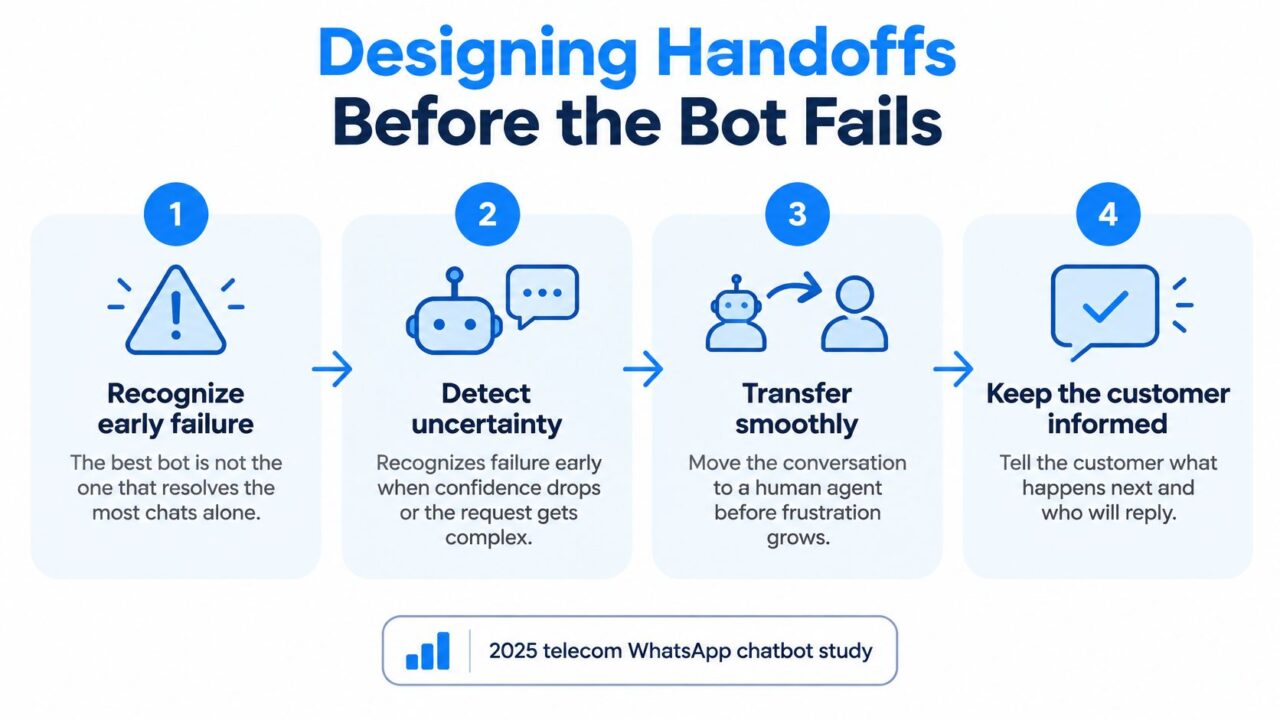
The best bot isn’t the one that resolves the most chats alone. It’s the one that recognizes failure early and transfers intelligently, before the customer has to repeat themselves or give up.
That isn’t just an opinion about good manners. A 2025 study of a telecommunications WhatsApp chatbot found routine FAQs and account-information requests performed well, while complex, multi-step requests such as SIM swaps and product purchases produced substantially more failures and abandonment.
The same study identified poor contextual retention and the lack of smooth human escalation as major sources of frustration. In plain terms, customers didn’t just dislike wrong answers. They disliked being stuck with no way out.
This short visual shows the sequence to build before failure happens.
Whatsapp AI Chatbot Handoff Process
Six handoff rules to set first
- Set triggers: Hand off after two failed answers, when emotional language appears, or when words like refund, complaint, cancel, or damaged show up.
- Verify identity first: Require verification before any account action, address change, payment discussion, or subscription change.
- Make the human option visible: Put a button in the flow and name who will reply next. If staffing that route daily is the blocker, a dedicated customer support agent can cover the escalations your bot shouldn’t touch.
- Pass a summary: Send the agent the order number, the issue, and what the bot already tried, so the customer doesn’t start again.
- Set a timeout fallback: If nobody replies within your stated time, send a holding message with a phone number or email.
- Confirm no repetition: Tell the customer their details have been passed on, and make sure your team can see them.
This is where human-in-the-loop automation design earns its keep. You’re not adding a person as an apology for the bot. You’re designing the person into the journey from the start.
Say a retailer gets, “This arrived broken, and I want my money back.” The bot should acknowledge the damage, collect the order number and a photo if your policy needs one, then transfer immediately. The agent opens the chat, sees the order, the photo, and the refund request, and can decide without asking, “Can you explain what happened?”
The video below is useful for checking how that transfer should feel from the customer’s side, with context moving with the conversation.
Clinics need the same discipline for different reasons. A bot can confirm a routine appointment slot, but symptoms, urgent pain, or a request to change medication should trigger a human route and verification, not a longer automated questionnaire.
Agencies feel this in lead quality. If a prospect asks a detailed pricing question and the bot keeps pushing a generic booking link, you’ll count it as an automated conversation. The prospect will count it as being ignored.
Write your three escalation triggers before you build anything else. Name the words, the failure count, and the sensitive actions that always stop automation. That one page will save you more customers than a clever greeting ever will.
Set Up Your First WhatsApp AI Flow
Keep your first flow narrow. One use case, one lookup, one handoff route. If something breaks, you want to know exactly where.
Seven steps to a working flow
- Register the number: Confirm the business account, verify the business, and register a dedicated WhatsApp number on the platform you chose.
- Submit templates: Get approval for any message that may go outside the service window, such as delivery updates or appointment reminders.
- Build the core path: Start with a greeting, ask one intent question, look up the order or booking record, then reply with what you found.
- Add the escape route: Place the handoff button and fallback message in every branch, not just the main path.
- Log timing and opt-out: Record each customer message time and add an opt-out keyword that stops automated sends and tags the contact.
- Connect your records: Link the flow to your CRM or email tool natively or through Zapier, Make, or n8n, so a handoff creates a record the agent can see.
- Test like a customer: Run the three opening test messages and have two staff members act as difficult customers before any public launch.
Step three is where teams rush. They write a friendly greeting, then forget the lookup is the whole point. A furniture store flow should ask for the order number, check the delivery record, and only then promise a date.
A clinic flow should do the same with availability. Check the calendar first, offer real slots, and confirm the chosen one. Don’t let the bot offer Tuesday at 10 a.m. because that slot was free last week.
Step six decides whether handoffs feel smooth. If the agent has to open three tools to find the order, the summary failed. The handoff record should land where your team already works, with the customer, issue, and bot attempts attached.
Use this sign-off checklist before launch.
- Number registered: The dedicated number sends and receives correctly.
- Templates approved: Every outside-window message has an approved template.
- Window timer live: Automated sends stop when the window closes.
- Handoff tested: A test refund request reaches a person with its summary intact.
- Opt-out tested: The stop keyword ends automated sends and updates the contact record.
Don’t add a second use case until the first one passes that checklist twice, once in testing and once with real customers. Boring reliability beats a broad bot that fails in interesting ways.
Designing a Reliable and Trustworthy Bot
Trust is built in two places. Customers see it in how the bot talks, and your team feels it in whether the system holds up when volume spikes or an integration fails.
Conversation rules customers notice
Disclose the AI when customers ask, and don’t hide it when a decision matters. A short line such as, “I’m the automated assistant, and I can bring in a person anytime,” sets expectations without turning the chat into a legal notice.
Keep replies short. WhatsApp is a messaging app, not a help center article, so give the answer first and offer tappable buttons for common next steps. Buttons for track order, book appointment, and talk to a person reduce typing and reduce misunderstanding.
Check multilingual accuracy in every market you serve. A bot that’s accurate in English but sloppy in Spanish or Portuguese will create verification mistakes and frustrated escalations in exactly the markets where WhatsApp matters most. Test real customer phrasing, not translated scripts.
Make opt-out a single word and honor it everywhere. If a customer replies stop to a reminder, that choice should update the contact record and block future automated sends, not just end that one flow.
A trustworthy bot says what it is, answers from a record, and gets out of the way when the request gets sensitive.
Infrastructure your team notices
Under the conversation, build for events, not polling. The Meta WhatsApp Cloud API overview states Meta’s Cloud API delivers inbound messages and outbound delivery-status events as JSON over HTTPS, and may retry failed webhook deliveries for up to seven days with exponential backoff.
That retry detail changes your design. Acknowledge webhooks quickly, place AI inference and CRM updates on a durable queue, and process events idempotently using message or event identifiers. If the same event arrives twice, your customer should not get the same reply twice.
Separate the jobs. Ingestion receives the event, intent classification decides what it is, response generation drafts the answer, and delivery sends it. When one part slows down, the others shouldn’t lose the lead or duplicate the message.
Add the safety nets before you need them.
- Dead-letter queues: Failed events land somewhere your team can inspect and replay.
- Replayable event logs: You can trace what arrived, what the bot decided, and what was sent.
- Timeout fallbacks: If the model or CRM doesn’t respond in time, the customer gets a holding message and a human route.
Capacity planning must count more than replies. Meta recommends webhook infrastructure capable of handling three times outgoing-message traffic plus expected incoming-message traffic, according to the same Cloud API guidance above.
Here’s the worked example. At 1,000 outbound messages per second with a 30% response rate, plan for approximately 3,300 webhook events per second, made up of 3,000 status events and 300 inbound messages.
Find your peak send rate before your next campaign. Load-test the endpoint at that level, including status events, because a promotion that works will create exactly the traffic spike your bot has to survive.
Launch a Small Pilot and Measure Transfers
Don’t launch to your whole inbox. Run a pilot on your top two use cases, keep people handling everything else, and measure whether transfers help or hurt.
Track six metrics from day one.
- Resolution without handoff: The bot finished the job from a verified record.
- Transfer quality: The agent received a complete summary.
- Abandonment after fallback: The customer left after a fallback message.
- First-contact resolution: The issue closed without a follow-up chase.
- Time to human: How long an escalated customer waited.
- Revenue saved or leads qualified: Money protected, carts recovered, or qualified leads passed to sales.
Use these chatbot KPI metrics for measuring pilot performance to set your baseline before traffic starts. Then run a four-week test with three arms for the same request types, disclosed AI, AI with a visible human option, and human-only replies.
That test matters because helpful doesn’t mean preferred. The WhatsApp Business State of Business Messaging resource reports a Meta-commissioned Kantar survey of 11,056 adults across 22 markets, conducted in April to September 2025, found 67.7% considered an AI chatbot response helpful, while only 42.9% believed AI would improve their messaging experience with businesses.
Because Meta commissioned that survey, don’t treat it as your answer. Run your own test on your customers, in your market, with your refund and booking requests.
Other service businesses face the same measurement problem. Reading about AI-powered law firm lead conversion is a useful reminder that intake speed only counts if qualified leads reach the right person with usable details.
Set your go or no-go rule now. Expand only when transfers arrive complete, and abandonment falls against your human-only baseline. Pick your two use cases, write the handoff trigger for each, and start there.
Build your first narrow WhatsApp flow, test the handoff with real staff, and expand only when transfers arrive complete and customers stop abandoning the chat. The same handoff rules apply on every messaging channel. If you also run Messenger and Instagram conversations, Clepher’s chatbot flows can be tried risk-free, come with FREE Chatbot Training, and can add Email and SMS when a conversation needs another channel. Visit Clepher to see how its flows handle handoffs on those channels.
