

Messy workflows rarely look expensive on the surface. They look normal. A marketer waits on approvals, a sales rep copies lead details between tools, and support answers the same question for the tenth time before lunch.
That routine waste adds up fast. One industry review reports that organizations implementing optimized workflows typically achieve 25 to 30% lower operating costs, 40 to 60% shorter process cycle times, 50% fewer errors and defects, and 150 to 200% ROI within the first year, according to 6Sigma’s review of process optimization outcomes. Those numbers reframe business process optimization. This isn’t a documentation exercise. It’s a performance lever.
Why Your Current Processes Cost More Than You Think
A busy marketing team usually doesn’t complain that it needs business process optimization. It says things like, “Why did this campaign launch late?” or “Who was supposed to approve this?” or “Why are leads sitting untouched in the CRM?”
Those are process problems, not talent problems.
The hidden drain on marketing teams
Take a common setup. Paid ads are running. Leads come in through forms, Instagram DMs, website chat, and email. One coordinator exports lists. Another cleans data. A manager checks lead quality. Sales follow up when they can. Support hears from prospects who never got a response and tries to patch the gap.
Nothing is fully broken. That’s why it persists.
But several costs are hiding inside that workflow:
- Lost time: Staff spend hours moving information instead of using it.
- Slow response: Hot leads cool off while teams wait on handoffs.
- Inconsistent quality: Different people follow different rules.
- Poor visibility: Nobody can say where work is stuck without asking five people.
- Customer frustration: Buyers feel the confusion long before leadership sees it in a dashboard.
If your first instinct is to add another tool, pause. A bad process inside better software is still a bad process.
Practical rule: Don’t automate a workflow just because it’s repetitive. Automate it only after you’ve identified which steps create value and which steps only create motion.
What business process optimization actually means
Business process optimization is the discipline of redesigning how work moves from start to finish so the team gets better results with less friction. In plain terms, it’s finding the shortest reliable path between request and outcome.
For a marketing manager, that can mean:
- turning lead routing into an automatic rule instead of a manual spreadsheet task
- removing duplicate approval layers in content production
- standardizing campaign setup so reporting is cleaner
- tightening follow-up windows for inbound leads
- using automation for repetitive tasks only where the workflow is already clear
The keyword is reliable. Fast isn’t useful if the process creates rework, bad data, or a poor customer experience. Smart optimization cuts waste without creating downstream damage.
The Core Frameworks for Optimization
You don’t need to memorize operations jargon to improve a workflow. You do need a few mental models so you can diagnose the problem correctly.
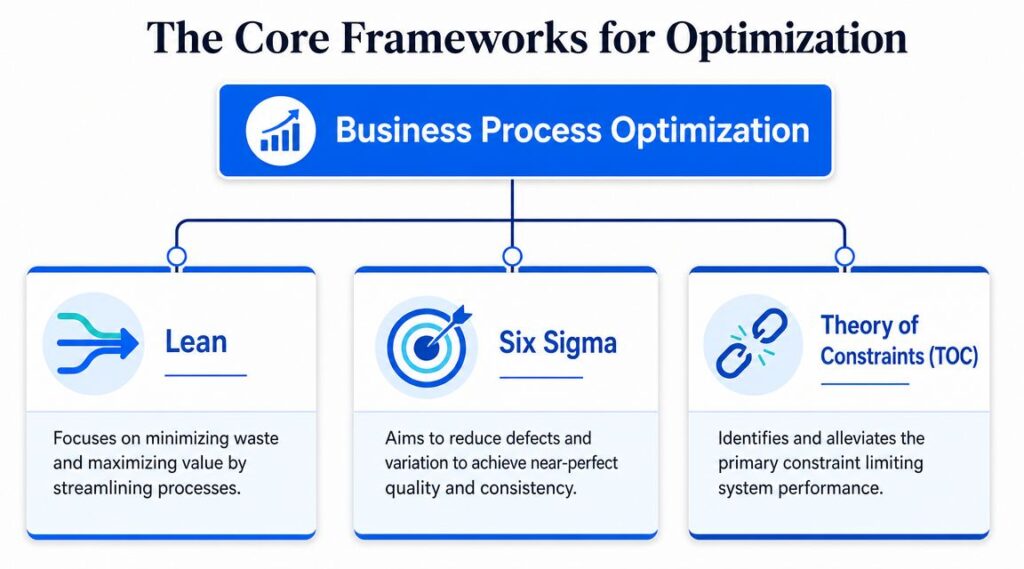
Business Process Optimization Frameworks
Lean removes the clutter
Lean is the simplest place to start. Imagine it as cleaning a crowded workspace. You remove anything that doesn’t help the customer outcome.
In marketing, Lean usually shows up as questions like these:
- Why are three people reviewing the same landing page?
- Why does campaign reporting require manual copying from multiple tools?
- Why are leads entering the funnel through channels that don’t map to the CRM cleanly?
Lean is useful when the process feels bloated. Too many handoffs. Too much waiting. Too much duplicated work.
Six Sigma reduces variation
If Lean asks, “What can we remove?” Six Sigma asks, “Why does this process keep producing inconsistent results?”
Use the recipe analogy. If the same ingredients produce a different result every time, the issue isn’t effort. The issue is variation in how the work is done.
For a marketing manager, Six Sigma thinking matters when:
- lead qualification standards differ across team members
- onboarding emails go out in the wrong order
- campaign naming conventions break reporting
- support responses vary depending on who is online
Standardization earns its keep not because teams love rules, but because customers notice inconsistency immediately.
BPM manages the whole operating system
Business Process Management, or BPM, sits above both. It’s the operating model that helps teams analyze, design, execute, monitor, and improve processes over time.
That larger market matters because it shows how mainstream this discipline has become. One industry summary cites the BPM market at $15.4 billion currently, with a projection to $65.8 billion by 2032, and says at least 74% of businesses have shown increased interest in adopting BPM, according to Comidor’s BPM market summary.
That growth makes sense. As businesses add tools, channels, and automation, they need a system for managing the whole workflow, not just isolated tasks. This is also why many teams start exploring no-code automation platforms once they realize process design can’t stay trapped in engineering.
Lean helps you remove waste. Six Sigma helps you reduce inconsistency. BPM helps you manage the full lifecycle.
A Practical Step-by-Step Optimization Method
Most process improvement efforts fail for a simple reason. Teams redesign based on opinion instead of evidence.
The better approach starts with what actually happened in the workflow, not what people think happened.
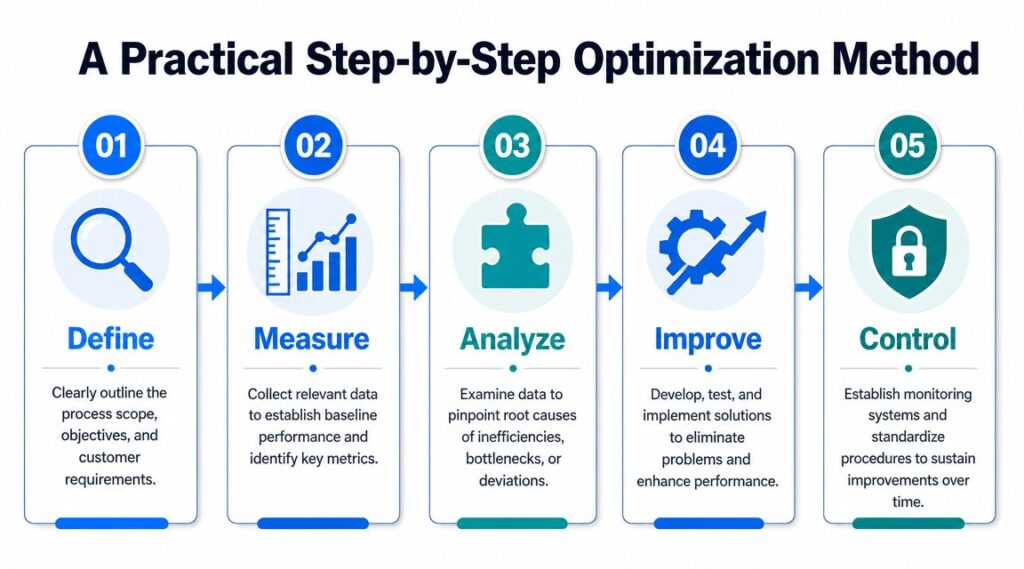
Business Process Optimization Process Diagram
A useful walkthrough sits below.
Step 1: Define the process boundary
Pick one process. Not five.
A good candidate is a workflow with clear business impact and frequent friction. For a marketing team, inbound lead handling is ideal. It crosses channels, involves multiple people, and affects revenue quickly.
Define:
- Start point: A lead submits a form, sends a DM, or starts a chat
- End point: The lead books a call, gets disqualified, or enters nurturing
- Owner: One person who is accountable for performance
- Goal: Faster response, cleaner routing, better follow-up consistency
The mistake here is making the scope too broad. “Improve lead management” is too vague. “Reduce handoff friction from first inquiry to booked meeting” is specific enough to improve.
Step 2: Measure the current state
This is the part many teams skip. They gather opinions in a meeting, draw a neat flowchart, and call it analysis.
That isn’t enough. Effective optimization is built on process mining and KPI baselining, where teams extract event logs from transactional systems, map the actual end-to-end process, and quantify bottlenecks, rework loops, and handoff delays before redesigning the future state, as described in Hakuna Matata Tech’s explanation of process mining in optimization.
For a marketing workflow, pull data from places like:
- ad platforms
- CRM timelines
- calendar bookings
- email automation logs
- chat transcripts
- support tickets
You’re looking for reality, not theory.
The process map on the whiteboard is usually cleaner than the one your customers experience.
Step 3: Analyze where the process breaks
Once the data is visible, patterns show up quickly.
Maybe paid leads from Instagram get fast replies, but website chat leads sit until morning. Maybe sales rejects half the leads because the qualification questions are weak. Maybe support keeps handling pre-sales questions because marketing content doesn’t answer basic objections.
Ask:
- Where does work wait?
- Where does it loop back?
- Which handoffs create confusion?
- Which tasks are manual but rule-based?
- Where do customers have to repeat themselves?
This is root-cause work. If response time is slow, the issue might not be staffing. It might be poor routing logic
Step 4: Improve the workflow
Now redesign with intent. Remove unnecessary approvals. Standardize naming and routing. Add automation where the rule is stable.
For the lead handling example, an improved workflow might look like this:
- Capture automatically: Every lead enters through a tracked source.
- Qualify upfront: The form or chatbot collects the minimum useful context.
- Route by logic: Sales-ready leads go to booking. Early-stage leads enter nurture.
- Escalate exceptions: High-value or unusual cases go to a human.
- Record every step: Status updates happen inside the system, not in side chats.
Notice what doesn’t happen. You don’t automate every corner case. You automate the repeatable path and define a clean human handoff for the rest.
Step 5: Control the process after launch
Durable gains emerge from this. The process isn’t finished when automation goes live.
Set review points. Watch the same KPIs you used for the baseline. Check whether downstream teams are seeing new friction. Audit edge cases. If the process starts drifting, fix it before the workaround becomes the new standard.
A healthy optimized process should be easy to explain, easy to measure, and hard to break.
Key KPIs to Measure Optimization Success
A vague goal like “work more efficiently” won’t survive a monthly review. You need metrics that tell you whether the new process is cheaper, faster, and better for the customer.
Measure across cost, time, and quality
A strong KPI set balances operational efficiency with customer impact. If you only track speed, teams cut corners. If you only track quality, the workflow may become too slow to be commercially useful.
Use a mix like this:
| KPI Category | Metric Name | What It Measures |
|---|---|---|
| Cost | Cost per lead handled | The operational effort required to process each incoming lead |
| Cost | Customer acquisition cost | The full cost to acquire a customer through the workflow |
| Cost | Rework volume | How often does the team have to redo tasks because the first pass failed |
| Time | Lead response time | How quickly a new inquiry receives a first response |
| Time | Cycle time | The total time from process start to completion |
| Time | Approval turnaround time | How long do internal reviews delay progress |
| Quality | Lead qualification accuracy | Whether routed leads match the intended criteria |
| Quality | Error rate | How often do records, messages, or actions contain mistakes |
| Quality | Customer satisfaction score | How customers rate the experience after the process |
| Quality | Handoff completion rate | Whether work moves cleanly between teams without manual rescue |
Pick metrics the team can actually act on
Not every metric deserves executive attention. Choose KPIs that connect directly to a decision.
For example:
- Lead response time helps you evaluate routing and staffing
- Cycle time reveals where work gets stuck
- The error rate shows whether the process is too manual or poorly standardized
- Customer satisfaction score keeps the workflow tied to experience, not just internal efficiency
Watch for this trap: teams often improve one local metric while hurting the full journey. A faster approval process isn’t a win if it sends weak campaigns live and creates more support issues later.
Build a simple review rhythm
The reporting habit often matters more than the dashboard design.
A practical cadence looks like this:
- Weekly check: Spot delays, errors, and exceptions
- Monthly review: Compare performance against the original baseline
- Quarterly reset: Decide whether the process still fits the business model, channel mix, and customer behavior
If a KPI doesn’t lead to a conversation about action, remove it. Good measurement should sharpen decisions, not create reporting theater.
Real-World Use Cases in Marketing and Sales
The easiest way to understand business process optimization is to look at common workflows that feel normal but perform badly.
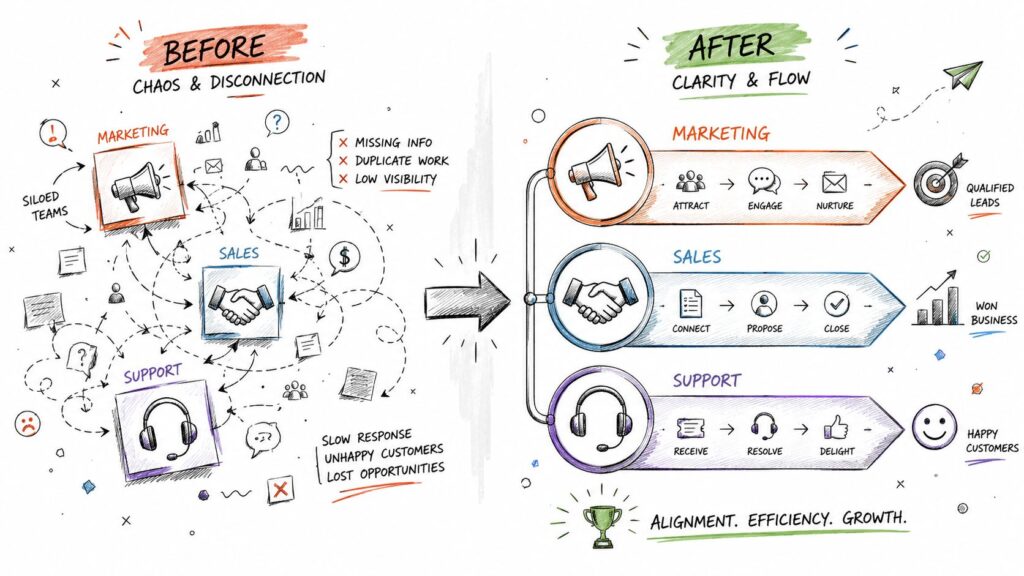
Business Process Optimization Workflow Diagram
Content production that keeps missing deadlines
Before optimization, the content process usually looks familiar. Strategy lives in one document, briefs in another, drafts in email, feedback in chat, approvals in a project tool, and assets in cloud folders with unclear naming.
The result is late publishing, duplicated edits, and last-minute design rushes.
After optimization, the team creates one intake format, one approval path, one asset location, and one publishing checklist. Writers know what’s required before they start. Designers don’t chase missing specs. Managers can see status without asking for updates.
The practical result is simpler than it sounds. Publishing becomes predictable.
Lead qualification that leaks opportunities
A lot of sales friction starts before sales ever touch the lead. Marketing collects too little information, sends every inquiry into the same path, and expects reps to sort it out manually.
That creates two kinds of waste. Good leads wait too long, and poor-fit leads consume selling time.
An optimized flow changes the entry point. Qualification questions move earlier. Routing rules separate ready-to-buy leads from early-stage interest. Meeting links appear only when the lead meets clear criteria. Everyone else gets the next best action, such as a nurture path or a support article.
The funnel gets cleaner because the process gets clearer.
Support workflows that overload the team
Support teams often become the catch-all for broken processes elsewhere. Customers ask where their order is, whether a feature works a certain way, or how to reschedule. Some of those questions belong in product education, some in account management, and some in a self-service flow.
Without optimization, every issue lands in the same queue.
After optimization, common requests follow a structured path:
- Routine questions: answered instantly through a knowledge-driven workflow
- Account-specific issues: routed with the right context attached
- High-friction cases: escalated to a human with conversation history preserved
That change doesn’t just lighten the support load. It improves the customer experience because people stop repeating themselves and reach the right resolution faster.
Automating Workflows with AI Chatbots
Automation becomes useful when the underlying process is stable enough to trust. That’s where AI chatbots fit. They don’t replace process design. They execute it consistently, at scale, across the channels where customers already ask questions.
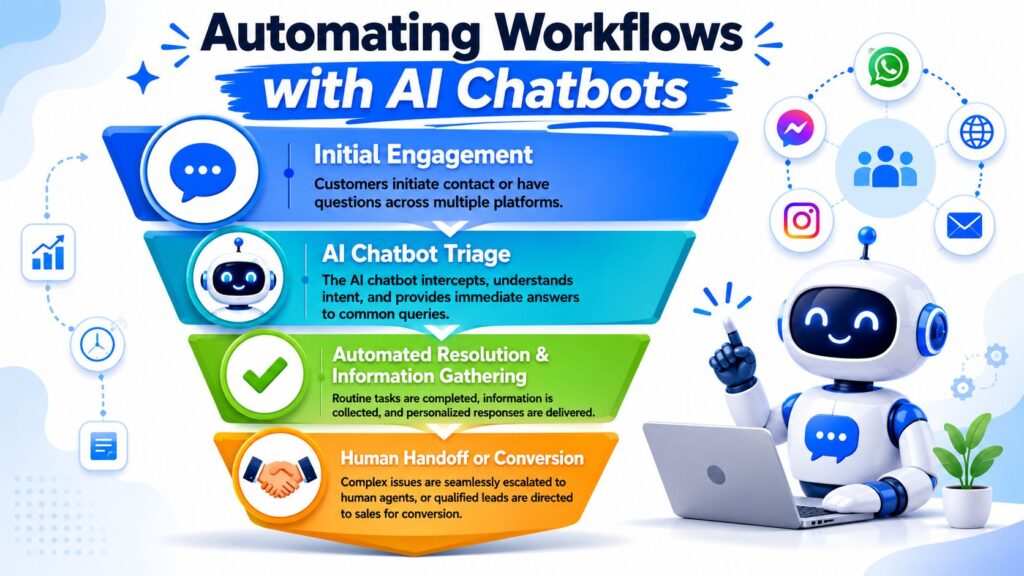
Business Process Optimization AI Chatbots
Where chatbots work best
The strongest use cases share one trait. The first part of the interaction is predictable.
That includes:
- Lead capture: asking qualifying questions when someone clicks from an ad
- Appointment booking: collecting details and pushing qualified prospects to a calendar
- Pre-sales support: answering repeated questions about pricing, shipping, features, or fit
- Customer service triage: handling common requests before a human steps in
- Post-purchase updates: guiding customers to the right next step
These workflows usually break when teams rely on manual monitoring. Nobody can watch every website visitor, Facebook message, Instagram DM, and WhatsApp inquiry all day.
The operational benefit of AI in the flow
A chatbot can enforce the process every time. It asks the same qualifying questions, captures the same fields, follows the same routing logic, and records the interaction in a structured way.
That consistency matters more than novelty.
For example, a DTC brand can use a chatbot to greet ad traffic, ask what product category the shopper wants, answer common buying questions, and route high-intent users toward checkout support or a sales conversation. A coaching business can use the same logic to pre-qualify leads before exposing a booking link. A SaaS team can automate common onboarding questions so customer success handles fewer repetitive tickets.
If you want a plain-language overview of the mechanics, this guide on how AI chatbots work is a useful starting point.
Good automation handles the obvious path well and hands off the non-obvious path cleanly.
One tool example in practice
For teams that want to build these flows without custom development, Clepher is one option. It lets businesses create no-code chatbot flows for website chat, Facebook Messenger, WhatsApp, and Instagram Direct Message, with features for lead capture, segmentation, live chat, and integrations across the broader stack.
The important point isn’t the brand. It’s the implementation pattern that successful process optimization projects tend to follow:
-
Define the customer intent
-
Collect only the data needed for the next decision
-
Automate the standard route through business process automation
-
Escalate edge cases with full context
-
Track outcomes using relevant key performance indicators
-
Refine the workflow based on performance data
That’s business process optimization in action, not as a slide deck, but as an operating system for real conversations. The goal is to improve process efficiency over time by reducing unnecessary steps, speeding up resolution, and creating a feedback loop that continuously improves how work gets done.
The Future of BPO is Continuous and AI-Driven
Most guides stop at deployment. That’s too early.
The harder problem starts after the workflow has been redesigned and automated. New failure modes appear. A faster front-end process can overload fulfillment. A chatbot can improve response speed while inadvertently collecting the wrong qualification data. A cleaner approval path can reduce oversight in a regulated step.
This is the post-automation problem. As noted in PMI’s guidance on optimization and ongoing monitoring, the more useful question isn’t “How do I automate this step?” but “How do I measure whether the optimized process is still healthy six months later?”
What continuous optimization looks like
Continuous, AI-driven optimization means treating the process like a living system rather than a one-time project. Organizations that successfully optimize business processes understand that improvement requires ongoing measurement, adaptation, and refinement.
That involves:
- Monitoring drift: checking whether performance slips over time
- Reviewing exceptions: looking at where humans keep intervening
- Watching downstream impact: confirming one fix didn’t create another bottleneck
- Updating logic: adjusting rules when customer behavior, channels, or offers change
AI-powered process automation can help identify inefficiencies faster, but automation alone is not enough. The goal is to continuously streamline workflows while maintaining quality and business outcomes.
The teams that get lasting value from business process optimization strategy initiatives don’t chase perfect diagrams. They build feedback loops. They start small, measure carefully, and improve the process after launch, not just before it. That’s what turns optimization from a one-time exercise into a sustainable competitive advantage.
If you’re ready to turn messy conversations into structured workflows, Clepher gives marketing, sales, and support teams a no-code way to build chatbot-driven flows across your website, Facebook, Messenger, WhatsApp, and Instagram. Use it to capture leads, route inquiries, answer common questions, and keep your optimized process running even when your team is offline.

Related Posts
Client Account Management: A Practical Playbook
October 13, 2026Chat Bot Responses That Convert: A Practical Guide
October 12, 202610 Broadcast Automation Software Platforms Compared
October 11, 2026
Founder Clepher