

A visitor lands on your pricing page, asks a chatbot whether the plan supports a small team, and receives a paragraph copied from the FAQ. They ask again in different words. The bot repeats itself, offers no useful action, and loses the conversation before a salesperson or support agent ever sees it.
That failure rarely comes from a lack of words. It comes from treating each reply as text instead of as a small workflow. A useful response recognizes the intent, provides the next piece of information, gives the customer one sensible choice, and knows when a person should take over.
Speed matters because customers judge service while they’re waiting. One independent summary reports an average chatbot response time of 0.8 seconds, compared with 3.2 seconds for human agents, while another analysis found stronger ratings when the first reply arrived in under 5 seconds. In a study of 10,000 chatbot conversations, satisfaction fell from 4.5 out of 5 for replies under five seconds to 2.8 out of 5 when customers waited more than five minutes. (World Metrics’ chatbot statistics summary)
The practical standard is simple: every chatbot response should either finish the job or create a clean path to resolution. The sections below show how to write, personalize, test, measure, and safely escalate those responses across support, e-commerce, sales, and lead generation.
Why Most Chat Bot Responses Fall Flat
A SaaS customer types, “How do I cancel?” The support bot returns a generic link to the cancellation policy. The customer rephrases the question, asking whether cancellation happens immediately or at the end of the billing period. The bot sends the same link again.
By the third attempt, the customer is angry. The support team receives an escalation with little context; the customer repeats the entire story, and the company has paid for automation that created more work instead of less.
The reply answers the topic, not the intent
“Cancellation policy” is a topic. “I want to cancel now, and I need to know what happens to my access” is the intent. Those require different responses.
Weak systems match keywords such as “cancel” and retrieve a document. Strong systems identify the customer’s desired outcome, then offer an action:
Better response: “I can help you cancel. Your access will remain available through the current billing period. Would you like to continue with cancellation, or speak with a billing specialist?”
The answer is shorter, more relevant, and operational. It also gives the customer a decision instead of another research task.
Repetition signals that the bot has lost control
A fallback that says “I didn’t understand” once may be acceptable. Repeating it after every unclear message makes the bot look broken. The same happens when teams deploy one template for every customer, regardless of urgency, account status, purchase history, or emotional tone.
Common production failures include:
- Robotic phrasing: “Your request cannot be processed at this time” sounds distant when “I can’t complete that here” would be clearer.
- One-size-fits-all replies: A new prospect, an active customer, and a frustrated buyer receive nearly identical language.
- Dead-end fallbacks: The bot admits confusion without offering a menu, a reformulation, or a person.
- Missing handoff logic: The system keeps answering after the customer has explicitly asked for an agent.
- No feedback loop: Teams publish responses but don’t collect and act on customer feedback to find repeated friction.
Each unresolved query extends handling time, reduces containment, and weakens trust. The benchmark range for mature systems shows why averages need context. AI chat handling can reach 75.3%, and chatbot-to-agent handoff CSAT can reach 92.6%, yet resolution varies sharply by intent. Gartner-reported resolution was 52% for order and purchase questions, 48% for returns and cancellations, 19% for product or service information, and 17% for billing disputes. (Comm100’s live-chat benchmark report)
The useful question isn’t “Does the bot sound human?” It’s “Did this response identify the job, complete the safe part, and route the unresolved part?”
The Building Blocks of a Strong Chat Bot Response
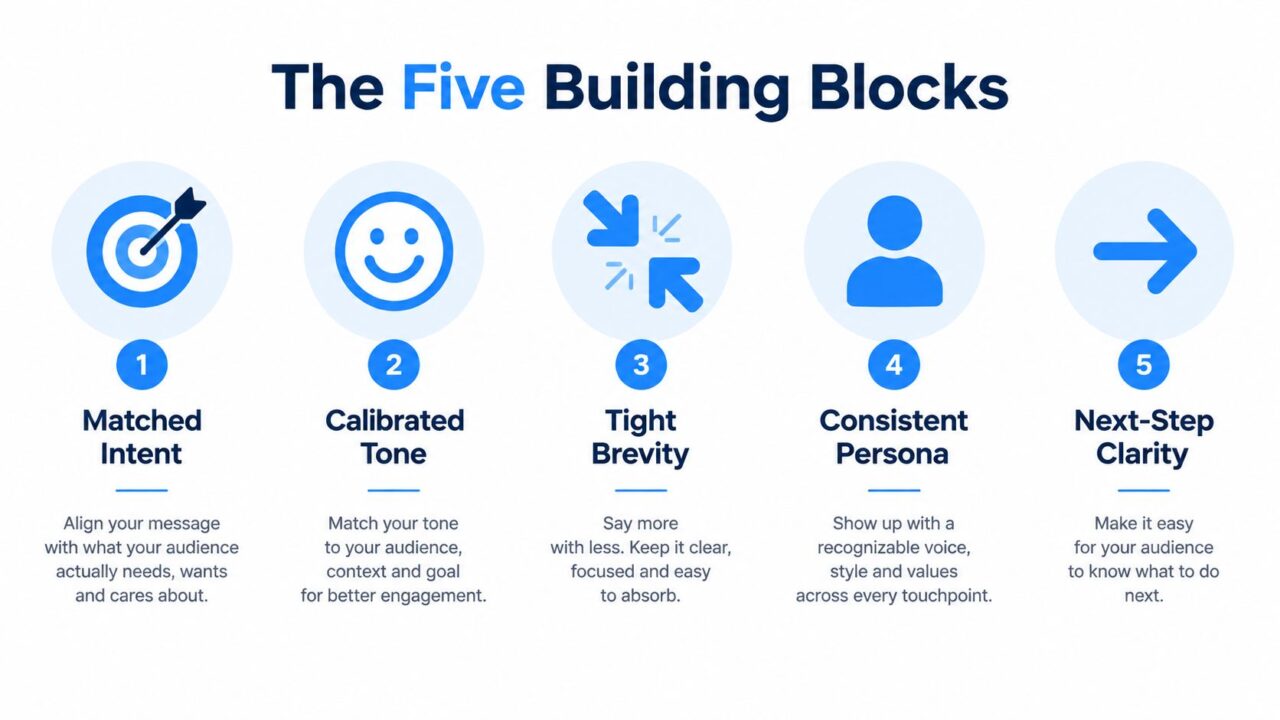
A reliable reply begins with five decisions. Matched intent determines what the customer is trying to accomplish. Calibrated tone reflects urgency and emotion. Tight brevity removes information that doesn’t help the next decision. Consistent persona keeps the brand recognizable. Next-step clarity tells the customer exactly what to do.
Chat Bot Responses Five Building Blocks
Make each ingredient observable
Matched intent means the response addresses the user’s verb. If the customer says “reset,” help them reset. If they say “compare,” compare. If they say “book,” start booking rather than describing the booking page.
Calibrated tone means the bot shouldn’t use cheerful promotional language during a failed payment or complaint. For “I can’t log in,” lead with reassurance and action: “Let’s get you back in. I’ll help you reset your password.” Avoid “Great question!” when the customer is blocked.
Tight brevity keeps the first reply focused. Put the answer first, then one explanation, then one action. A long knowledge-base dump forces the customer to extract the relevant sentence.
Consistent persona governs vocabulary, formality, and boundaries. A premium B2B product may sound concise and measured. A consumer brand may be warmer, but neither should pretend to have completed an action it hasn’t taken.
Next-step clarity ends with one CTA or one clarifying question. “Would you like to reset your password by email?” is stronger than “Let me know if you need anything else.”
Use before-and-after rewrites
Support:
- Weak: “Please review our account access documentation.”
- Strong: “I can help you regain access. Do you want a password-reset link sent to your account email?”
Sales:
- Weak: “Our plans include various features for different business needs.”
- Strong: “Yes, the plan supports a five-person team. Would you like a feature comparison or pricing for your use case?”
Lead generation:
- Weak: “Please provide your information so we can contact you.”
- Strong: “I can send pricing. What’s the best email for the quote?”
Before publishing, run every reply through this checklist:
- Intent: Does it answer the customer’s actual goal?
- Tone: Does the language fit the situation?
- Length: Can the customer understand it quickly?
- Persona: Does it sound like the same brand?
- Next step: Is there one clear action?
For more detailed guidance on wording, button labels, and conversational structure, review this practical resource on effective chatbot copywriting.
Real Examples of Chat Bot Responses Before and After
A response library often looks polished in a document and performs poorly in a live conversation. The fastest way to find the difference is to compare the reply a team wants to ship with the reply that helps a customer decide what happens next.
The examples below use an e-commerce greeting and FAQ, plus B2B SaaS pricing and fallback scenarios.
| Scenario | Weak Reply | Strong Reply | What Changed |
|---|---|---|---|
| E-commerce greeting | “Welcome to our website. How may we assist you today?” | “Hi, I can help you find a product, check an order, or start a return. What do you need?” | The opener names useful paths and replaces a vague question with three concrete choices. |
| E-commerce FAQ | “Our shipping policy can be found on our Shipping Information page.” | “Standard shipping is available, and you can check the delivery estimate for your order here. Are you checking an existing order or planning a new purchase?” | The answer leads with the relevant subject, uses the customer’s verb, and separates tracking from pre-purchase questions. |
| B2B SaaS pricing objection | “Our pricing depends on your requirements. Please contact sales for more information.” | “For a five-person team, the team plan is the natural starting point. I can show the included features or connect you with sales for a tailored quote. Which would you prefer?” | The rewrite acknowledges the use case, removes vague jargon, and presents one decision point. |
| Fallback | “Sorry, I didn’t understand. Please try again.” | “I’m not sure I understood that. I can help with an order, a return, or an account issue. Choose one, or ask for a support agent.” | The bot acknowledges its limit, offers recovery options, and makes escalation visible. |
What makes the stronger version work
The improved replies share a few traits:
- Answer-first openings: Customers see the useful information before background detail.
- Verb mirroring: “Check,” “start,” “show,” and “connect” match the job the customer wants done.
- Short sentences: Each sentence carries one decision or instruction.
- One follow-up: The bot doesn’t ask three questions before providing value.
- Routing readiness: The fallback doesn’t trap the customer inside automation.
Social proof deserves restraint. If a product has verified reviews, customer counts, or relevant proof in the system, the bot can use it. If that information isn’t available in real time, it shouldn’t invent reassurance such as “Most customers choose this plan.”
Score each reply from the customer’s perspective:
- Intent match: Did the reply solve the right problem?
- Clarity: Could a first-time user understand it?
- CTA strength: Is the next action obvious?
- Escalation readiness: Can the customer reach a person without restarting?
A response that scores well on tone but fails the final criterion is still incomplete.
Adding Personalization That Actually Changes the Reply
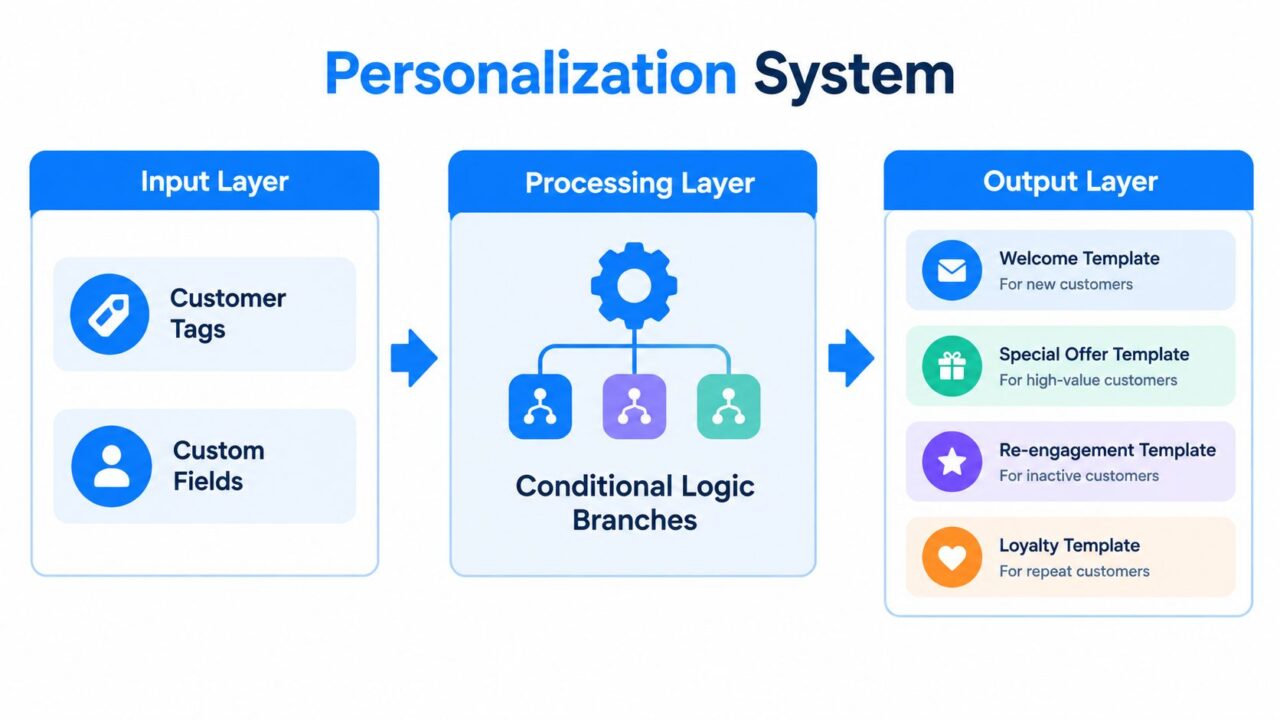
Adding a first name to “Welcome back” isn’t meaningful personalization. A useful system changes the answer based on customer tags, custom fields, events, account state, and product data.
Consider an abandoned-cart flow. The trigger event includes the product URL and cart ID. The bot identifies the intent as purchase recovery, retrieves the product name, price, and stock status from the catalog, then branches by customer segment.
Chat Bot Responses Personalization System
Build the branch around real fields
Useful variables might include:
{{product_name}}{{product_price}}{{stock_status}}{{customer_segment}}{{cart_url}}{{last_purchase_category}}
Then let the data change the substance of the message.
New customer, item available
“You left {{product_name}} in your cart. It’s available now at {{product_price}}. Want to return to your cart?”
Returning customer, item available
“Welcome back. {{product_name}} is still in your cart, and your saved checkout details are ready. Continue your order?”
Item unavailable
“{{product_name}} is currently unavailable. I can help you find a similar option or notify you when it returns. Which would you prefer?”
The third version is important. It doesn’t manufacture urgency when stock data is missing or imply that inventory is limited without evidence. Personalization must increase relevance, not pressure.
Teams can implement this logic with tags and conditions in tools such as personalization tags, provided the underlying fields are maintained accurately.
Add guardrails for missing or stale data
Never render an empty variable into a customer-facing message. If {{product_price}} is blank, use a version that omits the price. If inventory data is stale, say “I can check availability” and call the inventory action instead of claiming the item is available.
Store the context after the conversation:
- Customer identity: account or subscriber ID, not unnecessary personal detail.
- Intent: abandoned cart, return request, onboarding question, or another defined category.
- Product context: product ID and category, where relevant.
- Conversation state: last completed step and the next recommended action.
- Consent state: the purpose permitted and the time it was recorded.
The next conversation should inherit useful context without forcing the customer to repeat themselves. That inheritance is only valuable when the system can explain where the information came from and update it when circumstances change.
Designing Fallbacks and Smooth Human Handoffs
Fallbacks are safety systems. They should respond differently to a slightly unclear message, a repeated misunderstanding, and a customer who explicitly demands a person.
A practical confidence model can use three levels:
| Tier | Confidence Range | Example Phrase | Next Action |
|---|---|---|---|
| Clarify | High enough to narrow the intent, but not complete | “Do you want to track an order or start a return?” | Ask one focused question. |
| Guide | Several plausible intents remain | “I can help with orders, returns, or account access. Choose an option below.” | Offer menu buttons or quick replies. |
| Escalate | The bot lacks the required information, the request is sensitive, or the customer has repeated a failure | “I’ll connect you with support and pass along this conversation.” | Transfer the transcript and relevant metadata to a human. |
Don’t expose internal confidence scores to customers. Use them to choose the right recovery behavior.
Treat escalation as a decision, not an apology
Escalate when the customer asks for a human, uses repeated profanity, fails after multiple attempts, mentions a refund dispute, or raises a legal, regulatory, or compliance issue. Emotional complaints also deserve caution. Independent customer-experience research identifies knowing when a customer is speaking to a machine and having a smooth path to a human as major priorities. It also reports that a medical-review study found about 49.6% of chatbot answers were problematic, while qualitative research described irrelevant responses and ignored emotional requests. (COPC’s customer-experience research summary)
The handoff should carry the full transcript, detected intent, customer ID, sentiment flags, language, and relevant tool results. A human should see the problem before joining the conversation.
Weak handoff:
“Please wait while we transfer you.”
Stronger handoff:
“I’m going to connect you with a billing specialist. I’ve shared your conversation and the account issue you described, so you won’t need to repeat it. If chat is unavailable, we’ll reply through your account inbox.”
That message sets expectations without promising a wait time the system can’t verify. If the platform has a reference number, include it. If it doesn’t, don’t invent one.
A defensible default fallback is:
“I’m not sure I can answer that accurately. I can help you choose from these options, or connect you with a support agent. Which would you prefer?”
Log the failed intent, the utterance, the selected route, and the eventual resolution. Those records turn fallback failures into training material. For practical escalation patterns and message examples, see this guide to escalating an issue.
Testing and Optimizing Chat Bot Responses Over Time
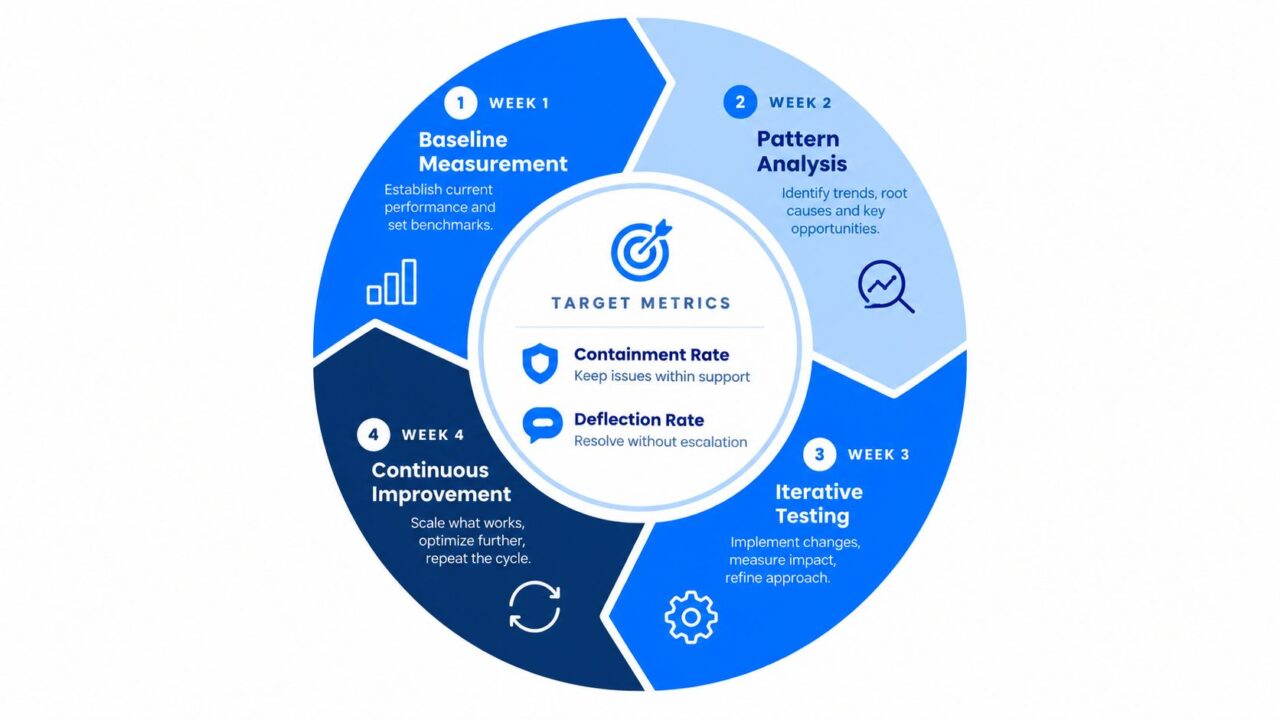
A chatbot can pass launch tests and still fail weeks later. Products change, policies move, and customers describe the same intent in new ways. Treat every response as a small workflow with a measurable outcome: finish the request, collect the next required input, or hand the conversation to the right team.
Start with a 30-day baseline. Track containment, deflection, CSAT, average resolution time, fallback rate by intent, and the handoff-to-human ratio. Segment results by traffic source, page type, device, and time of day rather than relying on one blended average. The chatbot performance methodology shows how segmentation can reveal why a response succeeds on a pricing page but fails inside account settings.
Chat Bot Responses Process Cycle
Run a weekly operating rhythm
Use a fixed review cycle:
- Monday, inspect failures: Read unresolved conversations, repeated fallbacks, and low-CSAT sessions. Label each failure by intent and workflow stage.
- Tuesday, edit copy and flow: Change one variable, such as shorter wording, button-led choices, empathy-first language, or solution-first language.
- Wednesday, redeploy safely: Test the revision against scripted scenarios and a sample of historical conversations.
- Friday, check for drift: Review new expressions, added intents, and handoffs that reached the wrong team.
For each test case, document:
- Input: “I paid, but my order still says pending.”
- Expected intent: Payment or order status.
- Expected response: Acknowledge the payment concern, check the order state, and offer human review if the status cannot be confirmed.
- Prohibited behavior: Do not claim a refund, delivery date, or payment reversal without a verified system result.
- Escalation condition: Transfer to an agent when the account or payment state is unavailable.
A/B tests should compare complete workflows, not isolated adjectives. A shorter reply may improve speed while removing context customers need. Buttons may contain routine requests but frustrate people using unusual wording. Review results after conversations settle, then check whether an early novelty effect has disappeared.
Set operating thresholds
A common target for well-implemented systems is 70% to 85% containment, with weekly containment and CSAT reviews and monthly resolution-time reviews after stabilization. Containment below 60% should trigger flow changes, while fallback rates above 20% indicate that the NLU or prompt design needs attention. Use the earlier methodology as the measurement framework rather than treating any single metric as proof of success.
Revise or retire a response when containment misses its agreed target, CSAT declines for two consecutive weeks, or transcripts show customers selecting the same correction repeatedly. Keep the previous version in a test archive. That record lets the team compare each workflow against a known baseline and see whether a faster response also completes the job or creates more handoffs.
Compliance, Consent, and a 7-Day Action Plan
Compliance belongs inside the conversation design, not in a footer added after launch. Use plain language, minimize personal-data fields, make rich cards accessible to screen readers, and provide alt text for meaningful visual content. Transcripts should redact unnecessary personally identifiable information, and opt-out language should be easy to understand and use.
Under GDPR, a business needs a valid lawful basis for processing personal data, and consent is only one of six possible bases. Where consent is used, it must be affirmative, specific, informed, unambiguous, freely given, and withdrawable. Pre-ticked boxes and silence don’t qualify, and processing based on consent must stop after withdrawal. (GDPR chatbot compliance guidance)
Consent becomes especially important when the bot collects a name, email address, or phone number for lead capture. A compliance guide recommends a clear consent gate, separate choices for support, marketing, and analytics, and timestamped records of the decision. (Chatbot consent design guidance)
Use this seven-day shipping plan:
- Day 1: Audit current fallbacks. Deliverable: a list of loops and escalation gaps. Watch fallback rate. Skipping it leaves the largest failures hidden.
- Day 2: Rewrite the top three greetings. Deliverable: intent-led openers. Watch first-action selection. Skipping it wastes high-intent sessions.
- Day 3: Add variables to cart recovery. Deliverable: product, price, stock, and segment branches. Watch completed checkout actions. Skipping it produces generic reminders.
- Day 4: Build human handoff triggers. Deliverable: rules for repeat failures, complaints, and sensitive topics. Watch handoff CSAT. Skipping it strands difficult cases.
- Day 5: Set containment and CSAT baselines. Deliverable: segmented dashboard. Watch each intent separately. Skipping it hides uneven performance.
- Day 6: Run two copy variants. Deliverable: a controlled comparison. Watch containment and CSAT together. Skipping it encourages opinion-led edits.
- Day 7: Review and lock in winners. Deliverable: approved responses, rollback notes, and owners. Watch regression after release. Skipping it lets changes drift without accountability.
Clepher provides no-code conversation flows, automated FAQ replies, quick replies, personalization tags, conditions, analytics, and GDPR tools for marketing, sales, and support conversations across channels such as websites, Messenger, WhatsApp, and Instagram Direct. Visit Clepher to design responses that complete routine workflows and hand complex conversations to your team with the right context.
