
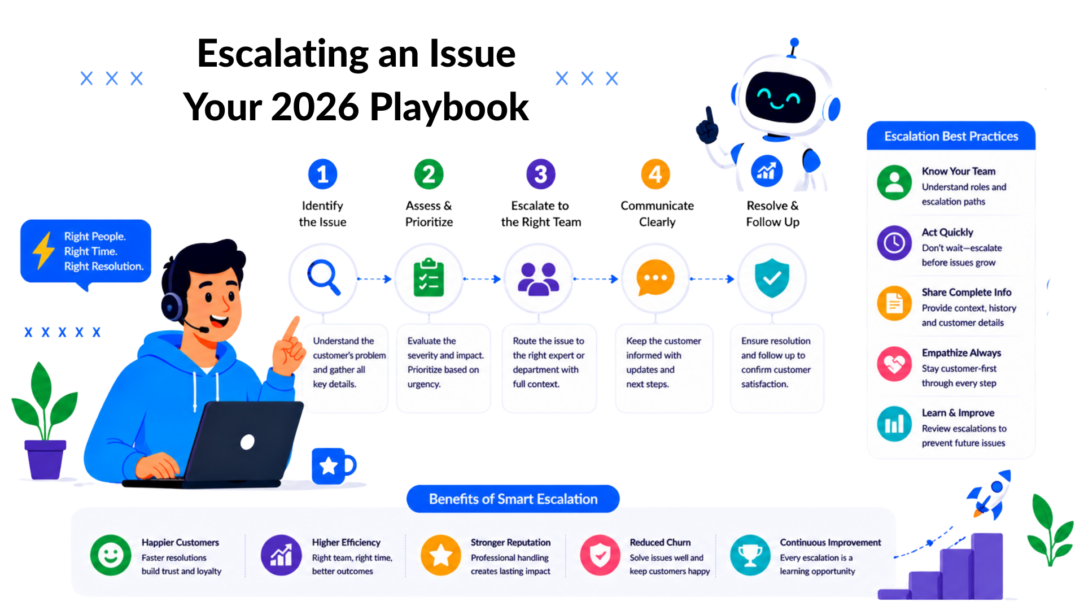
A customer says their order never arrived; your chatbot handled the first reply, support asked logistics for an update, sales jumped in because the account is high value, and then everything stalled. Nobody owns the next step. The customer sends a second message. Then a third. By the time a manager notices, the issue isn’t just a shipping problem anymore. It’s a trust problem.
That’s what it looks like to escalate a problem when the process is informal. Teams know they need to escalate issues, but without a clear path, the handoff is slow, the context gets lost, and the customer feels every internal gap.
The fix isn’t telling agents to “escalate faster.” The fix is building a proper escalation process, one with clear triggers, clean communication, and automation that moves the right conversation to the right team member with the urgency it deserves before the relationship slips. When issues at work follow a defined path instead of guesswork, teams resolve the issues faster and customers never have to chase an answer across three different people.
Why You Need an Escalation Playbook, Not a Panic Button
Many teams already have a version of escalation. It’s just messy.
A frontline agent pings a manager in Slack. A salesperson forwards a frustrated prospect email to support. Someone marks a ticket “urgent” with no shared definition of what urgent means. That’s not a process. That’s a panic button.
What panic-button escalation gets wrong
Ad hoc escalation usually creates three problems at once:
- It’s late: Teams wait until a customer is visibly angry or a deal is already at risk.
- It’s noisy: Too many people get pulled in, but ownership stays fuzzy.
- It’s personal: The conversation shifts from “what’s happening?” to “who dropped this?”
That last one matters more than people think. Escalation done badly creates internal defensiveness, and customers can feel the drag immediately.
Practical rule: Escalation should reduce uncertainty, not spread it.
A playbook changes the posture. Escalating an issue stops being a sign of failure and becomes a professional response to complexity. That’s especially important in customer-facing teams where speed and tone matter as much as the technical fix.
What a real playbook does
A workable escalation playbook answers a short list of questions:
- When does the issue move up?
- Who owns it at each level?
- What context must travel with it?
- How does the customer get updated during the handoff?
- What gets documented after resolution?
In support, that can mean moving a subscription cancellation risk from bot to human before the customer churns.
In sales, it can mean routing a pricing exception or security objection to the right specialist before the lead goes cold.
When teams skip this structure, they end up firefighting. When they define it, they can automate parts of it and protect the customer experience even when things get complicated.
Defining Your Escalation Triggers and Thresholds
A customer asks for a refund in chat, gets three generic replies, then types, “Can someone who can make a decision step in?” By that point, the issue is no longer just a refund request. It is a trust problem.
That is why triggers need to be explicit. “Use your judgment” sounds flexible, but it breaks the moment volume rises, a new rep joins, or a bot handles the first layer of the conversation. Clear triggers protect consistency across human teams and automated flows, which is really what an escalation procedure is for.
At its core, escalation is the process of recognizing that the current person or system can’t resolve something, and moving it to someone who can, before the customer has to ask. When teams don’t define what escalating issues at work actually looks like, every rep ends up guessing what they mean to escalate versus what they should just handle, and that inconsistency is what customers notice first. Proper issue escalation isn’t about passing blame upward; it’s about matching the problem to the right authority as early as possible.
A useful benchmark is to keep the majority of issues at Level 1 and move only the cases that meet defined conditions, as outlined in Atlan’s breakdown of data governance escalation workflows. In customer support and sales, the same principle holds. Frontline systems should handle the repeatable work. Escalation should happen because a rule was met, not because someone got nervous.
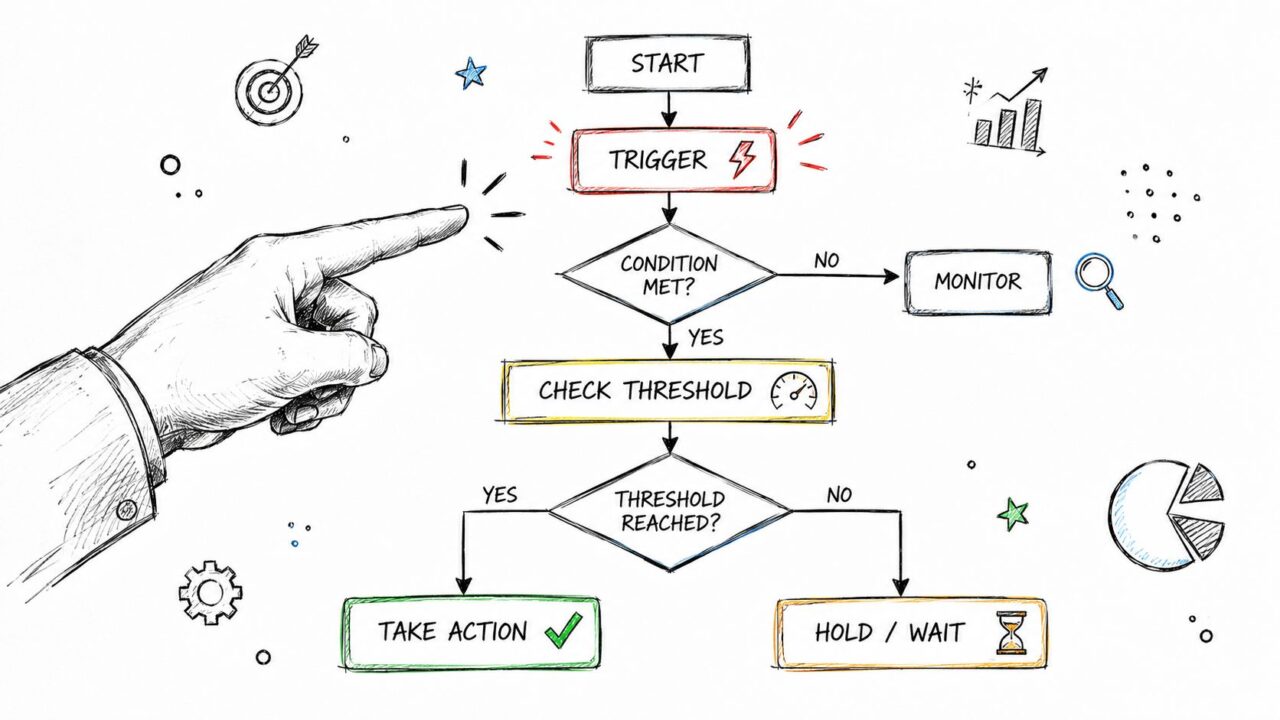
Escalating An Issue Flowchart
Use three trigger types
The simplest setup uses three categories: time, impact, and complexity. If your team cannot sort an issue into one of those buckets, the rule is still too vague to automate.
Time triggers
Time triggers work well because systems can track them without interpretation.
If a support case sits too long, customers read that as neglect. In sales, a slow answer on security, implementation, or contract terms can stall a deal that was ready to move.
Examples include:
- Response delay: The conversation passes your internal first-response target.
- Resolution delay: The issue stays open long enough that frontline ownership is no longer appropriate.
- Repeated follow-up: The customer asks again before the case has meaningfully progressed.
For chatbot-led support, this matters even more. If Clepher or another chat platform handles intake, the handoff rule should fire before the customer has to ask for a person twice. Teams that want a stronger frontline usually start with tighter service rules and cleaner triage, which is also a core part of good help desk practices for customer support teams.
Impact triggers
Some conversations should move up fast because the business risk is larger than the ticket itself.
A failed promo code during a launch is a good example. One complaint looks small. Ten complaints in twenty minutes is an escalation. The same pattern shows up in SaaS onboarding, billing failures, and pre-sales objections tied to procurement or compliance.
Use impact triggers such as:
- A high-value account is involved
- Clear churn or revenue risk appears
- Multiple customers report the same issue
- Legal, policy, or reputational exposure is present
The trade-off is simple. If these thresholds are too loose, specialists get dragged into noise. If they are too strict, frontline teams sit on issues that are already spreading.
Complexity triggers matter just as much
Some issues are stuck because they need authority or expertise, not more time.
A bot can explain refund policy. It should not decide a fraud exception. A junior sales rep can answer basic pricing questions. They should not improvise on security reviews, custom terms, or procurement escalations.
Use complexity triggers like these:
| Trigger type | Escalate when |
|---|---|
| Knowledge gap | The issue falls outside documented scripts or approved responses |
| System dependency | Another platform, vendor, or internal team must act |
| Decision authority | The fix requires an exception, credit, approval, or policy override |
I have seen teams miss this category because they treat every stalled case as a timing problem. It usually is not. It is a routing problem.
If your frontline team escalates everything unusual, you have a training problem. If they keep issues they cannot solve, you have a trigger problem.
Build thresholds your tools can understand
Good escalation rules are specific enough for a person to follow and structured enough for software to enforce.
Replace “customer seems upset” with signals your system can detect: repeated complaint language, multiple failed resolution attempts, cancellation intent, negative sentiment, or a high-risk account tag. Replace “this is taking too long” with a defined elapsed time, a missed SLA state, or a second unresolved contact on the same topic.
That is the difference between a process people remember and a process your chatbot, help desk, and routing logic can run every day without guesswork.
Building Your Three-Tier Escalation Framework
Once triggers are clear, the next problem is ownership. Many teams still break down at this stage. They know when to escalate, but not to whom.
A verified framework keeps things simple: Level 1 handles scripted troubleshooting, Level 2 handles complex technical cases with specialized teams, and Level 3 requires executive intervention to prevent churn or legal risks, as outlined in CloudTalk’s customer escalation management guide.
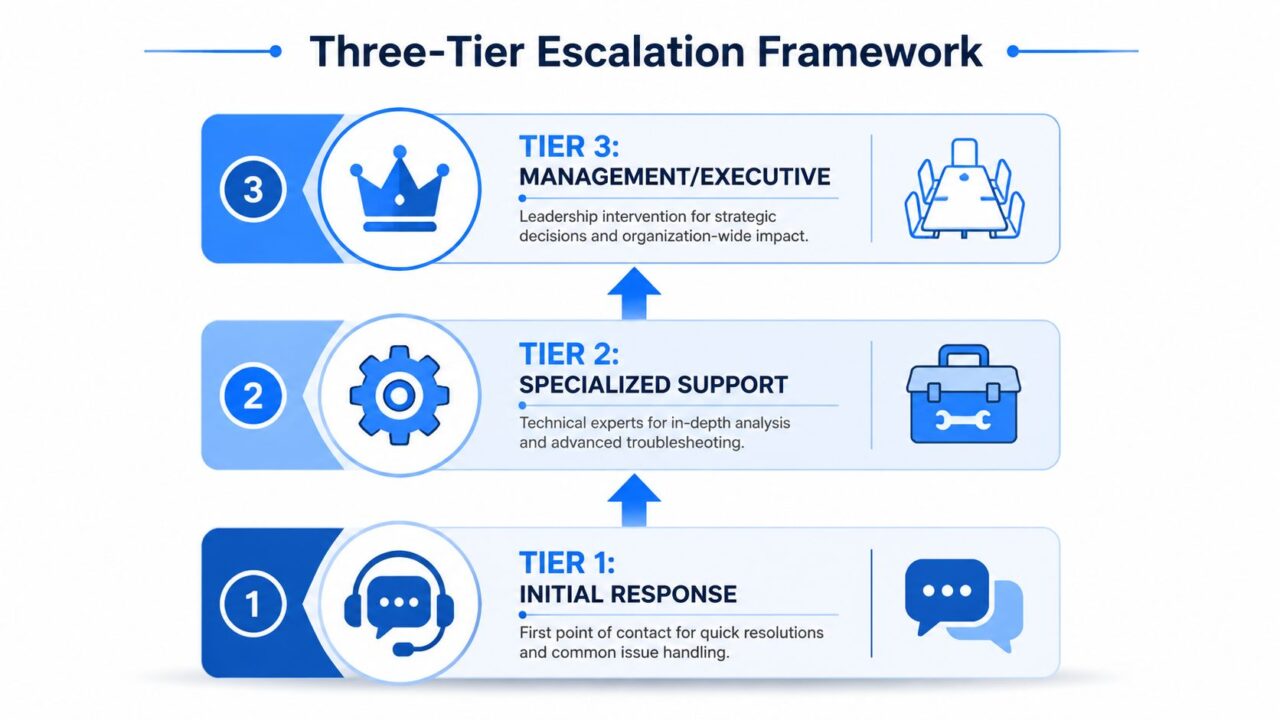
Escalating An Issue Framework
Tier 1 handles the predictable work
Tier 1 is your frontline. In many businesses, that includes chatbots, live chat agents, junior support reps, and basic sales qualification flows.
Their job is not to solve everything. Their job is to solve the common, repeatable issues quickly and consistently.
Tier 1 usually owns:
- Order status and policy questions
- Basic subscription changes
- Lead qualification and routing
- Known troubleshooting scripts
- FAQ-based objections in pre-sales chat
For this layer to work, your team needs decision trees, approved copy, and a usable knowledge base. If your frontline is improvising every answer, your escalation model will clog immediately. Teams looking to tighten this layer usually benefit from stronger operational basics like the ones in these help desk practices for customer support teams.
Tier 2 solves what scripts can’t
Tier 2 is where specialists step in. This might be senior support, technical support, customer success, implementation, or a product specialist.
These cases often share one trait. They require diagnosis, not just response.
A Tier 2 issue might include:
- A checkout bug tied to a specific browser or payment path
- A subscriber account mismatch between billing and CRM
- A pre-sales security question that needs a technical review
- A churn-risk account asking for a contract or service exception
Tier 2 should receive full context, not a vague note saying “customer angry, please help.”
Tier 3 is for business risk, not routine volume
Tier 3 is where managers, directors, or executives get involved. That should happen rarely and for the right reasons.
Use Tier 3 when the issue could create:
- Churn risk with a strategically important account
- Legal or compliance exposure
- Public reputation damage
- A major financial or operational decision
A broader reason this matters is the cost of unresolved incidents. IBM reported that the global average cost of a data breach reached $4.88 million in 2024, and organizations that fail to escalate promptly often face 30–50% higher recovery costs due to delayed containment, according to the IBM report on escalating data breach disruption. Even if your issue isn’t a security event, the principle carries over. Delay makes expensive problems more expensive.
Clear ownership beats heroic effort. A ticket should never be “with the team.” It should be with a named level and a defined owner.
The Art of Clean Escalation Communication
Bad escalation language creates drag before anyone starts solving the problem.
The fastest way to slow down a handoff is to make it emotional, vague, or accusatory. “This customer is furious because support didn’t respond” might feel honest, but it usually triggers defensiveness. “Order delivery issue unresolved after prior follow-up, customer at churn risk, needs logistics review today” gives the next person something they can act on.
A 2024 Harvard Business Review study found that 68% of managers perceive poorly handled escalations as a primary cause of team fragmentation, and Atlassian defines clean escalation as systemic and non-personal in its guide to clean escalations. That’s the standard to aim for.

Escalating An Issue: Professional Collaboration
Clean escalation versus dirty escalation
The distinction is simple.
| Style | What it sounds like | What it causes |
|---|---|---|
| Clean | Focuses on facts, impact, prior actions, and needed decision | Faster help, less friction |
| Dirty | Focuses on blame, frustration, or personal criticism | Slower action, damaged trust |
This matters inside support teams, but it matters just as much across support and sales. A seller escalating an implementation concern to support shouldn’t frame it as “your team is blocking the deal.” They should frame it around the customer’s obstacle and the decision needed to move forward.
Use a simple message structure
When escalating an issue, send four things in this order:
- What happened
- What impact it has
- What has already been tried
- What decision or action is needed now
That structure works in chat, email, help desk notes, and CRM tasks.
For example:
Customer cannot complete checkout after repeated attempts. This affects a current purchase and the customer has asked whether they should abandon the order. Frontline support verified browser basics and payment details, but the error persists. Need Tier 2 to test the checkout path and confirm whether this is account-specific or broader.
That’s clean. It’s factual. It travels well.
What to tell the customer during a handoff
The customer-facing message matters just as much as the internal note.
Don’t say:
- We’re escalating this internally
- I need to ask another team
- Someone else will handle it
That language tells the customer they’re being passed around.
Use wording like:
- I’ve brought in the specialist who handles this type of issue
- Your case is now with the team that can review the account details directly
- You won’t need to repeat yourself. I’m attaching the full context and staying on the thread
If your team needs help improving tone during tense moments, this practical guide on handling customer dissatisfaction in live conversations is a useful companion to any escalation policy.
Good escalation communication keeps the issue serious without making the relationship hostile.
Automating Your Escalation Playbook with Clepher
A customer types “I want to cancel” after waiting half a day for a reply. Your bot recognizes the message, but nothing happens beyond a generic alert in Slack. The rep who finally picks it up has no order history, no transcript summary, and no deadline. That is not automation. It is delayed manual work with extra steps.
Customer-facing escalations need workflow, not just notification. The job is to detect risk early, move the conversation to the right person, carry the context with it, and update the customer without making them start over.
Escalating An Issue Chatbot Marketing
Start with trigger logic your system can actually detect
Good automation begins with signals that are visible in chat, forms, and ticket activity. If a rule depends on someone noticing tone, remembering policy, and checking three systems, it will fail under load.
Useful customer-facing triggers include:
- High-value customer plus cancellation intent
- Refund request after repeated complaint language
- Lead asks for a pricing exception or security review
- Conversation stays open past the allowed response window
- Customer repeats the same failed self-service path
A DTC brand might route “order not received” messages from VIP customers straight to a senior support queue. A SaaS company might catch phrases like “cancel,” “downgrade,” or “this isn’t working,” then check plan type before sending the case to customer success.
The trade-off is straightforward. If you make triggers too broad, senior teams get flooded with noise. If you make them too narrow, risky conversations sit in the wrong queue too long.
Build actions that move the case forward
A lot of escalation setups stop at “send alert.” That is only one part of the job.
A useful automated escalation should:
- Tag the conversation with labels like Tier 2, billing risk, churn risk, or sales-assist
- Assign a clear owner to a person or queue
- Notify the right team in the channel they already monitor
- Attach the working context such as transcript, order details, account type, or lead source
- Send the customer a status update that confirms ownership and next steps
That last step matters more than teams expect. Internal routing can be perfect, but if the customer sees silence, the experience still feels broken.
A practical pattern for support and sales
This structure works well inside chatbot and messaging workflows:
| Workflow stage | Example automation |
|---|---|
| Detection | Message includes cancellation language or unresolved order issue |
| Qualification | Check account value, purchase history, or plan type |
| Routing | Assign to Tier 2 support, customer success, or sales manager |
| Notification | Send internal alert with transcript and issue label |
| Customer update | Confirm handoff and expected response timing in chat |
| Follow-up control | If unresolved after the set threshold, escalate again |
That is where a chatbot stops being a front door and starts acting like an operations layer for customer conversations.
Where Clepher fits
Clepher’s CRM and ticketing system supports this setup by keeping conversational flows, tags, handoff rules, live chat, and ticket history in one place. That lets teams define trigger logic, route the case automatically, and preserve the full conversation record for the next owner.
The practical advantage is context continuity. Support can see what the bot asked, sales can see what the lead requested, and the customer does not have to repeat the problem.
What tends to work:
- Rules based on intent, timing, and customer type
- Visible ownership after each handoff
- One conversation record across bot and human replies
- Separate escalation paths for support risk and pre-sales risk
What usually creates more work:
- Sending every frustrated message to a manager
- Adding too many exception routes
- Passing the case without transcript or account context
- Treating escalation as a heads-up instead of a tracked workflow
A well-built automation flow feels routine from the inside. The case lands with the right person, the customer gets a clear update, and the team stops firefighting the same handoff mistakes.
Closing the Loop and Preventing Future Escalations
Resolving the case isn’t the end of the job. If you stop there, the same issue comes back next week in a slightly different form.
The strongest teams use escalations as design feedback. Every serious handoff tells you something about your scripts, your product, your routing logic, or your expectations.
Document what actually happened
This doesn’t need to become bureaucracy. It needs to become usable intelligence.
Planta’s escalation methodology ends with full documentation to prevent recurrence, and that final step is what turns a reactive process into a proactive improvement cycle, as explained in Planta’s guide to escalation management in project work.
After a resolved escalation, capture:
- The original trigger
- The actual root cause
- The handoff path
- What slowed resolution
- What should change in the workflow
Look for the prevention move
Every closed escalation should lead to one operational question: what would have stopped this earlier?
Sometimes the answer is better automation. Sometimes it’s a clearer policy article. Sometimes it’s a smarter chatbot branch, a stronger macro, or a cleaner ownership rule between sales and support.
A quick review often reveals one of these patterns:
- Training gap: Frontline agents didn’t know the right first step.
- Content gap: The customer couldn’t find a clear answer through self-service.
- Routing gap: The issue reached the wrong team first.
- Authority gap: The right person saw it, but couldn’t approve the fix.
- Product gap: The escalation exposed a recurring system failure.
The goal isn’t getting better at emergencies. It’s creating fewer emergencies.
Keep the loop tight
If your team waits for a monthly review, most of the value gets lost. Close the loop while details are still fresh.
A short post-resolution review can feed directly into:
- chatbot flow changes
- new tags or trigger rules
- updated help center content
- revised support macros
- cleaner sales-to-support handoff steps
That’s how escalating an issue becomes part of system improvement, not just service recovery.
If you want fewer dropped handoffs and cleaner customer conversations, Clepher gives teams a way to build chatbot flows, route escalations, and connect marketing, sales, and support in one workflow without relying on manual triage.
