
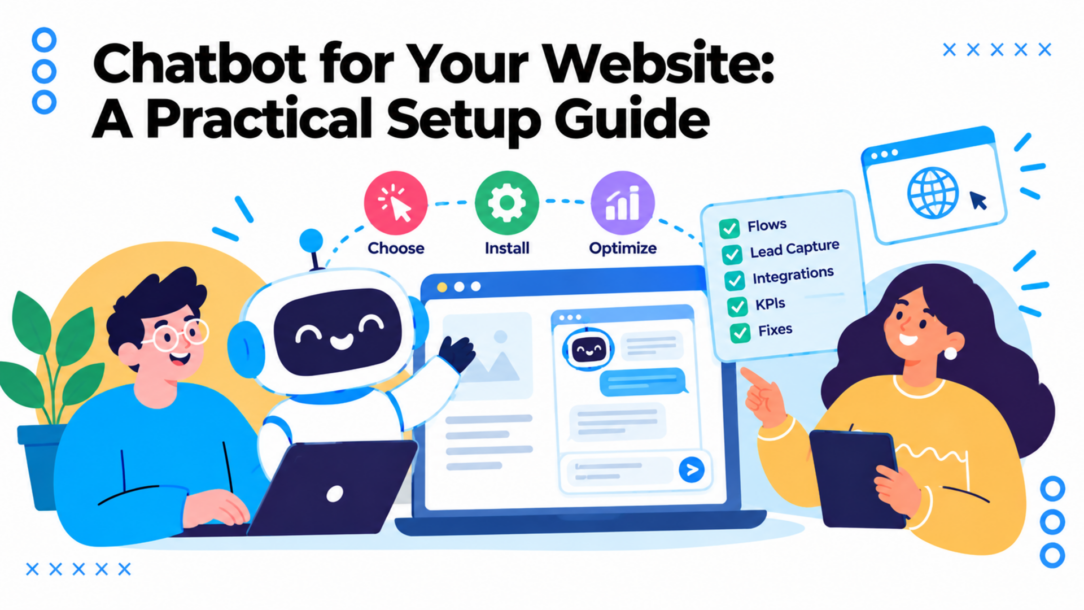
Your site gets traffic, but the contact form sits untouched. Support questions pile up while visitors wait, and shoppers leave with items still in their carts. A chatbot can help, but installing one won’t fix a weak offer, a confusing checkout, or a flow that asks for an email before giving a visitor any reason to share it.
Treat a chatbot for your website as a business tool with a defined job, not a feature to turn on and forget. Choose one outcome first, build the shortest useful flow toward it, and judge the bot by what visitors accomplish: qualified leads, resolved questions, or recovered sales.
The Website Chatbot Moment Most Brands Get Wrong
The common mistake is launching a bot with a vague goal like “improve engagement.” That gives the team nothing useful to build toward, and it lets a dashboard full of conversation starts look like progress even when few visitors become customers or get help.
Start with a specific business problem. Most website chatbots should earn their place by doing one of three jobs:
- Capture qualified leads: Ask a useful qualifying question, then offer an appropriate next step, such as booking a consultation or requesting a product recommendation.
- Resolve repetitive support issues: Answer common questions about shipping, returns, setup, or pricing, and route harder cases to a person.
- Recover at-risk carts: Identify a shopper’s uncertainty, answer it, and offer a permission-based follow-up when the shopper leaves before buying.
Choose the first job by asking where the current customer journey leaks most. If sales conversations are missed, start with lead qualification. If the support team repeats the same answers, build for resolution and handoff. If shoppers add products but hesitate at checkout, address cart friction instead of adding a generic greeting to every page.
Practical rule: If you can’t name the outcome and how you’ll measure it, the bot isn’t ready to launch.
Write a one-sentence brief before comparing platforms or drafting copy: “This bot will help [audience] do [task] on [page or channel], and we’ll measure success by [business outcome].” For example, a skincare store might help visitors choose a routine on product pages and measure qualified product inquiries or purchases. A software company might answer onboarding questions and count issues resolved without an agent.
That brief also helps you reject distracting features. AI, personas, and elaborate branching aren’t goals by themselves. Add a feature only when you can explain how it helps a visitor complete the target task or helps your team measure the result.
Choosing a Platform That Fits the Job
A platform comparison should begin with your brief, not a feature grid. Ask each vendor to show how a real visitor moves from the website widget to the outcome you care about, including what happens when the bot can’t answer.
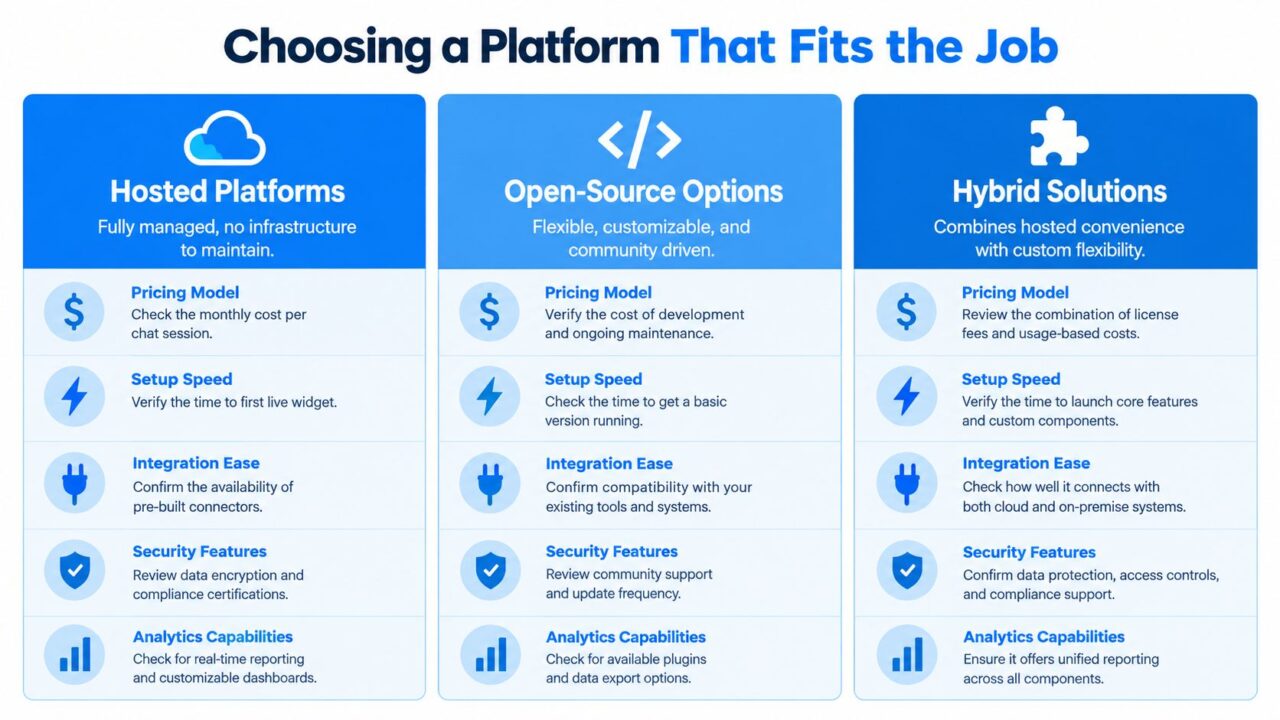
Chatbot For Your Website Platform Comparison
Compare capabilities by business need
For most marketing and support teams, a no-code flow builder is essential. Your team should be able to adjust a question, promotion, or support route without waiting on an engineer. Ask how the platform handles tags, segments, custom fields, and conditions, then check whether its analytics connect those decisions to qualified leads or resolved tickets.
Integrations matter when they move a conversation forward. Check whether leads can sync to your CRM, whether the bot can hand off to email or SMS, and whether native integrations or tools like Zapier, Make, n8n, or Pabbly can connect the rest of your stack. For ecommerce, test the product and order workflows. For agencies, verify that you can manage client channels and audiences without mixing data. Coaches, SaaS teams, local businesses, and solopreneurs should prioritize the channel and follow-up workflows their customers already use.
A/B testing, random path distribution, and broadcast controls are valuable when you use them to test outcomes and communicate responsibly. GDPR tooling and channel-specific permissions aren’t optional details if the bot collects personal information or sends follow-ups. Ask to see these controls in the product, not just in a sales presentation.
Gartner reported in December 2024 that 85% of customer-service leaders planned to explore or pilot customer-facing conversational generative AI during 2025, based on a survey of 187 service leaders conducted in July and August 2024 (Gartner’s customer-service survey). That projection signals growing interest, not proof that any particular platform will meet your needs. For background on planning and building chatbot projects, the Magnitude Marketing chatbot guide offers another perspective.
If you’re weighing automated responses against staffed conversations, compare the operating model as well as the tools in Clepher’s chatbot versus live chat guide. Clepher is one option for building no-code conversational flows and connecting website chat with messaging channels.
The deciding question is simple: can the platform report the result your brief names, or does it stop at conversations started? If it can’t show the path to a qualified lead or resolved issue, keep looking.
Installing the Widget Without Slowing Your Site
Treat installation as part of conversion work. A widget that loads slowly, blocks the page, or interrupts a visitor before they’ve read the offer can make the experience worse rather than better.
Chatbot For Your Website Chatbot Marketing
Use a five-move setup:
- Add the snippet: Install the widget code through your site or tag-management workflow. Confirm that it loads on the pages where the bot is meant to help.
- Choose placement: Put the launcher where it won’t cover product details, checkout controls, or important calls to action. Check the layout on mobile, not just on a desktop monitor.
- Set a deliberate trigger: Choose a relevant page, visitor action, or other trigger that matches the bot’s job. Don’t pop the same prompt on every page by default. An interruption without context trains visitors to dismiss the widget.
- Test the mobile experience: Tap the launcher, open quick replies, enter text, close the widget, and check that the page remains usable with the chat open.
- Run a live conversation: Test the complete path, including a successful outcome, an unclear answer, and the route to human support. Check where the data goes after the conversation ends.
Performance belongs on the acceptance checklist. Google recommends an Interaction to Next Paint (INP) below 200 milliseconds for a good user experience, a target that applies to interactive elements such as chat widgets and pop-ups (Google’s Core Web Vitals guidance). Test the page after installation, especially on mobile, and look for delays when opening the widget or sending the first message.
If the added script slows the page, defer nonessential code and reduce what the widget needs to load. For broader site-performance troubleshooting, SiteSelf’s speed optimization options provide a useful place to compare approaches. Don’t launch until the widget works at normal visitor speed, not just on a fast office connection.
Designing Flows That Actually Convert
A converting flow respects the visitor’s time. Ask one useful question before asking for contact details, offer clear choices, and make the next step obvious. When a bot starts with a long form or a generic greeting, visitors have little reason to keep going.
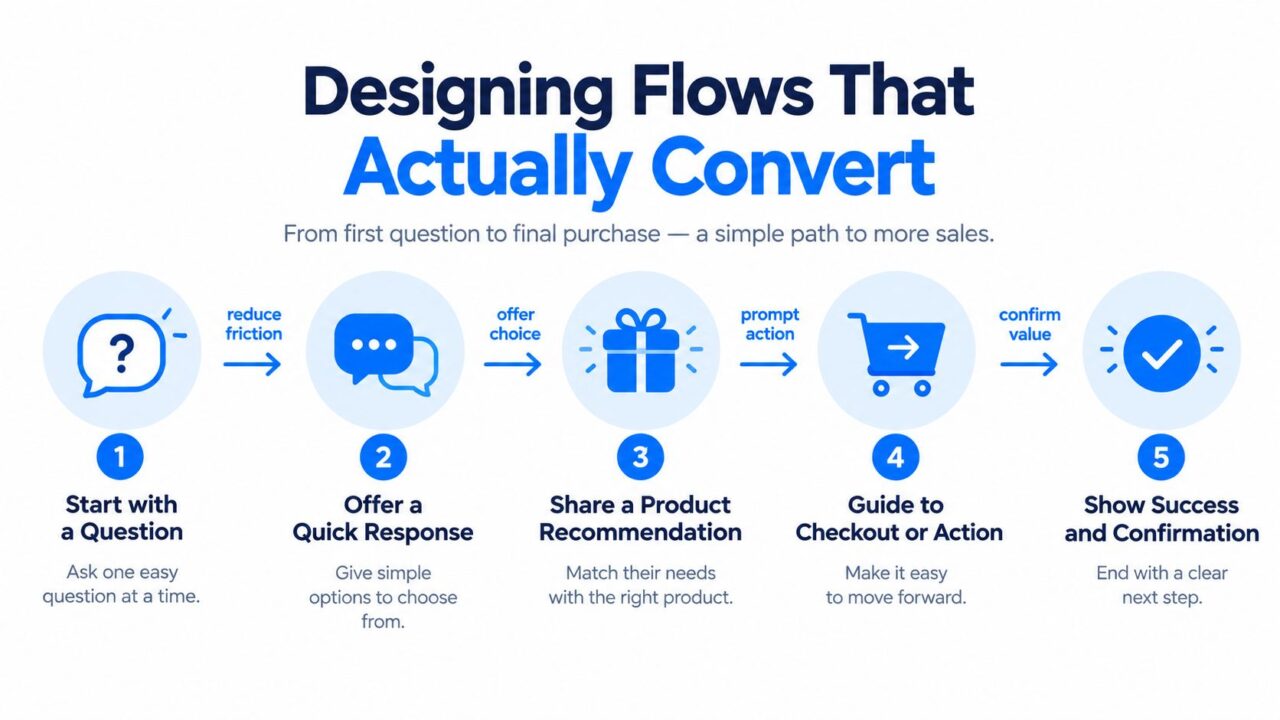
Chatbot For Your Website Chatbot Marketing
Start with the visitor’s decision
Build the opening around a question that helps the bot recommend, route, or resolve something. A DTC skincare brand could ask about a visitor’s skin type before suggesting a routine. A coaching business could ask what the visitor wants to achieve before offering a relevant session. A SaaS onboarding bot could ask about company size to route the conversation to the right setup path.
Keep response options specific. Quick replies reduce typing, but labels like “Other” or “Tell me more” can leave visitors unsure what happens next. Use personalization tags and fields to carry an answer forward, so the visitor doesn’t have to repeat information. Conditions should route people to different next steps, not create branches that nobody maintains.
Make the handoff visible. When the bot isn’t confident, when the visitor asks for a person, or when the issue needs account-specific help, offer a human route or a clear fallback. A conversation should never end with a dead end or a promise of support that the business can’t deliver.
A bot earns trust by recognizing its limits and making the next step easy.
Typing indicators can make a pause feel less abrupt, but they don’t replace useful response timing. Use custom and global fields only when the stored information supports a clear task, such as personalizing a recommendation or passing context to an agent. Random path distribution belongs in experiments: use it to compare alternative messages or routes, and preserve the visitor’s assigned path during the test.
Before publishing, walk through the flow as a hesitant visitor, a ready-to-buy visitor, and someone whose question the bot can’t answer. Check whether each person gets a relevant response without being pushed into an unnecessary form. For more detail on planning the conversation itself, use Clepher’s guide to designing a chatbot.
Here’s a short walkthrough to help you think through a visitor-facing flow:
Reading the Numbers Like a Growth Marketer
A chatbot dashboard can make a weak funnel look busy. Track each step from exposure to business result, and keep the denominator clear. An impression, an opened widget, a started conversation, a completed qualification, and a qualified lead are different events.
An industry analysis of 18 million chatbot triggers and 880,000 conversations reported roughly 10–15% contact capture among people who actively started a conversation, while the broader visitor-to-lead rate was closer to 1–2% because most visitors never engage (the chatbot lead-generation analysis). These rates can both be true. The engaged-user figure describes a selected group that already chose to interact; it isn’t the conversion rate for every site visitor.
| Funnel event | What it measures | Common trap |
|---|---|---|
| Impression | Visitors who saw the widget | Counting exposure as engagement |
| Widget open | Visitors who chose to open it | Treating a click as a lead |
| Conversation start | Visitors who sent a first message | Calling starts successful outcomes |
| Qualification completion | Visitors who supplied the information needed for routing | Confusing completion with lead quality |
| Qualified lead | A contact that meets your business criteria | Ignoring downstream sales results |
Report each rate against its own denominator. Then segment by device, traffic source, geography, and intent so you can see where the flow helps and where it adds friction.
Test before calling a winner
Set one primary outcome before the A/B test begins. Randomize at the visitor level, use cookie-based assignment so returning visitors see the same variant, and exclude internal traffic and duplicate sessions. Keep the copy and flow stable, run through a complete business cycle, and track guardrails such as bounce rate, opt-outs, handoff rate, response latency, and revenue per visitor.
A published implementation guide estimates roughly 2,000 visitors per variant for 95% confidence when a test starts with a 15% baseline conversion rate and aims for a 20% relative lift (the chatbot A/B testing guide). Use that as a planning example, not permission to stop early when the result looks favorable. Define the sample size before launch, and join downstream CRM outcomes back to the original experiment assignment.
Integrations, Accessibility, and Privacy as One Trust Layer
A useful chatbot has to do more than produce a persuasive reply. It needs to pass the right context to the next tool or human, remain usable for people with disabilities, and collect only the information the business needs.
Connect the bot to the systems that complete the work: a CRM for lead routing, email or SMS for permitted follow-up, and ecommerce tools for relevant product or order support. Test the handoff with real records, so a visitor’s answers don’t disappear between the widget and your team. If you’re assessing how trust cues fit alongside chat, Bragly’s integrations for social proof widgets can help you review related site components.
Accessibility needs hands-on testing. Check keyboard-only navigation, focus order, screen-reader announcements, contrast, readable error messages, timing controls, transcript access, and an obvious human-support alternative. A 2025 evaluation of deployed web chatbots found that more than 80% had at least one critical accessibility issue, while 45% had missing semantic structures or misused ARIA roles (the web chatbot accessibility evaluation). A modern-looking widget isn’t automatically an accessible one. Don’t trap users in a flow or make them guess what a quick-reply label means.
Privacy deserves the same practical attention. A 2025 Qualtrics XM Institute study of 23,730 consumers across 23 countries found that 53% were very or extremely concerned about personal-information privacy, while 33% trusted companies to use that information responsibly (the Qualtrics privacy and personalization study). Separate anonymous routing signals from optional contact details, and keep sensitive information out of the bot unless a secure process requires it.
Document a lawful basis for processing, explain why you collect each field, set retention limits, and make withdrawal or deletion procedures clear. Consent is one possible lawful basis under GDPR, not a substitute for choosing and documenting the basis that fits the processing. Use Clepher’s consent-management and GDPR guidance as a starting point for reviewing those controls.
Troubleshooting and a 30-60-90 Review Cadence
Don’t optimize for conversation starts just because they’re easy to count. A bot can start plenty of conversations and still fail to help shoppers, qualify leads, or resolve support needs. Measure the outcome, then diagnose the step that’s leaking.
| Symptom | Likely cause | First fix |
|---|---|---|
| The bot never opens | Trigger rules or script load order are wrong | Test the rule on the intended page and verify the widget loads |
| Conversations stall | The flow has a dead end or no useful handoff | Add a human route or fallback branch |
| Visitors ignore the widget | The trigger interrupts them or the greeting feels generic | Narrow the trigger and make the opening page-specific |
| The page feels slower | The widget adds unnecessary work during interaction | Defer nonessential scripts and reduce widget code |
| Starts are high but qualified leads are low | Qualification comes after the contact request | Ask the useful qualifying question first |
For ecommerce, investigate where shoppers hesitate rather than sending every visitor the same recovery prompt. Baymard Institute’s analysis of 50 ecommerce studies puts average cart abandonment at 70.22%. In the same analysis, 42% of US online shoppers said they abandoned because they were just browsing or not ready to buy, while 17% cited a checkout process that was too long or complicated (Baymard’s cart-abandonment research). Offer help with the uncertainty, such as sizing or delivery, and make follow-up dependent on permission.
Review the bot at a steady cadence
Day 30: Confirm the KPI baseline, verify that leads and handoffs reach the right systems, and repeat the accessibility checks.
Day 60: Launch a controlled A/B test with a predefined primary outcome, sample-size plan, and guardrails. Don’t change the flow halfway through and call the result a clean comparison.
Day 90: Re-segment results by device, traffic source, geography, and intent. Decide whether the test variant should replace the control based on qualified outcomes, handoff quality, and site performance, not on which version started more chats.
A chatbot is a maintained customer journey, not a one-time install. Review the flow when offers, support policies, products, or customer questions change.
Clepher gives teams a no-code way to build chatbot flows, add a chat widget to their website, capture leads, connect conversations to email and SMS follow-up, and hand chats off to a live agent. If you’re ready to build a bot around a measurable outcome, explore Clepher and map your first flow to a KPI before launch.
