

A client asks for an update, your delivery lead needs context, and the renewal date is buried in a spreadsheet nobody opened this week. Meanwhile, the account manager is rebuilding a QBR deck from Slack messages while the founder answers a support escalation that should have had an owner.
That isn’t a relationship problem. It’s an operating-model problem. Client account management gives every account a clear owner, a visible status, a defined cadence, and a trigger for the next action. Automation then carries the routine work, while people handle judgment, trust, and commercially sensitive conversations.
The Monday Morning That Breaks Without Client Account Management
At a 40-client digital agency, Monday starts with three Slack pings. One client wants to know why a campaign report hasn’t arrived. Another has approached renewal without a confirmed plan. A new account is waiting for an onboarding document that someone saved in the wrong Drive folder.
The founder opens a blank presentation and starts assembling QBR slides manually. The account team searches email for the latest goals. Delivery asks whether a scope change was approved. Nobody can answer whether the struggling account is officially “at-risk,” because the agency never defined the term.
By lunchtime, the team has worked hard and moved very little forward. Each person has handled a fragment of the truth, but no one has maintained a reliable account record.
Practical rule: If account status lives in memory, private messages, and scattered documents, the business doesn’t have account management. It has individual heroics.
The failures are predictable:
- No single source of truth: People use different versions of goals, contracts, usage notes, and open issues.
- No renewal control: Contract dates sit passively in a spreadsheet instead of triggering preparation and outreach.
- No escalation path: A complaint moves through whoever happens to see it first.
- No shared risk definition: One manager calls an account healthy because the client is polite. Another flags it because usage has dropped.
- No handoff discipline: Sales, delivery, support, and account management each retain part of the context.
A structured program turns that Monday into a controlled handoff. The CRM record shows the current health status. Clepher can trigger a kickoff or follow-up flow. The renewal owner sees the next milestone. The delivery lead receives an escalation with the relevant history instead of a vague message asking for help to support effective account management.
Engagement and account performance are connected. Kapta’s summary of a Gallup-based finding reports that only 29% of B2B customers are fully engaged, while 40% of customers who are very satisfied with their account manager are fully engaged, compared with 13% among those who aren’t very satisfied with their account manager. The same summary reports that companies driving customer impact have 72% more engaged customers. Kapta’s account-management analysis provides the useful operational lesson: account quality should be tracked, not assumed.
What Client Account Management Actually Owns
Client account management owns the relationship after the sale, but that description is too broad to run a team. A scalable program separates relationship ownership, data ownership, renewal control, and delivery coordination.
The Account Owner is the client-facing coordinator. They maintain the relationship, run the agreed review cadence, understand the client’s goals, and turn progress into an actionable account plan. The Data Steward keeps the CRM record accurate, including contacts, tags, contract context, meeting notes, and health signals. The Renewal Owner watches dates, usage, satisfaction, risk, and commercial next steps. The Delivery Lead coordinates fulfillment, tickets, dependencies, and scope changes.
Use this guide to master client account management as a useful reference when designing the wider discipline, then assign the actual responsibilities inside your own SOP.
| Role | Primary Inputs | Primary Outputs | Accountability Metric |
|---|---|---|---|
| Account Owner | Weekly usage report, NPS, client goals, meeting notes, and client satisfaction metrics. | Account status, QBR, next-step plan | Retention and relationship health |
| Data Steward | CRM activity, tags, ticket history, contract fields | Clean account record, status update, data-quality exceptions | Record completeness and update timeliness |
| Renewal Owner | Contract dates, usage signals, risk indicators, expansion context | Renewal brief, commercial timeline, escalation note | Renewal readiness and retention |
| Delivery Lead | Fulfillment queue, scope requests, blockers, support tickets | Delivery update, resolution plan, scope decision | CSAT, delivery reliability, issue resolution |
Account management isn’t project management. A project manager controls tasks, timelines, dependencies, and delivery quality for a defined body of work. Account management controls the broader relationship, including value realization, stakeholder alignment, renewal readiness, and expansion context.
It isn’t customer support either. Support resolves individual issues. Account management notices when repeated issues threaten confidence, identifies the executive conversation required, and ensures the account plan reflects the pattern.
For onboarding, document the handoff in a customer onboarding workflow that captures goals, ownership, access, and the first success milestone. Then make the division explicit:
- Responsible for maintaining the best account relationships. The person doing the work.
- Accountable: The person answerable for the outcome.
- Consulted: The specialist whose input is required.
- Informed: The people who need the update.
A simple RACI snapshot prevents the founder from becoming the default owner of every difficult account. The Account Owner is accountable for the relationship. The Data Steward is responsible for record integrity. The Renewal Owner is accountable for commercial readiness. The Delivery Lead is responsible for fulfillment coordination to ensure effective account management. The client sees one coordinated team, not four internal departments negotiating context.
The Four Workflows That Run Every Account
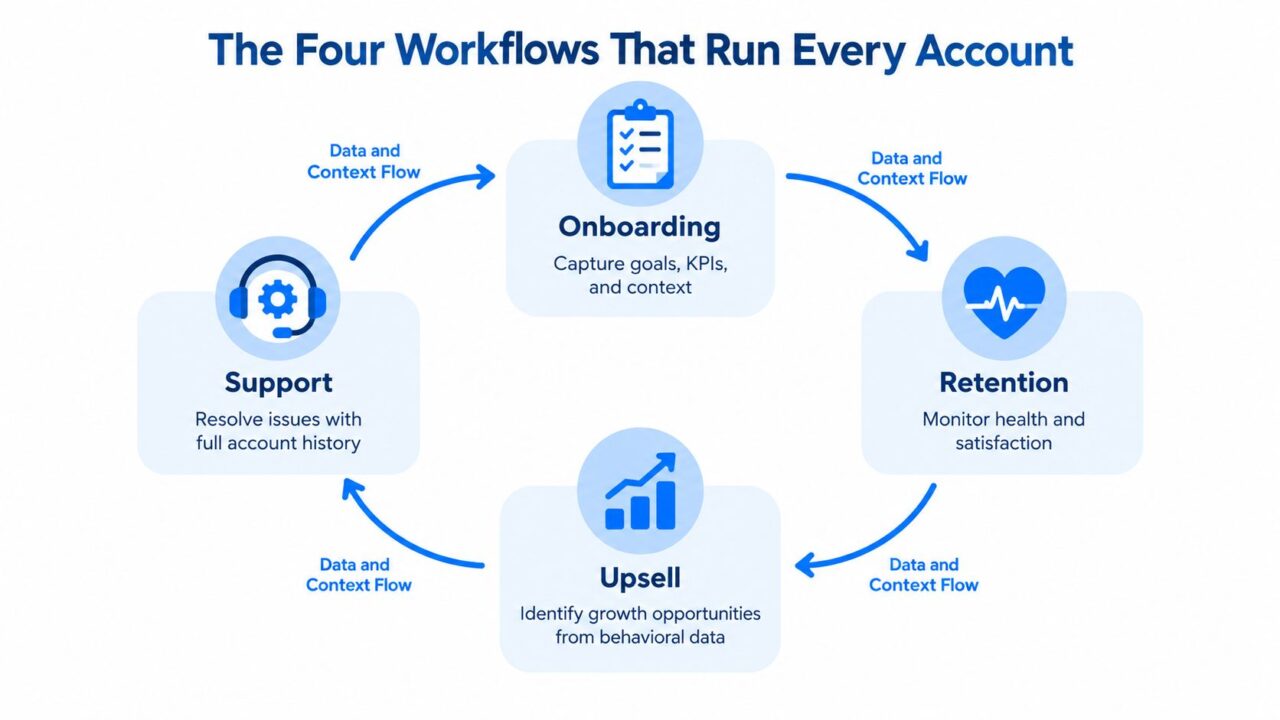
Onboarding, retention, upsell, and support shouldn’t live in separate playbooks. Each produces information that the next workflow needs.
Client Account Management Workflows
Onboarding creates the baseline
A new account needs more than a welcome email. Capture the client’s business goal, success measures, stakeholders, access requirements, preferred communication channel, and first-value milestone. The output should be a kickoff document, an agreed action list, and a complete CRM record.
Branch the process by service tier. A strategic account may need a live workshop and executive alignment. A lower-touch account may use a guided flow, a resource sequence, and a scheduled check-in. The standard can change, but the required information shouldn’t.
For teams hiring outbound support, Hire Appointment Setters offers relevant context on staffing appointment-setting work. Keep that function separate from post-sale ownership, though. A setter can create the opportunity, while the Account Owner turns the opportunity into a managed relationship.
Retention turns activity into health
Retention reviews combine progress against goals, usage, feedback, support history, and stakeholder engagement. A health scorecard should show movement and explain why the status changed.
Useful signals include:
- Feature adoption: Whether the client uses the capabilities tied to the promised outcome.
- Login frequency: Whether engagement is steady, weakening, or increasing in relation to client satisfaction.
- Support volume: Whether tickets indicate normal use or repeated friction.
- Onboarding status: Whether unresolved setup work is blocking value.
- Satisfaction feedback: Whether the decision-maker’s view matches the day-to-day user’s experience.
Dynamic segmentation lets teams trigger different actions for each cohort. This segmentation strategy guide describes signals such as feature adoption, login frequency, ticket volume, onboarding status, and churn risk as practical inputs. A high-usage account with an expansion signal needs a different message from a low-usage account with unresolved support issues.
Upsell follows evidence
An expansion conversation should follow a client milestone to enhance the client relationship, not an arbitrary sales target. Trigger an expansion brief when the client reaches a meaningful usage threshold, completes a milestone, approaches a contract anniversary, or asks for a capability outside the current scope.
The brief should contain the client’s stated goal, evidence of current value, the unmet need, the proposed solution, decision-makers, and delivery implications. That structure protects the relationship because the account manager can explain why the recommendation fits rather than presenting an unrelated offer.
Support closes the loop
Every meaningful ticket should update the account record. Capture the issue, severity, owner, resolution, client sentiment, and whether the problem points to a broader product or delivery concern. The output is an escalation log, not just a closed ticket.
When a renewal arrives, the Account Owner should see the experience, including recurring friction and unresolved dissatisfaction. That context keeps renewal planning honest and gives delivery a chance to fix patterns before they become commercial objections.
KPIs and Reporting Cadences That Keep Accounts Honest
A generic dashboard hides more than it reveals. Measure the account according to its lifecycle stage, then assign each metric a review moment and an owner.
The onboarding view should show whether the client is progressing toward value. Retention reporting should reveal health movement, not merely a current label. Upsell reporting should distinguish genuine client demand from proposals created to fill a pipeline. Support reporting should expose response quality and recurring friction.
| Lifecycle Stage | Primary KPIs | Target | Review Cadence |
|---|---|---|---|
| Onboarding | Time-to-First-Value, kickoff-to-handoff completion, 30-day NPS pulse | Time-to-First-Value under 14 days | Monday standup and onboarding review |
| Retention | Health-score movement, ticket re-open rate, QBR-over-QBR expansion pipeline coverage | Ticket re-open rate under 8% | Friday retention check and monthly account review |
| Upsell | Proposal-to-close conversion, average uplift per account, 90-day product adoption depth | Defined by segment and offer to align with key account strategies. | Monthly pipeline review |
| Support | First-response time, CSAT, deflection rate | Routine response within 24 hours, urgent response within 4 hours | Monday support read and weekly escalation review |
The response benchmarks above come from client communication KPI guidance, which also identifies 80%+ portal adoption within six months as a useful benchmark. If adoption falls below expectations for the key account, immediate action is required. 60%, the organization may be maintaining parallel email and portal workflows that increase process complexity. Treat those values as operating signals, not universal laws.
For a deeper metric framework, use client success metrics to build definitions your team can apply consistently. A health score isn’t useful if one manager updates it from intuition and another uses ticket volume alone.
Clients should see three reports:
- Progress report: Goals, completed work, current outcomes, and next actions.
- Health report: Adoption, satisfaction signals, open risks, and agreed interventions.
- Commercial report: Renewal status, scope decisions, and approved expansion opportunities.
The internal report stays private. It should include candid risk notes, stakeholder influence, margin pressure, delivery concerns, competitive context, and the next intervention. Clients deserve transparency, but internal teams also need a place to discuss uncertainty before converting it into a client-facing statement.
Run a 15-minute Monday standup for onboarding and support. Review health-score drift on Friday. Use a monthly QBR template with trend lines rather than snapshots. The operating rhythm described by account management cadence guidance also supports weekly health checks, monthly account-plan updates, monthly progress data points, quarterly QBRs, and continuous capture of client meetings in the shared record.
Wiring Clepher Into the Operating Model
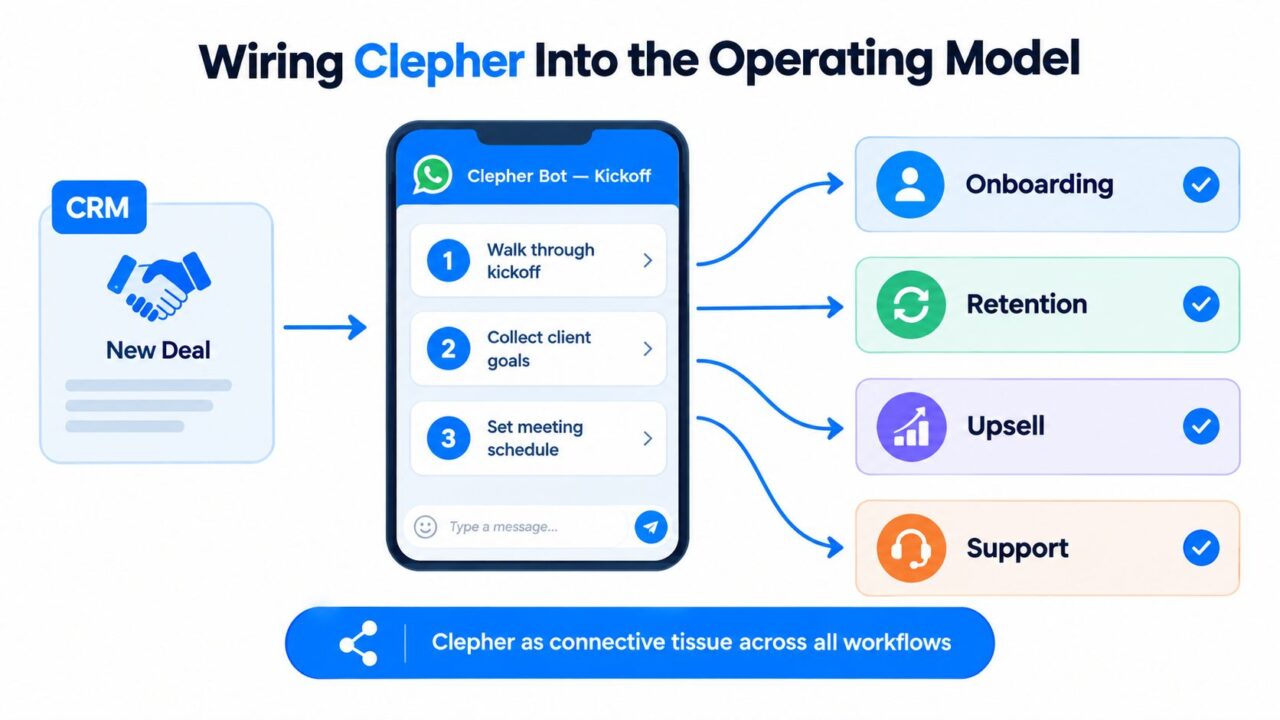
Clepher should sit between the CRM and the client conversation, not replace the account manager. The useful pattern is simple: a CRM event starts a flow, the flow collects structured information, and exceptions move to a human with context attached.
Client Account Management Clepher Automation
Start with the onboarding trigger
Create a WhatsApp bot flow that activates when a new CRM deal reaches the post-sale stage. The flow can walk the client through kickoff steps, collect goals and documents, confirm integration access, and offer meeting times. Branch the sequence by service tier so a strategic account receives a more guided path while a scaled account gets a concise self-service route.
Use custom fields for the information the Account Owner needs later:
- Primary goal: The outcome the client hired you to achieve.
- Success measure: The metric or milestone used in reviews.
- Stakeholders: Economic buyer, daily contact, approver, and escalation contact.
- Access status: Documents, accounts, permissions, and integrations still required.
- Communication preference: Channel, cadence, and escalation expectations are crucial for maintaining client satisfaction.
Don’t let the bot mark onboarding complete because the sequence ended; monitor the customer account for ongoing engagement. Require the CRM handoff to confirm that the kickoff record, access checklist, and first-value milestone are present.
Segment the account book
Create segments based on lifecycle and behavior, not only revenue. Examples include onboarding incomplete, healthy and expanding, declining usage, unresolved support friction, renewal approaching, and executive attention required.
Clepher broadcasts can send weekly performance digests or milestone updates without a manual pull. When a reply contains a renewal risk, pricing question, cancellation signal, or escalation request, route it through Zapier or Make into a private Slack channel for the Account Owner. The handoff should include the account ID, recent message, health status, open tickets, and required response time.
Validate contact data before enrolling people in flows. An Email Validation API for ensuring client satisfaction. can help teams check email addresses as part of a data-quality process, especially when CRM records come from forms, imports, or manual entry.
Connect every system to the record
For agencies, send Clepher events into HubSpot or Pipedrive through Pabbly so conversations attach to the correct contact and account. For in-house teams, use n8n to update Klaviyo profiles and trigger retention journeys based on structured events.
A monthly handoff should compile QBR inputs from support tickets, product usage, satisfaction feedback, and upsell pipeline. The team still interprets the material, but nobody should spend the morning copying it into slides.
Use a CRM and ticketing system when your team needs account context and issue history to remain connected. Before launch, confirm four elements to ensure product or service readiness:
- Bot menu: The questions and actions clients can complete without assistance.
- Segment taxonomy: The tags, lifecycle states, and behavioral conditions used across flows.
- Webhook map: The event sent from each system, its destination, and its required fields.
- Human handoff rules: The exact messages and conditions that stop automation and alert a person.
Two Real Playbooks for Agencies and E-commerce Teams
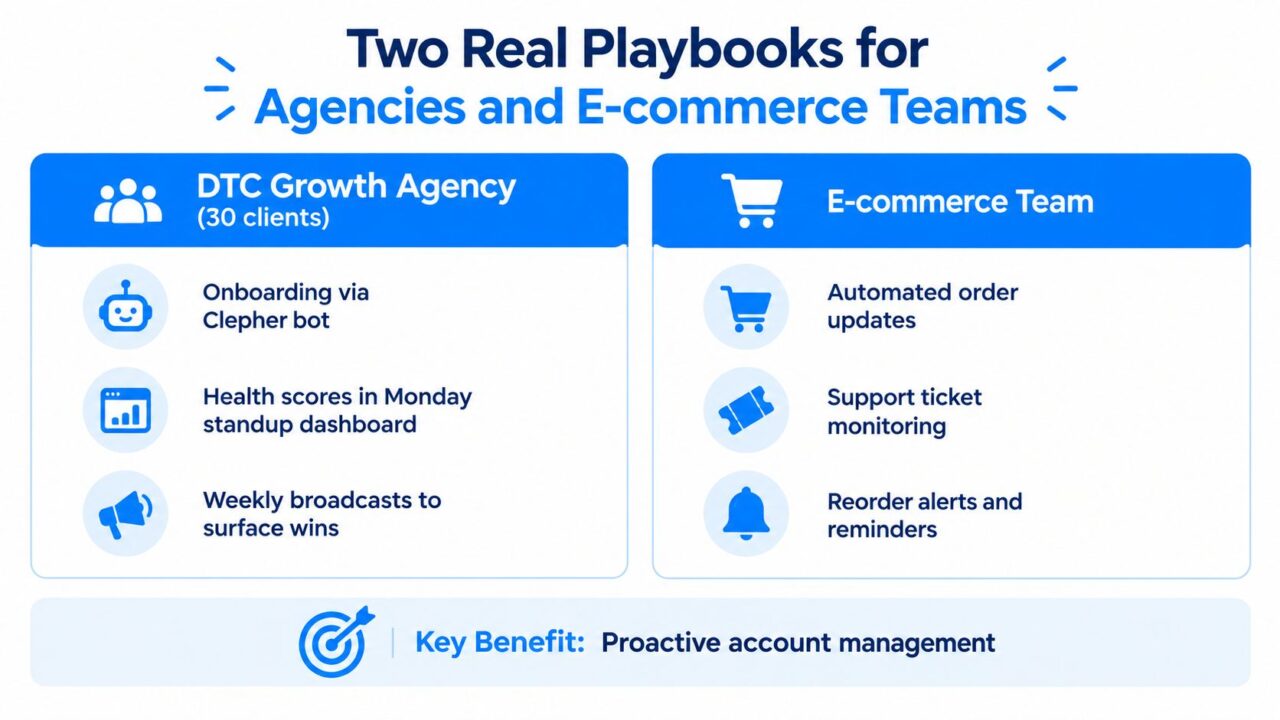
A 30-client DTC growth agency can use the same operating model as an e-commerce team, but the objects differ. The agency manages relationships across multiple logos. The in-house team manages customer journeys across many products, orders, and buying moments.
Client Account Management Business Playbooks
Playbook one for a DTC agency
The agency runs onboarding through a Clepher bot, captures goals and access requirements, and writes the results into the client record. The Monday standup dashboard shows health scores, open escalations, onboarding blockers, and upcoming QBR inputs.
Weekly broadcasts surface wins before the client has to ask. A message might summarize a completed test, a strong creative learning, or a campaign milestone. The account manager owns the relationship and upsell motion, while the agency owner keeps personal control of renewals where commercial trust is especially sensitive.
Red-flag replies route to a private channel with the account history attached. The team can respond quickly because the automation has already identified the issue and assembled the context. The bot doesn’t negotiate scope, defend performance, or answer a frustrated executive. A human does that.
Playbook two for an e-commerce team
An in-house e-commerce team treats account management as lifecycle operations. Clepher can trigger replenishment nudges, VIP early-access broadcasts, and post-purchase support flows. n8n sends structured ticket data back into Shopify tags, giving merchandising a view of recurring sentiment alongside order behavior.
The handoff ownership changes. The lifecycle manager owns the journey. Customer support owns resolution. Merchandising owns product and inventory implications. Marketing owns campaigns, but no one sends an expansion-style message without checking whether the customer has experienced reliable value first.
The agency uses templated QBRs and account health views. The e-commerce team uses templated retention journeys and SKU-level reporting. In both cases, automation handles predictable movement, while humans retain judgment around complaints, exceptions, pricing, scope, and sensitive relationship moments.
Where Account Management Goes Wrong and Your 90-Day Rollout
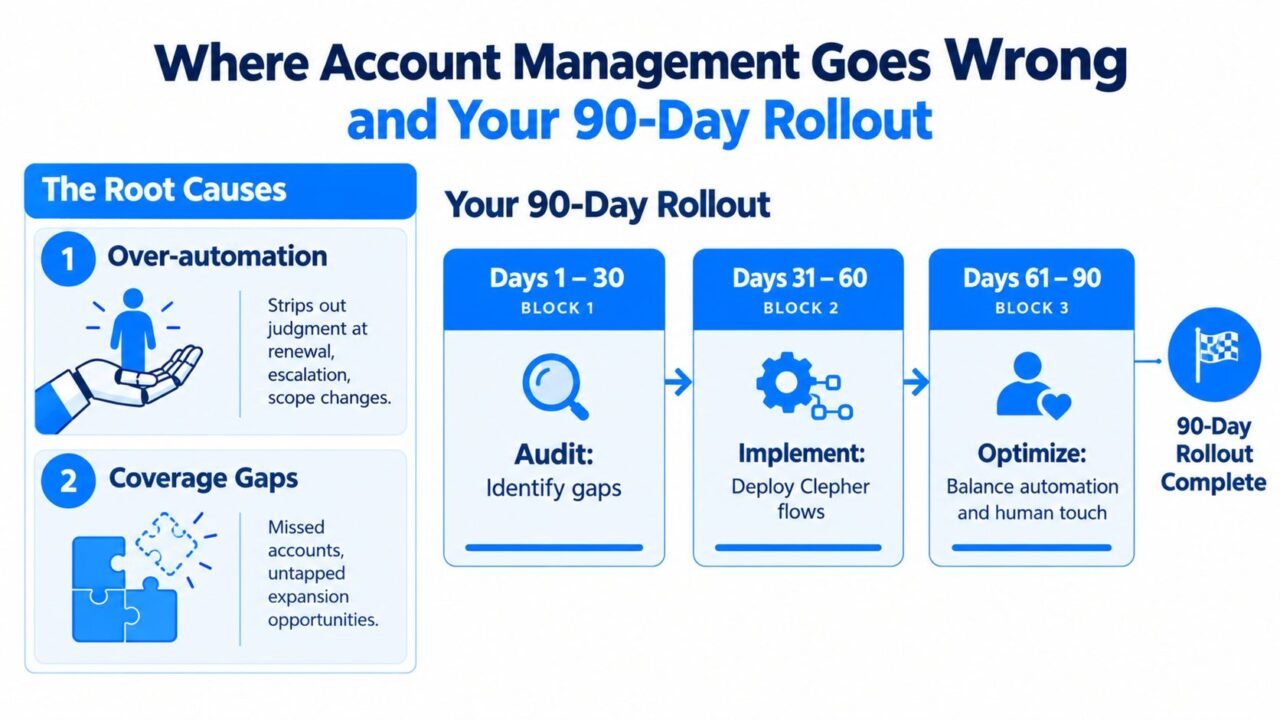
Two problems appear repeatedly when teams scale client account management. The first is over-automation, where a bot sends a polished message at the exact moment a client needs empathy, negotiation, or accountability. The second is a coverage gap, where no one owns the account between scheduled meetings.
Recent analysis from key account management shows promising trends. BCG on distribution and account coverage notes that firms can define segments by size and revenue while leaving much of the client base below the coverage threshold. It also identifies manual workflows, fragmented intelligence, and dependence on individual effort as barriers to timely follow-up and share-of-wallet analysis.
Research also flags over-automation, privacy and compliance risk, and integration complexity as concerns in account management. The CRM market was estimated at $83.0 billion in 2025, with 3.0% year-over-year growth, according to the cited account management trends research. More software won’t fix unclear ownership or poor judgment.
Client Account Management Rollout Strategy
Run the rollout in three blocks to optimize customer account management.
- Days 1 to 15, audit: Name the current owner for every account, map onboarding, retention, upsell, and support on paper, and identify the three most painful handoffs.
- Days 16 to 45, build: Create the Clepher flows, CRM fields, segment taxonomy, escalation routes, templates, and reporting views that address those handoffs.
- Days 46 to 75, pilot for the best account to measure revenue growth. Test the system with five accounts. Measure cycle time, response latency, missing data, false alerts, and client reactions. Adjust triggers before expanding.
- Days 76 to 90, expand: Apply the model across the full book, formalize the cadence calendar, and assign an owner for monthly review.
Retention also needs management structure. A documented complaint process, a clearly responsible retention person or group, a formal retention plan, and budgeted retention activities are distinct processes identified in research on customer retention management. Don’t target every at-risk customer identically. Retention management research distinguishes customers likely to churn from customers worth prioritizing for intervention.
By the end, every account should have a documented owner, every workflow should have a defined trigger, and every renewal should have a 60-day runway. Clepher should automate the reminders, data collection, routing, and summaries. Your team should reserve human attention for the moments where trust and judgment decide the outcome.
Clepher gives teams a no-code way to build conversational flows, segment audiences, send broadcasts, and connect client conversations with CRM and support systems. Visit Clepher to map your onboarding, retention, upsell, and support triggers into an operating model your account team can run consistently.
