
44% of subscription cancellations happen within the first 90 days, according to SundaySky’s customer onboarding statistics roundup. That number changes how you should think about onboarding.
If you’re still treating onboarding like a welcome email, a product tour, or a checklist someone gets around to later, you’re missing its essential purpose. Onboarding is the first serious conversion event after the sale. It’s where customers decide whether your product fits into their workflow, whether your team is easy to work with, and whether the promised outcome is attainable.
The practical question isn’t “Did we onboard them?” It’s “Did they get to value fast enough to stay?”
What Customer Onboarding Really Means
Analysts cited earlier found that a large share of subscription churn happens in the first 90 days. That is why onboarding deserves to be treated as a revenue event, not an administrative task.
Customer onboarding is the process of getting a new buyer to first value, repeat value, and a clear path to long-term adoption. It includes setup, training, expectation setting, support, and coordination across teams. The job is not to “welcome” the customer. The job is to convert a purchase into active usage that holds up at renewal.
That distinction matters.
A closed deal can still fail fast. Finance records the revenue, sales move on, and the customer is left trying to configure the product, import data, align stakeholders, and figure out what success should look like. If that work stalls, retention risk starts on day one.
Onboarding is the first post-sale conversion event
Pre-sale conversion gets attention because it is visible. Teams measure ad performance, demo-to-close rate, and pipeline velocity with discipline. Post-sale conversion often gets less rigor, even though it has a bigger effect on expansion, renewals, and referrals.
In practice, onboarding answers one question: can this customer get an outcome fast enough to justify the decision they just made?
For a SaaS company, that may mean connecting data sources, inviting the right users, and reaching the first useful report. For a service business, it may mean gathering intake details, confirming ownership, and getting the first deliverable out without delays. In both cases, the risk is the same. Customers do not stay because implementation tasks were completed. They stay because the product or service starts solving the problem they paid to solve.
Practical rule: Onboarding is not done when the checklist is done. It is done when the customer can use the product in a way that produces a real result.
Good onboarding changes by customer type
One of the fastest ways to lose a new account is to give every customer the same onboarding path.
A solo user buying a simple tool needs speed and clarity. A multi-seat B2B account needs stakeholder alignment, role-specific training, and tighter project management. A tutoring business needs records, communication, scheduling context, and admin workflows that staff can use every day. That is why products that show teams how to manage tutoring students and parents play a direct role in onboarding success. Value shows up when the workflow works under real operating conditions.
Strong teams build onboarding around the customer’s use case, complexity, and expected time-to-value. Weak teams build it around internal handoffs.
What onboarding is not
Poor onboarding usually breaks in familiar ways:
- Feature-first delivery: The customer gets a tour of the product instead of guidance toward one useful outcome.
- Company-centered sequencing: Steps follow internal process, not customer urgency.
- Early handoff gaps: Sales, implementation, and support each own part of the experience, but no one owns the result.
- One-size-fits-all flows: High-complexity accounts and simple self-serve users get pushed through the same motions.
Good onboarding starts with the promised outcome and works backward from there. If the customer bought to save staff time, reduce manual work, improve reporting, or launch faster, the first steps should support that goal directly. That is where automation also starts to matter. Used well, it removes repetitive friction, triggers the right next action, and gives teams more time for the accounts that need human guidance.
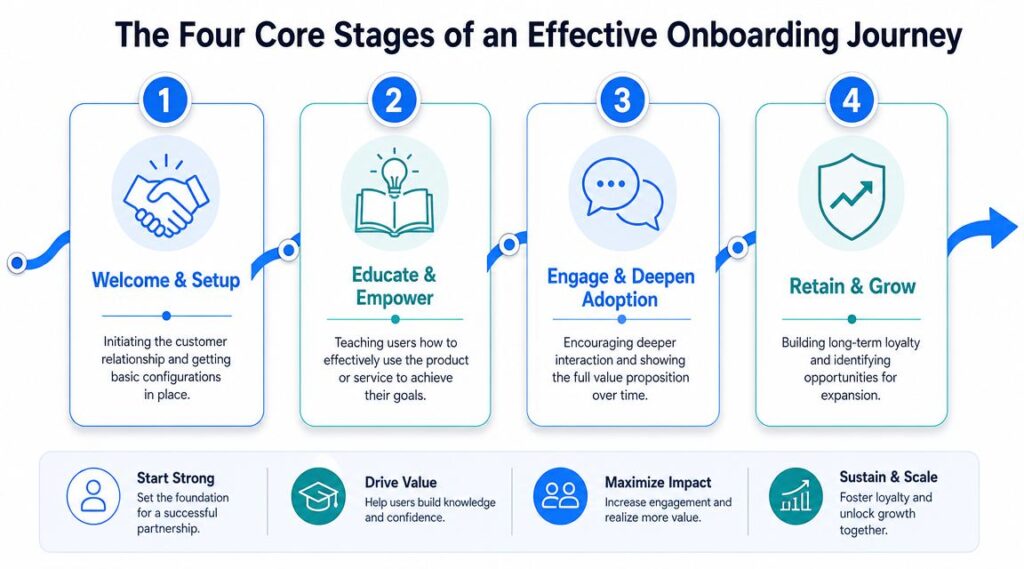
The Four Core Stages of an Effective Onboarding Journey
A strong onboarding process feels less like handing someone a map and more like guiding them along a path. Every stage has a different job. If you skip one, customers either stall early or never deepen adoption later.
Customer Onboarding Process
Welcome and setup
This stage is about orientation, not overload.
The customer needs to know three things quickly. What happens next, what success looks like, and what they need to do first. If those answers aren’t obvious, confusion starts before the product has a chance to prove itself.
For a SaaS product, this might include creating the account, connecting a data source, assigning user roles, or importing contacts. For a service business, it might mean collecting intake details, confirming the kickoff timeline, and establishing the main communication channel.
What works here:
- Clear next actions: Give customers one immediate task, not ten.
- Expectation setting: Tell them what will happen in the first few days.
- Friction removal: Reduce form fields, manual steps, and dependency bottlenecks.
What doesn’t work is burying the customer under documentation before they’ve done anything useful.
Educate and empower
Now the customer needs guided learning tied to real use cases. The goal is not broad product knowledge. The goal is early competence.
If you’re onboarding an e-commerce brand into a messaging tool, don’t start by explaining every automation branch available. Start with one high-value flow, such as a welcome sequence or abandoned cart follow-up. If you’re onboarding an agency client, teach the workflow they need for account setup, approvals, and reporting.
This stage should answer one question: how does the customer achieve the first meaningful win?
Most onboarding content fails because it explains the product before it explains the job the customer is trying to get done.
Engage and deepen adoption
Once the customer sees initial value, expand usage with purpose.
Many teams either disappear too early or push advanced features too soon. The better approach is to deepen adoption around adjacent wins. A project management customer who has created one board may need templates next. A chatbot customer who launched a welcome flow may be ready for segmentation, live chat handoff, or follow-up campaigns.
Useful tactics at this stage include:
- Role-based guidance: Show marketers, operators, and admins different next steps.
- Behavioral prompts: Trigger outreach when a key action is completed or missed.
- Milestone recognition: Mark progress so customers feel momentum.
Retain and grow
Onboarding should end in a stable operating rhythm, not in silence.
The final stage is the handoff from activation to ongoing success. The customer should know where to get help, what “good usage” looks like, and what the next milestone matters for their account. This is also where expansion becomes natural. Upsell pressure here usually backfires. Outcome-based guidance works better.
A customer is fully onboarded when they can use the product with confidence, explain its value internally, and continue without heavy intervention.
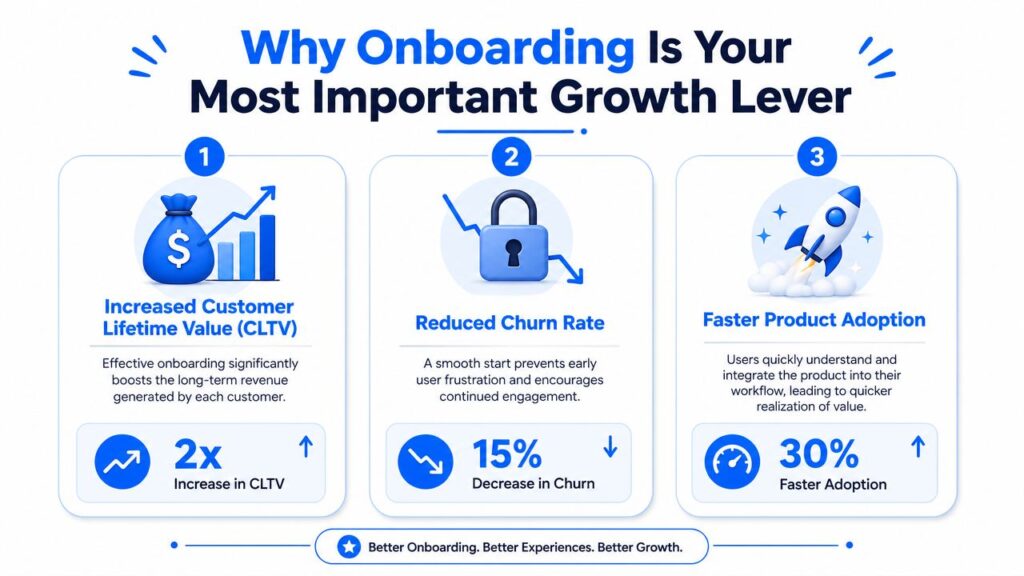
Why Onboarding Is Your Most Important Growth Lever
Many companies still budget onboarding like support. That view is too narrow. Onboarding influences retention, expansion, support load, and customer advocacy long before those outcomes show up in quarterly reporting.
Customer Onboarding Growth Lever
Loyalty starts early
The strongest business case for onboarding is simple. Customers judge your business after they buy, not just before.
Custify’s onboarding and retention statistics report that 86% of customers are more likely to stay loyal to a business that offers welcoming and educational onboarding content, and 63% consider the onboarding period when deciding whether to subscribe. That means onboarding affects both retention and purchase confidence. It sits close to revenue, not far away from it.
If your onboarding is messy, customers don’t separate that experience from the product itself. They treat setup friction, missing guidance, and slow support as part of what they bought.
The ROI shows up in several places
Onboarding pays back in ways operators can see:
- Better activation: More customers start using the product in a meaningful way.
- Lower support strain: Fewer basic tickets come in when the setup is clear.
- Deeper feature usage: Customers discover workflows that make the product stickier.
- Stronger renewals: Teams are less likely to question the purchase when value is visible.
- Cleaner expansion paths: It’s easier to introduce add-ons once the foundation is solid.
None of this requires a grand redesign. In practice, teams often get meaningful improvement by fixing just a few points of friction. A missing setup checklist, poor integration instructions, or unclear ownership between sales and customer success can gradually damage retention.
Why onboarding beats late-stage rescue
A lot of businesses spend more time trying to save unhappy customers than preventing the early problems that created the risk. That’s backward.
When a customer is already disengaged, every intervention is harder. Stakeholders are skeptical. Usage is low. Internal champions are quiet. Trust has slipped.
Operator’s view: Preventing confusion in week one is cheaper than repairing disappointment in month three.
This is why onboarding deserves executive attention. It connects promise to proof. If your product makes money over time, then the process that gets customers to first value is one of the most important growth systems in the company.
The Onboarding KPIs You Absolutely Must Track
If you can’t see where customers stall, you can’t improve onboarding in a serious way. The core metrics aren’t complicated, but they need to answer real operational questions.
Gainsight’s guidance on customer onboarding puts time to first value at the center. That’s the right starting point because onboarding exists to shorten the gap between purchase and first meaningful outcome.
Time to first value
Time to first value tells you how long it takes a customer to experience the first result that matters to them.
That result will differ by product. For a support platform, it may be resolving the first customer conversation. For an email or messaging tool, it may be launching the first live campaign. For a tutoring platform, it might be scheduling students and communicating with parents without manual back-and-forth.
If this metric is long, onboarding probably has one of these problems:
- Too many setup dependencies
- Weak guidance on first steps
- Poor data migration or integration flow
- No clear definition of the first success event
Completion rate and feature adoption
Completion rate sounds basic, but it exposes whether customers are finishing the path you’ve designed. If people consistently stop midway, your sequence is either too long, too confusing, or asking for tasks in the wrong order.
Feature adoption adds another layer. It shows whether customers are using the capabilities tied to retention. The point isn’t to maximize clicks across every feature. It’s to identify whether customers adopt the few workflows that make the product indispensable.
A good KPI review asks:
- Which onboarding steps have the biggest drop-off?
- Which features correlate with healthy usage?
- Which customer segments need a different path?
Teams building a measurement framework can use a broader set of client success metrics to connect onboarding signals with long-term account health.
Early support volume
Support tickets during onboarding are one of the clearest friction indicators. A rising volume of basic questions usually means your process isn’t carrying enough of the educational load.
Track what customers ask in the first phase, not just how many tickets they submit. Repeated questions about setup, login access, imports, integrations, or role permissions usually point to fixable onboarding design issues.
A ticket tagged “how do I start?” is often a process failure, not a support failure.
The simplest dashboard is often the most useful. Track time to first value, onboarding completion, feature adoption, and early support volume together. That combination shows speed, progress, engagement, and friction in one view.
Onboarding Best Practices Versus Common Pitfalls
Most onboarding problems aren’t mysterious. Teams either ask customers to do too much too soon or give too little direction when customers need it most.
The better approach is to make a series of deliberate choices. What should be automated? Where does a human need to step in? Are you onboarding one user or an entire team? Those decisions shape the whole experience.
Do this
A strong onboarding process usually includes these practices:
- Personalize the path: Segment by customer type, goal, and complexity. A solo creator and a multi-seat SaaS buyer shouldn’t get the same sequence.
- Define one early win: Make the first milestone obvious and useful. Customers need momentum before they need mastery.
- Use proactive check-ins: Reach out when activity stalls, setup breaks, or a key step is skipped.
- Teach in context: Put help where the customer is working. Long help docs are useful later, not as the main onboarding engine.
- Celebrate progress: Completion messages, milestone emails, and simple status tracking reduce drop-off by making progress visible.
Avoid this
The same mistakes show up again and again:
- Front-loading information: If you explain everything up front, customers remember very little.
- One-size-fits-all flows: A generic path usually serves nobody well.
- No owner: When sales, support, and customer success all assume someone else is driving onboarding, customers feel the gap.
- Confusing setup with success: Technical completion isn’t the same as customer value.
- Delayed intervention: Waiting for a customer to complain means you’ve already lost time and trust.
Choosing your onboarding model
WalkMe’s customer onboarding overview highlights an important distinction. Customer onboarding for a whole company is more relational and often needs a different approach than user onboarding for an individual, which can often be more automated. That’s the practical reason to choose the right model instead of forcing every account through the same playbook.
| Model | Best For | Key Activities | Primary Channel |
|---|---|---|---|
| High-touch | Complex products, larger accounts, team-based rollouts | Kickoff calls, implementation planning, training sessions, stakeholder alignment | Live meetings, email, shared workspace |
| Low-touch | Mid-complexity products and customers who need some guidance but not full service | Scheduled check-ins, templated training, milestone emails, and office hours | Email, chat, webinars |
| Tech-touch | Self-serve products, individual users, and smaller accounts | Interactive tours, automated messages, setup checklists, help center prompts | In-app guidance, chatbot, and email |
If you want more tactical examples of how these approaches work in SaaS, this roundup of SaaS onboarding best practices is a useful companion.
A practical decision rule
Choose the model based on risk and complexity.
If onboarding requires data migration, stakeholder alignment, custom configuration, or process change, use more human support. If the product is intuitive and the first win is easy to reach alone, automate aggressively.
What fails is the mismatch. High-touch for a simple product wastes resources. Pure self-serve for a complicated implementation creates avoidable churn.
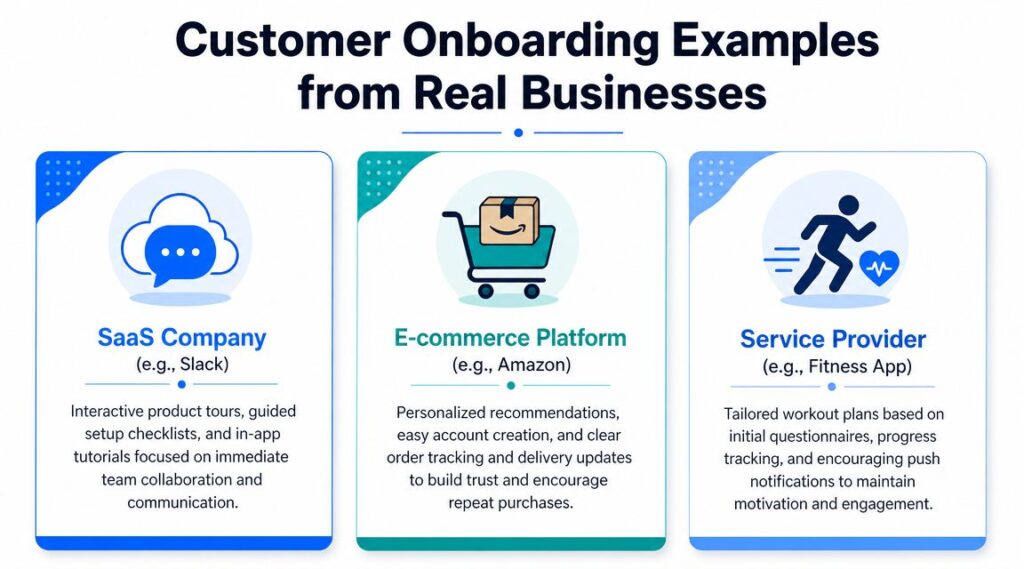
Customer Onboarding Examples from Real Businesses
Theory helps. Operational examples help more.
Customer Onboarding Examples
SaaS company
A team collaboration platform selling into small companies usually doesn’t need a heavy implementation process. But it does need to get users collaborating quickly.
A practical onboarding flow starts with workspace creation, team invites, and one guided action that proves value fast, such as assigning a task or starting a shared thread. The mistake would be teaching every setting, permission, and integration before the team has even used the product together once.
What works is a short checklist, in-app prompts, and follow-up emails based on whether the team completed the first collaborative action.
E-commerce brand
For a DTC brand, onboarding isn’t about software setup. It’s about turning a first purchase into trust and repeat behavior.
A solid post-purchase onboarding experience includes order confirmation, shipping visibility, product usage guidance, and fast answers to common questions. If the product needs assembly, care instructions, or fit guidance, that information should arrive before confusion turns into returns or support frustration.
The wrong move is treating the transaction as complete the moment the payment clears. The right move is to use onboarding to reassure the buyer, reduce uncertainty, and prompt the second purchase.
Service provider or course creator
For coaches, agencies, and course sellers, onboarding needs to organize both expectations and accountability.
A new client should know what happens first, what materials they need to submit, how communication works, and what milestone marks early success. A course creator might begin with a short intake form, a recommended lesson path, and reminders tied to progress. A fitness app might use a questionnaire to shape a starting plan and then support momentum with regular prompts.
The best onboarding examples don’t feel elaborate. They feel obvious, timely, and easy to follow.
Across these business types, the common pattern is simple. Reduce uncertainty, guide the first win, then build deeper engagement from there.
How to Automate Onboarding with AI Chatbots
Automation works best when it removes waiting, not when it removes care.
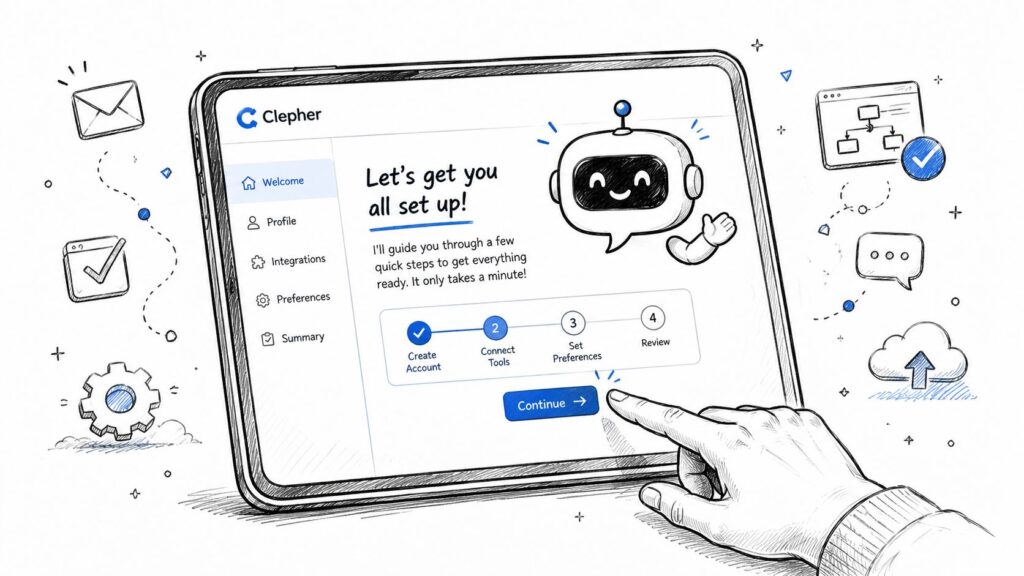
Clepher Onboarding
A good AI chatbot can handle the repetitive parts of onboarding that slow customers down. That includes welcome messages, setup guidance, FAQ handling, reminders, and branch logic based on what the customer has or hasn’t done. For businesses onboarding users through web chat, Messenger, Instagram, or WhatsApp, this creates a faster first response and a more consistent path.
What chatbots should automate
The strongest chatbot onboarding flows usually cover:
- Initial welcome: Confirm what the customer signed up for and direct them to the first task.
- Setup navigation: Walk them through account configuration one step at a time.
- Common question handling: Answer routine onboarding questions before frustration builds.
- Behavior-based nudges: Remind customers when a critical action is incomplete.
- Feedback capture: Ask where they got stuck and route issues to a human when needed.
One practical option for this is an AI chatbot for customer support. Clepher supports automated conversational flows across website chat and messaging channels, which makes it usable for onboarding sequences as well as support follow-up.
Automation still needs boundaries. Don’t force a bot to handle edge cases that need human judgment, especially in complex onboarding. Use it to accelerate the standard path, then escalate exceptions cleanly.
The advantage isn’t just labor savings. It’s response speed, consistency, and the ability to help every new customer take the next step without waiting for business hours.
If you want to turn onboarding into a repeatable system instead of a manual scramble, Clepher gives you a no-code way to build automated conversations for welcome flows, setup guidance, support questions, and follow-up across your website and messaging channels.

Related Posts
Client Account Management: A Practical Playbook
October 13, 2026Chat Bot Responses That Convert: A Practical Guide
October 12, 202610 Broadcast Automation Software Platforms Compared
October 11, 2026
Founder Clepher