
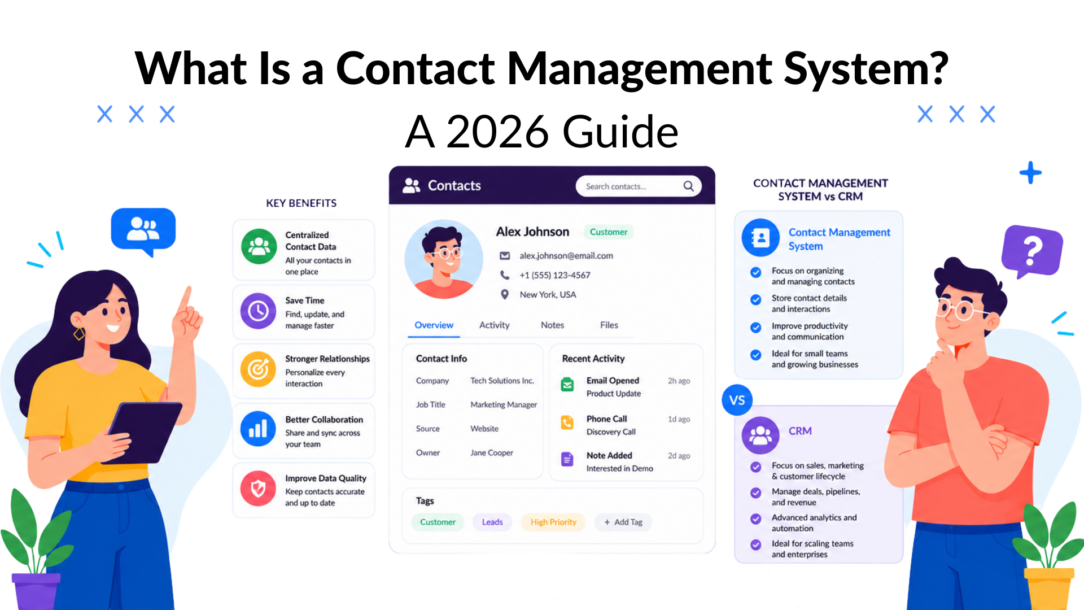
Customer data is no longer a back-office detail. The global CRM market, which includes contact management, was valued at $65.59 billion in 2023, and the contact management system market is projected to reach $2.73 billion in 2026, according to Infinity Group’s CRM market overview. That tells you something important. Businesses aren’t spending on contact management software because they like admin. They’re spending because clean, centralized contact data drives sales, service, and retention.
A contact management system used to sound like a basic utility. Today, it sits much closer to revenue. It decides whether your team sees the full customer story or just fragments. It determines whether a follow-up happens on time, whether a lead gets routed correctly, and whether your messaging feels personal or careless.
For marketers, founders, agencies, and support teams, the essential shift is this. A contact database is no longer the end product. It’s the operating layer underneath automation, segmentation, and conversational marketing.
Why Your Messy Spreadsheet Is Costing You Sales
Most businesses don’t lose opportunities because nobody cared. They lose them because contact data lives in five places at once.
A lead fills out a form. Someone replies from a personal inbox. Support gets a message on Instagram. Sales logs half the details in a spreadsheet. Marketing tags the same person differently inside another tool. Nobody sees the whole thread, so the next message is late, generic, or redundant.
That’s where revenue starts leaking.
Where the mess shows up
The problem usually looks harmless at first:
- Spreadsheets as the main database: one tab for leads, one for customers, one for “follow up soon”
- Inbox-driven memory: reps rely on email search instead of a shared history
- Channel silos: website forms, Messenger, Instagram, and support chats all capture contact details separately
- Manual handoffs: one person copies details into another system, often incompletely
- No ownership rules: nobody knows who should update records or when
A spreadsheet can hold names. It can’t reliably hold context.
When a team works this way, small errors stack up fast. A prospect gets two outreach messages from different people. A support rep asks for information the customer already shared yesterday. A warm lead goes cold because no reminder fired. Teams then try to fix the chaos with more manual work, which creates even more inconsistency.
Practical rule: If your team has to ask “Has anyone already spoken to this person?” more than once a day, you don’t have a contact process. You have a visibility problem.
Why this matters now
The market numbers above are a signal that centralizing customer data has become operationally important, not optional. Businesses are investing because contact data now feeds automation, routing, and personalized follow-up across the whole customer journey.
If you’re still coordinating customer relationships through spreadsheets and inboxes, start by removing repetitive admin and handoff work. A useful place to begin is this guide on how to automate repetitive tasks.
A contact management system fixes the root issue. It gives your team one reliable record for each person, one history of interactions, and one place to act from.
What Exactly Is a Contact Management System
A contact management system is the part of your customer stack that stores, organizes, and updates information about the people your business interacts with. Think of it as a smart digital filing cabinet, but one that doesn’t just hold names and phone numbers. It also holds context.
That context is what makes it useful. The system can include communication history, notes, preferences, purchase details, task reminders, and status changes. Instead of a flat contact list, you get a living record that multiple teams can use.
More than a digital address book
The idea has been around for a long time. Contact management traces back to database marketing in the 1950s and 1960s, then became widely accessible with software like ACT! in 1986, which functioned as a digital Rolodex for customer details, as described in this history of CRM and marketing automation.
That history matters because it explains the shift. Early systems were built to store contact details. Modern systems are built to support coordinated action across sales, support, and marketing.
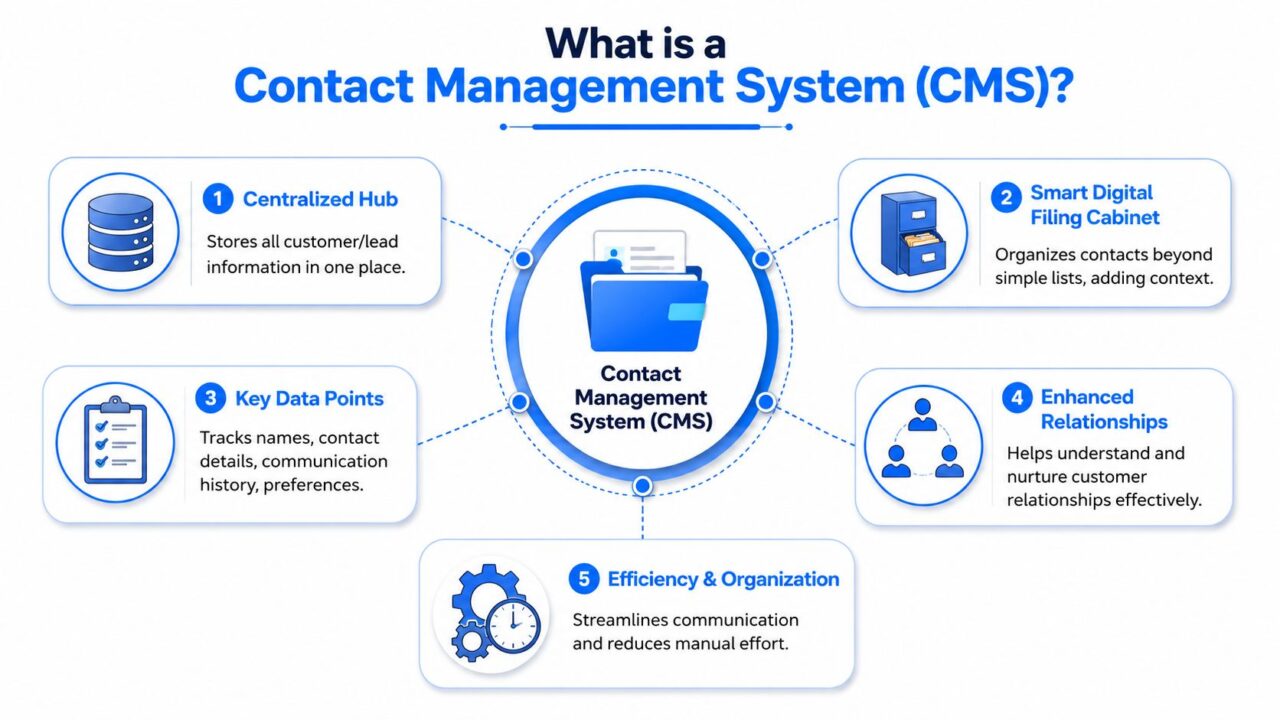
Contact Management System Infographic
What a good system actually does
A strong contact management system gives you a single source of truth for every person in your database. That means:
- Identity stays consistent: one person should exist as one record, not three near-duplicates
- History stays visible: everyone can see prior messages, notes, and actions
- Fields stay usable: names, emails, tags, statuses, and consent details follow a common format
- Teams stay aligned: marketing, sales, and support work from the same record instead of recreating it
Here’s a simple example. A local fitness studio gets a lead from Instagram, then later gets a website inquiry from the same person using a slightly different email. In a weak setup, those become two contacts. In a good system, they’re matched, merged, and enriched into one profile. Now the studio knows this isn’t a cold lead. It’s a returning prospect who has already asked about pricing.
A contact management system doesn’t just help you remember who someone is. It helps your whole team remember what happened, what matters, and what should happen next.
That’s the core purpose. Not storage. Shared memory.
Core Features That Transform Your Workflow
Features matter only if they remove friction. A contact management system earns its place when it helps teams act faster, with fewer mistakes and better context.
The features that pull the most weight
-
Centralized contact records: Store names, phone numbers, email addresses, communication history, and related notes in one place.
Why it matters: your team stops hunting through inboxes and tabs before every reply. -
Interaction tracking: Log calls, emails, chats, form fills, and follow-up activity against the contact record.
Why it matters: sales and support can pick up a conversation without asking the same question twice. -
Task and follow-up management: Attach reminders, next steps, and ownership to a record.
Why it matters: warm leads don’t disappear just because somebody got busy. -
Search and filtering: Find contacts by tag, source, status, product interest, or lifecycle stage.
Why it matters: segmentation becomes operational, not theoretical. -
Custom fields: Add fields for what your business needs, such as plan type, location, referral source, or service category.
Why it matters: you stop cramming useful data into note fields where nobody can use it later. -
Email and calendar integration: Connect communication and scheduling to the contact record.
Why it matters: the system reflects real activity instead of becoming another tool people forget to update.
What these features change day to day
The biggest improvement isn’t usually speed alone. It’s decision quality.
If a sales rep sees that a lead downloaded a pricing guide, asked a product question, and missed a scheduled demo, the next outreach can be specific and relevant. If a support agent sees that a customer recently upgraded, they can answer with the right level of urgency and context. If a marketer knows which contacts came from a webinar versus a checkout flow, campaigns can match intent.
A weak system captures data. A strong one makes data usable. This is really the dividing line between basic contact management tools and the best contact management software: the basic version stores the record, the better version surfaces the moment that record actually matters.
The hidden feature that matters most
Architecture and data discipline don’t get marketed well, but they affect everything. A review of CRM architecture notes that scalable systems depend on layered design and clean separation between data storage, business logic, and user interaction, while implementation guidance stresses unified standards, validation, and integration readiness in this CRM architecture paper.
That matters in practical terms because contact quality depends on more than a nice interface. It depends on:
- Validation rules that stop bad entries
- Deduplication logic that prevents record sprawl
- Entity resolution that helps unify the same person across tools
- Auditability so teams can trust what changed and why
If those pieces are weak, your automation inherits the mess.
Contact Management vs CRM: The Real Difference
A lot of teams buy the wrong tool because they treat contact management and CRM as interchangeable. They’re related, but they aren’t the same thing.
A good way to think about it is this. Contact management handles the who. CRM handles the whole relationship process.
According to Salesforce’s contact management overview, contact management is a subset of CRM focused on recording contact details and tracking interactions, while full CRM extends into the full customer lifecycle with capabilities like pipeline management and marketing automation.
The practical difference
If your immediate problem is scattered customer records, duplicate contacts, and missed follow-ups, you need strong contact management first.
If your business also needs deal stages, forecasting, campaign workflows, service processes, and coordinated lifecycle reporting, you’re in CRM territory.
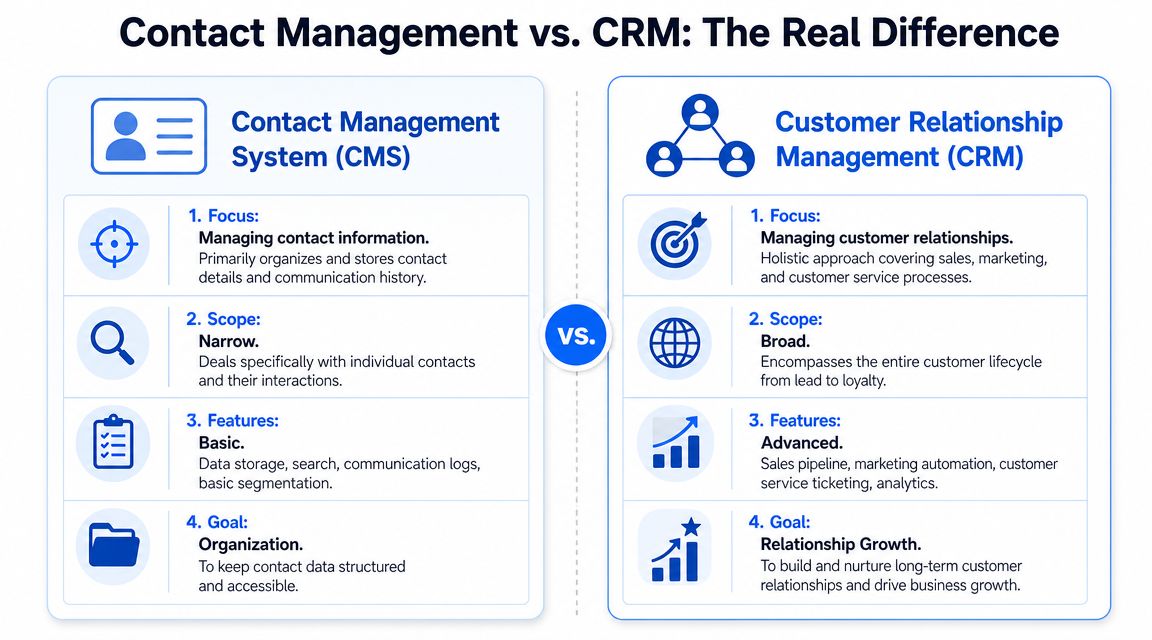
Contact Management System CRM Comparison
Contact Management vs. CRM at a Glance
| Aspect | Contact Management System | Customer Relationship Management (CRM) |
|---|---|---|
| Primary focus | Organizing contact details and interaction history | Managing the broader customer lifecycle |
| Core question | Who is this person and what has happened so far? | What stage is this relationship in and what should happen next? |
| Typical users | Sales reps, support teams, marketers, founders, admins | Sales, marketing, support, and leadership teams |
| Main workflows | Contact storage, notes, reminders, segmentation | Pipeline, lifecycle automation, campaign management, reporting |
| Complexity | Lower to moderate | Moderate to high |
| Best fit | Teams fixing data chaos and follow-up gaps | Teams coordinating multiple departments and processes |
What businesses usually get wrong
Some teams jump straight into a full CRM before they’ve established clean contact records. That usually backfires. If the contact layer is unreliable, the pipeline layer won’t save you. Forecasts become questionable. Automation routes the wrong people. Reports look polished but reflect bad inputs.
Other teams stay too long in lightweight tools because they’re trying to avoid complexity. That also has a cost. Once multiple channels, teammates, and handoffs are involved, simple lists stop being enough.
Decision shortcut: If your biggest pain is “we don’t have one clean record per person,” fix contact management first. If your biggest pain is “we can’t coordinate the full customer journey,” you need CRM capabilities built on top of it.
If you’re evaluating systems that combine customer records with broader service workflows, a useful reference point is this overview of a CRM and ticketing system.
How Different Businesses Win with Contact Management
The value of a contact management system shows up differently depending on the business model. The core benefit stays the same. One person, one record, one shared history. The workflow around it changes.
E-commerce brands
An online store gets a product question through Instagram. The same shopper later starts checkout, abandons the cart, and then contacts support about shipping. Without a unified record, those look like separate moments.
With contact management in place, the store can tie those interactions together. The support team sees product interest. Marketing sees purchase intent. The next message doesn’t sound random. It sounds like a continuation of the same conversation.
That’s how brands move from generic blasts to relevant follow-up.
Agencies managing multiple clients
Agencies deal with two kinds of contact chaos. Their own sales pipeline, and the contacts they manage for clients.
A contact management system helps separate those worlds cleanly. Agency teams can organize prospects, client stakeholders, campaign contacts, and platform conversations without mixing records or losing context. When an account manager takes over from sales, they don’t need a handoff document to understand the relationship. The history is already there.

Contact Management System Business Wins
Coaches and course creators
For coaches, consultants, and digital educators, the contact record often matters more before and after the sale than during it.
Someone might download a lead magnet, reply to a workshop invite, ask about pricing, and then join a program months later. If those touchpoints aren’t stitched together, the business treats a warm, informed lead like a stranger every time.
A solid system lets the creator track:
- Engagement history: webinar attendance, replies, form submissions
- Offer interest: what they asked about or clicked on
- Client context: stage, goals, or prior purchase
- Follow-up readiness: whether they need nurture, onboarding, or retention messaging
SaaS and subscription businesses
SaaS teams live on handoffs. Marketing captures the lead. Sales qualifies it. Customer success onboards it. Support handles issues. If each team stores contact information differently, the customer experience becomes disjointed fast.
A contact management system reduces that fragmentation. The onboarding team can see what was promised during the sales process. Support can see account status and prior onboarding notes. Expansion conversations happen with real context instead of guesswork.
Local businesses
Local service businesses often underestimate how much value is trapped in past conversations. A salon, clinic, gym, or home service company may already have the lead sources, referral notes, and service history needed to run better follow-up. They just don’t have it in one place.
That’s where even a straightforward contact system can create immediate clarity. Staff can identify repeat inquiries, see who asked for a quote but never booked, and recognize returning customers when they message again.
The businesses that get the most out of contact management aren’t always the biggest. They’re the ones that stop treating customer data like scattered notes and start treating it like an operating asset.
Choosing and Implementing Your First System
Buying software is the easy part. Getting a clean, trusted contact database is the primary project.
Most implementation problems come from rushing imports, skipping cleanup, and assuming users will all enter data the same way. They won’t. Without standards, the system starts decaying on day one.
What to ask before you choose
Use these questions to evaluate any contact management system:
- Can it import your current data cleanly? You want flexible import options, field mapping, and a clear way to test before moving everything over.
- Does it integrate with the tools you already use? Website forms, email, chat, support, commerce, and ad lead sources should feed the system without constant manual copying.
- How does it handle duplicates? This matters more than flashy dashboards.
- Can you customize fields without breaking usability? Too rigid, and teams work around the system. Too loose, and data quality collapses.
- Does it support permissions and ownership? Teams need clarity on who can edit, merge, assign, or archive records.
- Will people use it? If the interface slows down daily work, adoption drops and your “system of record” turns into another partial database.
What implementation should look like
A good rollout usually follows this sequence:
-
Audit your current data
Pull records from spreadsheets, inbox exports, forms, and existing tools. Identify overlap, missing fields, and obsolete contacts. -
Define your core fields
Keep this practical. Name, primary contact method, source, status, owner, last interaction, and any business-specific fields you truly use. -
Set rules before import
Decide formatting standards, naming conventions, owner logic, and what counts as a duplicate. -
Import in phases
Start with a sample. Check matching, field mapping, and team usability before a full migration. -
Train for workflow, not just clicks
Show staff when to update a record, what must be logged, and what happens if they skip it.
A critical implementation issue is data trust. As Nextiva’s contact management guidance notes, teams need rules for preventing duplicates, resolving conflicting information, and managing consent so one person remains a unified record across the stack. Without that governance, automation and personalization break down.
What works and what fails
Here’s the trade-off often discovered late.
| Approach | What happens |
|---|---|
| Import everything fast | You get quick setup and long-term confusion |
| Clean data before rollout | Setup takes longer, but adoption is stronger |
| Let every team invent fields | The database becomes inconsistent |
| Standardize key fields early | Reporting and routing stay usable |
| Rely on memory for consent and source | Compliance and personalization become risky |
| Store consent and source in the record | Teams can act with more confidence |
Clean contact data is a process, not a one-time migration.
If your team treats implementation as “load the CSV and move on,” you’ll rebuild the same mess in a nicer interface.
Supercharge Your System with Conversational AI
A contact management system becomes far more valuable when it drives action in real time. That’s where conversational AI changes the equation.
Instead of waiting for a rep to notice a lead, review notes, and send a reply, AI-powered workflows can use the contact record immediately. A returning customer messages your brand on Instagram. The system recognizes the person, checks tags or history, and routes the conversation based on context. A new prospect asks a product question on your site. The bot collects details, qualifies intent, and adds structured data to the contact record for follow-up.
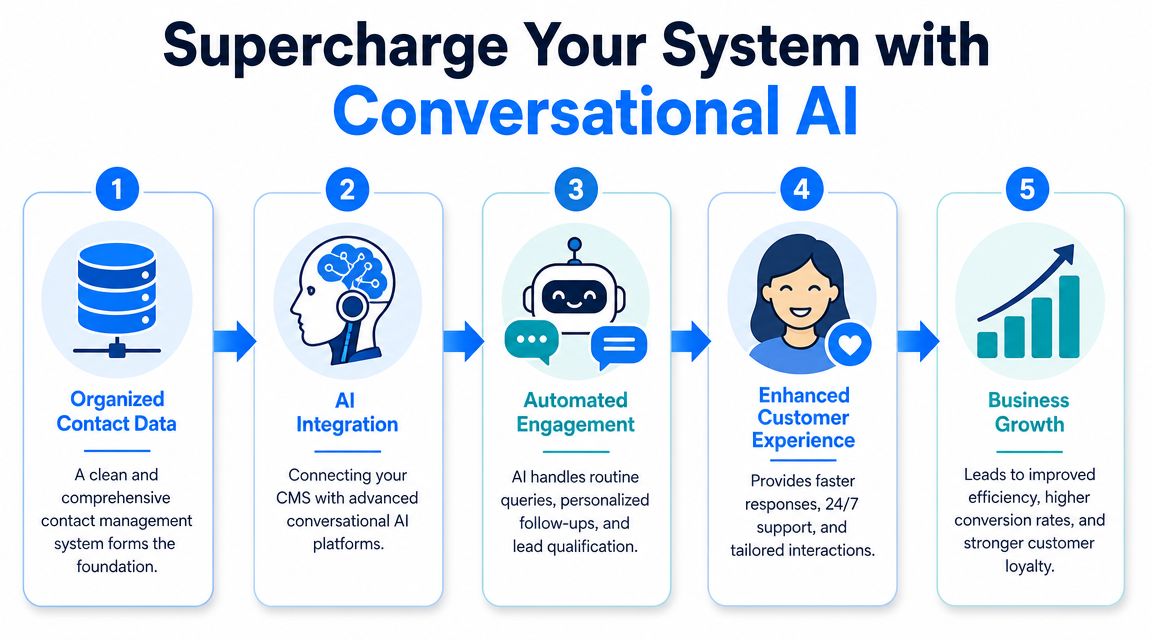
Contact Management System Conversational AI
That’s the shift from static storage to active engagement.
Where AI makes the contact record useful
When the contact layer is clean, conversational AI can help with:
- Lead capture: gather contact details and intent through chat instead of static forms
- Qualification: ask routing questions before a human gets involved
- Follow-up: trigger personalized reminders based on behavior or status
- Support triage: identify existing customers and direct them using known context
- Re-engagement: restart conversations with people who showed interest but went quiet
One practical option in this category is what conversational AI platforms such as Clepher enable: no-code chatbot flows across website chat, Facebook, Messenger, WhatsApp, and Instagram DM, with contact capture, segmentation, and integrations that keep records connected to the wider stack.
For teams thinking about how AI changes acquisition, this roundup of AI strategies for lead generation is a useful companion read because it focuses on how AI supports sales conversations instead of treating it as a novelty.
The key point is simple. AI doesn’t replace the need for a contact management system. It depends on it. If the record is incomplete, duplicated, or outdated, the automation will be noisy. If the record is clean, conversational AI can turn customer data into timely, relevant, scalable interactions.
If you want to turn your contact database into a working conversation engine, Clepher is one option to explore. It connects chatbot automation with contact capture, segmentation, and cross-channel messaging so teams can organize records and act on them through website chat, Messenger, WhatsApp, and Instagram DM.
