
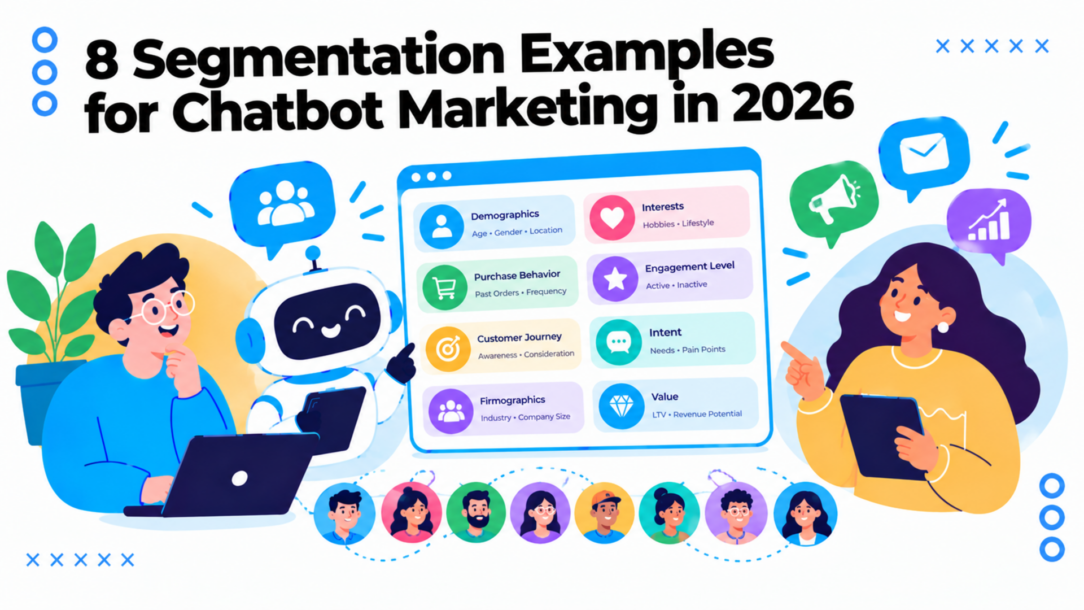
A broadcast goes to every subscriber. Some people have just discovered your brand, others have bought from you repeatedly, and a few are waiting for a simple answer about shipping. When they all receive the same offer, the message can feel irrelevant. Open rates slip, replies dry up, and sending more messages usually doesn’t fix the problem.
The better move is to group people by what they need, what they’ve done, or where they are. These segmentation examples show how to turn those differences into practical chatbot campaigns, with a Clepher setup for tags, qualifying questions, flow triggers, and broadcasts across Messenger and Instagram DM. The core idea is simple: create dynamic customer segments, then give each group a relevant next step.
Start with one useful signal, not an elaborate audience tree. A recent purchase, a selected interest, or an unfinished checkout can be enough to change the next message. The examples below pair familiar brand strategies with setups you can adapt to your own store, service, or SaaS business.
1. Demographic Segmentation With Old Spice
Demographic segmentation groups people by measurable traits such as age, gender, income, education, or family status. Old Spice’s “The Man Your Man Could Smell Like” campaign is a useful reminder that the person using a product and the person buying it aren’t always the same.
The campaign spoke to men while also catching the attention of women who bought grooming products for the men in their lives. That distinction matters for gift products, family purchases, and beauty brands. A message designed only for the end user may miss the buyer who actually makes the decision.
Toy brands use a similar logic when they organize products around a child’s age or developmental stage. The age range helps a parent find a suitable product, but it shouldn’t be the only signal. Purchase history and the relationship between buyer and user can make the recommendation more relevant.
Build two paths for buyer and user
In Clepher, collect an age range or parent status only when it helps route the conversation. Use tags such as age_band and parent_status, then apply them to subscribers who voluntarily provide that information in a Messenger or Instagram DM flow.
- Qualifying question: “Who are you shopping for?”
- Flow trigger: A form submission or chatbot answer adds the relevant tag.
- Broadcast: Send product guidance to the end user’s segment and gift ideas or bundles to the buyer segment.
Practical rule: Treat demographic tags as a starting point, not a complete customer profile. Pair them with product interest or purchase history before making a recommendation.
Keep the question optional and explain why you’re asking. A gift buyer and a product user may have different needs, but demographic assumptions can still misfire. Let subscribers correct their preferences, and avoid collecting personal details that don’t change the experience.
2. Geographic Segmentation With McDonald’s Localized Menus
A customer’s location can change what they want, what’s available, and when they’re ready to act. McDonald’s maintains a recognizable global brand while adapting menu choices to local tastes. Its vegetarian-friendly offerings in India, including McAloo Tikki and McSpicy Paneer, show how regional preferences can influence the product itself, not just the ad.
Local businesses can apply the same thinking on a smaller scale. A restaurant might promote a rainy-day delivery offer to nearby customers, while a neighborhood shop could invite people close to its location to an in-store event. The message has a reason to be local. A broad citywide promotion sent to everyone may reach people who can’t conveniently visit.
Route by service area and local timing
Ask for a city, postal code, or service area when a lead signs up. Use a tag such as city_toronto or service_area_northand make sure the location is specific enough to affect delivery, availability, or the offer. For more on how businesses define location-based groups, see this guide to geographic segmentation.
- Qualifying question: “Which area should we send local offers for?”
- Flow trigger: A location tag is applied after the subscriber answers.
- Broadcast: Send a neighborhood event invitation or menu offer only to subscribers in the matching service area.
Schedule messages around the customer’s local routine, not the sender’s time zone. A lunch promotion arriving after lunch has little value. For multi-region campaigns, use location data to organize timing and message relevance, then suppress audiences outside the delivery or service area.
Location data can be sensitive in context, so collect only what you need. If a general area is sufficient, don’t ask for a precise address. Let people choose or update their area, and keep a default experience for subscribers who prefer not to share it.
3. Psychographic Segmentation With Patagonia
Two customers can share an age range and location but care about completely different things. Psychographic segmentation looks at the reasons behind choices, including values, interests, and lifestyle. Patagonia has built a recognizable brand around environmental responsibility and outdoor life, including its Worn Wear program, which supports repair and resale.
Its “Don’t Buy This Jacket” message challenged the usual pressure to buy more. That approach makes sense for customers who value durability and responsible consumption, but it won’t resonate with everyone. Psychographic segmentation works when the brand can deliver on the values it claims to support. A sustainability tag without meaningful, relevant content is just another label.
Ask about priorities, then use the answer
In a Clepher Instagram DM flow, ask one clear question and let subscribers choose from a short set of interests. For example: “What matters most in the products you buy?” Offer options such as durability, sustainability, or simplicity. Apply tags like interest_sustainability or interest_minimalism based on the answer.
- Flow trigger: A comment keyword or incoming DM starts the preference flow.
- Broadcast: Send repair guidance or resale updates to the sustainability group, and product-care content to subscribers who prioritize durability.
Use the answer to tailor content, not to infer beliefs from unrelated behavior. Keep the question optional and make it easy to change the selection later. For guidance on turning audience insights into useful profiles, see how to create buyer personas.
The same method works for creators in fitness or wellness. A subscriber interested in strength may want training plans, while someone focused on recovery may prefer mobility and rest content. Don’t send both people the same sequence just because they follow the same account.
4. Behavioral Segmentation With Sephora’s Beauty Insider
Demographics describe who a customer is. Behavior shows what they do in practice. Sephora’s Beauty Insider program uses purchase activity and loyalty engagement to organize customers into tiers, then connects those tiers to rewards and communications.
That logic is useful even if a business doesn’t run a formal points program. A customer who has bought once needs a different next message from someone who returns regularly. A subscriber who repeatedly views a product may need product details, while someone who already purchased it may need usage advice or a replenishment reminder.
Make actions change the next message
In Clepher, use tags such as purchased_once, repeat_buyer, or clicked_product_x. Apply tags from order events, chatbot answers, or tracked interactions that your connected systems support. Avoid treating one click as proof of strong purchase intent; a click is a signal to test, not a guarantee.
- Qualifying question: “What would you like help with today?”
- Flow trigger: A purchase, product interaction, or loyalty action adds or updates a behavior tag.
- Broadcast: Give repeat buyers early access or relevant product news, while sending first-time buyers setup or care guidance.
A restock reminder can start when a customer shows interest in an item, but build in a purchase check before the reminder goes out. Otherwise, the customer may receive a nudge for something they already bought. The same guardrail applies to loyalty rewards: check eligibility before sending a tier-specific offer.
Behavioral segments need upkeep. Remove or update tags when new activity changes the customer’s status, and give subscribers a clear way to manage promotional preferences. The best automation reacts to meaningful actions without turning every tap into another campaign.
5. Lifecycle Segmentation for Abandoned Carts and Win-Back Journeys
A new subscriber, a first-time buyer, and a lapsed customer shouldn’t enter the same conversation. Lifecycle segmentation routes people according to their relationship with the brand. An online store can welcome a new subscriber with product education, reassure a first-time buyer after checkout, and offer a useful reason to return to someone who hasn’t purchased recently.
Cart recovery is more effective when the message addresses a likely barrier instead of sending the same discount to every shopper. Extra costs, delivery timing, account creation, payment concerns, and a complicated checkout can all contribute to abandonment. If your data reveals the obstacle, match the follow-up to it. For a deeper look at re-engagement planning, see this guide to win-back campaigns.
Separate journeys and add exit rules
Use distinct tags such as new_subscriber, first_time_buyer, cart_abandoned, and lapsed_customer. A cart event can trigger a recovery flow, but a successful purchase should immediately remove the subscriber from it.
- Qualifying question: “What’s holding you back from completing your order?” Use this only when the customer is actively engaging with the recovery flow.
- Flow trigger: An unfinished checkout starts the cart journey; a purchase event exits it.
- Broadcast: Send shipping reassurance to shoppers who checked delivery details, and remind shoppers who stalled at account creation about any faster checkout option you offer.
Keep the flow focused, helpful, and consistent with the channel’s messaging rules and the customer’s opt-in. Don’t keep sending reminders after someone buys, asks for no more messages, or indicates they’re no longer interested.
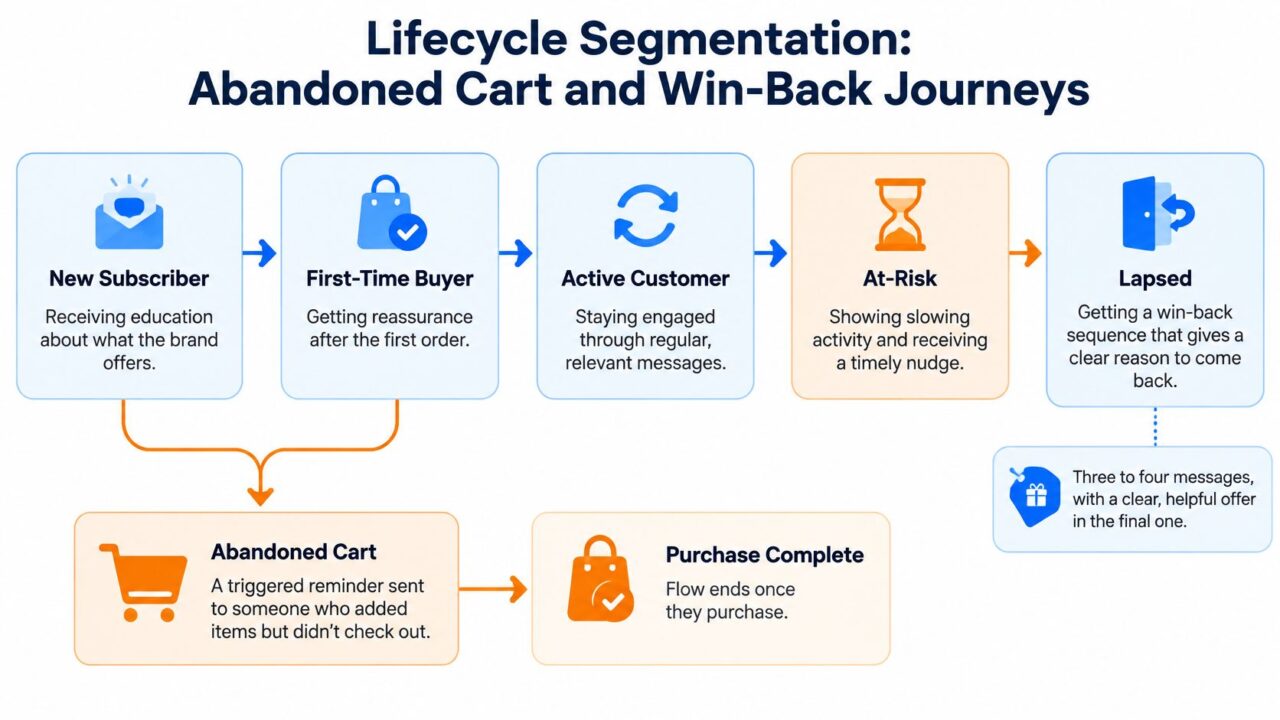
Segmentation Examples Lifecycle Diagram
6. Value-Based Segmentation With RFM Analysis
Recency, frequency, and monetary value, or RFM, gives marketers a practical way to group customers using purchase behavior. Recency asks how recently someone bought. Frequency looks at how often they purchase. Monetary value captures how much they spend. Together, these signals can distinguish customers who are active and loyal from those who may be drifting away.
A DTC skincare brand could use RFM to identify a Champions group for product previews and a separate At Risk group for a personal re-engagement message. A coaching business might identify former clients who haven’t booked recently and invite them to discuss a new goal. These segments are useful only if the action differs. If every group gets the same discount, the scoring hasn’t changed the campaign.
Turn transaction data into Clepher tags
Export order data on a regular schedule, calculate RFM groups in your commerce or analytics system, then sync the resulting labels into Clepher. Tags might include rfm_champions, rfm_loyal, rfm_at_risk, and rfm_hibernating.
- Flow trigger: A new order or scheduled data sync updates a customer’s RFM tag.
- Broadcast: Thank Champions and offer relevant early access; send At Risk customers a clear, time-bound reason to return.
- Control: Suppress customers from win-back offers if they’ve purchased since the segment was calculated.
Practical rule: Don’t discount your strongest customers by default. Recognition, useful access, and product guidance may be more appropriate than lowering the price.
RFM is a useful sorting method, not a complete explanation of intent. A customer may spend less because they need fewer products, not because they’re disengaged. Review the segment rules, use a control group when testing offers, and track incremental conversion and revenue rather than clicks alone.
7. Firmographic and Account-Based Segmentation With Dropbox’s Referral Program
A Dropbox user who brings colleagues onto the service can help a team adopt it. Dropbox’s referral program lets existing users invite others to join, connecting product use with new-user invitations. For B2B marketing, the useful idea is to identify which users are positioned to invite teammates, then tailor the invitation to their company and role.
Firmographic segmentation adds that account context. Industry, company size, business type, and job role can shape the buyer’s needs. A team admin may need setup and permission guidance; an individual contributor may want a quick view of how collaboration fits their workflow. The referral example alone does not identify those traits. A Clepher flow can ask about them before choosing what to send.
Qualify the account before routing the lead
Add a short question to the Clepher lead capture flow: “How many people are on your team?” Follow with a role question when it will change the next step. Apply tags such as team_small, team_growing, and role_admin only when they guide onboarding or sales follow-up.
- Flow trigger: A lead submits a team-size or role answer.
- Broadcast: Send admins team setup guidance and a teammate invitation they can share. Send individual contributors a concise collaboration walkthrough.
- Routing: Use conditions and personalization tags to route each lead to relevant qualification questions or a support handoff.
The invitation should match the account, not just the referral idea. For example, an admin at a growing team may receive a prompt to invite colleagues and setup instructions, while an individual contributor receives product guidance before an invitation. On Messenger or Instagram DM, the qualifying answer sets the tag, the flow trigger routes the contact, and the broadcast delivers the role-specific message.
Ask only for details that change the experience. If team size does not affect pricing, product fit, or the next step, leave it out. Keep the path short and offer a human handoff for questions automation cannot answer.
Account-based messaging also depends on accurate shared fields and tags. Keep them consistent across the systems your team uses, and coordinate campaigns so prospects do not receive conflicting offers. Firmographic segmentation earns its place when it makes the next conversation fit the business, not when it adds fields to a form.
8. Needs-Based and Occasion-Based Segmentation With Dollar Shave Club
Needs-based segmentation starts with the problem someone is trying to solve. Dollar Shave Club built its offer around convenient access to razors, then organized subscription options around different customer needs. Occasion-based campaigns use the same idea: the moment matters as much as the person. A customer shopping for a gift, a travel kit, or a seasonal event needs a different recommendation from someone restocking a household staple.
A florist, for example, can separate Mother’s Day orders from anniversary and sympathy inquiries. Each occasion calls for different products and tone. Combining them into one promotional broadcast risks sending an awkward message to someone whose need is personal or time-sensitive.
Let the customer name the need
Start a Clepher flow with one simple prompt: “What are you shopping for today?” Offer relevant choices, then add tags such as need_gift, need_travel_kit, or occasion_anniversary. If the customer is buying a gift, ask whether they want to share recipient details that would improve the recommendation.
- Flow trigger: The customer selects a need or arrives through an occasion-specific comment or DM.
- Broadcast: Send gift suggestions to gift shoppers, replenishment reminders to routine buyers, and occasion-based offers only to matching subscribers.
- Fallback: If someone skips the question, show a general product path rather than guessing.
Occasion tags can expire or become stale, so review them before reusing them in a later campaign. A holiday gift preference shouldn’t become a permanent profile assumption. Let customers change their answer, and use the shortest path that gets them to a useful recommendation.
How the Eight Segmentation Types Compare for Chatbot Marketing
| Segmentation Type | Segmentation Basis | Data You Need | Example Clepher Tag | Best For |
|---|---|---|---|---|
| Demographic Segmentation: Old Spice | Age, gender, income, or family status | Demographic details from forms or customer profiles | age_band | Targeting defined audience groups |
| Geographic Segmentation: McDonald’s | Country, region, city, climate, or density | Customer location | city_toronto | Localized offers, products, and messaging |
| Psychographic Segmentation: Patagonia | Values, beliefs, interests, and lifestyle | Survey responses, content engagement, or conversation patterns | interest_sustainability | Values-led messaging and brand loyalty |
| Behavioral Segmentation: Sephora | Purchases, clicks, product usage, and loyalty activity | Customer actions and loyalty activity | repeat_buyer | Retention, personalization, and upselling |
| Lifecycle Segmentation: Abandoned Cart and Win-Back Journeys | Stage in the customer relationship | Subscriber status, purchase history, and cart activity | lapsed_customer | Onboarding, cart recovery, and win-back campaigns |
| Value-Based Segmentation: RFM Analysis | Recency, purchase frequency, and monetary value | Transaction and purchase history | rfm_champions | Prioritizing valuable customers and reactivating at-risk customers |
| Firmographic and Account-Based Segmentation: Dropbox | Company size, industry, role, and buying stage | Business and account details | team_small | B2B lead targeting and account-based marketing |
| Needs-Based and Occasion-Based Segmentation: Dollar Shave Club | Customer needs, purchase situation, or occasion | Stated needs, shopping occasion, or motivation | need_gift | Relevant bundles, subscriptions, and seasonal offers |
Turn These Eight Segments Into Your First Clepher Campaign
Don’t start by building every segment at once. Choose the group tied to your biggest marketing gap: lapsed buyers who need a reason to return, first-time customers who need reassurance, or repeat customers who deserve a more relevant experience. A segment is useful only when it changes the message, timing, or next action.
Create one tag that represents the signal you can capture reliably. Add one qualifying question to a Messenger or Instagram DM flow, or use a purchase or product interaction already available in your connected systems. Then build a single flow trigger and a broadcast that gives that group something specific, such as product guidance, a local offer, or a relevant recovery message.
Keep the first test narrow. Check that customers enter the right flow, that purchase or opt-out events update their tags, and that people who don’t share optional information still receive a sensible default experience. If the data is missing, stale, or contradictory, don’t force a precise label. Route the customer to a broad, respectful message instead.
Measure more than clicks. Compare replies, conversions, and revenue against a comparable unsegmented send, and use a control group when you need to understand whether the segment itself drove the change. Watch for costs too: unsubscribes, support requests, and inconsistent messages can outweigh the benefit of finer targeting. More segments aren’t automatically better. Keep a segment only if it produces a meaningfully different action and your team can maintain it.
Privacy and trust belong in the setup, not as cleanup after launch. Ask only for details that serve a clear purpose, explain the value exchange, and let people control what they share. For automated decisions with significant effects, don’t treat a marketing tag as sufficient authority. Keep human review and appropriate safeguards in place where they’re needed.
This week, choose one audience, add one tag, and send one targeted message. Review what happened, fix the flow where it broke, and add another segment only when the first is useful and manageable.
Clepher helps businesses build no-code chatbot flows, organize subscribers with tags, and send targeted broadcasts across Messenger and Instagram DM. Start with one of these segmentation examples and build your first campaign with Clepher.
