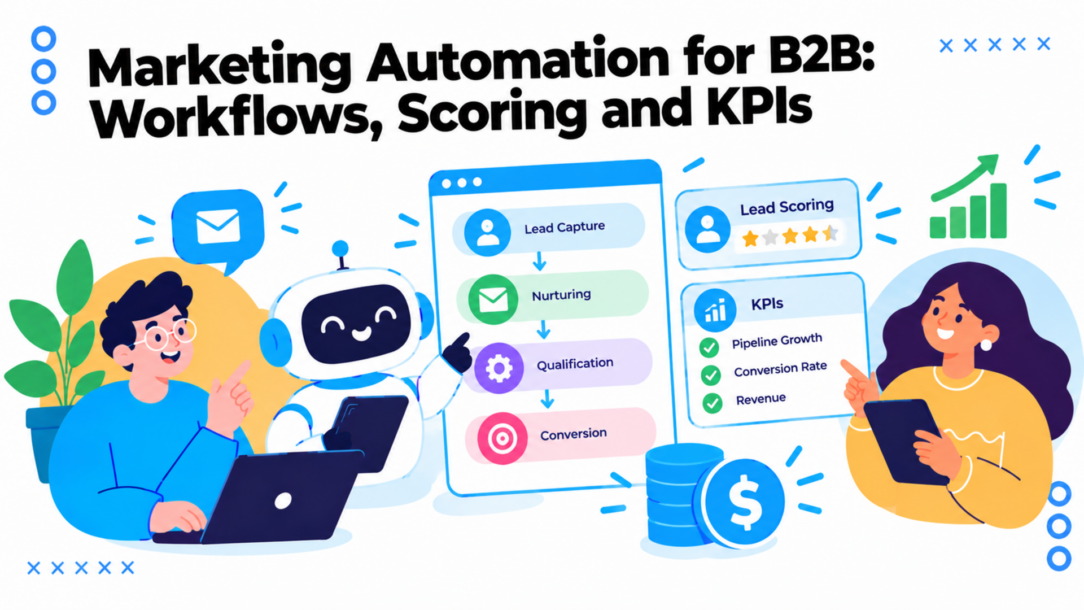
A demo request arrives on Friday evening. The marketing team’s notification gets buried, the sales rep is offline, and nobody follows up until Tuesday. By then, the buyer has booked a call with a competitor. The problem isn’t that the team lacks another email template. It’s that a high-intent signal depends on someone being available to notice it.
That’s the practical case for marketing automation for B2B. Done well, it connects prospect activity to timely, relevant actions, while keeping people responsible for the decisions and conversations that need human judgment. But the workflows are only as dependable as the data and handoffs behind them.
Why B2B Teams Are Automating Their Pipeline
A B2B team’s pipeline can look busy while basic steps still depend on memory: recording a content download, assigning the right owner, or making sure a follow-up happens. Buyers take time to evaluate options, bring colleagues into the process, and revisit information when it suits them. Automation gives teams a repeatable way to manage those steps as activity grows, without adding the same amount of manual work.
The business case is not a promised lift in revenue. A compilation of marketing automation adoption and productivity benchmarks can offer context, but the results depend on how a company uses the tools. In practice, reliable data, clear campaign rules, and agreed sales responsibilities determine whether automation reduces missed work or only sends the wrong messages faster.
What automation is meant to take off your plate
A demo request arrives outside working hours. A workflow can confirm that the form went through, record the request and its source, route it to the appropriate sales queue, and set a follow-up deadline. It works like a well-maintained relay: each step passes the right information to the next person, rather than leaving someone to reconstruct the context.
The handoff only works if the underlying details are trustworthy. A duplicate contact, missing company field, or unclear consent status can send an inquiry to the wrong queue or trigger an inappropriate email. Set rules for those records before automating the follow-up. That operational groundwork protects the buyer experience and gives sales usable context.
Some interactions still call for a person. A prospect asking about a complex implementation needs a considered conversation, not a generic sequence. Automation is best suited to repetitive coordination: capturing intent, applying agreed rules, sharing relevant information, and making sure a human sees opportunities that need attention.
Is it useful for a small team?
A large organization might coordinate campaigns across regions and business units. A small team can use automation to keep inquiries from slipping through the cracks, guide trial users through onboarding, or pass sales the context needed for a timely conversation. The best first workflow is often a recurring task that currently relies on someone remembering what to do next.
Keep the goal observable. For example, track whether first responses happen sooner or fewer prospects receive irrelevant follow-ups. Benchmarks can inform a business case, but they cannot predict your team’s outcome. Before building a workflow, be able to name the buyer signal that starts it, the action it should trigger, and who owns the handoff. Without those answers, automation may make an unreliable process run faster rather than make it work better.
What Marketing Automation for B2B Really Does
A restaurant kitchen gives a useful mental model. When an order arrives, staff don’t hand the same ticket to every cook. They tag it, send it to the right station, track its progress, and serve it when it’s ready. A B2B automation system should do something similar with a prospect’s information and activity.
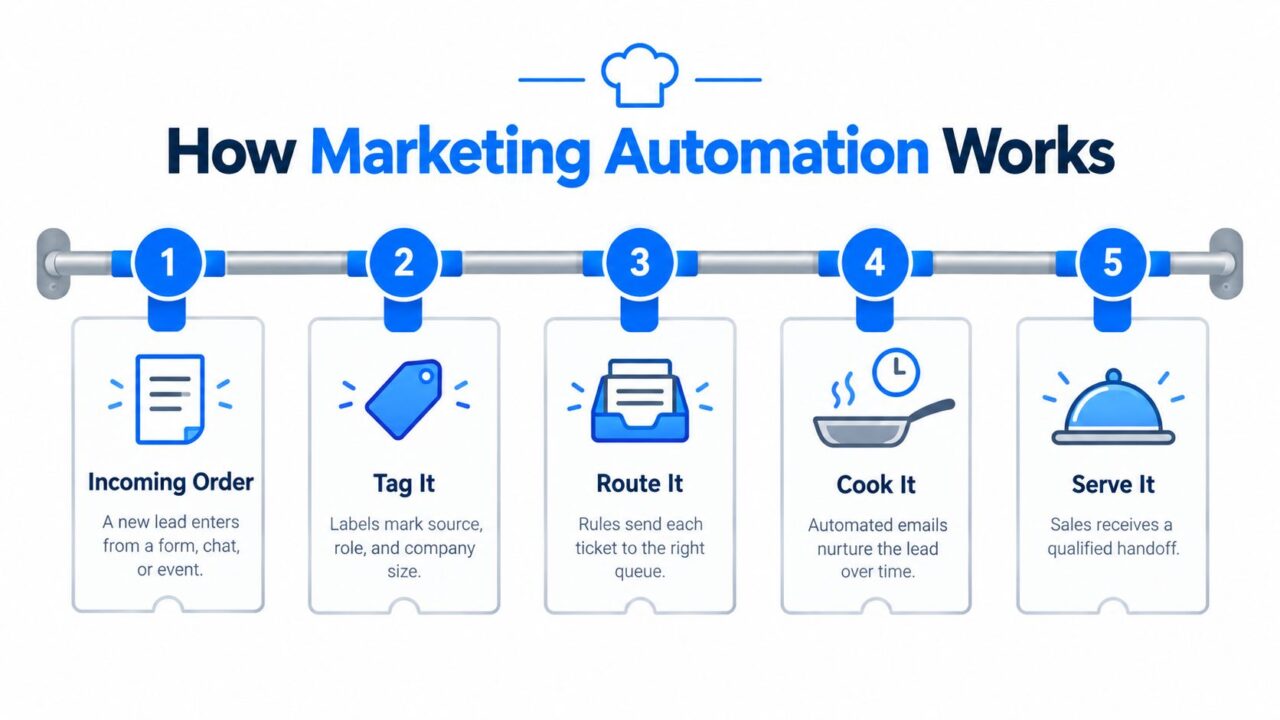
Marketing Automation for B2B Process
A contact record is the ticket. It might include a person’s email, company, role, original source, consent status, and recent interactions. A trigger is the event that puts the ticket on the rail: someone submits a form, starts a chat, requests a demo, or changes lifecycle stage.
The five parts of the flow
- Contact data gives the workflow something reliable to act on. If a company name is missing or a contact has duplicate records, routing and personalization can fail.
- Triggers start a process when something happens. A demo request should behave differently from an educational download.
- Rules decide what happens next. A rule might send a high-intent request to sales but place an early-stage inquiry into a learning sequence.
- Messages communicate with the prospect. These might be an acknowledgment, a useful follow-up email, or a chatbot prompt.
- Handoffs bring a person in when the prospect needs advice, evaluation, or a commercial conversation.
Together, those parts make automation an event-driven set of decisions connected to shared data, not merely a calendar of scheduled emails. A message sent on a fixed date can be part of a workflow, but the more important question is whether the system responds to what the buyer did.
For example, a contact who asks for a demo shouldn’t keep receiving introductory emails as if they’ve never engaged. The system needs to recognize the change, pause the old path, and give sales the relevant details. If your current setup can send campaigns but can’t reliably change course when a buyer’s status changes, it’s automating messages rather than managing the journey.
Core Workflows from Lead Capture to Churn Recovery
The most useful workflows connect into one journey. A SaaS prospect might arrive through a pricing-page chat, receive an answer based on their use case, and enter an onboarding flow after signing up. If they later show buying intent, sales gets a useful alert. Each action follows from a signal, and the prospect doesn’t have to start over at every stage.
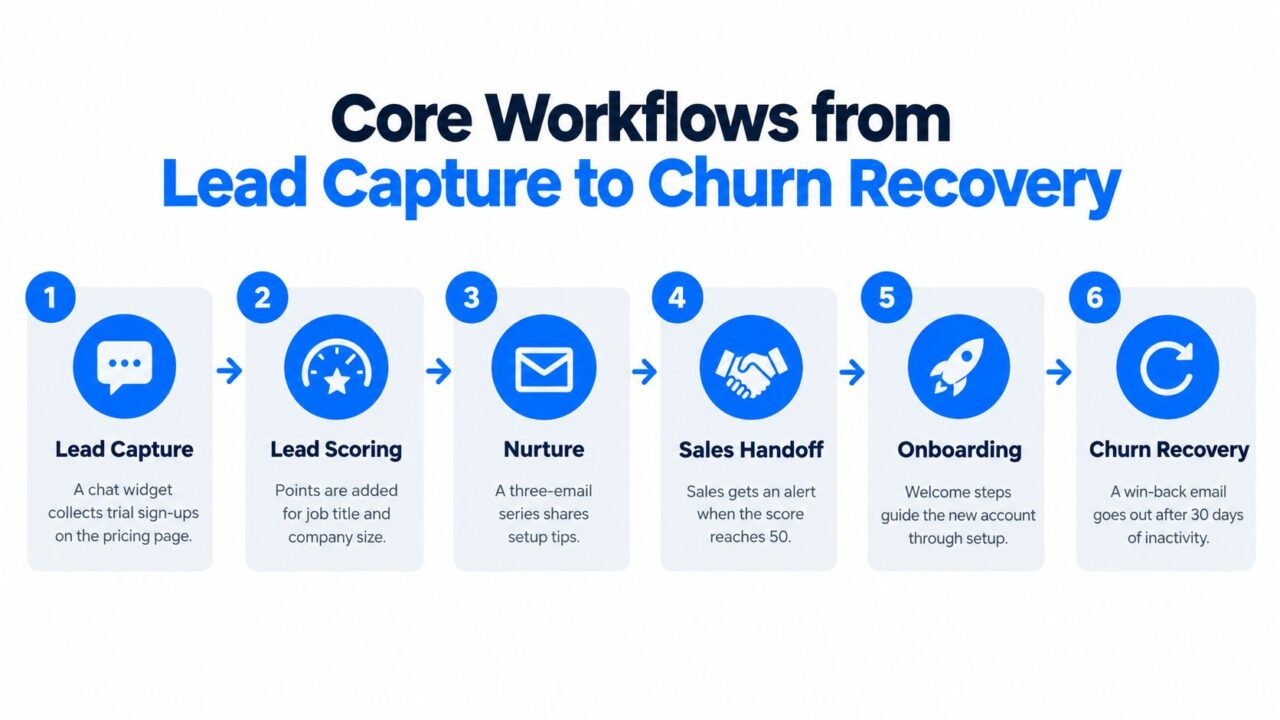
Marketing Automation for B2B Workflows
Capture and respond
SaaS trial capture: A visitor starts a chat on the pricing page and asks about a particular use case. The workflow collects their business email and declared need, creates or updates a contact, and sends the trial sign-up into the appropriate onboarding path. If the record is incomplete, it can be flagged rather than assigned a score based on a guess.
Agency lead capture: An agency running a client’s Messenger campaign asks interested prospects what service they need and how they prefer to be contacted. The answers become useful context for the client’s sales team, rather than a bare name in a spreadsheet.
Corporate training qualification: A training provider asks a prospective buyer about the audience, training topic, and purchasing timeline through a conversational flow. A contact ready to discuss a program can go to sales, while someone still exploring receives relevant educational material.
Nurture, score, and hand off
A buyer who downloads a guide may need more context before speaking with sales. A staged sequence can share an educational follow-up, then a related case study or invitation, with the next action shaped by engagement. A 2024 buyer report found that decision-makers often consume five to six or more pieces of content per buying-group member; in the research, 40% consumed four to six pieces and 21% consumed seven or more (B2B buyer content consumption findings). A sequence gives the team a way to coordinate those interactions without repeating the same offer to everyone.
Scoring can then help prioritize attention. A contact’s role or stated use case may indicate fit, while a demo request or return visit to a product page may signal intent. When a prospect meets the team’s agreed criteria, the workflow can notify the owner and include the activity that prompted the handoff.
Subscription onboarding and recovery: After a new account signs up, welcome messages can guide the user through setup and point them to relevant help. If product activity later declines, the business can prompt the customer with a useful check-in or support option. The aim isn’t to send an automatic win-back message on a timer regardless of context. It’s to notice a meaningful change and offer a relevant next step.
These workflows work best when teams treat them as stages of one buyer relationship. Capture should preserve source and consent. Nurture should respond to engagement. Sales should receive context. Customer communication should reflect the account’s actual status.
Building Trustworthy Data Before You Automate
More workflows won’t repair unreliable CRM records. If a company has duplicate contacts, stale job details, unclear ownership, or missing consent context, automation can send the wrong message more consistently. It might keep nurturing someone who has become an opportunity, or route an interested buyer to the wrong salesperson.
Data connection remains a challenge for B2B marketers. Research reports that 45% are very confident in their ability to connect data across teams, while separate 2025 findings say 44% prioritize improving data quality and 51% name creating an overall automation strategy as their biggest challenge (B2B marketing data and automation findings). That’s a practical warning: the foundation often needs attention before the workflow does.
Agree on the records your workflow trusts
Start with a short shared data model. Decide which fields are essential to routing and personalization, such as lifecycle stage, owner, source, consent status, company, role, and stated need. Define what each value means and how teams should enter it. If one system calls someone a “customer” and another treats the same person as a “lead,” a workflow can behave unpredictably.
Then decide how identities get matched. A known email address may connect a form submission to an existing CRM contact, but an anonymous website visit shouldn’t automatically be attributed to the wrong person. When records conflict, or a field is uncertain, route the contact for human review rather than silently choosing a value.
Practical rule: Automate only the fields you can explain, validate, and maintain.
Deduplication and ownership matter just as much. Decide which record survives when two contacts appear to represent the same person, how a company change is handled, and who owns a lead when territory or account assignments overlap. Map how updates move between your CRM, analytics, advertising, and messaging tools. For a closer look at connecting those systems, review customer data integration approaches.
Finally, keep consent and source context attached to the contact. A workflow should know what the person agreed to receive and where the interaction began. Check that a change in CRM status pauses or redirects the right nurture path, and test the synchronization before launching. These steps are less visible than a new campaign, but they help prevent automation from damaging trust.
Lead Scoring and Sales Handoffs That Stick
A score should help sales decide what to do next. If every email open earns points, the dashboard may look busy while the team misses buyers with a clear need. Build the score around fit and intent, then check whether the leads sent to sales result in conversations the team considers worthwhile.
Build a simple scoring model
Combine information a buyer provides with actions that show interest. Role, company profile, and use case can indicate fit. A demo request, pricing inquiry, or repeated visit to a product page can signal intent. A newsletter open is a weaker signal and should not outweigh several stronger ones.
Agree on what “sales-ready” means before routing leads. Otherwise, marketing and sales may use the same score to mean different things, turning it into a source of friction instead of a shared decision tool. Use these lead scoring best practices to define criteria both teams can apply consistently.
For example, one contact requests a demo and describes an active project; another downloads a whitepaper without showing interest in a sales conversation. Route the demo request to the appropriate sales queue with the buyer’s context. Keep the whitepaper contact in relevant nurture until new activity or a stated need supports a different path.
Make the handoff fast and useful
Timing can affect whether a buyer still wants to talk. A study of 2,241 companies, summarized in a report on lead response and follow-up, found an average initial response time of 42 hours. The study, conducted in the early 2000s, compared companies responding within one hour with those responding after an hour. Companies in the within-one-hour group were about seven times more likely to qualify a lead. This is an association, not proof that a quick response alone causes qualification, but a long delay can mean sales misses a buyer’s active interest.
Set an SLA for both the automated acknowledgment and the human follow-up. Name the lead owner, define after-hours coverage, and specify how to escalate a missed deadline. The alert should tell the salesperson what the buyer asked, which channel they used, their known company and role, and what triggered the notification. Without that context, the rep has to ask the buyer to repeat information they have already shared.
Implementation Checklist for Your First Workflows
Start with one process that causes recurring friction, such as slow responses to demo requests or inconsistent follow-up after a trial signup. Don’t begin by trying to automate every campaign. A narrow workflow is easier to test, explain, and improve.
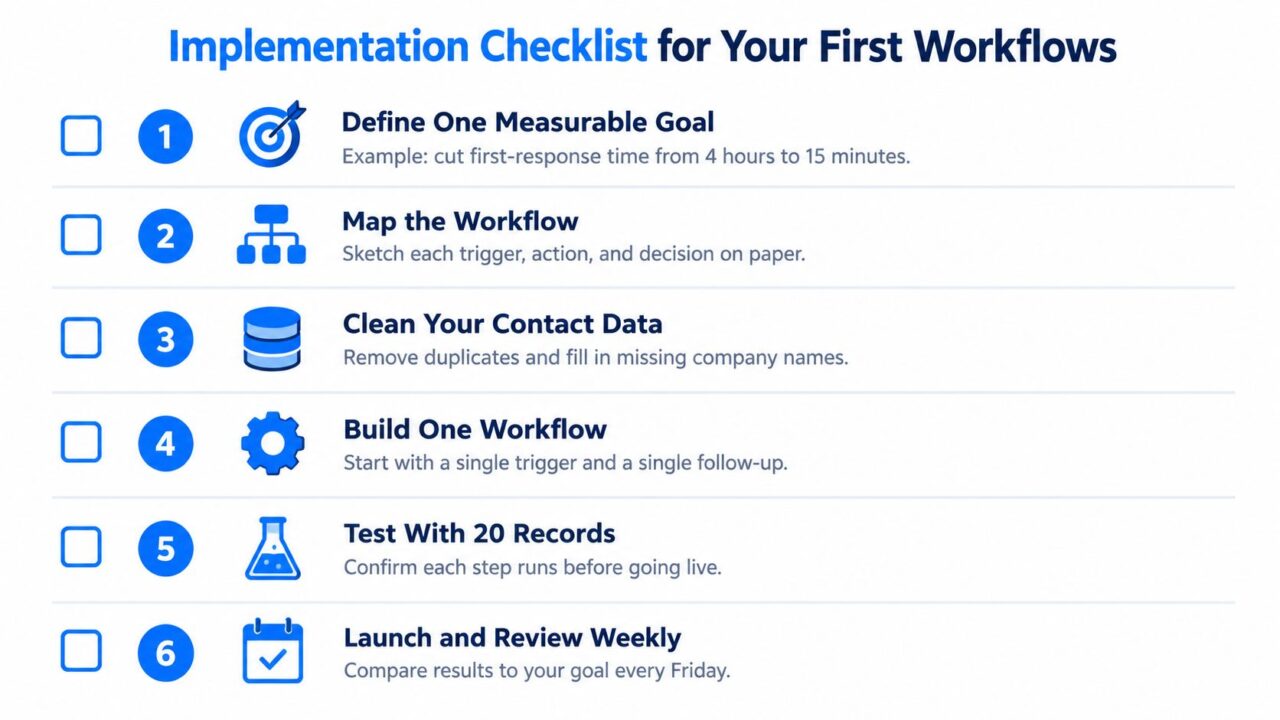
Marketing Automation for B2B Workflow Checklist
Roll it out in sequence
-
Choose one measurable goal. Decide what should change, such as reducing delays before first response or making trial onboarding more consistent. Avoid goals like “use more automation.” You’re ready to move on when the team can describe the desired business outcome in a sentence.
-
Map the current process. Write down where the contact enters, who sees the information, what decisions they make, and where delays or errors happen. Include exceptions, such as after-hours requests or contacts who already have an open opportunity. A process map is complete when someone outside the project can follow the intended path.
-
Audit the data. Check the fields the workflow will use, including source, contact details, owner, lifecycle stage, and consent. Resolve duplicates and agree on what happens when a critical value is missing. Don’t build personalization around data no one can keep current.
-
Choose the channel and tool. Match the workflow to how the buyer begins the interaction. A form, email, CRM task, or chatbot may be appropriate depending on the need. If you send nurture emails, include deliverability in the setup: a diagnostic such as an SPF and DKIM checker can help teams investigate whether authentication issues are undermining messages.
-
Build and test one flow. Add the trigger, rules, actions, and handoff, then test each branch with representative records. Confirm that the workflow updates the CRM correctly, stops when a contact opts out or changes stage, and alerts the intended owner. Don’t judge it only by whether the first email arrived.
-
Launch, measure, and improve. Review the goal and check for unintended effects, such as duplicate messages or misrouted contacts. Use a holdout group when you need to distinguish the workflow’s added contribution from activity that would have happened anyway. Launch a small set of useful workflows before expanding into less urgent processes.
A short visual walkthrough can help teams agree on what a workflow should do before they build it. The video below is a good starting point for that discussion.
KPIs That Show Whether Automation Works
A dashboard should tell you whether automation is responding promptly, moving qualified prospects forward, and doing so without creating unwanted messages or wasted work. Open and click activity can help diagnose communication, but they don’t prove that the workflow improved the sales process.
Track speed, progression, and efficiency
Speed metrics show how quickly a prospect gets a response. Track time to first response and inspect the distribution, not just the average. An average can hide a queue that responds most of the time quickly but leaves some high-intent inquiries waiting.
Progression metrics show whether contacts move through the pipeline. MQL-to-opportunity conversion helps test whether marketing-qualified leads become real sales opportunities. Stage velocity shows where prospects slow down, which can reveal an unclear handoff or a nurture path that isn’t answering buyer questions.
Efficiency metrics show whether the program works without creating avoidable friction. Monitor opt-out rate and revenue by automation path. Pair the numbers with feedback from sales and customer-facing teams: a workflow that generates activity but sends irrelevant leads to reps may be increasing workload rather than improving it.
| KPI | What It Reveals | How to Measure It |
|---|---|---|
| Time to first response | Whether inbound intent receives timely attention | Record the inquiry timestamp and first-response timestamp, then review averages and percentiles |
| MQL-to-opportunity conversion | Whether qualified leads progress into sales opportunities | Compare MQLs that become opportunities with the MQLs entering the workflow |
| Stage velocity | Where pipeline progress slows | Measure elapsed time between lifecycle or opportunity-stage changes |
| Opt-out rate | Whether messages are relevant and appropriately timed | Track opt-outs by message and automation path |
| Revenue by automation path | Which workflows are associated with revenue | Connect campaign and workflow history to CRM opportunities and closed revenue |
Use a holdout group to estimate whether a nurture workflow contributed incremental progress or merely contacted buyers who would have converted anyway. The right measurement depends on your sales cycle and data quality, so document how attribution is assigned and avoid treating association as proof of cause. For help thinking through credit across touchpoints, see this guide to marketing attribution.
A compact dashboard with these measures is more useful than a long list of activity counts. It shows where to fix the process, what to keep, and whether the workflow is helping buyers reach a relevant next step.
Choosing Your Stack and Taking the First Step
Choose tools around the work your team needs to do, not around the longest feature list. An enterprise marketing suite, a standalone email platform connected to a CRM, and a chatbot-first workflow can all be sensible choices. Their differences show up in implementation effort, channel coverage, and how much of the buyer’s first interaction they can coordinate.
Compare the operating models
| Setup | Works well when | Watch for |
|---|---|---|
| Enterprise suite with deep CRM tooling | Several teams need extensive campaign, reporting, and lifecycle controls | Implementation and ongoing administration can be substantial |
| Standalone email tool connected to a CRM | The central need is email nurture and the CRM remains the system of record | Contact updates and handoffs need careful synchronization |
| Chatbot-first with integrations | Buyers start conversations on a website or messaging channel and need qualification before sales follow-up | The team must define what the bot can collect and when a human should take over |
For teams that need to capture a conversation and pass its context into the rest of their stack, Clepher offers no-code chatbot and workflow automation for Facebook Messenger and Instagram Direct Messages. Teams can use conversational flows to collect answers, apply tags or custom fields, and route sales-ready conversations. It also integrates natively with more than 50 third-party tools and connects to many more through Zapier, Make, and Pabbly.
The same decision-making discipline applies when choosing software for adjacent operations. For example, an agency comparing systems for staffing workflows may find a staffing agency software comparison from dreach useful when assessing how tool choice affects lead and client handoffs. The point is to compare tools against a real process, including the data each one needs and the people responsible for acting on it.

Marketing Automation for B2B Business Roadmap
Before you expand, map one high-intent conversation you want to capture this week. Choose the three fields it must collect, decide who owns the follow-up, and write down what should happen when a record is incomplete. Launch that single flow, test the handoff, and use the result to decide what to automate next.
Clepher helps teams capture and qualify buyer conversations on Facebook Messenger and Instagram, then route useful context into follow-up workflows. Visit Clepher to explore how a conversational flow could support your next B2B automation workflow.