
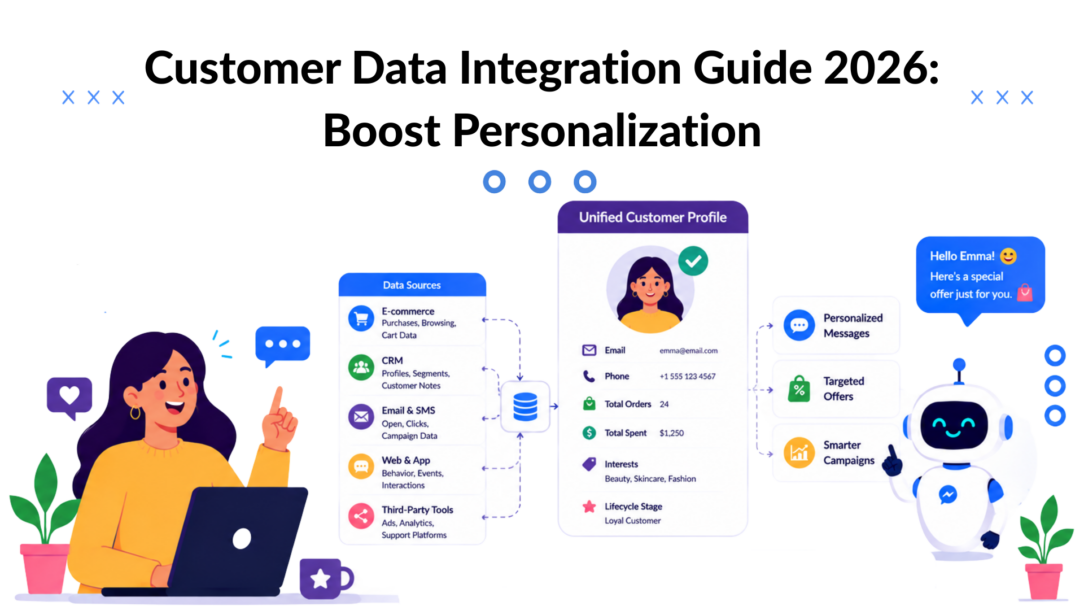
A shopper clicks your Instagram ad, asks a question in WhatsApp, browses your site later that night, and finally opens your email the next morning. To them, it’s one continuous conversation with your brand.
To most e-commerce stacks, it’s four unrelated events.
That gap is where sales leak out. Your chatbot answers with generic copy because it can’t see purchase history. Your email platform sends a discount to someone who already bought. Your support team asks for details the customer already shared on another channel. None of this feels broken inside each tool. It only looks broken from the customer’s side.
Customer data integration fixes that, not as a big enterprise science project, but as a practical way to make your marketing, support, and automation act like one team.
The Data Disconnect Plaguing Modern Brands
A common DTC scenario looks like this. A customer sees a product on Instagram, taps through, then later sends a message on WhatsApp asking whether it comes in another color. Your team has the answer, but the system handling WhatsApp doesn’t know they clicked the ad, viewed the product page, or already joined your email list.
So the customer gets a bland reply. No product context. No recognition. No continuity.
That’s the everyday cost of disconnected data. Not just messy reporting. Lost intent.
What fragmentation looks like in the real world
When customer data lives in Shopify, HubSpot, Meta inboxes, email software, and spreadsheets, brands run into the same problems:
- Repeated questions: Customers have to restate what they want on each channel.
- Broken personalization: Promotions ignore browsing behavior or purchase history.
- Wasted spend: Retargeting keeps pushing products people already bought.
- Confusing attribution: You can’t clearly connect an ad click to a conversation and then to a sale.
If you’re trying to build your marketing dashboard, this is usually the first obstacle. Dashboards don’t solve a data problem by themselves. They only display whatever your systems can connect.
The business case is bigger than many founders realize. The global data integration market is projected to reach $30.27 billion by 2030, growing at a 12.1% CAGR from $15.18 billion in 2026, according to Integrate.io’s market overview. That’s a projection, but it tells you something important. Unifying customer data has moved well beyond back-office IT work. It’s now tied directly to growth.
Practical rule: If a customer switches channels and your brand starts over each time, you don’t have a messaging problem. You have an integration problem.
What Is Customer Data Integration Really
Customer data integration is the process of turning scattered customer signals into one usable profile. Not a pile of exports. Not five tabs open in five tools. One record your business can use.
A simple way to think about it is a digital scrapbook. One page shows a Shopify order. Another shows an Instagram DM. Another records an email click. Another captures a support request. CDI pulls those pages together so your team can read the whole story, not isolated scenes.
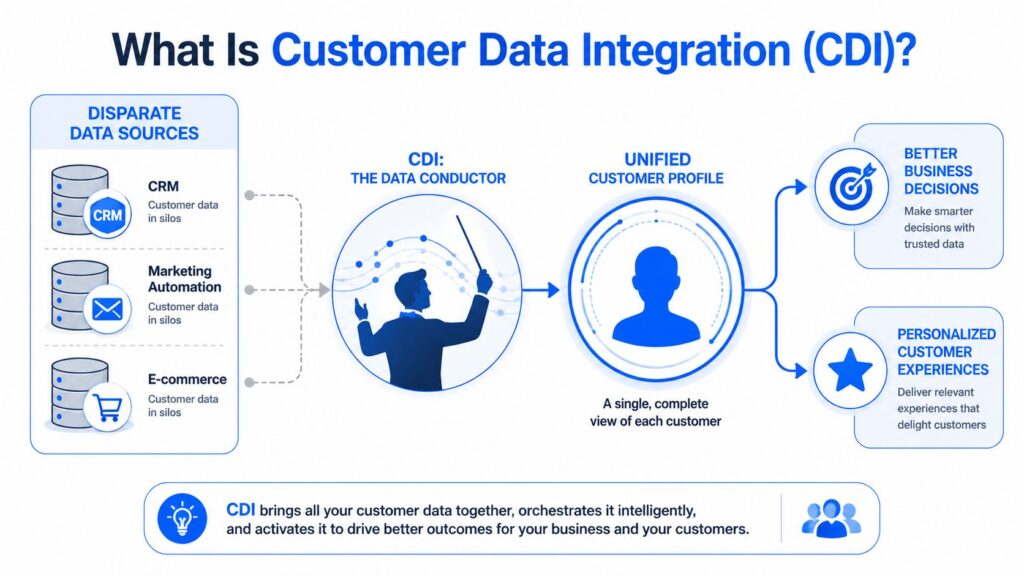
Customer Data Integration Data Flow
What a unified profile actually contains
For an e-commerce brand, a good customer profile might combine:
- Purchase data: Orders, products bought, refunds, repeat purchases
- Behavior data: Site visits, viewed products, cart activity
- Conversation data: Messages from Instagram, Messenger, WhatsApp, or site chat
- Marketing engagement: Email opens, clicks, campaign responses
- Support context: Ticket history, issues raised, resolution notes
The point isn’t to collect everything possible. The point is to make the right details available when someone needs them.
A support rep shouldn’t need to hunt for the last order. A chatbot shouldn’t ask for an email address that’s already in the CRM. A marketer shouldn’t build a campaign segment using stale or duplicate records.
CDI is about action, not storage
Many brands treat CDI like a storage exercise. They move data into one place and call the project done. That rarely improves customer experience on its own.
Useful CDI makes data operational. It gives you a single customer view that can trigger actions such as:
- Showing the right product recommendation
- Suppressing messages after a purchase
- Routing VIP customers to faster support
- Personalizing a chatbot based on prior activity
Identity resolution is central here. If one person appears as an Instagram handle, an email address, and a Shopify customer record, your system needs a way to recognize that those records belong together. A practical explanation of that process is covered well in this guide to customer identity resolution with AI.
A unified profile is only valuable if your team and tools can use it during the moment a customer is making a decision.
Why Unified Customer Data Is a Game Changer
The biggest payoff from customer data integration isn’t cleaner architecture. It’s better timing.
When your systems share context, you stop sending the wrong message at the wrong time. That changes how people experience your brand. Conversations become more relevant. Offers become better matched to intent. Reporting gets closer to reality.
To ground that in something measurable, 84% of organizations say integrations are “very important” or a “key requirement” for their customers, based on PartnerFleet’s summary of CDP Institute findings. That matters because it reflects a market shift. Integration is no longer treated as optional plumbing. It’s part of delivering a consistent customer experience.
Here’s a visual summary of why this matters so much for day-to-day operations.
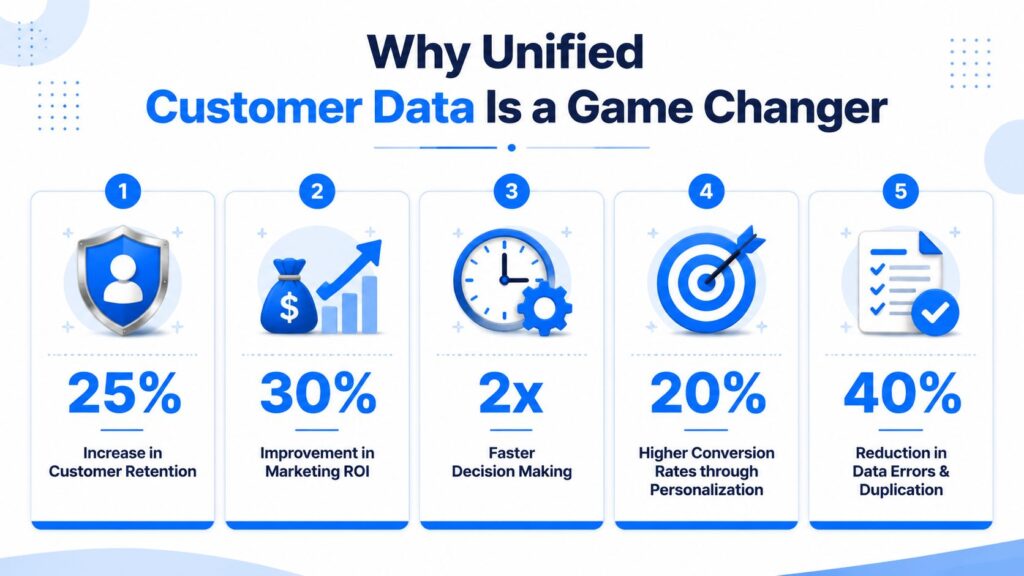
Customer Data Integration Benefits
Better personalization without guesswork
Personalization only works when systems can see enough context to make a smart decision. If your email tool knows what someone bought but your chatbot doesn’t, the experience still feels generic.
With unified data, you can do things like:
- Recommend accessories: based on prior orders
- Change conversation paths: based on support status or product ownership
- Suppress irrelevant offers: when someone has already converted
- Prioritize leads: based on combined chat activity and site behavior
That’s what makes personalization useful. It becomes specific, not decorative.
Less waste across marketing and support
Disconnected tools create duplicate work. Marketing builds segments by hand. Support asks repeat questions. Sales chases leads with incomplete history.
Unified customer data reduces that friction because everyone works from the same baseline. One profile. Shared context. Fewer conflicting messages.
A practical way to judge CDI is this: does it help your team decide what to send, who to send it to, and when to stop sending it? If the answer is yes, it’s already affecting revenue and customer trust.
What works: connecting customer history to the next interaction.
What doesn’t: collecting more data that nobody can use in the moment.
Common Customer Data Integration Patterns
Not every brand should integrate data the same way. The right setup depends on your tools, your speed requirements, and how much complexity your team can manage.
The easiest way to understand the main patterns is to think like a restaurant kitchen. Your marketing tools are the chefs. Customer data is the ingredients. The question is how the ingredients reach the line when an order comes in.
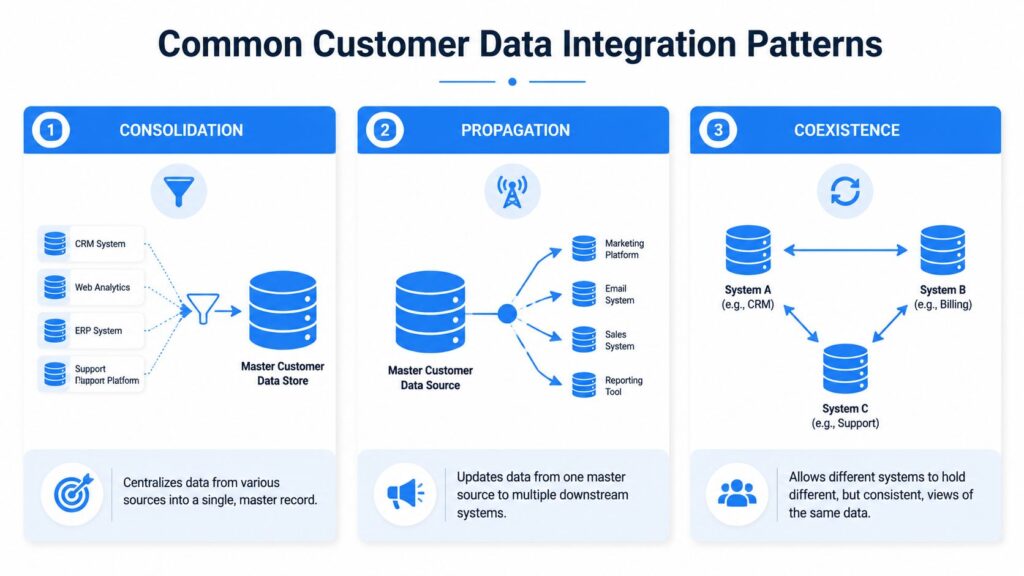
Customer Data Integration Patterns
Consolidation
In a consolidation model, data from multiple systems flows into one central store. Think of it as a prep station where all ingredients are brought together before cooking starts.
This pattern works well when you want one master profile for reporting, segmentation, and audience building. It’s often the clearest choice for brands that have customer data spread across a store, CRM, ad platform, and messaging channels.
Best fit: teams that want a dependable source of truth.
Trade-off: central stores can lag if updates aren’t pushed quickly enough.
Propagation
Propagation starts with one source and pushes updates outward to other tools. In kitchen terms, the head chef updates the special, and every station gets the same instruction.
This is useful when one system should control key customer fields and downstream tools need to stay aligned. For example, if your CRM owns subscription status or lifecycle stage, propagation keeps your email and support tools synced.
Best fit: brands that already know which system should be the master.
Trade-off: if the master record is wrong, every connected tool inherits the mistake.
Coexistence
Coexistence allows multiple systems to keep their own view of the customer while syncing important fields between them. Think of separate kitchen stations sharing updates so service doesn’t break.
This pattern is common when brands can’t fully replace existing tools. A help desk may need its own ticket history. A store platform may still own transactional data. A messaging platform may keep live conversation context.
A practical example is connecting chat records with CRM and support data through a workflow layer. If you’re dealing with support plus customer history together, this kind of setup is easier to understand when you see how a CRM and ticketing system can exchange context without forcing everything into one app.
Quick comparison
| Pattern | Strength | Main risk | Good for |
|---|---|---|---|
| Consolidation | One clear customer record | Data can become stale | Reporting and segmentation |
| Propagation | Fast updates across tools | Errors spread quickly | Operational alignment |
| Coexistence | Flexible with existing stack | More moving parts | Growing brands with mixed systems |
Your CDI Implementation Best Practices
Most CDI projects fail for boring reasons. Not because the idea was wrong, but because the setup skipped the fundamentals. Fields don’t match. Duplicate records pile up. Sync rules are vague. Nobody owns data quality.
The fix is usually less glamorous than people hope. It’s a checklist, not a miracle.
Start with data mapping
Data mapping means deciding exactly how one system’s fields connect to another system’s fields. That sounds technical, but the business impact is very simple. If Shopify stores customer_email and HubSpot stores email_address, someone has to define that relationship properly or the customer record breaks.
That’s why data mapping matters so much. It’s the stage where you tell your tools what counts as the same thing.
Use a small worksheet before touching automation:
- List source systems: Shopify, HubSpot, Meta lead forms, help desk, chat platform
- Mark critical fields: email, phone, first name, order ID, last purchase date
- Define field ownership: which system is authoritative for each field
- Set formatting rules: lowercase emails, consistent phone format, standard country names
A lot of brands jump straight into workflows before doing this. That’s backwards.
Build identity resolution rules
Once fields align, you need rules for merging records. The verified guidance here is clear: data mapping is critical, and identity resolution uses deterministic and probabilistic matching to merge records into one usable profile. The practical example is mapping fields like Shopify’s customer_email to HubSpot’s email_address, then using matching rules so the business treats one user as one person across channels. Without that, you can’t reliably connect an ad click to a final purchase or support laser-targeted messaging.
Deterministic matching is the safer starting point. Exact email match. Exact customer ID. Exact phone number.
Probabilistic matching can help later when data is messy, but it needs care. If your rules are too loose, you’ll merge the wrong people. If they’re too strict, you’ll keep duplicates.
Field-tested advice: Start strict. It’s easier to merge a suspected duplicate later than to untangle two customers you fused by mistake.
Choose the right sync rhythm
Not every field needs instant syncing. But some absolutely do.
For example, purchase status, subscription preferences, and support updates usually need fast handoffs. Historical enrichment fields can often update on a schedule. Trying to force real-time sync on everything creates more failure points than most small teams can manage.
A practical model:
- Real-time: cart updates, new leads, opt-ins, support status
- Scheduled: product catalog syncs, enrichment jobs, historical backfills
- Manual review: edge-case merges, exception handling, legacy cleanup
When you’re tightening your broader first-party data strategy, CDI becomes operational. First-party data only becomes useful when the right systems can trust and use it.
Add validation and governance early
Good integration isn’t just about moving data. It’s about trusting it.
The most practical approach is to validate critical fields before data activates downstream. If email, phone number, or opt-in status is missing or malformed, don’t pass the record into campaigns until it’s fixed. Teams that skip this end up blasting segments full of bad records and then blaming channel performance.
Keep governance lightweight but explicit:
- Assign an owner: one person should own customer data quality
- Create naming rules: tags, segments, and custom fields should follow a pattern
- Document edge cases: refunds, guest checkout, duplicate phone numbers, shared family emails
- Review exceptions weekly: don’t let “temporary” cleanup become permanent chaos
CDI in Action for Marketing and Chatbots
The value of customer data integration becomes obvious when you follow one buyer across channels.
A shopper clicks an Instagram ad for a skincare bundle. They don’t buy right away. Later, they message your brand with a simple question about ingredients. If your messaging tool can see product interest, previous orders, and customer status, the conversation changes immediately. This is where a customer data platform earns its place — it pulls customer information out of every data silo and makes it available where the conversation is actually happening.
Instead of a generic reply, the system can respond with context. It can acknowledge the product they viewed, answer the question, and guide them toward the best next step. Good data management makes this possible not just once, but consistently across every touchpoint. Without it, each interaction starts from zero, and the buyer has to repeat themselves every time they switch channels.
A better conversation flow
A strong conversational flow usually looks like this:
- Ad click captured: the campaign and product interest enter the customer record
- Site visit logged: viewed product pages and cart activity attach to that profile
- Message received: the chatbot or agent sees recent intent before replying
- Follow-up triggered: the next message reflects what the customer already did
That creates continuity, not in a vague brand sense, but in a practical sales sense. The message becomes shorter, sharper, and more useful.
A good example is product recommendation. If the customer previously bought a cleanser, the conversation can suggest the matching moisturizer instead of restarting from scratch. If they abandoned a cart, the bot can continue from that point rather than asking broad discovery questions.
What this changes for reporting
When teams don’t connect these moments, they also misread performance. The ad platform claims credit for awareness. The chatbot platform reports conversations. The store shows purchases. Nobody sees the chain. These are the core challenges of customer data integration — not the technical setup, but the blind spots it creates when it’s missing.
That’s why measurement discipline matters. Integrated customer data gives you the full picture across every touchpoint, so you’re not piecing together three partial reports and guessing what happened in between. Without it, CDI customer value is impossible to calculate accurately because the journey is fragmented before it even reaches your reporting layer.
Some dashboards look polished while still hiding the handoff failures between systems. A data lake can help consolidate these signals, but only if the logic connecting channels to outcomes is defined first. A useful companion read is Du Marketing’s insights on metrics, especially if you’re trying to separate vanity reporting from real operating signals.
Practical personalization also depends on message logic, not just data collection. If you want examples of how this plays out at the campaign level, this guide to personalization in digital marketing is a helpful reference point for turning unified profiles into relevant experiences.
The win isn’t that a bot knows more. The win is that the customer has to explain less.
Building Your Modern Data Stack with Clepher
For smaller brands, the biggest mistake is assuming CDI requires enterprise software, a data warehouse project, and a dedicated engineering team. That assumption stops a lot of good projects before they start.
There’s a simpler route. Build a low-code stack around the moments where customers already talk to you, then connect those conversations to the systems that need the context.
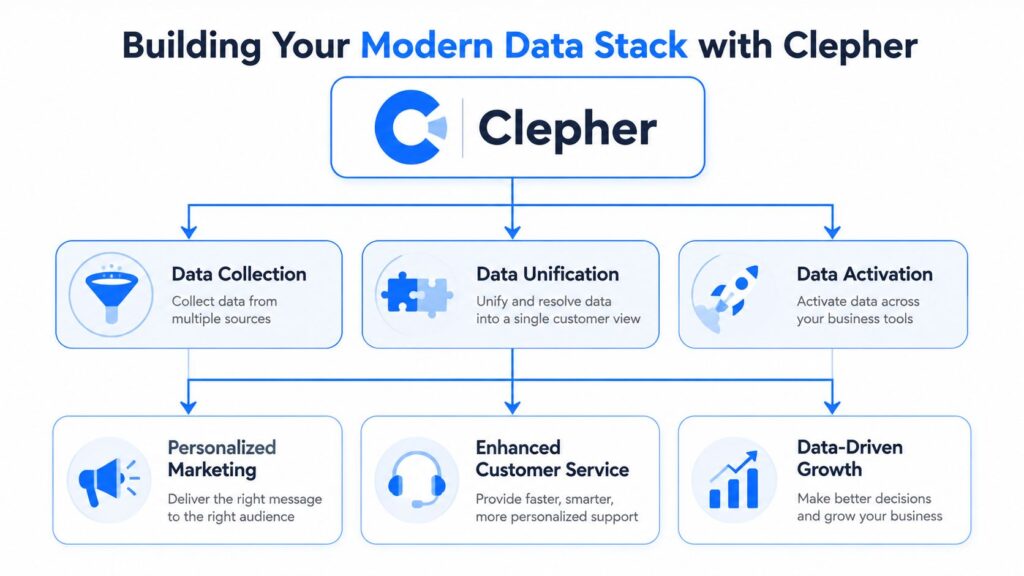
Customer Data Integration Data Stack
What a practical stack looks like
A workable modern stack for many e-commerce brands includes:
- Conversation layer: website chat, Instagram, Messenger, WhatsApp
- Commerce layer: Shopify or another storefront
- Customer layer: CRM, help desk, or audience database
- Workflow layer: Zapier, Make, or similar automation tool
- Activation layer: email, SMS, ad audiences, support workflows
This setup doesn’t try to centralize everything on day one. It focuses on the most valuable handoffs first.
For example, when a shopper starts a conversation, the system can capture contact details, tag intent, pass that context into the CRM, and trigger the right follow-up in email or support. That’s already meaningful CDI, even if the stack is still evolving.
Why low-code matters
The demand for simpler setups is real. The verified data notes that 82% of EU consumers demand data transparency, and that 47% of small businesses abandon CDI initiatives due to complexity. This points directly to a gap in how data integration strategies are being designed — most assume enterprise resources that smaller teams simply don’t have.
It also points to a major opportunity in low-code approaches. Brands that need accessible, compliant personalization don’t always require a full integration solution. Chatbot-native platforms paired with tools like Zapier can handle the most common data types and data entry workflows without the burden of enterprise tooling. The result is a setup that connects the systems that matter, moves customer signals where they’re needed, and stays manageable for a small team to maintain and adjust over time.
That combination matters because many smaller teams don’t fail on strategy. They fail on implementation friction.
A practical low-code approach helps by narrowing the first build to a few essentials:
- Capture key identifiers early: email, phone, order reference
- Tag conversational intent: product interest, support issue, lead type
- Sync only critical fields first: don’t map everything at once
- Use automation for routine updates: keep manual cleanup for exceptions
- Respect deletion and consent workflows: compliance gets easier when it’s built into the process
The result is a stack that grows with the brand instead of collapsing under complexity.
If you’re trying to unify customer conversations, purchases, and follow-ups without building a heavyweight data project, Clepher gives you a practical place to start. It helps you capture and automate conversations across your key channels, then connect that context to the rest of your marketing and support stack so your customer experience feels consistent from first message to repeat purchase.

Related Posts
10 Lead Capture Software Tools Compared for 2026
October 18, 2026WhatsApp Chatbot for Ecommerce: A Practical 2026 Guide
October 17, 2026What Is Lead Scoring and How It Drives Real Sales Results
October 16, 2026
Founder Clepher