
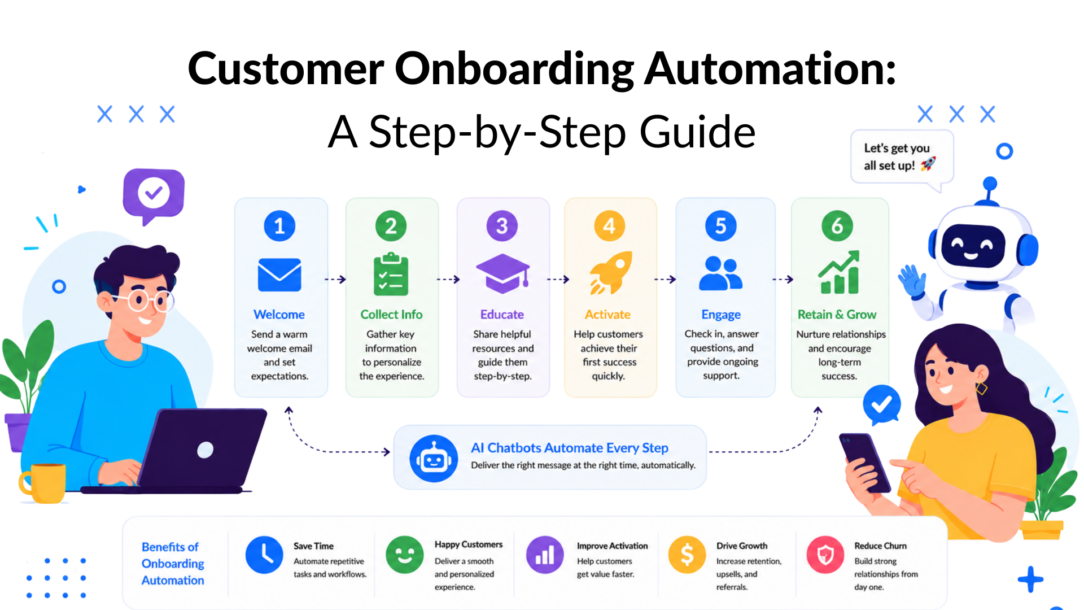
In many companies, onboarding still gets treated like paperwork. That’s expensive.
In financial services, 90% of institutions report losing customers during onboarding, as cited by MetaSource in its overview of automated onboarding workflows, referencing the 2023 Digital Onboarding Report by ebankIT (MetaSource on customer onboarding automation). Even if you don’t work in a regulated industry, the lesson is the same. Friction right after signup isn’t a minor UX issue. It’s where intent turns into confusion, delay, and avoidable churn.
What’s frequently missed isn’t just automation itself. It’s proof. Plenty of onboarding flows look polished. Fewer can show which message, trigger, or branch improved activation, shortened time-to-first-value, or helped retention. That’s where customer onboarding automation becomes a growth discipline instead of a workflow project.
Why Your Current Onboarding Is Costing You Customers
Manual onboarding looks harmless when volume is low. A welcome email goes out late. A support rep answers the same setup question five times. A customer has to wait for someone to push data into a CRM or explain the next step. None of that feels catastrophic in isolation.
It compounds fast when signups increase.
IBM notes that automated onboarding uses software and AI to handle repetitive setup tasks, route customer information directly into CRM systems, and trigger timed communications. IBM also notes that this creates structured performance data, so teams can track average onboarding time and stage-by-stage drop-off rates, turning onboarding into a measurable lifecycle instead of a one-off task (IBM on customer onboarding automation).
What poor onboarding usually looks like
In SaaS, it often shows up as users who create an account but never complete setup. They intended to evaluate the product, then got stuck importing data, inviting teammates, or connecting one critical integration.
In e-commerce, the pattern is different but just as costly. A first-time buyer completes checkout, then never gets guided toward account setup, replenishment, SMS opt-in, loyalty enrollment, or community participation. The purchase happened, but the relationship didn’t deepen.
Poor onboarding doesn’t just slow customers down. It hides where you’re losing them.
Why automation fixes more than labor costs
The obvious win is efficiency. You stop making people manually send reminders, assign tasks, or chase missing information.
The more valuable win is consistency. Every customer gets a defined path, every key step can trigger the next action, and every drop-off becomes visible. Once that happens, onboarding shifts from “customer success work” into a growth lever.
A practical way to consider this:
- Manual onboarding is reactive: Teams answer problems after customers hit them.
- Automated onboarding is proactive: The system anticipates common blockers and responds at the right moment.
- Measured onboarding is strategic: Teams can connect early experience to retention and churn trends over time.
If your onboarding is inconsistent, slow, or invisible in your reporting, it’s probably contributing to churn long before your team notices it. That’s why retention work doesn’t start with win-back campaigns. It starts the moment someone signs up, buys, or books a demo. If you’re trying to reduce avoidable attrition, this is closely tied to broader customer churn reduction strategies.
Mapping Your Onboarding Journey Before You Automate
Automation doesn’t rescue a broken journey. It speeds it up.
The strongest onboarding systems start with a map. Onramp recommends treating onboarding as a staged workflow: define success goals first, map the end-to-end journey, identify repetitive manual tasks, and automate the highest-friction touchpoints first. It also recommends piloting with a small customer cohort before full rollout (Onramp on customer onboarding automation).
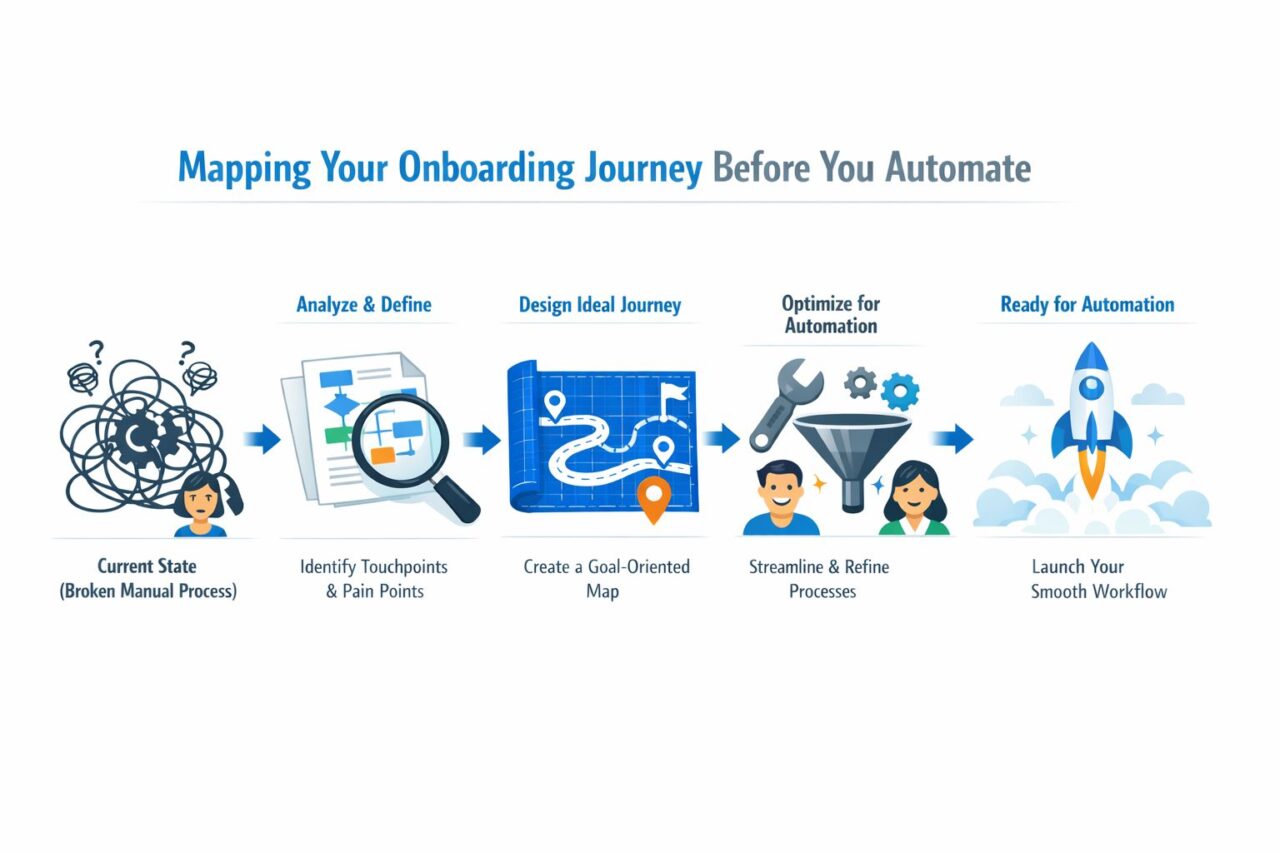
Customer Onboarding Automation Process Flow
Start with one activation moment
Organizations often map too many outcomes. They want users to explore every feature, complete every profile field, join every channel, and invite the whole team on day one. That creates bloated onboarding.
Pick one activation milestone that matters most.
For a SaaS product, that milestone might be “user creates their first project” or “user connects their data source.” For a skincare subscription brand, it might be “customer completes the post-purchase routine quiz and creates an account.” Different business models need different first wins.
Build the journey backward
Once the activation milestone is clear, work backward.
Ask:
- What must happen before that milestone?
- Where do customers stall, hesitate, or leave?
- Which steps are repetitive enough to automate well?
- Which steps still need a human handoff?
Here’s a simple SaaS example:
- Signup happens as part of the client onboarding experience: User registers for a trial.
- Immediate need appears in the client onboarding process: They need to import contacts or create a workspace.
- Risk point emerges: They don’t know which step matters first.
- Automation opportunity: Trigger a welcome flow that asks role, use case, and desired outcome.
- Activation milestone: First project created as part of the onboarding process.
An e-commerce version looks different:
- First purchase happens: Customer buys a product bundle.
- Immediate need appears: They need guidance on product use, account setup, and reorder timing.
- Risk point emerges: They don’t understand what to do after delivery.
- Automation opportunity: Trigger post-purchase messages with usage guidance, support answers, and loyalty prompts.
- Activation milestone: Account created plus second meaningful engagement, such as joining a loyalty program or product education flow.
Prioritize friction, not visibility
Don’t automate the steps that look easiest to build. Automate the moments that create the most confusion.
That usually means:
- Welcome and expectation-setting: What happens next and when
- Setup confirmation: Showing users they completed a key step correctly
- Document or data collection: Gathering required inputs without back-and-forth
- Role-based guidance: Giving different paths to buyers, admins, and end users
Practical rule: If a customer asks the same question every week, that step probably belongs in your automation map.
A lot of teams also benefit from reviewing stronger SaaS onboarding best practices before they touch a builder. The map matters more than the tool. Once you know the milestone, the blockers, and the high-friction steps, automation becomes far easier to design well.
Designing High-Impact Automated Onboarding Flows
Great onboarding flows feel timely, specific, and useful. Bad ones feel like a drip campaign wearing a chatbot costume.
The difference usually comes down to triggers, branching, and relevance. A message sent right after signup can help. The same message sent after the customer already completed setup is noise in the onboarding experience. That’s why strong customer onboarding automation relies on behavior, not just time delays, to enhance customer retention.
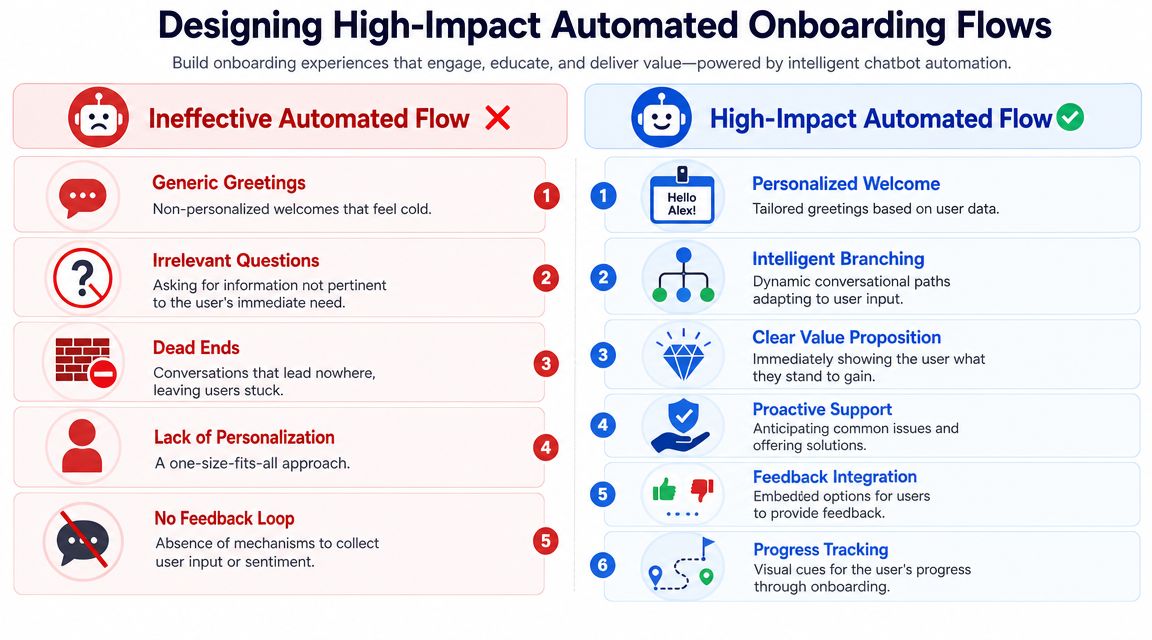
Customer Onboarding Automation Chatbot Flows
Flow one welcomes and segments
This is the first flow almost every business should build. Its job isn’t just to say hello. It should learn enough about the customer to route them into the right path.
A SaaS example:
“Hi {{first_name}}, welcome aboard. What are you trying to do first?”
- Launch a campaign
- Invite my team
- Connect my tools
- Just exploring
That one branch changes everything after it. A campaign manager shouldn’t receive the same onboarding prompts as an operations lead evaluating integrations.
An e-commerce example:
“Thanks for your order, {{first_name}}. Want help getting the most from it?”
- How to use it
- Shipping and delivery
- Manage my subscription
- Rewards and perks
This works because it respects intent. It doesn’t dump every possible next step into one message.
Flow two drives feature adoption
This flow should trigger when a customer reaches a meaningful milestone but hasn’t taken the next action yet.
For a project management SaaS product, that trigger might be “workspace created, no teammates invited.” The message can be direct:
“Your workspace is ready for your onboarding experience. Want to invite your team now or see how to set up your first workflow?”
For a subscription app, the trigger might be “customer downloaded the app, but didn’t complete profile setup.” The best message isn’t a generic reminder. It should explain the payoff:
“Complete your profile to unlock a plan tailored to your goals.”
The key is clear value. Don’t teach features in the abstract; instead, integrate them into the customer onboarding process. Tie each action to the result the customer wants.
Here’s a simple comparison of flow ideas by business type:
| Business Model | Key Goal | Example Flow Trigger | Core Message Content |
|---|---|---|---|
| SaaS trial | Reach first in-product value | User signs up but hasn’t completed setup | Welcome, role selection, guided next step |
| Product-led SaaS | Adopt core feature | User completes initial setup but stops before key action | Value-driven prompt to use the most important feature |
| E-commerce brand | Strengthen post-purchase engagement | Order placed and delivered | Product education, account creation, loyalty or refill path |
| Subscription business | Reduce early churn risk | Customer starts but doesn’t personalize account | Guided setup, preference capture, support options |
Flow three checks in before support tickets appear
Here, experienced teams separate themselves from basic automation.
A proactive check-in flow triggers around predictable friction. If customers usually struggle after a certain setup step, ask before they open a ticket.
Examples:
- For SaaS: “Need help importing your data? I can show the quick method or connect you with support.”
- For e-commerce: “Has your order arrived? I can help with usage tips, delivery questions, or returns.”
- For agencies onboarding clients: “Are you waiting on assets, approvals, or access credentials?”
The best automated flows don’t mimic human conversation perfectly. They remove friction fast and hand off cleanly when needed.
A chatbot builder becomes far more useful when you design these paths deliberately. If you’re planning conversational onboarding, it helps to study how to design a chatbot around intent, branching, and customer context instead of writing one long script.
Building Your Chatbot and Integrating Your Stack
Teams usually overbuild the bot and underbuild the plumbing. That is why onboarding often looks polished in a demo and falls apart in production.
The build should start with events, field mapping, and routing logic. Copy matters, but triggers, data flow, and handoffs decide whether a customer gets help at the right moment or gets stuck in a dead-end sequence.
Build around events, not send schedules
Scheduled sequences treat every new customer the same. Event-based onboarding reacts to what the customer did, skipped, or asked.
That difference shows up fast in performance. A SaaS user who created an account but never connected a data source needs a setup assist. A Shopify brand shipping a consumable product needs a different flow after delivery, based on product type, order history, and whether the buyer created an account. One generic sequence cannot handle both well.
Useful triggers include:
- Signup completed: start welcome, qualification, and setup guidance
- Key setup step missed: send a reminder tied to the blocker
- Purchase delivered: start product education, cross-sell, or replenishment timing
- Question asked in chat: route by intent, urgency, and account value
- Form or document incomplete: Trigger follow-up and queue review if needed to automate customer onboarding.
The trigger should match a business outcome, not just a message slot in a calendar.
Integrate the systems that affect the customer experience
Generally, the minimum working stack is the chatbot, CRM, email platform, and product or order event source. Support, billing, and SMS often join next.
Each integration needs a job:
- CRM sync: write lifecycle stage, onboarding status, use case, and account attributes
- Email platform sync: continue the journey across channels with the same context
- Support platform connection: create tickets or route conversations when the bot detects risk or confusion
- Product or order events: trigger messages from real behavior instead of assumptions
- Billing or subscription data: flag failed payments, trial status, renewal risk, or plan constraints
A practical SaaS setup looks like this. The chatbot asks role, team size, and use case during onboarding. Those fields write back to the CRM. The email platform sends setup content matched to that use case. Product events suppress reminders for users who already completed the step and trigger help for users who stalled.
A practical e-commerce setup looks different. The chatbot handles post-purchase questions, tags customers by product category and purchase intent, and passes those segments into Klaviyo or a similar platform for usage tips, refill timing, and loyalty prompts. If a customer signals a delivery issue, the support tool should get the conversation with order context attached to streamline the customer onboarding process.
Keep human review for edge cases
Automation should handle the repeatable path. People should handle exceptions, ambiguity, and anything with compliance or account risk attached.
That matters most in regulated onboarding, but the rule applies broadly across the customer onboarding process. Identity checks, incomplete documents, billing disputes, enterprise procurement questions, and high-value account escalations all need clear handoff logic. A bot can collect missing information, classify the issue, and route it to the right queue. It should not pretend to resolve what requires judgment in the customer onboarding process.
The trade-off is straightforward. More automation lowers response time and operating cost. It also raises the chance of a bad handoff if your intent model, field mapping, or routing rules are weak. Good teams accept that trade-off and design for containment. They automate the common path, then make escalation fast and traceable.
Instrument the build so you can prove it works
This is the part many onboarding builds miss.
If you cannot tie chatbot prompts and system handoffs to activation, second purchase rate, trial conversion, or reduced ticket volume, you built a workflow, not a growth program for the client onboarding process. Every major branch should write an observable event back to your CRM or analytics layer. Every escalation should be tagged by reason. Every suppression rule should be visible, so analysts can separate customers who ignored a message from customers who never should have received it.
That instrumentation is what lets you run holdouts later. It also shows whether the chatbot is creating lift or just intercepting customers who would have converted anyway.
A practical build order
Start narrow and make each layer measurable.
- Launch the welcome flow first so every new customer enters a defined path
- Add one branch based on a meaningful variable such as role, plan, product category, or intent
- Sync onboarding fields into the CRM and analytics layer to improve the client onboarding process. so downstream systems can use them
- Set up exception routing for support issues, billing blockers, compliance checks, or high-value accounts
- Add channel coordination rules so chat, email, and SMS do not stack on top of each other
- Review event logs before expanding so broken triggers or bad tags do not spread across the system
A smaller, instrumented flow usually beats a bigger one with weak data hygiene. The goal is not more branches. The goal is faster paths to value, fewer preventable support touches, and a setup you can measure against revenue or retention later.
Measuring the ROI of Your Onboarding Automation
Measurement often stops too early.
They track open rates, click rates, chatbot starts, or completion percentages. Those are useful diagnostics, but they don’t prove business impact. If you want executives to care about onboarding, you need to connect it to activation, time-to-first-value, retention, and downstream revenue behavior.
Braze notes that effective automation uses behavioral triggers and AI-driven personalization. It also recommends treating onboarding like a growth program: define an activation milestone, then A/B test message timing, channel, and branch logic against a holdout group to measure incremental impact on KPIs like time-to-first-value or retention (Braze on measuring onboarding automation impact).
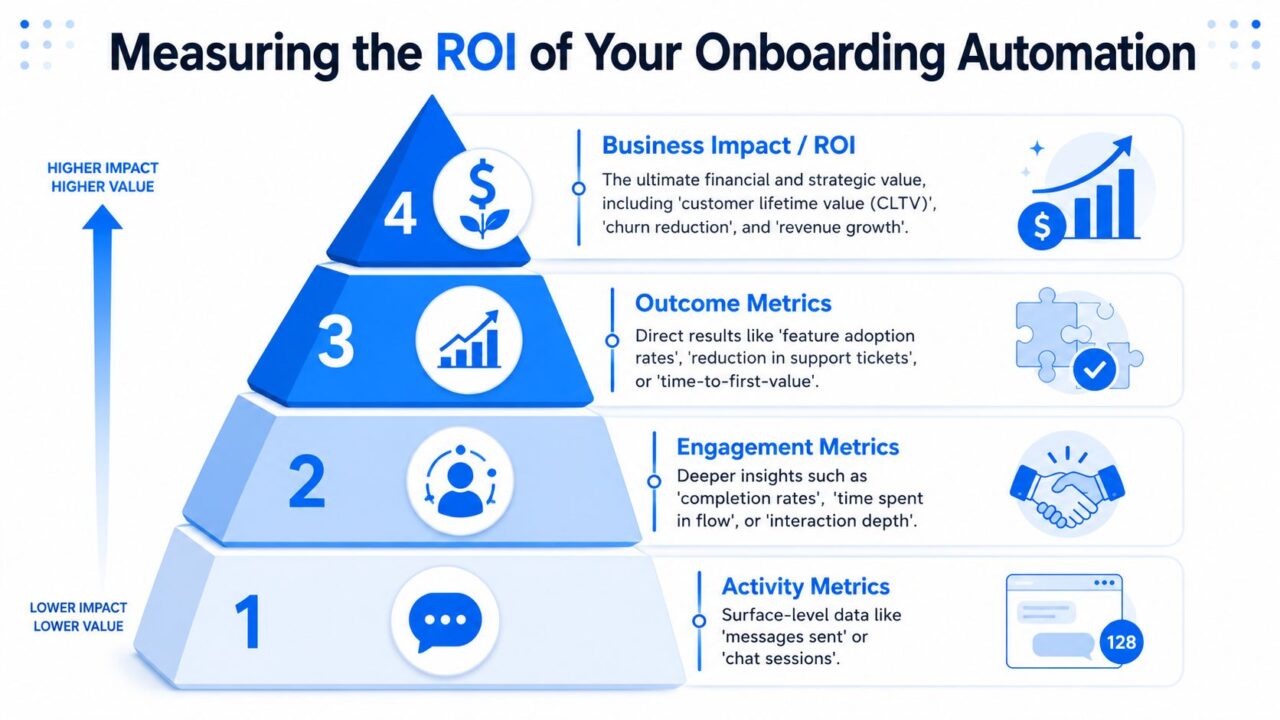
Customer Onboarding Automation ROI Pyramid
Start with one outcome that matters
Pick a primary KPI before you launch or change any flow.
For SaaS, that’s often:
- Time-to-first-value
- Activation rate
- Retention at a defined interval
For e-commerce or subscription brands, it might be:
- Second purchase behavior
- Subscription continuation
- Reduced support dependency during early usage aids in the onboarding process.
The mistake is trying to improve all of them at once. A good test has one main outcome and a few secondary diagnostics.
Use a holdout group
This is the part most onboarding content skips.
If every new customer gets the new automation, you can see correlation but not causation. Maybe activation improved because of a product release, seasonality, stronger acquisition quality, or a pricing change.
A holdout group solves that problem. Keep one segment on the existing experience and expose another segment to the new flow. Then compare outcomes over the same period.
Measurement rule: If you didn’t keep a control, you measured performance. You didn’t measure lift.
This doesn’t need to be complicated. You can test:
- Timing: immediate welcome versus delayed nudge
- Channel: chatbot first versus email first
- Branch logic: role-based path versus generic path
- Message framing: setup instruction versus benefit-led copy
- CTA style: “Complete setup” versus “See your first result”
Track the chain from interaction to outcome
The cleanest reporting stack connects four layers.
First are activity metrics. Messages sent, chats started, reminders triggered.
Next come engagement metrics. Did users reply, click, complete the flow, or reach the final step?
Then come outcome metrics. Did they activate faster, complete setup, adopt the feature, or avoid a support ticket?
Finally, the top layer is business impact. Did retention improve? Did repeat purchase behavior strengthen? Did onboarding reduce the load on support or customer success?
A practical testing cadence
A growth-minded onboarding team usually works in short cycles.
One useful rhythm looks like this:
- Week one: Define the activation milestone and pull baseline data
- Week two: Launch one isolated test
- Week three: Review drop-off points and qualitative replies
- Week four: Keep the winner, kill the loser, queue the next hypothesis
For example, if a SaaS company sees users stall after workspace creation, test two follow-ups. One focuses on setup steps. The other focuses on the outcome of inviting teammates. If the outcome-led version moves more users to activation than the holdout, keep it and move to the next bottleneck.
For e-commerce, if many customers ask the same post-purchase questions, test whether proactive education in chat reduces those early questions and increases a more meaningful next action, like account completion or reorder readiness.
What ROI proof actually looks like
Strong ROI reporting sounds like this:
- We changed one onboarding variable.
- We kept a holdout group.
- We measured the change against a defined activation milestone.
- We reviewed the effect on retention or another downstream KPI.
- We rolled out only what showed incremental improvement.
That’s a much stronger story than “the flow had good engagement.” Customer onboarding automation earns budget when you can show what changed, who changed it, and which business result moved because of it.
Common Pitfalls and How to Optimize for Scale
Most onboarding failures aren’t caused by bad software but by ineffective automation tools in the customer onboarding process. They come from bad sequencing, weak ownership, or trying to automate complexity too early.
Rocketlane notes that common failure modes are usually process-design errors. Teams automate before defining goals, fail to map the full customer journey, or try to automate too many complex steps at once. It also highlights stakeholder alignment, personalization, and closed feedback loops with continuous measurement as core controls for better onboarding systems (Rocketlane on onboarding automation pitfalls).
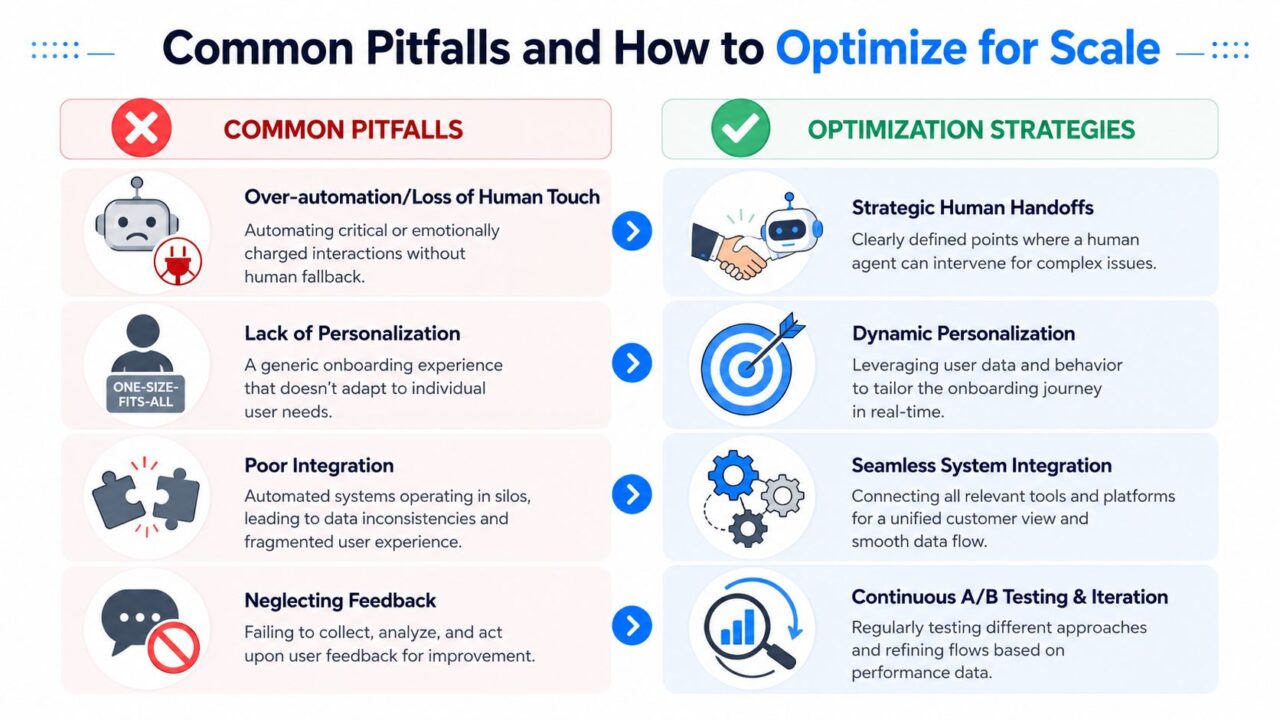
Customer Onboarding Automation Optimization Strategies
The pitfalls that show up most often
Some patterns repeat across almost every team:
- Automating before defining success: If nobody agrees on the activation milestone, every flow becomes guesswork.
- Using one generic path for everyone: New trial users, enterprise admins, first-time buyers, and repeat customers shouldn’t get identical guidance.
- Overbuilding on day one: Teams create huge branching systems before validating the first few steps.
- Ignoring feedback signals: If customers say they’re confused, or support keeps answering the same issue, the flow needs revision.
What optimization looks like in practice
Scaling doesn’t mean adding endless automation. It means improving the right parts while keeping the experience clear.
A strong optimization loop includes:
- Feedback prompts inside the journey: Ask simple questions like “Was this helpful?” or “Did you complete this step?”
- Regular review of exceptions: Look at where humans still need to step in. Those moments usually reveal design flaws or missing guidance.
- Segment-specific refinement: Rewrite the same onboarding step differently for different customer types.
- Ongoing testing discipline: Keep a backlog of hypotheses and test one variable at a time.
Customers don’t mind automation. They mind irrelevant automation.
The scale test
Your onboarding system is ready to scale when these are true:
| Signal | What it means |
|---|---|
| Teams agree on one activation milestone | Everyone is optimizing toward the same outcome |
| Support handoffs are intentional | Humans handle edge cases, not avoidable basics |
| Segmentation exists early in the journey | Customers get relevant next steps faster |
| Reporting connects onboarding to retention or value | The program can defend its budget |
Transformation is operational and commercial at the same time. You move from scattered manual tasks to a system that guides customers, captures data, exposes friction, and gets smarter with each test. That’s what customer onboarding automation should do. Not just save time. Build a repeatable engine for activation and retention.
Clepher helps teams turn customer onboarding into a measurable, multi-channel conversation across website chat, Facebook, Messenger, WhatsApp, and Instagram DM. If you want to build no-code onboarding flows, personalize paths by behavior, run A/B tests, and connect chat data to the rest of your stack, explore Clepher.

Related Posts
10 Lead Capture Software Tools Compared for 2026
October 18, 2026WhatsApp Chatbot for Ecommerce: A Practical 2026 Guide
October 17, 2026What Is Lead Scoring and How It Drives Real Sales Results
October 16, 2026
Founder Clepher