

Monday morning starts with a familiar kind of chaos. At a 12-person DTC skincare brand, the founder is triaging Instagram DMs, the support lead is copying tracking numbers between Shopify and Gmail, and a sales rep has just lost a warm lead because nobody answered a quote request quickly enough. Each person is doing useful work, but the customer experience still feels disconnected from the workflows vs AI agents.
The hidden problem isn’t a lack of effort. It’s the manual bridges between channels, systems, and people. An AI agent workflow connects those bridges so a trigger can start a process, an agent can interpret the customer’s intent, tools can retrieve or update information, and a human can take over with the right context.
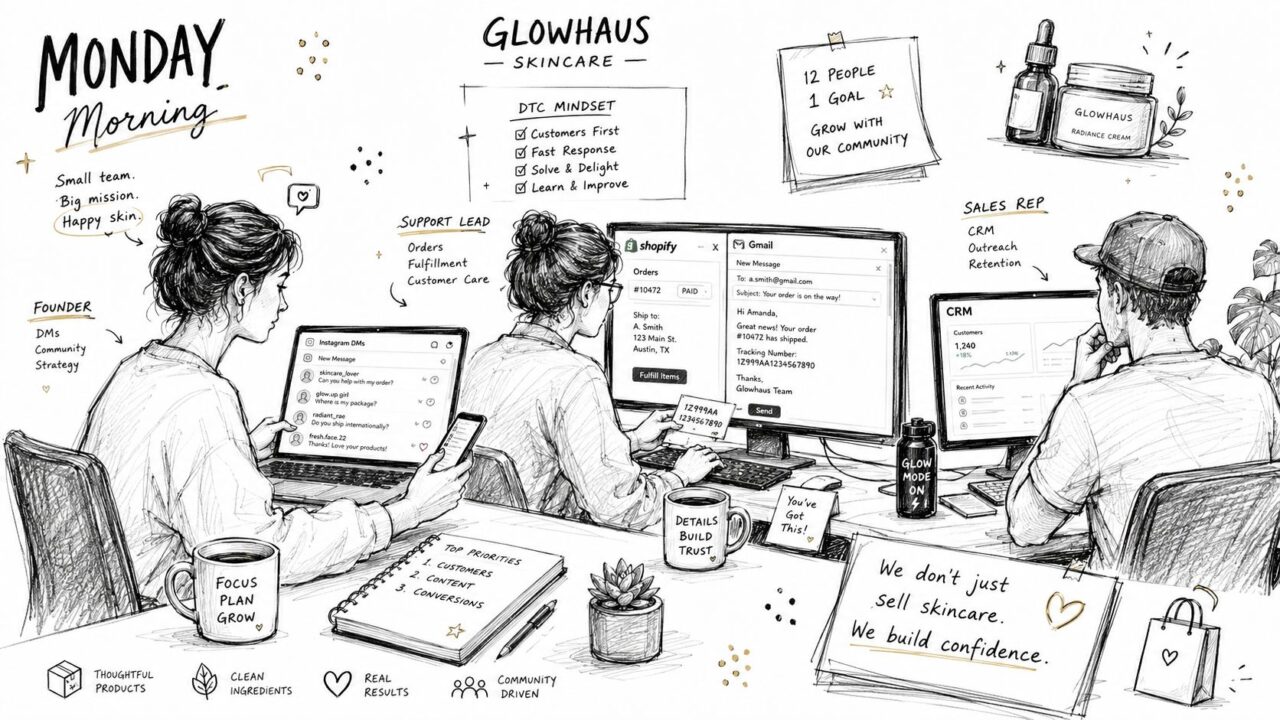
AI Agents Workflow Skincare Team
Meet the Team Behind Your Customer Conversations
Think of the brand’s customer operation as five invisible roles:
- The listener: Watches Instagram DMs, website chats, comments, and inbound messages for buying signals or support requests.
- The researcher: Looks up customer history, order details, subscription status, and previous tickets.
- The coordinator: Moves information into the CRM, assigns owners, adds tags, and starts follow-up sequences using specialized agents.
- The responder: Writes the next message, recommends an action, or answers a product question.
- The safety net: Recognizes uncertainty, sensitive requests, and high-value opportunities that need a person.
In a small team, these roles usually belong to the same few employees. That creates delays because every conversation requires someone to remember what happened in another system. The founder sees the DM, the support lead finds the order, and the sales rep receives the lead only if somebody manually passes it along.
An agent workflow turns that informal teamwork into an operating system. A message can trigger the flow. The workflow can preserve the conversation state, ask an agent to classify intent, call a store or CRM tool, and route the interaction to a live representative when the situation needs judgment.
A meeting transcript can also become useful workflow context. For example, a sales manager could use a meeting transcription tool to capture objections and follow-up promises, then feed the important details into the next CRM task instead of relying on memory.
Three conversations, one connected process
A marketing flow might capture a lead from an ad, identify the product they’re interested in, and offer a booking link. A sales flow might qualify a reply, update the lead record, and send a concise summary to the assigned representative. A support flow might identify a billing issue, check the subscription, and escalate with the relevant account details already attached.
The point isn’t to remove people from customer conversations. It’s to stop making them perform repetitive coordination work. Tools such as AI models and specialized agents enhance the workflow. Real-time agent assistance can support that coordination while a human remains responsible for decisions that require nuance.
By the end of this guide, you’ll be able to audit where a workflow gets its trigger, how it stores context, which tools it can call, where it hands off, and how you’ll know whether each step worked. First, the term itself needs a clear definition.
What an AI Agents Workflow Actually Is
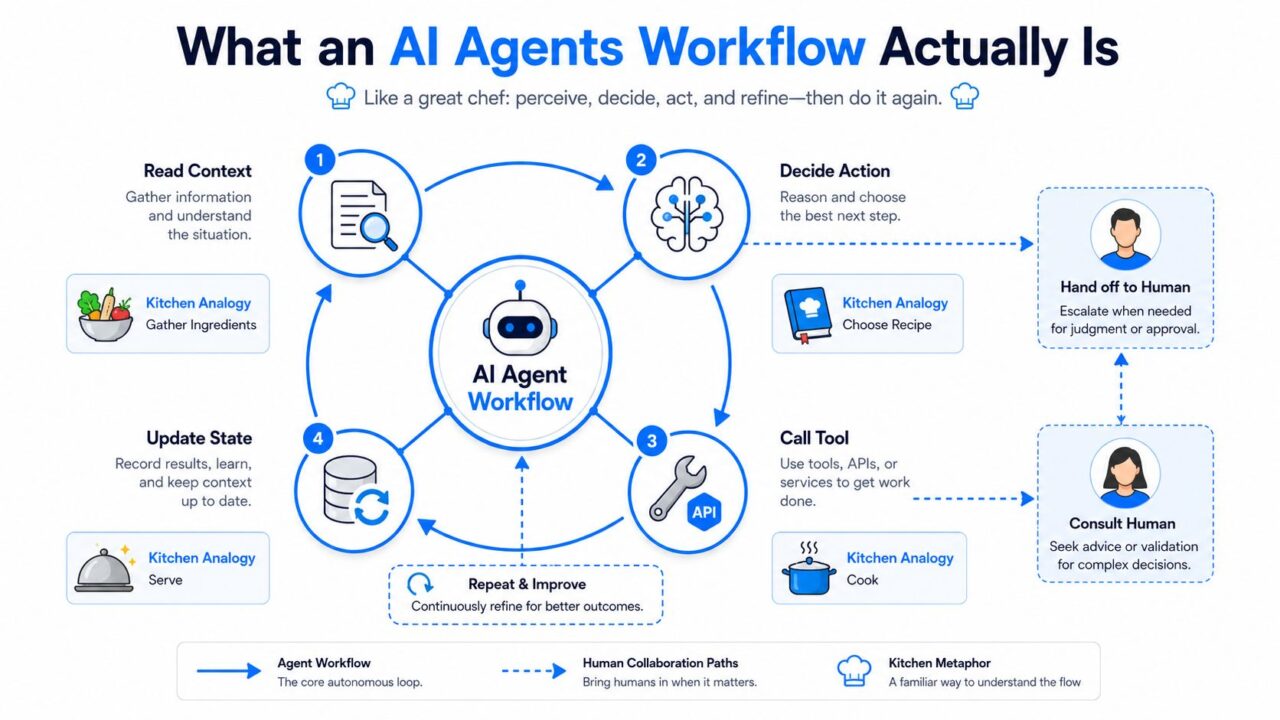
An AI agents workflow is a sequence of connected steps in which one or more AI agents read context, decide what should happen next, use tools or request human help, and update the record of the interaction.
A kitchen makes the idea easier to understand. The recipe is the workflow. The chef is the agent deciding how to interpret the ingredients and proceed. The pantry is the knowledge base and connected business data. The oven, payment terminal, and order system are tools. The pass, where the chef sends a finished plate to a manager or server, represents a handoff to a human.
A simple chatbot script follows a fixed path. If the visitor selects “shipping,” the bot sends the shipping answer. An agentic workflow can read the question, determine that the customer is asking about a delayed order, retrieve the order status, decide whether the delay requires compensation, and route the case to support if the available policy doesn’t cover it.
That flexibility adds responsibility. The more control an agent has over the next action, the more carefully you need to define its tools, permissions, state, and review points. A useful overview of the distinction appears in this guide to what AI agents are.
Six mechanics appear in most workflows
- Trigger: The event that starts the process, such as a new DM, form submission, CRM update, keyword, or scheduled check.
- Context window: The information available for the current decision, including the message, customer record, prior turns, policies, and retrieved facts.
- Reasoning step: The agent interprets the context, identifies the user’s intent, and selects an allowed next action.
- Tool call: The workflow retrieves or changes information through a CRM, store, calendar, help desk, database, or another service.
- State update: The system records what happened, such as a new intent, tag, status, owner, or completed action.
- Handoff: The workflow transfers responsibility to another agent, subflow, or human with the relevant context attached.
These mechanics can be explicit in a visual builder or hidden inside application code. Either way, they’re what you need to inspect when a customer receives the wrong answer or a lead disappears between systems.
Keep two mental models separate. The flow is the sequence of steps and conditions. The agent is the decision-maker inside one or more of those steps. That distinction becomes important when diagnosing integration failures later.
AI Agents Workflow Process Diagram
The Core Mechanics That Make a Workflow Run
A workflow can look tidy on a canvas and still behave badly in production when using AI systems. The test is what happens when events arrive out of order, information is missing, a tool responds slowly, or a customer changes their mind halfway through the conversation.
Triggers start the clock
A webhook might fire when a lead submits a form. A keyword might start a product recommendation flow in Instagram Direct. A scheduled event might ask an agent to review abandoned carts. A CRM event might launch onboarding after a deal changes stage. An ad click might open a conversation with a campaign-specific entry point.
The trigger owns the beginning of the workflow and, in practice, much of its latency. One subtle failure occurs when two triggers race. A customer may click an ad and submit a form almost simultaneously, creating duplicate contacts or two competing conversations. Use an idempotency key, a deduplication check, or a short locking step so the workflow recognizes that both events belong to the same interaction.
State preserves the customer’s story
A stateless FAQ bot treats every message as new. A stateful workflow remembers that the customer shared an email address earlier, selected a sensitive-skin product, and already received a shipping estimate.
Useful fields might include:
lead_status: New, qualified, booked, nurtured, or assigned.intent: Product question, order issue, billing request, or sales inquiry.cart_value: A value used to determine whether a recovery path or human review applies.last_agent: The person or automated role that handled the previous step.
State owns context. If the workflow doesn’t write important information back to a durable record, the next agent has to guess, ask the customer to repeat themselves, or make a decision without the full history.
Handoffs define responsibility
A handoff shouldn’t mean “the bot gave up.” It should be an explicit exit condition. A request involving a disputed charge, a medical concern, an angry customer, or a high-intent enterprise prospect may need a human from the start.
The handoff payload should include the customer’s message, detected intent, relevant account facts, actions already taken, unresolved question, and suggested next step. If no representative accepts within the service-level agreement, the workflow needs a second path, such as a queue notification, callback request, or carefully worded expectation-setting message.
| Mechanic | What It Controls | Where It Breaks |
|---|---|---|
| Triggers | When the workflow begins and how quickly it reacts | Duplicate events, racing triggers, missed webhooks, or unclear entry conditions |
| State | What the workflow remembers and passes forward | Stale fields, missing updates, conflicting records, or context loss |
| Handoffs | Who owns escalation and what information travels | Unassigned conversations, incomplete summaries, or no fallback when a person is unavailable |
Connected tools need consistent interfaces. Teams evaluating shared tool access may find this overview of the Model Context Protocol for developers useful when deciding how agents should discover and use capabilities.
A platform such as an AI agent platform can make these mechanics visible, but visibility doesn’t replace design. You still need to decide which event starts the process, which fields matter, and where a human must take ownership.
Real-World Flow Examples for Marketing, Sales, and Support
The best way to design an agent workflow is to start with a business decision, not an AI feature. Ask what should happen after a particular customer event, then map the data, tools, conditions, and owner required to complete it.
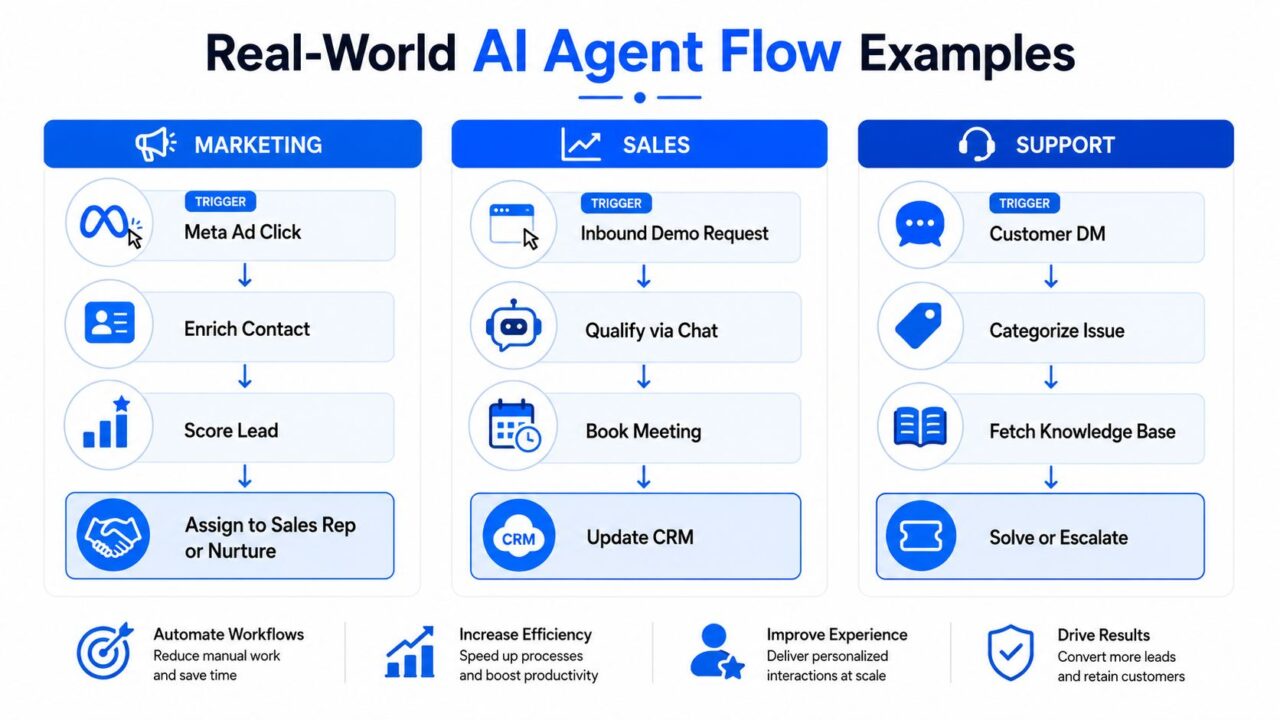
AI Agents Workflow Automation Diagram
Marketing flow, turn interest into a conversation
Trigger: A prospect clicks a Meta ad and opens a chat.
- The workflow captures the campaign, ad, name, and contact details.
- The agent asks a focused question about the prospect’s goal, such as acne care, hydration, or routine building.
- A CRM or enrichment tool adds available company and contact information.
- The agent decides whether the person fits a discovery-call path or a nurture path.
- The booking tool offers a suitable time and writes the appointment to the CRM.
Handoff target: A sales representative receives the conversation summary, campaign source, stated need, and booking status. A lead prioritization service, such as this lead prioritization API, can support routing logic when the business needs a separate scoring layer.
Sales flow: qualify without making prospects repeat themselves
Trigger: An inbound demo request or reply enters the sales inbox.
The agent asks questions aligned with the team’s qualification criteria, including business need, buying authority, urgency, and available budget. It records the answers, assigns a fit tag, and checks whether the prospect has expressed a high-intent signal, such as requesting implementation details or asking about next steps.
Tool calls: CRM lookup, tagging, calendar availability, and notification creation.
Decision point: High-fit prospects go to a representative. Unclear or lower-fit prospects enter a nurture sequence with a specific follow-up task rather than disappearing into a general inbox.
Handoff target: The sales rep receives a summary card, not a transcript dump from a single agent. It should state the problem, qualification answers, objections, requested timeline, and recommended next action.
Support flow: resolve the routine and expose the exception
Trigger: A customer sends a DM saying a subscription charge looks wrong.
The agent categorizes the issue as billing, retrieves subscription status through the billing API, checks the relevant policy, and determines whether an approved refund action is available.
Tool calls: Customer lookup, subscription-status request, refund action, ticket creation.
Decision point: If the policy and account state support the action, the workflow initiates the approved refund path and confirms what will happen next. If the request is disputed, ambiguous, or outside policy, the workflow stops before making an irreversible change.
Handoff target: A billing specialist receives the account details, customer explanation, API result, policy check, and actions already attempted.
The same pattern applies across departments. A trigger opens the case, context informs the decision, tools change the outside world, state records progress, and a handoff assigns responsibility in the AI system.
Segmentation, Personalization, and Analytics Inside the Flow
Raw conversation data becomes valuable when the workflow turns it into a decision. A customer’s industry, plan tier, previous purchase, support history, or campaign source can determine which branch runs next in the AI workflow.
A skincare brand might send a first-time buyer toward education about routine order, while a repeat customer with a recent purchase receives replenishment guidance. A SaaS company might route an administrator on an enterprise plan to a specialist, while a self-serve user receives a product walkthrough. The agent shouldn’t invent these distinctions. The workflow should expose approved fields and define what each branch is allowed to do.
Personalization works the same way. CRM fields can supply the customer’s name, last order, subscription status, previous ticket, or preferred channel. The agent then uses those facts in a response or handoff. A useful rule is to show the source of each personalized value in the trace, so a reviewer can tell whether the message came from current data or an unsupported assumption.
A compact mapping for the operating team
| Segment Input | Personalization Output | Analytics Event |
|---|---|---|
| Industry or customer type | Use relevant examples, terminology, and routing in the AI workflow. | Segment branch entered |
| Plan tier or account status | Apply the appropriate support path or offer | Entitlement check completed |
| Prior purchase or ticket | Reference the relevant history and avoid repeated questions | Context retrieved |
| Campaign source | Match the conversation to the ad or landing-page promise | Source captured |
| Intent and urgency | Adjust response path, owner, and escalation priority | Intent classified |
Analytics should follow the workflow’s actual mechanics rather than focus only on the final message. Track resolution rate to see whether the issue was completed, handoff rate to understand where automation stops, and qualified-lead rate to measure whether marketing conversations produce usable opportunities.
Also track step-depth distribution. If most successful conversations finish early but failures cluster after several tool calls, the problem may be orchestration or context retention rather than the opening prompt. Step-level evaluation is especially important because an agent can choose the wrong tool, construct invalid parameters, or decide that a tool isn’t needed even when the final result looks superficially acceptable. Guidance on evaluating AI agentic systems describes these separate quality dimensions.
Where AI Agents Workflows Quietly Break in Production
Adding an agent to a channel doesn’t repair a broken process. It can make the process harder to inspect because the system appears helpful while failing between the visible messages.
A support workflow may stall after an API timeout without telling the customer or the team. An agent may produce malformed tool arguments that write the wrong value to a CRM record. A customer may type “agent” and still remain trapped in an automated loop because the handoff condition only recognizes a narrow set of phrases.
The integration layer carries much of the risk
Production latency often comes from the components around the model. Systems-level benchmarking found that Non-LLM components dominate latency in 5 of 10 agentic AI applications, while sandbox working sets can peak at 28 GB per session. It also found that latency across GPU inference, memory-bound retrieval, and CPU-bound sandboxes can differ by up to 32x. These findings are summarized in AgentSysBench’s analysis of agentic workloads.
Trace model calls, retrieval, tools, orchestration, and sandbox execution separately. Otherwise, a team may keep changing prompts when the actual delay comes from a slow connector or a saturated execution environment.
Long chains create another problem. Context can drift, tool errors can compound, and a small wrong assumption can affect every later action. One enterprise-focused benchmark reported 58% success on single-turn tasks and 35% on multi-turn interactions, reinforcing the need for checkpoints in longer journeys. Oliver Wyman’s discussion of integrating AI into workflows covers this reliability gap and the related developer challenges around workflow, UI, and API behavior.
Guardrails belong in the design
- Permission boundaries: Limit each agent to the tools and records it needs.
- Argument validation: Reject malformed or unsafe tool parameters before execution.
- Timeout handling: Retry safely, notify the workflow owner, or route to a human.
- Loop limits: Stop repeated clarification requests and expose the conversation for review.
- Rollback paths: Make it possible to reverse or investigate consequential updates.
- Trace logging: Record decisions, tool results, state changes, and handoff timing.
The question isn’t whether an agent can produce a convincing reply. It’s whether the whole process remains observable and recoverable when one integration behaves badly.
Best Practices, Checkpoints, and Common Questions
A reliable workflow starts narrow. Define one trigger and One success metric for evaluating AI models. for each flow, then add only the tools required to reach that outcome. Before launch, test normal requests, missing data, duplicate events, tool errors, ambiguous intent, and explicit requests for a human.
Use this operating checklist:
- Keep the path bounded: Aim to reach a decision within six to eight nodes before a handoff or subflow.
- Log ownership changes: Record every transfer between an agent, queue, and human representative in the AI workflow.
- Review failed intents weekly: Group failures by missing data, wrong classification, tool error, and policy gap in the AI system.
- Measure steps, not only outcomes: Inspect where conversations stall or repeat.
- Protect irreversible actions: Require approval for refunds, account changes, or sensitive updates.
Enterprise governance also needs a control plane for ownership, identity, lifecycle management, and observability, with separate policies for data access, compliance, and security. Microsoft’s guidance on governance and security across an organization highlights why agent accountability belongs to named leaders, not an unattended automation queue.
Clepher helps teams design no-code AI agent flows that connect triggers, business context, tags, CRM updates, nurture sequences, analytics, and live chat handoffs across customer conversations. Visit Clepher to map one marketing, sales, or support workflow, define its checkpoints, and turn the finished process into an automation your team can monitor.

Related Posts
Revenue Optimization: A Practical Playbook for Growth
October 19, 202610 Lead Capture Software Tools Compared for 2026
October 18, 2026WhatsApp Chatbot for Ecommerce: A Practical 2026 Guide
October 17, 2026
Founder Clepher