

Maya’s skincare brand has a bot on the website, another sending discount codes through Messenger, an Instagram DM autoresponder collecting leads, and a WhatsApp Business line that forwards conversations to her virtual assistant. Each tool works well enough on its own. The problem appears when one customer moves between channels. The Instagram lead lives in ManyChat, the support email lands in Zendesk, the WhatsApp conversation remains on the assistant’s phone, and the CRM receives only part of the customer’s information because every system uses different field names.
That’s the AI chatbot integration problem. A chat interface is only the visible layer. The useful system underneath needs shared contact records, consistent events, consent status, routing rules, escalation logic, and reliable connections to the CRM, helpdesk, email, SMS, and commerce stack. In 2026, that operational layer matters more than adding another attractive chat bubble. A global AI survey found that 47% of organizations were scaling AI chatbots across the enterprise to improve customer engagement, while 81% were using AI in at least one business function. The survey summary shows why chatbot projects increasingly sit inside customer service, sales, and workflow automation rather than operating as isolated experiments.
The Integration Problem That Siloed Bots Create
A shopper receives a discount on Instagram, asks about shipping on the website, then reports a damaged package through WhatsApp. The bots answer each request, yet the customer repeats their order number, email address, and product concern because the systems share no usable context. Maya’s team sees three conversations, each powered by an ai agent to facilitate smoother interactions. The shopper experiences one unresolved relationship.
That failure starts in the data model. One platform stores the contact under an email address, another under a phone number, and a social channel under a platform-specific ID. Campaign source and product interest can vanish before the lead reaches the CRM. If a bot escalates without the conversation summary, intent, order ID, or promised next step, the agent must reconstruct the case. Separate automations may then send a discount and a support message to the same customer.
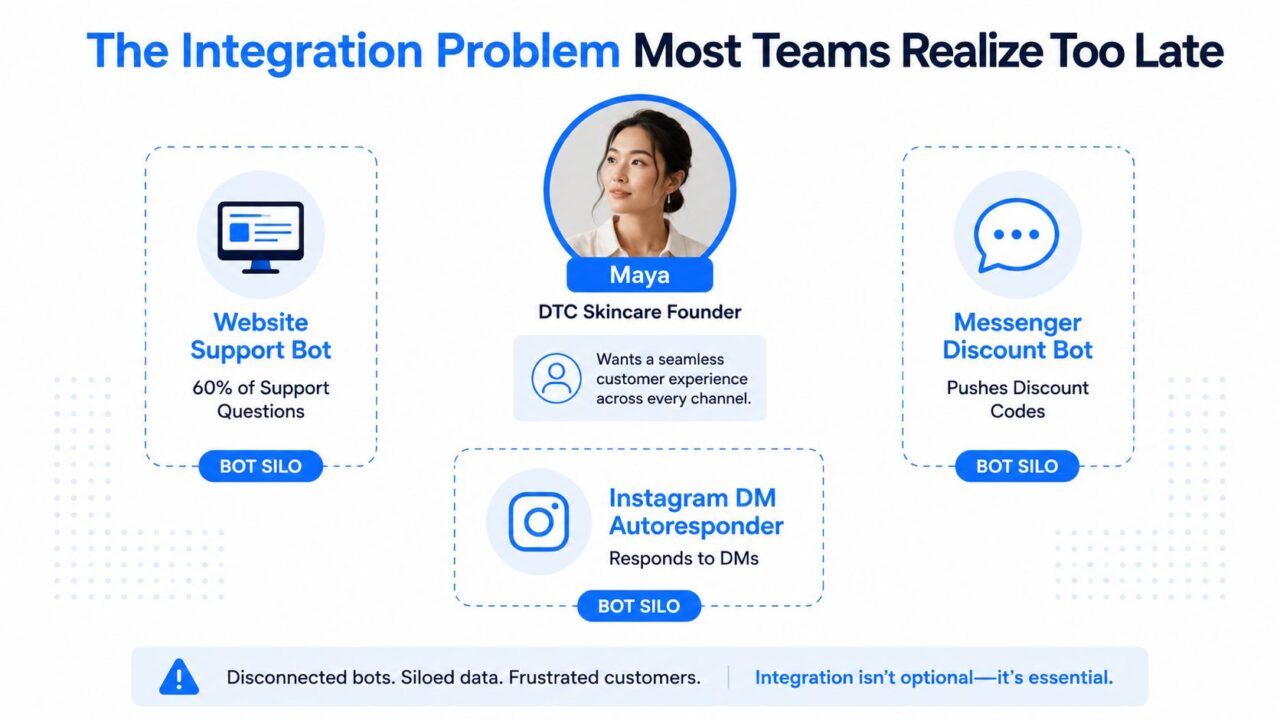
AI Chatbot Integration Siloed Bots
Practical rule: Treat every conversation as a source of structured customer events, not as a transcript trapped inside a channel. Capture the event, map its fields, and define the next system that should receive it.
Adoption data reinforces the need for that operational layer. A separate 2025 snapshot reported that 16.3% of the world’s population used generative AI tools in the second half of 2025, compared with 15.1% in the first half. Another dataset cited chatbot integration among 58% of B2B companies and 42% of B2C companies are leveraging conversational ai to enhance their customer interactions. The adoption overview also reported adoption rising about 4.7x from 2020 to 2025. Customers increasingly encounter AI across service, sales, and marketing. The business question is whether your systems preserve context when they do.
Start with one canonical contact record. Assign a stable The contact_id is important for identifying customers in the context of ai chatbots and their interactions., then attach channel identifiers, consent states, lifecycle stage, product interests, and conversation history. Define shared events for lead capture, purchase intent, support escalation, and follow-up. The website bot, Meta messages, WhatsApp, CRM, and support desk can then update one customer profile instead of creating separate versions of reality.
Mapping Your Stack Before You Touch a Platform
Most integration failures begin before anyone opens a vendor dashboard. A Shopify supplement brand might say its goals are “better automation,” but that phrase doesn’t tell a builder what to connect or how to judge the result. Translate the goal into an operational outcome such as reducing repetitive order-status tickets, capturing qualified supplement leads, or recovering carts with a consented follow-up sequence.
Define intents and fields together
List the intents the bot must handle before writing responses. For a supplement store, the initial list could include order status, shipping time, returns, subscription changes, ingredient questions, product recommendations, dosage questions, allergy concerns, discount requests, abandoned-cart recovery, and human-agent escalation.
Each intent should produce a deliberate payload. A product recommendation flow may collect email, phone, skin_concern, or product_interest. An order-status flow may require order_id and email. A lead flow should also carry The utm_source can help analyze the effectiveness of different channels in deploying ai chatbots., utm_campaign, channel, The conversation_id is crucial for tracking interactions in an ai-powered customer support system., and consent_timestamp.
Keep the first scope narrow. Research on enterprise implementation recommends defining design principles, adapting conversational flows to users, and testing situational input options before rollout. Other implementation guidance emphasizes early user involvement, narrow initial scope, and clear data ownership, while organizational research identifies successful issue resolution as the central success criterion. The implementation research and the organizational study point to the same practical conclusion: a bot that handles fewer intents reliably is more valuable than one that attempts everything and resolves little.
Build the field map
Create this document before choosing middleware. The table should become the contract between marketing, support, engineering, and whoever owns data compliance.
| Data Source | Field Captured | Destination System | Destination Field | Transform/Rule |
|---|---|---|---|---|
| Shopify | customer_id |
HubSpot | shopify_customer_id |
Preserve as text, never overwrite |
| Shopify | order_id |
Helpdesk | order_number |
Match against the latest order |
| Chatbot | email |
HubSpot | email |
Lowercase and trim whitespace |
| Chatbot | phone |
Klaviyo | phone_number |
Normalize country format |
| Chatbot | skin_concern |
HubSpot | product_interest |
Map approved values only |
| Chatbot | cart_value |
Klaviyo | cart_value |
Store as a numeric property |
| Chatbot | consent_timestamp |
CRM | marketing_consent_at |
Write only after explicit opt-in |
| Chatbot | conversation_id |
CRM and helpdesk | conversation_id |
Use for deduplication |
| Meta or WhatsApp | Channel user ID | CRM | channel_identity |
Store with a channel tag |
| GA4 | UTM parameters | HubSpot | Campaign properties | Preserve original source |
Consent needs its own fields, not a note buried in a transcript. Separate support permission, marketing permission, and SMS permission. GDPR doesn’t prescribe one fixed chatbot retention period. It requires personal data to be kept only as long as necessary for its purpose. A practical checklist suggests support transcripts for 6 to 12 months, lead data until conversion or 6 months, anonymous analytics for 24 months, and marketing subscriber data until opt-out plus 30 days for processing. The chatbot GDPR checklist explains the operational implications, including deletion, anonymization, and audit records.
For teams formalizing this work, customer data integration guidance can help turn the field map into a repeatable operating model. Define success before launch, too. Your internal targets might include a deflection rate above 55%, CSAT above 4.3, and a lead-to-CRM match rate above 90%. These are team thresholds, not universal benchmarks. They tell you whether the integration is doing useful work rather than merely generating conversations.
Connecting Bots Across Web, Messenger, Instagram, and WhatsApp
A multi-channel setup needs one contact model and several channel-specific adapters. Don’t force every platform into the same technical behavior. Normalize the output after each channel collects its native identifiers, message metadata, and consent signals to create a cohesive knowledge base.
Website chat
Install the bot’s embed snippet, then pass a session_id and visitor cookie into the session. When a shopper logs in, use the platform’s JavaScript SDK to identify the customer and pull the Shopify customer ID. That association lets the bot retrieve relevant order context without asking the customer to repeat information already present in the commerce system.
Don’t rely on a browser session as the permanent identity. A visitor may clear cookies, switch devices, or begin on Instagram and finish on the website. Store the session identifier as an event attribute, then connect it to the stable contact record when the shopper provides an email, phone number, account login, or another approved identity signal.
Messenger and Instagram Direct Message
Connect both channels through the Meta Business Portfolio and subscribe the app to the relevant page webhooks. Mirror the Messenger Greeting and Persistent Menu so users see consistent entry points, then normalize the platform-specific user IDs before writing to the CRM.
Messenger uses a page-scoped user ID, commonly called a PSID. Instagram uses an Instagram-scoped ID. They aren’t interchangeable. Store each value with a channel attribute and resolve both to the internal contact_id only when your matching rules confirm the identity.
Instagram DM automation also has policy restrictions around certain message tags and interaction windows. Build escalation and follow-up logic around the permissions the channel grants, rather than assuming a lead can receive any message at any time.
WhatsApp Business Platform
Use the embedded signup flow, request a display name, verify the phone number, and store both the WhatsApp Business Account ID and the phone_number_id. Make the phone number a normalized contact attribute, not the entire identity model, to ensure consistency across various channels, including email and social, in the context of customer support.
WhatsApp template approval can introduce launch delays, so prepare approved transactional and marketing templates early. Also separate customer-initiated support from outbound promotional messaging. The channel’s rules, consent state, and approved templates should travel with the contact record.
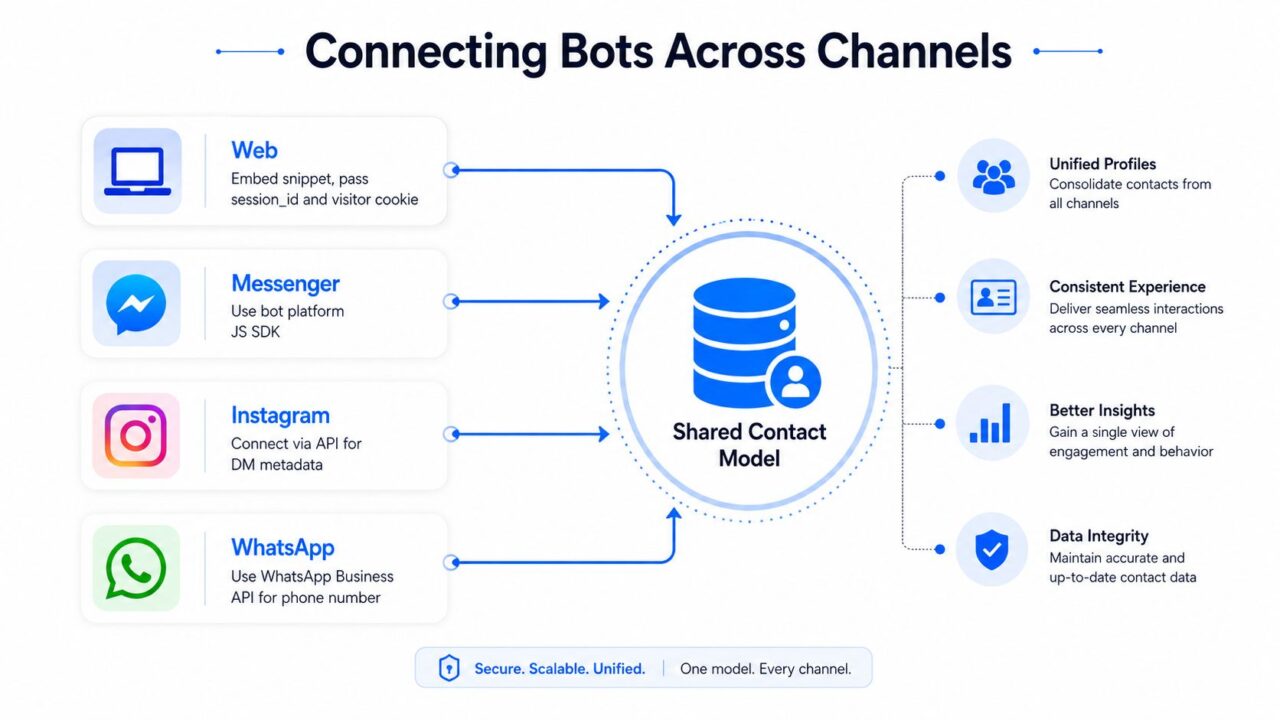
AI Chatbot Integration Omnichannel Architecture
For a practical reference on website deployment, startup AI feature implementation is useful when your team is deciding how the front-end experience should connect to application logic. For broader channel orchestration, a multi-channel messaging platform can sit alongside the channel APIs and help centralize flows, tags, and audience actions.
The invariant across all four channels is simple:
- Identity: Store the platform user ID.
- Channel: Record whether the event came from Web, Messenger, Instagram, or WhatsApp.
- Contact: Resolve the event to one internal
contact_id. - Conversation: Preserve the
conversation_id. - Permission: Attach the relevant consent and messaging status to ensure compliance when using AI-powered communication tools.
- Handoff: Pass intent, summary, and ownership when a human takes over.
The bot can vary by channel. The downstream record shouldn’t.
Wiring Chatbots Into CRM, Email, SMS, and Automation Tools
The chatbot should emit an event payload, not become the final destination for customer data. A qualified lead from Manychat or Botpress should arrive in HubSpot, Salesforce, Klaviyo, or Attio with the same naming convention regardless of where the conversation started.
A useful lead payload contains the person’s name, email, phone, intent, product interest, UTMs, channel, conversation ID, consent timestamp, and lifecycle stage. It should also include a source timestamp and an event type such as lead_qualified, human_handoff_requested, or cart_recovery_eligible. Those event names make downstream automations easier to audit than vague actions such as “bot completed.”
Worked field map
Suppose a visitor asks about a supplement, shares an email address, selects a product category, and requests a human recommendation. The bot should create one lead event, then update or create the contact using deterministic matching.
| Chatbot Field | HubSpot Property | Salesforce Field | Klaviyo Property | Transform |
|---|---|---|---|---|
first_name |
firstname |
FirstName |
first_name |
Trim whitespace |
email |
email |
Email |
$email |
Lowercase and validate |
phone |
phone |
Phone |
$phone_number |
Normalize format |
intent |
The chat_intent can be enhanced by utilizing an ai agent to better understand user needs. |
Chat_Intent__c |
chat_intent |
Use controlled values |
product_interest |
product_interest |
Product_Interest__c |
product_interest |
Map category names |
lifecycle_stage |
lifecyclestage |
LeadStatus |
lifecycle_stage |
Apply agreed state mapping |
utm_source |
original_source_detail_1 |
UTM_Source__c |
utm_source |
Preserve original value |
conversation_id |
conversation_id |
Conversation_ID__c |
conversation_id |
Deduplicate on match |
consent_timestamp |
marketing_consent_at |
Marketing_Consent_At__c |
consent_timestamp |
Write only after opt-in |
handoff_requested |
human_handoff |
Human_Handoff__c |
human_handoff |
Convert yes/no consistently |
Segment by lifecycle stage after the contact write, not before identity resolution. A new prospect may enter a welcome sequence, an existing customer may receive support routing, and a subscriber asking about cancellation may need retention handling instead of acquisition messaging. Product-interest tags should be additive, while lifecycle stage should have one authoritative value.
Automation tools add another failure point. Zapier, Make, n8n, and Pabbly all support webhook-driven workflows and connections to thousands of applications, but their retry and error behavior differs. Store conversation_id in both the chatbot event and the destination record. Before creating a new contact or ticket, search for that ID. This prevents duplicate CRM writes when a webhook is retried.
Human handoff
When an agent accepts the conversation, trigger an SMS handoff through Twilio or Telnyx only if the customer has the required permission. Send the agent the transcript summary, intent, order ID, and channel source. Don’t make the customer explain the issue again just because the automation changed systems.
Teams that need a more formal service connection can review CRM and ticketing system integration. Clepher can be used as one option for building no-code conversational flows across website, Facebook, Messenger, WhatsApp, and Instagram Direct Message, with fields, tags, segmentation, and connections to email or SMS workflows.
Choosing Native Connectors, Middleware, or Custom APIs
The right architecture depends less on the chatbot brand than on the number of systems, the sensitivity of the data, and the team’s ability to maintain failure handling.
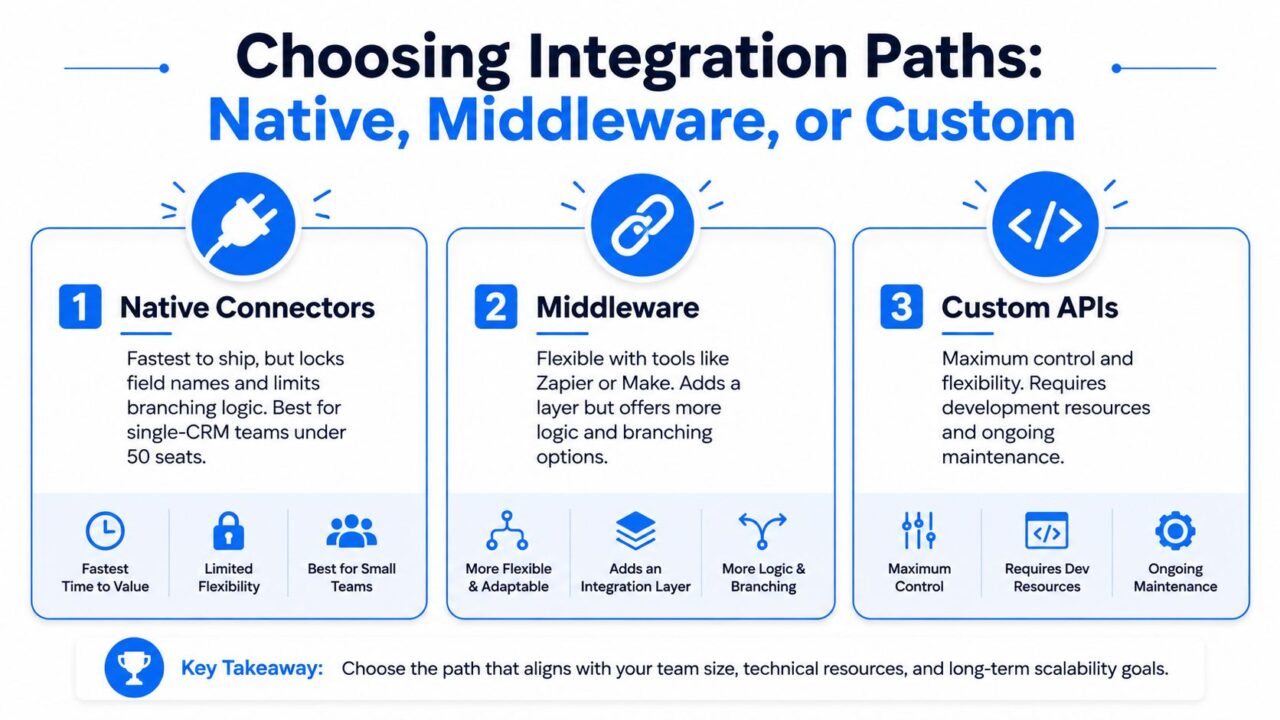
AI Chatbot Integration Paths
Native connectors
Native integrations ship quickly and usually cover common actions such as creating a contact, adding a tag, or sending a notification. They work well for a team using one CRM and a relatively simple routing model, particularly a single-CRM team with fewer than 50 seats. The trade-off is limited branching logic, which can be improved by implementing more advanced natural language processing in AI chatbots. You may have to accept the connector’s field names, supported triggers, and update behavior.
Use native connections when the workflow is straightforward: qualified lead to CRM, tag to email list, escalation to helpdesk. Test whether the connector updates existing records safely before enabling it for live traffic.
Middleware
Zapier, Make, n8n, and Workato provide a visible orchestration layer. Middleware can inspect the payload, branch on intent, enrich a record from Shopify, route support cases, and send different events to Klaviyo or HubSpot. It costs more per operation and adds another service to monitor, but it can absorb schema changes through field mappers.
This is usually the practical middle ground for a brand or agency connecting several channels to several business applications. Keep the workflow modular. One automation should resolve identity, another should update the CRM, and another should handle messaging. That separation makes failures easier to isolate.
Custom APIs
Custom webhooks and application code, such as a Lambda function, Worker, or Node script, offer control over retries, idempotency keys, PII handling, validation, and logging. They make sense when conversations touch sensitive systems, when auditability matters, or when a regulated business can’t delegate data handling to a general-purpose automation layer.
Custom code also creates maintenance work. Your team owns API version changes, authentication, monitoring, queueing, and incident response. A two-channel, two-application setup rarely needs this complexity. A six-channel, six-application system often benefits from it because informal point-to-point connections become difficult to govern.
Choose based on operational maturity, not technical ambition. The cheapest integration is the one your team can test, understand, and repair.
Keeping Integrations Healthy After Launch
“Deploy and forget” is how chatbot integrations rot. A working demo can hide failed webhooks, renamed CRM properties, expired permissions, and abandoned conversations. The first launch proves that the happy path works. Ongoing monitoring proves that customers still reach the right outcome.
Review four signals weekly
- Webhook delivery: Set an internal target above 98% for successful delivery, then inspect every failure rather than averaging it away.
- Schema drift: Compare the chatbot payload with the CRM schema. Flag missing fields, renamed properties, and unexpected value formats.
- Consent accuracy: Check that channel-specific opt-ins still match the permissions stored in the CRM, especially after Meta policy changes.
- Terminal outcomes: Measure whether conversations reach a resolved, qualified, escalated, or otherwise deliberate terminal node instead of ending mid-flow.
A dead-letter queue is essential. If you don’t have one, create a temporary Google Sheet fallback that stores the event payload, failure reason, timestamp, and retry status. A lost lead shouldn’t disappear because one connector timed out.
A failed automation is an operational incident, not an invisible inconvenience.
Run a short monthly transcript review with marketing, support, and whoever owns the integration. Classify each failure as a missing intent, broken handoff, bad data, policy restriction, or integration timeout. Then fix the category that creates the most customer friction, not the one that’s easiest for the builder.
Watch for silent quality loss, too. A CRM write may succeed while the wrong lifecycle stage is applied. A message may send while the consent flag is missing. A human handoff may trigger while the agent receives no order context. Logs need both technical status and business outcome.
The broader implementation evidence reinforces this discipline. One analysis attributed chatbot failures to 31% strategic misalignment, 28% poor process integration, 24% inadequate data foundations, and 17% change-management issues. The failure analysis supports a useful diagnosis: many broken deployments of AI-powered solutions aren’t model failures but rather issues with the use case. They’re workflow and governance failures.
Your 30-60-90 Day Integration Rollout Plan
A controlled rollout gives your team time to validate identity, fields, permissions, and handoffs before every channel depends on the system.
Days 1 to 30: foundation
Define the initial intents, create the field map, choose the source of truth for each property, and document escalation ownership. Verify consent capture, fallback routing, webhook authentication, deletion rules, and the CRM deduplication method before launch.
Days 31 to 60: connect and test
Deploy website chat and one messaging channel first. Use a small user segment to test event tracking, contact creation, custom fields, tags, email triggers, and SMS handoffs. Deliberately test malformed emails, duplicate events, missing order IDs, revoked permissions, and human escalation.
Days 61 to 90: scale and optimize
Add Instagram DM, Messenger, and WhatsApp after the first channels behave consistently. Enable middleware workflows in Zapier or Make, then review handoff rate, fallback frequency, data-sync errors, and unresolved intents.
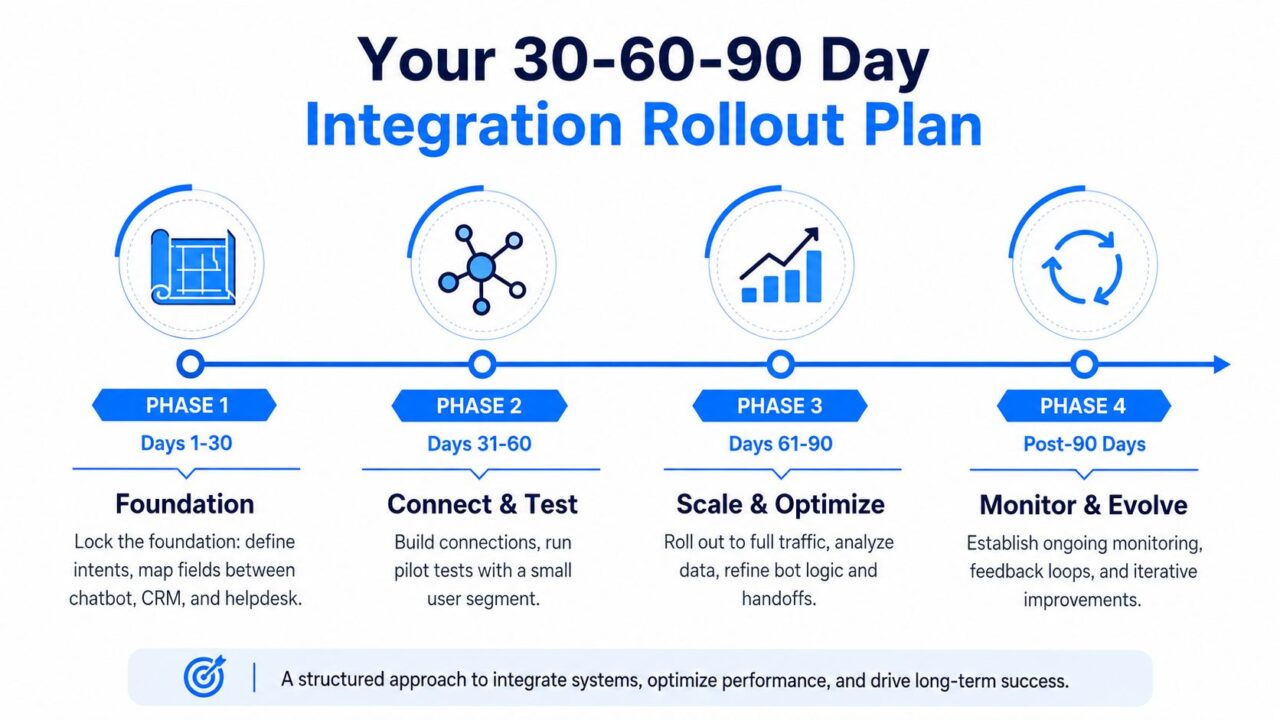
AI Chatbot Integration Rollout Plan
After the initial rollout, keep a recurring review cycle. Look for revenue or retention outcomes, not just conversation volume. Useful evidence includes resolved support issues, qualified leads reaching the CRM, recovered customer journeys, accurate consent records, and human agents receiving complete context.
For teams building media and marketing workflows alongside automation, AI video generation insights: Integrating a knowledge base can provide useful context for connecting conversational campaigns with broader creative production and customer support efforts. The same integration principle applies: track the source, event, audience, permission, and destination instead of treating each asset or interaction as a disconnected activity.
Use this reusable launch checklist:
- Intent coverage: The initial intent set is documented and tested.
- Field ownership: Every important property has one source of truth.
- Identity resolution: Email, phone, account IDs, and channel IDs follow clear matching rules.
- Consent controls: Opt-in, opt-out, retention, and deletion behavior are explicit.
- Handoff quality: Agents receive intent, transcript summary, customer identity, and relevant order data.
- Deduplication:
conversation_idand contact matching prevent repeated writes. - Failure recovery: Failed events enter a queue or visible fallback log.
- Outcome reporting: Dashboards track resolution, qualified leads, retention, and sync quality.
Clepher helps businesses build conversational flows across website, Facebook, Messenger, WhatsApp, and Instagram Direct Message, then connect captured fields, tags, segments, email, SMS, and CRM workflows across the stack. Visit Clepher to design an integration that preserves customer context from the first message through qualification, support, and follow-up.

Related Posts
Revenue Optimization: A Practical Playbook for Growth
October 19, 202610 Lead Capture Software Tools Compared for 2026
October 18, 2026WhatsApp Chatbot for Ecommerce: A Practical 2026 Guide
October 17, 2026
Founder Clepher