
The global AI-powered e-commerce tools market is projected to reach nearly $17 billion by 2030, with AI forecast to handle about 80% of customer interactions and recommendation systems showing up to 3× revenue growth and 2× higher conversion rates in e-commerce implementations, according to EcommerceTrix.
That number matters because automation is no longer a side project for large teams. It’s becoming part of the operating system of a modern online store.
Most brands first think about automation as email flows, shipping alerts, or a chatbot answering simple questions. That’s part of it. But the bigger idea is this: e-commerce automation tools connect your store, marketing, support, inventory, and customer conversations so the business responds faster without needing a person to push every button.
Think of it as a digital nervous system.
When a customer browses a product, abandons a cart, sends an Instagram DM, asks about shipping, completes a purchase, or requests a return, your systems should pass that signal to the right tool. One action should trigger the next. If that handoff doesn’t happen, teams end up copying data between tabs, missing follow-ups, and giving customers a fragmented experience.
Therefore, the primary opportunity isn’t just “saving time.” It’s building a store that reacts consistently across channels.
What Are E-commerce Automation Tools
E-commerce automation tools are software systems that handle repeatable work inside an online business. They can send messages, update records, route tasks, sync data, trigger promotions, and respond to customers based on rules or AI-driven logic.
What these tools do
In plain language, they replace the work your team keeps doing manually.
That often includes:
- Customer messaging: Sending a cart reminder, answering a support question, or following up after purchase
- Marketing actions: Triggering email or SMS flows based on browsing or buying behavior
- Operational tasks: Updating order status, pushing shipping info, or syncing inventory across systems
- Reporting work: Pulling data into dashboards so the team can use all day
A simple example helps.
A shopper adds shoes to the cart but leaves without buying. An automated setup might do three things without staff intervention:
- Log that cart event in your store
- Trigger a reminder message
- Stop the reminder if the order is completed later that day
That’s automation at its simplest. The more advanced version adds channel awareness. If the customer doesn’t respond to email but often engages on Instagram, your system can shift the follow-up to the place where the conversation is more likely to happen.
Practical rule: Good automation doesn’t just do tasks faster. It moves the customer to the next useful step.
Why the category keeps expanding
The category is growing because online stores now operate across more touchpoints than ever. Customers don’t only browse a site and wait for an email. They ask product questions in DMs, check delivery status in chat, click paid social ads, and expect the brand to remember the context.
That’s why brands are looking beyond email-only setups and into connected systems that handle website chat, Messenger, Instagram, WhatsApp, support, and store data in one flow.
For teams exploring adjacent systems, this guide to ecommerce price monitoring tools is also useful because pricing signals often affect the automations you build around promotions, stock alerts, and competitive response.
What automation is not
It isn’t a “set it and forget it” machine.
It won’t fix weak offers, bad product pages, or confusing policies. It also won’t replace judgment. Your team still decides the strategy, tone, escalation rules, and customer experience standards.
The tool handles repetition. People handle nuance.
That distinction matters. When brands get automation right, they don’t become robotic. They become more responsive, because the repetitive work happens automatically, and the human team gets more time for merchandising, creative testing, partnerships, and problem-solving.
The Five Core Categories of Automation Tools
The easiest way to understand e-commerce automation tools is to group them by job, not by brand name. Most stores don’t need “more software.” They need clarity on what kind of work needs to happen automatically.
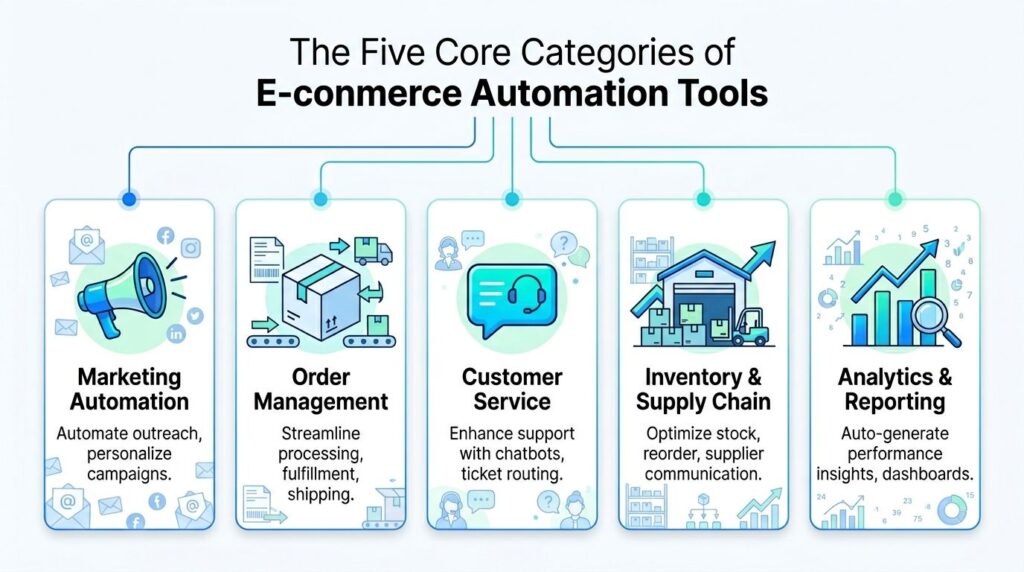
E-commerce Automation Tools Infographic
Conversational commerce and customer service
This category covers chatbots, DM automation, live chat routing, and support workflows.
Its job is to keep customer conversations moving without forcing someone to answer every routine message manually. That might mean replying to a question about sizing, collecting an order number, routing a refund request, or handing a complex issue to a human agent. Many brands are still underbuilt in this area. They’ve automated email, but their Instagram inbox is still a pile of unread conversations.
A practical example:
- A customer comments on a product post
- They receive a DM prompt
- The chat flow answers a common question
- If they ask about delivery, the system requests the order identifier and passes the request into support or fulfillment logic
That’s conversational commerce. It doesn’t replace support. It shortens the path to support.
Marketing automation
This category is often recognized first. It includes email flows, SMS journeys, list segmentation, campaign triggers, and lifecycle messaging.
Its core job is to send the right message at the right time without relying on manual batch sends.
Typical use cases include:
- Welcome flows: Introduce the brand and top products to new subscribers
- Cart recovery: Remind shoppers to complete checkout
- Post-purchase follow-up: Deliver care tips, review requests, or replenishment reminders
- Win-back campaigns: Re-engage customers who’ve gone quiet
The common mistake is treating this category as the whole automation strategy. It’s only one part. Email and SMS are useful, but they don’t cover every conversation customers are already having elsewhere.
Inventory and fulfillment
This category sits closer to operations. It handles stock syncing, warehouse status updates, order routing, and shipping communications.
When this layer is weak, marketing makes promises that operations can’t keep. That creates the classic problem where a campaign drives demand for items that are low in stock or delayed in fulfillment.
These tools help teams keep product availability, orders, and shipping states aligned across systems.
If your marketing, support, and fulfillment tools don’t share the same facts, automation amplifies confusion instead of reducing it.
Conversion rate optimization and retargeting
These tools focus on nudging purchase decisions. They often include on-site popups, product recommendations, urgency campaigns, retargeting triggers, and recovery logic tied to shopper behavior.
This category matters because many shoppers need a second prompt, not a second discount.
For example, if someone views a product several times but doesn’t buy, an automation can trigger a more relevant follow-up than a generic newsletter. It can reference the category they browsed, the collection they spent time on, or the cart they left behind.
Analytics and reporting
This category answers a simple question: Is the automation helping?
Analytics tools pull data from your store, campaigns, and support channels into a view that the team can use. That means spotting drop-offs, seeing which flows influence purchases, and identifying where customers get stuck.
Without this category, brands build automations blindly. The flow may be “live,” but no one knows whether it’s improving conversion, reducing tickets, or just creating noise.
How the categories work together
A mature stack connects all five categories.
Here’s the sequence:
- Conversational tools capture intent
- Marketing automation nurtures and follows up
- Inventory and fulfillment systems provide real-time order truth
- Conversion tools recover lost sales
- Analytics show what to improve next
If you’re comparing broader no-code options before picking a stack, this roundup of automation platforms is a practical reference.
Why Automation Matters More Than Ever
The business case for automation is no longer theoretical. Teams are using it to protect time, recover sales, and reduce the drag that comes from disconnected tools.
E-commerce Automation Tools ROI Chart
According to Cirrus Insight, organizations using sales automation report 25–50% productivity increases, 10–20% revenue growth, and 15–30% shorter sales cycles. The same source notes that, in e-commerce contexts, specific tools have delivered +41% conversion rate lifts and +36% total sales increases within 24 hours.
Those are strong outcomes, but the reason behind them is straightforward. Automation closes the gap between customer intent and brand response.
Time savings turn into better execution
Most growing brands don’t lose momentum because the team lacks ideas. They lose momentum because staff spend too much time on repetitive admin.
That usually looks like:
- Checking carts manually
- Exporting lists for campaigns
- Copying shipping updates into support replies
- Segmenting buyers by hand
- Answering the same product questions in DMs all week
When automation takes over the repetitive layer, your team can do more valuable work. They can improve offers, test creative, tighten merchandising, and handle the customer moments that need a real person.
Revenue improves when response timing improves
A lot of e-commerce revenue is won or lost in small windows of time.
If a shopper abandons a cart and hears nothing, the moment passes. If they ask a question on social and wait too long, attention fades. If they buy and never get a thoughtful follow-up, the next purchase becomes less likely.
Automation helps because it acts immediately.
A well-built system can:
- Trigger cart recovery without waiting for a marketer
- Send confirmation and post-purchase guidance automatically
- Route high-intent questions to the right channel
- Pause irrelevant messages once someone buys
That speed matters because customers compare your response time to the best experience they’ve had anywhere, not just to another store in your niche.
Automation earns its keep when it removes lag from the buyer journey.
Customer experience gets more consistent
Consistency is underrated. Customers notice when one channel knows who they are and another acts like a stranger.
That often happens when email, support, social DMs, and fulfillment all run separately. The shopper gets a promotional message after placing an order. Support can’t see shipping updates. The Instagram team doesn’t know that the customer has already emailed.
Automation improves that experience by syncing actions and context.
A simple example is post-purchase communication. Instead of sending every buyer the same generic sequence, a connected system can adapt based on order status, product type, or whether the customer has already asked for help. The message becomes more useful, not just more frequent.
The hidden ROI is fewer dropped handoffs
Many teams calculate ROI only in direct sales. They should also look at reduced friction.
Fewer missed follow-ups. Fewer duplicate replies. Fewer manual exports. Fewer moments where the customer has to repeat themselves.
That operational cleanup doesn’t always show up as a flashy dashboard number on day one, but it often determines whether a brand can scale smoothly or keeps adding headcount just to manage growing complexity.
Real-World E-commerce Automation Workflows
The most effective e-commerce automation tools don’t work in isolation. Their value comes from how they connect channels that usually sit apart, especially social DMs, email, order data, and support.
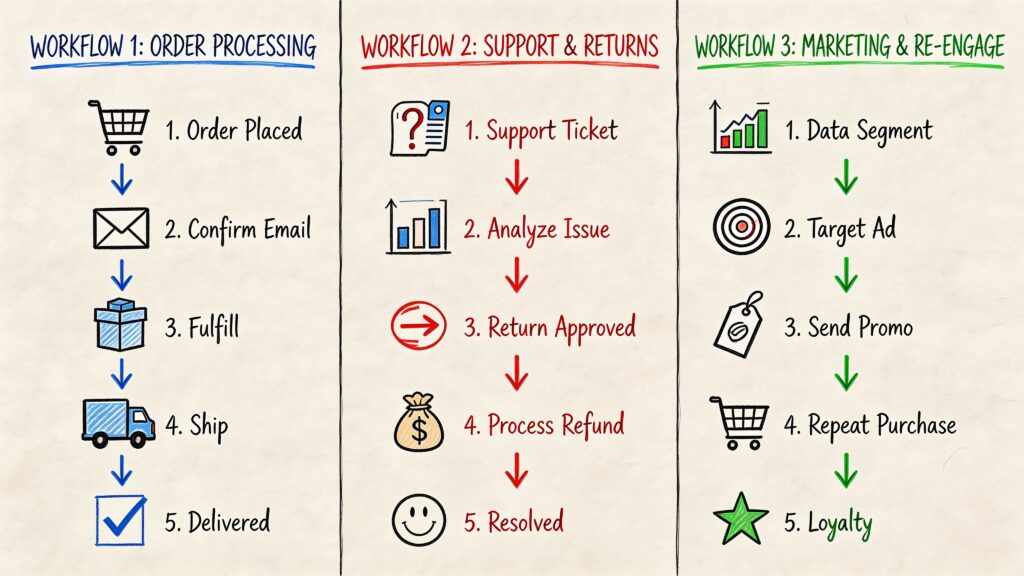
E-commerce Automation Tools Business Workflows
One useful way to think about this is to treat each workflow like a relay race. One tool shouldn’t run the whole track. It should pass the customer context to the next system at the right time.
The gap in many stores is social messaging. According to The Automators, 49% of impulse buys come from personalization, yet only 17% of tools cover social DM personalization. The same source says stores can lose 20-30% of cart recovery opportunities without that layer, while Messenger and Instagram chatbots can see 85% open rates and support 10-12% revenue growth when automation is managed effectively.
Workflow one for abandoned carts across email and Instagram
A shopper adds two items to the cart, enters their details, and leaves.
A standard setup sends an email reminder. That’s fine, but it assumes email is the best place to continue the conversation. For many brands, it isn’t.
A more connected workflow looks like this:
- The store records the abandoned cart event.
- An email reminder goes out first.
- If there’s no purchase and the customer is known on Instagram, the system triggers a personalized DM.
- The DM references the product or category and offers help, not just a discount.
- If the shopper replies with a question, the chatbot handles simple intent and hands off edge cases to a human.
That shift matters because recovery isn’t always about price. Often, the customer needs a nudge, reassurance, or a fast answer.
For teams thinking through operational handoffs after checkout, this walkthrough on Automating E-commerce Order Processes is a practical companion because recovery only works when the order side of the business can keep up.
The strongest abandoned cart flows don’t just remind. They remove the reason the shopper hesitated.
Workflow two for proactive order support in Messenger
Support automation works best when it’s tied to live store data.
A customer sends a Messenger note asking where their order is. Without automation, a support rep opens the commerce platform, checks fulfillment, copies the update, and replies manually.
With an integrated workflow:
- The chatbot asks for the order identifier or pulls it from a known profile
- It checks order and shipping status through the connected store or fulfillment system
- It sends an instant update
- If the status looks unusual, such as a delay or failed delivery event, it routes the issue to support
Here, conversational automation becomes useful rather than gimmicky. The customer gets an answer right away, and the support team only handles the exceptions.
Brands exploring setups like this often combine website chat, Messenger, Instagram, and store triggers through tools such as when they want a workflow builder spanning multiple messaging channels.
A short demo can help you visualize how these systems come together in practice:
Workflow three for post-purchase upsell and retention
After the first purchase, many brands go quiet or send generic campaigns. That’s a missed opportunity.
A stronger workflow starts with segmentation. The system looks at what the customer bought, whether they’ve purchased before, and what kind of follow-up makes sense.
An example sequence:
- Immediately after purchase, send confirmation and care information
- After delivery, trigger a product education message
- If the customer bought from a repeatable category, schedule a replenishment reminder
- If they bought from a broader collection, send a targeted cross-sell by SMS or another opted-in channel
- If they engage, move them into a loyalty or VIP segment for future campaigns
This kind of workflow feels more like guided selling than promotion blasting. It respects the stage the customer is in.
What these workflows have in common
They all depend on the same discipline:
- One trigger: A cart event, support question, or purchase
- One source of truth: Store and customer data that stays synced
- One next action: A message, update, route, or suppression rule
- One fallback path: Human handoff when the logic reaches its limit
That is the key lesson with e-commerce automation tools. The power isn’t in collecting apps. It’s in designing clean handoffs between systems so the customer experience feels continuous.
How to Choose Your E-commerce Automation Stack
Choosing a stack is where many brands get stuck. The mistake is comparing features before defining the job the stack must do.
Start with the business problem, not the demo.
Ask what should happen automatically first
A tool is only useful if it removes a recurring bottleneck.
For one brand, that bottleneck is cart recovery. For another, it supports volume from shipping questions. For another, there is inventory confusion between the storefront and fulfillment.
Write down the manual processes your team repeats every week. Then rank them by business impact and frequency. The best early automations usually sit where those two overlap.
Look hard at integration depth
Marketing teams often underestimate complexity at this point.
A tool might look polished, but if it can’t connect cleanly to your store, CRM, help desk, shipping platform, or messaging channels, your automations will break at the handoff point.
Check for:
- Native integrations: Usually simpler and more stable
- Middleware options: Useful when you need to connect apps quickly
- API flexibility: Important when you need custom logic or deeper data sync
- Channel coverage: Especially if your audience engages heavily in social DMs, not just email
Don’t ignore scaling costs
Small brands often buy based on entry pricing and discover later that usage rules change the economics.
The clearest warning here is cost scaling. As noted by Bluetuskr, many articles talk about ROI but overlook how usage-based pricing, especially in tools like Omnisend or task-limited connectors such as Zapier, can become expensive for a sub-10k contact list.
That doesn’t mean those tools are wrong. It means you need to model your likely usage before committing.
If you’re comparing options in the marketing layer, this list of AI-focused platforms is a helpful starting point.
Use this evaluation checklist
| Evaluation Criteria | What to Look For | Why It Matters |
|---|---|---|
| Core use case fit | The tool solves your highest-friction workflow first | A broad feature list won’t help if your key bottleneck remains manual |
| Channel coverage | Support for email, SMS, website chat, and social messaging where needed | Your customers won’t all engage in one place |
| Integration options | Native connections, middleware support, or API access | Automations fail when systems can’t pass data cleanly |
| Pricing model | Clear limits on contacts, sends, tasks, users, and add-ons | Cheap plans can become costly as volume grows |
| Ease of maintenance | A builder your team can manage without constant developer help | Overly complex setups often get abandoned |
| Reporting quality | Visibility into flow performance, message results, and operational outcomes | You need to know what to improve, pause, or expand |
| Human handoff | Ability to route exceptions to support or sales | Not every customer issue should stay inside automation |
| Compliance controls | Consent handling, data fields, and privacy-friendly workflows | Customer trust depends on responsible data handling |
Choose for the next stage, not just today
A stack should fit your current team, but it should also survive growth.
If you’re a small store, simplicity may matter more than customization. If you operate across multiple brands, warehouses, or support teams, the flexibility of your architecture starts to matter more.
Buy the system your team can run well. A simpler stack that gets used beats a complex stack that sits half-configured.
Your Roadmap for Implementing Automation
Implementation gets easier when you stop treating it like a giant transformation project. Most brands should begin with one high-value workflow, make it reliable, and then layer on complexity.
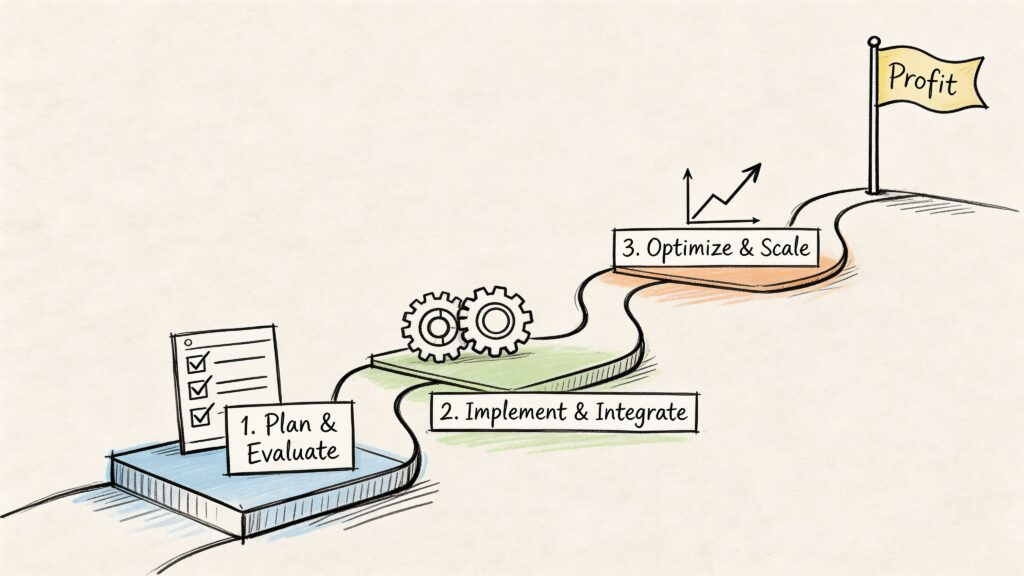
E-commerce Automation Tools Business Growth
Phase one for audit and prioritization
Start by mapping where manual work piles up.
Look at the last few weeks of operations and mark tasks that are:
- Repetitive
- Time-sensitive
- Rule-based
- Tied to revenue or customer satisfaction
Good first candidates include cart recovery, order status requests, welcome sequences, and post-purchase follow-up.
Avoid starting with the most complicated workflow. Start with the one that has a clear trigger, a clear action, and a visible business outcome.
Phase two for selecting and integrating tools
Once you know the first workflow, connect the systems that need to talk to each other.
According to CS-Cart, the integration layer requires strong API capabilities. The same source notes that no-code tools like Zapier work well for speed, while open-source options like n8n or native API integrations are often better for superior performance, cleaner data consistency, and more complex workflows.
That distinction matters.
When no-code is the right starting point
No-code connectors are useful when you want to launch quickly and prove the process.
They’re often a strong fit for:
- Smaller stores
- Lean teams without developer support
- Straightforward app-to-app handoffs
- Early workflow testing
When deeper integration makes more sense
Native APIs or more flexible workflow systems are worth considering when:
- You need multi-step business logic
- Data must stay highly consistent across systems
- Transaction volume is high
- You’re syncing operational events, not just marketing triggers
Phase three for building and testing
Build the smallest version of the workflow first.
For example, if you’re automating order support, don’t start with five fallback branches and multilingual logic. Start with one use case: order status requests.
Test for:
- Correct trigger timing
- Accurate customer identification
- Reliable data retrieval
- Message clarity
- Proper suppression when the workflow should stop
- Human handoff when the bot can’t resolve the issue
Many teams rush at this stage. They launch a flow after seeing the happy path work once. Then a customer uses a different email, asks an unexpected question, or hits a delayed order edge case, and the automation creates more support work than it removes.
Build for real customer behavior, not for the clean path in your whiteboard diagram.
Phase four for measurement and optimization
Once the workflow is live, monitor both outcome and friction.
Track questions such as:
- Did response time improve?
- Did support volume shift?
- Are customers completing the intended next action?
- Where do people drop off or ask for a person?
- Are there repeated exceptions that the workflow should handle better?
Optimization usually means tightening logic, improving message copy, adding suppression rules, or creating clearer handoffs to a human.
That’s the rhythm that works. Audit, connect, launch small, watch closely, improve.
Start Automating and Reclaim Your Time
The core promise of e-commerce automation tools isn’t that they make your store feel more technical. It’s that they make your e-commerce business easier to run.
When automation is built well, repetitive work stops eating the day. Customers get faster answers. Marketing reacts to intent sooner. Support spends less time copying updates. Operations and messaging stay aligned, streamlining your overall processes.
The bigger shift is strategic. You stop managing isolated tasks and start designing connected experiences. Advanced automation capabilities help create these seamless journeys for both businesses and customers.
That matters even more now because buyers don’t move through one neat channel. They bounce between site visits, emails, social ads, Instagram DMs, support questions, and post-purchase follow-up. Brands that automate only one piece of that journey leave revenue and customer trust on the table.
You don’t need to automate everything at once.
Pick one workflow that creates obvious friction today. Cart recovery is a good candidate. Order-status support is another. Build the simplest working version, test it, and improve it. Then move to the next one.
That’s how mature ecommerce solutions and automation stacks are built. Not with a giant software purchase, but with a series of useful systems that save time and improve the customer experience.
Start small. Make it reliable. Then expand. Using the right ecommerce automation tools can help you scale while maintaining quality customer interactions, ultimately enhancing your business efficiency.
Frequently Asked Questions About E-commerce Automation
If your brand wants to automate sales, support, and follow-up across website chat, Facebook, Messenger, WhatsApp, and Instagram, Clepher is one option to explore. It gives teams a no-code way to build conversational flows, connect messaging with the rest of the stack, and turn everyday customer conversations into structured automation.

Related Posts
10 Lead Capture Software Tools Compared for 2026
October 18, 2026WhatsApp Chatbot for Ecommerce: A Practical 2026 Guide
October 17, 2026What Is Lead Scoring and How It Drives Real Sales Results
October 16, 2026
Founder Clepher