
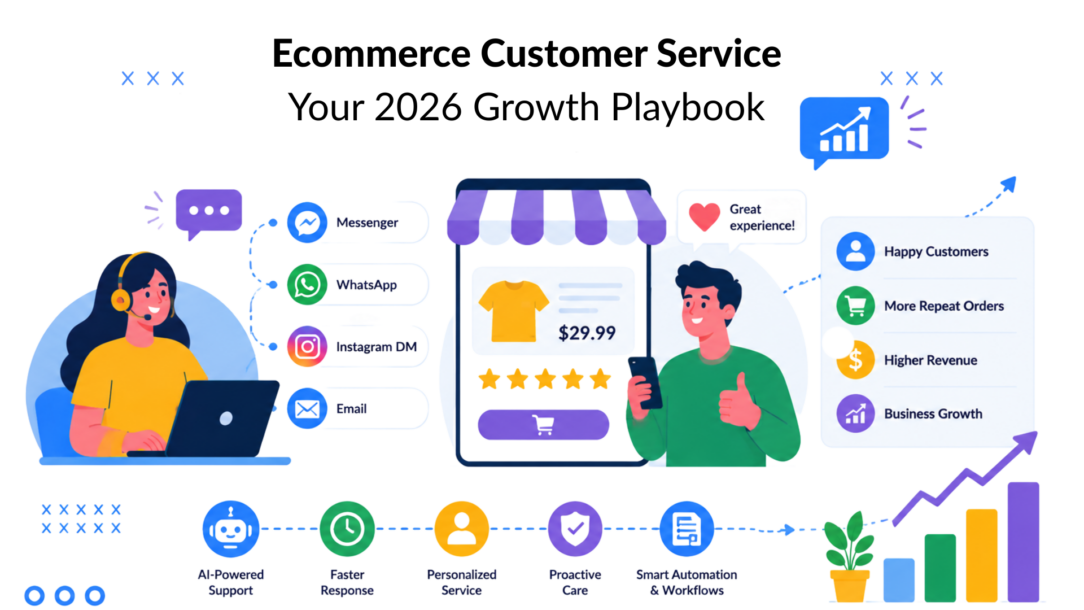
Poor service costs sales before a ticket ever gets opened. Ecommerce customer service now affects conversion, repeat purchase behavior, and long-term retention, because buyers ask questions at the exact moment they are deciding whether to trust your store.
Many ecommerce teams still scope support too narrowly. They treat it as a post-purchase function tied to WISMO tickets, returns, and refunds. In practice, service starts much earlier. It starts when a shopper asks about fit, stock, delivery timing, subscription terms, or return policy details. A fast, accurate reply keeps that shopper moving toward checkout. A slow or generic one wastes paid traffic you already bought.
The revenue upside is often hiding in two places brands underinvest in. The first is proactive pre-purchase support powered by automation, so common buying questions get answered before carts are abandoned. The second is a unified workflow for social DMs, live chat, email, and post-purchase requests, so agents can see customer context instead of replying channel by channel in isolation.
That operating model improves more than response time; it elevates overall customer satisfaction. It protects conversion on high-intent conversations, reduces missed sales from Instagram and Messenger, and gives the customer support team a direct role in retention. Brands already investing in proven retention tactics should treat service the same way: as a revenue function with measurable commercial impact.
This is how ecommerce customer service transitions from a cost center into a sales team.
Why Ecommerce Customer Service Is Your New Sales Team
Poor service kills revenue before the order is placed and after it ships.
As noted earlier, a large share of shoppers abandon purchases or stop buying from brands after a bad service experience. In ecommerce, that shows up in very specific moments: a sizing question sits unanswered, a delivery concern gets a vague reply, or an Instagram DM from a ready-to-buy customer disappears into a separate inbox. Paid traffic brought that buyer in. Service decides whether the session turns into revenue for the ecommerce business.
Support now shapes the full buying journey
Support has expanded well beyond post-purchase ticket handling. For many brands, the highest-value conversations happen before checkout, when a shopper is comparing products, checking fit, asking about subscription terms, or trying to confirm arrival dates for an event. Fast, accurate answers keep intent warm. Slow replies send that demand back to Google, Amazon, or a competitor.
That gives customer service direct influence over four commercial outcomes:
- Conversion: Quick answers remove friction at the point of decision.
- Retention: A key factor in maintaining excellent customer service. Clear post-purchase communication reduces buyer’s remorse and unnecessary refunds.
- Brand preference: Helpful service becomes a differentiator when products look similar.
- Lifetime value: Customers who get useful answers early are easier to retain and upsell later.
Brands already spend heavily on email, SMS, loyalty, and retargeting because retention is cheaper than reacquisition. The same logic applies here. If you’re working on proven retention tactics across the customer lifecycle, support must be integrated directly into that system.
Practical rule: If an interaction can change whether a customer buys, buys again, or requests a refund, treat it as a revenue event.
Revenue-minded service looks different
Teams that treat support as a sales function measure different things and build different workflows. They still care about queue health, but they also ask whether support saved a sale, protected margin, or increased repeat purchase odds.
Three questions matter more than raw ticket volume:
Did live chat answer the objection that was blocking checkout?
Did automation handle the common pre-purchase question before the shopper bounced?
Did the agent have enough context from email, chat, and social DMs to move the conversation forward in one reply?
Those are commercial questions. They push teams to design support around speed, context, and channel coverage instead of isolated inbox management. That matters most in two places brands still underuse: proactive pre-purchase automation and unified handling for social DMs alongside email, chat, and post-purchase support. Miss either one, and high-intent customer requests slip through the cracks.
The Modern Ecommerce Support Landscape
Support now sits inside the buying journey, not after it.
Shoppers move from a product page to chat, from Instagram to checkout, from a shipping question to a repeat order. They expect continuity across every touchpoint. If your team is still working from separate inboxes, the customer feels that disconnect immediately through repeated questions, slower replies, and generic answers that miss the core issue.
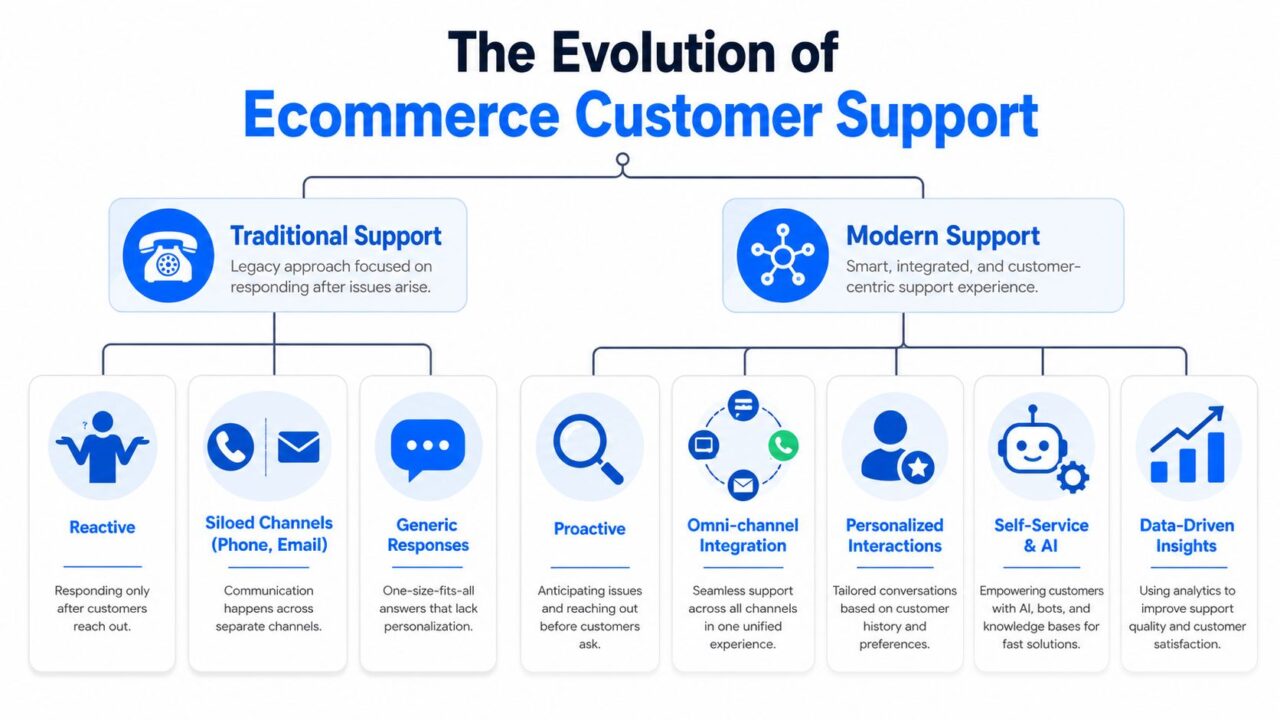
Ecommerce Customer Service Evolution
What the old model gets wrong
The older ecommerce support model was built for ticket closure. It works poorly for conversion support.
A customer runs into sizing uncertainty, shipping hesitation, or a payment issue. They send a message and wait. The agent replies only in that channel, often without purchase history, site behavior, or the earlier conversation that happened in chat or social. The result is extra back-and-forth at the exact moment the shopper needs clarity.
Three problems show up again and again:
- Slow starts: Customers have to repeat order details, product questions, or the reason they reached out.
- Disconnected channels: Email, live chat, and social DMs hold separate fragments of the same customer story.
- Low-context replies: Macros keep queues moving, but they rarely address purchase intent, margin sensitivity, or repeat-buy potential.
That creates operational drag and revenue loss. A delayed answer on a return policy question can kill a first order. A missed Instagram DM can waste paid social traffic. A generic post-purchase reply can turn a simple exchange request into a refund.
What modern support actually looks like
Modern ecommerce customer service works best when it combines fast automation, shared customer context, and clear human intervention points. The goal is to create an assisted shopping experience.
That shows up in two areas many brands still underuse.
First, pre-purchase support. Automated prompts, FAQ flows, and intent-based routing can answer common objections before the shopper leaves the site. Support then starts acting like conversion infrastructure. If a shopper hesitates on fit, delivery timing, or bundle compatibility, the system should surface the answer before that hesitation becomes abandonment.
Second, social messaging. Instagram and Messenger are no longer side inboxes. They are active buying channels, especially for mobile-first brands and creator-driven traffic. Teams that connect those conversations into an omnichannel customer service workflow to enhance customer feedback collection and give agents the context to pick up a conversation once and resolve it cleanly.
The three operating principles that matter
Immediacy
Speed determines whether the customer service team influences the sale or merely documents a missed opportunity. Fast first responses matter most in pre-purchase moments, where hesitation is highest and switching costs are low.
Personalization
Useful personalization is operational, not cosmetic. Agents need order history, product details, return eligibility, loyalty status, and prior conversations in one view so they can respond with precision instead of asking the customer to start over, thus improving the customer experience.
Proactivity
Proactive support removes friction before a ticket exists. That can mean showing delivery estimates on product pages, triggering sizing guidance on high-return SKUs, or sending order updates before customers ask where their package is.
The strongest teams do not treat support as a queue to manage. They treat it as a system for protecting conversion, reducing avoidable refunds, and improving customer confidence at every stage of the journey.
Choosing Your Customer Service Channels
Channel choice shapes both cost and conversion. Add too many inboxes without clear ownership, and teams create duplicate work, slower replies, and broken context. Choose too few, and shoppers leave because the brand is hard to reach at the moment they need reassurance from the customer service team.
The practical goal is coverage with control. Each channel should have a job based on question type, urgency, buying intent, and how much context the agent needs to resolve the issue without another handoff.
Ecommerce Support Channel Comparison
| Channel | Best For | Pros | Cons | Expected Response Time |
|---|---|---|---|---|
| Address detailed post-purchase issues, refunds, and account updates to improve customer retention. | Good for documentation, attachments, and non-urgent issues | Feels slow, easy to silo, poor for saving in-session conversions | Best handled with clear SLA and prioritization | |
| Phone | Sensitive complaints, complex escalations, high-emotion interactions | Fast clarification, strong for de-escalation | Expensive to staff, harder to scale, limited after-hours coverage | Customers expect quick pickup |
| Live Chat | Pre-purchase questions, order status, checkout friction | High intent, immediate, strong conversion support | Requires staffing discipline and routing logic | Best run with fast triage and tight routing |
| Instagram and Messenger DMs | Social commerce, order questions from mobile shoppers, public-to-private support | Meets customers where they already are, strong for conversational support | Easy to overlook if social sits with marketing only | Best managed as an active queue |
| AI Chatbot | WISMO, returns intake, FAQs, lead capture, triage | Always available, handles volume, standardizes answers | Weak on edge cases without clear escalation | Should feel immediate |
| Help Center and FAQ | Policy questions, self-serve repeat issues | Reduces repetitive contacts, available anytime | Poor content gets ignored, limited for nuanced questions | Instant self-service |
Live chat earns its keep before the order exists
If a brand can only improve one channel first, I usually start with live chat. It has the clearest path from service activity to revenue because it supports shoppers while they are still deciding.
eDesk found that brands responding to live chat inquiries within 1 minute convert 15% higher than those responding within 5 minutes (eDesk). That gap matters because pre-purchase support is not just service coverage. It is assisted selling.
The operational challenge is staffing. Keeping chat open all day is not enough if product questions wait behind return requests and order edits. Teams get better results with a simple structure:
- Intent-based routing: Send sizing, compatibility, and product selection questions to agents trained to sell, not just close tickets.
- Page-based triggers: Offer chat on PDPs, cart, and shipping policy pages where hesitation shows up to improve the ecommerce customer support experience.
- AI-first intake can streamline the customer service software for better efficiency. Collect the SKU, variant, and question before the agent joins so the conversation starts with context.
- First-contact resolution rules for enhancing customer satisfaction: Build macros and decision trees that help agents solve the issue in one interaction. Hosted Telecommunications’ FCR guide is a useful reference for tightening that process.
Social DMs need to sit inside the support operation
Instagram and Messenger often get trapped between marketing and support. That split costs sales.
A shopper who comes from a Reel, lands on a product page, and sends a DM asking about restock timing or delivery dates is showing purchase intent. If that message stays in a social inbox with no routing, no order context, and no SLA, the brand treats a buying signal like a community comment, negatively impacting customer retention.
That is why social messaging needs to flow into the same queueing logic as chat and email. An omnichannel customer service workflow gives agents the customer record, conversation history, and channel context in one place. That setup cuts repeat explanations and makes it far easier to recover sales that would otherwise disappear in DMs.
Use channels by role, not by habit
Email handles issues that need detail, attachments, and an audit trail to increase customer satisfaction. Phone is better for escalations and emotional conversations where tone matters. Live chat is the strongest fit for in-session buying questions. Social DMs catch mobile shoppers who may never visit a help center. AI should absorb repetitive requests and route edge cases to a person with the right context.
The key is to use each channel for its strengths rather than expecting one to do everything.
Actionable Best Practices for Superior Service
Most support advice stalls at “respond faster” and “be empathetic.” That’s not enough. Teams need operating habits they can implement this week to provide excellent customer service.
The biggest missed opportunity is pre-purchase support. 70% of shoppers abandon carts because questions about size, fit, stock, or delivery dates go unresolved (Suptask). That’s not a service failure after the fact. That’s a conversion leak happening before the order exists.
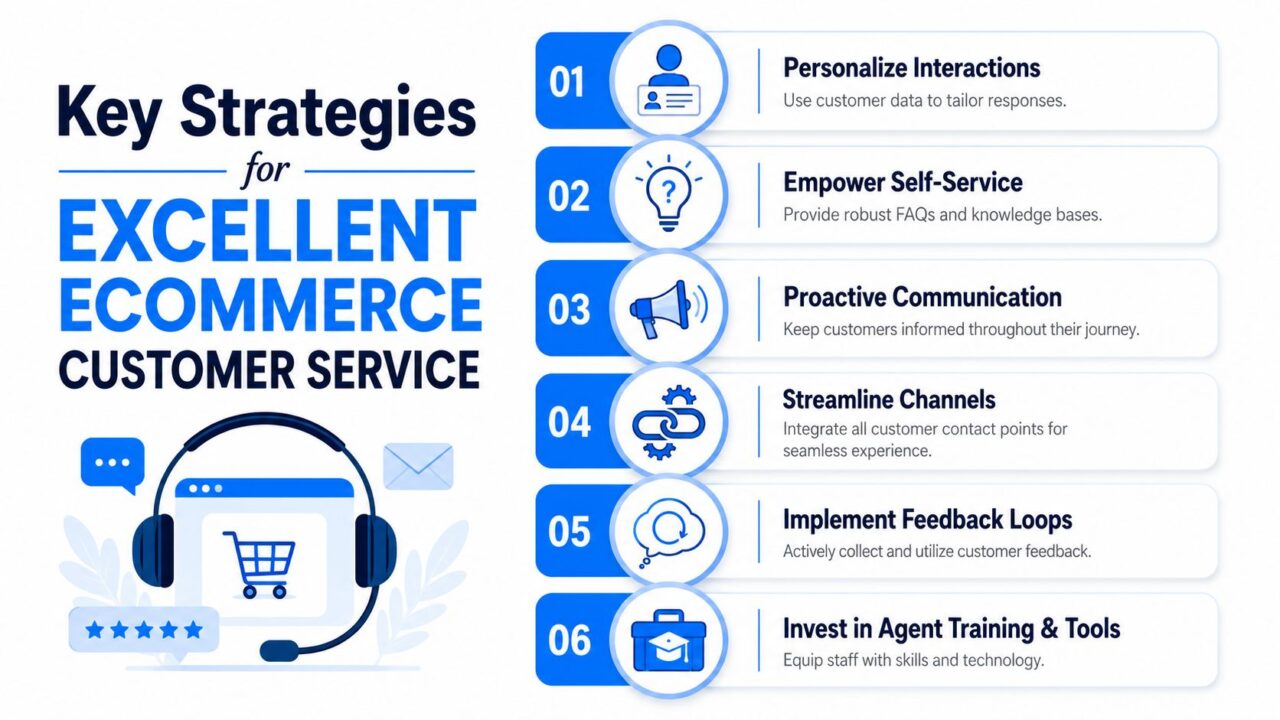
Ecommerce Customer Service Strategies
Turn pre-purchase questions into a sales workflow
A shopper asking, “Will this fit me?” is rarely asking for education alone. They’re asking for confidence. Treat those conversations like assisted selling.
Use practical triggers such as:
- Size and fit prompts: On apparel or footwear PDPs, trigger a chat support offer after the shopper spends time on the size selector to enhance customer feedback.
- Stock reassurance enhances customer satisfaction and loyalty. If inventory is thin or variant selection is confusing, surface real-time stock help before they leave.
- Delivery timing support: Put shipping estimate answers where urgency is highest, especially on cart and checkout pages.
This doesn’t require a human answering every message live. Automation can collect product, size, location, and urgency, then present the right answer or route the shopper if the question needs judgment.
Set service levels by intent, not by inbox
Not every contact should wait in the same queue. Brands get better outcomes when they separate pre-purchase, post-purchase, and exception handling.
A simple model works well:
- Revenue-risk contacts first: Product, checkout, and shipping-before-purchase questions.
- Routine automation second: Order tracking, return initiation, basic policy questions.
- Human escalation third: Damaged items, VIP customers, repeated contacts, fraud-sensitive cases.
That structure also improves first-contact resolution because the right person or workflow gets involved earlier. If you’re refining that part of your operation, Hosted Telecommunications’ FCR guide is a useful reference for tightening resolution logic.
If an agent has to ask three follow-up questions just to understand the issue, your workflow is unfinished.
Personalize the response without overcomplicating it
Good personalization isn’t writing longer messages. It’s removing friction with context.
For example:
- An order-status response should include tracking context if it’s available.
- A return reply should reflect the item and policy path, not a generic return page.
- A repeat customer should not have to re-explain a problem raised in another channel.
Keep the voice consistent across channels
Customers don’t care which team owns the inbox. They care whether the brand sounds coherent.
Write macros and AI prompts that sound like your store, but don’t stop there. Review conversations from email, chat, and social side by side. If one feels transactional and another feels helpful, the customer notices. Consistency builds trust faster than polished wording, leading to increased customer satisfaction.
Essential Workflows and Automation Blueprints
Automation pays off when it removes predictable friction. It fails when it hides the route to a human. The best ecommerce customer service flows do both jobs well. They answer routine questions instantly and escalate cleanly when the issue needs judgment.
Here’s a visual model for two common automations.
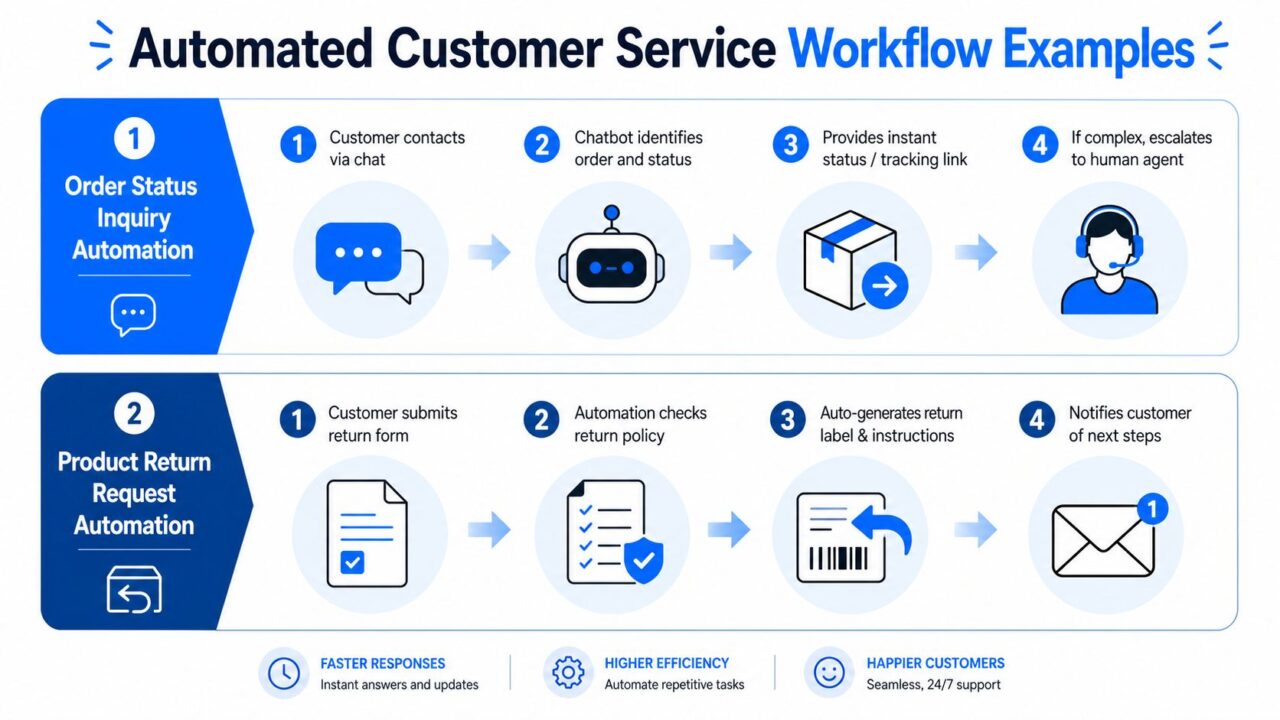
Ecommerce Customer Service Automation Workflow
Workflow one for WISMO
“WISMO” questions soak up support capacity. They also don’t need a human most of the time.
A workable order-status flow looks like this:
-
Customer opens chat or DM
The system asks for order email, order number, or authenticated identity. -
Automation checks order source
Pull status, fulfillment stage, carrier event, and tracking link from the ecommerce or shipping platform. -
System returns the next-best answer
Don’t just show “in transit.” Explain what that means. Example:- Label created
- Picked and packed
- Out for delivery
- Delivered
- Delayed, with next step
-
Escalate when the issue breaks the script
If the package is stalled, marked delivered but missing, split across shipments, or linked to a replacement, route to an agent with the order details attached.
A lot of teams overbuild this. Start with the top WISMO scenarios and write the answer the way a human agent would explain it.
For operators building these flows inside Shopify, this walkthrough on how to automate Shopify customer service with AI is useful because it focuses on practical automation paths instead of generic chatbot theory.
Workflow two for social DMs
Social support becomes chaotic when marketing owns the channel and support owns the problem. The customer sends an Instagram DM, someone screenshots it into Slack, and the actual support team has no order history or prior conversation.
That setup causes delays. Treating Instagram DMs and Messenger as marketing afterthoughts rather than integrated support queues leads to 40% longer resolution times and lower CSAT (Zendesk).
Here’s the fix.
Unified DM queue blueprint
-
Capture the message in the support platform
Don’t leave it inside the native social inbox only. -
Attach customer identity
Match the profile to email, phone, or order history when possible. -
Tag by intent
Use buckets such as pre-purchase, WISMO, return, damaged order, influencer request, or escalation. -
Route by team and urgency to enhance the efficiency of the customer support team.
Product questions can go one way. Fulfillment issues go another. -
Preserve conversation history
If the customer later emails or opens website chat, the next agent should see the DM context.
A platform like Clepher can sit in this layer for businesses that want AI-powered flows across website chat, Facebook, Messenger, WhatsApp, and Instagram Direct Message while keeping automation and live chat in one no-code builder. The important point isn’t the vendor. It’s the architecture.
If you’re mapping the broader process from triage to escalation, this guide to automate customer service workflows is a practical companion.
A starter script that works
Use a simple script for chatbot intake:
Hi, I can help with order tracking, returns, sizing, stock, or delivery questions. If this needs a customer service representative, I’ll pass your details along so you don’t have to repeat yourself.
That one line does three jobs. It sets scope, offers speed, and reduces the fear of getting trapped in automation.
Measuring Success: The Metrics That Matter
A support team can post strong CSAT and still hurt the business. That happens when customers are happy with resolved tickets, but response speed is too slow to save conversions, agents spend too much time on repetitive contacts, or social inquiries never make it into the main queue.
So measure ecommerce customer service like an operator, not just a survey owner.
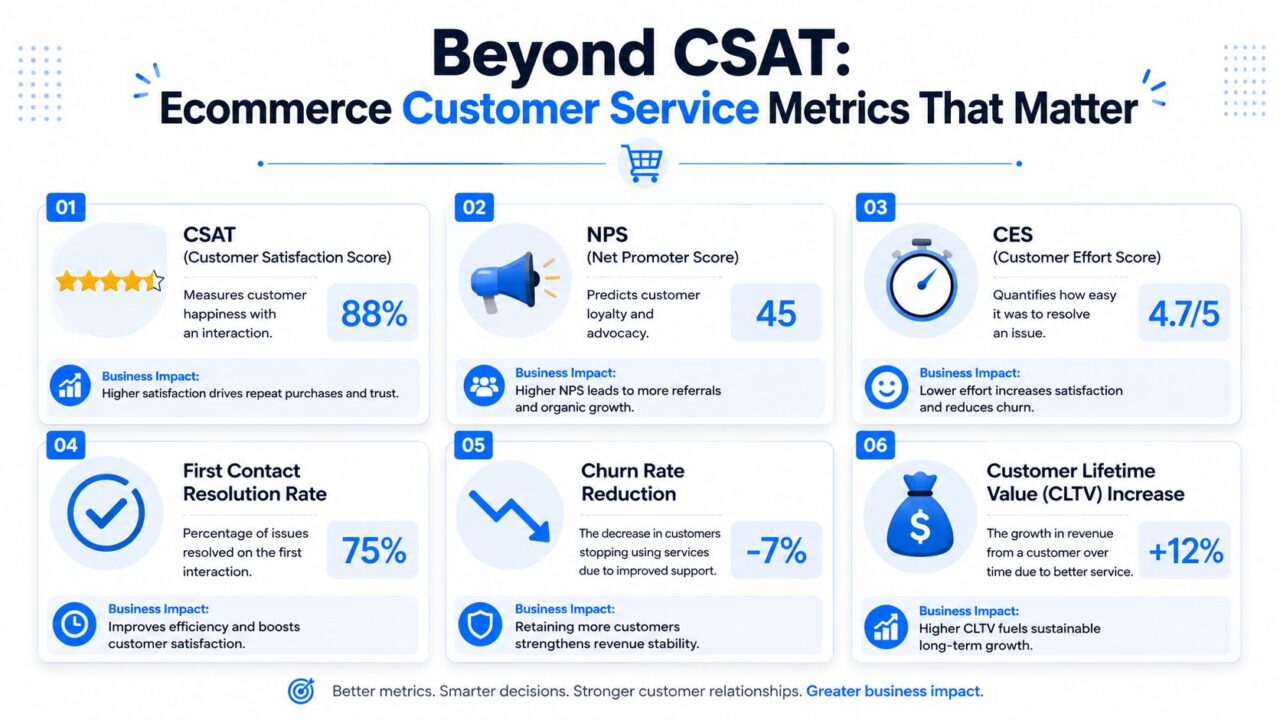
Ecommerce Customer Service Metrics
Start with operational metrics that expose friction
You still need the basics:
- First response time is critical for the ecommerce business’s success in customer support. Especially for live chat, social DMs, and pre-purchase flows.
- Average resolution time: Useful when segmented by issue type, not just overall average.
- Customer effort: If customers have to restate order details or bounce channels, effort is too high.
- First-contact resolution: Strong signal that routing and agent enablement are working.
But these metrics become more useful when tied to customer intent. A two-minute response on a refund question might be acceptable. A two-minute response on a cart-stage fit question can be too late.
Add business metrics that support can influence
Service should earn space on the growth dashboard. That means tracking outcomes support can shape directly:
- Chat-influenced conversion
- Recovered carts linked to support interactions
- Repeat purchase behavior after service events
- Return containment through better pre-purchase guidance
- Revenue at risk saved through fast intervention
That broader lens helps teams defend investment in staffing, tooling, and automation.
Use AI resolution rate carefully
One of the most useful forward-looking metrics is how many contacts your automated system fully resolves. In ecommerce, well-implemented agentic AI reaches a resolution ceiling of 75–80% end-to-end (Aissist). That’s a serious efficiency gain, but it also sets a healthy expectation. Not every contact should be automated, and chasing full automation usually creates worse handoffs.
The right goal isn’t maximum deflection; it’s optimizing customer loyalty. It’s maximum clean resolution with safe escalation.
Track AI performance by issue family. WISMO, return initiation, stock checks, and policy questions should resolve differently than damaged shipments or emotionally charged complaints. If automation “contains” a conversation but forces the customer to come back later, that isn’t success.
For teams building a measurement framework that goes beyond ticket volume, this overview of client success metrics is crucial for the customer experience. is a solid model for connecting operational data to commercial outcomes.
Your Path to Service-Led Growth
Most brands don’t need a full support transformation on day one. They need a sharper operating rhythm.
Start with a short, practical plan for the next 90 days:
-
Audit your highest-intent channel
Review live chat or social DMs first. Measure how long customers wait, what they ask before buying, and where agents lose context. -
Automate one high-volume workflow
WISMO is the usual starting point. Return initiation is another strong candidate. Build the flow, define escalation rules, and make sure the customer never gets stuck. -
Create a pre-purchase support layer
Add automated answers for fit, stock, and delivery timing where shoppers hesitate most. Product pages and cart are usually the right places to start. -
Unify social and support operations to streamline customer requests.
Stop treating Instagram and Messenger as side inboxes. Route them into the same system your support team uses for customer data and the rest of customer communication. -
Track one metric tied to revenue
Chat-influenced conversion, support-assisted cart recovery, or repeat purchase after resolution all work. Pick one and make it visible.
The payoff is straightforward. Better ecommerce customer service reduces preventable friction, protects conversion intent, and gives your team a cleaner way to scale without throwing headcount at repetitive tickets.
The brands that win this don’t just answer faster. They make buying easier.
If you want to turn conversations into a structured support and sales workflow, use Clepher. This system gives teams a practical way to automate website chat, Facebook, Messenger, WhatsApp, and Instagram DMs while keeping live chat, segmentation, and customer context in one place, ultimately leading to better customer interactions. It’s a useful fit for brands that need pre-purchase support, order-status automation, and social inbox integration without building a custom system.
