A five-star rating can hide a failed conversation. A customer may tap a positive button because the bot was polite, then contact support again because the order still hasn’t been found, the return label wasn’t created, or the handoff forced them to repeat everything. The popular advice, “ask users whether they enjoyed the experience,” is too shallow for a production chatbot.
A useful chatbot feedback questionnaire measures whether the customer reached the intended outcome, how much work the interaction created, and what happened after the bot ran out of capability. Satisfaction still matters, but it belongs beside resolution, relevance, escalation, and behavioral data, not above them.
Why Most Chatbot Feedback Questionnaires Measure the Wrong Thing
Consider a direct-to-consumer clothing brand handling a “Where is my order?” message. The chatbot finds an order number but gives a vague delivery estimate. The customer rates the interaction positively because the exchange was fast and friendly, then opens another chat the next day. A star rating records the pleasant tone. It misses the unresolved delivery problem.
Recent survey evidence found that problem-resolution ratings varied substantially across users, while more than half still required human assistance after interacting with a chatbot. Privacy concerns, inconsistent answers, and an unclear need for automation were also frequently reported in the same evidence base (recent chatbot questionnaire evidence). That finding changes the first question you should ask. Instead of “How was your experience?”, start with “Did you complete what you came here to do?”
Operational rule: A pleasant conversation that fails to resolve the customer’s goal is a support failure, even if the rating looks healthy.
Measure the work the customer had to do
A practical questionnaire should expose friction that a satisfaction score compresses into one number:
- Task resolution: Did the customer complete the intended task?
- Answer relevance: Did the response address the actual question?
- Repeat information: Did the customer have to provide the same details again?
- Escalation timing: Did the bot offer human help at the right moment?
- Handoff quality: Did the agent receive the conversation context?
- Downstream outcome: Did the customer complete checkout, activate a subscription, or contact support again?
These questions give different teams something they can act on. Product managers can revise an answer block. CX leads can improve escalation rules. Marketers can identify whether a lead qualification flow produces a qualified handoff rather than just a completed conversation.
A compact prompt library such as SupportGPT-1 quick prompts can help teams start with sharper wording, but the questionnaire still needs to reflect the business outcome of each flow. Generic prompts are useful for ideation. They aren’t a substitute for intent-level measurement.
Stop averaging unrelated constructs
A single “overall chatbot score” can conceal a fast but untrustworthy bot, or a relevant bot with a frustrating handoff. Analyze each construct separately and connect it to behavior. Segment results by intent, such as order status, returns, product discovery, lead qualification, and complaints.
The useful question isn’t whether the bot received a high average rating. It’s whether the bot resolved the right problems for the right customer groups without creating a second support interaction.
Designing the Questionnaire Structure for Clepher Flows
Start with the decision the feedback must support. If your objective is to reduce repeat contacts, task completion and repetition deserve priority. If the objective is to improve lead qualification, measure whether the user understood the next step and whether the handoff preserved relevant information.
A defensible usability foundation is the 11-item BUS-11 chatbot usability instrument, which reports estimated reliability of 0.76–0.87 across five factors and uses Likert-scale agreement items (BUS-11 research). You don’t need to copy the instrument into every flow. Use its construct-based logic to avoid writing six versions of the same satisfaction question.
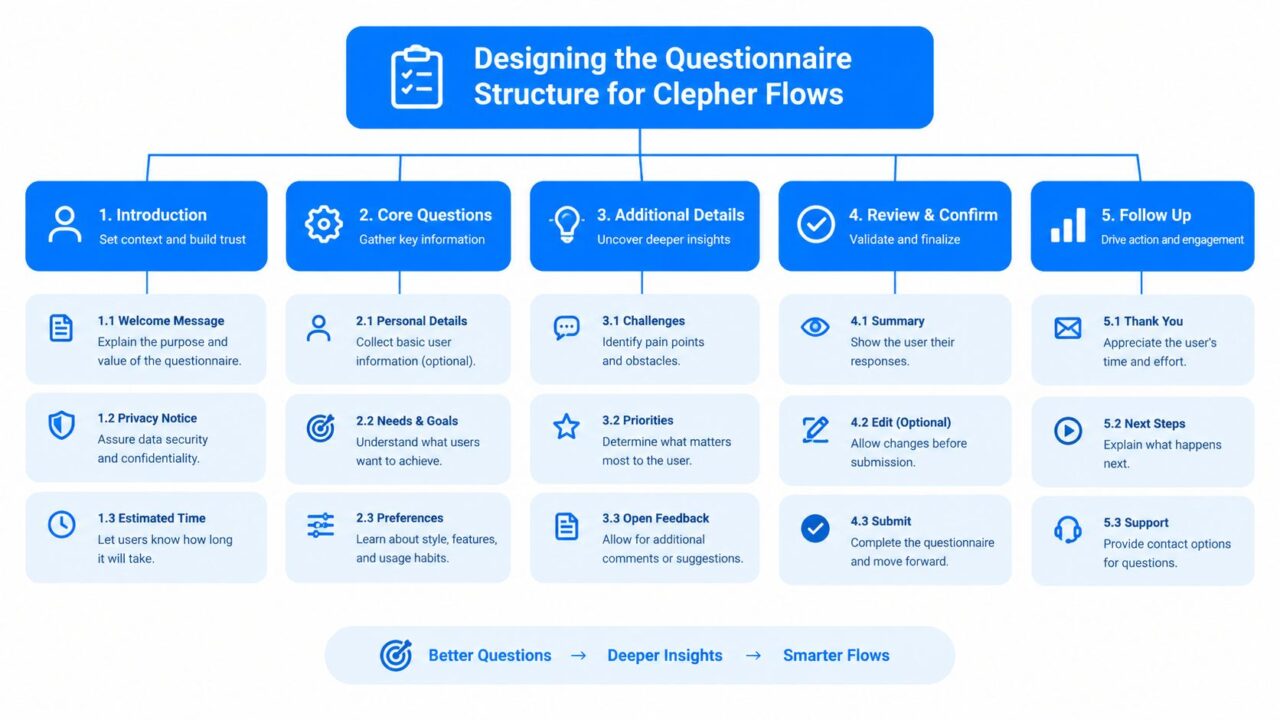
Chatbot Feedback Questionnaire Structure
Build separate measurement blocks
A workable Clepher structure looks like this:
- Task success: “Did you accomplish what you came here to do?”
- Answer relevance: “How well did the chatbot answer your question?”
- Speed: “How would you rate the time it took to get an answer?”
- Ease of use: “How easy was it to complete this conversation?”
- Trust: “How confident are you in the information you received?”
- Handoff quality: “If you contacted a person, did they have the context they needed?”
Use one consistent five-point or seven-point scale throughout the flow. Mixing scale lengths makes comparisons harder and introduces unnecessary interpretation. Keep each item focused on one idea. “Was the answer fast and accurate?” is double-barreled because a customer may think the answer was fast but wrong.
Add one optional open-text question at the end, such as “What should we improve?” Make it optional, because requiring a written explanation after several rating questions adds effort precisely when the user is ready to leave.
Keep the data clean enough to use
Button labels should be unambiguous, ordered consistently, and mapped to a stable internal value. Before launch, test the flow with users outside the target sample, ask an independent reviewer to check construct relevance and accessibility, then test internal consistency statistically. For form hygiene and response validation ideas, see this guide to cleaner form submissions.
The same discipline applies to the surrounding bot experience. Review the wording, branches, fallback messages, and handoff logic in Clepher’s chatbot script guide before attaching a questionnaire. If the interaction itself is inconsistent, feedback can’t tell you whether the problem lies in the bot or in the measurement.
A Ready-to-Use Question Script for Post-Purchase Support
The following script is short enough to place after a completed support or sales interaction, but specific enough to produce operational signals. It assumes the customer has reached a meaningful end state, such as receiving tracking information, completing a return request, or finishing a product recommendation.
Open with a low-effort invitation:
“Can you help us improve this chat? Tap a few answers. It takes about 20 seconds.”
Then ask:
-
“Did you complete what you came here to do?”
This is the primary resolution signal. A low result should trigger an intent review, not a generic apology. -
“How relevant was the chatbot’s answer to your question?”
This separates a wrong answer from a missing capability. Low relevance often points to intent detection, retrieval, or script problems. -
“How easy was it to complete the conversation?”
This identifies confusing menus, unclear buttons, and excessive branching. -
“Did you have to repeat any information?”
A “yes” should flag memory, field mapping, or handoff context. Repetition is one of the clearest signs that the flow is creating work. -
“If you needed a person, was the handoff offered at the right time?”
This tells the team whether escalation happened too early, too late, or not at all. -
“Did the person you spoke with have the information from this chat?”
A low result belongs with the support operations team. The bot may be functioning correctly while the handoff is failing. -
“What should we improve?”
Keep this optional. Tag the response by intent and theme rather than treating every comment as an isolated anecdote.
The same structure adapts to different journeys. In a fashion brand’s order-status flow, “complete the task” means locating the shipment and understanding the delivery status. In lead qualification, it may mean answering eligibility questions and receiving a clear next step. The constructs stay stable, while the examples and follow-up action change.
| Question | Construct | Trigger If Low |
|---|---|---|
| Did you complete what you came here to do? | Task resolution | Review the intent flow and unresolved conversations |
| How relevant was the answer? | Answer relevance | Audit intents, knowledge content, and fallback replies |
| How easy was the conversation? | Ease of use | Simplify buttons, wording, or branching |
| Did you repeat information? | Context retention | Check fields, memory, and agent handoff data |
| Was the handoff offered at the right time? | Escalation quality | Adjust escalation conditions |
| Did the agent have the chat context? | Handoff continuity | Fix transcript or CRM synchronization |
| What should we improve? | Qualitative diagnosis | Code themes and assign an owner |
Don’t average these items into one score by default. A flow with strong ease-of-use ratings and weak resolution ratings needs a different intervention from a flow with poor usability but successful outcomes.
When to Trigger the Questionnaire and How to Define Completion
Trigger feedback after a completed support or sales interaction, not after the first bot message. A user who abandoned during an intent-selection menu hasn’t experienced enough of the flow to judge resolution. You can still measure that abandonment separately, but don’t mix it with post-resolution feedback.
Randomize survey invitations where possible. If every user receives a questionnaire, frequent customers or highly engaged users can dominate the dataset. A randomized invitation rule gives you a cleaner comparison across channels, intents, and customer segments.
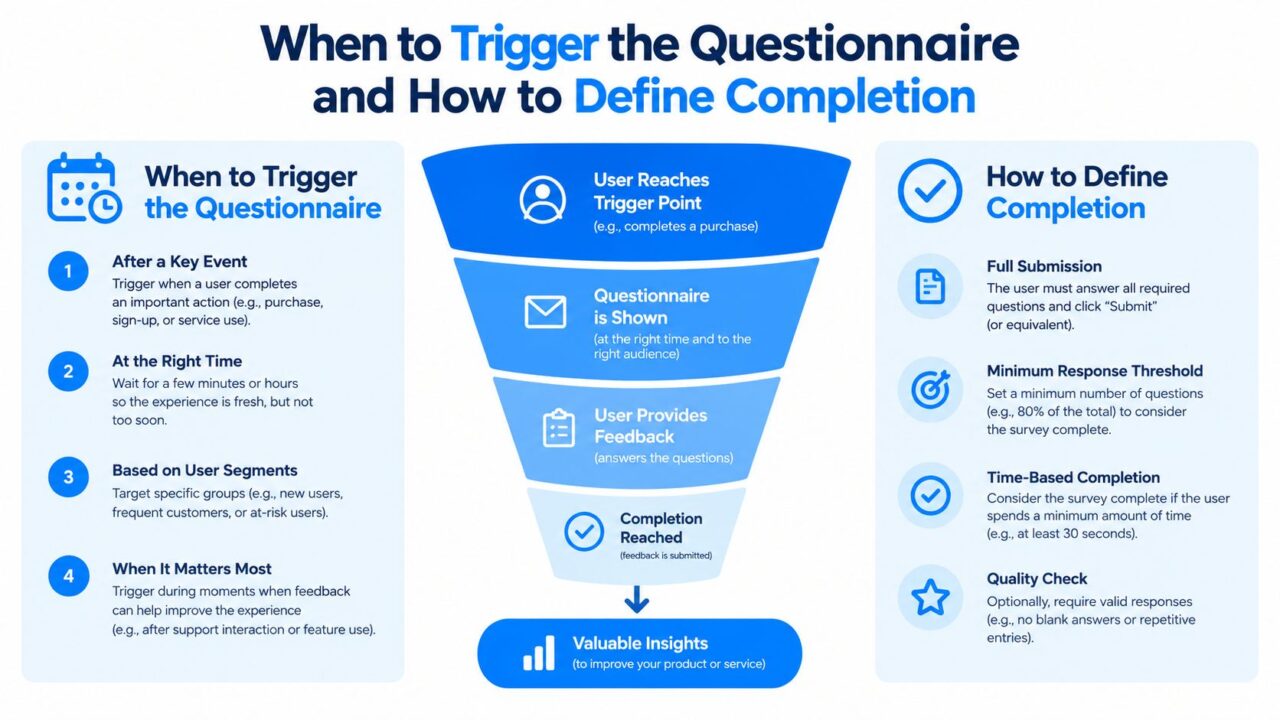
Chatbot Feedback Questionnaire Triggers
Define what “complete” means
AHRQ’s CAHPS guidance defines a questionnaire as complete when it contains answers for at least 50% of key items and at least one reportable item. The same guidance recommends response-rate targets of 40% for Medicaid plans and 50% for commercial plans, which are survey-program benchmarks rather than universal chatbot standards (AHRQ CAHPS guidance).
Translate that rule into separate Clepher events:
- Opened: The invitation was delivered and viewed.
- Started: The user selected the first response.
- Rated: The user answered the main resolution item.
- Completed: The user met your predefined key-item rule.
For example, if 1,000 eligible customers receive a post-purchase flow and 240 provide enough answers to meet the completion rule, the completion rate is 24%, not the number who clicked the first button. This denominator discipline prevents partial sessions from being reported as successful feedback collection.
Treat response rate as a diagnostic
A DTC brand might set an internal target of 20% for a short post-purchase Messenger or Instagram questionnaire, then test timing, reminders, and incentives against that baseline. If 5,000 eligible buyers are invited and 1,000 complete the questionnaire, the response rate is 20%. Report the denominator, exclusions, and completion definition alongside the percentage.
For customer-journey timing, connect the questionnaire to the relevant customer journey automation event. The goal is to survey a user while the interaction is still fresh, without interrupting an unresolved case or adding friction to checkout.
Wiring Feedback Into Analytics and Follow-Up Flows
A questionnaire that ends with “thanks” leaves the most valuable action on the table. Store each answer as a structured field, attach the conversation intent, and trigger an operational path from the combination of score and context.
Chatbot Feedback Questionnaire Clepher Landing Page
A simple routing model might work like this:
- A 1–2 rating: Tag the conversation for CX review, preserve the transcript, and identify the failed intent.
- A 3-star rating: Offer a live-chat handoff and ask whether the customer wants help now.
- A 5-star rating: Invite the customer into a referral or advocacy broadcast, but only when the underlying task was also resolved.
- A “repeat information” response: Send the flow to the product owner responsible for memory and handoff fields.
- A low trust response: Review claims, source content, and escalation language before changing the tone.
The important distinction is between a rating and an action condition. A five-star score without task resolution shouldn’t trigger advocacy. A low score with successful resolution may indicate tone or speed issues rather than a broken support path.
Practical rule: Every questionnaire answer should either change a customer experience, create a review queue, or improve an experiment. If it does none of those, remove the question.
Connect feedback to the rest of the stack
Use native integrations or automation tools such as Zapier, Make, n8n, or Pabbly to send structured feedback into email, SMS, CRM, and support systems. When you need more context about a contact, a data enrichment layer can help. For a comparison of approaches, see Fetchin’s data enrichment comparison. Keep enrichment separate from the questionnaire itself so you don’t ask customers for information your systems already hold.
Track the questionnaire alongside behavioral outcomes:
- Completion and abandonment by question
- Escalation and repeat contact
- Completed checkout or lead qualification
- Subscription activation
- Resolution by intent and channel
- Rating by customer segment
Use A/B tests to separate wording effects from genuine bot-performance changes. Test the invitation, question order, or scale presentation while keeping the underlying bot flow stable. Then test a bot change while keeping the questionnaire stable. Clepher’s conversation analytics can support this review by keeping conversation-level signals closer to the feedback data.
AHRQ’s web-survey analysis found completion rates of 73.7% for a modified short encouragement, 77.3% for an enhanced short encouragement, and 60.5% when no encouragement was used (AHRQ invitation analysis). The practical lesson is simple. Lead with purpose and low effort, such as “How was your delivery? Tap one answer. This takes 20 seconds.” Don’t put a dense explanation or several qualification questions before the first response.
Avoiding Bias and Reaching Users Most Questionnaires Miss
A questionnaire can be technically clean and still represent the wrong customers. Convenience samples often overrepresent people who are already engaged, digitally confident, comfortable with the brand, or willing to answer another message. Their positive ratings can hide friction experienced by older users, people on low-bandwidth connections, multilingual customers, and people who rely on assistive technology.
An Egyptian banking study found that digital literacy and trust strengthened the relationship between chatbot service quality and satisfaction, while convenience sampling restricted generalizability beyond digitally engaged customers (Egyptian banking study). That means “easy to use” doesn’t have one universal meaning. It can reflect confidence with chat interfaces as much as the quality of the bot.
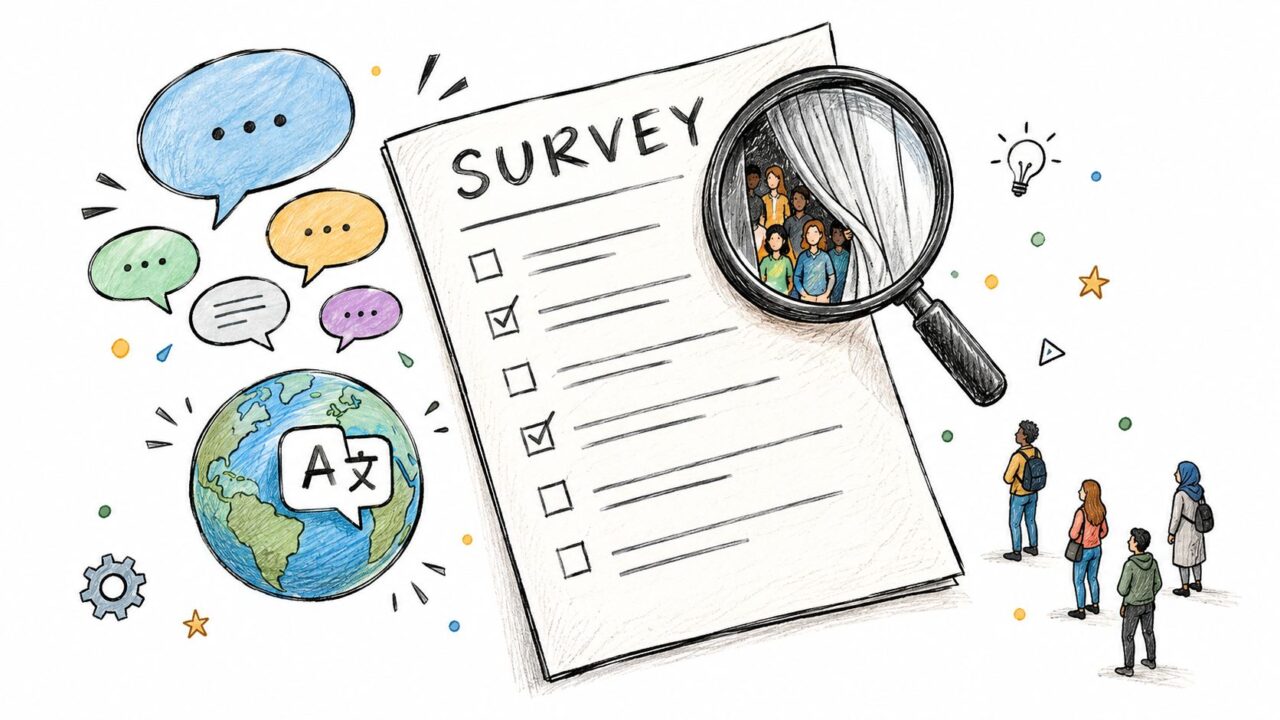
Chatbot Feedback Questionnaire Diverse Survey
Ask for context without making identity mandatory
Add optional context questions that let you compare experiences:
- Region or country
- Preferred language
- Device type
- Connection quality
- Assistive-technology use
- Previous chatbot experience
- Customer intent
Use plain wording, clearly labeled scales, and a low-literacy response path. Offer multilingual versions where the audience requires them. A customer shouldn’t need to interpret subtle labels such as “somewhat dissatisfied” to report that the bot failed.
Report results by segment instead of publishing only a global average. A strong overall score may conceal poor resolution for returns, weak trust among first-time users, or accessibility problems on a particular device.
One recent chatbot questionnaire study recorded only 15 completed Likert responses, limiting statistical reliability. Treat a small convenience sample as directional, not conclusive. Set a minimum sample rule before acting on a segment, and report the response count with every score.
Your Chatbot Feedback Questionnaire Launch Checklist
Use this as a go-live gate. A questionnaire passes only when the answer is clear and documented.
- Objective: Can the team name the operational decision the questionnaire will support?
- Resolution measure: Does the flow ask whether the customer completed the intended task?
- Constructs: Are task success, relevance, speed, ease, trust, and handoff measured separately?
- Scale: Does the flow use one consistent five-point or seven-point scale?
- Wording: Has the team removed ambiguous and double-barreled questions?
- Open text: Is there no more than one optional open-text prompt?
- Trigger: Does the invitation follow a meaningful support or sales interaction?
- Completion: Are opened, started, rated, and completed events stored separately?
- Denominator: Does every response-rate report include eligible recipients, exclusions, and the completion rule?
- Target: Has the team set an internal response-rate benchmark for the relevant channel?
- Routing: Do low ratings create a human follow-up, review tag, or recovery action?
- Behavior: Are repeat contact, escalation, abandonment, and conversion connected to feedback?
- Segments: Are results compared by intent, language, device, channel, and customer context?
- Bias: Has the team checked whether digitally confident users dominate responses?
- Benchmark: Will the team periodically compare results with the Chatbot Usability Questionnaire, which uses 16 positively and negatively worded items on a five-point scale, can be normalized to 0–100, and has a commonly cited comparison benchmark of 68 (Chatbot Usability Questionnaire reference)?
Review the questionnaire regularly, but don’t change every question after one noisy result. Preserve the measurement structure, document revisions, and always report the denominator, completion definition, response count, and segment beside the score.
Clepher lets you build conversational flows that ask feedback questions, collect ratings and open responses, segment contacts, and trigger follow-up actions across channels such as Messenger, Instagram Direct, and your website. Use Clepher to turn a post-chat questionnaire into a resolution signal, escalation workflow, and continuous improvement loop.