
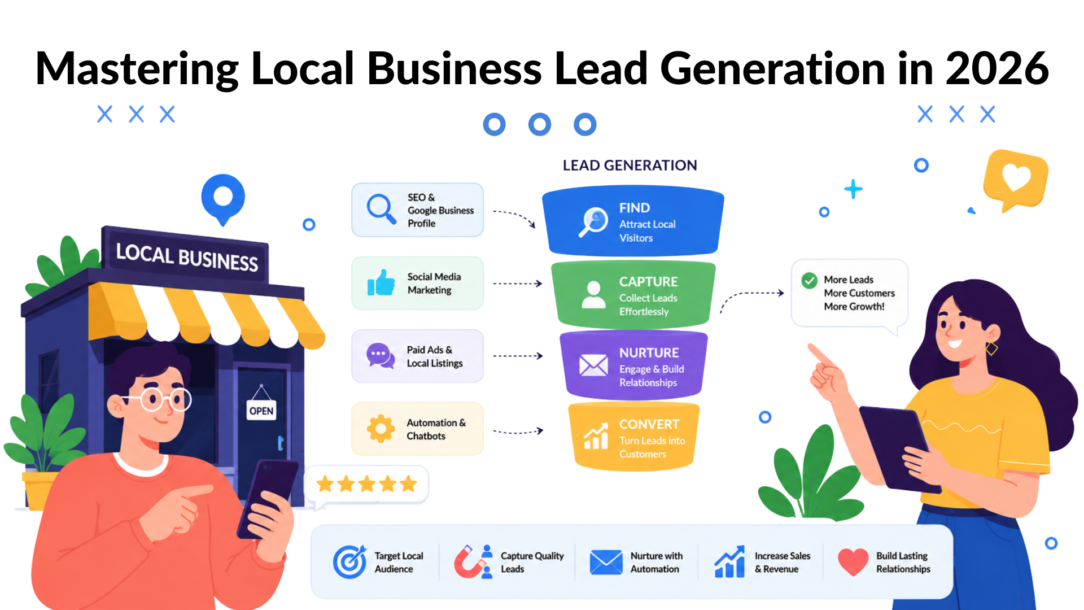
Leads rarely arrive in one neat place.
They come in through your Google Business Profile, a website form, an Instagram DM, a Facebook message, a phone call, and sometimes a comment that somebody expects you to answer like a private inquiry. Most local businesses don’t have a lead generation problem first. They have a lead handling problem.
A roofing company gets a quote request on its site at 9:30 p.m. A med spa gets an Instagram DM asking about pricing during a busy afternoon. A gym gets a Facebook message about trial passes while staff is helping people on the floor. None of those inquiries are bad. They’re just scattered, easy to miss, and hard to follow up on consistently when the business is already busy doing the actual work.
That chaos is why local business lead generation breaks down. The issue usually isn’t visibility alone. It’s the gap between interest and response.
Some owners keep trying to solve this by adding more tactics. More ads. More posts. More directory listings. More apps. Sometimes that helps. Often it just creates more places for leads to leak.
A better approach is to treat every inquiry like the start of the same conversation. Search, social, paid traffic, listing clicks, and referrals should all feed into one system that captures contact details, qualifies intent, and keeps following up when the owner can’t.
If you’re looking for broader strategies to find new clients, that resource is useful. But the local advantage comes from tightening the handoff between discovery and response.
From Scattered Inquiries to a Stream of Leads
The businesses that grow steadily at the local level usually do one thing better than their competitors. They respond fast, and they respond the same way every time.
That sounds simple until you look at a normal day. A plumber may get map calls in the morning, website inquiries at lunch, and Messenger questions after hours. A dental office may have front-desk staff answering phones but no one watching DMs closely. A salon may be active on Instagram but still send people to a generic homepage that doesn’t capture anything cleanly.
What the mess looks like in practice
Most local lead flow problems show up in familiar ways:
- Missed timing: The customer asks a question when nobody’s available.
- Incomplete details: You get a name and maybe a phone number, but not the service needed or location.
- No follow-up: Staff members mean to reply later and forget.
- No attribution: You know leads are coming in, but not which channel is producing the best ones.
The result isn’t dramatic. It’s quieter than that. A few missed messages here, a slow reply there, some inquiries that never get logged. Over time, those become lost revenue.
Local lead generation gets easier when every source feeds one capture and follow-up process.
What a unified system changes
A good local business lead generation system doesn’t treat SEO, ads, listings, and social as separate marketing projects. It treats them as different entry points into the same conversation.
That means a person who clicks from Google Maps, a person who taps a click-to-message ad, and a person who lands on your site after searching for a nearby service should all hit a structured path:
- They ask or answer a few simple questions.
- You collect the important lead details immediately.
- The lead gets tagged by intent, service, or location.
- The business gets notified, or the lead gets nurtured automatically.
This is how scattered inquiries become a manageable stream. Not by being everywhere at once, but by making every channel work together.
Master Your Local Visibility Foundation
Local lead generation usually breaks before the lead form. A nearby customer searches, compares three businesses in Google Maps, opens two profiles, and messages the one that looks active, clear, and easy to reach. If your visibility layer is thin or inconsistent, automation never gets a chance to work.
For local businesses, that foundation starts with Google Business Profile, core directory accuracy, and location signals that match across every place a buyer might check. The goal is not just to appear. The goal is to make every discovery point feed the same lead capture system, so search traffic, listing views, and social profile visits all end up in one managed conversation flow inside Clepher.
Practitioners who work local lead gen every day tend to agree on the channel mix. Google Maps, local SEO, geo-targeted PPC, Meta ads, and third-party listings all play a role, and each market weights them differently, as discussed in this local lead generation discussion.
Local Business Lead Generation Map Magnifier
Build a Google Business Profile that converts
A half-finished profile can still show up. It just does a poor job of turning attention into contact.
A strong profile helps a prospect answer the questions that matter fast: Do you offer the service they need, in their area, on their timeline, and do you look credible enough to message now? That means the profile has to support both ranking and conversion.
Use this checklist:
- Choose accurate categories: Set the primary category around the main service you want to win. Use secondary categories only when they support that service.
- List real services: Add the actual jobs customers request, using the language they use.
- Write a clear business description: Explain what you do, where you work, and who you help.
- Upload current photos: Show proof. Team, location, vehicles, projects, rooms, products, or finished work all help.
- Keep hours updated: Include holiday changes, weekend coverage, and emergency availability if relevant.
- Use posts and Q&A: Answer buying questions before they become missed inquiries.
- Watch reviews closely: Fresh reviews build trust. Replies show the business is active.
Fix your listings before you spend more on traffic
Directory work is not exciting, but bad listing data creates friction at the exact moment a buyer is deciding whether to reach out. A mismatched phone number, an old address, or different business names across platforms can stall the lead before it starts.
Run a listing audit across the places local buyers use:
- Google Business Profile
- Facebook business page
- Yellow Pages
- Yelp
- Industry directories
- Local chamber or community listings
Keep your business name, address, phone number, service area, hours, and service descriptions aligned. Then connect those visibility assets to a single response path. That is the part many local businesses miss. They clean up listings, improve rankings, and buy ads, but each channel still sends people into separate inboxes, forms, and staff workflows.
That split is expensive.
The better setup is one where your Google Business Profile, local landing pages, and social profiles all point into the same capture and follow-up system. Clepher makes that practical by giving local businesses one place to route inbound interest, trigger instant replies, and keep lead details organized instead of buried across messages and missed calls.
For a broader look at connecting visibility with follow-up, Clepher’s guide on how to promote a local business online and offline covers the channel mix well.
A local business does not need to win every platform. It needs accurate local presence, clear proof of service, and one well-integrated path from discovery to conversation.
Turn Clicks and DMs into Qualified Leads
Traffic isn’t the win. Qualified contact is the win.
A lot of local businesses still send every visitor to a homepage with a phone number at the top and hope the person calls. That works for some ready-to-buy prospects. It fails for everyone who wants a quick answer first.
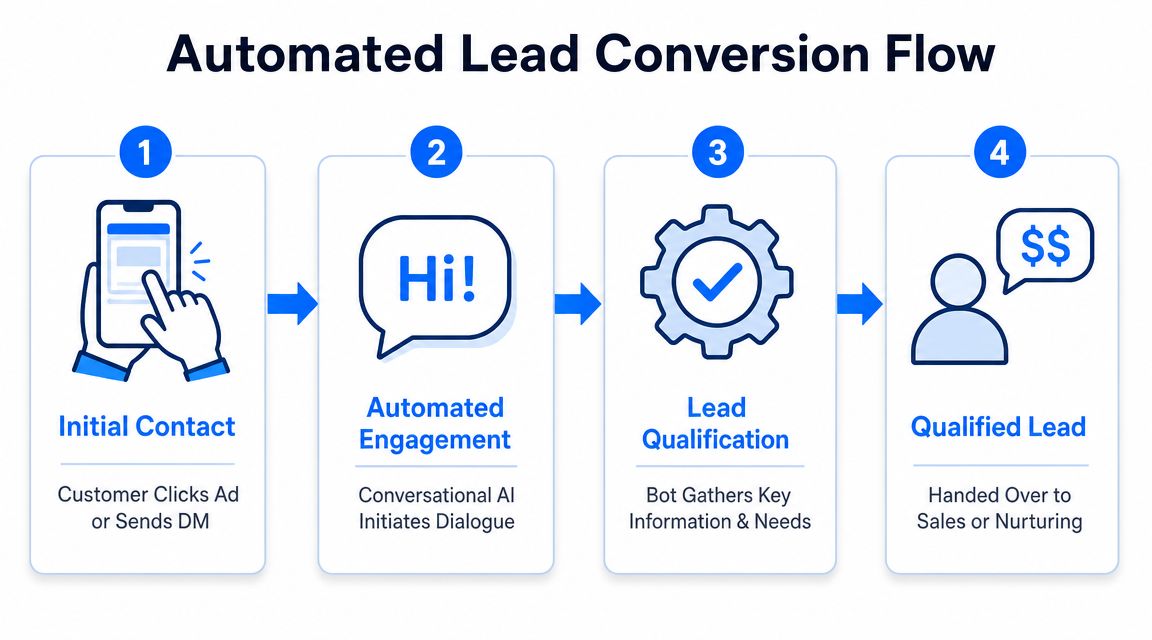
Local Business Lead Generation Flow
Before and after automated capture
Before automation, the process usually looks like this:
| Situation | What happens |
|---|---|
| Website visitor asks about pricing after hours | Nobody answers |
| Instagram DM asks if you serve a nearby area | Reply comes the next morning, if at all |
| Facebook inquiry wants a quote | Staff asks basic questions manually every time |
| Ad click lands on homepage | Visitor browses, gets distracted, leaves |
After automation, the flow gets tighter:
| Situation | What happens |
|---|---|
| Website visitor asks about pricing | Chat asks service, location, timeline, contact details |
| Instagram or Facebook inquiry arrives | Instant reply starts qualification |
| Ad click shows buying intent | User enters a guided message flow instead of a generic page |
| Lead completes key answers | Staff gets notified or lead enters nurture |
What the conversation should ask
The first interaction shouldn’t feel like a long intake form. Keep it short and useful.
For most local businesses, a strong qualification flow asks for:
-
Service needed
“What are you looking for help with?” -
Location or service area
“What city or ZIP code is the job in?” -
Timing
“Do you need this soon, or are you just researching options?” -
Contact method
“What’s the best phone number or email for a follow-up?” -
Optional deal-breaker question
Budget, appointment type, property type, party size, or urgency.
This structure works because it filters casual browsing from real buying intent without making the user work too hard.
Industry benchmark data cited by Leadspicker says companies using AI for lead generation report up to a 50% increase in sales-ready leads, and marketing automation can boost qualified leads by as much as 451% in some cases, according to its guide on lead automation generation strategies.
Two local examples that work
A gym can use a website widget or social DM flow like this:
- Opening prompt: “Interested in a trial, membership, or class schedule?”
- Branching question: “Which location are you closest to?”
- Intent check: “When are you thinking about starting?”
- Capture: name, phone, email
- Outcome: send trial details or route hot leads to staff
A restaurant can use a reservation or event inquiry flow:
- Opening prompt: dine-in, private event, catering
- Details gathered: preferred date, party size, contact info
- Routing: reservation request to front-of-house, event lead to manager
One practical option for this kind of setup is Clepher, which supports website widgets and Instagram or Messenger automation through a no-code flow builder. For local businesses, that matters because the same qualification logic can run across multiple channels instead of forcing staff to answer the same opening questions manually. If Instagram is a core source for your business, this guide to Instagram DM automation shows how that channel can be structured.
If a lead has to wait for your team to ask basic qualifying questions manually, your process is slower than it needs to be.
Keep the handoff simple
Don’t overbuild the first version. Most local businesses need only three possible outcomes:
- Hot lead: notify staff now
- Not ready yet: enter follow-up
- Poor fit: give a polite redirect or clarification
That’s enough to stop leakage fast and create a cleaner pipeline from the traffic you’re already generating.
Run Hyper-Targeted Local Paid Ads
Paid ads are useful for local business lead generation when they feed a qualification system. They’re expensive when they don’t.
A lot of campaigns fail because the targeting is broad and the destination is weak. The ad may be fine. The click may even be cheap. But if the person lands on a generic homepage and has to hunt for next steps, the campaign wastes attention you already paid for.
Start with geography, not audience size
For local businesses, smaller targeting often performs better than wider targeting because the message can match the market. Artisan recommends segmenting campaigns by geography first, then automating personalized outreach by city or neighborhood and adding local signals into messaging to improve relevance and measurement, as described in its article on local lead generation.
That has two practical implications:
- Split campaigns by city, ZIP code, or neighborhood when those areas behave differently.
- Adjust ad language to local context instead of running the same creative everywhere nearby.
A family dental office might run separate campaigns for nearby neighborhoods if one area responds better to emergency appointments and another responds better to family scheduling. A home service company may separate dense urban jobs from suburban service areas because travel time and service type aren’t the same.
Send ad traffic into a conversation
For many local businesses, the best ad destination isn’t a homepage. It’s a flow that starts collecting details right away.
That can look like:
- Meta click-to-message ads that open Messenger or Instagram DM
- Lead ads that trigger immediate follow-up
- Landing pages with chat entry points instead of static contact forms
- Google local campaigns that support calls, directions, or lead capture in a defined area
Google also positions Local Service Ads as a specialized local lead tool for businesses serving defined service areas, which makes them worth considering when call-based leads matter.
What smart local ad setup looks like
A cleaner paid strategy usually follows this pattern:
| Ad type | Better destination |
|---|---|
| Facebook or Instagram local promo | Messenger or Instagram qualification flow |
| Google service query traffic | Local landing page with immediate lead capture |
| Offer-driven campaign | Short conversation that sorts intent |
| Service-area ad | Flow that confirms ZIP code before routing |
Paid media rule: Don’t buy local clicks unless you know where those clicks go next.
The trade-off is simple. Narrow targeting reduces reach, but it usually improves relevance. Sending people into a structured conversation adds one more step, but it also filters weak inquiries and gives your staff better information before they ever pick up the phone.
That’s the point of local ads. Not traffic for its own sake. Better leads, from the right area, entering the right workflow.
Automate Lead Nurturing and Qualification
Not every local lead is ready today.
Some people are comparing providers. Some need to check with a spouse, partner, office manager, or landlord. Some are curious about pricing but haven’t committed to timing. If you don’t have a follow-up system, those leads disappear into a spreadsheet, a message inbox, or someone’s memory.
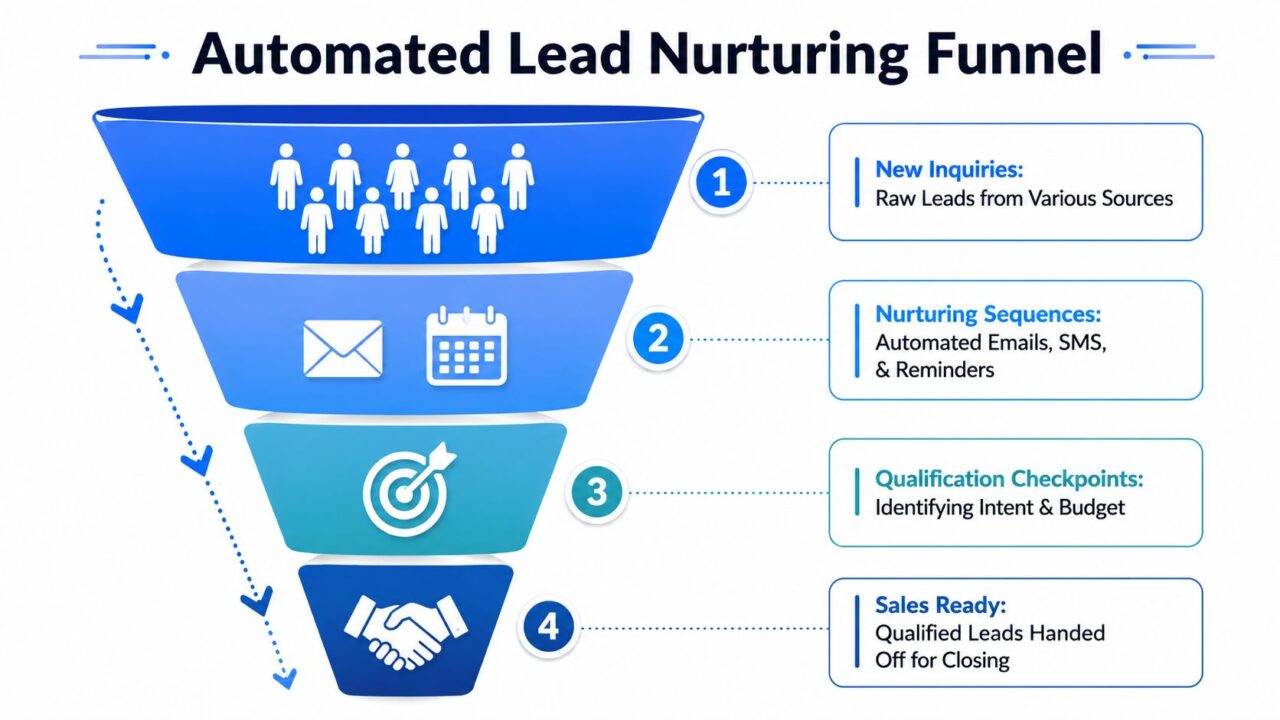
Local Business Lead Generation Funnel
Tag first, follow up second
The biggest mistake in nurturing is sending the same message to everyone. A better system starts with tags.
Use tags that reflect what the lead asked for. For example:
- price_quote
- service_area_check
- book_consult
- more_info
- not_ready
- high_intent
Those tags let you control the next message instead of blasting one generic follow-up to every contact.
A service business can also tag by:
| Tag type | Example |
|---|---|
| Service line | roof repair, facial, legal consult, private event |
| Location | downtown, west side, specific ZIP |
| Urgency | immediate, this week, researching |
| Source | website, Instagram, Messenger, paid ad |
A simple three-touch nurture flow
This is enough for many local businesses.
Touch one should go out after the initial inquiry if the lead didn’t book or call. Keep it short. Confirm what they asked about and give one useful next step.
Example for a local HVAC company:
- Acknowledge the request
- Mention the service asked about
- Ask if they want an estimate or a callback
- Include a direct booking or reply option
Touch two should answer a common objection. Don’t oversell. Reduce friction.
Examples:
- What areas do you serve?
- Do you offer weekend appointments?
- What’s included in an inspection?
- How long does a treatment or appointment usually take?
Touch three should create a reason to respond now. That could be limited scheduling, seasonal relevance, or a reminder that spots are filling. Keep the tone helpful, not pushy.
A nurture sequence works best when each message answers the next obvious question the buyer has.
Build the workflow cleanly
A practical setup inside an automation platform usually includes:
- Trigger when a person completes the first chat or submits a lead form
- Tag assignment based on answers
- Delay before the first follow-up
- Conditional logic based on replies or non-replies
- Handoff if the lead reaches a booking or callback threshold
That gives you a patient system that doesn’t rely on someone remembering to circle back later.
If you want examples of message timing, segmentation, and follow-up logic, Clepher’s article on lead nurturing best practices is a practical place to compare approaches.
Qualification should continue during nurture
Qualification doesn’t stop after the first capture. Good follow-up keeps refining intent.
A lead who ignored the original quote request may respond to a message about appointment availability. A lead who wasn’t ready this week may become active when they see a relevant reminder. A lead from one service area may reveal they need another location.
That means nurture isn’t just staying in touch. It’s collecting enough context to know who deserves immediate human follow-up. For small business lead generation especially, that context is often the only edge you have over bigger competitors with bigger budgets.
Some local businesses overcomplicate this stage with long email sequences, too many branches, and too many offers. Keep it tighter. One clear message at a time. One useful question per touch.
One obvious action to take next. Even simple ways to generate leads, like a follow-up tied to a recent local events sponsorship or a seasonal reminder, work better with this kind of restraint than a crowded sequence trying to cover every angle at once.
Measure What Matters and Close the Loop
If you can’t trace a lead back to a source, you’re making budget decisions with guesswork.
For local business lead generation, the core stack should combine local SEO, geo-targeted paid media, and robust conversion tracking. Thomasnet recommends UTM parameters, CRM tracking, and call tracking so businesses can attribute leads to source and shift spend toward the channels that perform best, as described in this article on lead tracking for local business lead generation.
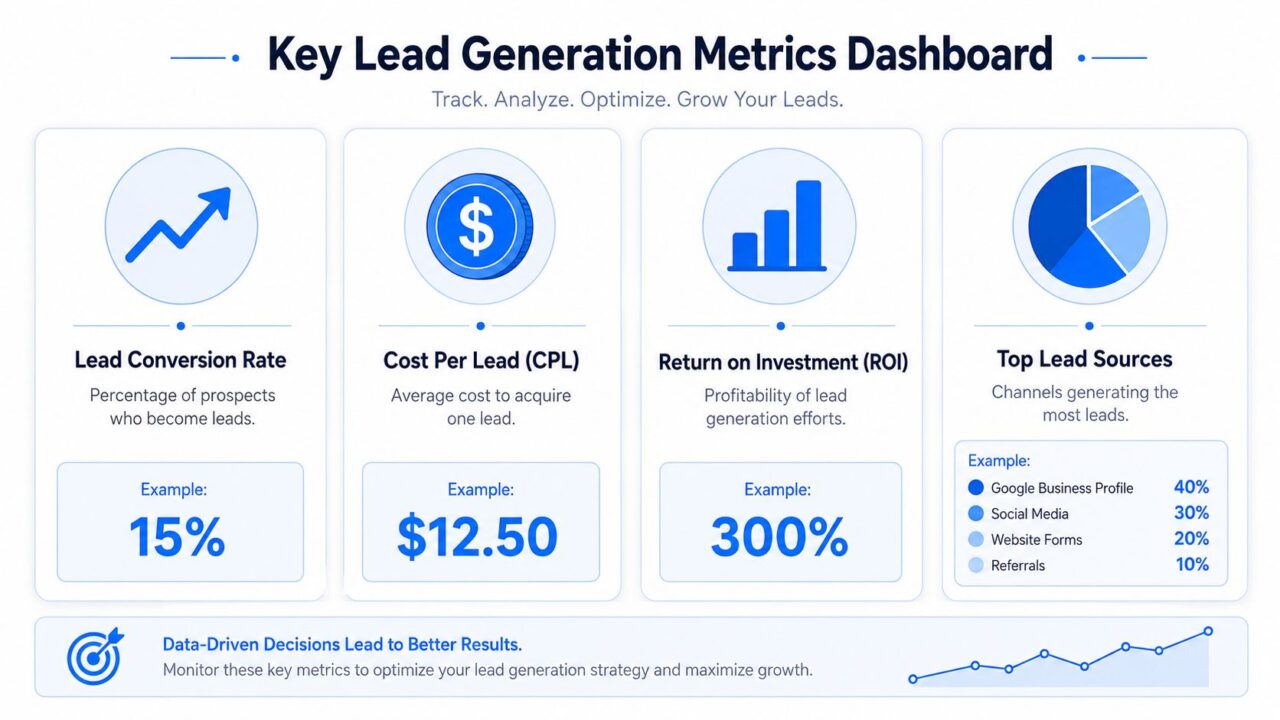
Local Business Lead Generation Dashboard Metrics
Track source before you scale source
UTM parameters are simple, but they fix a major reporting problem. If your Google Business Profile website button, local landing pages, and ad campaigns all use tagged URLs, you can see where leads started instead of lumping them together as “website.” This kind of tracking is one of the more overlooked lead generation strategies precisely because it costs nothing to set up but changes how clearly you can see what’s actually working.
That matters because not all local leads behave the same way. A map visitor found you through local search and may already be close to booking. A paid social lead may need more education before converting. A directory lead may care most about fast response.
For a business owner running both Google Ads and organic local search, this distinction is the difference between generating leads campaigns that just add volume and ones that add the right kind of volume. Any digital marketing effort, whether run in-house or through lead generation services, depends on this same visibility to know which channel is actually earning its budget.
Use source labels that stay readable:
- utm_source=google_business_profile
- utm_source=facebook_ads
- utm_source=instagram
- utm_source=directory
- utm_medium=local_paid or organic
- utm_campaign based on service or area
Push qualified leads into an action system
Analytics alone won’t close the loop. The lead also needs to reach the right person fast.
A simple handoff setup can send qualified leads into:
| Destination | Why use it |
|---|---|
| Google Sheet | lightweight tracking for small teams |
| CRM | pipeline visibility and follow-up ownership |
| Email or SMS alert | immediate response for urgent inquiries |
| Calendar workflow | direct booking for consultations |
Zapier, Make, or a native integration can handle this handoff. The key isn’t the tool choice. It’s deciding what qualifies a lead for action.
For example, a lead might trigger an alert only when the person has provided:
- service needed
- valid contact details
- service area confirmation
- preferred timeline
Track the first click, the qualification step, and the final outcome. Anything less leaves blind spots.
Measure lead quality, not vanity activity
A local campaign can generate lots of chats, clicks, or message opens without producing useful opportunities. That’s why the most useful reporting questions are operational:
- Which source produced the most qualified inquiries?
- Which area generated weak-fit leads?
- Which campaigns produced calls but not booked jobs?
- Which conversation path created the cleanest handoff to staff?
When that feedback loop is in place, local marketing gets easier. You stop judging channels by noise and start judging them by lead quality and closeability.
If your local leads are spread across website chats, Facebook, Instagram, Messenger, and WhatsApp, Clepher can help centralize those conversations into one automation and follow-up workflow. The practical advantage isn’t adding another marketing channel. It’s giving every channel the same capture, qualification, nurturing, and handoff system so fewer local inquiries get missed.

Related Posts
Revenue Optimization: A Practical Playbook for Growth
October 19, 202610 Lead Capture Software Tools Compared for 2026
October 18, 2026WhatsApp Chatbot for Ecommerce: A Practical 2026 Guide
October 17, 2026
Founder Clepher