
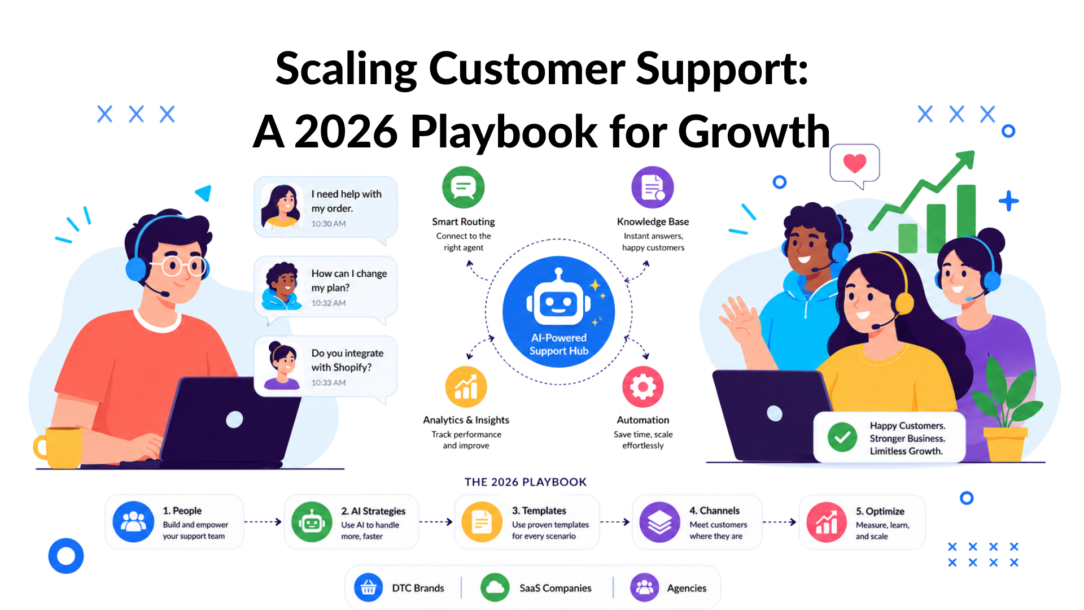
Support costs rise fast when volume spreads across email, chat, social DMs, and after-hours requests. The old fix was simple. Hire more agents. That still buys time, but it stops working once the same issue shows up in five channels, handoffs break, and managers have no clean view of what the team is doing.
The job changes at that point. Scaling support becomes an operating design problem. Teams need to decide which conversations should be handled by automation, which ones need human judgment, and how customer context follows the case from first contact to resolution. If that foundation is weak, growth shows up as longer queues, inconsistent answers, and a payroll line that keeps climbing.
I’ve seen the same pattern across DTC, SaaS, and agencies. The trigger looks different, but the failure mode is similar. DTC teams drown in order-status and returns questions during peaks. SaaS teams get buried under repetitive billing, access, and setup tickets. Agencies lose time chasing updates across shared inboxes, Slack threads, and client-specific workflows.
The fix is rarely another hiring sprint.
Teams that scale well usually get three things right early. They document repeatable work, segment support by customer type and issue type, and build automation around actual queue patterns instead of generic tool features. That is the difference between adding headcount because demand is growing and adding headcount because the operation is disorganized.
If you are working through how to automate customer service without breaking the customer experience, start with process clarity before you start turning rules on. Automation works when ownership, routing, macros, and knowledge are already defined. Without that, AI just helps your team make the same mistakes faster.
This playbook is built for operators running DTC, SaaS, and agency support. It covers what to put in place first, where automation pays off, what tends to break during rollout, and how to manage the change without creating confusion for agents or customers.
Why More Agents Is No Longer the Answer
Poor customer service puts $3.8 trillion in global revenue at risk in 2026, and 74% of customers expect that anything they can do in person should also be possible through digital channels, according to Pylon’s roundup of customer support trends. That combination changes the conversation. Support isn’t just a staffing issue. It’s a revenue protection issue.
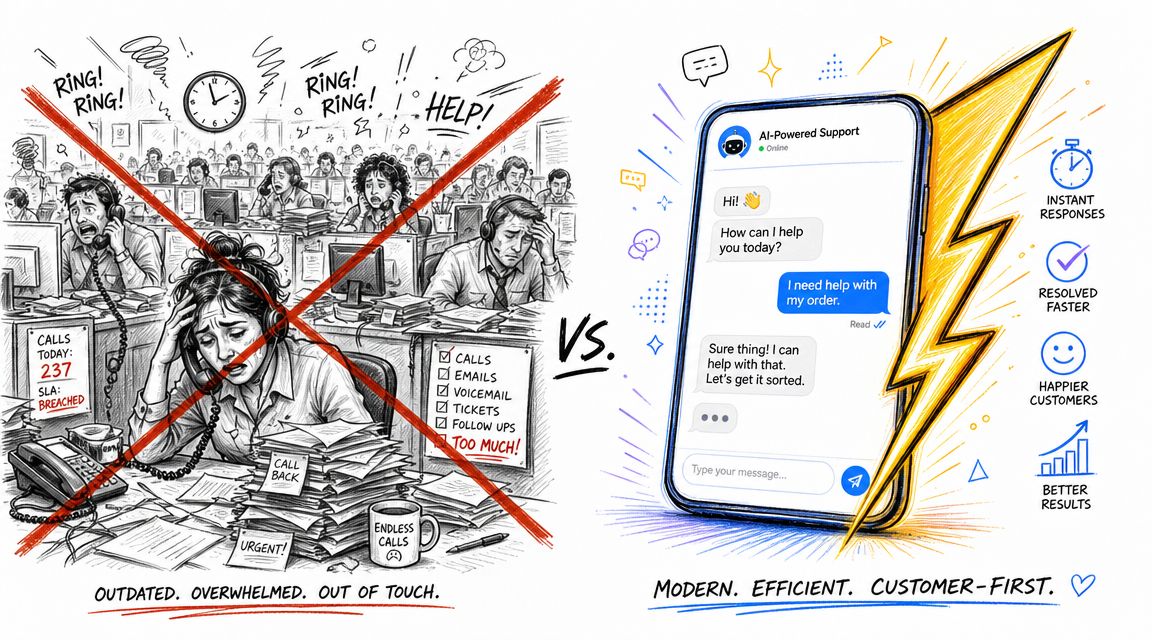
Scaling Customer AI Support
A bigger team can help for a while. It rarely fixes the root problem. If your agents answer the same shipping question all day, or copy the same billing explanation into chat, adding people only increases payroll around a weak process.
Where the old model breaks
The old support math was simple. More customers meant more agents.
That worked when support lived in one or two channels, and customers were willing to wait. It doesn’t work when someone starts with Instagram DM, follows up through email, and expects the next agent to know the whole story. It also doesn’t work when your busiest hours don’t match your team’s schedule.
You can usually tell when the team has outgrown the manual model:
- Response quality drifts: Two agents give different answers to the same question.
- Queue triage is reactive: Urgent issues sit beside low-stakes requests because no one has designed routing rules.
- Burnout shows up fast: Strong agents spend their day on repetitive Tier 1 work instead of solving complex issues.
- Hiring stops working: New agents reduce backlog for a week, then the same bottlenecks return.
More agents increase capacity only if the work is already structured. If the system is messy, hiring scales the mess.
What support leaders should assess first?
Before adding headcount, audit the operation like an operator, not like a recruiter.
Ask a few blunt questions:
- Which issues repeat every day? Those are automation and self-service candidates.
- Which tickets require judgment? Those belong with humans.
- Where does context get lost? Usually at channel switches, handoffs, or missing CRM data.
- Which requests are expensive but low value? Those often consume far too much agent time.
- Do agents follow a real workflow or personal habit? Personal habit doesn’t scale.
For teams planning that shift, a practical starting point is to review how customer service automation workflows can absorb repetitive intake and first-line questions before they ever hit an agent queue.
The real reframing
Scaling customer support isn’t about building the biggest team. It’s about building a support system that can absorb volume without degrading quality.
That means fewer heroics, fewer copy-paste answers, and fewer situations where the only answer to growth is “hire five more people.” The strongest support orgs don’t remove humans. They reserve humans for the work that needs them.
Laying the Groundwork for Scalable Service
Most automation failures are process failures wearing a software costume. Teams buy a bot, wire up a few triggers, and then wonder why customers still escalate to humans. The reason is simple. The underlying answers, workflows, and ownership rules were never defined.
Zendesk’s guidance is clear on the sequence: a common pitfall is scaling labor before documenting repeatable answers and workflows, and the recommended path starts with a knowledge base built from common ticket issues, then adds automation and defined escalation paths, as outlined in Zendesk’s guide to scaling support teams.
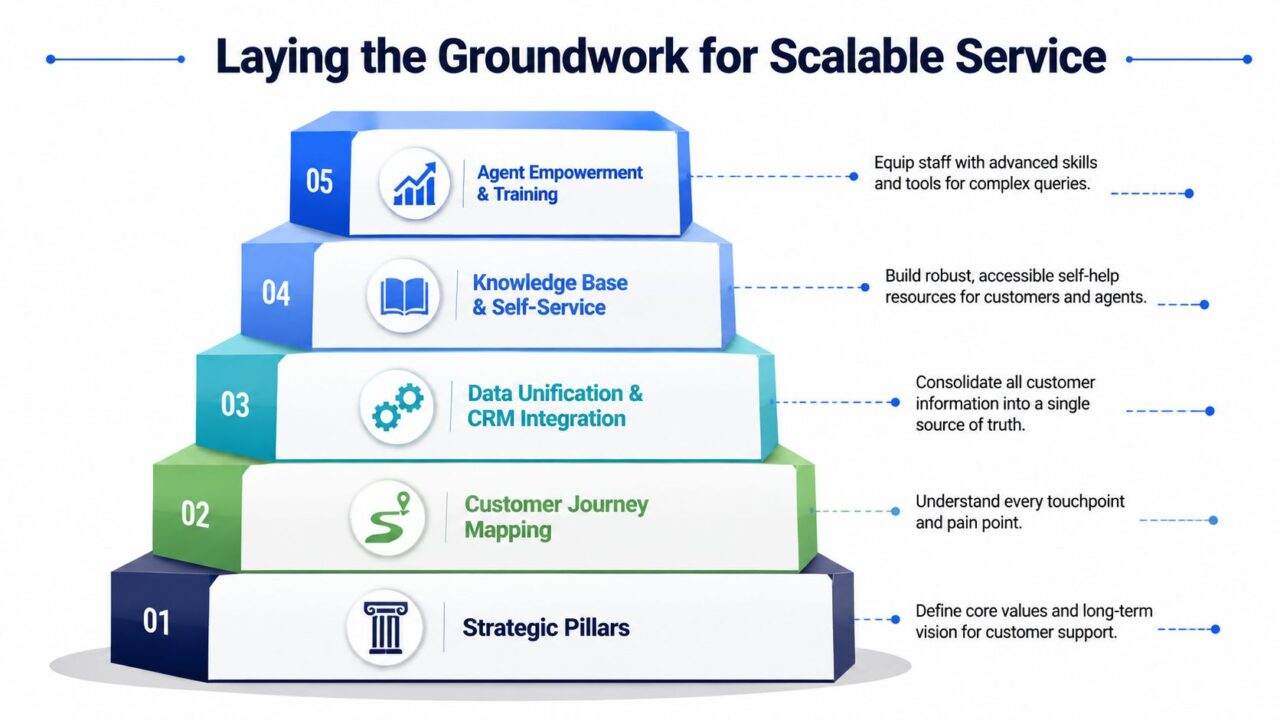
Scaling Customer Support Service Pyramid
Start with the questions you already answer
A strong knowledge base usually begins inside your ticket queue, not in a brainstorm doc.
Pull a sample of recent conversations and sort them into themes. For a DTC brand, that often means shipping, returns, damaged orders, subscription changes, and promo code issues. For SaaS, it tends to be login problems, setup steps, permissions, billing, and feature confusion. For agencies, it’s status updates, approval requests, asset collection, and scope questions.
Then separate those topics into three buckets:
- Always answer the same way: These should become help articles, macros, and bot flows first.
- Need a few variables: These need structured forms, conditional logic, or CRM lookup.
- Need human judgment: Leave these with the team and define escalation rules.
Build the first useful knowledge base
The first version doesn’t need to be huge. It needs to be accurate and usable.
Write articles the way customers ask questions, not the way product teams name features. “How do I change my plan?” beats “Subscription modification procedure.” Keep each article short, current, and linked to the next action.
A practical starter set often includes:
- Account basics: Login, password, profile changes, permissions.
- Billing answers: Invoices, refunds, renewals, payment failures.
- Operational FAQs: Shipping timelines, return steps, onboarding tasks, deliverable timelines.
- Escalation triggers: What customers should do when the self-serve path doesn’t solve the issue.
Practical rule: If an agent has answered the same question enough times to build a reliable template, that answer should not live only in the agent’s head.
Document workflows before you automate them
Support teams often skip this because documentation feels slow. It isn’t. Rework is slower.
For each high-volume issue, define:
| Workflow element | What to document |
|---|---|
| Intake | What information must be captured upfront |
| Ownership | Which team or role handles it first |
| Decision points | What changes the path |
| Escalation | When it moves to a specialist |
| Closure | What counts as resolved |
Support maturity becomes evident. If “urgent” means something different to every agent, your automation will route badly. If refund rules vary by person, your self-service content will create more tickets, not fewer.
Keep the foundation simple
Don’t start with edge cases. Start with the questions that drain the most team time.
For example:
- A DTC team can document a return workflow with approved reasons, required order details, and when a damaged-item claim needs manual review.
- A SaaS team can map trial-to-paid onboarding questions into setup, permissions, integrations, and billing.
- An agency can standardize new client intake so project status requests don’t arrive as random emails and DMs.
The point of groundwork isn’t perfection. It’s consistency. Once your team answers common questions the same way and follows the same path, automation can reduce load instead of multiplying confusion.
Structuring Your Team for Efficiency
Flat support teams feel efficient early on. Everyone handles everything, queues stay simple, and managers get flexibility. That breaks as soon as volume and complexity rise together.
A generalist-only team usually creates two problems at once. Senior people spend time on routine work, and newer people touch issues they shouldn’t own yet. The result is slower answers, more rework, and constant internal handoffs.
Match support intensity to customer value
One of the most useful scaling patterns is to segment customers and assign different engagement models such as high-touch, tech-touch, or self-service, instead of giving everyone the same support intensity, as explained in Gainsight’s guidance on scaling customer success.
That principle matters because not every account needs the same level of service design.
Here’s how that looks in practice:
- High-touch: Best for enterprise SaaS accounts, major retainers, strategic agency clients, or top-spending DTC customers with complex issues.
- Tech-touch: Works for mid-market SaaS customers, active subscribers, and standard service tiers where automation plus human review is enough.
- Self-service: Ideal for common product questions, basic order help, onboarding basics, and low-risk requests.
If you ignore these differences, you end up spending premium agent time on low-complexity work while high-value accounts wait in the same queue.
Build a tiered internal structure
You don’t need a huge org chart. You need clean ownership.
A practical support structure often looks like this:
| Role | Best use case |
|---|---|
| Tier 1 generalists | Intake, routine questions, policy-based resolutions |
| Tier 2 specialists | Technical issues, billing exceptions, account-specific problems |
| Product or ops liaison | Bugs, workflow exceptions, cross-team coordination |
For DTC brands, Tier 1 can handle order status, returns policy, and basic product questions. Tier 2 takes damaged-order exceptions, payment issues, and fraud-sensitive cases.
For SaaS, Tier 1 covers login, navigation, basic setup, and known help-center paths. Tier 2 handles integrations, permissions, edge-case billing, and reproducible product issues. A product liaison closes the loop on defects and release communication.
For agencies, account coordinators can field standard status questions and request collection. Senior strategists or delivery leads step in when the issue touches campaign strategy, scope, or client risk.
A support team scales faster when agents know what they own, what they escalate, and what they should never improvise.
Stop treating every queue the same
Many teams keep one shared inbox for too long because it feels fair. It isn’t. It hides priority.
Instead, route by a mix of customer segment and issue type. That doesn’t have to mean complex software logic on day one. Even basic queue separation improves control:
- Revenue-sensitive issues first: Cancellations, failed payments, delivery failures.
- Time-sensitive operational issues next: Launch dates, account lockouts, order changes.
- Routine education last: FAQs, how-to requests, policy lookups.
This structure also helps with career progression. Tier 1 agents can grow into specialization instead of burning out on endless volume. Managers get cleaner coaching. Customers get more consistent answers.
The best hiring move is often not “add more people.” It’s “add the right role at the point of failure.” Sometimes that’s a technical specialist. Sometimes it’s a support ops owner. Sometimes it’s no hire at all, because the underlying gap is routing.
Automating the Front Lines with AI
Support teams that scale well stop treating AI like a side experiment. They use it as the first layer of service. The goal is not full automation. The goal is to keep low-complexity work away from agents, capture clean context early, and send the right cases to the right human without wasting another headcount plan on repetitive tickets.
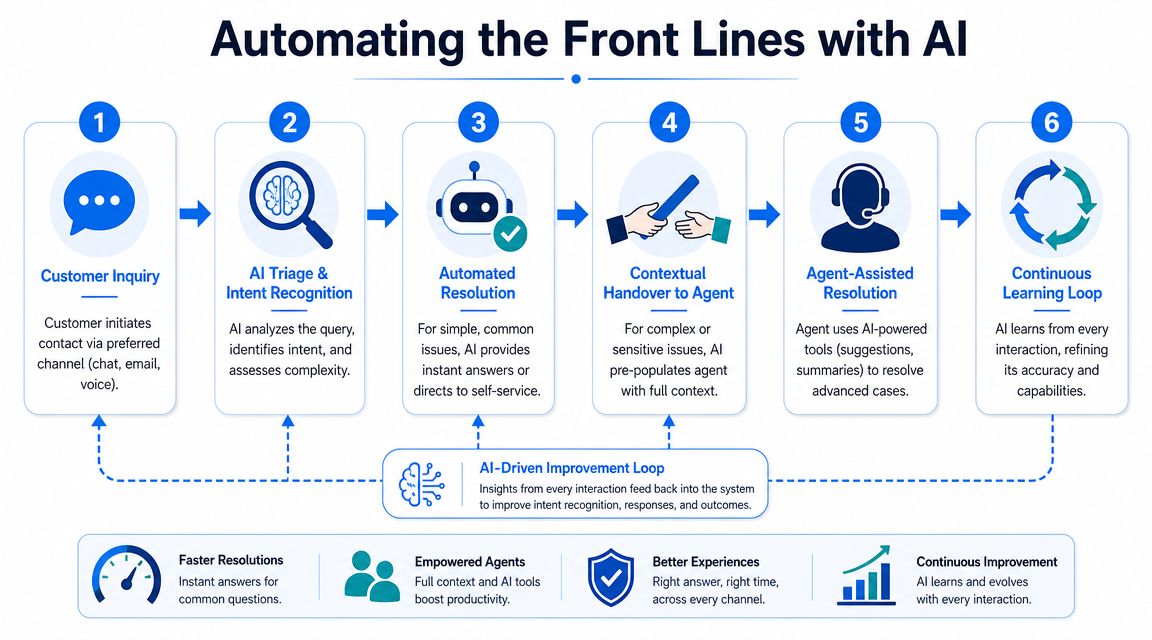
Scaling Customer Support AI Automation
The strongest setups handle three jobs well. They classify intent, resolve the repetitive requests that follow known rules, and prepare a handoff that an agent can use immediately.
That sounds simple. The implementation is where teams usually fail.
What AI should handle first?
Start with work that is repetitive, structured, and easy to verify. If a flow depends on judgment, exceptions, or policy interpretation, keep a human in the loop until the process is tighter.
Good first-line AI use cases include:
- Triage and routing: Sort issues into billing, delivery, technical setup, account access, cancellation risk, or account management.
- Answering known questions: Pull approved answers for policy, how-to content, onboarding steps, and standard account tasks.
- Collecting details before handoff: Order number, email, account name, screenshot, device, plan, campaign ID, or error text.
- Triggering workflow actions: Apply tags, create tickets, notify teams, update fields, or start follow-up sequences.
The pattern changes slightly by business model.
For DTC, early wins usually come from order tracking, return windows, damaged-item intake, and address changes. For SaaS, AI is useful for login issues, onboarding questions, license requests, and basic troubleshooting intake before technical support steps in. For agencies, it works well for status requests, missing approvals, asset collection, and routing client messages based on whether the issue affects delivery, billing, or scope.
Design handoffs that agents can use
A bad bot gathers data and then forces the customer to repeat it. That kills trust fast.
A useful handoff includes the issue summary, captured fields, prior conversation history, and a clear signal of what the customer already tried. If your workflows support it, add a suggested next action or queue destination. That saves minutes on every escalation, which matters a lot more than shaving a few seconds off the bot interaction.
One option for teams working across web and Meta channels is an AI chatbot for customer support that can automate conversations on website chat, Facebook, Messenger, WhatsApp, and Instagram Direct Message while passing structured context into broader workflows.
Set a clear exit rule. If the bot cannot verify the request, answer with approved content, or collect the fields needed for resolution, it should hand off quickly.
Keep the customer record in one place
Channel coverage is not the same as operational control. A team can automate chat, social DMs, and email intake and still create a mess if identity and history stay split across tools.
A common failure pattern looks like this. A DTC customer asks about a delayed order on Instagram, follows up in website chat, then replies to an old email thread that night. A SaaS user opens chat for a login problem, then emails support after trying a workaround. An agency client sends a campaign question in Slack, then submits a formal request through a portal. If those interactions do not resolve to one record, agents waste time reconstructing context, and customers get inconsistent answers.
A practical automation stack by business model to Scale Customer Support
The tools vary. The operating logic does not.
For DTC
- Chat or messaging automation for order questions and policy lookups
- Help desk with macros, tags, and return or refund workflows
- Ecommerce integration for order status, shipment events, and customer lookup
- Rules for damaged items, failed payments, fraud review, and carrier exceptions
For SaaS
- In-app or web chat for intake
- Help desk and CRM connection
- Knowledge base mapped to product areas and common workflows
- Escalation paths to technical support with captured account, plan, and environment data
For agencies
- Client-facing intake forms or chat
- Project management or ticketing integration
- Automated status updates and request collection
- Routing rules for campaign delivery issues, billing questions, and creative approvals
Use AI to automate the first move. Keep humans focused on judgment, exceptions, recovery, and revenue-risk conversations.
That is the trade-off worth making. Teams get lower handling cost and cleaner queues. Customers get faster answers when the issue is simple, and a better human response when it is not.
Defining Service Promises and Proving Your ROI
If you don’t define service promises, customers invent their own. If you don’t define ROI, leadership treats support as overhead.
Zendesk recommends monitoring core service KPIs such as first reply time, resolution time, and CSAT, and reviewing them regularly as volume grows. That’s the right baseline. But for scaling customer support, baseline metrics aren’t enough on their own.
You also need measures that show whether your new system is reducing work, not just moving it around. This is really what separates real strategies for scaling customer support from ones that just look good on a dashboard while agents quietly absorb more work behind the scenes.
Scaling customer support teams without sacrificing quality means tracking deflection, repeat contact rates, and where handoffs actually happen, not just how fast the first reply goes out. A team can hit every baseline KPI and still be scaling customer support without sacrificing quality in name only, if no one is watching whether the new system is genuinely reducing the load or just redistributing it.
Set promises your team can actually keep
Service promises should reflect channel, business model, and customer tier. A DTC team handling weekend order issues shouldn’t publish the same expectation as a SaaS team managing technical onboarding. An agency supporting retained clients shouldn’t treat every request like an instant-response chat interaction.
Here’s a practical example table you can adapt.
| Business Model | Metric | Target |
|---|---|---|
| DTC | First reply time | Fast enough to protect conversion and post-purchase trust, with tighter coverage during evenings and weekends |
| DTC | Resolution time | Same-day for routine order and policy issues, longer only when carrier, fraud, or warehouse review is required |
| SaaS | First reply time | Fast for trial, onboarding, and production-impacting issues; lower urgency for education requests |
| SaaS | Resolution time | Short for known issues and documented workflows, longer for bugs or integration dependencies |
| Agency | First reply time | Clear acknowledgment on all client requests, with priority handling for launch-day or delivery-risk issues |
| Agency | Resolution time | Defined by request type, with separate expectations for status questions, approvals, and strategic changes |
Track the metrics that show economic impact
A support dashboard should answer two questions. Are customers getting timely help? Is the operating model getting more efficient?
The second question usually gets ignored. Don’t ignore it.
Track metrics such as:
- Ticket deflection rate: Are self-service and AI reducing inbound volume that would have reached agents?
- Cost per resolution: Is your operating model lowering the average effort required to close common issues?
- One-touch resolution rate: Are customers getting answers without bouncing across teams or channels?
- Escalation rate by topic: Which issues are still too messy for frontline resolution?
- Reopen rate: Which “resolved” tickets come back because the first answer was incomplete?
Review by segment, not just in aggregate
Averages can hide bad service. If your enterprise queue is healthy but trial users wait too long, or if Instagram DMs perform worse than email, the overall dashboard may still look fine.
Break reviews down by:
- customer segment
- issue type
- channel
- time of day
- agent group
Good reporting doesn’t just tell you whether support is busy. It tells you where the system is leaking effort.
When support leaders can show faster first replies, cleaner resolution paths, and lower manual effort on routine work, ROI becomes visible. That’s when support stops sounding like a cost center and starts sounding like operations.
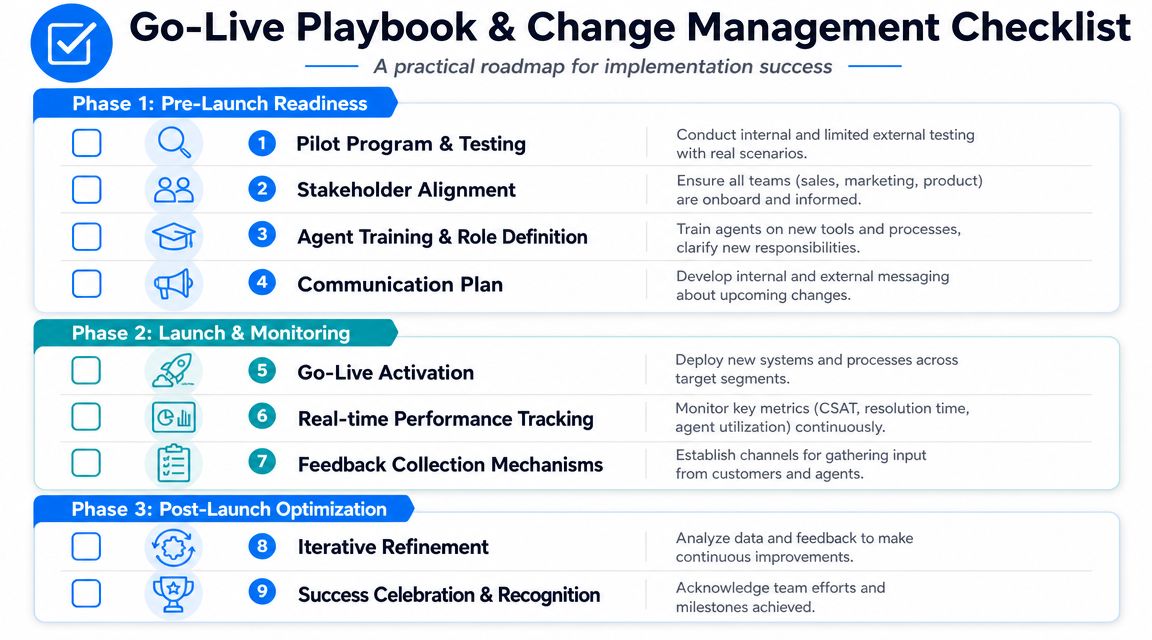
Your Go-Live Playbook and Change Management Checklist
Most support rollouts fail for boring reasons. The workflow wasn’t tested, the team didn’t trust the routing, or channel data stayed fragmented. The tooling gets blamed, but the problem is usually rollout discipline.
One practical challenge stands above the rest. Managing conversations across web chat, WhatsApp, Instagram DM, and email creates operational complexity, and the primary bottleneck is often the lack of a system that links a customer’s identity and history across channels, as discussed in Netfor’s article on how to scale customer support.
Scaling Customer Support Change Management
First automation to build for DTC
For most DTC brands, the first flow should be WISMO, short for “Where is my order?”
It works because the demand is high, the intent is clear, and the customer usually wants one of a few outcomes: current status, delay explanation, delivery confirmation, or next step.
A simple rollout looks like this:
-
Capture the identifier
Ask for order number, email, or phone linked to the purchase. -
Check the order state
Pull the latest shipping or fulfillment data. -
Branch by status
Delivered, in transit, delayed, exception, or not found. -
Offer the next action
Self-serve tracking, address correction path, claim flow, or human escalation. -
Tag the case
Mark by issue type so you can improve content and routing later.
This one flow removes a lot of repetitive volume and sharpens your post-purchase experience quickly.
First automation to build for SaaS
SaaS teams usually get faster wins from an onboarding and feature-question assistant.
The flow should do three things well:
- Identify user stage: Trial, new customer, active account, admin, or end user.
- Identify intent: Setup, permissions, billing, feature usage, bug, or integration question.
- Send the user down the right path: Help article, walkthrough, intake form, or technical escalation.
This prevents technical teams from drowning in basic “how do I” questions while still fast-tracking customers with real blockers.
A good SaaS support bot should also collect structured details before handoff. Account name, browser, workspace, feature area, and screenshot requests save real time for the specialist queue.
First automation to build for agencies
Agency support is different because the request often sits inside a client relationship, not just a ticket category.
The highest-value first automation is usually client intake plus status updates.
That means:
- a standardized way for clients to request work
- automated collection of required assets or approvals
- status visibility without manual chasing
- routing by account, urgency, and service type
If you don’t build this, account managers become human routers. They spend too much time forwarding emails, clarifying briefs, and answering “just checking in” messages.
For agencies evaluating tools for that layer, help desk automation for cross-channel support can be useful when you need intake, messaging automation, and channel coordination in the same workflow.
Change management checklist that actually matters
Support changes stick when the team knows what is changing, why it’s changing, and what to do when the automation gets it wrong.
Use this checklist before and after go-live:
- Pilot with real tickets: Test on live scenarios from your highest-volume queue before broad rollout.
- Define ownership: Name who manages flows, who updates knowledge, and who handles exceptions.
- Train for the handoff: Agents should know what context the automation collects and how to use it.
- Write fallback rules: When the bot fails, agents need a fast manual path.
- Tell adjacent teams: Sales, marketing, product, and ops need to know what customers will now see.
- Review transcripts weekly: Bad branches, missing articles, and confusing prompts show up fast in conversation logs.
- Keep one feedback loop: Let agents flag broken automations without chasing multiple managers or systems.
The first launch is not the finished system. It’s the start of a tighter operating rhythm.
What good rollout discipline looks like
The strongest launches are narrow, monitored, and boring in the best way. One or two use cases. Clear routing. Measured reviews. Fast edits.
What breaks things is trying to automate every channel and every ticket type at once. Start with one repeatable use case per business model, prove that the handoff works, then expand. This is especially true for teams introducing AI agents into support, since a narrow rollout lets you catch a bad response before it reaches hundreds of customers instead of after.
Support scale comes from operational discipline. The tool matters. The workflow matters more. The team’s trust matters most. A disciplined rollout tends to improve response time almost immediately, simply because routing gets clearer, but customer satisfaction only follows once every customer interaction, automated or not, meets the same bar for quality. That bar is also what makes the difference between outsource decisions that hold up over time and ones that quietly erode trust in the support experience.
If you’re building a support system that needs to work across website chat, Facebook, Messenger, WhatsApp, and Instagram Direct Message, Clepher is one option to evaluate. It gives teams a no-code way to build AI-assisted flows, centralize conversations, and automate routine support interactions without forcing every request into a human queue.
