

You’re living in five tabs at once. A lead comes in through Instagram. The chatbot captures the email. Facebook Ads shows the click. Your CRM doesn’t update fast enough. Sales follow-up late. Then someone exports a CSV to “fix” the mismatch, and now nobody trusts the data. This is why people start looking at go high level integration.
Not because connecting apps is exciting, but because disconnected tools break follow-up, reporting, and customer experience.
Used well, GoHighLevel becomes the control layer for your stack. It can sit in the middle of lead capture, messaging, pipeline movement, attribution, and reporting. The mistake is thinking integration means “connect one app.” In practice, the wins come from building a system where native connections, middleware, and API workflows each do the job they’re best at.
Your Marketing Stack is Holding You Back
Teams don’t have a tool problem. They have a coordination problem.
The ad platform knows who clicked. The chatbot knows what the person asked. The scheduler knows whether they booked. The CRM knows whether the deal has moved. But if those systems don’t share data cleanly, your team ends up stitching the customer journey together by hand.
GoHighLevel integrations pay off by streamlining workflows, reducing manual work, and centralizing campaigns, leads, and performance. In practical setups, tools like Kixie can be live in 15-30 minutes and have shown 3x improvement in call answer rates according to the Instant HighLevel integration tutorial.
What the bottleneck usually looks like
A fragmented stack creates the same symptoms over and over:
- Leads get stuck: Someone fills a form or messages your page, but the CRM record is incomplete or delayed.
- Follow-up loses context: Sales sees a name and phone number, but not the product interest or conversation history.
- Reporting turns into cleanup: Teams spend more time reconciling fields than acting on the data.
- Automation stays shallow: You can send messages, but you can’t trigger the right message from the right behavior.
If you’re sorting through broader strategy and platform-specific tactics, this Go Highlevel resource collection is useful because it shows how people are using the platform in the field, not listing features.
What better setup does
A cohesive system gives you one operational center. Lead data enters once, gets enriched as the person interacts, and triggers the next step automatically.
Practical rule: If your team retypes lead data, copies tags manually, or exports lists every week, the integration layer isn’t finished.
For many teams, the first breakthrough comes from understanding what can be handled with simple automation versus what needs a more deliberate architecture. If you need a refresher on that distinction, this primer on no-code workflows is a solid place to start.
Choosing Your Go High Level Integration Path
Not every integration problem deserves the same solution.
Some jobs need a direct connection you can turn on in minutes. Others need a middleware layer to route data between several apps. Some require webhooks or the API because the logic is too specific for drag-and-drop tools.
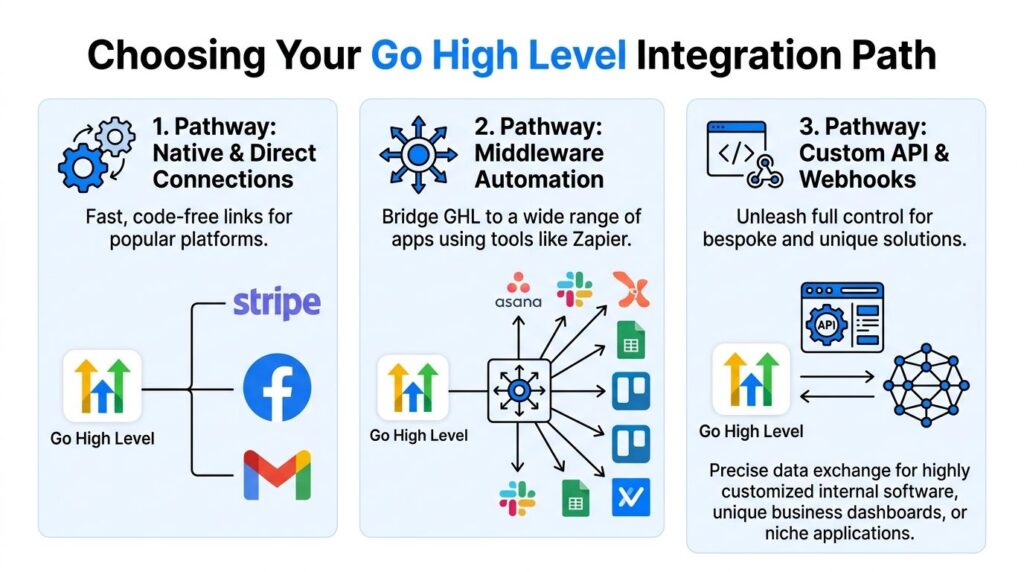
GHL Integration Pathways
Three paths that matter
Native integrations are the fast wins. You use them when the connection already exists inside GoHighLevel and the use case is standard, like calendars, payment tools, or direct messaging infrastructure.
Middleware tools like Zapier, Make, n8n, or Pabbly are the bridge layer. They’re ideal when you need to connect GoHighLevel with an external app that doesn’t have a native connection, or when one trigger should launch several downstream actions.
API and webhooks are for custom operations. Agencies build internal dashboards, two-way syncs, or bespoke lead-routing logic here that no off-the-shelf connector handles cleanly.
A lot of confusion around go high level integration comes from using the wrong method for the task. If you’re comparing systems more broadly, this explanation of CRM integration is useful because it frames the problem correctly: the point isn’t the connection itself, it’s reliable data flow between business-critical systems.
GoHighLevel Integration Methods Compared
| Method | Best For | Ease of Use | Flexibility | Cost |
|---|---|---|---|---|
| Native | Standard app connections, fast deployment, core operational links | High | Low to medium | Usually lowest |
| Middleware | Multi-step automations across several apps | Medium | Medium to high | Variable based on task volume |
| API and Webhooks | Custom reporting, two-way sync, bespoke workflows | Low without technical help | Highest | The highest build and maintenance effort |
How to choose without overbuilding
Use this simple filter:
- Pick native when the use case is common, and speed matters more than customization.
- Pick middleware when you need conditional logic, cross-app routing, or when business users need to manage the workflow.
- Pick API when timing, control, or data structure really matters.
The strongest stacks aren’t built on one integration method. They’re layered.
In most agency and e-commerce builds, the cleanest architecture uses all three. Native handles foundational channels. Middleware handles orchestration. API handles the parts that create real differentiation.
Mastering Native and Direct Connections
The easiest wins in go high level integration come from built-in connections.
These are the integrations that don’t need a developer and usually don’t need a long planning cycle either. If the platform already supports the connection directly, start there. It removes friction, reduces moving parts, and gives your team a stable base before you add more automation.
Go High Level Integration Native App
Where native connections shine
Native setup works best when the business process is common and the app relationship is direct.
Examples include:
- Payments: Connect a gateway so funnel purchases and order activity stay close to the CRM.
- Tracking: Add your Google Analytics tracking ID in settings so performance data is easier to tie back to campaigns.
- Communications: Use a direct messaging infrastructure so workflows can trigger messages without extra middleware.
- Scheduling and lead flow: Connect calendars and intake forms so booking activity immediately updates the contact record.
The strength of native connections is reliability. Fewer tools are involved, so fewer things break.
Twilio is the classic quick win
Twilio is a good example because the setup is simple and the business value is immediate.
You purchase a Twilio number, generate your Account SID and Auth Token, then add those credentials in GoHighLevel under the native integration settings. Once the connection is live, you can trigger SMS inside workflows using contact fields for personalization.
Agencies using this setup report 25-40% uplift in follow-up conversions, and SMS open rates often exceed 98%, according to this Twilio and GoHighLevel workflow breakdown.
What to build first
Don’t start with your most complex campaign. Start with one message flow that matters.
A practical rollout looks like this:
- Connect the channel: Get the native integration authenticated and confirmed.
- Build one trigger: Form fill, abandoned cart, appointment request, or inbound lead.
- Personalize the message: Use basic fields like first name and offer context.
- Test the contact path: Make sure the lead record updates cleanly after the message sends.
- Add segmentation later: Tags, engagement logic, and branching belong in round two.
Native integrations are best for foundations, not edge cases.
The trade-off is obvious. Native is quick, but it’s only as flexible as the built-in options allow. When the workflow has exceptions, conditional branches, or needs another app in the middle, native starts to feel narrow. That’s when middleware earns its place.
Automating Everything with Zapier Make and Pabbly
Middleware is where go high level integration starts to feel like a business system instead of a collection of app connections.
This layer matters when a lead doesn’t just need to appear in the CRM. It needs to be qualified, tagged, routed, enriched, and pushed into the next workflow based on behavior.
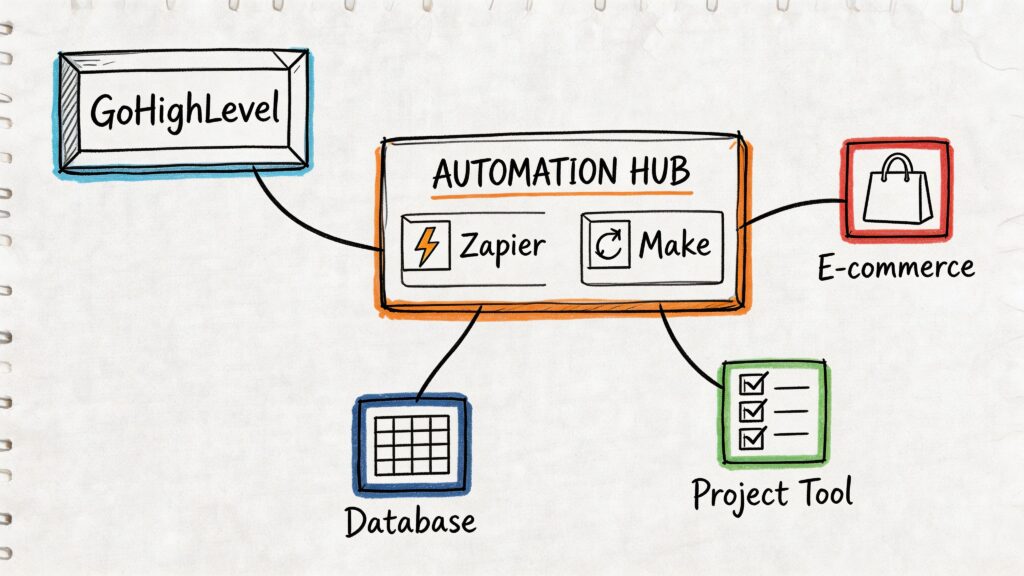
Go High Level Integration Automation Hub
What middleware solves
Field mapping is where good automations fail
Most broken automations aren’t broken because the app connection failed. They fail because the fields were mapped loosely.
Watch for these issues:
- Name mismatch: “Full Name” arrives in one field while your workflow expects first and last name separately.
- Source confusion: A tag gets sent as text into a note field, so downstream automations never trigger.
- Formatting drift: Phone numbers, dates, and dropdown values don’t match what the receiving system expects.
- Custom field sprawl: Teams create multiple fields for the same concept and then wonder why reporting is messy.
Clean field mapping beats fancy automation every time.
Using Zapier with GoHighLevel can deliver 30-50% efficiency gains in lead management, but there are trade-offs. 40% of users experience sync delays due to API rate limits, and 22% of data loss in these setups comes from misconfigured webhooks, according to GetAutomized’s GoHighLevel integration overview.
If you’re building this style of workflow, this guide to connecting apps through Zapier is a practical companion.
A walkthrough is useful here because the logic tends to click once you see it in motion:
What works and what doesn’t
What works:
- Middleware for lead routing
- Middleware for status-based branching
- Middleware for connecting niche tools that won’t justify custom development
What doesn’t work as well:
- High-volume processes that need immediate, guaranteed sync
- Reporting setups where delays create dashboard inaccuracies
- Complex two-way syncs with many object dependencies
That’s the handoff point to webhooks and API work.
Building Custom Solutions with Webhooks and The API
When native connections feel too rigid, and middleware starts showing seams, the API becomes the right tool.
This is the layer for businesses that need control over timing, data structure, and scale. Agencies hit this point first because they need reporting across multiple sub-accounts, custom client dashboards, or direct syncs with internal systems that no connector supports neatly.
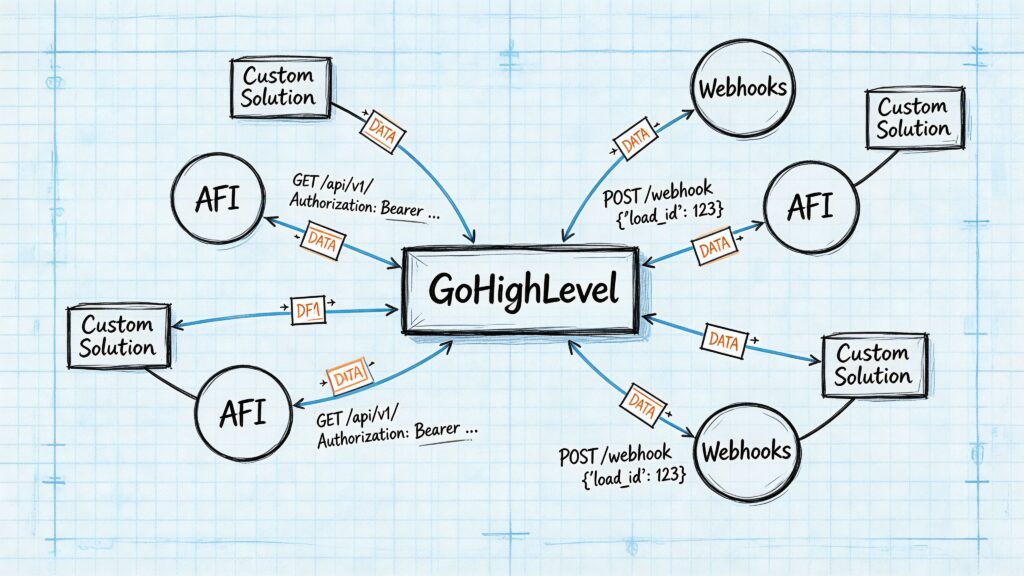
Go High Level Integration Data Flow
Webhooks versus API calls
A webhook is event-driven. Something happens, and the system sends a notification outward.
An API call is request-driven. Your application asks GoHighLevel for data, or sends data into GoHighLevel, when your logic decides it should happen.
That distinction matters.
Use webhooks when you need real-time reactions, like pushing a tag change or a new lead event into another system immediately.
Use the API when you need controlled read and write access, like pulling opportunity data for a custom dashboard or updating records from an internal application.
The use case that changes the game
Custom reporting is where API work stops being “nice to have.”
Many agencies outgrow platform-native reporting because clients want a single dashboard showing pipeline movement, call outcomes, campaign engagement, and lead source context across accounts. You can build that by pulling data into your own reporting stack rather than exporting spreadsheets or relying on delayed middleware syncs.
GoHighLevel’s API enforces rate limits of 100 requests per 10 seconds per resource and 200,000 requests per day per resource, which are documented in the official HighLevel API documentation. The same documentation notes these limits support scalable custom integrations, including analytics use cases. In the verified data for this article, that kind of dashboard build is tied to faster agency growth.
What private integrations change
Private Integrations are one of the more practical advances in this category because they let teams build secure custom connections without going through a full public app development process.
That matters for internal tools, one-off client workflows, and specialized systems where you need direct access but don’t need a marketplace app. In practice, that opens the door to setups like:
- Internal reporting apps: Pull lead and opportunity data into a custom view your team uses.
- Two-way sync with proprietary systems: Update tags, stages, or contacts from your own software.
- Operational tools for agencies: Trigger actions across sub-accounts without relying on a brittle chain of third-party tasks.
Where the API is worth the extra effort
The API earns its cost when one of these is true:
| Situation | Better Choice |
|---|---|
| You need a simple one-app connection | Native |
| You need business-user-managed routing | Middleware |
| You need strict control over sync timing and structure | API |
| You need custom dashboards across many accounts | API |
| You need a specialized internal workflow | API or webhook plus API |
Build with the API when the workflow is part of your operating advantage, not just a convenience.
This is also where conversational systems become more interesting. If an external chat system needs to write structured intent data into GoHighLevel in real time, or if you want CRM activity reflected back into the conversation layer, API design gives you that control. For teams exploring that model, this overview of chatbot API workflows helps frame the pattern.
The trade-off is maintenance. API builds are powerful, but they need logging, retry logic, and someone who understands how the data model behaves over time.
Real World Workflow Clepher and Go High Level
A practical example makes this easier to see.
A shopper clicks an Instagram ad for a specific product and sends a direct message instead of filling out a form. That’s common in DTC because people want answers before they want a sales process. They ask about sizing, shipping, bundle options, or whether a product fits their use case.
A conversational flow captures the intent first. The bot asks a few qualifying questions, collects the email or phone number, and tags the lead based on product interest.
Then the integration layer takes over.
The handoff that matters
If the person expresses buying intent, their data moves into GoHighLevel with the product tag and source context attached. That can happen through middleware or a webhook pattern, depending on how fast and how customized the sync needs to be.
Inside the CRM, the contact is either created or updated. A workflow can then place that lead into the right nurture path, add an internal task, and trigger the next message sequence with the product context intact.
That’s the part many teams miss. The value isn’t just “lead captured.” It’s lead captured with context.
Why conversational marketing benefits most
Social and messaging leads carry richer intent than a simple form fill.
Someone who typed “I want the blue version” or “Does this work for sensitive skin?” has already revealed where they are in the buying process. If that information lands in the CRM as a useful tag, note, or field value, GoHighLevel can act on it immediately.
One option in this category is Clepher, which supports conversational flows across website chat, Facebook, Messenger, WhatsApp, and Instagram Direct Message, with integrations through tools like Zapier, Make, n8n, and Pabbly. In a real workflow, that means chat behavior can become usable CRM data instead of sitting in a separate inbox.
The strongest omnichannel systems don’t pass leads around blindly. They pass intent, timing, and conversation context.
A clean end-to-end example
A working setup might look like this:
- Inbound message: Prospect asks about Product X on Instagram.
- Qualification: Bot collects email and identifies product interest.
- Sync: Integration sends the contact data and interest tag into GoHighLevel.
- Automation: The CRM triggers a Product X nurture workflow.
- Sales visibility: The rep sees where the lead came from and what they asked.
- Ongoing enrichment: Later engagement can add more tags or notes for better follow-up.
That’s what a cohesive GoHighLevel integration strategy should do. It should make the next action obvious and automatic.
Security Testing and Best Practices for Reliable Syncs
A flashy automation that fails is worse than a manual process.
The standard to aim for is simple. Every sync should be testable, traceable, and recoverable. If your team can’t tell what triggered an automation, what fields moved, and where errors are logged, you don’t have an integration system yet. You have a gamble.
What to lock down early
- Protect credentials: Store API keys, tokens, and connector credentials like passwords.
- Test with sample records: Use realistic test data before a workflow touches live leads.
- Monitor failures: Check middleware task histories, webhook logs, and API responses regularly.
- Document every automation: Record trigger, action, field mappings, owner, and failure plan.
Where teams get caught
Regulated industries need more than standard convenience tools. HIPAA is the clearest example. Standard Zapier or Make setups may not be sufficient for handling Protected Health Information, and agencies report 30-40% higher churn in regulated verticals because of integration hurdles, according to Keragon’s GoHighLevel healthcare integration page.
That doesn’t mean GoHighLevel can’t be part of the stack. It means the integration design has to account for compliance, auditability, and controlled data movement from the start.
Reliability comes from restraint. Fewer moving parts, cleaner mappings, and disciplined testing outperform clever automations built in a rush.
The teams that get the most from go high level integration treat it like infrastructure. They don’t just ask whether the automation works. They ask whether it will still work after the next campaign, the next client, and the next thousand leads.
If your lead flow starts in conversations, Clepher can help you turn chat interactions on your website, Facebook, Messenger, WhatsApp, and Instagram Direct Message into structured automation paths that feed the rest of your stack cleanly. It fits best when you want conversational capture and segmentation working alongside the CRM, email, and SMS systems you already use.

Related Posts
Chat Bot Responses That Convert: A Practical Guide
October 12, 202610 Broadcast Automation Software Platforms Compared
October 11, 2026Customer Journey Automation: The Practical Guide
October 10, 2026
Founder Clepher