

Instagram Stories became too important for marketers to treat polls like a throwaway sticker. Polls can lift story completion rates by 20 to 30%, according to a referenced walkthrough on viewing Instagram poll results. That matters because a poll isn’t just engagement. It’s live audience feedback tied to actual usernames.
If you’re trying to learn how to see poll results on instagram, the mechanics are simple. The useful part is knowing what those results mean and what action to take next. A vote for one option over another can shape product messaging, follow-up DMs, content themes, and even which offer you push first.
Why Instagram Polls Are a Goldmine for Marketers
Instagram polls work because they ask for a tiny action and return useful intent data. People tap once. You get a signal about preference, curiosity, timing, or buying interest.
There’s also a major visibility advantage for creators. Instagram poll results are available only to the poll creator in full detail, including the usernames attached to each answer, while viewers only see aggregate percentages after voting, as explained in Tailwind’s guide to Instagram Story poll visibility and voter breakdowns. That split is what makes polls practical for marketers. You get specific feedback without making the public experience feel invasive.
What makes poll data so useful
A poll can answer questions that usually take longer to validate:
- Product direction: Which color, feature, or bundle gets the strongest interest?
- Content planning: Which topic deserves a Reel, carousel, or email?
- Lead qualification: Who raised their hand for a launch, event, or waitlist.
- Customer insight: Whether your audience wants education, discounts, demos, or proof.
Practical rule: Don’t ask polls just to “boost engagement.” Ask questions that change a business decision.
A simple example. A skincare brand runs a Story poll asking, “What’s your biggest issue right now?” with two options like “Dryness” and “Breakouts.” That answer can shape the next Story sequence, the next product angle, and the next DM conversation.
Polls also fit neatly with service and support. If your audience votes on frustration points, your team can answer those concerns in a way that feels more thoughtful and personal. That’s the same reason strong support habits matter after the click. If you want a good framework for handling those conversations well, Carti’s customer service tips are worth reviewing.
Finding Poll Results Across All Instagram Formats
Instagram users interact with Stories at a scale that makes even simple poll responses commercially useful. For marketers, the important part is not just where to tap. It is knowing which formats give you usable audience signals and which ones are harder to act on later.

Instagram Poll Results
Story polls
Story polls give the clearest path from response to action. Open your active Story, then swipe up or tap the Seen By area to view the results tied to that poll.
Use this path inside Instagram:
- Open Instagram.
- Tap Your Story from the home screen or your profile.
- Open the Story with the poll sticker.
- Swipe up, or tap Seen By at the bottom left.
- Review the poll insights screen.
That screen usually shows three things that matter in a campaign:
- Vote percentages, which show which option won
- Total viewers, which shows how many people saw the Story
- Voter identities, which show who selected each answer
Marketers should treat those three fields differently. Percentages help with messaging decisions. Viewer count helps judge distribution. The voter list is the part you can use for follow-up, because it shows named people who raised their hands around a product, problem, preference, or buying timeframe.
If you want better answers in the first place, this guide on how to do a poll on Instagram helps tighten the question design before you start measuring results.
Reading Story poll data like a marketer
A poll result is not a verdict. It is a signal.
If 70 people view a Story and 8 vote, the topic may have been visible but weakly framed. If fewer people view it but a high share votes, the question likely matches a real pain point or purchase interest. I usually look at response quality before I look at raw reach, because a smaller set of clear voters is more useful than a large set of passive viewers.
Here is the practical read on each metric:
| Metric | What it shows | Marketing use |
|---|---|---|
| Percentages | Which choice got more support | Choose the angle for the next Story, Reel, ad, or email |
| Viewer count | How many people saw the Story | Judge whether weak results came from poor reach or a weak question |
| Voter list | Which accounts selected each option | Build a follow-up segment for DMs, chatbot flows, or sales outreach |
A buying-intent poll deserves immediate handling. If someone votes for “Send me pricing” or “I want the demo,” that person should not wait three days for a generic follow-up.
Quiz stickers
Quiz stickers work differently, but the reporting flow is similar. Open the Story, swipe up, and review how people answered each option.
Use quiz stickers when the business goal is education, not preference testing. They are useful for coaches, software companies, and service brands that need to see whether the audience understands a problem well enough to buy a more advanced offer. If a large share chooses the wrong answer, the next move is usually explanation content, not a sales push.
That trade-off matters. Polls are stronger for demand capture. Quizzes are stronger for diagnosing awareness gaps.
Live video polls
Live polls are useful during a stream because they help steer the session in real time. You can ask which feature to demo next, which objection to cover first, or which topic deserves more time while the audience is still watching.
They are less convenient for organized post-campaign analysis. Story polls are usually better if your plan includes segmentation, DM follow-up, or automation through a chatbot platform such as Clepher. A Story voter can go into a clear follow-up path based on what they selected. A Live response is better for shaping the moment than for building a clean lead workflow afterward.
Use Live polls if you need immediate direction during the broadcast.
Use Story polls if you want a cleaner review, named voter visibility, and a direct handoff into lead nurturing or sales follow-up.
Accessing Poll Results After the Story Expires
The biggest mistake marketers make is assuming poll data disappears when the Story does. It doesn’t.
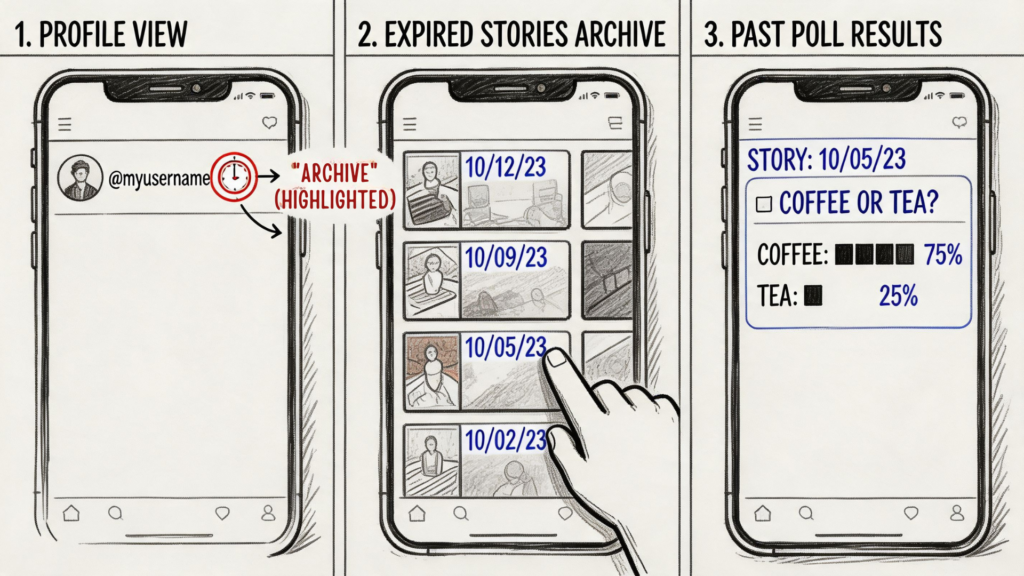
Instagram Story Analytics
After the 24-hour window closes, creators can still access poll data in Story Archive, where 95% of the insights retain full fidelity for later analysis, according to reporting on the Instagram poll results outage and archive access.
Where to find expired poll data
Follow this path inside Instagram:
- Go to your profile
- Tap the menu
- Open Archive
- Make sure Story Archive is selected
- Open the Story containing the poll
- Check the available insights tied to that Story
If you need a visual walkthrough of where archived Stories live, this article on viewing archived Instagram Stories fills in the interface details well.
Archived poll results are useful because they let you review trends after the campaign pressure is gone. That’s often when the underlying pattern becomes obvious. You can compare what people voted for against what they later clicked, bought, or asked about in DMs.
Save the data while it’s clean
Instagram gives you visibility, but it doesn’t organize your poll analysis for you. That part is still manual unless your team has a separate workflow.
Useful low-tech options:
- Screenshot the result screen: Good for final percentages and quick reporting.
- Screen record the voter list: Better when you want usernames and response context.
- Log responses in a sheet: Helpful if multiple team members need the data later.
- Tag patterns manually: For example, “launch interest,” “pricing sensitivity,” or “style preference.”
Here’s a quick visual walkthrough if you prefer to follow along on-screen:
Archived poll data is most valuable when you review it alongside the campaign that surrounded it, not in isolation.
A poll about “Which bundle do you want?” means more if you also note the Story creative, the caption style, and the offer timing. Otherwise, you risk overvaluing the winning answer and missing why it won.
How to Interpret Poll Data for Business Growth
A poll result is only useful if it changes what you do next. Most brands look at the winner and move on. Better operators treat poll results as lightweight market research.

Instagram Analytics
Read poll answers as intent signals
If a clothing brand asks, “Which drop should come first?” and one option wins, that’s not just content feedback. It can influence merchandising order, paid creative emphasis, and what the team features on the product page first.
The same logic applies in other categories:
- Coaches: “Want templates or training first?” tells you what lead magnet should come next.
- SaaS brands: “Need reporting or automation more?” points to the feature narrative that deserves top placement.
- Beauty brands: “Glow or hydration?” reveals the language customers already use for the outcome they want.
Use polls to segment audiences
Advantage comes from grouping people by what they chose.
A “Blue T-shirt” vote and a “Red T-shirt” vote may look like a simple style preference, but they also signal different creative tastes. One segment may respond better to minimalist product shots. The other may respond to bolder visuals and urgency-led messaging.
Try organizing responses into simple buckets:
| Poll response type | Likely signal | Best next move |
|---|---|---|
| Preference vote | Taste or style choice | Match future visuals and product recommendations |
| Problem vote | Pain point or friction | Send education, proof, or objection handling |
| Timing vote | Readiness level | Follow up with launch reminders or nurture content |
| Price-related vote | Budget sensitivity | Test bundles, payment framing, or lower-commitment offers |
Field note: Polls work best when each answer leads to a different message, not just a different statistic.
Competitor polls can still teach you something
There’s a blind spot many articles ignore. Viewers only see real-time percentages after they vote, and there’s no native way to see final results on expired or Highlighted Stories, as noted in Business Insider’s explanation of what viewers can and cannot see in Instagram polls.
That limitation still leaves room for useful observation during the active window. If a competitor keeps polling on product use cases, pain points, or preferred formats, watch the themes they test. You won’t get their full voter data, but you can still learn:
- Which questions do they ask repeatedly
- Which offers they seem to be validating
- Which audience anxieties do they think are worth surfacing
- How they frame choices between price, speed, convenience, or quality
That’s not a shortcut to exact audience intelligence. It is a practical way to spot positioning patterns in your category.
Turn Poll Responses into Sales with Automation
Most brands stop at observation. They check who voted, maybe jot down a few names, then move on. That leaves money on the table because the strongest moment to follow up is right after interest appears.

Instagram Sales Automation
The most effective poll workflows do three things fast:
- Identify the signal
- Match the response to an offer
- Start a conversation while the interest is fresh
A simple automation scenario
An online course seller posts a poll: “Want early access to the new workshop?” The options are “Yes” and “Tell me more.”
Those responses shouldn’t sit in a Story analytics screen. They should trigger the next step:
- People who chose Yes get a waitlist link.
- People who choose ” Tell me more get a short explanation and a proof-based message.
- People who watched but didn’t vote may get retargeted later with a softer educational angle.
That’s why DM automation matters. It turns passive Story interaction into a structured lead flow.
What works and what doesn’t
What works:
- Clear intent polls: Questions tied to one business action.
- Fast follow-up: Outreach while the Story is still top of mind.
- Message matching: Different replies for different answers.
What doesn’t work:
- Vague polls: “What do you think?” give weak data.
- One-size-fits-all outreach: Treating every voter the same wastes the signal.
- Delayed manual follow-up: By the time someone checks the list a day later, intent is colder.
If you want to operationalize this, study how teams set up Instagram DM automation for growth. The principle is simple. Use the poll as the entry point, then route people into the right conversation based on what they told you.
The best poll is the one that starts a relevant conversation, not the one that gets the most taps.
For e-commerce, that might mean sending product recommendations. For coaches, it might mean delivering a lead magnet. For SaaS, it could mean routing feature-interest votes into a demo sequence.
Frequently Asked Questions About Instagram Polls
If you want to turn Instagram poll engagement into actual conversations, Clepher helps you automate follow-up across Instagram DMs, qualify leads, and move voters into personalized flows without making your team chase every response manually.

Related Posts
Chat Bot Responses That Convert: A Practical Guide
October 12, 202610 Broadcast Automation Software Platforms Compared
October 11, 2026Customer Journey Automation: The Practical Guide
October 10, 2026
Founder Clepher