
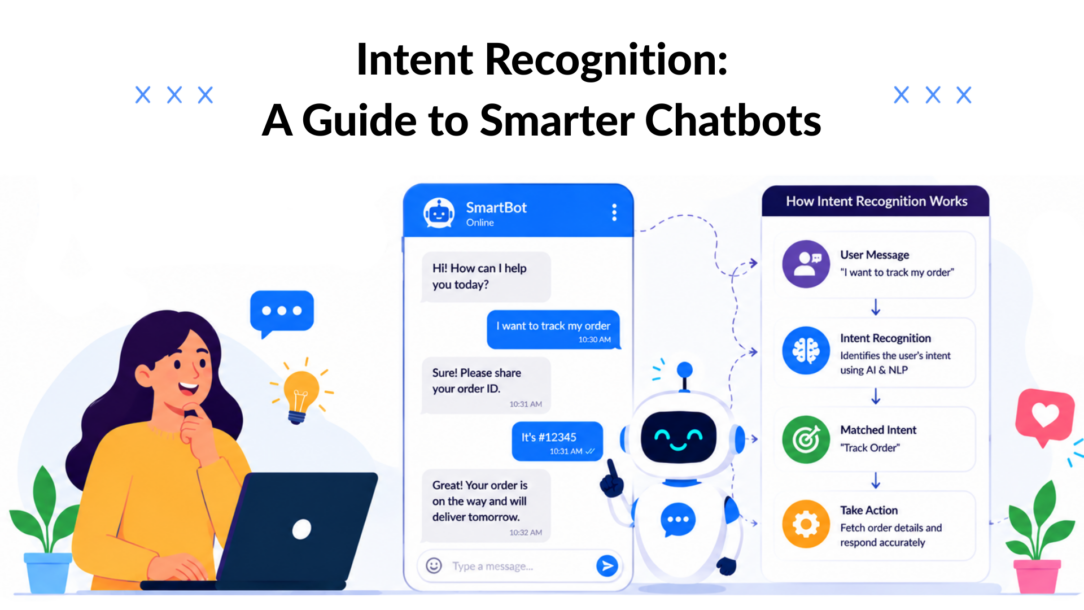
A chatbot can hit about 94% intent accuracy with as few as 25 training examples per intent, and move into the 94 to 96% range with fewer than 50 examples per intent, according to this BERT intent classification study. That should change how most small businesses think about conversational AI.
A lot of teams still assume intent recognition is enterprise-only work. They picture massive datasets, model tuning, and a data science team they don’t have. In practice, the bigger problem is usually simpler. They launch a bot that follows a script, not a conversation. Then it misses obvious customer goals, routes people to the wrong flow, and turns a quick question into friction.
Intent recognition fixes that. It gives the bot a working brain for customer conversations. Instead of matching only exact words, it tries to identify what the person is trying to do. That could mean buying, comparing, booking, tracking, canceling, or asking for help.
For marketers, that shift matters because customer intent is where revenue and experience meet. A visitor asking “does this come in black?” is often close to purchase. A person typing “where’s my order?” needs support right now. If your bot treats both messages like generic chat, you lose sales and patience at the same time.
Why Your Chatbot Needs a Brain
Most bad chatbot experiences follow the same pattern. A customer asks a normal question in normal language. The bot fails to understand it, offers irrelevant buttons, or drops into a dead-end fallback. The customer leaves annoyed, and the business loses a chance to help, sell, or retain them.
Intent Recognition Chatbot Confusion
That failure usually isn’t a design problem alone. It’s an understanding problem. A scripted bot can ask questions and show menus, but it can’t reliably infer what a person wants unless you give it some form of intent recognition.
What goes wrong without it
A bot without intent recognition acts like a junior staff member who only responds when customers use the exact approved phrase. If someone says “I need to return this,” it may work. If they say “this isn’t right, how do I send it back?” the bot may miss the point completely.
That creates business damage in three places:
- Sales leakage: High-intent shoppers don’t get routed to product answers, offers, or checkout help.
- Support backlog: Simple questions that should be automated end up in human queues.
- Brand friction: Customers blame the business, not the bot.
A chatbot doesn’t need to sound human first. It needs to understand the customer’s goal first.
What intent recognition changes
Intent recognition helps the bot identify the goal behind the message, not just the wording. That’s the difference between hearing “refund,” “money back,” and “send this back” as three separate phrases or recognizing that all three likely point to the same support path.
When that layer is in place, the bot becomes useful fast. It can qualify leads, answer pre-sale questions, guide people to the right product, triage support, and hand off edge cases cleanly. It stops being a pop-up widget and starts acting like operational infrastructure.
For a marketer or owner, that’s a significant shift. You’re no longer building a bot that talks. You’re building a system that recognizes buying signals, support needs, and next-best actions in real time.
What Intent Recognition Really Is
Intent recognition is the process of figuring out what a customer wants to accomplish from the words they use. The easiest way to think about it is a strong retail associate on the sales floor.
If someone walks in and says, “Got anything in blue?” a good employee doesn’t fixate on the word “blue.” They understand the shopper wants to browse relevant products, probably with purchase intent. The wording is casual. The goal is clear.
A chatbot needs that same skill.
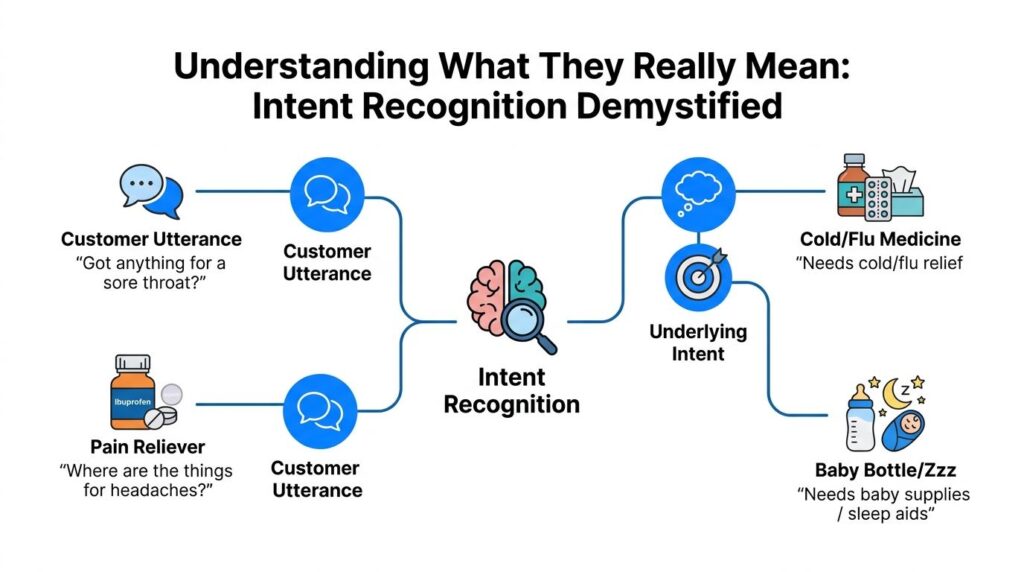
Intent Recognition Analysis
The three parts that matter
Most practical intent systems rely on three building blocks.
- Intent: The user’s goal. Examples include
track_order,book_demo,request_refund, orbrowse_products. - Utterance: The way the user phrases that goal. “Where’s my package?” and “Has my order shipped yet?” can both map to
track_order. - Entity: The specific detail inside the request. That might be an order number, product color, date, location, or plan name.
Here’s a quick working view:
| Element | What it means | Example |
|---|---|---|
| Intent | The job the user wants done | track_order |
| Utterance | The sentence they type | “Where is my stuff?” |
| Entity | The detail needed to fulfill it | Order number |
Context matters more than most teams expect
A lot of beginners train a bot as if every message exists alone. Real conversations don’t work that way. Someone might first ask about sizing, then shipping, then say “okay, what about express?” The last message only makes sense if the system remembers what the conversation is about.
Modern systems need that history. This overview of intent recognition and contextual signals notes that systems should use conversation history and context, not just the current utterance, because context reduces repetitive clarification and supports smoother task completion.
That matters in marketing and support flows where a short reply often depends on the previous turn.
Practical rule: If a message looks vague on its own but obvious in conversation, your bot needs context, not more keyword rules.
Why this feels simpler once you see it
Intent recognition sounds technical until you map it to customer journeys. In a skincare chatbot, “my skin feels dry,” “what helps with flakes?” and “need a better moisturizer” may all sit near the same buying path. In a SaaS onboarding bot, “I can’t log in,” “password reset,” and “locked out” point toward account access help.
If you’re building conversational flows, it helps to pair this thinking with a broader understanding of chatbot natural language processing. Intent recognition is one layer inside that stack. It’s the layer that decides what the customer is trying to do, so the rest of the flow can respond intelligently.
How Intent Recognition Works Under the Hood
There are two broad ways to make a chatbot recognize intent. One is simple and rigid. The other is more flexible and much better for real customer language.
Rule-based matching
Rule-based intent recognition looks for predefined words or phrases. If a message contains “refund,” route to returns. If it contains “track” and “order,” route to shipping status. This method is easy to set up and still useful for narrow cases.
It works well when:
- The request is predictable: Store hours, coupon code prompts, and basic routing.
- Compliance matters: You want deterministic handling for a fixed set of phrases.
- You need speed: A team wants to launch a basic flow this week, not build a richer model first.
The weakness is coverage. Customers rarely use the exact language you planned for. They misspell, combine requests, use slang, or ask indirectly. Rule systems break down when meaning matters more than keywords.
Model-based recognition
Model-based systems use natural language processing to classify meaning across many wording variations. They can learn that “where’s my package,” “did this ship,” and “tracking update?” are closely related even though the phrasing differs.
That makes them better for:
| Approach | Best for | Main limitation |
|---|---|---|
| Rule-based | Narrow flows, exact triggers, simple routing | Brittle with language variation |
| Model-based | Natural conversations, synonyms, ambiguity, scaling | Needs thoughtful training and review |
This is why a modern chatbot stack usually mixes both. Use rules where exact control helps. Use model-based intent recognition where customers talk like customers.
What this looks like in a platform
Inside no-code tools, these methods often show up as different features. Keyword triggers usually map to rule-based logic. AI-driven classification maps to model-based recognition.
For example, some teams use keyword automations for obvious triggers like “unsubscribe” or “hours,” then use AI for open-ended questions about products, policies, or support. That split is practical. It keeps the easy stuff deterministic and lets the model handle natural language.
If you’re evaluating platforms and want the non-technical version of that stack, this guide to how AI chatbots work gives a useful framework. One example is Clepher, which combines no-code flows, AI keywords, and AI agents, so teams can choose between exact-match routing and broader language understanding depending on the job.
What doesn’t work is pretending one method solves everything. A pure rules setup becomes fragile fast. A pure AI setup without guardrails can become messy. Strong systems use each where it fits.
Designing and Training Intents That Win
Success with intent recognition is not about having massive datasets. It comes from defining intents that map to real business actions, then training them with clean, varied examples.
That matters for small teams because a useful model does not require thousands of labeled messages to start pulling its weight. With a focused setup, a marketer or support lead can get strong accuracy from a surprisingly small sample set, then improve it from live conversations.
Start with the business action
The fastest way to create messy intents is to name them like topics instead of decisions. “Pricing question” can be useful. “General support” usually is not, because it hides too many different workflows inside one bucket.
A better test is simple: what should the bot do next if this intent is correct?
For an e-commerce brand, that usually points to a short list of high-value intents:
- Pre-purchase buying signals: product fit, sizing, shipping timing, stock availability
- Checkout recovery: payment issues, promo code questions, cart friction
- Post-purchase support: order tracking, returns, exchanges, account access
A service business may start with quote requests, appointment booking, service area checks, and rescheduling. A SaaS team may begin with demo requests, pricing, onboarding help, and cancellation risk.
Those are good starter intents because each one leads to a clear action. Better routing, faster answers, and fewer abandoned chats follow from that clarity.
Build version one with a small dataset
Start with the conversations you already have. Website chat logs, Instagram DMs, support tickets, email threads, and sales notes usually contain enough language to build a first pass.
Use this process:
- Collect real messages. Pull examples from channels customers already use.
- Group by customer goal. Sort for intent, not wording.
- Name intents by action. Use labels like
track_order,book_demo, orcancel_subscription. - Write 15 to 30 realistic examples per intent. Use short, messy phrases people type.
- Add fallback and clarification flows. Low-confidence matches should ask a follow-up or hand off cleanly.
That small-data approach works because the early gains usually come from cleaner labels, not bigger spreadsheets.
I have seen teams waste weeks adding more examples to weak intent definitions. A tighter taxonomy often improves performance faster than doubling the training set.
Write examples that teach range
Poor training data is repetitive. It gives the model ten slight rewrites of the same sentence, then expects it to understand how customers really talk.
Strong examples show variety in wording, sentence shape, and level of directness:
| Intent | Weak examples | Better examples |
|---|---|---|
request_refund |
“refund”, “want refund”, “need refund” | “how do I get my money back?”, “this didn’t work for me”, “I’d like to return this” |
track_order |
“track order”, “where order”, “order status” | “has my package shipped?”, “where is my stuff?”, “can I check delivery status?” |
The goal is coverage. Include blunt phrasing, casual phrasing, and indirect phrasing. Include a few typos if your audience uses mobile chat heavily. Include common synonyms, but skip artificial variation that no customer would ever write.
Keep boundaries tight
Broad intents feel efficient at first. They create problems later.
An intent like order_help may look neat in a dashboard, but it mixes tracking, cancellations, address changes, damaged items, and return requests. Those are different jobs with different automations, owners, and customer expectations.
Set boundaries with three practical checks:
- Different action: If the next step changes, split the intent.
- Different stage: Pre-purchase and post-purchase requests usually deserve separate handling.
- Different team owner: If sales, support, and operations respond differently, create separate intents.
This keeps reporting cleaner too. A marketer can see buying intent separately from service issues, which makes the chatbot more useful for revenue decisions, not just support triage.
Treat fallback as part of the design
Fallback is not a trash bin for model mistakes. It is a planned customer experience.
Good fallback flows do one of three things. They ask a clarifying question, present a short menu of likely paths, or send the conversation to a human with context attached. That prevents dead ends and protects conversion on high-intent chats.
If two intents are hard to separate, use a clarifying step instead of forcing a shaky guess. A bot asking “Do you want to track an order or change it?” is better than sending a ready-to-buy customer into the wrong flow.
Launch early, review weekly
Intent design improves in production. The first live conversations reveal which intents overlap, which phrases are missing, and where customers use language your team did not expect.
Review misclassified chats every week. Look for patterns:
- repeated fallback phrases
- intents that steal traffic from each other
- high-value requests buried inside broad categories
- training examples that sound like your brand team, not your customers
Small teams do not need a data science function to do this well. They need a short list of business-critical intents, clean examples, and a review habit.
That is how intent recognition starts producing real wins early. Better routing cuts support load. Better detection of buying signals creates more qualified conversations. Both matter more than building an oversized intent library on day one.
Real-World Use Cases for Business Growth
Intent recognition becomes valuable when it changes what the business can do in real time. That usually shows up across the customer lifecycle, not in one isolated support bot.
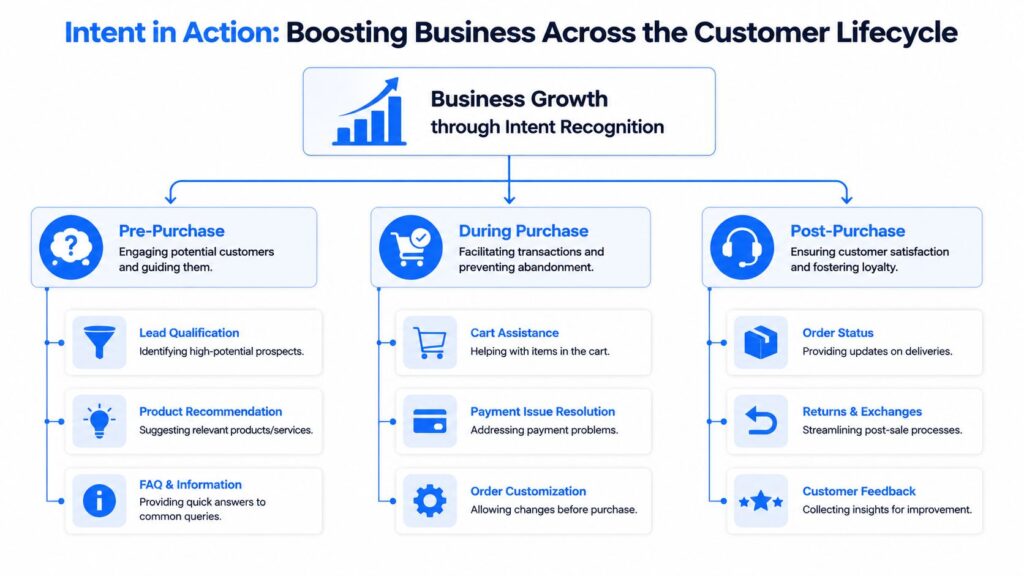
Intent Recognition Customer Lifecycle
Intent data is already tied to revenue work across teams. A 2020 TechTarget survey cited in a 2025 industry overview found that 55% of organizations reported higher lead conversion rates when using intent data, with top use cases including demand marketing at 47%, sales enablement at 40%, and advertising at 38%, according to these intent data statistics.
Marketing use cases
A marketer doesn’t need a bot that chats more. They need a bot that distinguishes curiosity from buying intent.
A visitor who asks “how does this work?” is in research mode. A visitor who asks “does this come in medium?” or “when can this ship?” is closer to purchase. Intent recognition helps route those conversations differently.
Use it to:
- Qualify inbound traffic: Send high-intent shoppers into product or offer flows.
- Personalize lead capture: Ask for an email after a clear interest signal, not on every visit.
- Segment campaigns: Tag people based on interest in pricing, category, or problem area.
That changes the timing of the ask. The bot stops forcing the same lead form on everyone and starts responding to actual buyer signals.
Sales use cases
Sales conversations benefit when the bot identifies what the person is trying to advance.
Someone asking for pricing may need a quote flow. Someone asking “can I book a call?” should move straight into scheduling. Someone asking “is this right for agencies?” likely needs qualification and proof points.
A practical sales bot can handle:
| Customer message type | Recognized intent | Useful next action |
|---|---|---|
| “How much is it?” | Pricing inquiry | Show plans or route to quote |
| “Can I talk to someone?” | Sales contact request | Offer booking or handoff |
| “Do you integrate with Shopify?” | Product fit question | Send fit info and collect lead details |
Support use cases
Support is where intent recognition often delivers the fastest operational gain. The same inbox may receive delivery questions, return requests, damaged item complaints, and account issues. Routing all of that through one generic flow creates friction.
With clearer intent detection, the bot can immediately send people to the right path:
- Order status: Ask for order details and show the next step.
- Returns and exchanges: Trigger the right policy or return workflow.
- Escalation cases: Route complaints, edge cases, or billing disputes to a human.
The biggest support win isn’t answering everything automatically. It’s getting each customer to the right next step without making them repeat themselves.
Where this creates business lift
Across marketing, sales, and support, the pattern is the same. Intent recognition removes guesswork from the first response. That means fewer wasted clicks, better handoffs, and more conversations that progress.
For smaller brands, this is one of the few AI capabilities that can improve both conversion and service quality without requiring a large team. The payoff comes from routing and relevance, not from trying to mimic a human personality.
Common Pitfalls and Best Practices
Most intent recognition problems are self-inflicted. Teams create too many overlapping intents, train on tidy examples nobody uses, then stop reviewing conversations once the bot is live.
The hardest part isn’t the first launch. It’s keeping quality stable as the bot grows. This analysis of intent recognition at scale points out that maintaining intent quality gets much harder as teams add new promos, products, and categories, and that poor management of overlapping boundaries leads to intent drift.
Pitfall one: broad and fuzzy intents
“General question” is usually a sign that the taxonomy hasn’t been thought through. Broad buckets hide customer goals instead of exposing them.
Best practice: define intents by the action the business should take next. If two requests lead to two different actions, give them different intents. If they lead to the same response path, keep them together.
Pitfall two: near-duplicate intents
This happens when teams create labels like edit_order, change_order, and modify_order. To the business, those may sound different. To users, they’re often the same thing.
Use this test:
- Keep separate intents when the operational path, owner, or policy differs.
- Merge them when the user language overlaps heavily, and the same flow can handle both.
- Clarify with entities when the main difference is a detail, not a goal.
Pitfall three: training on ideal language
Customers don’t write like product managers. They use fragments, shorthand, typos, mixed requests, and emotional language.
Best practice: train with real messages from chats, DMs, support tickets, and on-site conversations. Include informal wording. Include incomplete wording. Include the way people complain, ask, and buy.
A clean taxonomy beats a large taxonomy. More intents don’t automatically mean a smarter bot.
Pitfall four: set it and forget it
Once a bot is live, new offers, SKUs, policies, and campaigns change what customers ask. If the team never reviews logs, the model subtly degrades.
A simple review rhythm works better than occasional overhauls:
- Weekly: Review missed utterances and fallback transcripts.
- Monthly: Check for overlapping intents and outdated examples.
- After launches: Add training phrases tied to new products, promos, and support topics.
What works is ongoing maintenance tied to business changes. What doesn’t work is treating intent recognition like a one-time setup task.
Measuring Success and Integrating Your Stack
A bot that feels helpful in a few test chats can still miss intent patterns that hurt conversions at scale. The teams that get real business value from intent recognition measure two things at the same time: classification quality and downstream outcomes.
Start with the model itself. Accuracy is useful, but it is not enough on its own. A bot can post a strong overall score and still misread high-value intents like demo requests, refund questions, or pricing inquiries. That is why teams also track precision, recall, and F1-score, as outlined in this overview of intent recognition evaluation practices.
Here is the plain-English version:
- Accuracy: How often the bot chose the right intent overall.
- Precision: When the bot assigns a specific intent, how often that prediction is correct.
- Recall: How often the bot catches messages that belong in that intent.
- F1-score: A combined view of precision and recall.
Then look at the confusion matrix. It is a report that shows which intents the model keeps mixing up. If track_order and change_shipping_address overlap, the matrix will show the pattern fast. That matters because those mistakes create real cost. Customers get the wrong flow, support teams get messy handoffs, and leads stall.
For smaller teams, this is good news. You do not need thousands of examples or a data science team to get a clear read on performance. A few well-defined intents, a modest test set, and regular transcript reviews are enough to spot where the model is earning its keep and where it is creating friction. For KPI planning, chatbot KPI metrics that tie intent quality to containment, handoff quality, and lead progression help connect model performance to business results.
Integration is what turns intent recognition from a clever feature into an operating tool.
A few practical uses show the difference:
- CRM updates: Mark a contact as sales-ready when the bot detects pricing, demo, or purchase intent.
- Email or SMS follow-up: Send conversation context into Zapier, Make, or another workflow tool so the next message matches what the customer asked.
- Human handoff: Route billing disputes, cancellation risk, or complex support cases to an agent with the detected intent attached.
Small datasets can still produce outsized returns. If the bot only needs to recognize 10 to 20 high-value intents accurately, each correct classification can trigger a useful action in the stack. A focused intent recognition model built around your most common and most valuable customer signals will outperform a broader model trained on noisy, unstructured data every time. That is often enough to shorten response times, improve lead routing, and keep more customers from dropping out mid-conversation.
If you want to put intent recognition into production without building everything from scratch, Clepher gives teams a no-code way to build chatbot flows, use AI-driven conversations, and connect chat activity to the rest of their marketing, sales, and support stack.
